Most real estate teams adopt a CRM and then use about 15% of it. Contacts go in, deals get created, maybe a followup task gets set, and that is where adoption flatlines.
Zoho CRM ships features quarterly that map directly onto the daily mechanics of running a brokerage, managing listings, and closing transactions. The gap is almost always in configuration. These features already exist and are live in the platform. They just need to be turned on and wired into your workflows.
We routinely configure these ten capabilities for our real estate clients. Each one addresses a specific operational problem that comes up in every brokerage we work with, whether that is leads decaying without followup, property documents scattered across email threads, commission splits tracked in spreadsheets, or territory management done by memory.
Here is what your Zoho CRM should be doing for your real estate practice right now.
1. Cadences for Lead Nurturing
A buyer inquires about a listing on Monday. Your agent follows up on Tuesday. Then a showing gets scheduled, three new leads come in, and that buyer never hears from anyone again.
This is the single most common revenue leak in residential real estate.
Cadences fix it structurally. You build multistep, multichannel followup sequences that execute automatically once a lead enters the flow. A typical sequence might start with an email introduction on day one, followed by a call task on day three, a property recommendation on day seven, and a reengagement check on day fourteen. Each step fires on schedule, and the sequence pauses or exits based on the lead’s actual response behavior.
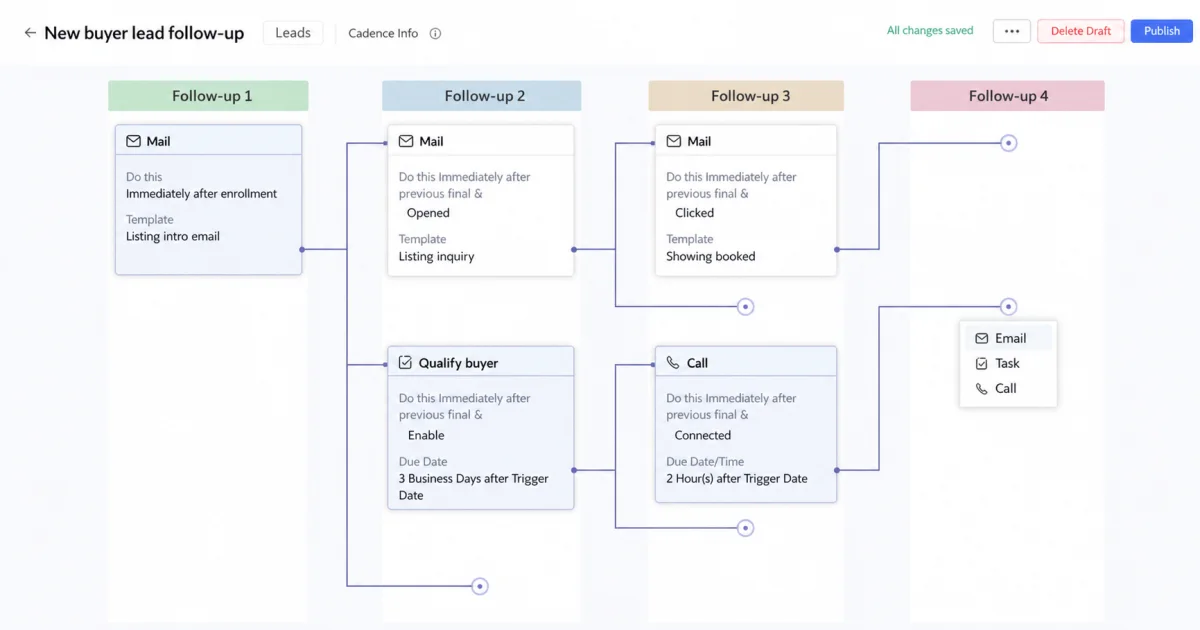
Fig 1 – Cadence setup interface, where the multistep followup sequence is built.
Property buying cycles are long and nonlinear. A buyer who is casually browsing in January may be ready to make an offer in April. Cadences keeps your brokerage in front of them across that entire window without any agent needing to manually remember. We configure separate sequences for open house attendees, online inquiry leads, referral introductions, and past clients approaching their lease renewal window.
The branching logic is where this gets powerful. You can route the sequence differently based on whether the lead opened an email, answered a call, or clicked a listing link. Engaged leads get accelerated into a shorter, higher touch track while cold leads move into a longer nurture sequence. The system handles the routing and your agents handle the conversations that actually close deals.
2. Structured Address Fields
Addresses in most CRM setups are free text fields. Agents type them differently every time. “123 Main St” in one record becomes “123 Main Street, Apt 2B” in another. You cannot filter by city, sort by zip code, or plot anything on a map because the data has no structure.
Property addresses are the single most important data field in a real estate CRM. Every deal, every listing, every comparable sale ties back to a physical location. The structured address field breaks addresses into discrete components including street, city, state, zip, and country. It auto suggests as the agent types and stores latitude and longitude coordinates with every entry.
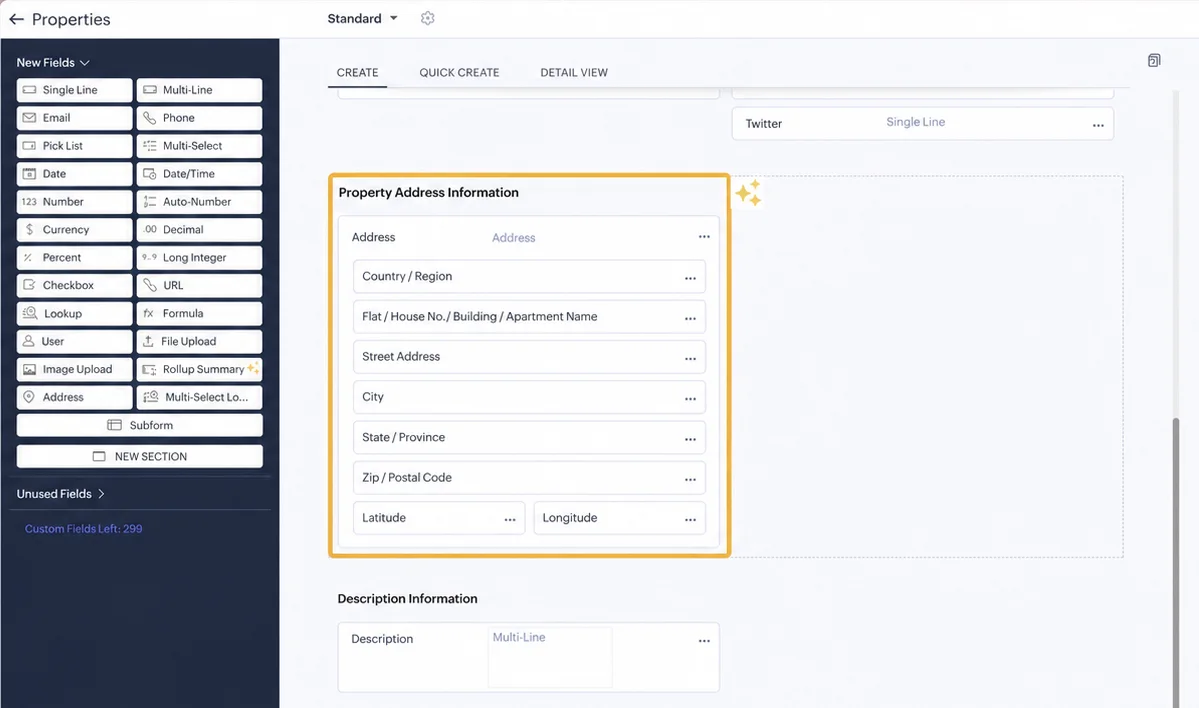
Fig 2 – Address component breakdown showing each stored sub field.
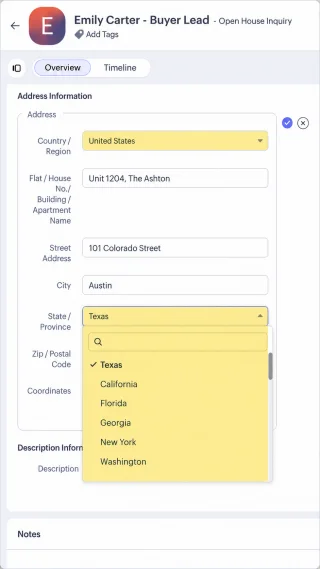
Fig 3 – Address auto suggest in action while an agent types.
This is foundational. Once your addresses are structured, you can filter your pipeline by neighborhood, sort listings by zip code, run radius searches for comparable properties, and feed clean location data into third party map integrations. The stored coordinates also power geo based workflow rules and territory assignment logic.
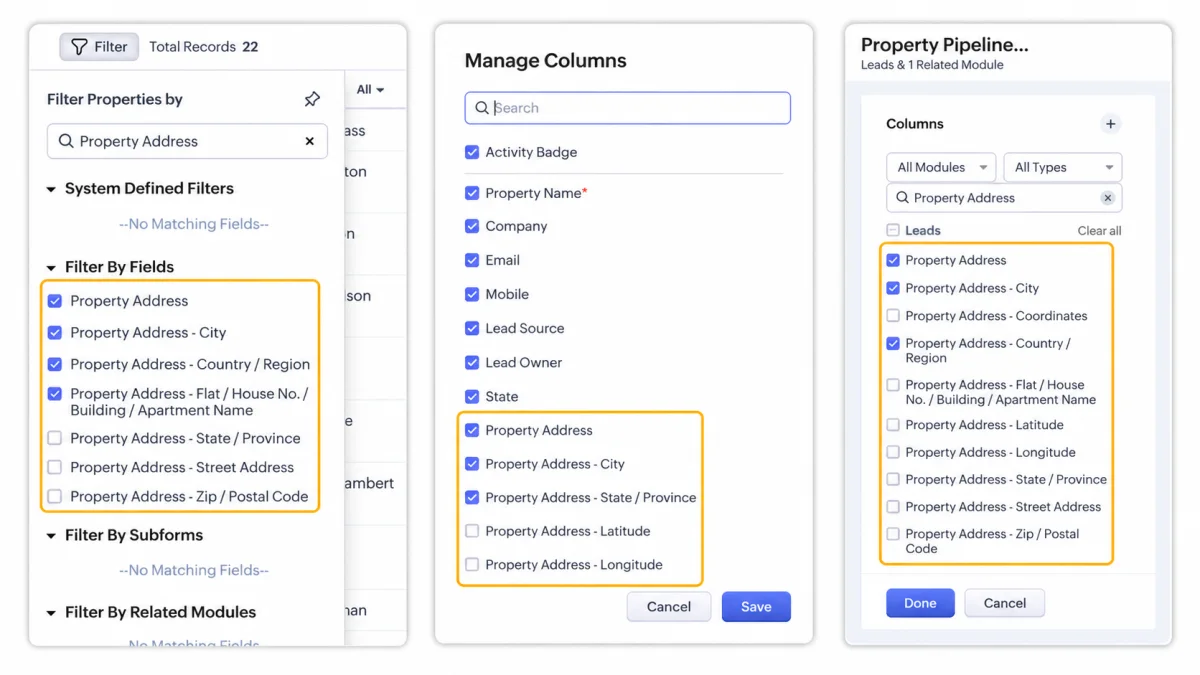
Fig 4 – Address sub fields available for filtering and criteria.
We treat this as a day one configuration. Everything else on this list works better when your address data is clean.
3. Cross Module Filtering
Real estate data is inherently relational. A property listing connects to a seller contact, a buyer contact, a set of showing records, and a deal. Standard CRM filters only work within a single module, which means you cannot answer the questions that actually matter to your business without exporting data or building reports.
Cross module filtering changes that. It lets you create custom views that filter records based on fields in related modules connected through lookup fields. You can build a Deals view filtered by the Contact’s city, or a Contacts view filtered by the Deal’s stage and value.
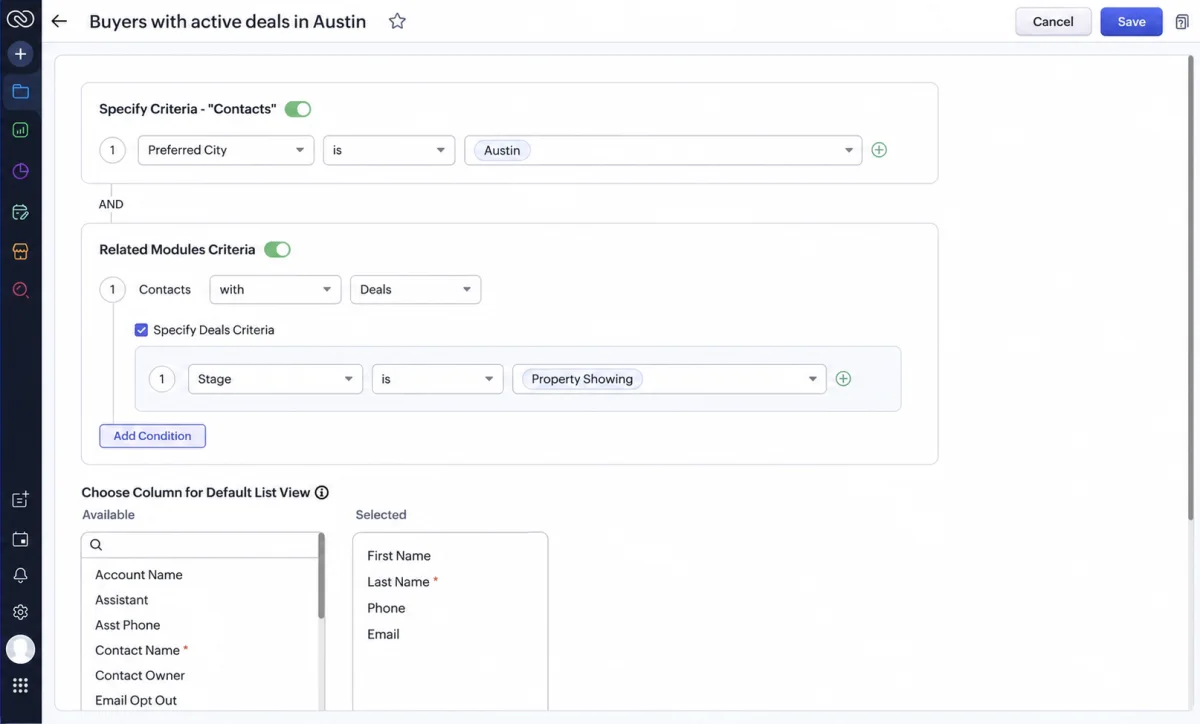
Fig 5 – Cross module criteria setup, filtering one module by fields on another.
In practice, this means your agents can answer questions like which of their active buyers are looking in the same neighborhood as a new listing, or which sellers have properties that have been on the market longer than 90 days without a showing in the last 30. These are the kinds of lookups that typically require a report or a manual data pull. Cross module filtering puts them directly in your agents’ everyday working views, accessible with a single click.
4. Timeline View
Real estate relationships span years. A client who bought a starter home in 2022 may be ready to upgrade in 2025. An investor who purchased one rental property may be evaluating a second. But the interaction history is buried across emails, call logs, notes, and deal records, and reconstructing the relationship takes 15 minutes of clicking through tabs.
Timeline View consolidates every interaction with a contact into a single chronological view spanning up to three years. Emails, calls, meetings, notes, deals, tasks, and custom activities all appear in sequence. You can filter by activity type and scan the entire relationship arc without switching modules.
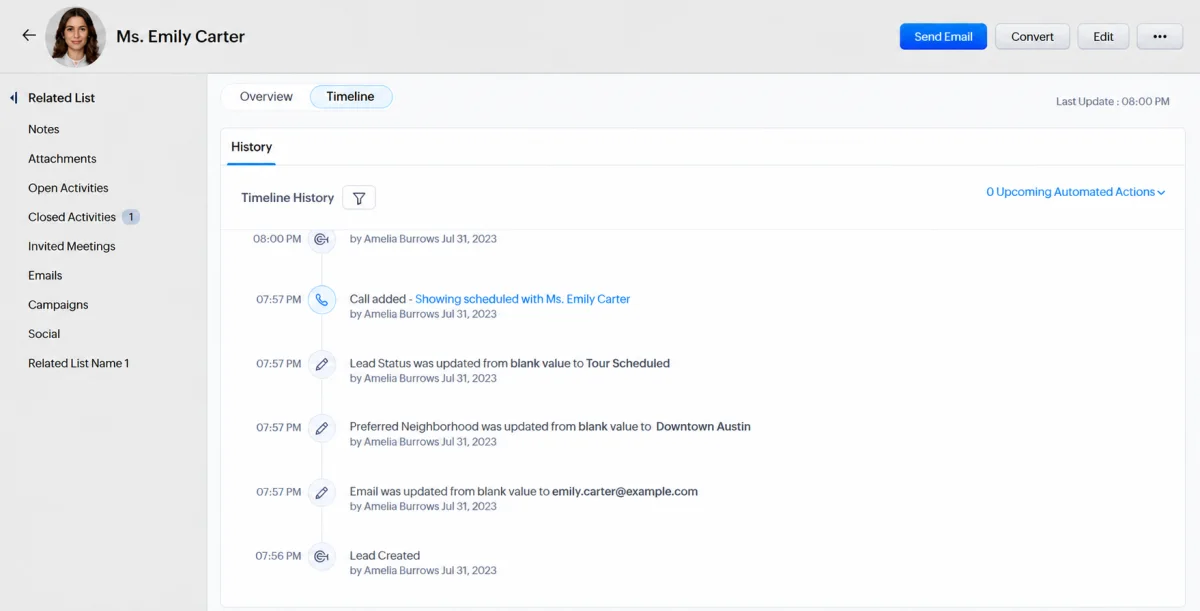
Fig 6 – Timeline tab selector on the record detail page.
The agent who remembers that a client mentioned wanting a bigger backyard 18 months ago wins the repeat business. Timeline View makes that institutional knowledge accessible to any agent on the team. For brokerages with agent turnover, this means client context survives even when the original agent leaves.
It also gives managing brokers a fast way to audit deal progression. If a deal has been in “negotiation” for six weeks, the timeline shows exactly what has happened and what has stalled.
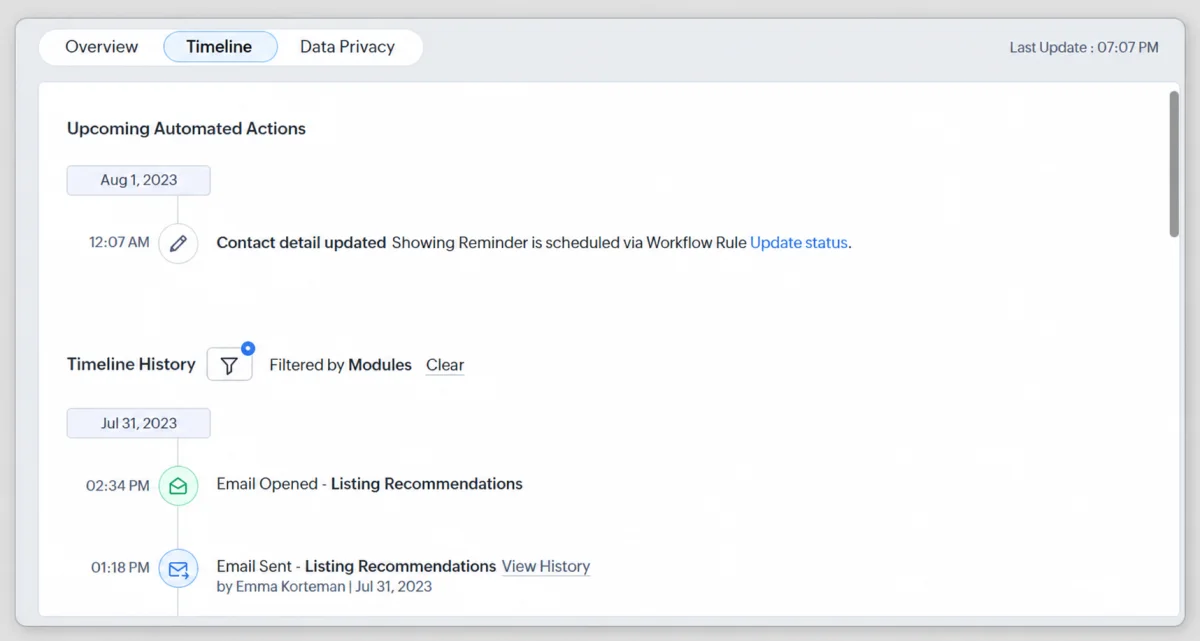
Fig 7 – History tab with filtering by module, user, time and source.
5. CRM and WorkDrive Integration
A single real estate transaction generates 20 to 40 documents, everything from listing agreements and purchase contracts through inspection reports, appraisals, title documents, disclosure forms, and closing statements. These live in email attachments, shared drive folders, and sometimes a filing cabinet. When a title company asks for the inspection report, someone has to go hunting.
The CRM and WorkDrive integration creates a direct link between deal records and document folders. Every deal, contact, or custom module record gets its own WorkDrive folder that stores all associated documents, accessible directly from the CRM record without switching applications.
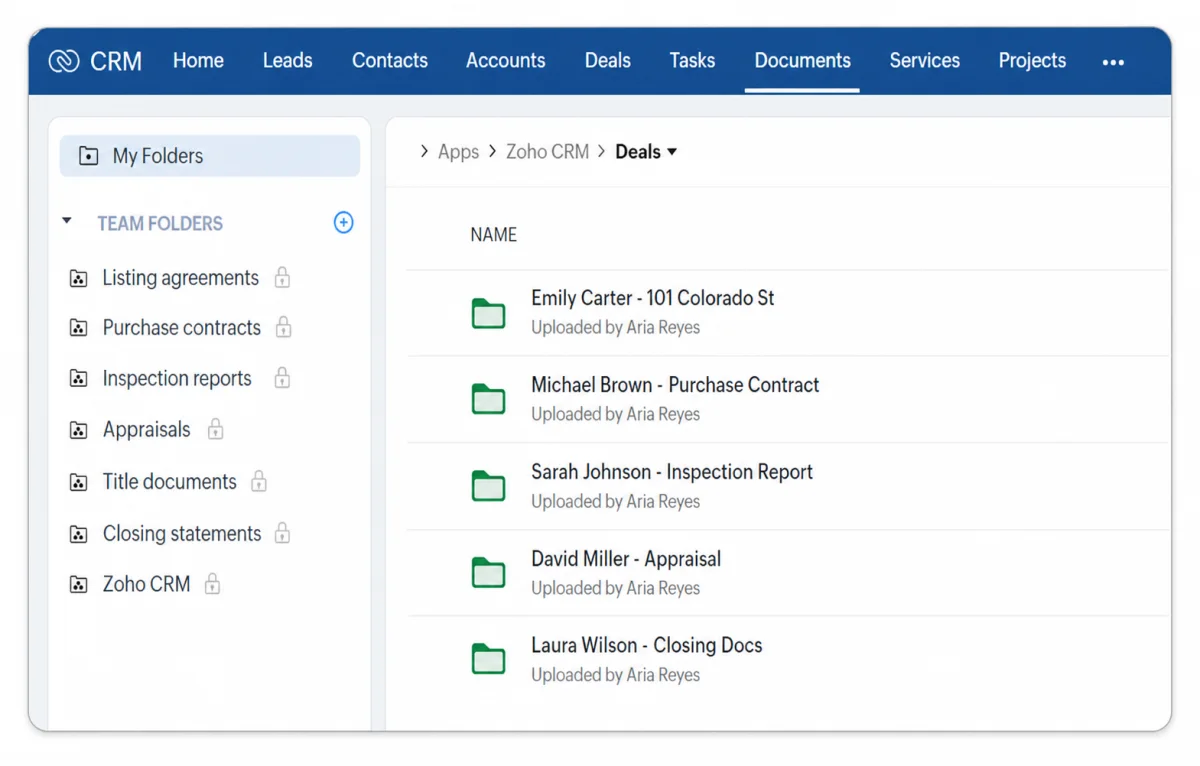
Fig 8 – File attachment on a deal record, served from WorkDrive.
We configure this with a standardized folder structure per deal type, with separate subfolders for contracts, inspection and appraisal documents, and title and closing documents. When an agent opens a deal, every document from the initial listing agreement through the final closing statement is organized and accessible.
The integration supports version tracking, so when a contract goes through three rounds of amendments, the full revision history is preserved. For teams handling multiple concurrent transactions, this keeps every closing organized and every document locatable in seconds.
6. Canvas View for Property Style Record Layouts
The default list view in any CRM shows records as rows in a table. For most business data, that works fine. For real estate, it strips out the visual context that makes a listing meaningful. A property record has a photo, a price, a bedroom count, a status, and a neighborhood. Displaying all of that as a text row alongside 50 other text rows makes every listing look the same.
Canvas View lets you design custom visual layouts for how records appear in list and detail views. You drag and drop fields, images, tags, and color indicators into a card style layout that your agents see every time they open the module. The design studio is built into Zoho CRM and requires no code.
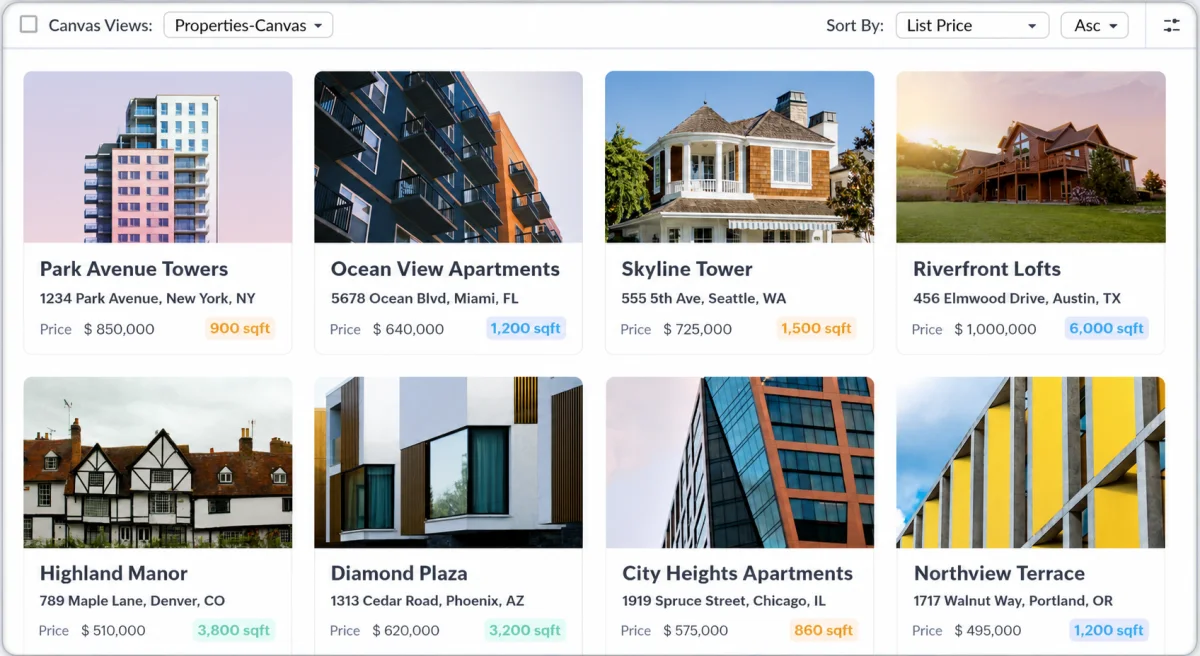
Fig 9 – Canvas view of properties, replacing the default list rows.
For real estate teams, this means your listings module can display property cards showing the listing photo, address, asking price, beds and baths, days on market, and deal stage at a glance. Your contacts module can show buyer cards with their budget range, preferred neighborhoods, and pipeline status. The visual density is dramatically higher than a standard table, and agents can scan 20 properties in the time it takes to read five rows.
We typically build two or three Canvas layouts per module. One for the agent’s daily working view, one for the broker’s pipeline review, and one for client facing presentations. Canvas applies layout rules on top, so the same record can look different depending on who is viewing it and what role they hold.
Canvas View is available in all paid editions across all data centers.
7. Workqueue
A productive agent juggles 10 to 20 active relationships at any given time, spanning buyers at different stages, sellers with listings, and past clients due for check ins. The tasks, calls, and followups for all of these are scattered across different deal records. Figuring out “what do I need to do today” requires opening multiple records and mentally assembling a priority list.
Workqueue pulls every pending task, call, and followup across all records into a single prioritized worklist. The agent works through items sequentially, completing one and surfacing the next. The queue is filterable by type, due date, and module.
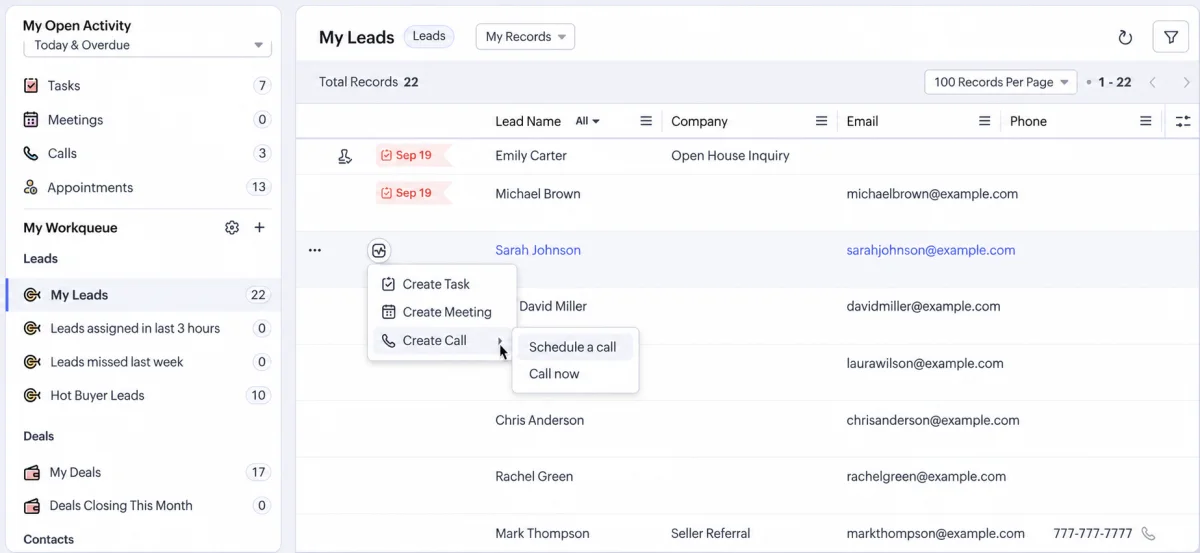
Fig 10 – My Open Activity view with color coded status.
Agent productivity in real estate is directly tied to how many meaningful touches they make per day. Workqueue removes the overhead of deciding what to do next. Your agent opens the CRM in the morning and the day’s work is already assembled, from calling back the buyer who toured a property yesterday to sending the listing agreement to a new seller, following up on a pending inspection, and checking in with a past client.
For managing brokers, Workqueue also serves as a visibility tool. You can see each agent’s queue, identify who is overloaded, and redistribute work before something slips through.
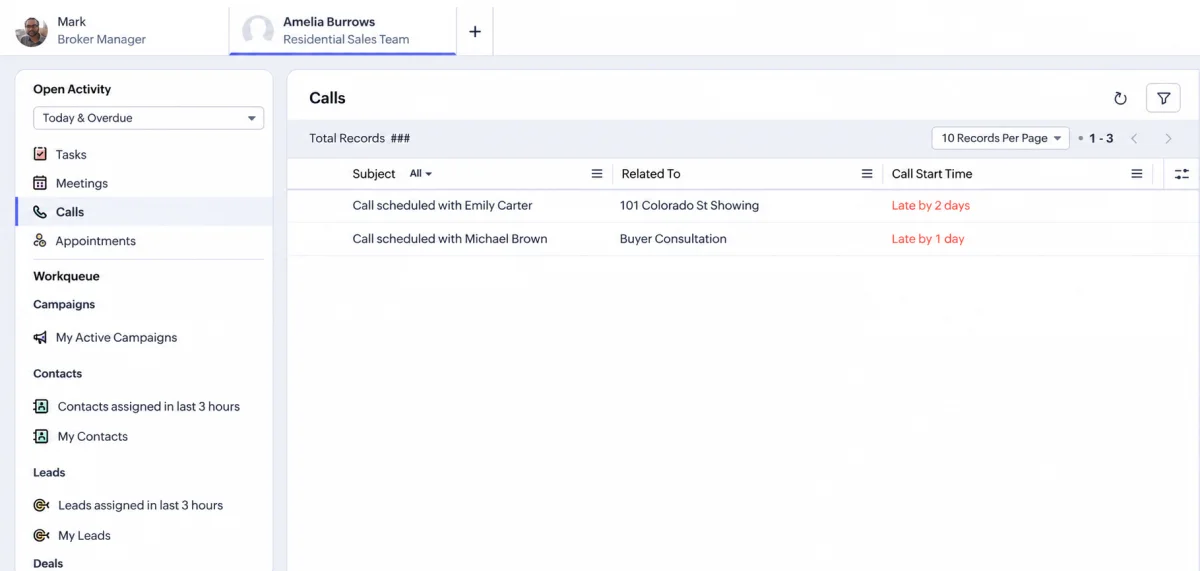
Fig 11 – Manager view for team workqueue tracking.
Real estate generates paper and PDF documents that contain structured data, including lease terms, inspection findings, property specifications, and tax assessments. Someone on your team is manually reading these documents and typing the key figures into CRM fields. This is slow, error prone, and a poor use of licensed agent time.
ICR to Subform uses Zia (Zoho’s AI engine) to scan uploaded documents, extract specific data fields, and populate them directly into subform records within the CRM. You define which fields to extract, upload or photograph the document, and the system parses and fills the data.
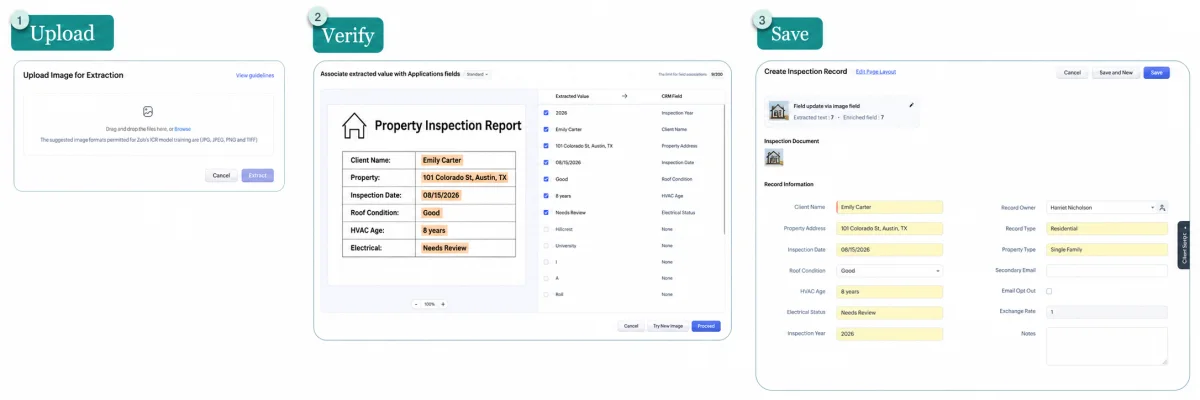
Fig 12 – ICR at work, showing document scan to CRM field population.
Consider the property inspection process. An inspector produces a 30-page report with dozens of data points covering roof condition, HVAC age, foundation status, and electrical system rating. With ICR to Subform, you extract the key findings into a structured subform attached to the deal record. That data is now searchable, sortable, and reportable. You can filter past deals by properties that had foundation issues, or track which HVAC systems are approaching replacement age for your property management clients.
The same applies to lease abstracts, tax documents, and closing statements. Any structured document that your team currently extracts data from by hand is a candidate.
9. Layout Rules
A residential rental listing, a commercial sale, and a luxury property development all live in the same Deals module, but they require completely different information. A rental needs lease terms and tenant screening fields. A commercial sale needs square footage, zoning classification, and CAP rate. Showing every field to every agent for every deal type creates cluttered, confusing forms that agents start skipping.
Layout Rules let you conditionally show, hide, and require fields based on the values in other fields. When an agent selects “Commercial Sale” as the deal type, the form automatically surfaces commercial fields and hides residential ones. When a deal moves from “Negotiation” to “Under Contract,” new required fields appear for contract details that were not relevant at earlier stages.
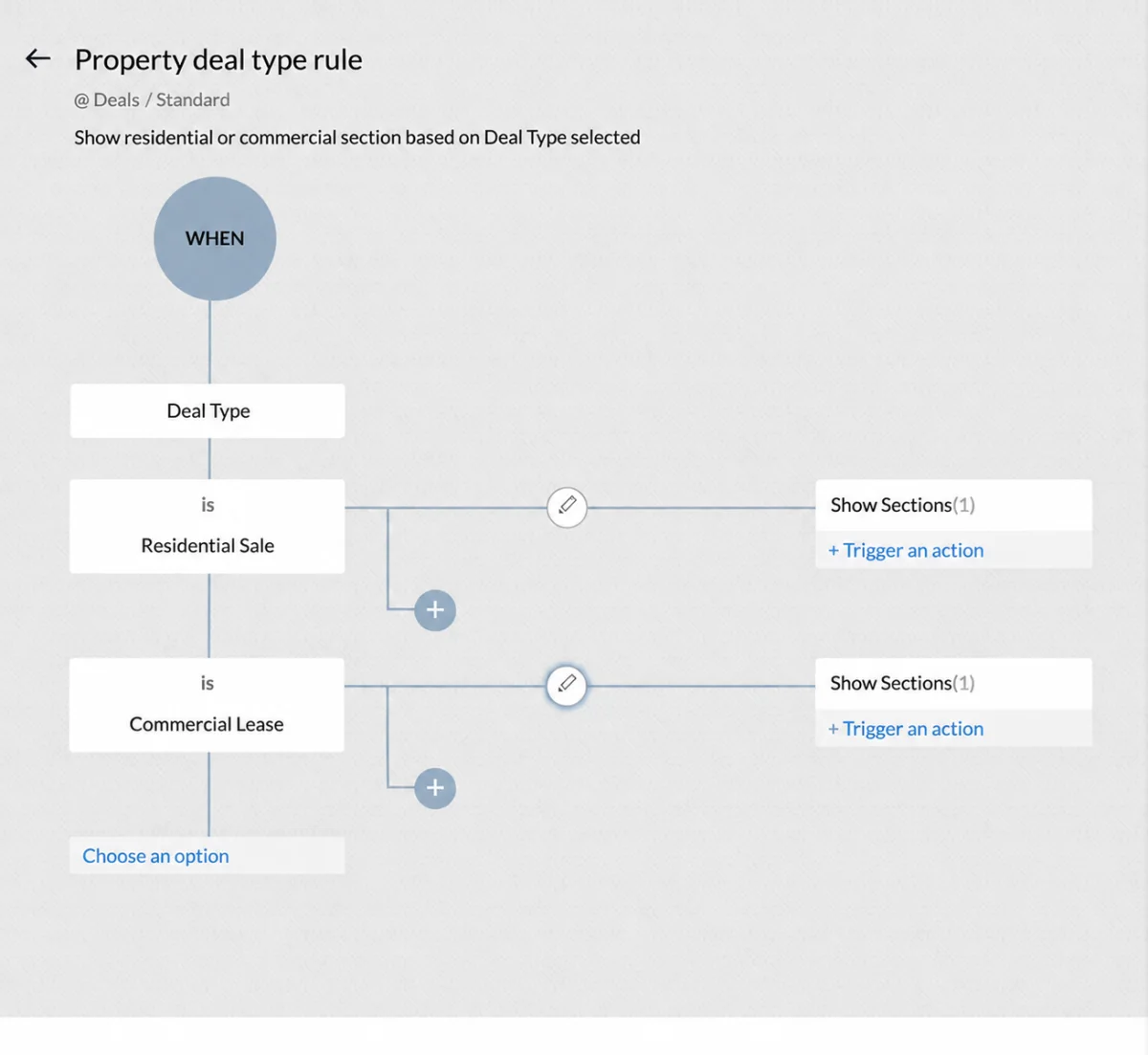
Fig 13 – Layout rules in action, fields showing and hiding based on selection.
This serves two purposes. It keeps forms clean and relevant so agents actually fill them out, and it enforces data quality by making critical fields mandatory at the right moment. An agent cannot move a deal to “Closing” without entering the closing date, attorney contact, and title company information.
For brokerages that handle multiple property types, Layout Rules eliminate the need to create separate modules for each one. One Deals module handles everything, with the form adapting to the context. This also reduces training overhead for new agents because the form itself guides them through what information is needed at each stage, for each property type.
10. Custom Commission Tracking Module
Real estate commissions are structurally complex. A single transaction might involve a listing agent’s split, a buyer agent’s split, a team lead’s override, and the brokerage’s cut. Most teams track this in spreadsheets, which means commission disputes, reconciliation headaches at month end, and delayed payouts that frustrate agents.
Zoho CRM does not ship a native commission module that handles real estate split structures out of the box. The marketplace extension that exists for general commission tracking was not built for the layered splits, overrides, and tiered rates that brokerages operate on. This is where a custom module built directly inside Zoho CRM becomes the right answer.
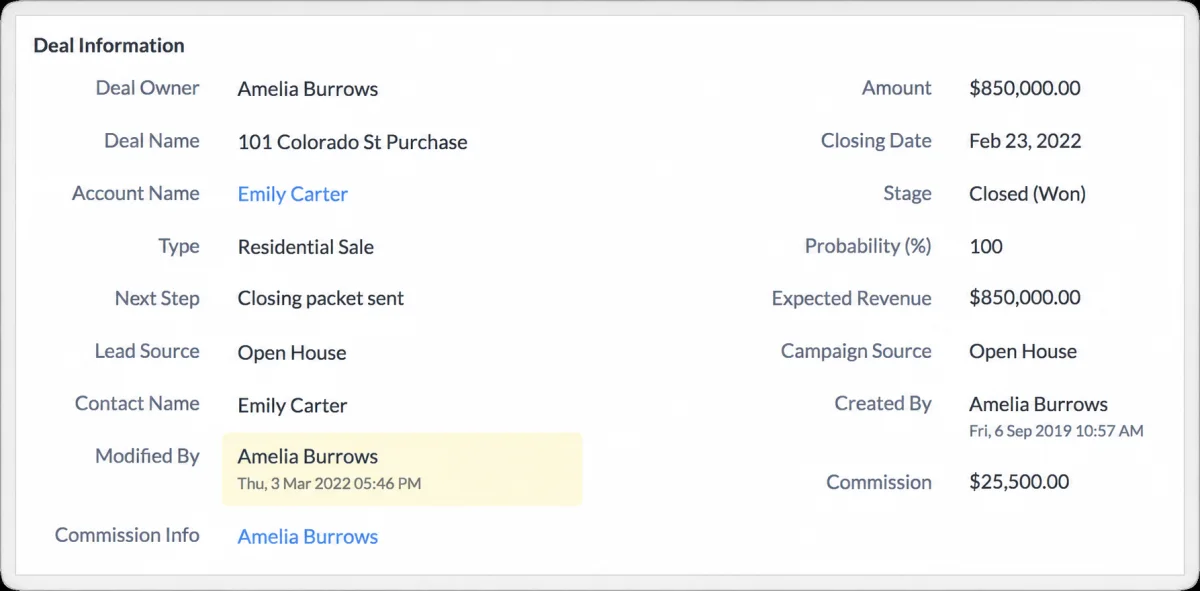
Fig 14 – Commission management in Zoho CRM for real estate agents.
We build a dedicated Commission Tracking module using Zoho CRM’s custom module and workflow infrastructure. The module ties directly to your Deals records and calculates payouts automatically when a deal closes, supporting multi party splits, team lead overrides, tiered rate structures where agents earn a higher percentage after hitting a quarterly target, and brokerage level cuts. Every agent involved sees their calculated commission directly in the CRM, and the brokerage sees the full split breakdown across all active teams.
For brokerages running multiple teams with different split structures, this replaces what is often a full day of monthly accounting work with a module that calculates, tracks, and reports on commissions natively inside the system your agents already use every day.
Where to Start
You do not need to adopt all ten at once. We typically phase the rollout based on where the current workflows break down most.
If leads are converting poorly, start with Cadences and Workqueue. These two address the most common failure in real estate CRM usage, which is leads entering the system and then decaying because no systematic followup exists. Cadences provides the structure and Workqueue makes sure agents execute it daily.
If data quality is unreliable, start with Structured Address Fields and Layout Rules. Clean, structured data is the foundation for everything else on this list. If your addresses are free text and your deal forms collect inconsistent information, fixing this first makes every subsequent configuration more effective.
If administrative overhead is consuming agent hours, start with WorkDrive Integration, ICR to Subform, and Commission Tracking. These three automate the operational work that consumes agent time without producing revenue, covering document management, data entry from paper documents, and commission calculation.
Nine of these features are already live in Zoho CRM and just need to be configured. The tenth, commission tracking, is a custom module we build to match your brokerage’s specific split structures. The value across all ten is in the implementation, setting them up correctly for your specific property types, deal stages, team structure, and commission model. That is where implementation expertise matters, and where most teams stall out trying to do it themselves.
We help real estate teams configure Zoho CRM so it actually runs their business. Most teams are storing contacts and stopping there. If your CRM is underperforming, we can audit your current setup and show you exactly which configurations will have the highest impact for your brokerage.
Request a Free CRM Configuration Audit