TL;DR
- At the 5 user paid tier, Zoho Books Professional lists at $50 a month and QuickBooks Online Plus lists at $140, based on each vendor’s current US list prices.
- QuickBooks wins on familiarity. In our implementation experience, most US bookkeepers and CPAs already work in it, and its payroll product has a long track record.
- Zoho Books wins on value, integrated 1099 filing, deeper customization, and native links to Zoho CRM, Inventory and Payroll.
- Both vendors now offer a free plan. Pick between them on invoice volume, features and connected tooling at the lowest tier.
- Pick QuickBooks if your accountant only works in QuickBooks, or if you need many users plus mature payroll in one place.
- Pick Zoho Books if you are cost conscious, already use Zoho apps, or want sales, inventory and accounting on one connected system.
- If you run multiple entities, manufacturing, or complex approvals, you may have outgrown both and need an ERP.
Most comparisons of these two tools predate the current pricing. QuickBooks Online offers a limited Free plan, with paid plans starting at $38 (Simple Start) and reaching $140 (Plus) on its official subscription page. Simple Start used to list at $35. That jump changes the math for a lot of small businesses. We redid this comparison from scratch using only what each vendor publishes today.
Our Zoho implementation team works inside Zoho every day, so you should know where we stand. We also tell clients to stay on QuickBooks when it fits them better, and you will see exactly where that line sits below. By the end, you should know which tool fits your business, and why.
Zoho Books vs QuickBooks at a Glance
Here is the short version. Each row reflects US editions and list prices as published by Zoho and Intuit in October 2026.
Table 1 - Zoho Books and QuickBooks Online compared across the factors that decide most purchases
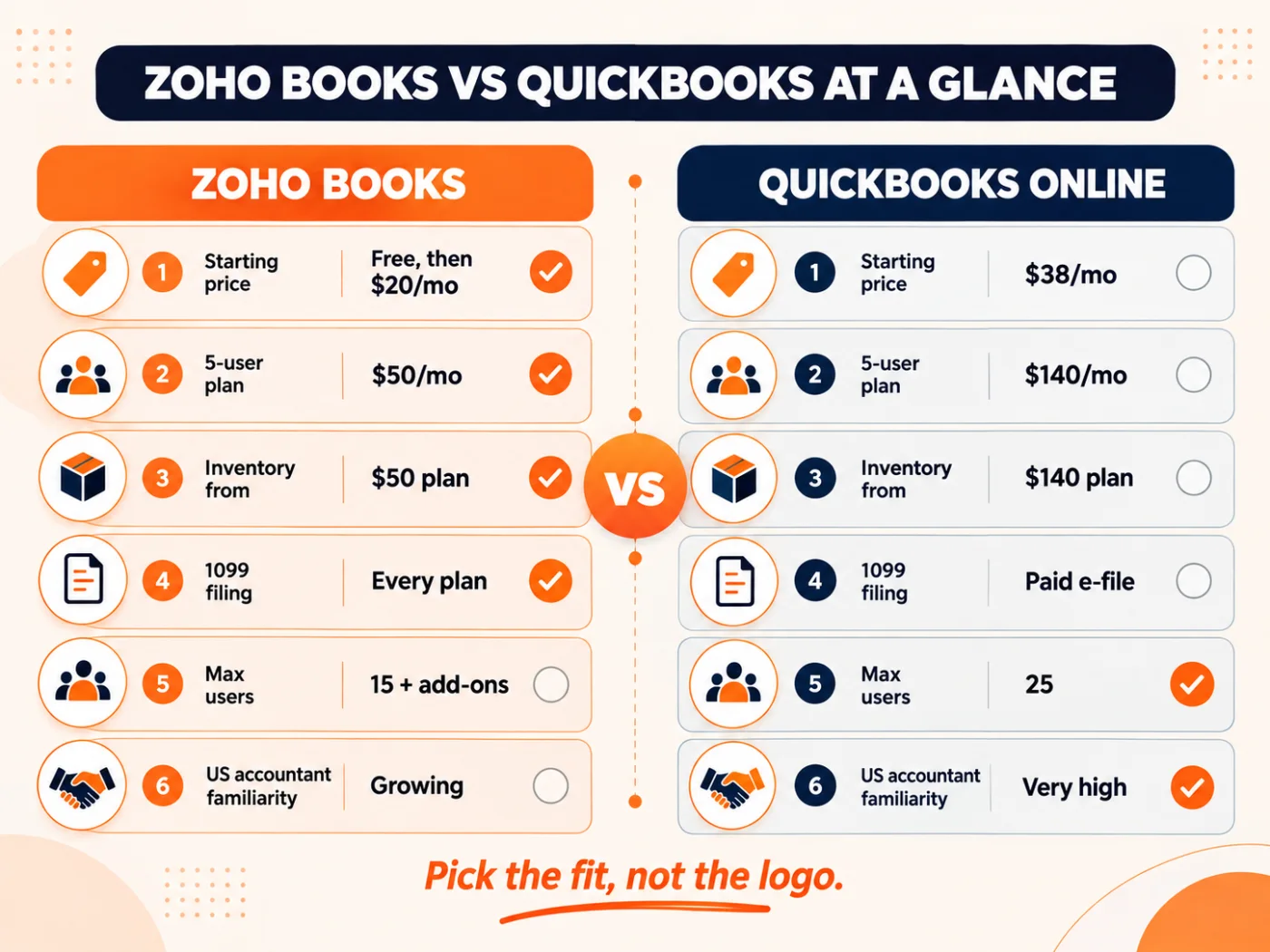
Fig 1 - Where each tool wins at a glance, based on official US pricing in October 2026.
How Much Does Zoho Books Cost Compared to QuickBooks in 2026?
Price is where these 2 tools split the hardest, so we will start here. Zoho Books publishes 6 US plans on its Zoho Books pricing page, including a free plan for businesses under $50,000 in yearly revenue. QuickBooks Online publishes 4 paid plans plus a free plan.
Table 2 - Plan levels, list prices and included users on each vendor’s current US pricing
QuickBooks Free limits default invoicing to 2 per month, allows 1 bank connection, and offers no mobile app, no third party integrations and no accountant access. Invoices become unlimited only when the account enables QuickBooks Payments and clears approval. Estimates stay capped at 1 per month.
QuickBooks often runs a 50% discount for the first 3 months. The offer applies once, to new customers on monthly plans. On the Plus plan the discount saves $210 in total. The gap with Zoho Books Professional is $90 every month after that.
What you actually pay by team size
Plan prices become useful once you map them to your own team. We ran 3 common setups at monthly list prices, with no introductory discount applied.
Table 3 - Annual cost by team size, with the yearly difference between the two
With the QuickBooks 3 month intro discount, first year costs drop slightly. QuickBooks Online Plus comes to $1,470, down from $1,680. The gap with Zoho Books returns in full from year 2.
Over 3 years at undiscounted monthly list prices, a 5 user team saves roughly $3,240 on Zoho Books Professional versus QuickBooks Online Plus before extras. With the current 3 month QuickBooks introductory discount applied to year 1, the 3 year saving is closer to $3,030. Billing yearly on Zoho Books widens that gap further, since Professional drops to $40 a month.
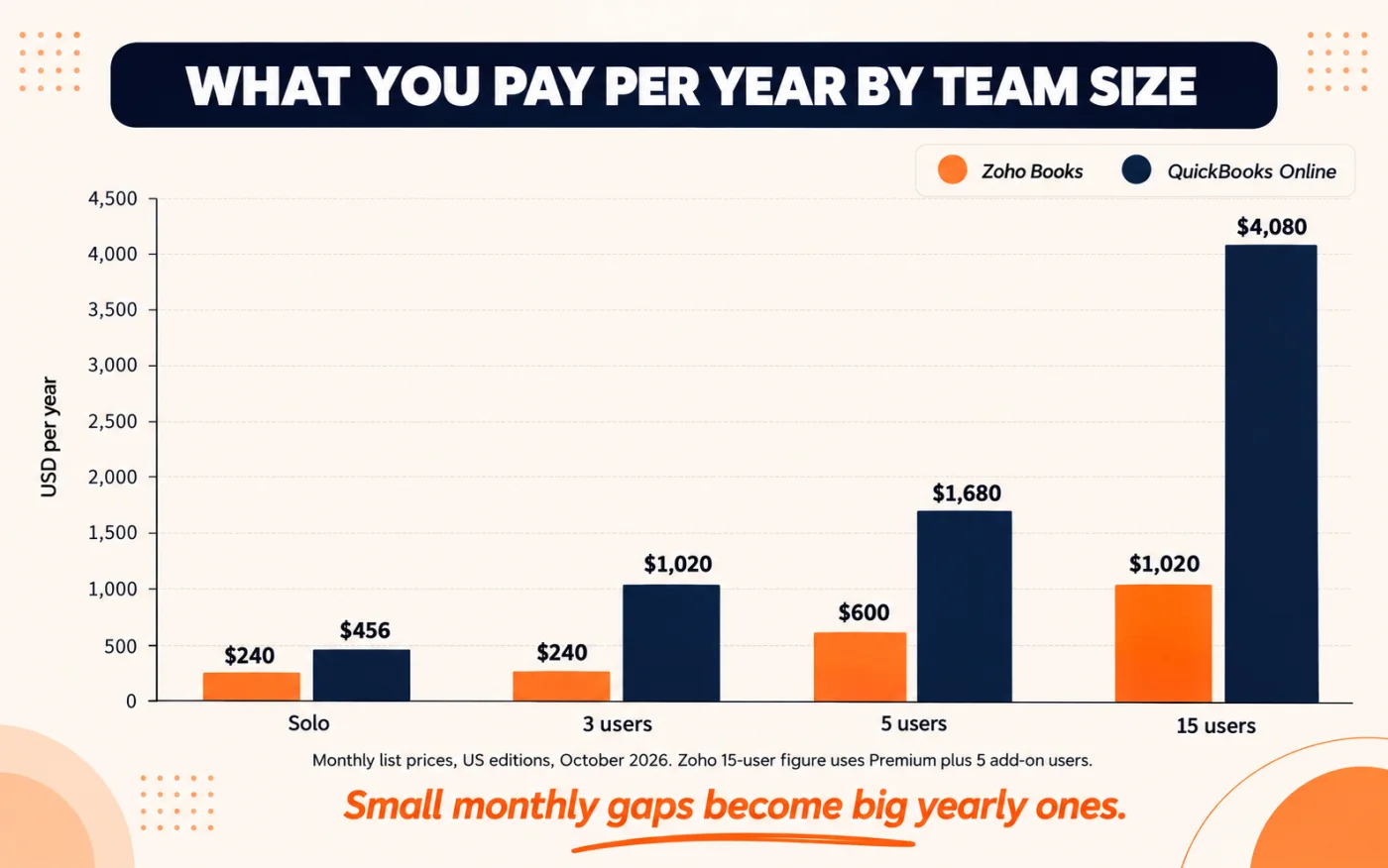
Fig 2 - Yearly list price by team size. The gap grows as you add users and features.
The limits you should check before you sign up
A cheaper plan still carries limits. Zoho Books caps yearly invoices and bills by plan, for example 1,000 invoices a year on Free, 5,000 on Standard and 10,000 on Professional, per the FAQ section of its pricing page. In our implementation experience, most small businesses never come close to these caps. A high volume ecommerce store can.
QuickBooks has its own caps. Its usage limits article notes a 250 account limit on the chart of accounts for Simple Start, Essentials and Plus, and class and location tracking only starts on Plus. If you track profit by department or branch, that pushes you up a tier faster than you might expect.
Also budget for extras. Zoho Books charges $3 per extra user per month and $12 per extra location. QuickBooks charges separately for payroll, payments processing and 1099 electronic filing.
Which Has Better Features for Everyday Accounting?
For core bookkeeping, both tools cover the basics well. These include invoices, bank feeds, bank reconciliation, receipts, expenses and standard financial reports. The difference shows up in which plan carries the features growing businesses actually need.
Table 4 - The first plan on which each feature appears, by vendor
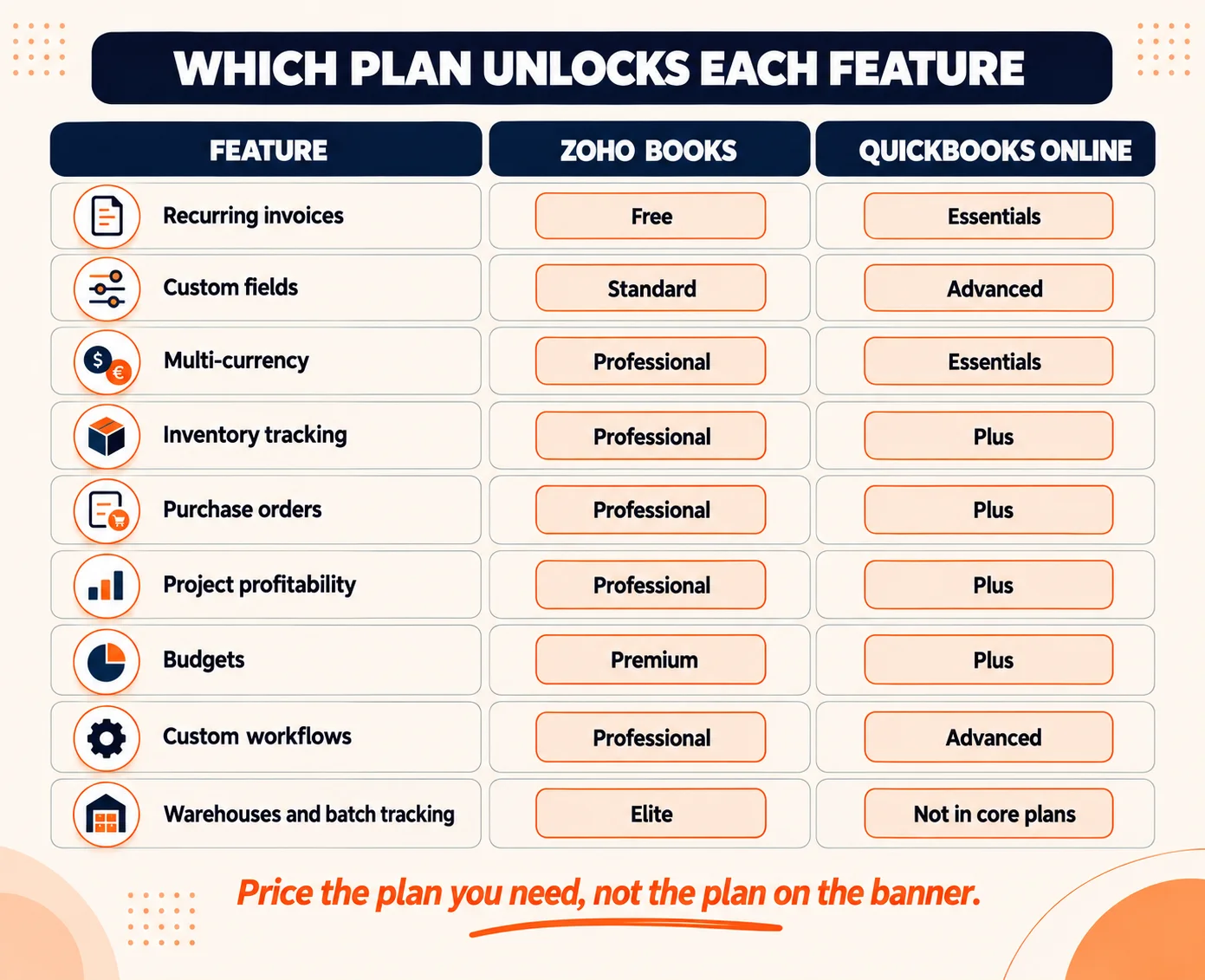
Fig 3 - The plan you need for each feature, which often matters more than the starting price.
Invoicing, quotes and getting paid
Zoho Books gives even free users a customer portal, payment reminders and recurring invoices. QuickBooks gives unlimited invoices and estimates from Simple Start, which matters if you send a high volume. Both connect to online payments, and both charge processing fees on card payments through their own payment services.
Inventory and purchasing
This is one of the clearest wins for Zoho Books. Inventory starts at $50 a month on Professional, and the Elite plan adds warehouses, batch tracking, serial numbers, shipping labels and connections to Amazon, eBay, Etsy and Shopify. On QuickBooks, inventory starts at the $140 Plus plan with FIFO valuation, and deeper warehouse needs usually mean a separate inventory app.
Automation and customization
Zoho Books lets you build approval flows, custom modules, custom buttons and scripted functions as you move up its plans. QuickBooks Online Advanced ships a named workflows feature with more than 60 templates, approval steps and reminders. In our implementation experience, Zoho users still miss custom buttons and scripted functions after switching, since those remove copy paste work between teams.
Reporting
QuickBooks lists over 60 reports on Plus and bundles a Fathom reporting subscription on Advanced, which is a separate third party analytics product. Zoho Books lists around 50 reports from the free plan, and its Ultimate plan adds a native analytics component with KPI tracking. If forecasting matters to you, our guide on time series forecasting in Zoho Analytics shows what that component can do with your financial data.
Is Zoho Books Easier to Use Than QuickBooks?
In our implementation experience, both are easy for a business owner to pick up in a week. The bigger question is who else needs to use it.
QuickBooks has a strong head start with US accountants. In our implementation experience, most US bookkeepers we meet already live in QuickBooks every day, which saves onboarding time and often lowers the bookkeeping bill. QuickBooks also lets you connect 2 accounting firms on most plans, and 3 on Advanced.
Zoho Books has a clean interface, a full mobile app, a Windows desktop app, and its own accountant partner program. The catch is the talent pool. Fewer US bookkeepers know it deeply, so you may need a Zoho implementation team for setup and for training your accountant on it.
On ease of use, we rate it a tie for owners and a clear QuickBooks win for hiring. If your current CPA refuses to work outside QuickBooks, that alone can decide this comparison for you.
How Do Zoho Books and QuickBooks Handle US Tax Compliance?
For US businesses, 3 compliance jobs matter most. These are sales tax, 1099s for contractors, and payroll tax. Here is how each tool handles them.
Table 5 - US tax compliance tasks handled by each tool
On sales tax, both tools calculate and track what you owe. Zoho publishes a dedicated sales tax accounting page for its US edition, and also explains nexus rules in its own guide on understanding sales tax nexus. If you sell into many states, check how each tool handles your specific nexus states before you commit.
On 1099s, Zoho Books is more generous. Its 1099 and W-9 management lets free users track contractors and prepare and file 1099s. QuickBooks lets you prepare 1099s at no charge. Standalone QuickBooks 1099 e-filing uses per form fees. Several QuickBooks Payroll, Contractor Payments and Bill Pay subscriptions include unlimited standard 1099 filing at no extra cost.
On payroll, QuickBooks has the longer track record and a strong guarantee. Its payroll product, now called QuickBooks Workforce, offers penalty protection on its top tier. Zoho Payroll Standard runs payroll in any one of the 50 states and starts at $39 a month plus $6 per employee monthly, or $29 plus $5 per employee billed yearly, per the Zoho Payroll pricing page. Multi state payroll requires the Professional plan, which starts at $59 a month. Zoho Payroll is also included in Zoho One, which matters if you already pay for that bundle.
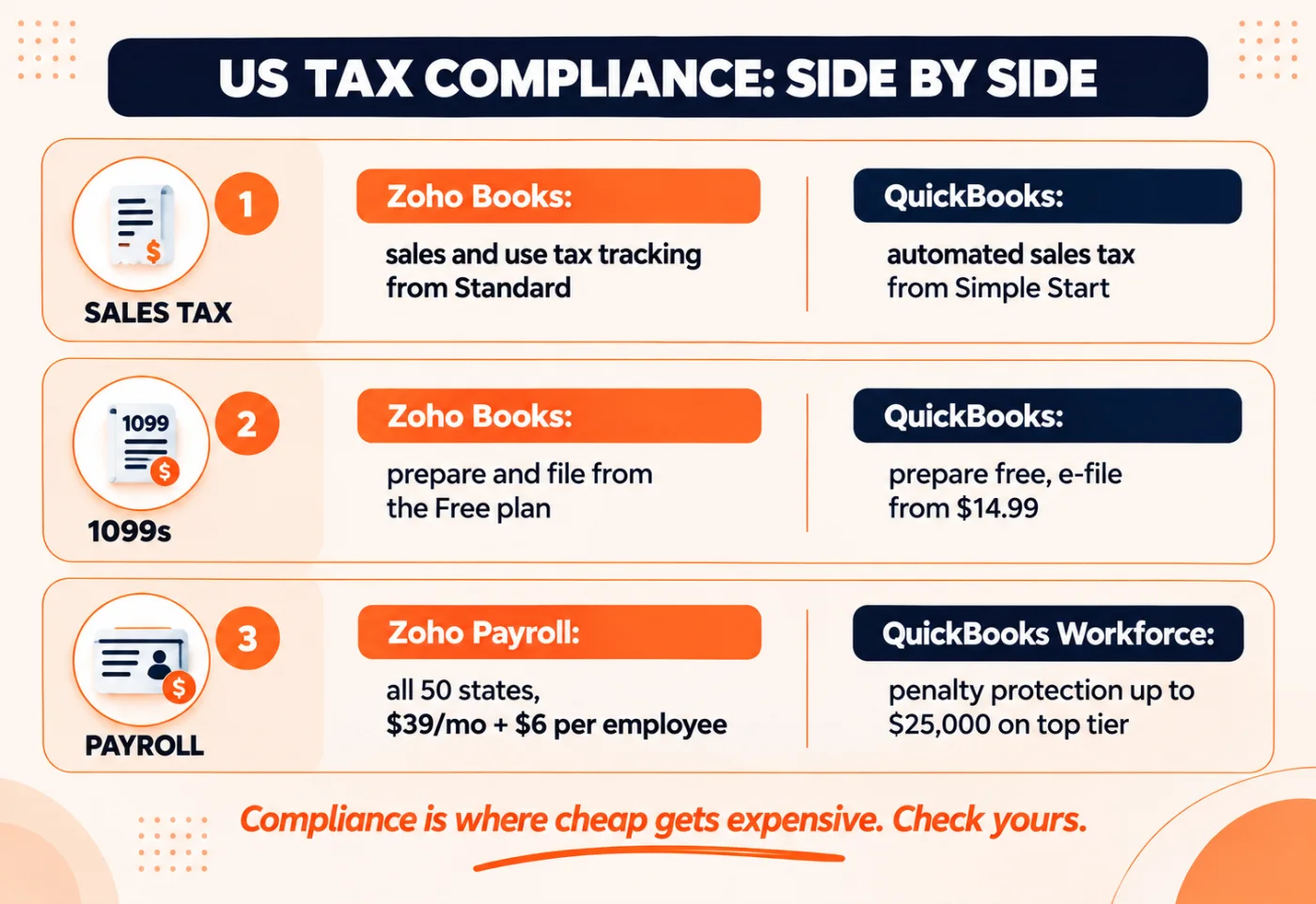
Fig 4 - How each tool handles the 3 US compliance jobs that matter most.
What About Canada, the UK, Europe and Australia?
Both vendors run separate local editions, and features differ by country. Never assume a US feature list applies to your region.
- Canada. Zoho Books has a Canadian edition in English and French, and QuickBooks has its own Canadian edition. Confirm GST, HST and PST handling in the local feature list before you buy.
- UK. Both tools support Making Tax Digital for VAT. Zoho Books is also ready for Making Tax Digital for Income Tax, which matters for sole traders affected by the 2026 rollout.
- Europe. Zoho Books offers a dedicated edition for Germany. QuickBooks products are no longer available for new subscriptions in France. Intuit withdrew the French edition in 2023. Outside Germany, check local VAT and electronic invoicing rules carefully, since requirements vary a lot by country.
- Australia. Both run an Australian edition. Check GST and BAS reporting in the local edition before you migrate.
If you run entities in more than one country, that is usually a sign to look at the ERP section below. A small business tool stretched across borders will struggle.
This is the factor most comparisons skip, and it often decides the outcome.
QuickBooks connects to a large marketplace of third party apps. If your tooling includes popular US apps for payments, ecommerce, time tracking and payroll, odds are good a QuickBooks connection already exists. You can browse them on the QuickBooks integrations page.
Zoho Books works best inside the Zoho suite. Quotes from Zoho CRM can flow into Zoho Books and turn into invoices, inventory syncs with Zoho Inventory, and payroll and expenses sync without middleware. Zoho lists both native and third party connections on its Zoho Books integrations page.
That native link is where most of the value sits, and it does not always require leaving QuickBooks. On a Zoho One quote to cash project for a custom awards manufacturer, we used Zoho Books to run estimates, retainer invoices and final invoices connected to Zoho CRM and Zoho Inventory. QuickBooks stayed as the accounting book of record through a monthly journal transfer. Quote turnaround dropped from 8 to 10 business days to the same or next business day. The cost is a monthly reconciliation step that needs a clear process behind it.
Zoho Books or QuickBooks. Which One Fits Your Business?
Fit depends on your type of business. Here is how we would call it.
Table 6 - Which tool fits which business type, and why
Contractors deserve a closer look, since job costing drives most of their decisions. Our comparison of Zoho Projects vs Procore for construction covers how project tools connect to accounting on site heavy work.
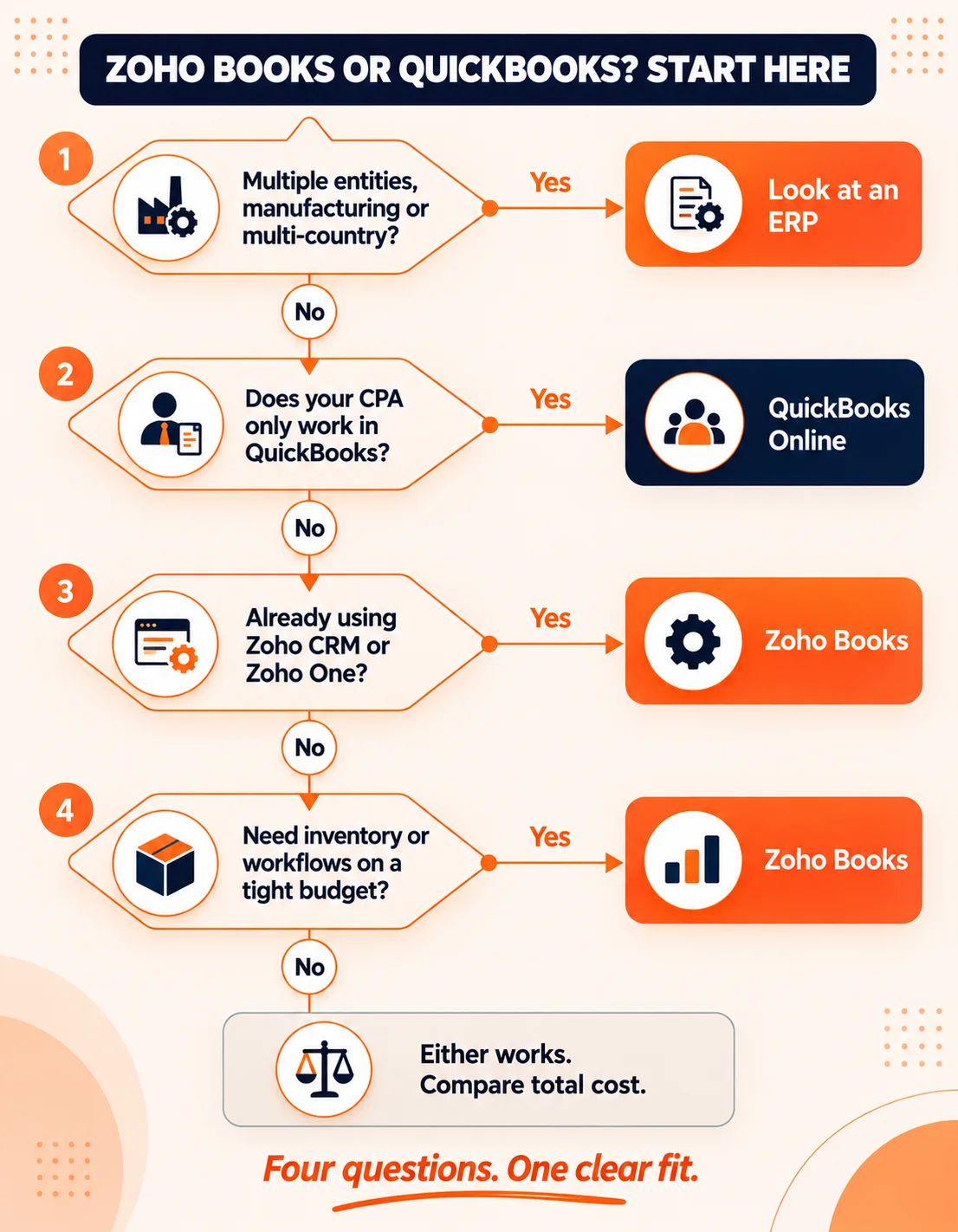
Fig 5 - Answer 4 questions to find your fit. Zoho Books, QuickBooks or an ERP.
Signs You Have Outgrown Both Zoho Books and QuickBooks
Some businesses search this comparison when the real answer is a bigger system. Both tools are built for small and medium businesses. Intuit’s own answer at that scale is Intuit Enterprise Suite, its separate ERP product for multi entity organizations.
You have likely outgrown both when 3 or more of these are true.
- You run 2 or more legal entities and close each month with spreadsheet consolidations.
- You manufacture products and need bills of materials, work orders or production costing.
- Your approval chains involve several departments and you track them over email.
- You hit plan limits on users, transactions or locations every year.
- Finance, sales and operations each keep their own version of the numbers.
At that stage, a cheaper accounting app does not fix the problem. A connected ERP does. Our ERP services team helps businesses map their processes, pick the right platform and move off accounting tools they have outgrown. Before you start, read our list of ERP implementation risks so you know where projects usually go wrong.
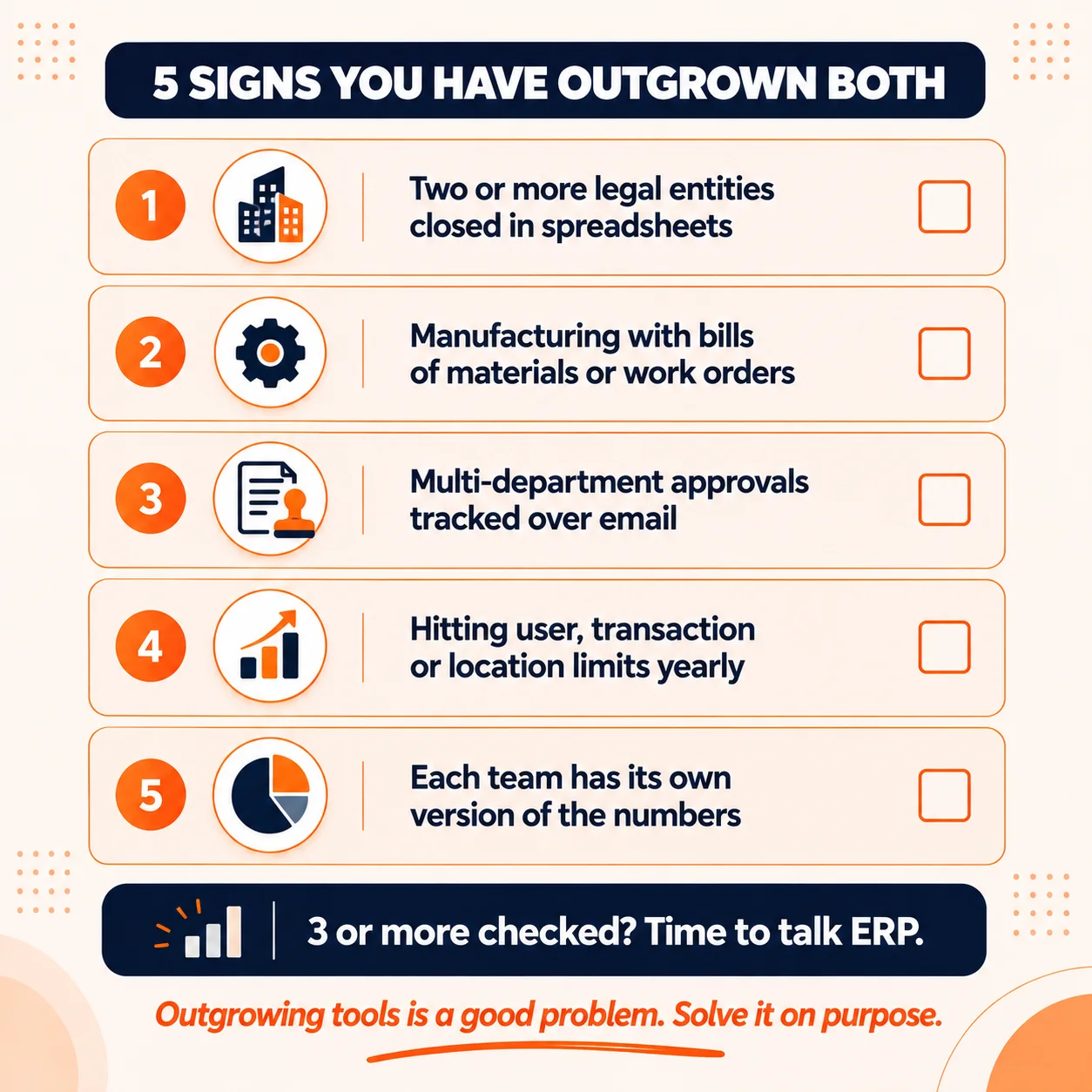
Fig 6 - If 3 or more of these sound familiar, an ERP is worth a serious look.
Outgrown your accounting software?
If you are managing multiple entities, inventory and approvals across disconnected tools, talk to our ERP team. We will tell you honestly whether you need an ERP or a better setup of what you already have. See our ERP services
Talk to our team
Switching From QuickBooks to Zoho Books. What to Plan For
If Zoho Books is the right fit, the switch is doable. Zoho even publishes a free QuickBooks to Zoho Books migration offer. A data import is one part of the job. These areas usually need real planning.
- Opening balances and history. Decide how many years of transactions to move and when to cut over, ideally at a month or quarter end.
- Chart of accounts and items. Clean them up before you migrate. Old duplicates follow you otherwise.
- Sales tax settings. Recheck every state, rate and exemption you collect for.
- Integrations. List every app connected to QuickBooks today and confirm its Zoho Books equivalent.
- Workflows. This is the upside. Plan approvals and automations you could not run in QuickBooks.
- Your accountant. Bring them in early and give them access before go live.
This is the kind of work our Zoho consulting team handles, from migration and setup to connecting Zoho Books with CRM and inventory. If you are still choosing a Zoho implementation team, our guide on how to find a Zoho implementation partner lists the questions worth asking. You can also see the full range of our Zoho services.
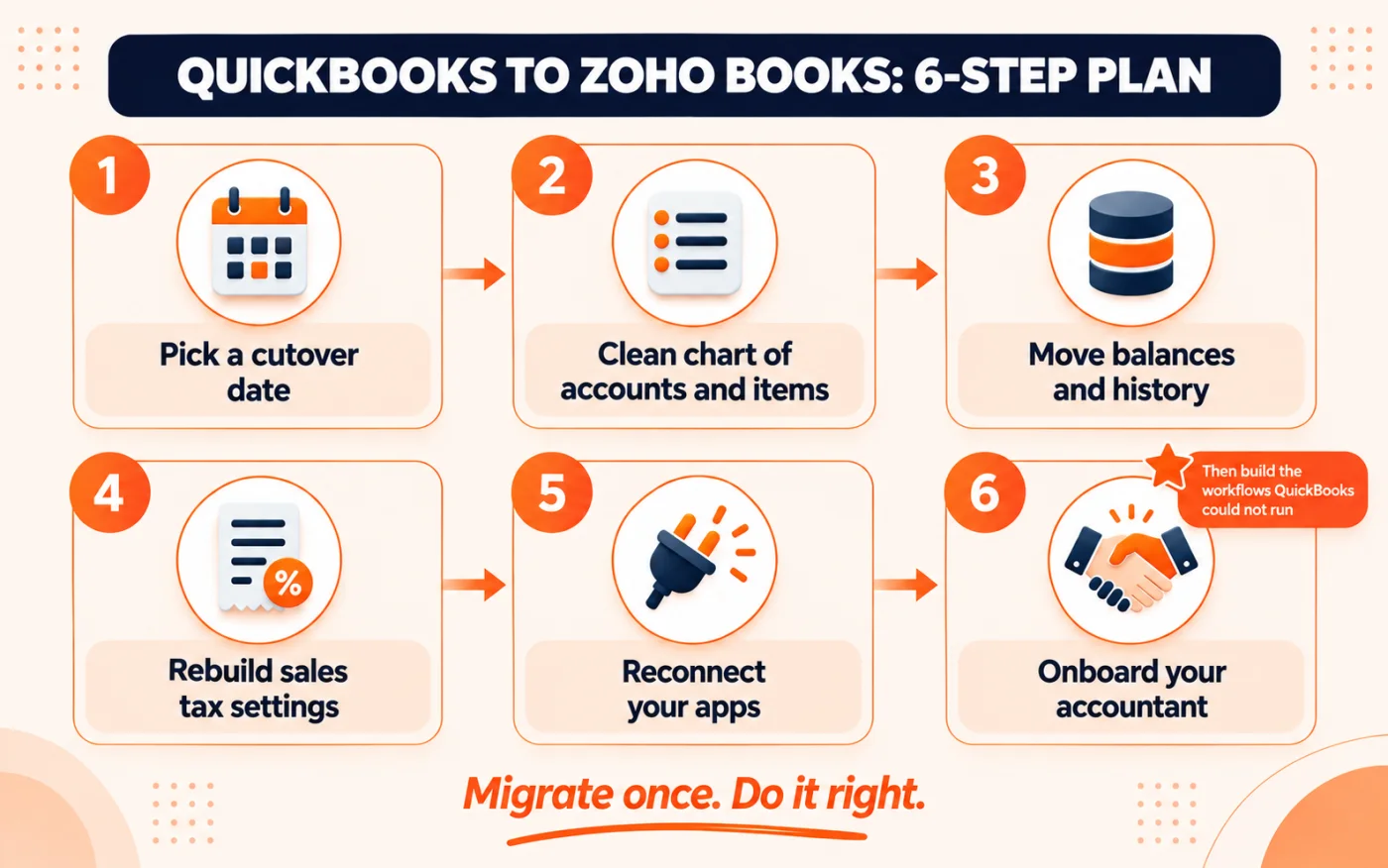
Fig 7 - 6 areas to plan before you move from QuickBooks to Zoho Books.
Moving from QuickBooks to Zoho Books?
We plan the cutover, migrate your data, rebuild your sales tax setup and connect Zoho Books with your CRM and inventory, so your team keeps working from day one. Talk to our Zoho consultants
Talk to our team
Our Verdict on Zoho Books vs QuickBooks
The short version. QuickBooks is the safe default for US businesses tied to a QuickBooks accountant. In our implementation experience, Zoho Books is the better value for most growing teams that need inventory, workflows or a connected CRM.
At paid team sizes of 3, 5 and 15 users, QuickBooks costs roughly 2 to 4 times more than Zoho Books. At the free tier both are $0, with different limits. That premium buys you accountant familiarity and a proven payroll product. For some businesses that is worth it. For a growing team that wants inventory, workflows and a connected CRM, the extra cost is hard to justify.
Run your own numbers with the tables above, ask your accountant which tool they support, and then decide. If you want a second opinion on your setup, we are happy to look at it with you.