Most Zoho CRM instances we audit carry the same hidden weight, a backlog of records from 6, 12, 18 months ago that never converted and never got disqualified cleanly. The sales team stopped working them long ago; the marketing team treats them as part of the contact count it pays for; nobody opens the file. Operators call these records dead. We have come to see them as unattended, which is what makes them recoverable.
The first move is to stop treating the dormant pile as one category. Every dormant record belongs to one of 4 conditions, each wanting a different first touch. Some leads entered the database and never engaged. Others engaged once, then went silent for 90 plus days. A third group reached MQL or SQL, sat there for 60 days, and aged out without disposition. The fourth group reads as Lost in the system, with the Lost Reason either empty or set to a recoverable cause like budget cycle timing.
These 4 conditions want 4 different reactivation tracks. A single re-engagement send aimed at the whole pile underperforms a segmented program by a factor of 3 to 5.
Figure 1 – The Four Dormancy Conditions Four conditions. Four reactivation tracks.
The Campaigns versus Marketing Automation confusion
Anyone working inside a Zoho account for more than a few months hits the choice point between Zoho Campaigns and Zoho Marketing Automation. The 2 products cannot run simultaneously on one account, and the CRM module’s marketing area defaults to Campaigns regardless of which is active. Practitioners post about this in the Zoho community forums on a more or less monthly cycle.
Here is the distinction that matters. Zoho Campaigns is a broadcast engine for newsletters, scheduled blasts, and event emails, which is roughly the limit of its native ambition. Zoho Marketing Automation is a journey engine; it handles behavioral triggers, lead scoring with decay, branching workflows, and multi step nurture sequences. Reactivation needs the second. Campaigns can send a we miss you email on a schedule; only Marketing Automation can run a journey that watches for the click, scores the engagement, branches the engaged from the silent, and routes the active subset back to sales while sunsetting the rest.
For our money, this is the cleanest place to start. If reactivation is on the roadmap, the right product is Marketing Automation, and the decision is permanent in practical terms once committed. Picking the product is one decision; the scoring model, the branch logic, and the sales handoff that a reactivation journey runs on are a separate build, and that build is what our marketing automation services team sets up.
Figure 2 – Zoho Campaigns and Marketing Automation by Use Case Reactivation needs the journey engine.
The integration architecture in 3 mechanics
The single largest source of reactivation program failure we encounter is a misunderstanding of the integration architecture. Operators treat the CRM to MA connection as a single sync mechanism, when in practice it is 3 mechanics operating on different cadences with different field coverage. Teams that get reactivation right understand all three; teams that conflate them spend a quarter wondering why the lead score never reaches the SDR’s queue.
The first mechanic is the record sync from CRM to Marketing Automation. It runs one direction, continuously, covering Contacts, Leads, Accounts, Deals, and any mapped custom modules. In Marketing Automation 2.0, Zoho deprecated criteria based syncing in favor of one sync per module, so every record in the synced module flows into MA without filtering. Zoho frames this as a 360 degree view of the lead. Operators read it as a contact tier cost implication. A 100,000 lead CRM now syncs 100,000 records into MA, and MA pricing scales with contact count. Teams near a pricing band boundary need to forecast the tier shift before turning sync on.
The second mechanic is reverse field mapping from MA back to CRM. Operators configure it once at sync setup, with narrow field coverage and updates on a periodic cadence. The common use is mapping the MA Lead Score to a CRM custom field, where it lands once per sync cycle and becomes available to CRM workflows and SDR views.
The third mechanic is event driven Journey actions (Push Data, Create Deal, Create Task, Update Field), which fire from inside a Journey at specific moments like a lead crossing a score threshold or clicking a campaign CTA.
The asymmetry is the part nobody warns operators about. CRM to MA is all or nothing at the sync stage; MA to CRM is selective and event driven. A reactivation architecture has to use all three mechanics correctly, and confusing them tends to break the program in 3 different ways.
Figure 3 – Three Integration Mechanics Three mechanics, asymmetric by design.
Segmenting dormant leads using CRM properties
Once the integration is right, the next question is which dormant records belong in a reactivation journey at all. This is where the difference between Lists and Segments earns its keep. A List is static. Operators build it once, contacts stay unless someone removes them, later matches do not auto flow in. A Segment is dynamic; criteria evaluate continuously, and contacts move in or out as field values change. For reactivation, Segments do the work.
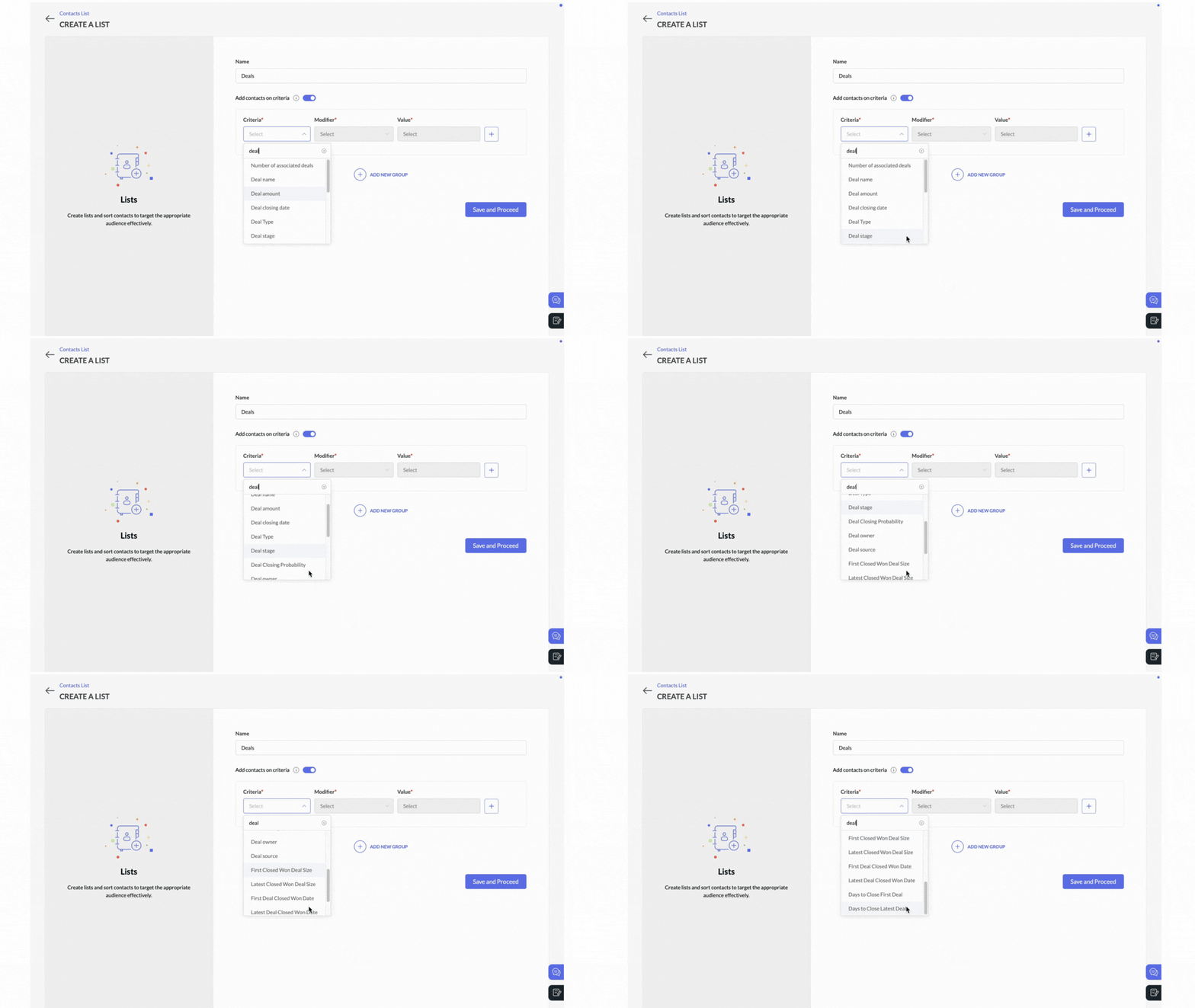
A Segment criteria builder exposes most of the CRM properties an operator needs. Deal level fields include Number of Associated Deals, Deal name, Deal amount, Deal closing date, Deal type, Deal stage, Deal closing probability, Deal owner, Deal source, First and Latest closed-won deal size, First and Latest deal closed-won date, and Days to close first or latest deal. Account level fields include Account type, Account name, and Account owner. Custom deal and module fields sync through once mapped at setup.
Six of these properties drive most reactivation segmentation.
Property
What it signals for reactivation
Latest Deal Closed-Won Date
Time since last conversion. The dormancy timer for past customers.
Number of Associated Deals
Lifetime engagement frequency. A higher count signals deeper history.
Days to Close Latest Deal
Decision velocity. A lengthening cycle on the last deal suggests hesitation.
Deal Stage
The pipeline stage where the conversation stalled.
Deal Source
Acquisition channel, which informs tone matching for re-engagement.
Deal Type
New versus renewal, which changes the natural angle.
A workable dormant lead Segment for a B2B account combines Latest Deal Closed-Won Date greater than 180 days ago, Number of Associated Deals at least 1, and Deal Stage in Negotiation, Proposal, or Qualification. This builds a continuously updating cohort of past customers gone quiet, with at least one historical conversion, who stalled at a recoverable stage.
One note on depth. The Marketing Automation criteria builder is shallower than the CRM one. The richest logic should live on the CRM side (custom views, multi criteria filters, workflow driven flags), syncing the flag fields into MA as flat values the simpler Segment criteria can read. We have made this mistake on our own early implementations, building elaborate Segment logic in MA and watching maintenance become a chore.
Figure 4 – Reactivation Segment Criteria Builder Dormant Segment built on 3 CRM properties.
Building the reactivation Journey
With the dormant Segment defined, the Journey itself is a 6 step orchestration Zoho documents directly. The order matters; operators who reshuffle it tend to produce results that look like noise.
The Journey opens with an Added to Segment trigger pointed at the dormant Segment. The outbound send follows, using the CRM Lead Owner’s name and email in the Sender Details. This is the credibility lever; an email from the rep the lead spoke to in March reads differently than one from a generic marketing address. The same Journey send supports email, SMS, and WhatsApp channels.
The Email Action Trigger comes next, filtering on Specific Email and Specific Link Clicked with the exact CTA URL as the matching condition. This is the engagement gate. Contacts who click progress further; contacts who do not click route toward a Sunset List branch.
For the engaged subset, the remaining steps are Update Lead Stage (moving the contact to a Marketing Engaged stage inside MA), Push Data to CRM (writing state back to the CRM Leads module), and CRM Actions (Create Deal opens a new opportunity, Create Task assigns a follow up to the deal owner). The SDR opens CRM the next morning and finds the dormant lead in their active queue with the context attached.
The Sunset List branch matters more than most operators realize. Continuous sending to non clickers erodes sender reputation across the whole domain, and within 6 to 9 months that erosion shows up as deliverability decline on the campaigns the team cares about. A clean reactivation Journey routes non clickers to reduced frequency or a final permission ask, then stops. The sunset branch makes the program sustainable.
Figure 5 – The Canonical Reactivation Journey Flow Six named primitives. The sunset branch is not optional.
The recipient end (personalization, identity, consent)
Send mechanics and segmentation get a reactivation program to the door. Three concerns determine whether the recipient opens it. How personal the message reads. Whether the lead’s identity ties back to their on site behavior. Whether the message respects the permission they granted in the first place.
Personalization that does not read as marketing
Marketing Automation exposes 2 families of merge tags from synced CRM data. Account Tags carry firmographic fields with the syntax $[AF:FIELDNAME||]$, for example $[AF:INDUSTRY||]$, $[AF:ACCOUNT_TYPE||]$, $[AF:ANNUAL_REVENUE||]$, $[AF:ACCOUNT_OWNER||]$. Predefined Tags carry subscriber defaults and custom CRM fields with the syntax $[UD:FIELDNAME||]$, for example $[UD:FIRST_NAME||]$, $[UD:LAST_NAME||]$, $[UD:EMAIL||]$, plus any custom Zoho CRM field that syncs through. Dynamic Content blocks let one campaign show different text, images, CTAs, and button copy based on tag values, so a single send carries an industry specific opening and an account size specific offer.
The highest leverage personalization mechanic we have found is the Text Area method. Operators create a 2,000 character Text Area custom field in CRM, populated by the rep with a paragraph of context about the last conversation. They sync it through as a Predefined Tag and drop it into the email body via merge tag syntax ($[UD:LAST_CONVERSATION||]$). Each recipient sees a different paragraph inside the same campaign template. The email reads as a one to one follow up, with the rep’s name in the Sender Details.
Figure 6 – Generic Blast Versus Personalized Reactivation Email Sender impersonation plus the Text Area method reads as 1:1 follow up.
Identity resolution via profile stitching
Zoho rolled out enhanced profile stitching in February 2025, and we suspect more operators have it active than realize what it does. The mechanic resolves anonymous visitors into known contacts. A dormant lead returns to a tracked site, browses through cookies, then clicks a tracked link in a reactivation email. Marketing Automation matches the cookie’s visitor ID to the contact ID, the anonymous browsing history retroactively attaches to the contact profile, the lead score updates, and an SDR alert can fire. One caveat. Profile stitching applies only to forms integrated from Marketing Automation to Zoho Forms.
Figure 7 – Profile Stitching Identity Resolution Cookie ID matches to contact ID on email click. Silent return becomes a real time signal.
Consent and Topic subscription discipline
Topics inside Marketing Automation are the consent primitives, with categories like Newsletters, Sale Announcements, Product Updates, and Member Content. A dormant lead subscribed to one Topic should not receive a reactivation send tied to a different Topic without confirming the opt in. The Subscription Management action handles this with 2 operations, Add Subscription to Marketing Topics and Unsubscribe From All Topics. A well designed Journey uses both. It re-subscribes the engaged subset to relevant Topics and unsubscribes the silent subset after the sunset window.
Operational gotchas to avoid
Every reactivation program we have audited that underperformed did so for one or more of the same 5 reasons.
Re-entry and dedup behavior on forms. When the same email submits multiple forms in quick succession, Marketing Automation may treat the second as a duplicate even with Allow re-entry of contacts enabled. A returning form fill is the strongest reactivation signal, and suppressing it means CRM never sees the touch. Operators need to test the Open Trigger timing parameters before treating form fills as reactivation events.
The pick one constraint between Campaigns and Marketing Automation. The decision is permanent in practical terms. For reactivation work, the right choice is Marketing Automation.
All records sync and contact tier cost. The CRM to MA record sync pulls every record from the synced CRM module. Teams near a Marketing Automation pricing band boundary need to forecast tier shifts before turning sync on; we have seen accounts tip into a higher tier the week sync activates.
Segment criteria operator limits. The Marketing Automation criteria builder offers fewer operators than the CRM one. Multi select CRM fields need flattening into boolean fields for MA segmentation. Operators build the logic on the CRM side, sync the flag fields through, and let MA read flat values.
No sunset rules.The most damaging mistake. A reactivation Journey without a clean exit branch destroys the value of the marketing infrastructure around it within 6 to 9 months.
Measuring what reactivation returns
ZMA Planner gives operators a plan level view of the marketing function, with no native cohort breakdown. The Reports tab surfaces a fixed set of system defined cards (Total Visitors, Anonymous Visitors, Existing Leads Reached, New Leads Generated, Primary Goal Count), a Conversion Funnel panel toggleable between Known and Anonymous visitors, Revenue and Deals Stats, and Expense and ROI Stats. The configuration is fixed.
This is fine for the question how is the marketing plan as a whole performing. Reactivation programs ask a different question of the same data. Reactivation rate by quarter, cost per reactivated lead versus cost per net new lead, pipeline by cohort, and sunset volume all require segmenting the plan output by cohort, which Planner does not do natively.
Cohort tracking in our experience lives in Zoho Analytics. Operators pull synced data from CRM (Deal Stage, Latest Deal Closed-Won Date, Deal Source, Number of Associated Deals) and from Marketing Automation (Lead Score, Topic engagement, Journey membership) into a single workspace, defining cohort membership as a derived field on the synced lead record. Cohort dashboards then surface Reactivation Rate by Quarter, Cost per Reactivated Lead versus Cost per Net New Lead, Pipeline by Cohort, Sunset Volume, and Unsubscribe and Complaint Rate on dormant sends.
Here is the economic frame leadership cares about. A 10 percent reactivation rate on a 50,000 lead dormant base recovers 5,000 active leads at a fraction of the cost of acquiring 5,000 new ones. The acquisition cost is sunk; the reactivation cost is platform time, content, setup, and an Analytics workspace build. We have not seen leadership take more than a quarter to approve the program on that math.
Figure 8 – Native ZMA Planner Reports View Native Planner covers plan-level metrics. Cohort tracking comes from Zoho Analytics.
Where this goes next
The Zoho native reactivation stack we have described is the foundation. The interesting work for the next 12 months is happening on top of it. Agentic intelligence reads the same CRM, Marketing Automation, and Analytics data through the Model Context Protocol, shaping the reactivation loop in ways that previously required senior marketing operators to assemble manually.
Clixlogix built this on top of a Zoho stack for a California alternative investment firm, delivering a Claude Teams integration with Zoho CRM via MCP that supports natural language queries across the firm’s full Zoho portfolio. The same architecture applies to dormant lead reactivation. Claude reads the lead’s history and Analytics cohort data through MCP, drafts the personalized Text Area paragraph, picks the right reactivation Topic, and surfaces a send time and next action recommendation to the SDR. The rep reviews, edits, and ships.
The agentic reactivation play is worth a dedicated post, which we are working on next.
Figure 9 – Conversational Reactivation with Claude and MCP MCP extends the reactivation stack into conversational automation.
Closing
Dormant leads are the cheapest pipeline source available in a Zoho CRM account. The acquisition spend is gone, the data is on hand, and the remaining work is structural. Segment by condition, build journeys that match each condition, decay scores honestly, sunset what cannot revive, and measure by cohort. The output is a CRM that reflects current intent and a marketing function producing measurable pipeline from data the business already owns.
Request a Reactivation Audit
If your team runs a Zoho CRM and Marketing Automation environment without a reactivation program, or runs one that is underperforming, we will scope your dormant base, walk the architecture against the framework above, and identify the 3 highest leverage moves for your specific configuration.
Reactivation only works as well as the data model beneath it, and tidying that up is part of the wider Zoho consulting and implementation we deliver.
Pushker is the founder of Clixlogix. Give him a messy operation and he finds the leverage point, then builds the fix himself. He works at the edge of what AI can actually do inside a business, and writes about what he finds there.