TL;DR
- Move to Shopify when store upkeep, security fixes, and checkout problems cost you sales. Stay on WordPress when content drives your main growth channel or when heavy custom features anchor your store.
- Traffic loss after a WordPress to Shopify migration almost always comes from URLs that changed with no redirect in place. Shopify itself rarely causes the drop.
- Before you touch anything, record every URL, its traffic, its rankings, and its backlinks. That snapshot gives you the only way to prove what changed later.
- Products, customers, and blog posts move well. Customer passwords, plugin features, and your old URL structure stay behind.
- After launch, check Google Search Console daily for 2 weeks. A short dip reads as normal. A dip that lasts past 6 to 8 weeks means something slipped.
Picture this. A store owner finally makes the move from WordPress to Shopify. The new store looks great. Checkout runs fast. Then, 3 weeks later, organic traffic drops 40% and nobody can explain why.
We see versions of this story often, and here is the part most people miss. Shopify did not lose that traffic. The process did. Old URLs pointed nowhere, page titles got rewritten on the fly, and hundreds of internal links broke without anyone noticing.
The good news is that a WordPress to Shopify migration does not have to cost you rankings. Google itself says that 301 redirects do not cause a loss in PageRank. When you map every old URL, redirect it, and check the result, your traffic follows you to the new platform.
In this guide, we will walk you through the whole thing in order. First, whether you should switch at all. Then the pros and cons, the risks that cost stores their traffic, the prep work, the data move, the SEO protection, launch day, and the first 90 days after. We flag the pro tips from our own migration work along the way.
By the end, you will know exactly what to do, in what order, and where the real risks sit.
Should You Move From WordPress to Shopify? When to Switch and When to Stay
Here is the short answer. Switch to Shopify when running the store eats more of your week than growing it. Stay on WordPress when your content brings in customers, or when your store depends on custom features Shopify cannot copy without heavy development.
Most people who search for “should I move from WordPress to Shopify” already feel the pain. The real question is whether the pain comes from WordPress itself or from how the site was built. Those are 2 different problems, and switching solves only 1 of them.
Signs It Is Time to Switch to Shopify
- Plugin updates keep breaking your cart, checkout, or product pages, and every fix needs a developer.
- Your team spends hours each month on hosting, backups, and security patches away from selling.
- The site slows down or crashes during sales and holiday traffic spikes.
- You have no developer on staff, and paying one for routine upkeep is getting expensive.
- Payments, taxes, and shipping rules depend on a pile of plugins from different vendors.
Signs You Should Stay on WordPress
- Content and SEO drive most of your sales. WordPress gives you more control over blog structure and URLs than Shopify does.
- You run custom logic (complex bundles, quote requests, membership rules) that has no off the shelf Shopify app.
- Your URLs carry years of backlinks and you have no budget for a careful redirect project.
- Your store is small, stable, and well maintained. If nothing is broken, a migration adds risk without a reward.
If you remain unsure, run the quick check below. Give yourself 1 point for every “yes.”
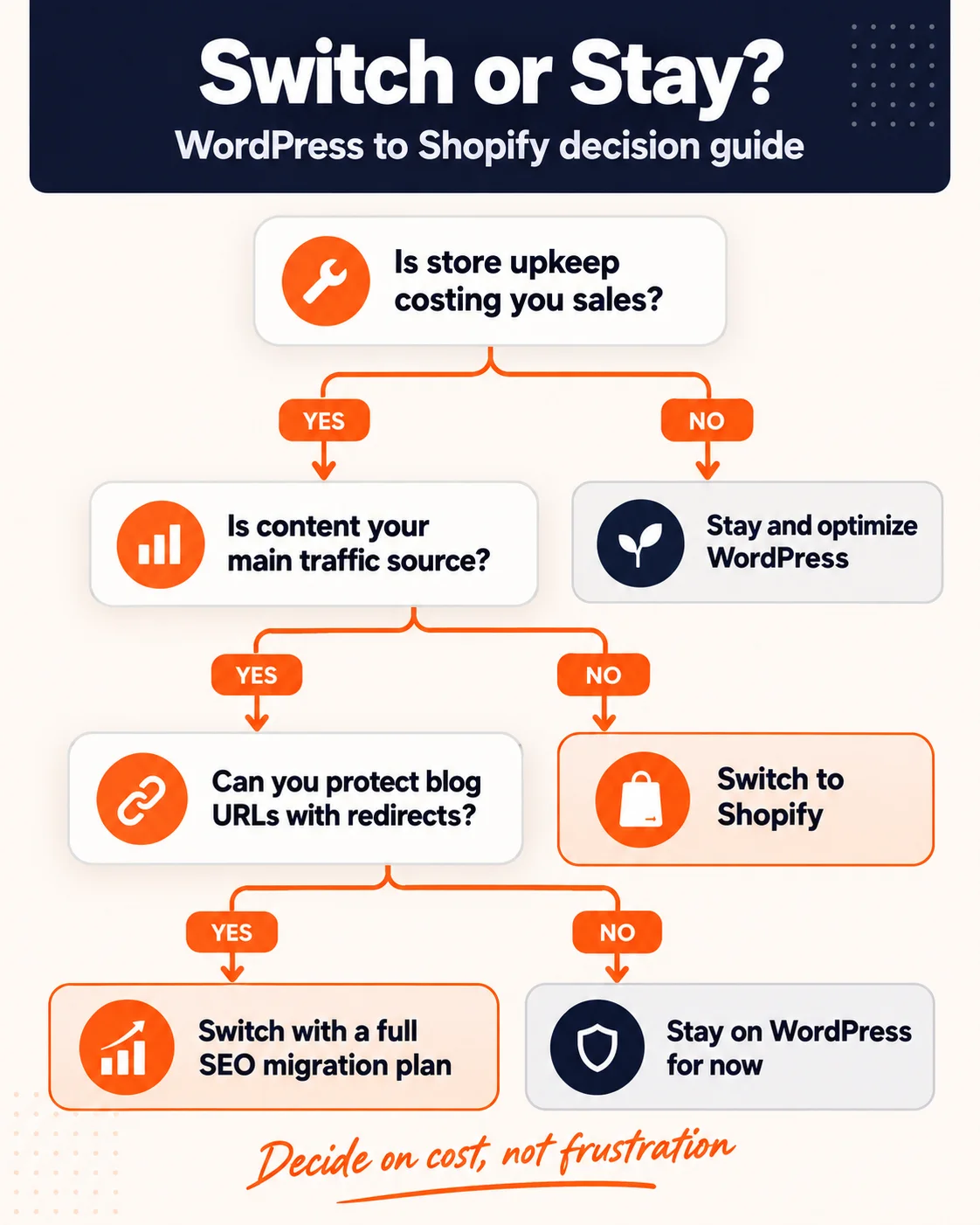
Fig 1 - Use this flowchart to decide whether switching from WordPress to Shopify makes sense for your store.
If you landed on “switch,” good. Before you commit, make the call on business cost and not on frustration. Add up the hours your team spent on site upkeep last quarter, multiply by an hourly rate, and compare that number with Shopify’s plan plus the apps you will need. Our IT consulting team runs this exact comparison for retailers if you want a second opinion on the numbers. Then see the trade offs side by side.
Pros and Cons of Switching From WordPress to Shopify
Moving from WordPress to Shopify is a trade. You give up some control and get a lot of stability back. Whether that trade is worth it depends on what your store needs more.
What You Gain on Shopify
- Shopify handles hosting, security, and software updates for you. No more patching plugins at midnight.
- Shopify ships checkout as part of the platform, fast and stable, so you avoid gluing together payment plugins.
- Daily running runs simpler. Adding products, managing orders, and handling discounts happen inside a single admin.
- The site handles traffic spikes without you having to upgrade hosting before a big sale.
What You Give Up
- URL control. Shopify forces fixed paths like /products/ and /collections/, so almost every old URL changes.
- Blog flexibility. Shopify’s blog runs simpler than WordPress, with fewer layout and SEO options.
- Predictable costs. Shopify apps are usually monthly, and 5 or 6 of them add up faster than people expect.
- Code level control. You can customize themes, but you cannot change how the platform works underneath.
Here is how the 2 compare on the things that matter most to a store owner.
Why Most WordPress to Shopify Migrations Lose Traffic
If you read only 1 section of this guide, make it this one. Every later step exists to stop one of the problems below.
Google tracks your site page by page. In its own words, a site move happens on a per URL basis. So when a URL changes and nothing tells Google where the page went, the rankings that page earned stop. Multiply that by a few hundred pages and you get the 40% drop from our opening story.
Google also warns that if you combine a move with a redesign of content and URL structure, you will probably see some traffic loss while it relearns your pages. A WordPress to Shopify migration does both at once. That is why planning matters so much here.
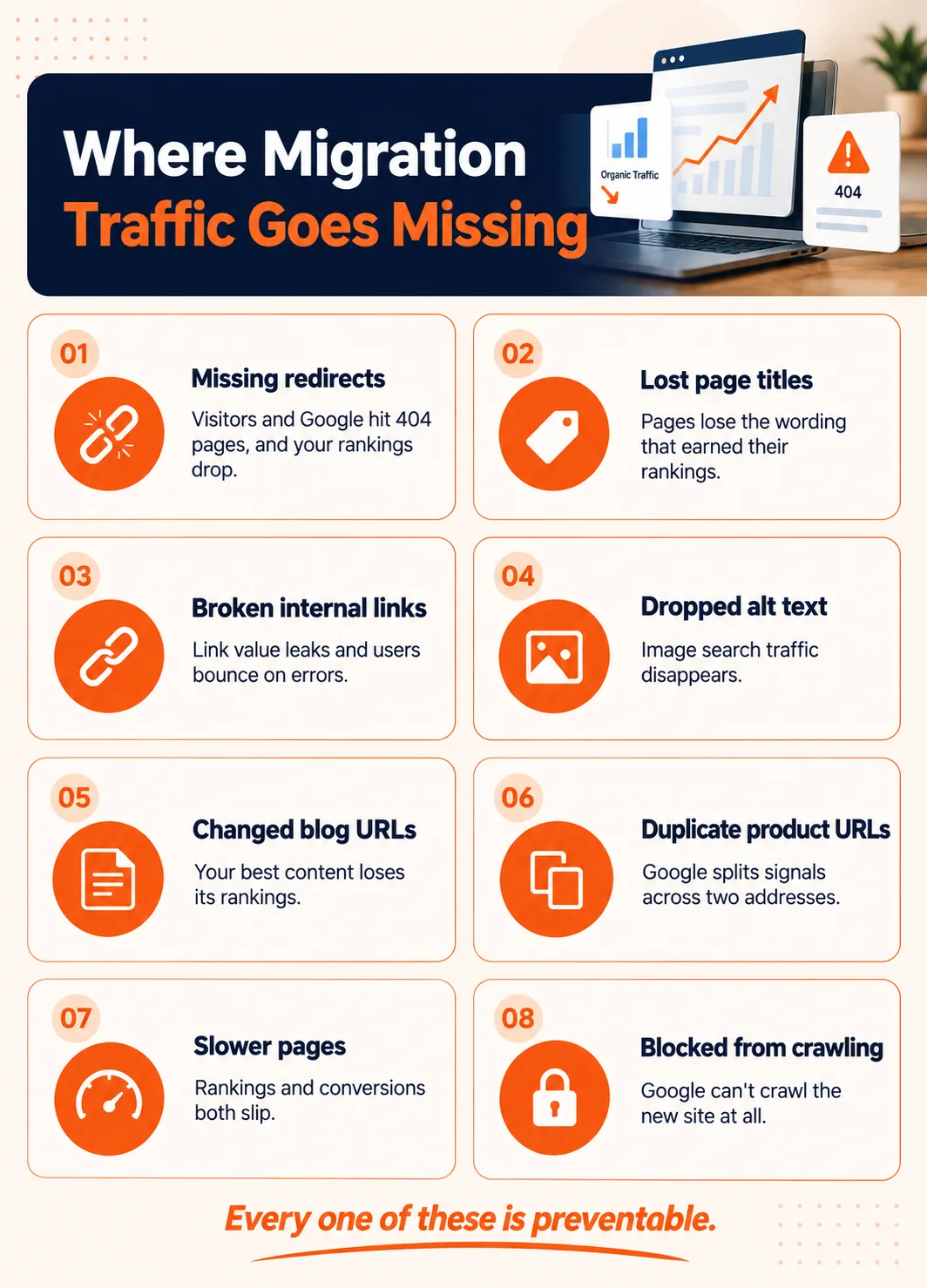
Fig 2 - The 8 most common reasons stores lose organic traffic after moving to Shopify.
Before You Migrate from WordPress to Shopify. The Pre Migration SEO Checklist
This is the boring part, and this is the part that saves you. Skip it and you have no way to prove what broke, and no list of what to fix.
Shopify’s own enterprise team makes the same point in its replatforming SEO guide. Record how your site performs before the move so you have something to compare against afterward.
1. Export Every URL on Your WordPress Site
You need a complete list of every page Google might know about. That includes products, categories, tags, blog posts, pages, author archives, and image URLs. Pull them from 3 places, because each one catches URLs the others miss.
- Your XML sitemap, which lists the pages you meant to publish.
- A full site crawl with an SEO crawler, which finds pages linked from your site.
- Landing page reports from Google Analytics and Search Console, which show pages people actually reach, including old ones you forgot about.
Merge the 3 lists into 1 spreadsheet and remove duplicates. In our experience, Search Console almost always surfaces a handful of old URLs that go missing from both the sitemap and the crawl, and some of them still get traffic.
2. Record Traffic, Rankings, and Conversions for Each Page
For every URL on your list, add its organic sessions, its main ranking keywords and positions, and the revenue or conversions it drives. Date the file. This becomes your baseline. Save a copy you never edit. When someone asks 3 months from now whether the migration hurt a page, you will want the original numbers and not a version that got overwritten along the way.
3. Flag Your Top Pages and Any URL With Backlinks
Mark the pages that bring the most traffic and revenue. Then export your backlink data and flag every URL that other sites link to.
Pro tip
A page with backlinks and zero traffic still needs a redirect. Those links pass value to your whole domain. Let them hit a 404 and you throw that value away for nothing.
4. Save All Titles, Meta Descriptions, Alt Text, and Schema
Export the SEO title, meta description, H1, image alt text, and structured data for every important page. Your SEO plugin can usually export most of this, and a crawler can capture the rest. Keep the exact wording. The titles on your top pages are part of why they rank, so you will copy them over word for word.
5. Freeze Content Changes and Take a Full Backup
From the day you crawl until the day you launch, no new posts, no URL edits, and no product slug changes. Put the freeze in writing and share it with everyone who can publish. One sincere blog post during the migration window creates a URL that exists nowhere on your redirect map. Then take a full backup of files and database and store it somewhere other than your current host.
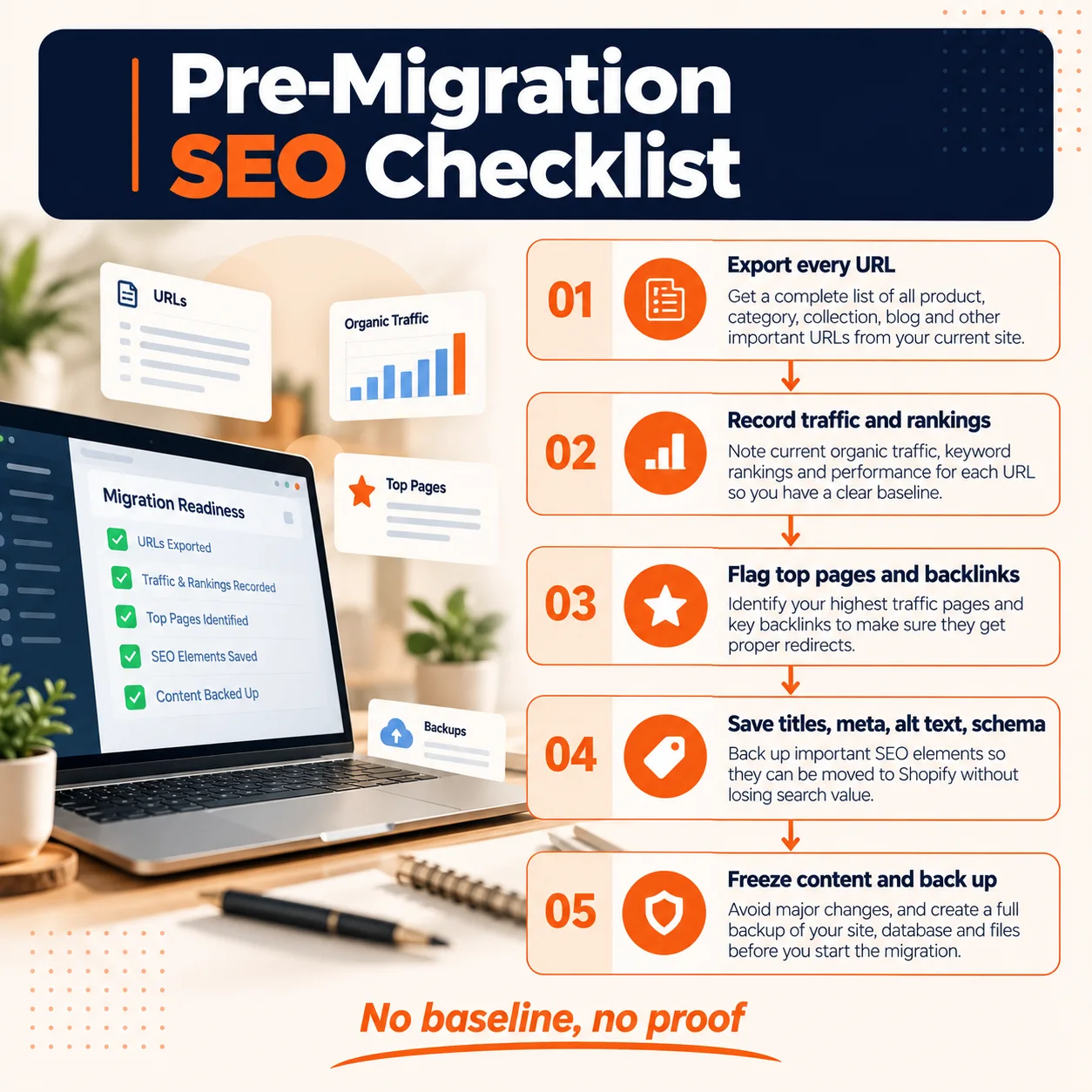
Fig 3 - Complete all 5 steps before any data moves to Shopify.
How to Migrate WordPress to Shopify. Moving Your Store Data
Now the actual move. Here is what transfers cleanly, what needs work, and what you leave behind.
Products, Variants, and Images
Products are usually the smoothest part of a WordPress to Shopify product migration. You export from WooCommerce, reshape the file to match Shopify’s product CSV format, and import. A migration app can do the reshaping for you.
The trouble spots are variants (sizes, colors, materials) and custom fields. WooCommerce lets you build almost any product structure. Shopify applies stricter rules, so complex products sometimes need a split or a rebuild with metafields.
Pro tip
Clean your catalog before you import. Do the tidying up in WordPress first. Delete dead products, merge duplicates, and fix broken images in WordPress first. Every bad record you import is one you will have to find and fix again on Shopify.
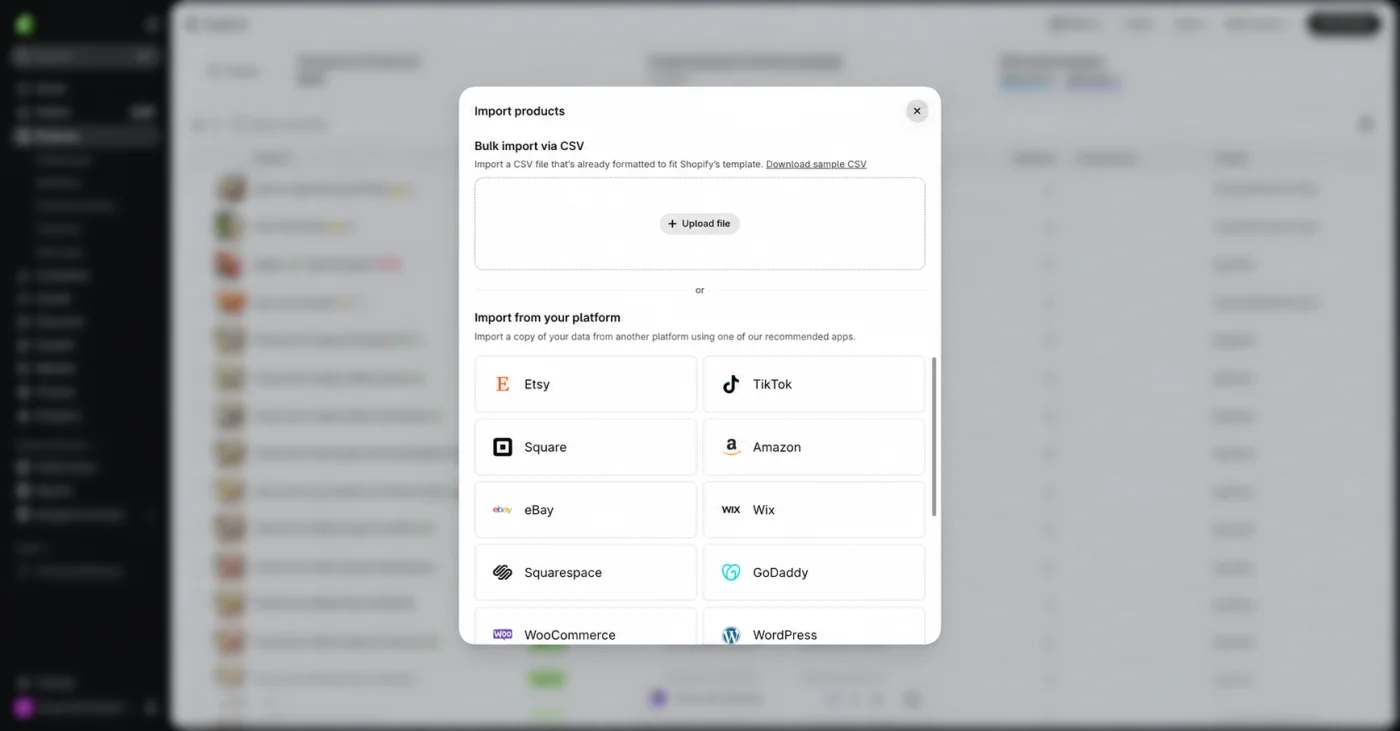
Fig 4 - The Shopify product import screen, where your reshaped WooCommerce CSV gets uploaded.
Customer Data, and Why Passwords Do Not Come With It
Customer names, emails, addresses, and tags import cleanly. Passwords do not. Shopify states plainly that because passwords sit encrypted outside its platform, you cannot migrate customer passwords from another store. After import, each customer has to set a new one.
This is the part that annoys loyal customers most if you handle it badly. Handle it well and it becomes a chance to reconnect.
Pro tip
Plan the account invite email before launch. Explain the move in a short friendly paragraph, give a clear “set your password” button, and add a small thank you offer for reactivating. Send it in batches across a few days.
Order History
Shopify does not import orders through its standard CSV tools, so order history needs a migration app or a custom import. Ask yourself how much history you need. Recent orders support returns and customer service. Orders from 10 years ago mostly support reports you could keep in a spreadsheet. Bring over the history your team actually uses, often the last 2 or 3 years, and archive the rest as an export. It cuts migration time and cost without hurting customer service.
Blog Posts, Pages, and Images
If you wonder how to import your WordPress blog to Shopify, the posts themselves move fine. Titles, body content, images, and publish dates can all come across. What changes is the structure around them.
- Every post moves to a Shopify blog path such as /blogs/news/your-post-title, so every blog URL changes.
- WordPress categories become Shopify tags, since Shopify blogs do not use nested categories.
- Images inside posts need an upload again or a fresh link so they stop pointing at your old WordPress media folder.
- Plugin features like tables of contents, related posts, and custom blocks will not carry over on their own.
Fix the internal links inside your posts during the migration. Swap every link to an old WordPress URL for its new Shopify URL as you import. Redirects will catch old links, and direct links are cleaner and keep link value strong.
Most WordPress stores run on WooCommerce, so a WordPress to Shopify migration is usually a WooCommerce to Shopify migration underneath. That adds a few extras on top of products and customers.
- Subscriptions. Active subscriptions need a Shopify subscription app and a plan to move payment details, which often means customers entering cards again.
- Payment gateways. Check that your current gateway works with Shopify, and note that Shopify may charge a fee when you use an outside gateway.
- Taxes and shipping. Rebuild your tax rules and shipping zones from scratch and test them with real addresses.
- Email flows. Abandoned cart, welcome, and after purchase emails tied to WooCommerce need a rebuild. Our marketing automation team usually rebuilds these flows in parallel so they are live on day 1.
- Back office connections. Inventory, CRM, and accounting links need to reconnect to Shopify. Here is how we connected Shopify to Zoho CRM and Inventory for an eyewear brand.
Before the full import, run a test migration of about 50 products, 50 customers, and a few orders. Check every field by hand. Small test batches catch mapping mistakes that would otherwise repeat across your entire catalog.
How to Keep Your URLs and Rankings After Moving to Shopify
Here is the honest truth. Most of your URLs will change when you move to Shopify. Your rankings do not have to. The fix is a complete 301 redirect map, carried over metadata, and clean internal links.
How Shopify’s URL Structure Differs From WordPress
WordPress lets you set almost any URL structure. Shopify uses fixed paths for each type of content. Shopify’s own team shows examples like a category page moving from a custom path to /collections/shoes and an About page moving to /pages/about-us.
How to Build Your 301 Redirect Map
A redirect map has 2 columns. Old URL on the left, new URL on the right. Every URL from your pre migration export gets a row. Shopify lets you import redirects in bulk from a CSV file, so this spreadsheet becomes the file you upload.
- Map 1 old URL to 1 new URL. The closest match wins. A product goes to its new product page, a category goes to its new collection.
- For products you discontinued, redirect to the most relevant collection, and not the home page.
- Use relative paths in the import file, such as /product/blue-running-shoe/ to /products/blue-running-shoe.
- Upload and test the redirects before you point your domain at Shopify.
Two Shopify rules trip people up. First, a redirect only fires when the old URL does not load a real page, because Shopify notes that if the URL still loads a valid webpage, the redirect won’t work. Second, you cannot redirect URLs that use Shopify’s own fixed paths. Plan around both.
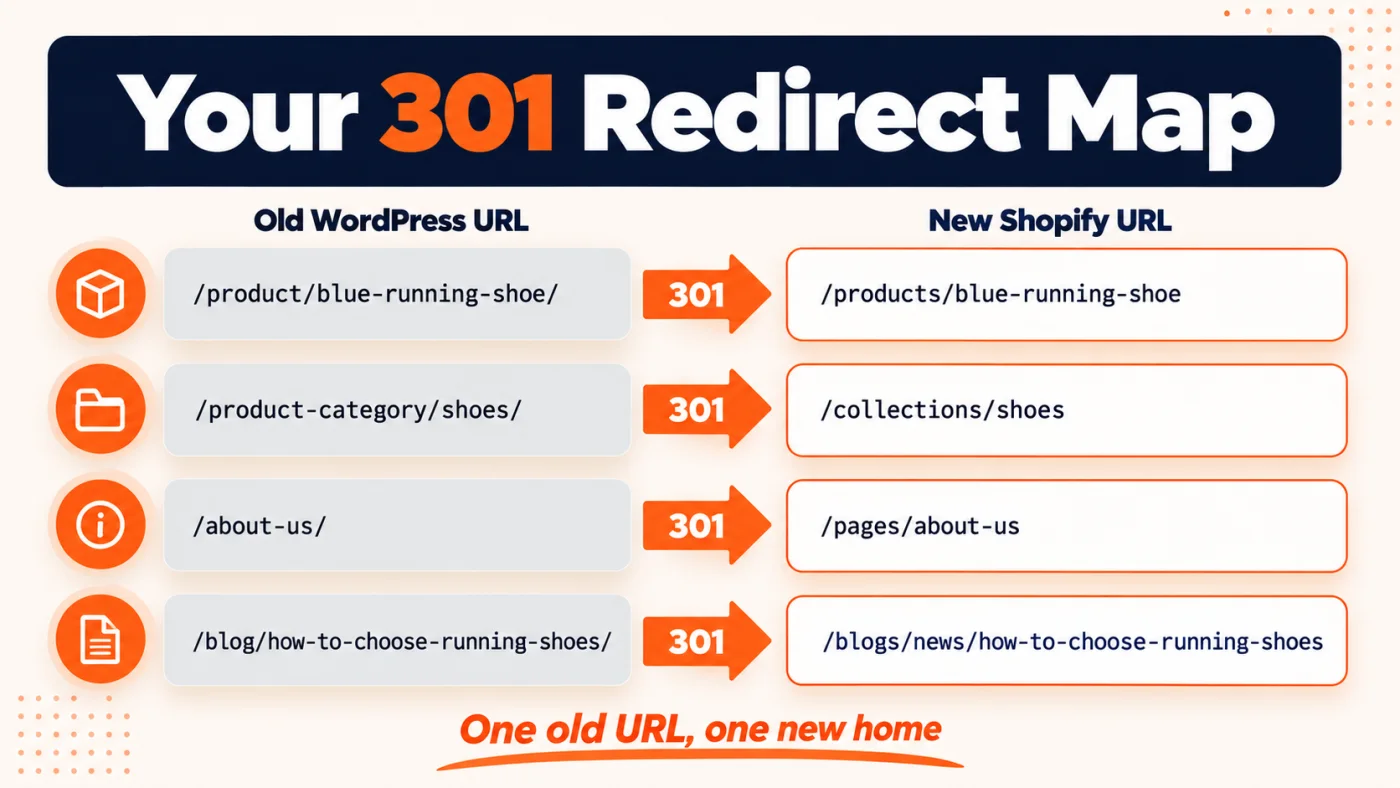
Fig 5 - A redirect map pairs every old WordPress URL with its closest new Shopify URL.
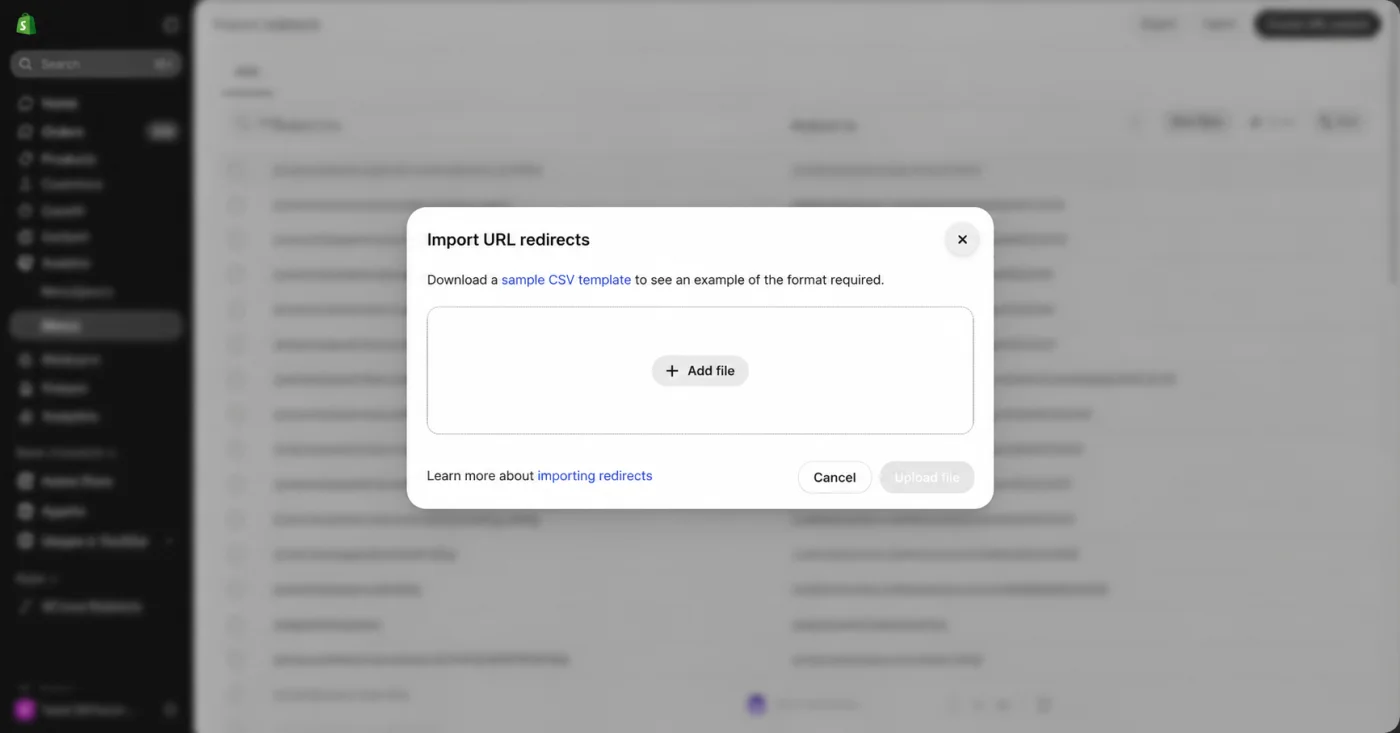
Fig 6 - Shopify’s URL redirects page, where you bulk import your redirect map as a CSV.
Pro tip
Never redirect everything to the home page. It feels like a safe shortcut, and Google tends to read mass home page redirects as missing pages, so the rankings disappear anyway. Page by page mapping takes longer and it is the only version that protects your traffic.
Carrying Over Titles, Meta Descriptions, and Alt Text
Shopify has fields for page titles, meta descriptions, and image alt text on every product, collection, page, and post. Fill them with the exact values you saved in your pre migration export.
Pro tip
Do not rewrite the titles on your top pages during the move. Changing URLs and titles at the same time makes it impossible to tell which change caused a drop. Move first, test improvements later.
Fixing Internal Links and Structured Data
Update your menus, footer links, and links inside product descriptions so they point straight to the new Shopify URLs. Then check structured data. Shopify themes usually add product schema, and review, FAQ, and organization schema from WordPress plugins may need adding back. After import, crawl the Shopify store on its temporary domain and filter for any link that still contains your old WordPress paths, such as /product-category/ or /wp-content/. Each one is an internal link you missed.
Handling Shopify’s Duplicate Product URLs
Shopify can show the same product at 2 addresses. /products/item and /collections/shoes/products/item. Most modern themes set a canonical tag pointing to the /products/ version, which tells Google which one counts. Older or heavily customized themes do not always do this. Open a product through a collection page, view the page source, and check that the canonical tag points to the plain /products/ URL. If it does not, fix the theme before launch.
Most of the damage is done before launch
The pages that cost stores the most are the ones with backlinks and almost no traffic. We find them, map them, and watch every ranking for 90 days after you go live.
Talk to our SEO team
Launch Day. Moving Your Domain and Going Live
Launch day should feel uneventful. If you did the prep work, it mostly does.
Connecting vs Transferring Your Domain
You have 2 options when you transfer a domain from WordPress to Shopify. You can connect it, which keeps the domain at your current registrar and points its DNS records to Shopify. You can also transfer it, which moves the domain registration itself to Shopify.
- Connecting runs faster and keeps control of email and other DNS records with your registrar. This is what most stores do.
- Transferring puts everything in a single Shopify bill, and it moves more pieces at once on a day when you want fewer surprises.
The Pre Launch Test List
- Place real test orders with every payment method, then refund them.
- Verify redirects for your top 50 URLs from the pre migration list.
- Test the store on phones, since most ecommerce traffic reaches you from mobile.
- Compare page speed for your top pages against the old WordPress numbers.
- Confirm analytics, ads pixels, and conversion tracking are firing.
Our QA and testing team runs a version of this list on every launch, because a 5 minute checkout bug on launch day can cost more than the whole test budget.
Removing the Store Password and Submitting Your Sitemap
Shopify stores sit behind a password page until launch, and Google cannot crawl a locked store. Remove the password, then submit the new Shopify sitemap in Google Search Console right away.
After the Migration. What to Check in the First 90 Days
Your WordPress to Shopify migration does not finish at launch. Google has to recrawl every old URL, follow each redirect, and reassess the new pages. Google says to expect temporary ranking fluctuation during a move, and that the move only counts as complete once Googlebot has visited every URL on both sites.
Reading Search Console After a Migration
Watch the Pages report for “Not found (404)” and “Page with redirect” counts. Rising redirect counts are a good sign. Google is following your map. Rising 404s mean URLs that slipped through, and each one needs a redirect.
When a Traffic Dip Is Normal, and When It Is Not
A dip in the first 2 to 4 weeks reads as normal while Google reprocesses everything. A dip that keeps going after 6 to 8 weeks, or a sudden drop on specific pages, means something broke. Usually it is a missing redirect, a lost title, or a page Google dropped from the index.
Keep your redirects in place for the long term. Google’s guidance is to keep them for as long as possible, generally at least a year.
This is the same approach we used when we moved an Australian fishing tackle retailer’s retail and wholesale stores to Shopify. We followed the migration with on page SEO across every product so the new store held its search visibility. We have run similar post launch SEO programs for stores like the one in our Maguba ecommerce SEO case study.
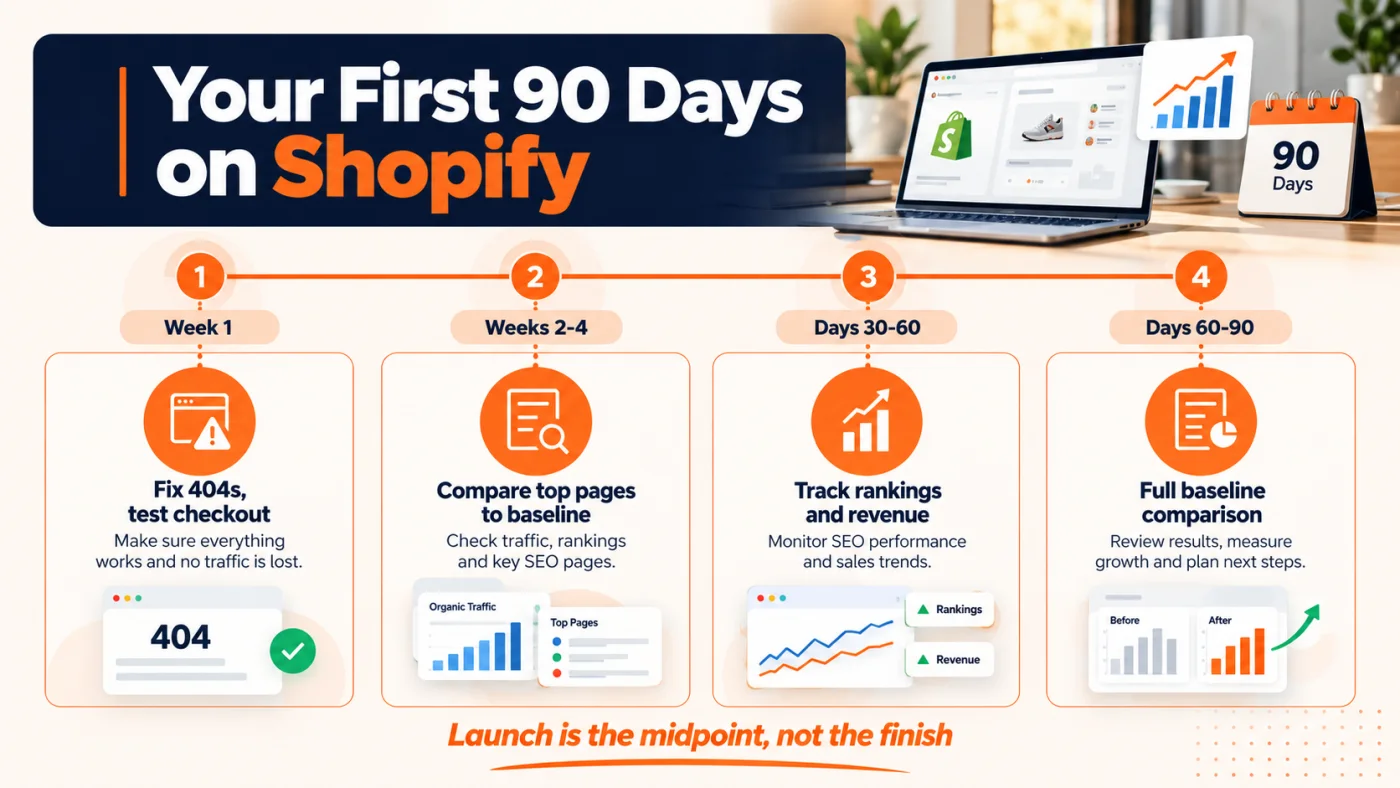
Fig 7 - What to check, and what is normal, in the 90 days after your Shopify launch.
DIY, Import App, or Shopify Migration Experts. Which Is Right for You?
There are 3 ways to do a WordPress to Shopify migration. The right one depends on your catalog size, how custom your store is, and how much organic traffic you stand to lose.
A note on cost. Migration apps charge for moving data, which is 1 slice of the work. The real cost of a migration includes redirect mapping, theme rebuilding, testing, and the months of monitoring after launch. When you compare quotes, compare the whole job, from the data move through the redirects, the theme, the testing, and the post launch SEO.
What Good Shopify Migration Services Should Include
Whether you hire us or anyone else, a proper Shopify migration agency should cover every item below. If a quote skips one, ask why.
- A full URL export and a baseline of traffic, rankings, and backlinks before any work starts.
- A page by page 301 redirect map, tested before launch.
- Titles, meta descriptions, alt text, and structured data carried across.
- Data migration with a test batch first, covering products, customers, orders, and blog posts.
- A Shopify theme build that matches your brand. Our design team handles this part on our projects.
- Pre launch testing of checkout, redirects, tracking, and mobile.
- At least 60 to 90 days of post launch SEO monitoring.
This is how we run migrations at Clixlogix. Our ecommerce development team handles the data and store build, our SEO team protects your rankings, and you can see how we work with clients from first audit to post launch reporting. We also work across retail and ecommerce, so we know which apps, integrations, and shortcuts hold up in the real world.
Ready to move to Shopify without losing your traffic?
Most stores find the missing redirect in week 6, when the rankings are already gone. We baseline every URL before anything moves, map each one to its new Shopify address, test the redirects before your domain switches, and track your top pages for 90 days after launch. Our ecommerce development team builds the store, our digital marketing team protects the search visibility.
Get a free migration scope