TL;DR
The short version
- A Zoho CRM consultant studies how you sell, then designs, builds, tests, and hands over a Zoho CRM setup that matches it.
- Hire one when adoption is slipping, sales and finance report different numbers, your team types the same data twice, or a migration is coming.
- The work covers five areas. These are workflow design, custom fields, automation rules, integration, and training.
- Expect an audit first, then a written specification, a tested build, a verified release, and support after launch.
- Pricing follows the audit. Any quote that comes before someone looks inside your setup is a guess.
Start with the ending. Your sales manager opens one dashboard on Monday morning and trusts the number on it. A new lead has an owner within a minute. Quotes go out from the deal record, and finance sees the same figures sales does.
Now rewind six months. Same company, same subscription. Reps log calls in a spreadsheet, someone adjusts the pipeline report before every board meeting, and the person who set everything up has moved to another team. That is frustrating. It is also common.
The software is identical in both pictures. The gap between them is design work, and design work is where a Zoho CRM consultant earns the fee.
More teams face this choice every year. Zoho Corporation now serves more than one million paying customers, with customer count up 32% year over year, according to its latest corporate update. Many of those teams are deciding right now whether to set the CRM up themselves or bring in help.
We run Zoho projects for a living, so we have a stake in your answer. We will still show you the cases where your own team can do the job, because those cases are real and you deserve to see them.
Here is what this guide covers. When hiring makes sense, what Zoho CRM consulting includes, what the engagement looks like stage by stage, and how the price gets set.
What Does a Zoho CRM Consultant Do?
A Zoho CRM consultant is a specialist who studies how your business sells and then designs and configures Zoho CRM to match it. The work covers process mapping, modules and fields, automation, connections to other systems, data migration, reporting, and user training. The goal is a CRM your team uses every day and your leadership trusts.
Simple enough. So why do buyers confuse the role?
Because three different roles share the label "the Zoho person", and they do three different jobs.
Table 1 - The three roles that share the "Zoho person" label
Most projects need all three skills at different moments. A firm like Clixlogix supplies them as a team. A solo consultant usually covers two of the three. You will see the same split in CRM consulting and implementation work on any platform, so it is worth asking early which of the three you are buying.
Seven Signals It Is Time to Hire a Zoho CRM Consultant
You can switch Zoho CRM on without anyone's help. The question is whether the cost of a weak setup is now higher than the cost of expert design. These seven signals say it probably is.
- Adoption is slipping. Reps work around the CRM and keep records elsewhere. In our experience the cause is usually friction in the screens. Too many fields, unclear stages, steps that add work and give the rep nothing back.
- Sales and finance report different numbers. Two versions of revenue mean two definitions of a closed deal. Someone has to pick one and build it into the system.
- Your team types the same data twice. If a person copies records from the CRM into accounting, a help desk, or a project tool, you are paying salary for a task a connection can do.
- Nobody wants to touch the automation. Someone added rules one at a time over the years. Now an email fires at the wrong moment and your team is afraid to switch anything off.
- A migration or edition upgrade is ahead. Moving from another CRM, or moving up an edition, is the cheapest moment to fix the design. It is also the easiest moment to copy old mistakes into a new system.
- Your sales motion is changing. New product line, new territory, a partner channel, a shift into renewal revenue. The CRM has to change with it.
- You want AI working on your CRM data. Zia scoring, predictions, and agents feed on clean, structured records. Our guide to Zia digital employees in Zoho CRM shows how much the results depend on the data underneath.
One signal alone can wait. Two or more at once, and you are already paying for the problem every month in lost time and deals that go quiet.
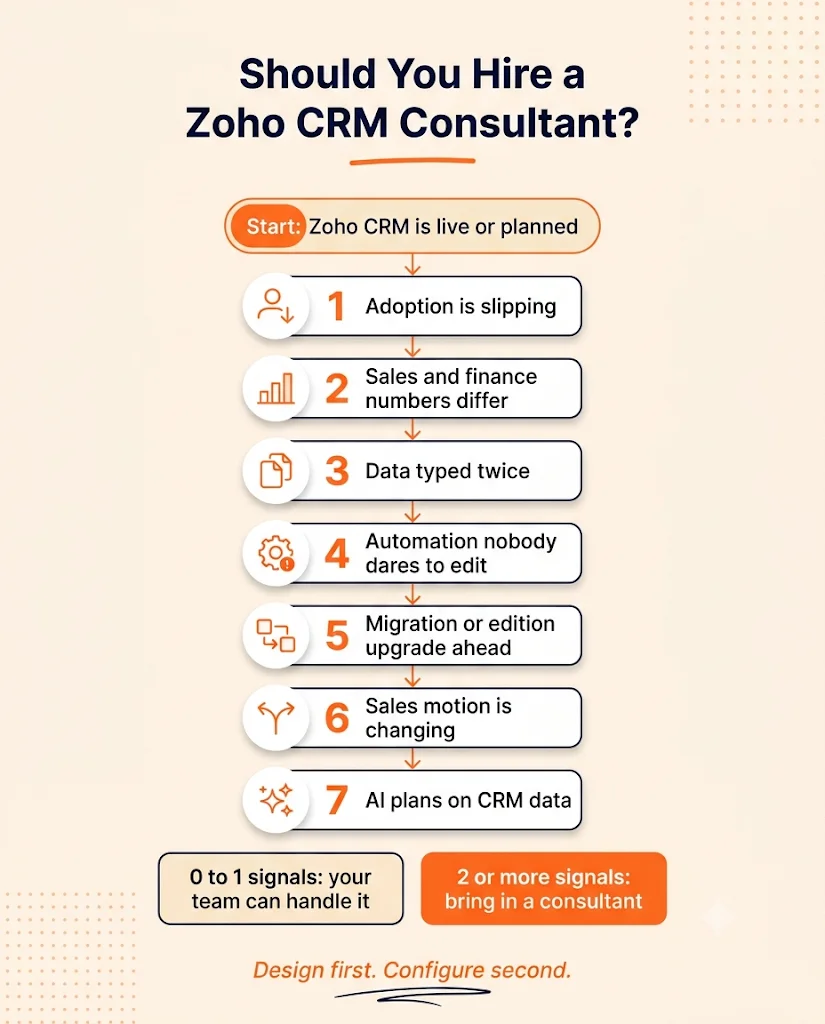
Fig 1 - Decision flow, consultant or in-house. Two or more of these signals at once usually justify outside help.
When your own team can handle it
This is the part most consulting firms skip, so we will be direct about it.
Zoho's own edition and role guide says most small teams start on the Standard or Professional edition and can begin with a free trial. That matches what we see. A team with a single pipeline, standard modules, and zero outside systems to connect can get a clean setup from one careful person and Zoho's help pages.
We have met office managers who run tidier CRMs than some funded startups. They kept the setup small, said yes to few custom fields, and reviewed the pipeline every Friday. It worked.
So where is the line? It moves. Ten users with three connected systems can be harder than forty users with one pipeline. Complexity counts for more than headcount.
What Zoho CRM Consulting Services Cover
Feature lists from consulting firms tend to run long. Strip them down and Zoho CRM consulting services come to five work areas. Each one produces something you can hold, and each one asks for some of your team's time.
Table 2 - The five work areas of Zoho CRM consulting, and what each asks of your team
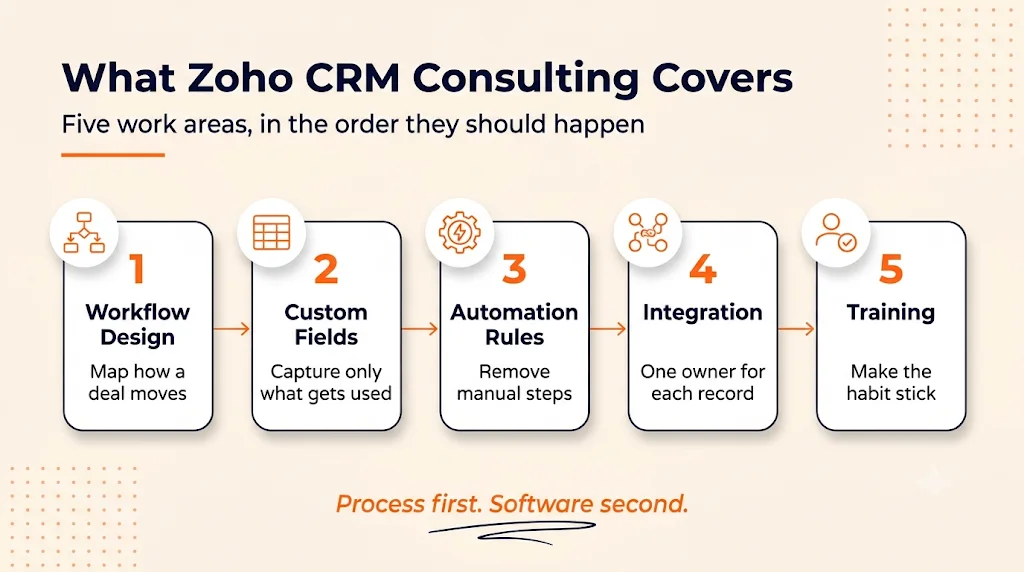
Fig 2 - The five work areas of Zoho CRM consulting. Every Zoho CRM consulting engagement is some mix of these five areas.
We will walk through each one, because the order matters more than most buyers expect.
Workflow Design Comes First
Before anyone opens the settings page, a good consultant asks you to describe a deal. Where does a lead come from? Who touches it first? What has to be true before it moves to the next stage? Who approves a discount?
This sounds basic. It is also where the project is decided. If two sales managers describe the stages differently in the workshop, the CRM was never going to give you one clean report.
What you should receive at the end:
- A written process map with every stage, its entry rule, and its owner.
- A list of handoffs between teams, such as sales to onboarding or sales to finance.
- A short list of what the project will leave out. That list protects your budget.
Industry shapes this work a lot. A property brokerage tracks listings, viewings, and offers. A manufacturer tracks quotes and production slots. You can see how far the stages differ in our read on Zoho CRM workflows for real estate teams.
Custom Fields and the Data Model
Here is a rule we hold every project to. Every custom field must feed a report, an automation, or a decision. If it feeds none of the three, it stays out.
Why so strict? Because each extra field is one more thing a rep has to fill in, and reps vote with their keyboards.
A consultant decides four things in this area:
- Which modules you need. Leads, Contacts, Accounts, and Deals come standard. Contracts, Renewals, or Site Visits may need a custom module.
- Which field type fits. A picklist gives you clean reports. A plain text box gives you fifty spellings of the same answer.
- How records relate. Lookup fields and subforms link records together, and each has limits you want to know before you build.
- Who sees what. Page layouts, layout rules, and field security keep each role's screen short.
Limits change with your plan. Zoho publishes the number of custom modules and fields each edition allows on its feature availability page, and a consultant should check your edition against that list before promising a design.
Subforms deserve a special mention. They look like the easy answer for line items and repeat entries, then reporting gets awkward. We wrote up the limits of Zoho CRM subforms so you can spot the issue before it reaches your dashboards.
Automation Rules That Remove Manual Work
Automation is the part buyers get most excited about. Fair enough. It is where hours come back.
Zoho CRM gives a consultant several tools here, and picking the right one for each job is half the skill:
- Workflow rules fire an action when a record meets a condition. Send an email, create a task, update a field.
- Assignment rules route new leads to the right owner.
- Blueprint enforces your sales process stage by stage, so a deal can only move forward when the required steps are done.
- Approval processes send discounts or contracts to a manager before they go out.
- Custom functions written in Deluge handle logic the standard tools cannot express.
What does good automation look like in numbers? Zoho's customer story on Booth reports that the company's job fulfillment rate climbed to 82%, up from 56% after it automated its process with Zoho CRM and Zoho Recruit, and turnaround time on core tasks fell by half.
One caution here. Automating a messy process makes the mess run faster. That is why this area comes third.
Approvals are a good test of a consultant's depth. Ask how they would handle a discount that needs two approvals above a set amount, then compare the answer with our walkthrough of the Zoho CRM approval process.
Integration With Your Other Systems
A CRM that stands alone tells half the story. Sales closes the deal, then accounting, support, and delivery each open a different system and start typing.
Integration work answers three questions for every type of record:
- Which system owns it? Customer address lives in one place. Every other system reads from there.
- Which direction does it sync? One way is simpler and safer. Two way needs rules for conflicts.
- What happens when a sync fails? Someone gets an alert, and there is a log to check.
The tools span light and heavy options. Zoho's own apps (Books, Desk, Projects, Campaigns) connect natively. Zoho Flow and Marketplace extensions cover many popular outside tools. Custom API work handles everything else, including the internal system your founder built years ago that the whole company still runs on.
Messaging channels are a common first project because the payoff is easy to see. Our guide to connecting WhatsApp with Zoho CRM shows what a scoped integration looks like end to end.
Training and Adoption
You can do the first four areas perfectly and still end up with an empty CRM. People are the fifth area, and they are the hardest one.
Good training is short, scoped by role, and uses your own data. A sales rep learns the six screens they use daily. A manager learns the dashboards. An admin learns how to add a user, edit a picklist, and read the audit log.
Three things separate training that sticks from training that fades:
- An internal owner. One named person on your side who answers questions and approves changes.
- Written handover. Every workflow and function documented with its purpose, so your admin can make changes with confidence.
- A check after launch. A review a few weeks in to see which fields stay empty and which reports nobody opens.
Does every team need formal training? Small teams with a simple setup often do fine with a 60 minute walkthrough and a short guide. The bigger and more varied the team, the more structure pays off.
What to Expect From a Zoho CRM Consulting Engagement, Stage by Stage
Every firm has its own method. Ours runs in five stages, the same ones described on our how we work page, and it gives you a fair picture of what a structured engagement feels like from the client's chair.
Table 3 - The five stages of a Zoho CRM consulting engagement
Two things here tend to surprise new buyers.
First, the specification stage feels slow. You want to see screens, and you are reading a document. Stay with it. Changes cost little on paper and a great deal after the build.
Second, the launch date follows the evidence. If testing shows the migrated records still need cleaning, launch waits. That can be annoying when you have told the whole company a date. It is still better than a launch your reps stop trusting in week one.
How long does all of this take? It depends on scope, and anyone who names a number before the audit is guessing. A single sales team on standard modules moves quickly. Add a migration, several integrations, and custom modules, and the calendar stretches. Ask for dates per stage once the specification is written.
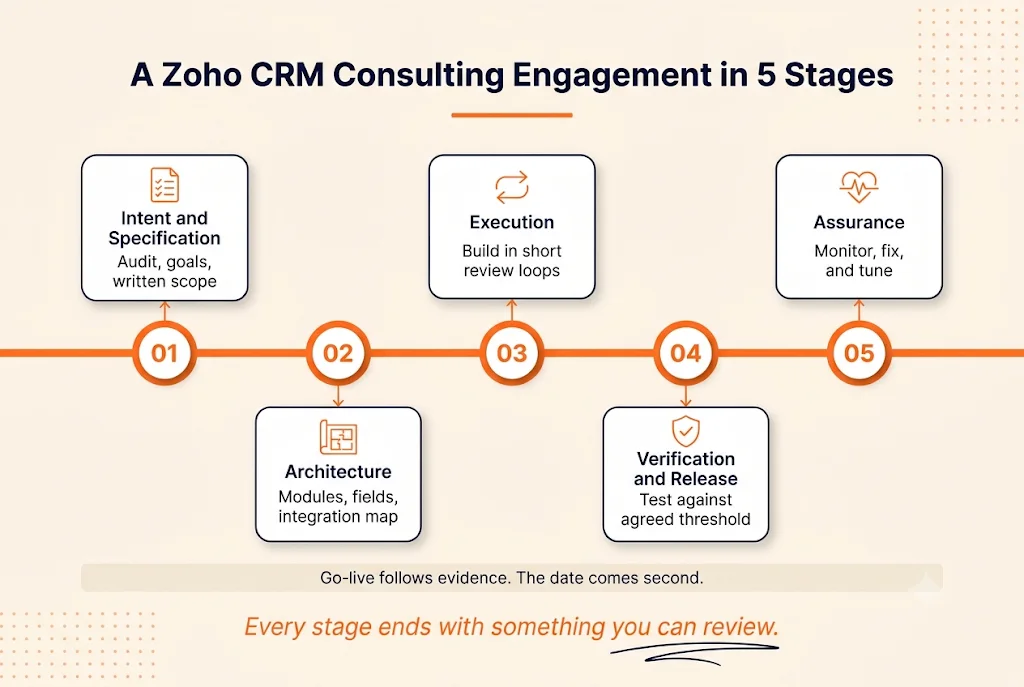
Fig 3 - Five delivery stages of a Zoho CRM consulting engagement. A structured engagement moves through five stages, each with its own deliverable.
Curious what an audit of your Zoho CRM would show?
Our Zoho team reviews your current setup, your process, and your connected systems, then tells you plainly what needs work and what can stay as it is.
See how our Zoho consulting team works
What Zoho CRM Consulting Costs, and Why the Audit Comes First
You were probably hoping for a price table here. We understand. We also think a price table would mislead you.
At Clixlogix there is no fixed rate card for Zoho CRM consulting. We audit the client's setup first and quote after, because two companies with the same user count can need different amounts of work.
Six things move the number:
- Users and roles. More roles mean more layouts, permissions, and training groups.
- Data condition. Clean records migrate fast. Duplicates and incomplete fields take real hours.
- Number of integrations. Each connected system adds design, build, and testing.
- Automation depth. A few workflow rules sit at one end. Blueprints with custom functions sit at the other.
- Your Zoho edition. Blueprint starts at Professional. Sandbox testing and custom functions start at Enterprise. A design that needs them on a lower edition means an upgrade.
- Training scope. One team in one office differs a lot from five teams across time zones.
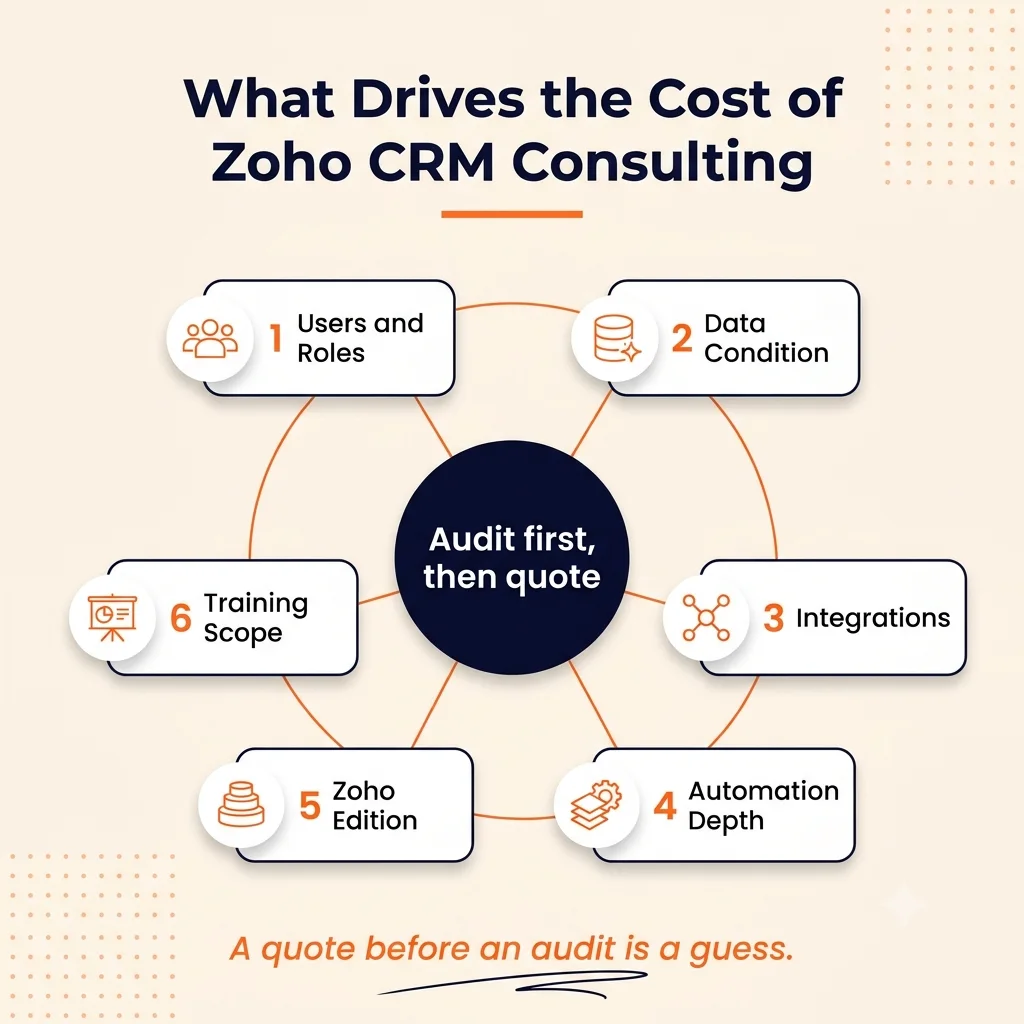
Fig 4 - Six cost drivers of Zoho CRM consulting. Six factors set the price of a Zoho CRM consulting project. An audit measures all six.
How you pay is flexible too. Once the specification exists, a fixed price project makes sense because both sides know the deliverables. Ongoing improvement work fits time and material billing, where you pay for tracked hours. Some clients add our people to their own team for a period.
Most start small. Across our engagements, a majority of clients begin with a light scope model and expand once results show up. An audit plus one priority fix is a common first step.
One more budget line to plan for. Zoho bills licenses separately from any consulting fee, and the current per user rates sit on the Zoho CRM pricing page.
Freelancer, Internal Admin, or Consulting Firm?
Each option is the right answer for somebody. Here is how they compare.
Table 4 - Freelancer, internal admin, and consulting firm compared
Plenty of companies mix them. A firm does the heavy build, then an internal admin takes over daily care. We like that model, even though it means less ongoing work for us, because the client ends up owning their system.
Five Questions to Ask a Zoho CRM Consultant Before You Sign
You can learn a lot in one call if you ask the right things.
- Who will work on our account, and which Zoho certifications do they hold? Ask about the people, and ask to meet them.
- Can we see a specification from a past project? A redacted one is fine. You are checking that the firm writes things down.
- Where do you test changes before they go live? The strong answer mentions a sandbox and a test plan.
- What do we own at handover? You want the documentation, the configuration, and any custom code, in writing.
- Who answers when something breaks in month three? Get a name and a response time.
These five get you through a first call. For the full evaluation, including how to read case studies and compare proposals, use our guide on how to find a Zoho implementation partner.
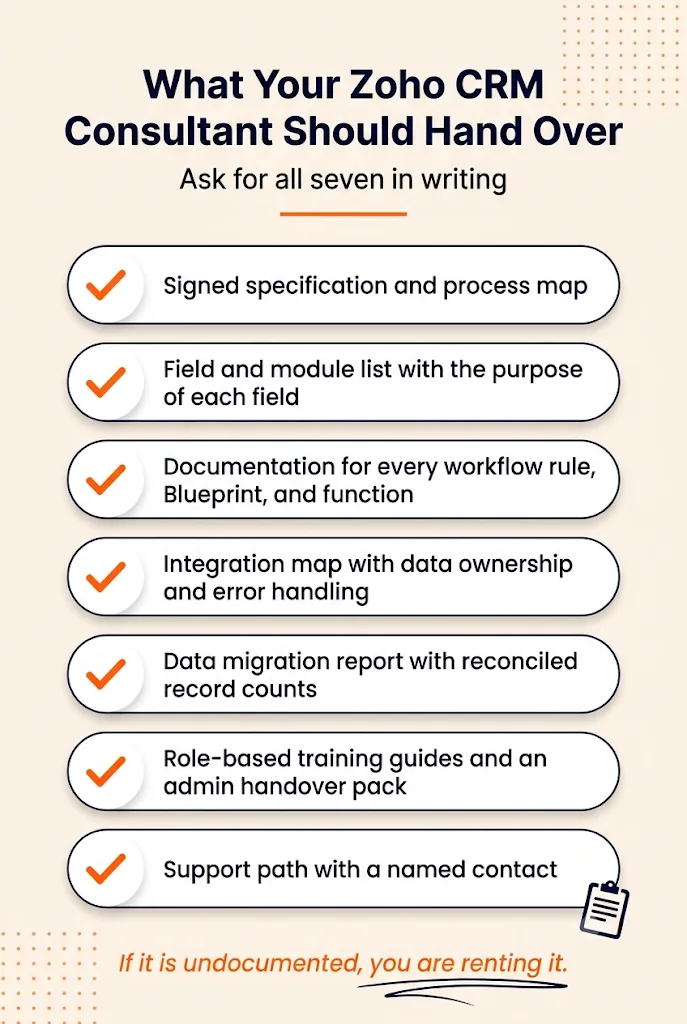
Fig 5 - Handover checklist. Ask for every item on this list in writing before the project starts.
Where Projects Still Go Sideways With a Consultant on Board
Hiring a consultant improves your odds. It leaves some risks in place, and you should hear about them from someone who sells the service.
- Too many requests survive the workshop. Every department wants its fields. A consultant who agrees to all of them hands you a slow, crowded system.
- The internal owner is missing. With nobody on your side to make decisions, the project drifts and the consultant fills the gaps with guesses.
- Data cleanup slides to later. Later arrives at launch, and then the launch date moves.
- The champion leaves. Sometimes the sales leader who drove the project takes another job during the build. That is plain bad luck, and it has stalled strong projects.
Timing plays a part as well. A rollout that lands in your busiest sales month will struggle for attention, whatever the quality of the design. Many of the risks in our guide to ERP implementation risks apply to CRM projects almost word for word.
And sometimes a rough project still pays off. A setup can launch late, with a smaller scope than planned, and the team can still end up with a forecast they trust for the first time. Messy and successful can be the same project.
How We Run Zoho CRM Consulting at Clixlogix
A short version, since you have read the method above.
Clixlogix has delivered technology projects for over a decade. Our Zoho practice runs with 32 certified practitioners, and every engagement starts with an audit of what you already have. Senior people own the specification and the review. Working configuration comes to you on a regular cadence through the engagement.
Two examples show the range. For a custom awards manufacturer, we built a quote-to-cash process on Zoho One so a quote, an order, and an invoice live in one connected flow.
For a home insurance agency in New York, the work centered on Zoho CRM with AI running daily operations. Different industries, same starting point. Understand the process before touching the settings.
Start with an audit, then decide
Tell us about your Zoho CRM setup and what is bothering you about it. We will review it and come back with findings, a scope, and a quote based on what we see.
Talk to the Clixlogix Zoho team
One question stays open, and we cannot answer it from the outside. Who inside your company will own the CRM a year from now? Settle that before your first call with any consultant, us included.
Frequently Asked Questions