TL;DR
- Zoho shipped SalesIQ Summer 2026 in pieces. Most teams noticed the Zia Agents announcement and missed the six other capabilities in the same release.
- A fraction of Zoho customers now have an autonomous qualifier handling their high intent pages at three in the morning. Everyone else is still routing overnight chats to an offline form.
- The gap between the SalesIQ you already have and one that turns a Spanish speaking visitor into a qualified CRM lead by breakfast is one configuration screen and a decision most admins do not know they need to make.
- This post walks through what actually shipped, six workflows that compose into one funnel, and five configuration steps to activate the whole thing.
Zoho SalesIQ has always sat at the front door of a Zoho customer’s website. It handled visitor tracking, live chat, and Zobot conversations for more than 465,000 businesses, processing 46 million chats and 30 million chatbot interactions in a single year at 99.9 percent uptime. The gap was that a rule based Zobot only captures visitors who fit the scripted flow, and a human operator can only pick up chats during business hours. Visitors outside those two envelopes landed, browsed, and left. Human operators picked up a fraction of chats. Rule based Zobots handled the rest with scripted flows that broke the moment a visitor phrased a question in a way the flow did not anticipate.
The Summer 2026 release changes the mechanics. Zia Agents can now be deployed as autonomous Operators inside SalesIQ, standing alongside human operators in the routing queue. A new Webpages module inside the Resources hub turns any public URL into a live AI knowledge source. Direct integrations connect Anthropic, Google AI, and DeepSeek models into the same bot framework. For Zoho customers already running CRM, Desk, and Campaigns, this is the first release where the front door experience can qualify a visitor without a human being awake.
This blog explains what actually shipped, how the visitor to qualified lead workflow now assembles, and what a Zoho stack owner needs to configure to make it work. For a broader view across the Zoho stack this cycle, see our Zoho release coverage.
What Zia Agents in SalesIQ Actually Are
Zia Agents are autonomous digital workers built inside Zia Agent Studio, Zoho’s prompt based no code builder. A Zia Agent is described in plain language, granted access to specific Zoho apps and data, and given a scope. Zoho ships more than 700 pre built actions across its product suite that agents can call, which covers most standard workflows including lead qualification, meeting scheduling, ticket triage, and record enrichment. Agents run on Zoho hosted LLMs by default, and organizations that want frontier reasoning can point an agent at Anthropic, Google AI, or DeepSeek through the new direct integrations.
Zia Agents on the CRM side operate as digital employees against sales rep records. Inside SalesIQ specifically, three deployment shapes now exist.
- Zia Agent as Operator. An agent is added to the operator pool and receives chats through the same routing rules that assign chats to human operators. It reads the visitor’s context, holds a multi turn conversation, and either resolves the query, qualifies the visitor, or hands off to a human with the full transcript and any structured data it collected.
- Zia Agent as Zobot Plug. An existing Zobot flow calls a Zia Agent at a specific step through a plug. This is useful when a Zobot handles the top of the flow with structured questions, and needs an intelligent module for one segment such as open ended objection handling, product recommendation, or technical Q&A. The plug sends the visitor’s input to the Zia Agent and passes the response back into the flow.
- Webpages powered Answer Bot. The new Webpages module inside Resources ingests URLs including product pages, documentation, pricing pages, and help center articles, and treats them as a live knowledge source. The Answer Bot uses this content to respond to visitor questions with citations, smart suggestions, and self service experiences that stay current with the site.
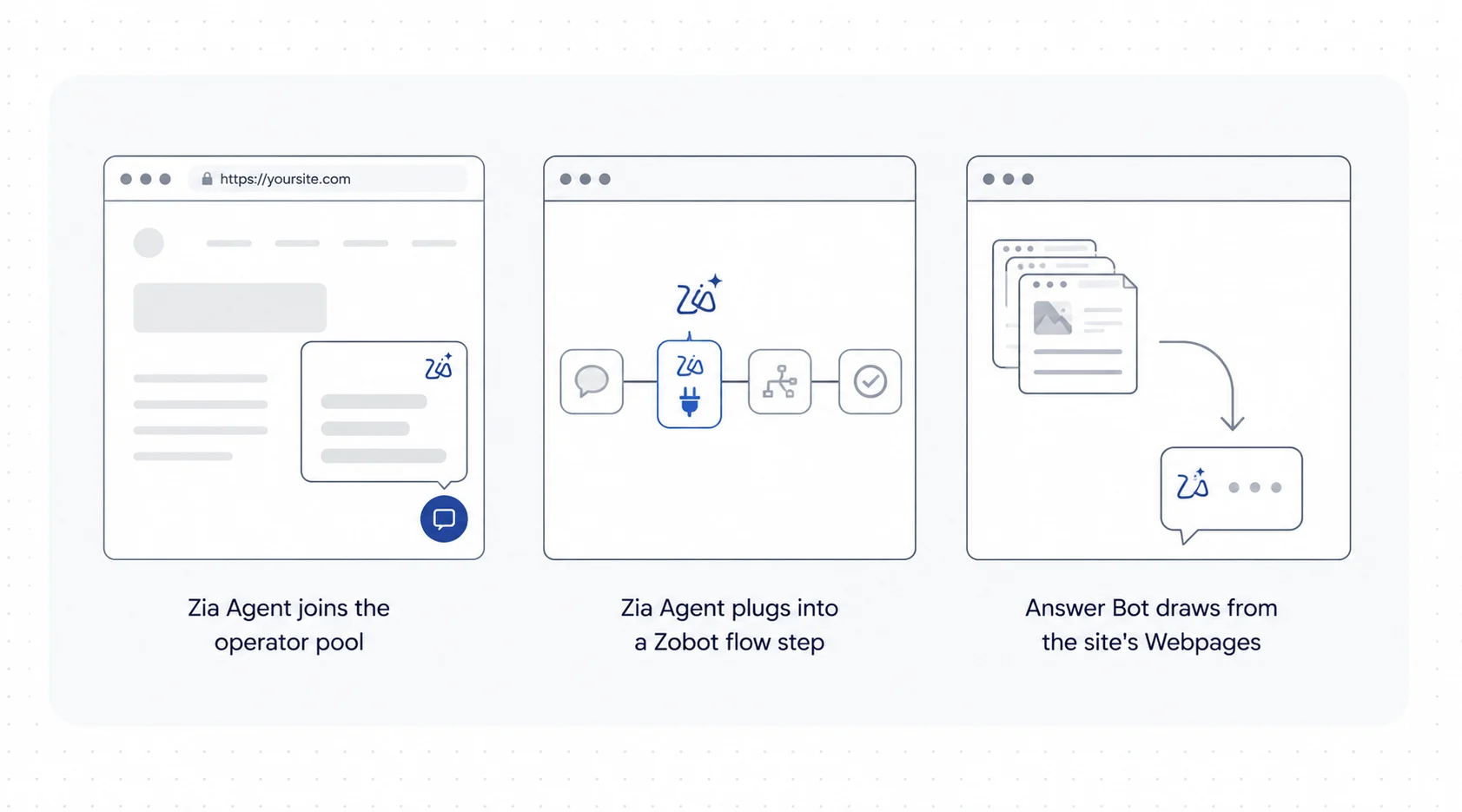
Fig 1 – Three deployment shapes for Zia Agents in SalesIQ.
Where the Old Visitor to Lead Funnel Broke
Before Zia Agents, a Zoho customer running SalesIQ typically had this pipeline. Visitors were tracked and scored using SalesIQ’s lead scoring rules and company scoring. Intelligent Triggers fired chat invites based on time on page, referral source, or specific URL rules. A rule based Zobot handled first contact, asking name and email, then routing to a human. Human operators qualified the visitor, updated Zoho CRM, and booked a meeting through Zoho Bookings. Chats outside business hours went to Answer Bot, which pulled from FAQs and Articles inside Resources.
Three failure modes recurred at scale.
- Failure 1 – Rigid Zobot flows. A Zobot that asks “What are you looking for today” with three buttons cannot handle a visitor who wants to compare two SKUs or ask a pricing question conditional on user count. Visitors who did not fit the scripted flow dropped off.
- Failure 2 – Operator bottleneck. High intent pages generated more qualified visitors than operators could pick up, and the ones who tried to chat outside working hours got either an offline form or a shallow Answer Bot response that closed without capturing intent.
- Failure 3 – Chat signals stayed as free text. The SalesIQ Zoho CRM integration auto pushed contact fields, visit score, and full chat transcripts to CRM records. What it did not do was extract qualifying signals from the conversation itself into structured CRM fields. A visitor saying “we are a 50 person marketing agency looking to replace our CRM in Q1” ended up as a transcript line. The CRM fields for industry, team size, and timeline stayed empty until an operator read the transcript and filled them by hand.
Zia Agents as Operators address the shape of all three problems. They engage a visitor with context awareness that a scripted flow cannot match, they scale without a headcount conversation, and they push structured qualification data to CRM through the same 700 plus actions available in Agent Studio.
How SalesIQ AI Agents Change Lead Qualification
The following are the workflow shapes worth building first. Each maps directly to a familiar Zoho customer problem.
1. The Always On Qualification Operator
Deploy a Zia Agent as an operator on high intent pages including pricing, product detail, and integration pages. Use Web Proactive Messaging with customized templates to initiate the conversation on the visitor’s terms. Templates fire on visitor context including journey stage, current page behavior, and segment. The proactive message comes from the Zia Agent with a targeted opener, and the qualification conversation begins on the first turn.
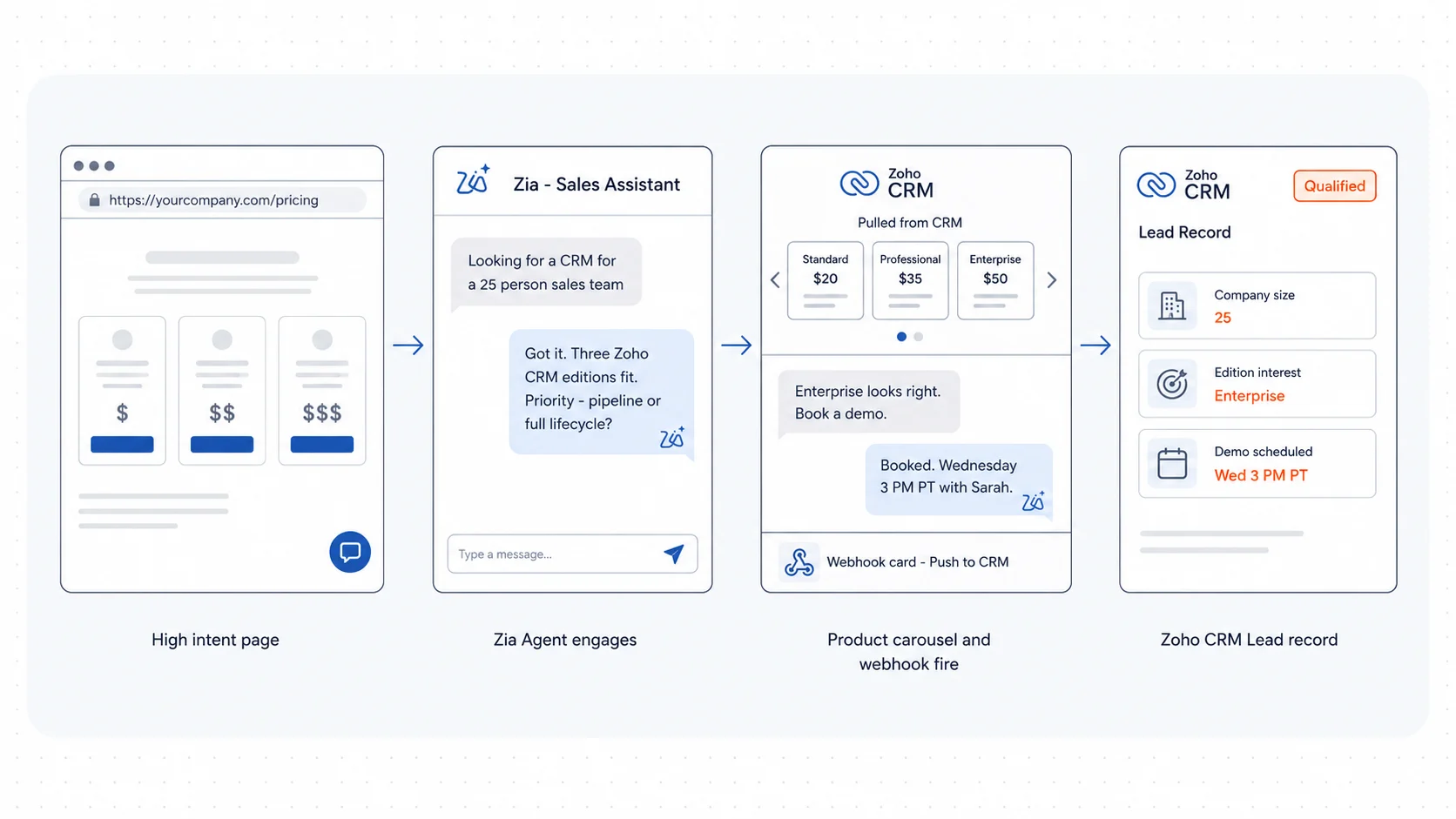
Fig 2 – The Always On Qualification Operator.
Configure the agent with three responsibilities.
- Answer product and pricing questions using Webpages ingestion of the site.
- Ask qualifying questions when intent signals are strong, for example when a visitor asks about implementation, integrations, or enterprise use.
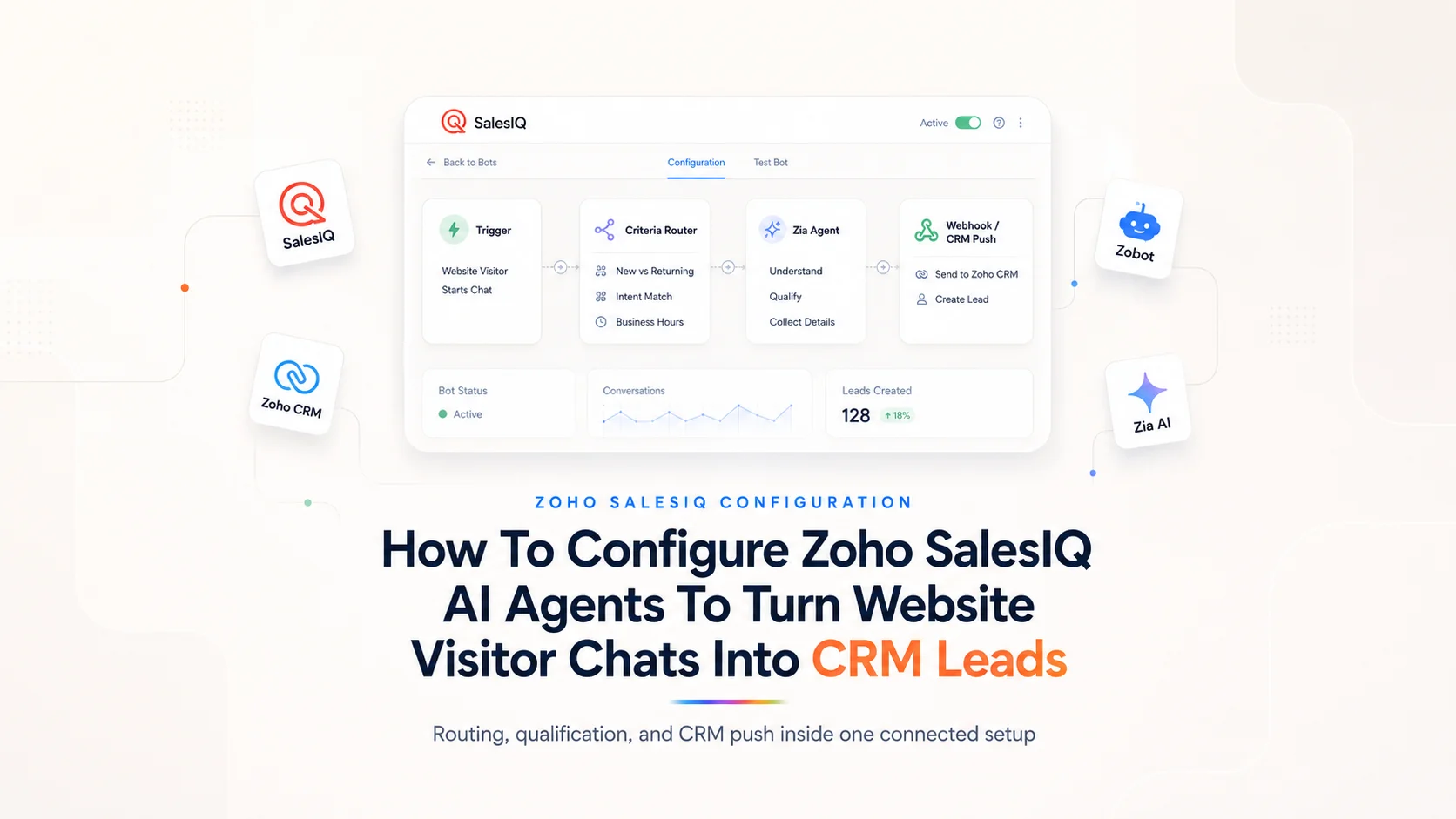
- Push qualified visitors to Zoho CRM as leads with structured fields through the webhook card in the Codeless bot builder, and schedule the follow up meeting through the native SalesIQ Meetings action from the same flow.
For Zoho customers with product catalogs, an input carousel card in the bot flow shows product tiles fetched by a plug from the Zoho CRM Products module. The visitor’s selection is captured as a structured field on the lead record and can trigger a scoped qualifying question keyed to that product.
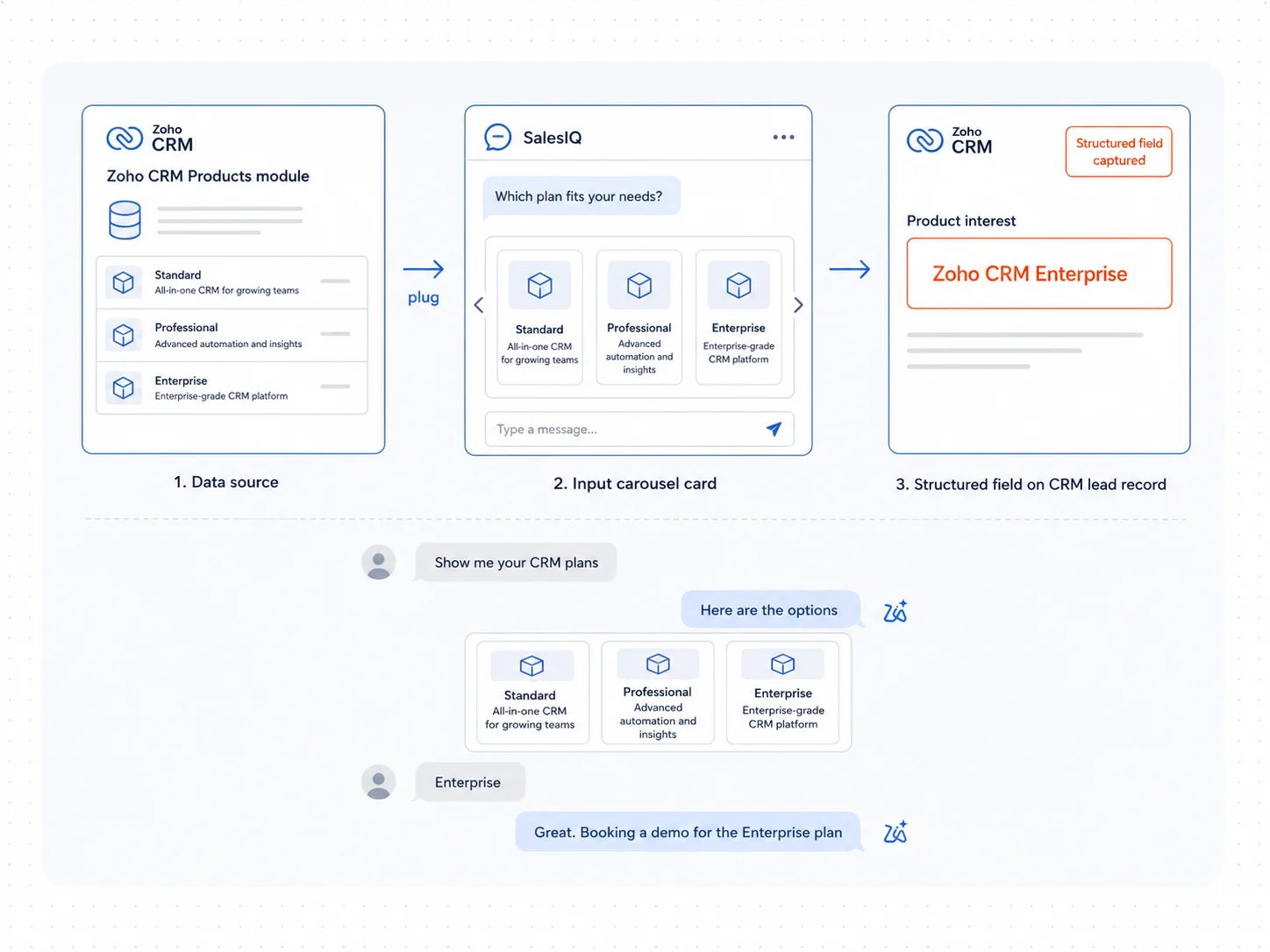
Fig 3 – Input carousel with products from Zoho CRM.
The key configuration is the confidence threshold. SalesIQ enforces confidence scoring before an agent answers, and routes uncertain queries to a human operator when the agent is not sure. This is what separates a governed agent from a Zobot that hallucinates.
2. AI Filters in the Criteria Router at the Front Door
Before this release, chat routing inside SalesIQ was rule based. A chat landed with the next available operator, or in a queue keyed to page URL. The system had no read on what the visitor was actually asking about. A pricing question and a support question ended up in the same queue, and a high intent lead often waited behind a low intent one.
The Criteria Router card in the Codeless bot builder has existed for rule based routing. The Summer 2026 release added AI Filters to it. Rules can now condition on three AI inferred signals from the visitor’s message. Sentiment reads the tone as positive, negative, or neutral. Intent reads the purpose as buying, cancellation, scheduling, or a similar action. Topic reads nouns such as product names or locations. Rules combine these signals and evaluate in priority order, first match wins.
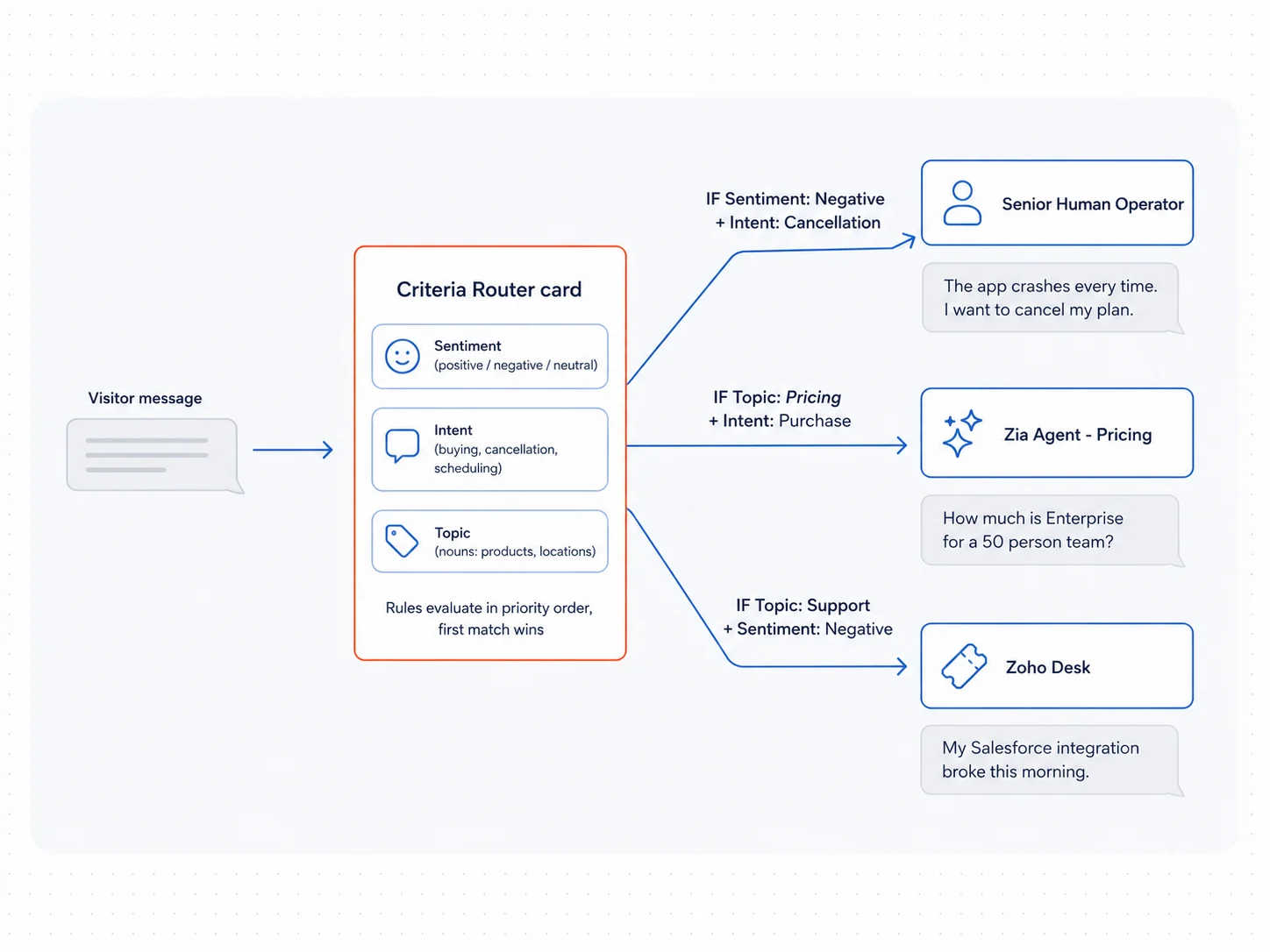
Fig 4 – AI Filters in the Criteria Router.
A rule matching negative sentiment plus cancellation intent routes a churn risk chat to a senior operator. A rule matching a pricing topic plus purchase intent routes to a Zia Agent trained on pricing scenarios. A rule matching a support topic plus negative sentiment routes to Zoho Desk. For qualification specifically, this collapses the two or three clarification steps a Zobot used to ask before it could route. With the Criteria Router placed at the front of the flow and rules well configured, the visitor reaches the right agent, human or Zia, inside the first response.
AI Filters require the SalesIQ Enterprise plan.
3. Objection Handling Through a Zobot Plug
A structured Zobot flow works well for capturing name, email, and use case. Where it fails is at the objection stage, when a visitor pushes back on price or asks for a specific comparison. Insert a Zia Agent plug at the objection step. The Zia Agent behind the plug is configured with the objection handling playbook, competitor comparison content, and pricing tiers as its knowledge sources. When the visitor’s objection arrives, the plug sends the message to the Zia Agent, retrieves the AI generated response, and passes it back into the Zobot flow for the meeting booking step.
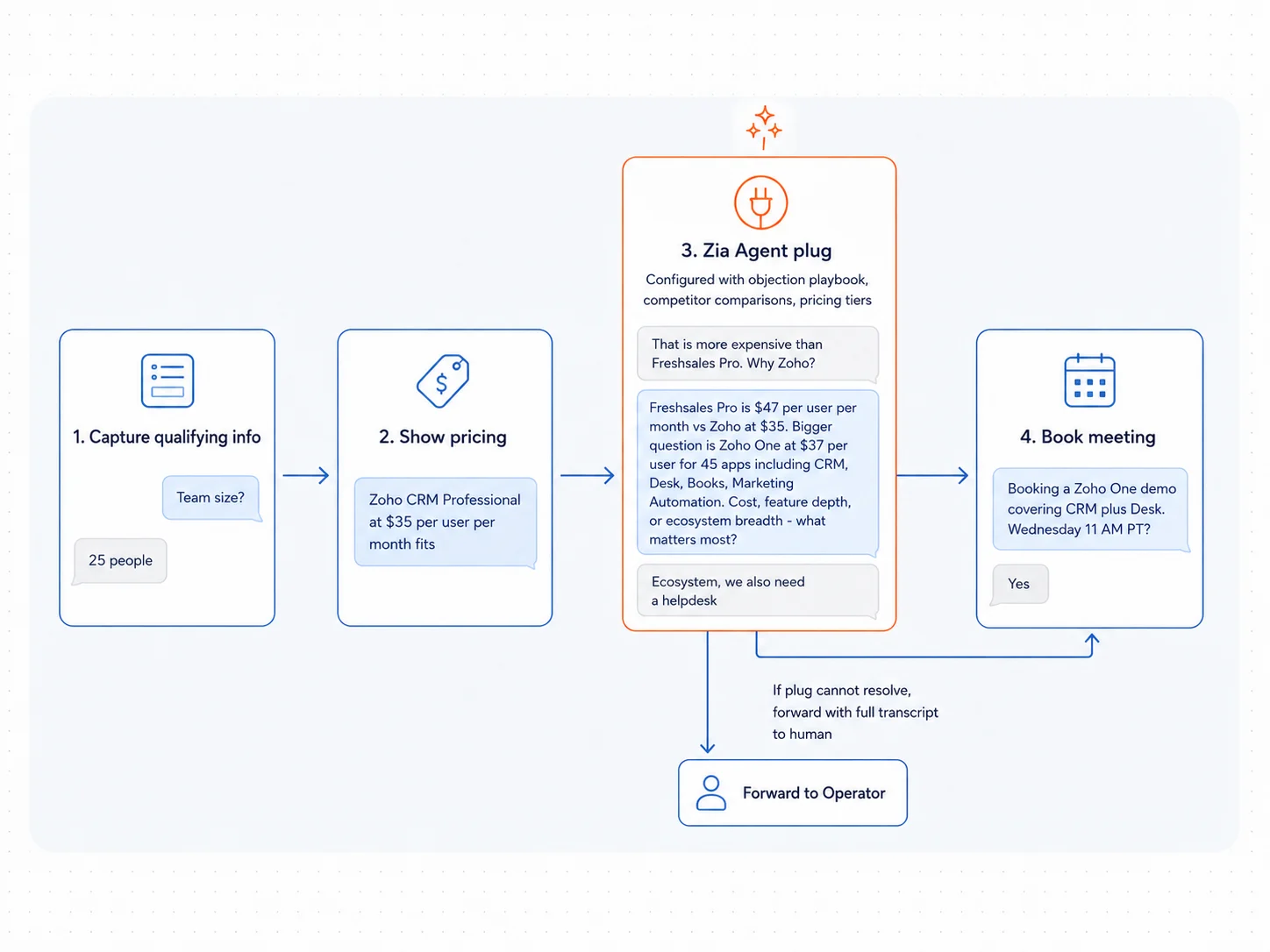
Fig 5 – Objection Handling Through a Zobot Plug.
When the objection is too complex for the plug and the visitor needs a live human, the Forward to Operator card in the Zobot flow hands the chat to the on call sales rep with the full transcript preserved. The transcript carries the visitor’s qualification data, the objection they raised, and the plug’s attempted response, so the human operator picks up mid conversation with the visitor’s own words on screen. The visitor does not repeat anything.
4. Off Hours Lead Capture with Full Context Handoff
Human operators sign off. Traffic keeps coming. A Zia Agent operator handles the queue overnight, conducts a full qualification conversation, and creates a CRM lead with the transcript attached.
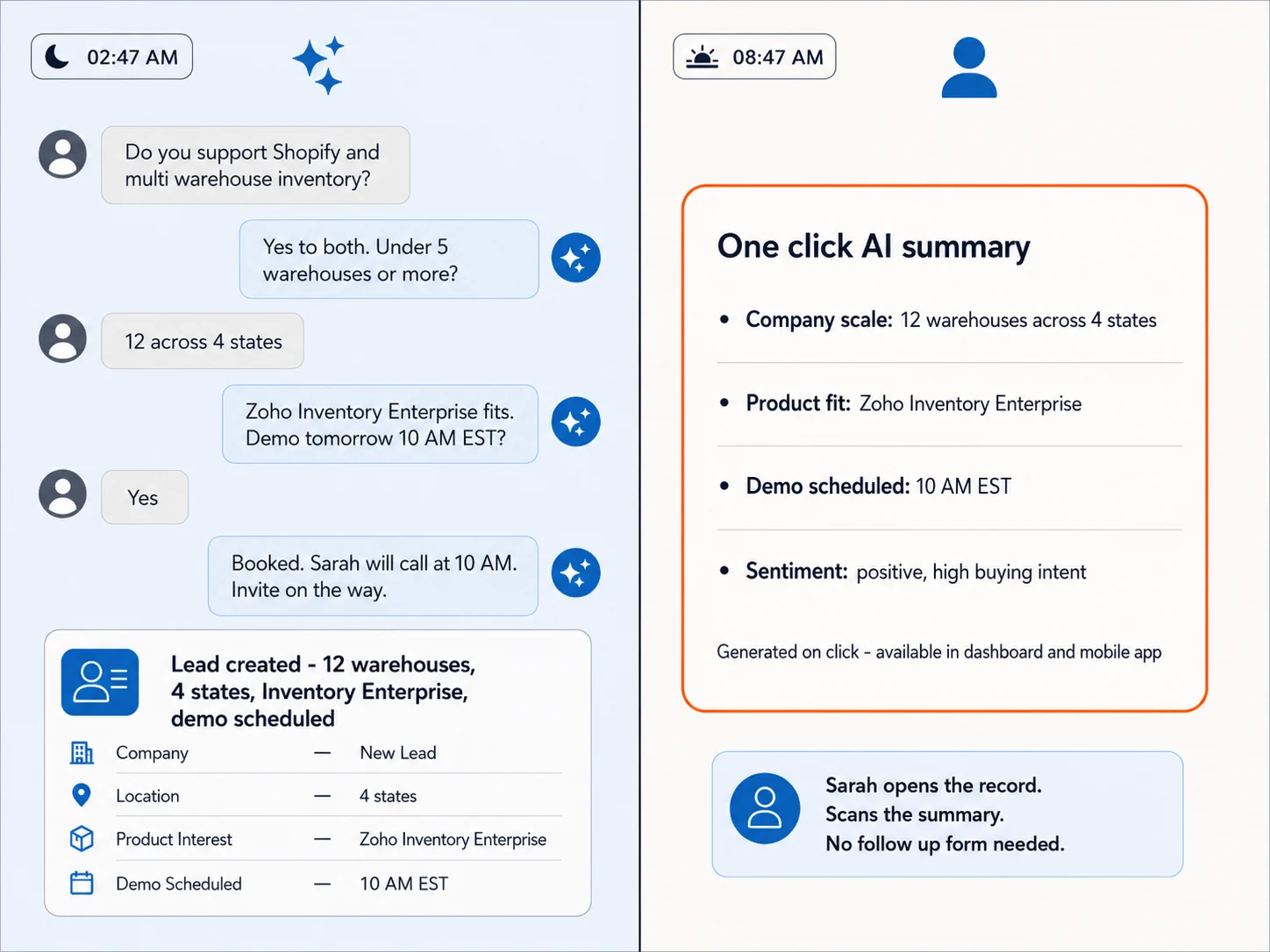
Fig 6 – Off Hours Lead Capture with Full Context Handoff.
When the human team logs in the next morning, one click generates an AI summary of each chat inside the operator dashboard or mobile app, so the team scans lead intent in one pass. Every overnight chat that would have been a missed lead is now a scored record with structured qualification data.
5. Multilingual Qualification Without Translation Latency
The Summer 2026 release added Auto translate for bot content in SalesIQ. Zia’s in house translation covers the default flow. Zoho customers can plug in one of three alternative engines depending on their language mix or provider preference.
- Google Translate
- Azure AI Translator
- DeepL Translate
Coverage runs to 30 plus languages across both Zobot and Answer Bot.
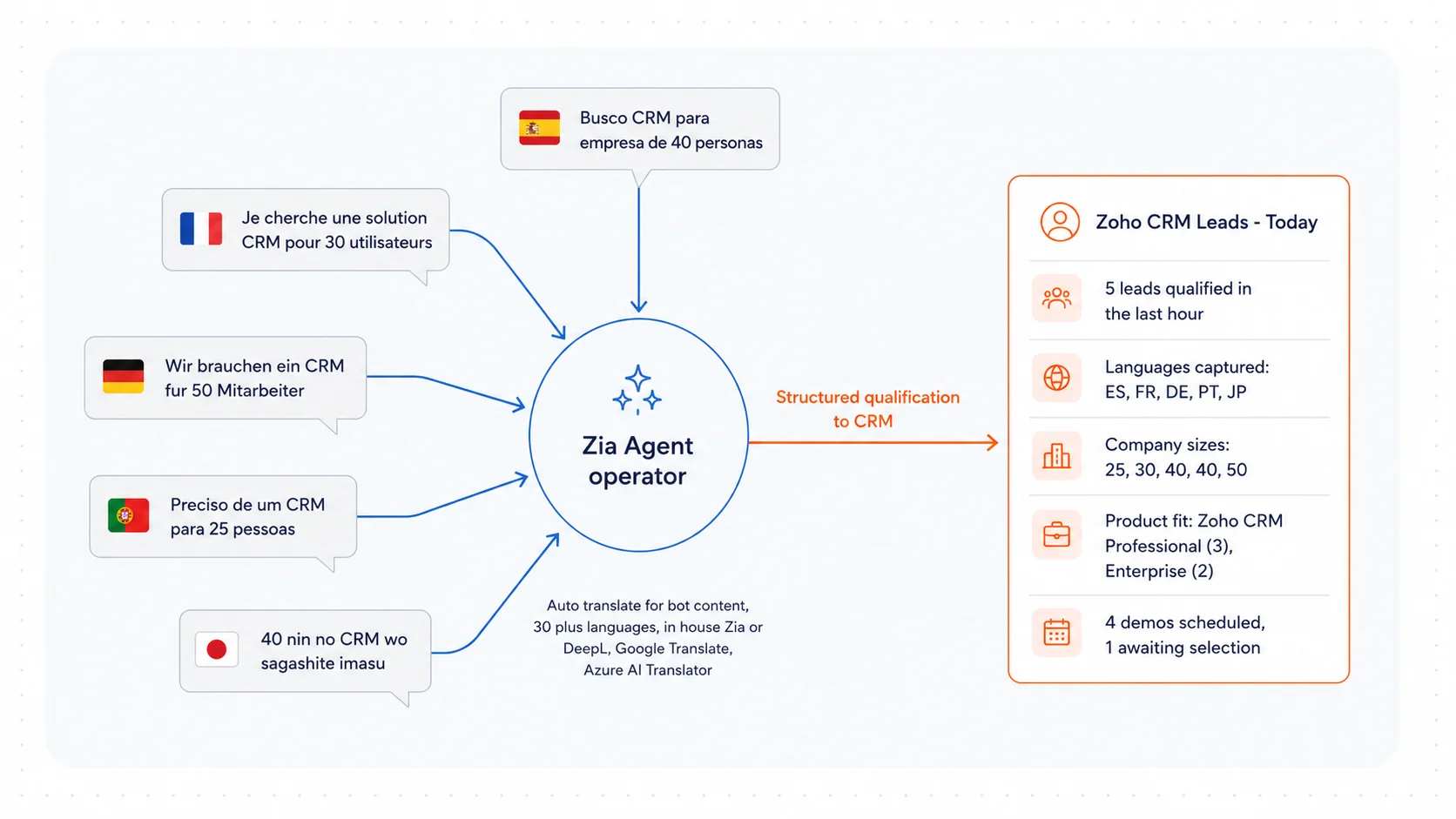
Fig 7 – Multilingual Qualification Without Translation Latency.
For a Zia Agent operator, this means the qualification conversation happens in the language the visitor arrived in. The agent extracts structured qualification signals from that conversation and pushes them to Zoho CRM as fields on the lead record. For Zoho customers with traffic from multiple regions, this removes the fallback that used to route non English speakers to an offline form.
6. Progressive Profiling Across Sessions
SalesIQ identifies returning visitors through a mix of a persistent cookie that lasts 365 days, JavaScript APIs for logged in users, and CRM Identifiers. Every visit adds to the visitor record with days visited, number of chats, last visit URL, and full chat transcripts attached to the CRM lead or contact.
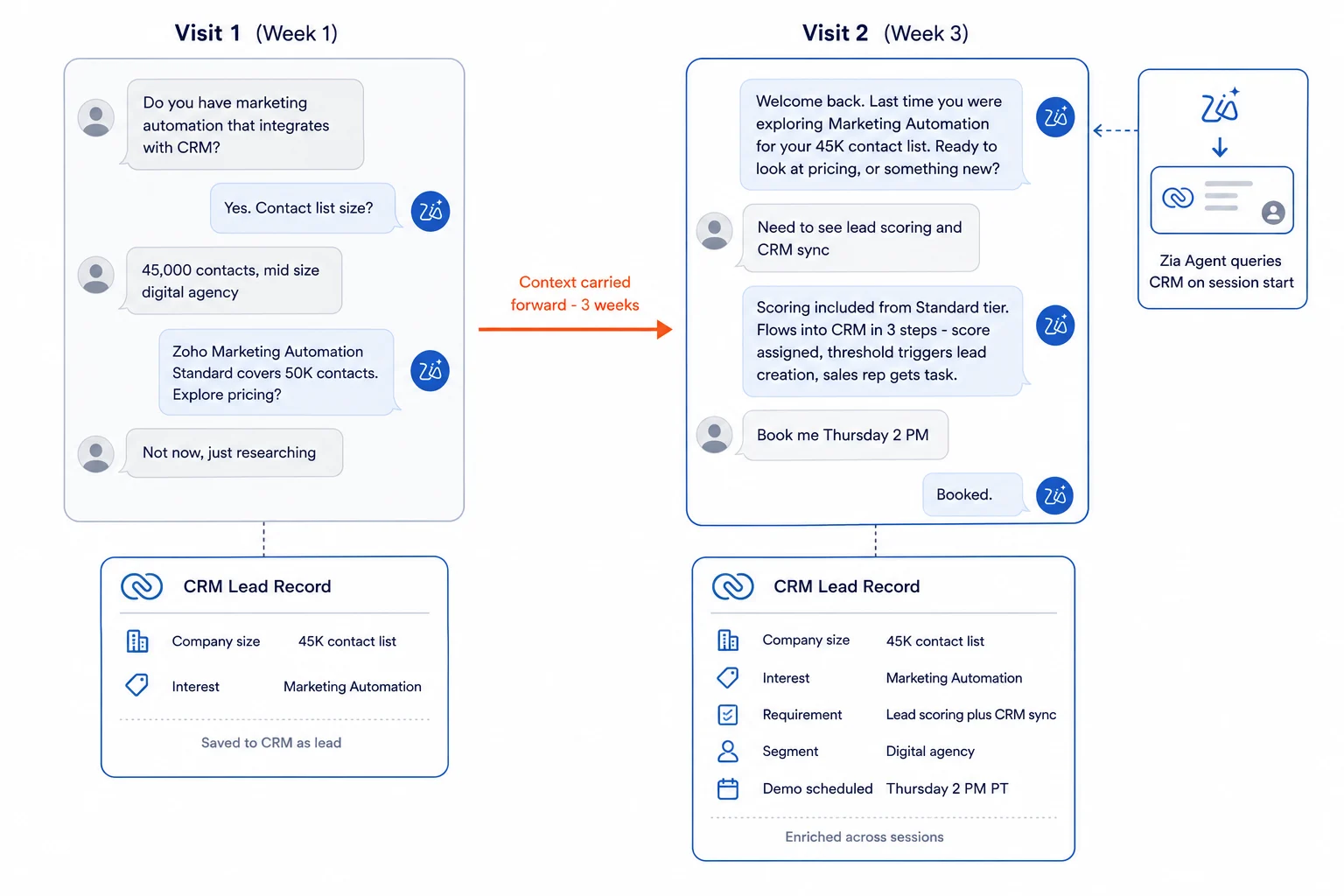
Fig 8 – Progressive Profiling Across Sessions.
When a Zia Agent is configured with instructions to query CRM on session start and read the visitor’s prior chat history, the opening message can reference the earlier conversation. A first visit might capture company name and use case. A return visit two weeks later starts with the agent acknowledging the earlier conversation and asking about the specific area of interest the visitor had signaled. The agent has to be built for this. It is not out of the box behavior.
This is how a chat interface starts to behave like a persistent account manager. For visitors who do not return on their own, reactivation through Zoho Marketing Automation triggers a nurture sequence keyed to the CRM record state.
How a Zoho Stack Owner Wires This Up
The configuration sequence for a Zoho customer already running SalesIQ, CRM, and Desk breaks into five discrete steps.
Step 1. Ingest the site into the Webpages module
Open the Answer hub inside SalesIQ and add product pages, pricing, integration documentation, and help center articles as Webpages. This becomes the shared knowledge source for both Answer Bot and any Zia Agent that needs product context. Refresh cadence and crawl scope are set at this step.
Step 2. Build the first Zia Agent in Agent Studio
Go to ziaagents.zoho.com and create the agent. Define its purpose as qualifying website visitors on high intent pages and creating leads in Zoho CRM. Grant access to SalesIQ for conversation context, CRM for lead creation and updates, and SalesIQ Meetings for scheduling the follow up meeting inline. Configure the transfer to human protocol explicitly in the agent’s instructions per Zoho’s deployment guidance. SalesIQ allows up to ten Zia Agents per portal without additional operator license.
Step 3. Deploy the agent as a Digital Employee to your SalesIQ portal
From inside Agent Studio, click Deploy, then Deploy as Digital Employee. Select your SalesIQ portal and assign the appropriate department. The agent then appears in the SalesIQ operator pool and receives chats through the standard routing rules that assign chats to human operators. Configure intelligent triggers and Web Proactive Messaging templates in SalesIQ to initiate the agent on specific URL rules, visitor score thresholds, and journey stage. High intent pages get the agent, low intent pages stay on Answer Bot.
Step 4. Set the Observability review cadence in Agent Studio
Inside Agent Studio’s agent detail view, the Observability tab surfaces agent performance across three views, dashboard level metrics, session level interactions, and step by step execution details. Book a weekly review of low confidence sessions. This is where the knowledge base gets improved and the agent’s scope gets tightened over time.
Step 5. Decide the LLM strategy
Zia’s in house model is the default and covers standard qualification conversations. For workflows that benefit from frontier reasoning, SalesIQ Summer 2026 added direct integrations for Anthropic, Google AI, and DeepSeek. Which model to pick for which workflow is covered in depth in the model selection section of our Zia Agents guide, with Salesforce CRM Benchmark data by task type. Pick per workflow, not portal wide.
Governance, Economics, and What to Watch
Zia Agents in SalesIQ come with the guardrails that separate production agents from experimental chatbots. Policy based execution limits, approval workflows for high consequence actions, contextual validation, and restricted operational boundaries are all configurable at agent level. Low confidence outcomes surface as recommendations, which keeps critical decisions under human oversight. Zia runs on Zoho hosted infrastructure with no third party LLM data sharing by default, so visitor data does not leave the Zoho tenant unless an organization explicitly connects an external LLM.
On economics, the pricing question matters. Zoho CRM Enterprise sits at 40 USD per user per month against Salesforce Enterprise at 175 USD per user per month, and Zia Agents are included in that cost envelope with no separate add on charge. For a Zoho customer already running SalesIQ Pro or Enterprise, adding Zia Agents does not add a per conversation charge the way outcome based pricing on other platforms does. That makes high volume qualification workflows economically defensible on Zoho in a way they are difficult to justify elsewhere.
| Item | Zoho | Salesforce |
|---|
| —— | —— | ———— |
| CRM Enterprise, per user per month | $40 | $175 |
| AI agent platform | Free | Separate purchase |
| AI agent usage charging | 30M tokens per month free, then $1 per 1M tokens on standard tier | $2 per conversation, or Flex Credits at ~$0.10 per action |
| Bundled unmetered AI tier | Not required | Agentforce 1 Sales at $550 per user per month |
All figures from official vendor pricing pages, zoho.com/crm/compare and zoho.com/agents/pricing for Zoho, salesforce.com/sales/pricing and salesforce.com/agentforce/pricing for Salesforce. Verified July 2026.
Two operational risks are worth flagging. First, Zoho’s in house Zia model is competent for structured qualification conversations and knowledge based Q&A, and organizations that need frontier reasoning for complex objection handling or technical support should route those specific workflows through Anthropic or Google AI plug ins. Second, general availability of the full agentic feature set follows a phased rollout, and Zoho customers on the early access waiting list are getting access ahead of broader availability. Organizations that want to build against these capabilities today should confirm their portal has the Summer 2026 release before committing to a build timeline.
What Zoho Customers Should Do This Quarter
The workflow that pays back fastest for most Zoho customers is the Always On Qualification Operator on the two or three highest intent pages of the site. The build effort is small with one agent, one knowledge source, and one CRM push action. The risk is contained because the agent runs on specific pages, not the whole site. The observability is strong because the Observability tab shows exactly what the agent did and where it hesitated.
From there, the sequence that has worked for organizations already running Zia Agents in production is to enable AI Filters in the Criteria Router so the qualification operator sees only the right chats, then add objection handling plugs into existing Zobot flows, then extend to off hours coverage, then add multilingual and progressive profiling once the base qualification workflow is stable. Trying to build all six workflows at once produces an agent portfolio that is difficult to govern and difficult to attribute results to.
For Zoho customers still running SalesIQ with rule based Zobots and human only qualification, the honest read is that the funnel arithmetic has changed. A visitor who arrives at three in the morning, asks a pricing question in Spanish, and pushes back on a comparison with a competitor was, until this release, a lost lead. That visitor now becomes a qualified record in CRM by breakfast. Once the record is in CRM, Zia Sales plays inside Zoho CRM pick up the mid funnel work. The question is not whether to build against Zia Agents in SalesIQ. It is which two workflows to build first, and how quickly the CRM data model can be updated to receive the structured qualification output that the agents will start pushing.
Working on your SalesIQ setup
Two things separate a Zia Agent deployment that ships from one that stalls at configuration. The CRM data model has to be ready to receive structured qualification output before the agent goes live. And the two workflows to start with should be chosen based on your specific visitor mix. A generic playbook rarely produces the right answer for a specific traffic profile. Both are cheaper to think through before configuration than after.
Zia Agent deployments across SDR, support, and success workflows are one slice of the Zoho consulting and implementation work our team does, and the surrounding CRM model usually matters more than the agent itself.
Ready to Make SalesIQ Work Like a Qualification Engine?
Send us your SalesIQ setup and one representative high intent page URL. We will send back a two workflow recommendation, the CRM field additions each one needs, and a rough timeline based on your traffic mix.
Start a SalesIQ Review