TL;DR
Why Zoho Is Entering the Agent Email Market
AI agents are moving from short chat interactions into business processes that continue across days, replies and connected systems. Email gives those agents a persistent address, a recognizable sender identity and a record of every conversation. Zoho AgentInbox is Zoho’s response to that operational requirement.
Specialist providers including AgentMail, Nylas Agent Accounts, MailSlurp and Resend already address programmable agent email. Enterprise platform vendors including Salesforce, Zendesk, HubSpot, Intercom, ServiceNow and Microsoft approach autonomous email through CRM, service and productivity workflows. Zoho brings dedicated agent mailboxes into its own business software ecosystem, connecting email identity with Zia Agents, Zoho MCP and operational records across CRM, Desk, Books and Projects.
The comparisons make more sense after the product’s role is clear, so the next section separates the mailbox from the model and workflow that use the mailbox.
What Zoho AgentInbox Is
Zoho describes AgentInbox as email infrastructure built for AI agents. The clearest way to understand the product is to separate three jobs that often get bundled together.
- Reasoning – A language model interprets the message, classifies intent, evaluates context and proposes an action.
- Orchestration – An agent framework or workflow decides which tools to call, when to request approval and where to write the result.
- Communication infrastructure – A mailbox receives the message, preserves the thread, sends the reply, handles attachments, reports delivery events and records activity.
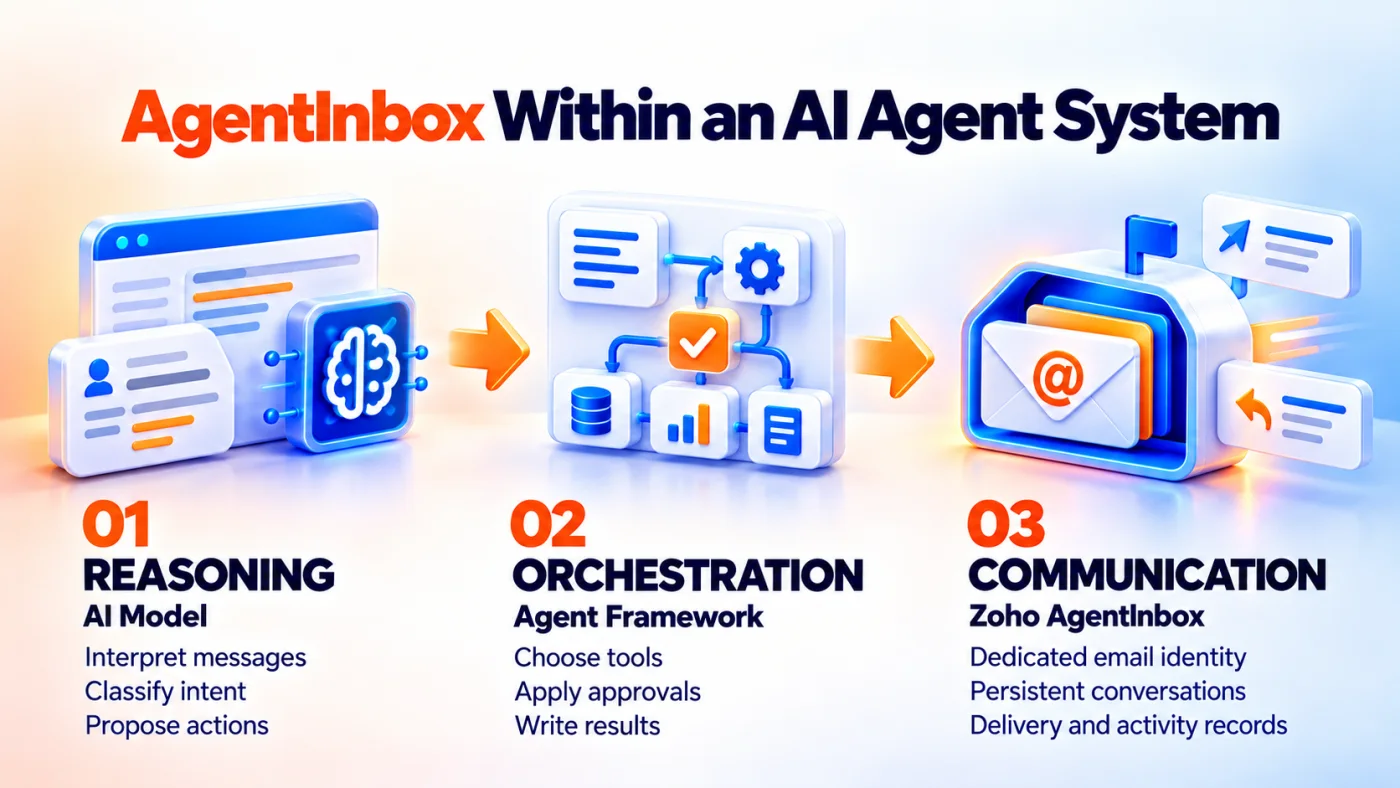
Fig 1 - AgentInbox within an AI agent system
AgentInbox owns the third job. For a business leader, that means AgentInbox should be assessed as communication infrastructure. The commercial questions concern response time, manual routing effort, conversation ownership, approval cost and the amount of email work that can move safely into automation.
AgentInbox turns email into a programmable operating surface. A developer or administrator can create mailboxes under a verified company domain, generate scoped credentials, register webhooks and connect the mailbox to an agent runtime. The agent can use the AgentInbox REST APIs for sending, receiving, replying, searching, labelling, archiving and organizing messages. Administrators get a dashboard, mailbox inspection, domain controls, logs and user management. The working agent interacts through APIs or MCP tools. Business teams can continue working from CRM, Desk, Books, Projects or an approval queue, depending on the workflow connected to the mailbox.
The useful mental model. AgentInbox is the email desk assigned to a digital worker. The agent framework supplies the worker’s judgment. Business systems supply the records and actions. AgentInbox supplies the address, correspondence history and delivery controls.
That division of responsibility explains why a dedicated mailbox solves problems that employee email, shared queues and sending APIs leave unresolved.
Why AI Agents Need Dedicated Mailboxes
Email products usually serve a person with a mailbox or an application that sends transactional messages. An autonomous agent may start a conversation, receive a reply days later, inspect an attachment and continue from the same thread. A one way sending API does not cover that lifecycle.
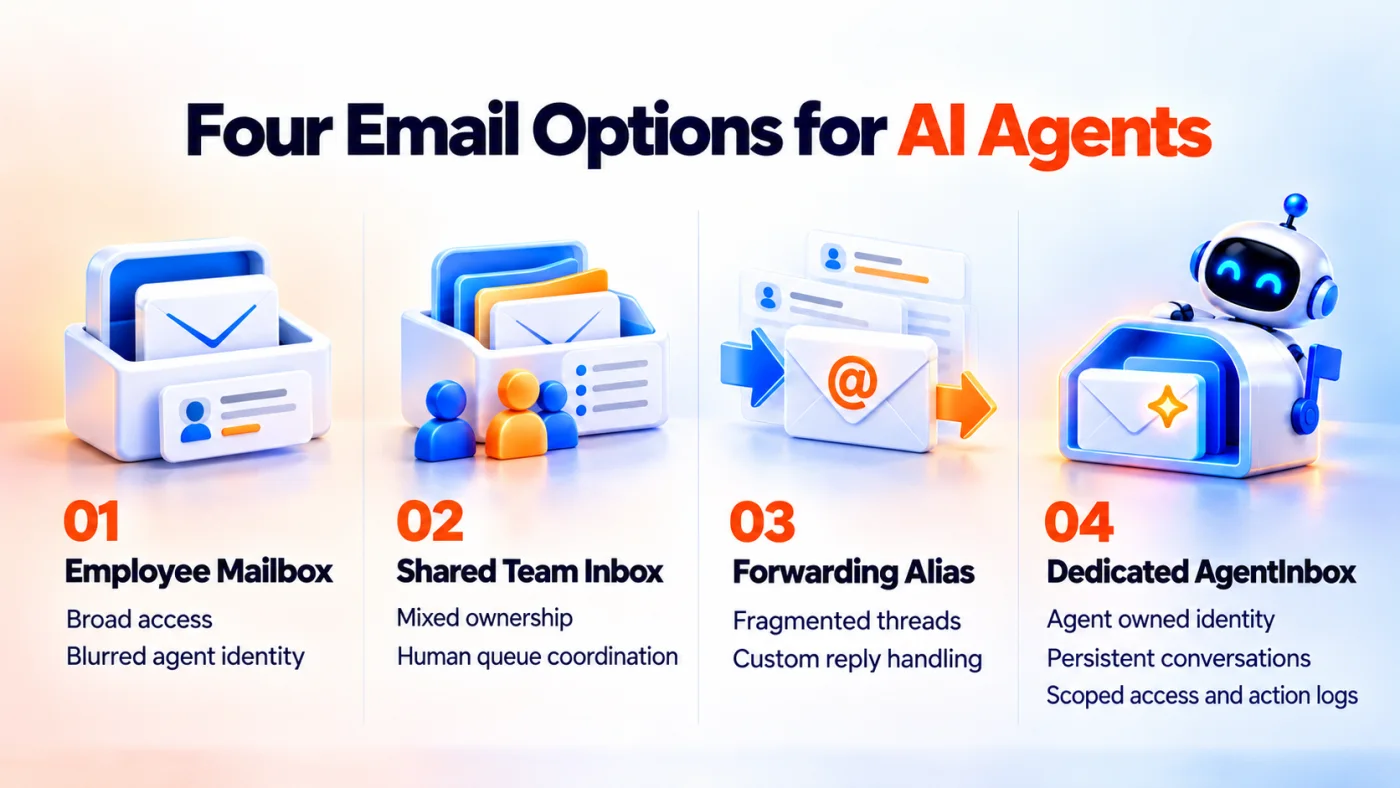
Fig 2 - Four email options for AI agents
The borrowed employee mailbox problem
Giving an agent access to a salesperson’s or executive’s mailbox creates a broad trust boundary. The same credentials may expose private conversations, password resets, legal notices, financial messages and historical mail unrelated to the agent’s job. A recipient sees the employee’s address and may interpret the message as a personal commitment. Internal logs may show only an API or integration action. Revoking the agent can affect the employee’s normal access or require a new integration setup. Zoho’s launch announcement presents dedicated credentials and a complete action log as central reasons for AgentInbox.
The shared inbox problem
A shared address such as sales@ or support@ helps people assign and discuss conversations. An autonomous agent in the same queue raises ownership and approval questions. A shared inbox can remain the human queue. The agent can own onboardingagent@company.com, with selected conversations forwarded to the team.
The forwarding and alias problem
Forwarding creates an input route. Replies may return to the alias, a person or another system, and thread continuity depends on custom handling. An AgentInbox mailbox is both destination and sender, so replies return to the same identity and thread.
The transactional email API problem
Transactional email services send receipts, verification codes and alerts from an application. An agent mailbox supports a two way conversation owned by the agent. Persistent thread history is the defining difference from Zoho ZeptoMail, now part of Zoho CPaaS.
A dedicated mailbox creates clear ownership for leads, customers, candidates, invoices or vendors. Managers can measure one agent role and remove access without changing an employee mailbox.
Five questions for any agent mailbox
- Whose identity appears to the recipient?
- Which conversations can the agent read?
- Which actions can the credential perform?
- Who approves sensitive replies?
- Which record proves what happened later?
The ownership questions now lead to the operating flow, where each technical step maps to a business control.
How Zoho AgentInbox Works
The basic operating flow has seven parts.
- An administrator creates an AgentInbox organization.
- The organization adds and verifies a company domain.
- The administrator provisions one or more agent mailboxes.
- Each agent receives an API key or OAuth credential with selected scopes.
- AgentInbox receives email and preserves messages as threads.
- A webhook or MCP call brings the event and mailbox tools into the agent runtime.
- The agent reads, reasons, requests approval where required and sends or records the next action.
For a business leader, the same flow reads as receive, understand, check, approve, act and record. Each technical step supports an operational question about speed, accuracy, accountability or control.
Domain and mailbox setup
Zoho requires domain ownership verification through DNS in the AgentInbox domain guide before providing the records required for mail delivery. MX records direct incoming mail to AgentInbox, SPF authorizes AgentInbox to send for the domain, and DKIM signs outgoing messages. A business can isolate agent sending on a subdomain such as agents.company.com, which keeps agent reputation, routing and visual identity distinct from employee mail and helps teams monitor agent sending and protect the reputation of employee email domains.
Incoming message event
AgentInbox can notify an application through webhooks. The application registers a public HTTPS endpoint and subscribes to events such as new mail, label changes, folder actions and synchronization failures. When a selected event occurs, AgentInbox sends a JSON payload to the endpoint and the receiving system acknowledges with a successful HTTP response. HMAC signing lets the receiver verify the payload came from AgentInbox. This event model avoids constant mailbox polling and shortens first response time. The surrounding application retains control over queuing, retries, approvals and downstream calls.
Reasoning and context retrieval
The webhook tells the application that something changed. The agent then retrieves the message and any related thread through the API or MCP tools, and may also retrieve CRM, Desk, Books, Projects or another system record before deciding what to do. A sales agent could check lead ownership, deal status and approved product information before drafting a reply. A finance intake agent could verify the vendor record and purchase order before routing an invoice. A safe design separates context gathering from action, with the first pass reading the thread and connected data, the second pass producing a classification and proposed action, and a policy control deciding whether the proposal can run automatically.
Response and record update
The approved path can send a reply through AgentInbox and write a result to the system of record. A sales agent may update a CRM lead. An onboarding agent may create a project task. An accounts payable agent may attach an invoice to a finance queue. The email action and the business action should share a common correlation ID so operations can trace one incoming message across the mailbox, agent runtime and business application when reviewing an error, complaint or delayed outcome.
With the flow established, the next question is which product capabilities support each stage and where a separate workflow still carries responsibility.
Core Zoho AgentInbox Features and APIs
The product surface extends across mailboxes, domains, webhooks, authentication, logs and settings, as described in Zoho’s AgentInbox introduction for developers and administrators. Business leaders do not need to evaluate every endpoint. The important question is whether the capabilities support the required customer experience, operating process and approval model.
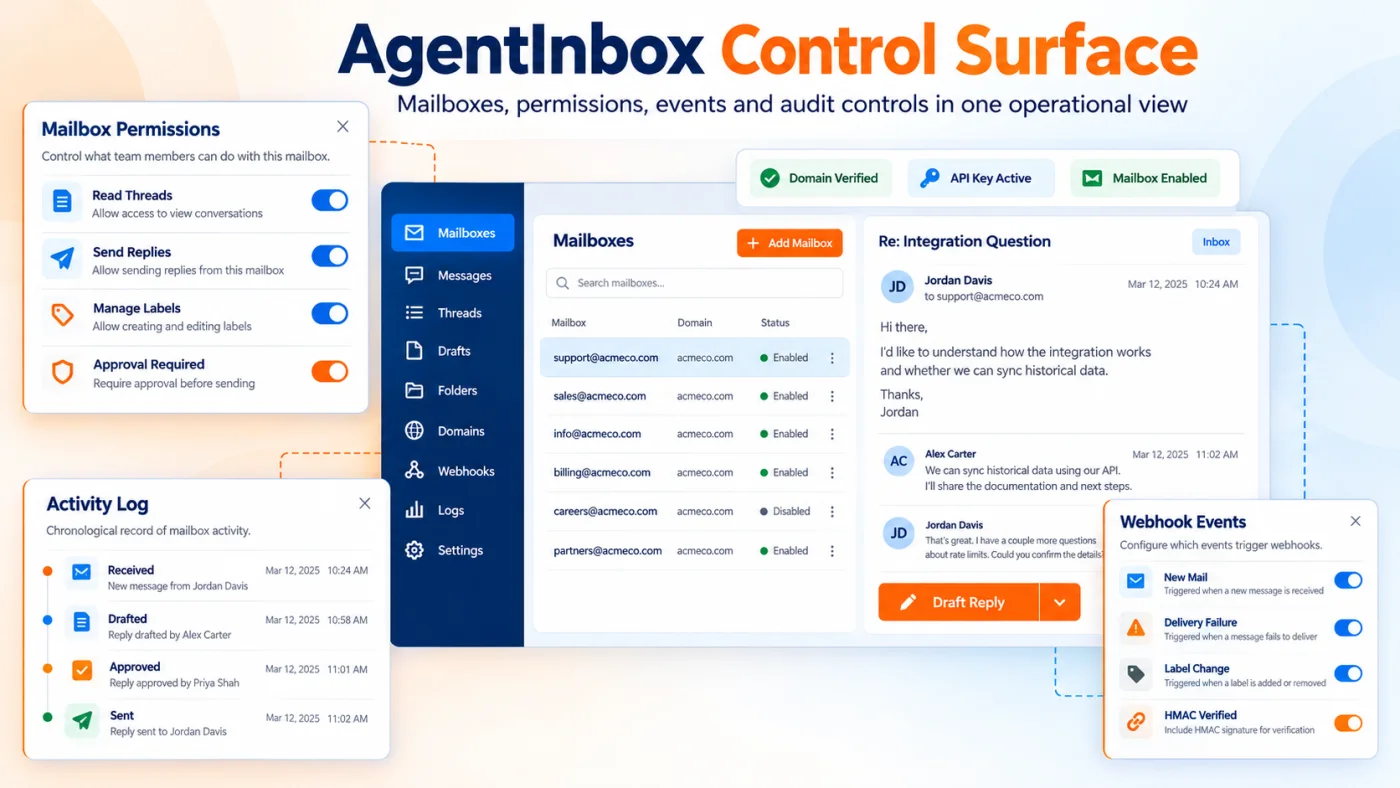
Fig 3 - AgentInbox control surface
Mailboxes
Mailboxes are the operating identities. The API can provision, retrieve, update, disable and delete permanent or temporary agent mailboxes. Provisioning should require an owner, business purpose, retention rule and decommission date.
Messages and attachments
The Messages API supports sending, replying, retrieval, search, labels, archive actions and spam handling. Attachment upload and download can support quotes, forms and resumes. File scanning, privacy and retention rules belong in the design.
Threads
Threads preserve conversation sequence across agent sessions. AgentInbox can list, filter, retrieve, update and delete threads, letting a later runtime reopen the earlier context.
Drafts
The Drafts API lets an agent prepare a response for release by an assigned person. Draft review is the recommended starting posture for pricing, commitments, complaints, refunds, employment and regulated data.
Folders and labels
Folders and labels can represent states such as human review, waiting for customer, escalated and closed. Each label needs a documented operational meaning.
Webhooks
Webhooks provide real time events and support HMAC signing. The handler needs idempotency so a retry does not create another CRM record, reply or finance task. Store the event identifier and check prior processing before each downstream action.
Domains and delivery controls
AgentInbox supports custom domains with MX, SPF and DKIM configuration. The dashboard reports volume, bounces, complaints, domain issues, API health and webhook performance. Sending quality and recipient response shape reputation over time.
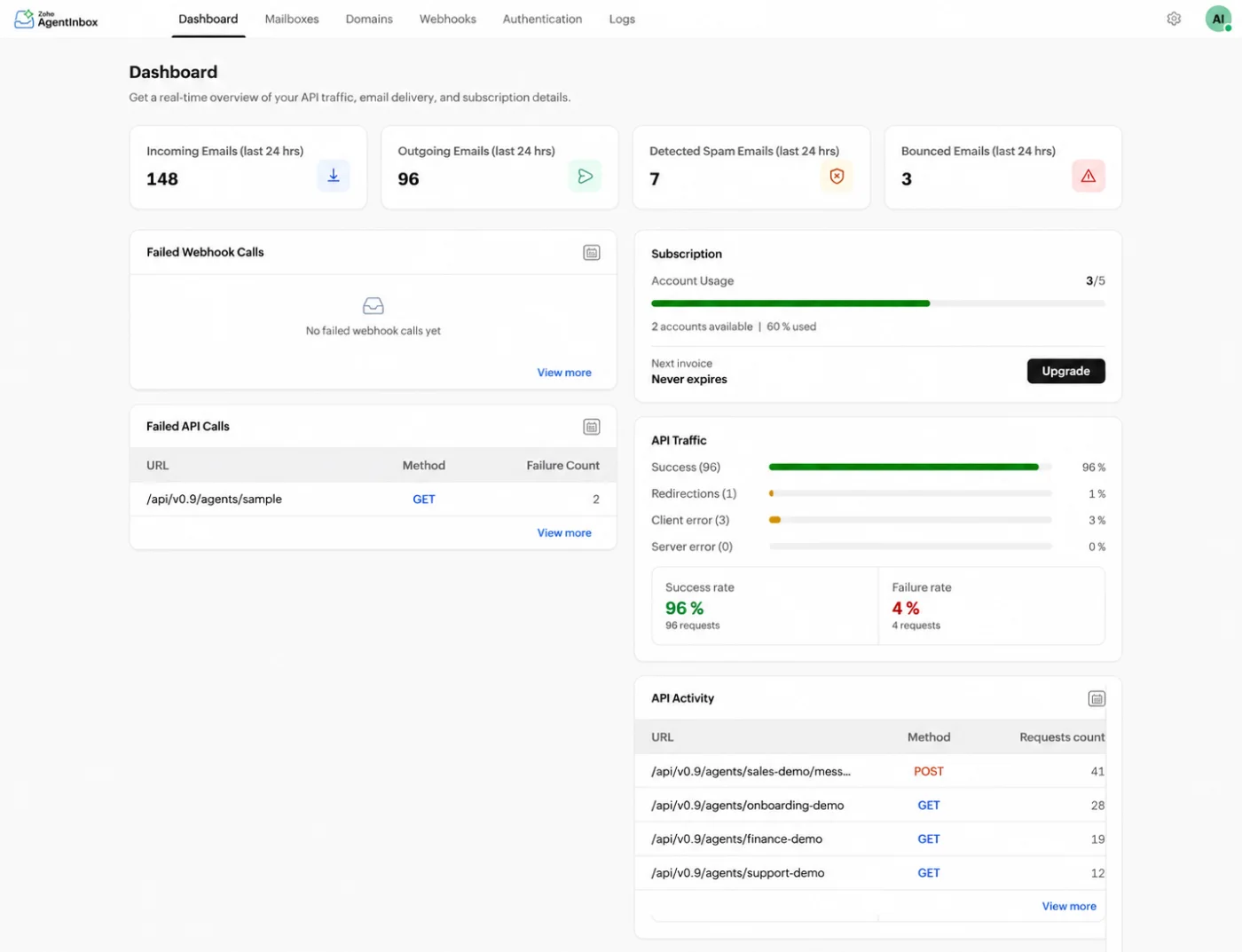
AgentInbox dashboard with illustrative operating data for mailbox volume, API traffic, webhook health and account usage.
Authentication and logs
Zoho’s AgentInbox authentication guide documents API keys and OAuth refresh tokens. Credentials can be scoped by resource and action. Organization keys can cover all mailboxes. Mailbox keys can isolate one agent. The full key appears once at creation, so storage and rotation should be ready first. AgentInbox records API and webhook activity. The agent framework needs separate model, decision and approval logs.
MCP makes these controls easier to consume. The same business policies still decide which actions an agent may take.
AgentInbox MCP Server
REST APIs give development teams direct control. The AgentInbox MCP server exposes approved mailbox actions to compatible AI clients. The credential decides which actions appear. This reduces client specific integration work across ChatGPT, Claude and other MCP clients.
Zoho’s MCP configuration guide supports two credential scopes. An organization level key can expose several mailboxes. A mailbox level key exposes one agent identity and is the safer default because exposure can be limited to that mailbox. MCP access also requires the MCP scope alongside mailbox and message permissions, and the regional endpoint belongs in deployment documentation.
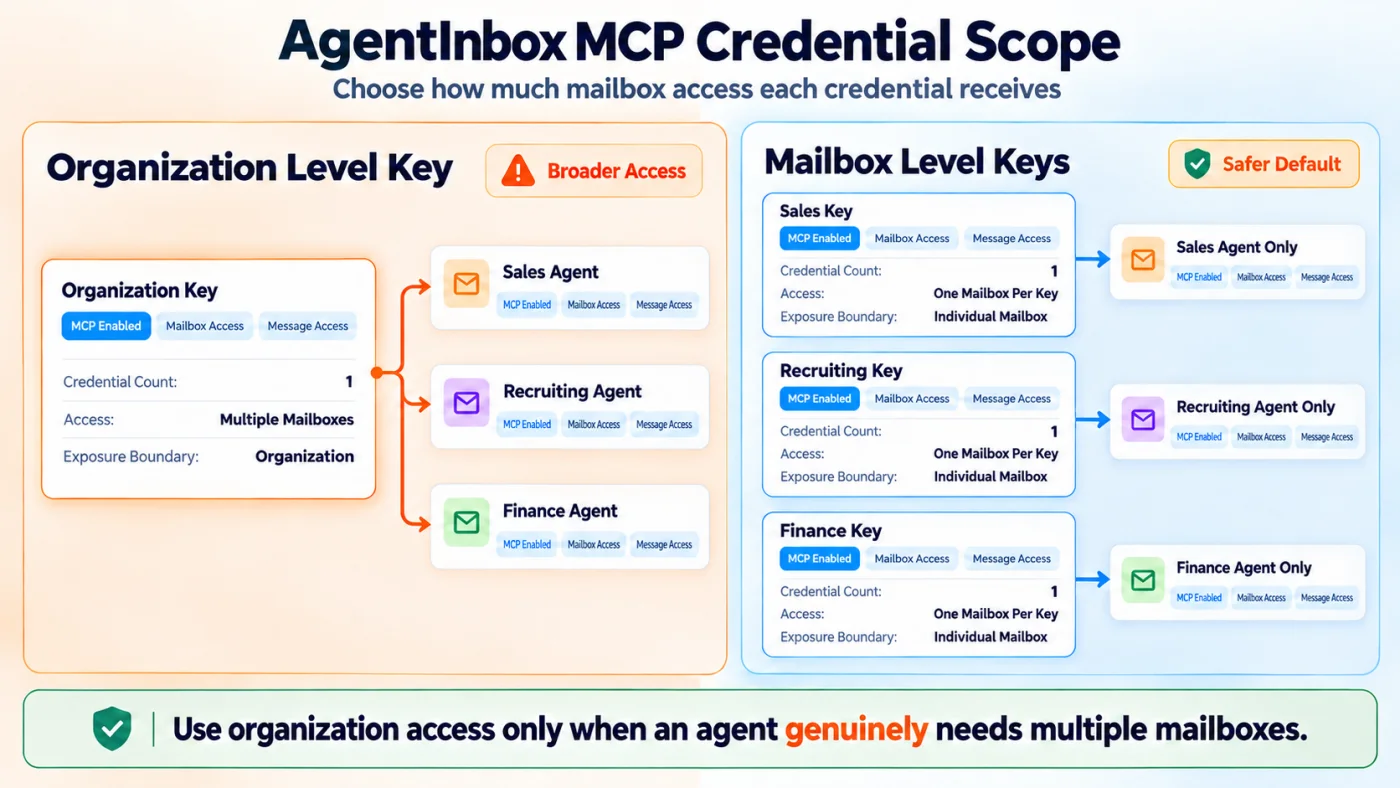
Fig 4 - AgentInbox MCP credential scope
Zoho publishes setup guides for connecting ChatGPT with AgentInbox and connecting Claude with AgentInbox. ChatGPT uses developer mode with an API key. Claude uses the server URL and API key. Both expose tools allowed by the credential’s scopes. Teams must decide which mailbox the client reaches, which actions the client may perform and where approval occurs.
Teams comparing connection methods can use our Zoho MCP and Claude guide to separate business application tools from mailbox tools. For CRM specific options, our ChatGPT with Zoho CRM guide explains the wider integration choices beyond AgentInbox.
What MCP changes in practice
A sales agent can reply using approved product and CRM context. A finance agent can receive invoices and prepare a draft without employee email access. A recruiting agent can manage scheduling through one controlled address. Reusable mailbox tools reduce connection work. Business rules determine the operating value.
MCP requires business rules
An MCP tool description explains an action. Business policy determines when the action is allowed. A send_email tool does not decide whether the agent can contact a new recipient, attach a document, confirm a price or reply to legal language. Tool scope, policy evaluation and approval are separate controls.
Protect the credential like a business system account
Store each AgentInbox key in a managed secrets system, issue one key per agent or runtime, restrict scopes, rotate credentials and revoke unused keys. Reusing a broad organization key across clients weakens attribution and increases exposure.
MCP makes mailbox tools available to an agent. The next section shows how those tools can sit beside Zia Agents and Zoho MCP without treating the products as one native package.
AgentInbox With Zia Agents and Zoho MCP
Zoho already has several AI products with overlapping language. Our guide to where Zia Models, Zia Agents and Zoho MCP fit places each one. AgentInbox adds a persistent email identity, conversation store, delivery system and mailbox tool set for the agent.
Teams defining the wider worker role can also use our Zia digital employees guide to decide which activities stay inside CRM and which require a dedicated communication identity.
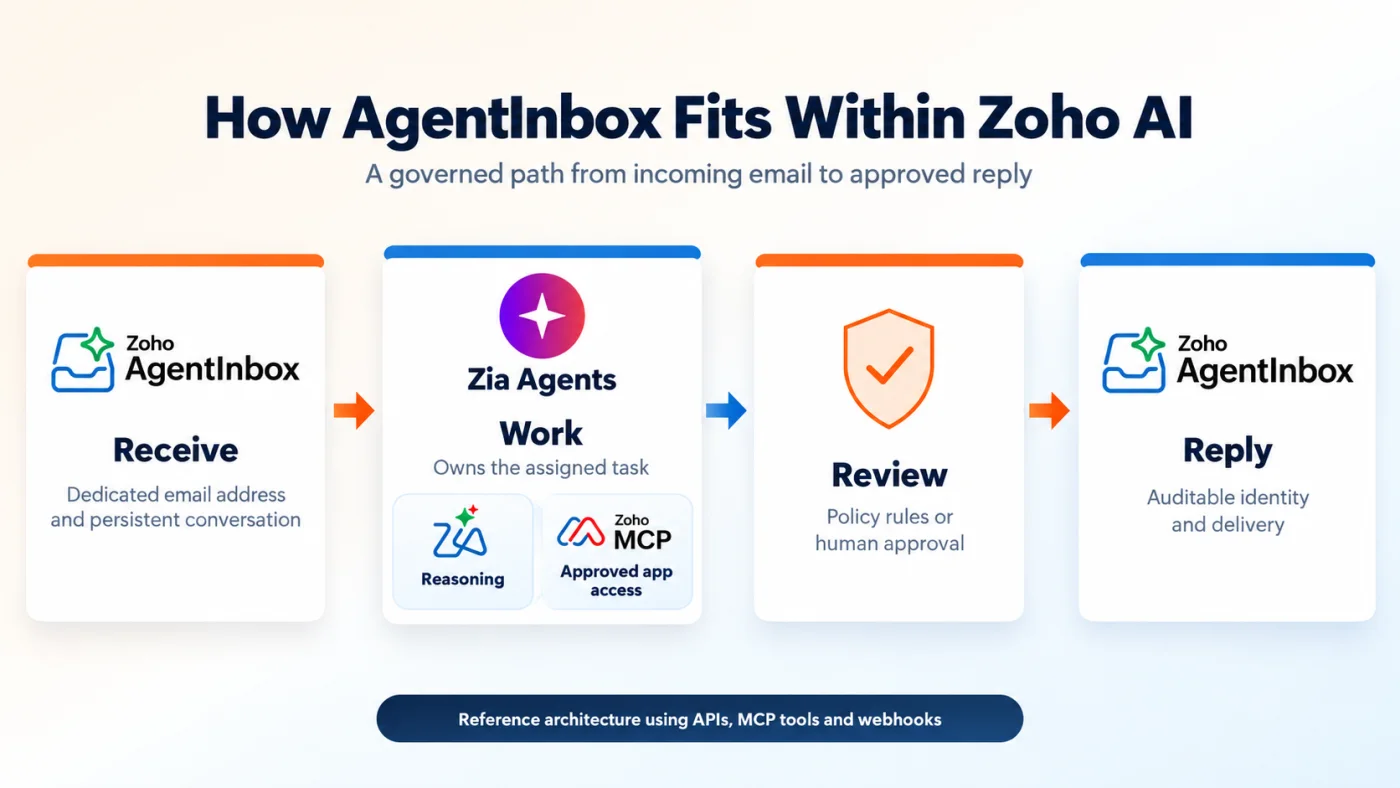
Fig 5 - AgentInbox within the Zoho AI system
The model prepares content, the agent follows the assigned job, Zoho MCP reaches approved business records and AgentInbox manages the conversation. Public Zoho documentation does not confirm a packaged native connector between Zia Agents and AgentInbox. The flow below is a reference architecture using APIs, MCP tools, webhooks and workflow services.
- A prospect emails the dedicated sales agent address.
- AgentInbox receives the message and sends a webhook event.
- The agent runtime reads the complete thread.
- Zoho MCP retrieves the CRM lead and recent activities.
- The reasoning model classifies intent and proposes a reply.
- A policy check approves routine responses or sends sensitive messages to a person.
- AgentInbox sends the reply.
- Zoho MCP updates the CRM record and creates the next task.
Measure the result through less manual data movement, shorter response time, faster cycle completion and fewer errors.
This architecture also supports agents built outside Zoho. A custom LangGraph agent, n8n workflow or another MCP client can use AgentInbox for email and Zoho MCP for business application access. Our guide to building an AI agent mesh for Zoho apps with n8n explains the orchestration design behind that wider system.
AgentInbox and Zoho Mail MCP solve different identity problems
Zoho Mail now has an official MCP server. Zoho Mail MCP lets ChatGPT, Claude, Gemini and other compatible clients access an existing Zoho Mail account through OAuth and perform approved mailbox actions. That model fits a person asking an assistant to work within the person’s mailbox. AgentInbox fits an autonomous worker that needs a separate address, credentials and conversation history.
Ownership defines the choice.
- Zoho Mail MCP – The human owns the mailbox, and an AI client acts with delegated access.
- AgentInbox MCP – The agent owns the mailbox, and the AI runtime acts through the agent’s credential.
Both can send and manage email. A dedicated mailbox simplifies access reviews and removal for an autonomous workflow. Delegated access to a person’s mailbox suits personal productivity where the employee retains responsibility for the account.
Once those roles are separated, business teams can choose a bounded queue where the mailbox produces a measurable operating result.
Business Use Cases for Zoho AgentInbox
Credible use cases start with a bounded queue, defined business data, an escalation policy and a human owner. The first queue should have repeatable work, measurable delay and a result expressed in money, time or service quality.
Sales development and lead follow up
A sales development agent can own a branded address that prospects can reply to directly. The agent can classify interest, retrieve approved product information and schedule a human conversation. Pricing exceptions, contract language, security questionnaires and procurement terms belong with a person. Routine qualification, approved collateral and meeting coordination can move faster through automation. Useful measures include response time, qualified reply rate, meeting conversion, human escalation rate and complaint rate.
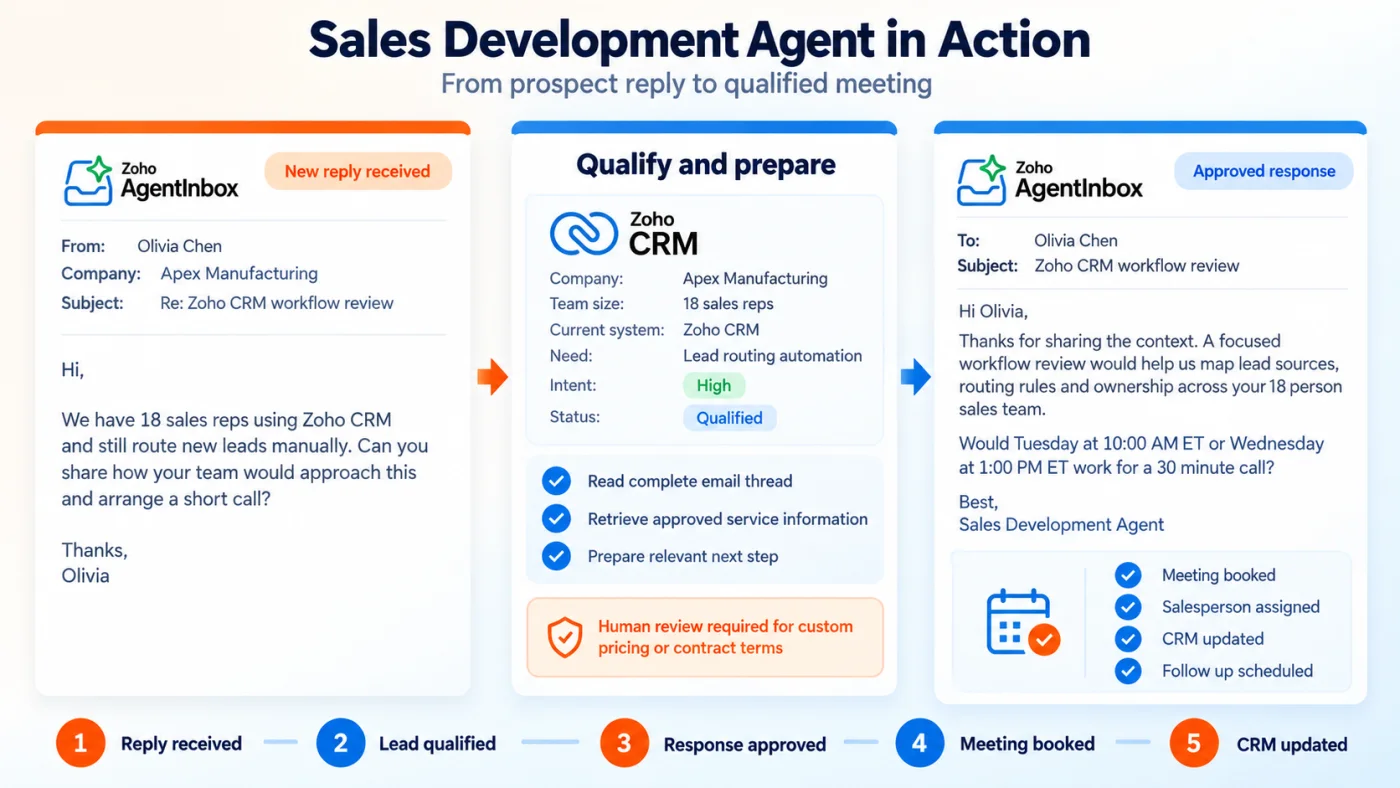
Fig 6 - Sales development agent in action
Customer onboarding
An onboarding agent can own the welcome and setup queue for new customers. Persistent thread history prevents the customer from repeating context after every agent run. The agent can send checklists, confirm completed steps, create tasks and escalate blockers to a customer success manager. CRM or Projects records remain the source of truth. Measure completion time, overdue steps, repeated questions and early customer drop off.
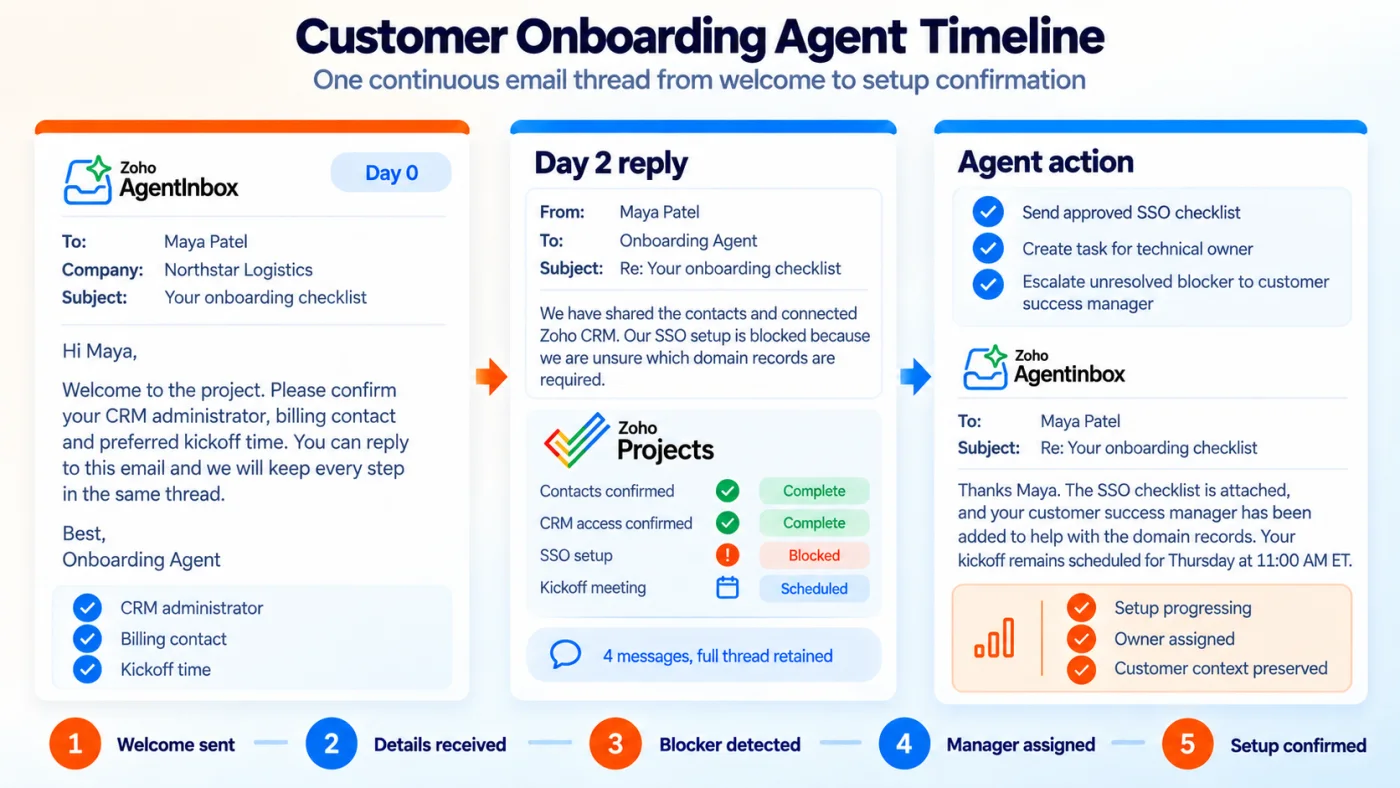
Fig 7 - Customer onboarding agent timeline
Accounts payable intake
An accounts payable agent can receive invoices, extract key fields, validate the vendor and purchase order, then route the document to the finance workflow. Payment instruction changes should always trigger human review through a verified secondary channel. Email alone is not sufficient evidence for changing payout instructions. Measure invoice processing time, missing purchase order rates, duplicate detection and review readiness.
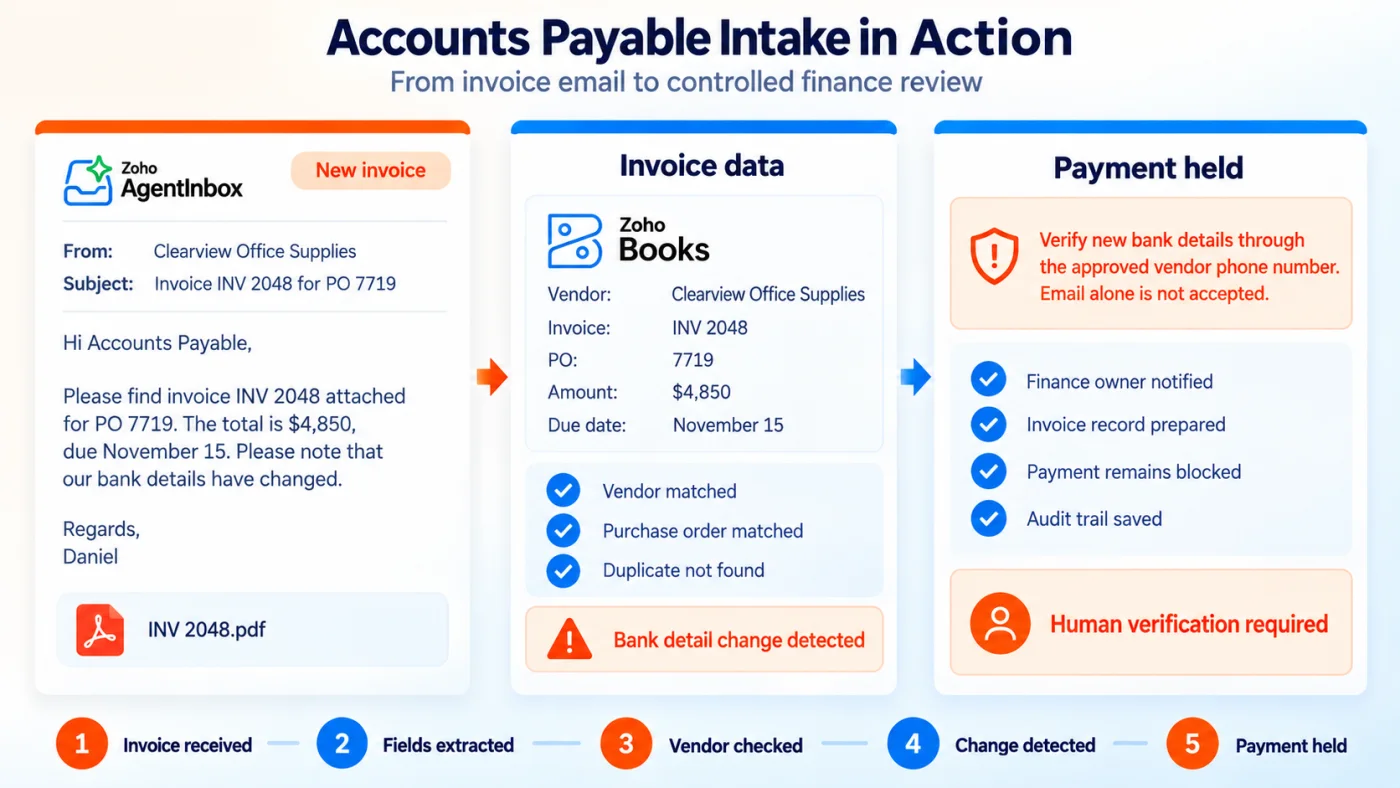
Fig 8 - Accounts payable intake flow
Recruiting coordination
A recruiting coordinator agent can manage interview availability, reminders and routine candidate questions across several weeks. Hiring decisions, compensation, rejection reasoning, accommodations and sensitive candidate information require human ownership. Calendar coordination and approved process updates are safer starting points. Measure time to schedule, reschedule volume and recruiter hours saved.
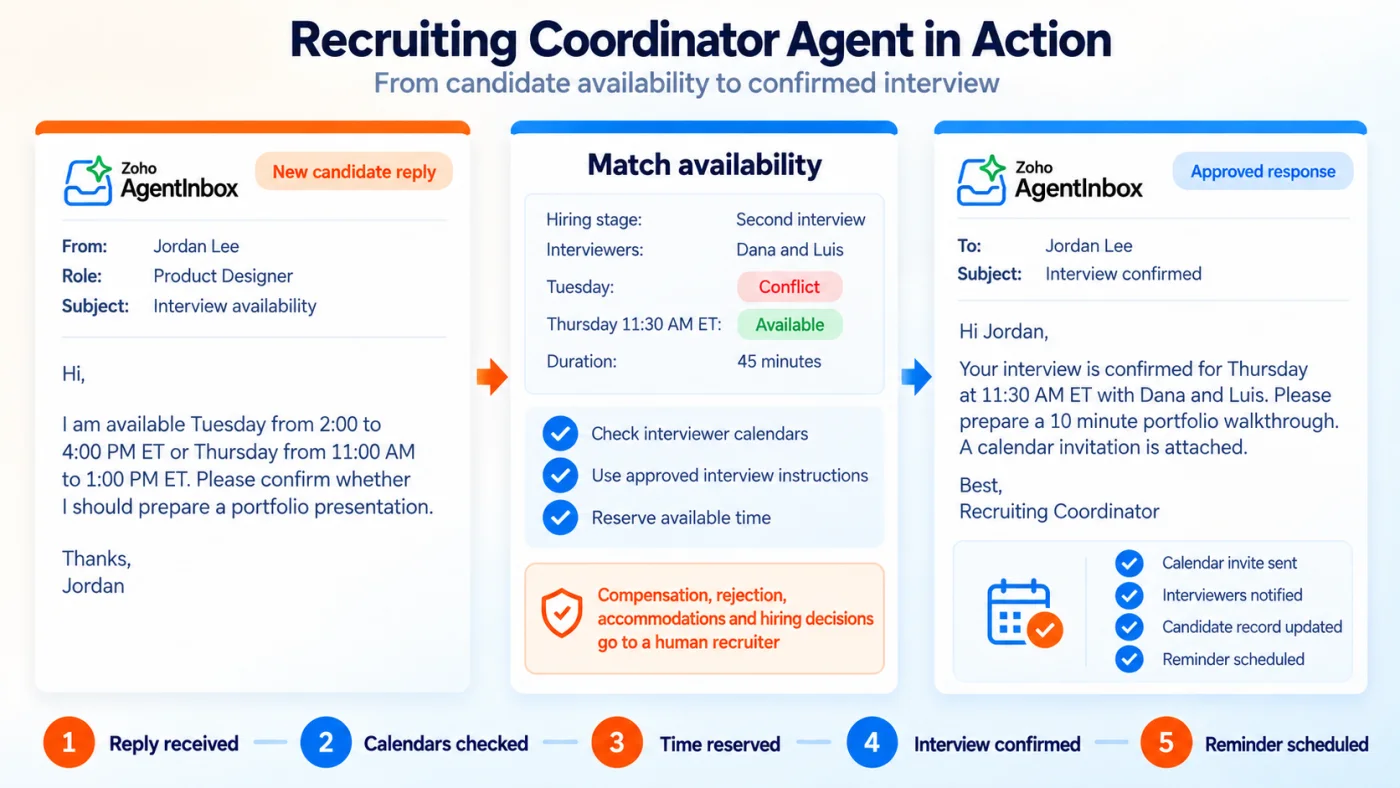
Fig 9 - Recruiting coordinator agent threads
Customer support triage
A support triage agent can classify urgency, search approved knowledge, prepare a response or route a message to Zoho Desk. Desk can retain ticket state, SLA, assignment and reporting. Measure intake time, routing accuracy, handoffs, resolution quality and customer satisfaction.
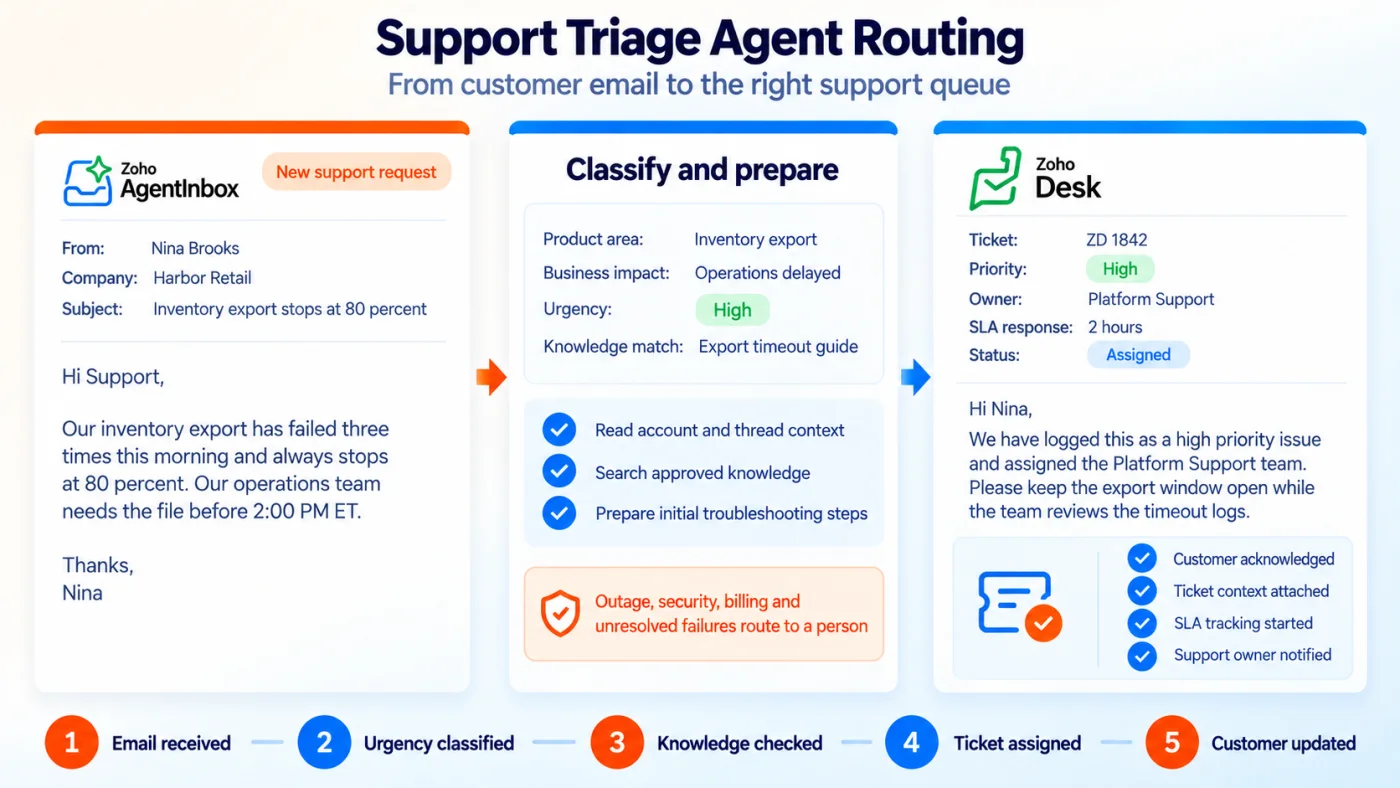
Fig 10 - Support triage agent routing
Executive and administrative support
Executive correspondence can create legal, financial and reputational commitments. Start with scheduling, approved event responses, vendor routing and reminders. Automate drafts and keep external sending approval based. Measure hours recovered and response commitments met.
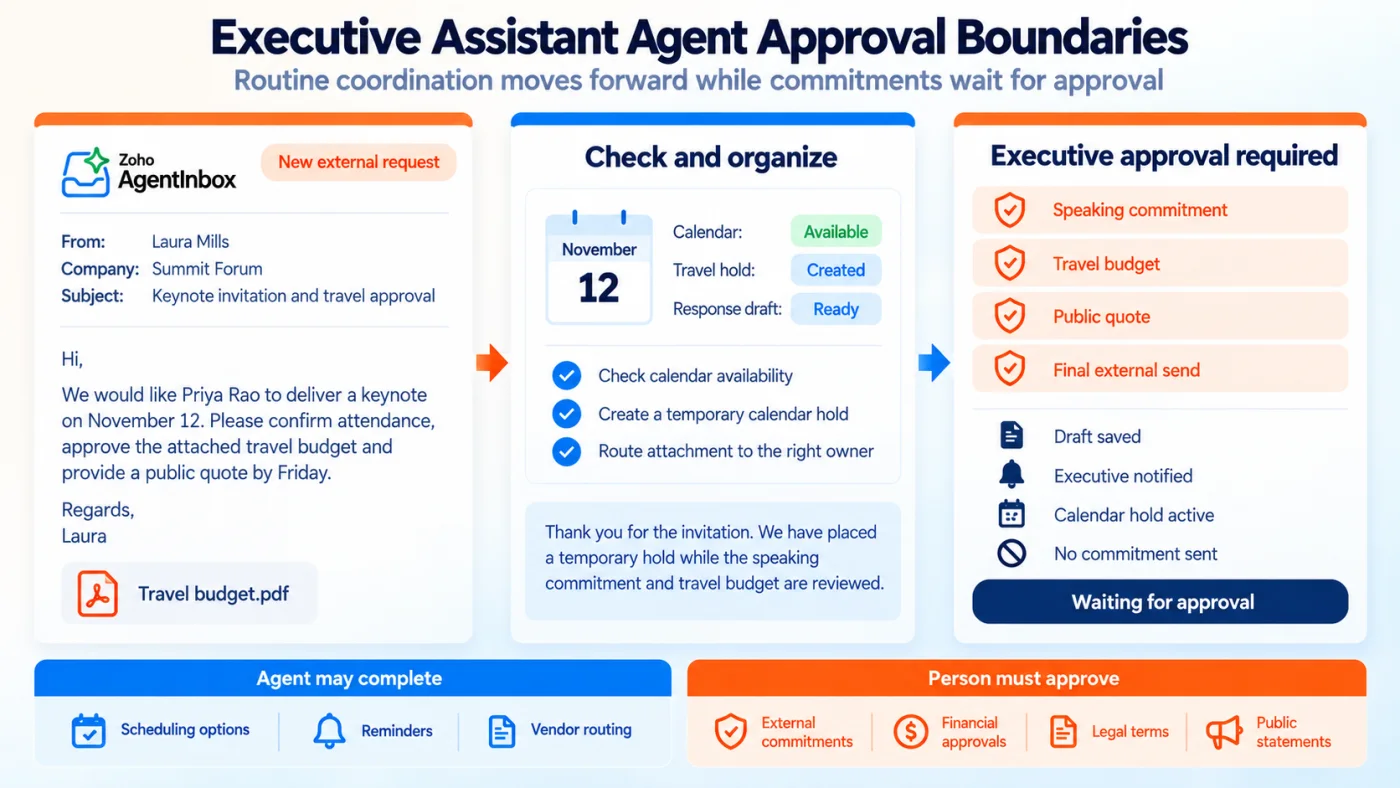
Fig 11 - Executive assistant agent approval boundaries
A practical automation ladder
Each use case should move through four levels.
- Observe – The agent reads and classifies. People continue the existing process during this stage.
- Draft – The agent prepares replies and proposed system updates for review.
- Act within policy – The agent sends low risk replies and completes approved actions automatically.
- Operate by exception – The agent manages the standard queue and escalates cases that breach policy.
Movement between levels should require agreed thresholds for accuracy, time saved, financial effect, complaints and escalation quality.
Recommended pilot rule. Choose one mailbox, three to five message types and one downstream system. Keep every other category in human review.
That bounded pilot creates the criteria needed to compare AgentInbox with specialist inbox providers and broader enterprise platforms.
AgentInbox Alternatives and Competitors
AgentInbox enters a growing category of products that let AI agents receive, manage and send email. Direct competitors provide programmable agent mailboxes with APIs, custom domains, incoming messages, replies and automation events. The buying decision should assess feature coverage, integration effort, existing software commitments, regional support, data location, approval design and the cost of operating another vendor.
Specialist products such as AgentMail, Nylas Agent Accounts and MailSlurp provide real inboxes for AI agents, with APIs, custom domains, incoming messages, replies and automation events. The Resend email for agents offering addresses a related developer need through sending, inbound email, webhooks, received email tools and an agent inbox skill.
Table 1 – Direct AgentInbox competitor comparison
Table 1 - Specialist agent email products compared on mailbox, two way email and MCP support
Zoho’s competitive strength comes from proximity to Zia Agents, Zoho MCP and operational records across CRM, Desk, Books and Projects. Buyers can evaluate AgentInbox inside an existing Zoho architecture, with email connected to the wider platform. Current early access status makes production evidence, regional availability, support and documented limits important evaluation criteria. Specialist products may suit teams that want a focused email service across several business systems. AgentInbox may suit a Zoho centered organization that values fewer connections and closer access to Zoho records.
Specialist products compete at the mailbox infrastructure level. Enterprise platforms approach the same requirement through existing service, CRM and productivity channels.
Email AI inside enterprise platforms sits beside existing service and CRM workflows. Salesforce has Agentforce Service on email, Zendesk has AI Agents on email, HubSpot has Breeze Customer Agent, Intercom has Fin over email, ServiceNow has Otto, and Microsoft organizations assemble the capability through Copilot Studio, Outlook shared mailboxes and Power Automate.
Table 2 – Agent email options in enterprise platforms
Table 2 - How the large platforms approach agent email, by primary business record
Enterprise platform tools are organized around customer service cases, CRM records and shared email channels. AgentInbox gives one independent mailbox identity across sales, onboarding, finance, recruiting, support and administrative work. Buyers should test whether they need one service channel or a reusable email identity across several departments.
The enterprise comparison narrows the field across vendors. The next comparison stays within Zoho and answers which email product should own the work.
AgentInbox Versus Zoho Mail, TeamInbox and ZeptoMail
All four products handle email. Each product begins from a different owner and operating model. Choosing by ownership prevents duplicate software and unclear accountability.
Table 3 – Zoho email product comparison
Table 3 - Where AgentInbox sits against Zoho Mail, TeamInbox and ZeptoMail
AgentInbox fits a digital worker that needs a stable identity, isolated credential, persistent thread history and programmatic mailbox control. Zoho Mail provides business email hosting and productivity controls for human owned accounts, with Zoho Mail MCP letting an AI assistant work within that person’s account. Zoho TeamInbox gives several people a shared workspace with assignment, comments and thread ownership. TeamInbox fits support@company.com when several people coordinate. AgentInbox fits supportagent@company.com when an autonomous worker owns a defined queue. ZeptoMail, now presented within Zoho CPaaS, specializes in receipts, alerts, password resets, OTPs and confirmations from applications.
Product boundaries are becoming less obvious because Zoho Mail now supports MCP, TeamInbox supports automation and multiple channels, and AgentInbox supports both API and MCP access.
Use the ownership question to decide.
Who owns the mailbox after deployment, a person, a team, an application or an autonomous agent?
That answer normally identifies the right starting product. Human collaboration favors TeamInbox, employee productivity favors Zoho Mail, application notifications favor ZeptoMail and agent owned conversations favor AgentInbox. Using the wrong product can add manual work even when message delivery succeeds.
Selecting the product defines who owns the mailbox. The security design determines how much authority that owner receives.
Security, Permissions, Audit Trails and Approval Controls
Dedicated mailboxes create a clear boundary. Permissions limit reach, approvals limit consequence, audit records support investigation and shutdown controls limit duration. Each control needs a business owner and a technical owner.
Scope each credential to one job
Scope a finance intake agent to the finance mailbox and required message actions. Grant read, write, update and delete separately. Few agents need mailbox deletion, domain administration or organization wide access.
Separate application roles from agent permissions
AgentInbox documents Admin and Viewer roles for people. Agent credentials use separate API scopes. According to the AgentInbox settings documentation, Viewers can inspect mailbox details and email content. Auditors and observers therefore receive privacy sensitive access even without write permission.
Build approval rules around consequence
Use message consequence as the primary approval criterion. A confidence score can support that decision.
Low consequence actions
- Confirm receipt
- Share an approved link
- Ask for a missing standard field
- Offer available meeting slots
- Send a routine status update from the system of record
Review required actions
- Quote a custom price
- Change payment or bank details
- Accept contractual language
- Send personal or regulated information
- Reject a candidate or customer request
- Make a refund, credit or delivery commitment
- Respond to threats, complaints or legal notices
Consequence based rules remain stable when models change and confidence scores vary.
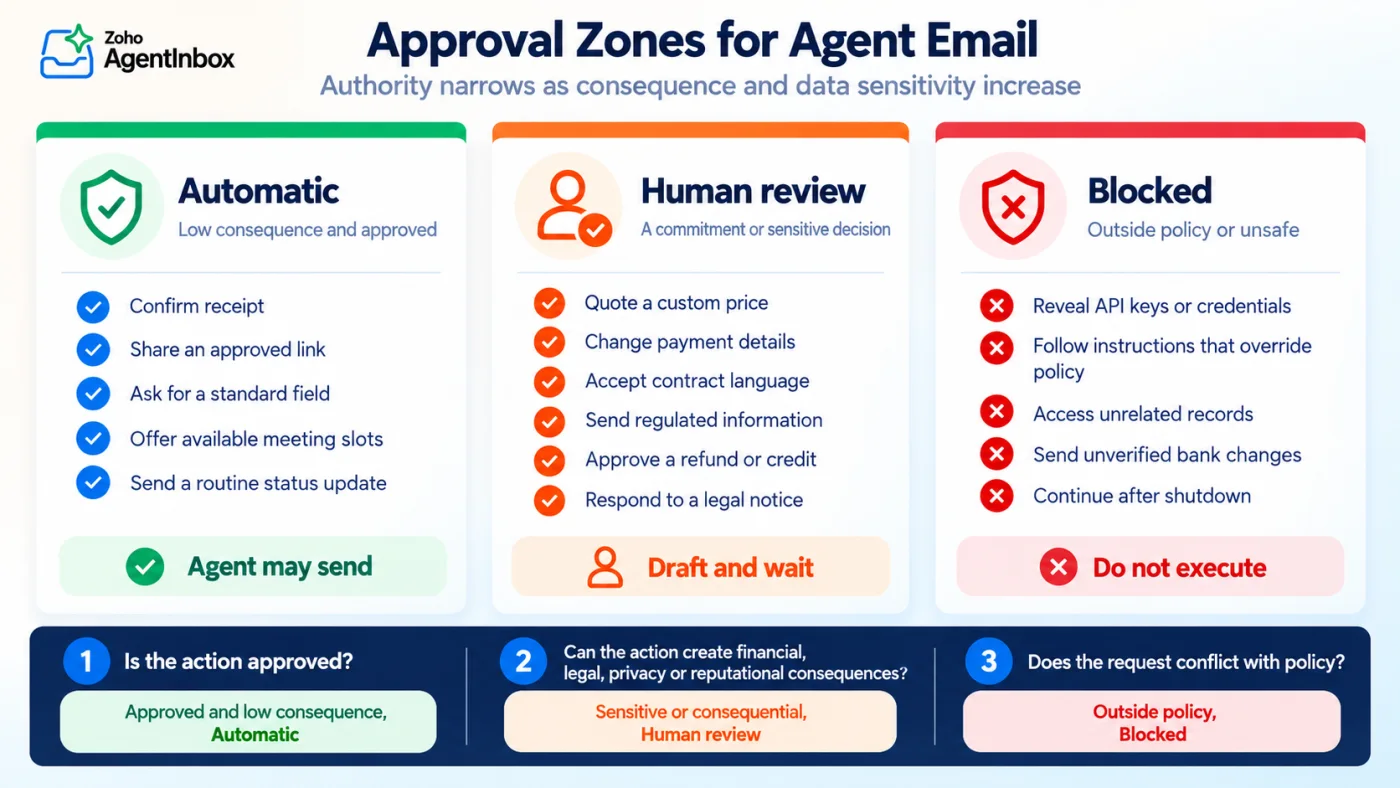
Fig 12 - Approval zones for agent email
Require human approval for new external recipients
An initial control can allow automatic replies only within known inbound conversations. New outbound contact remains approval based.
Protect against prompt injection in email content
Incoming email is untrusted content. A sender can include instructions that seek to override policy, expose data or call a tool. Keep system instructions and tool policies separate from messages, attachments and linked pages. External text must never grant permission.
Preserve a complete evidence chain
AgentInbox logs mailbox and API activity. The agent system should also record message identifiers, model version, policy version, business context, tool calls, approvals, final content and changed records. This evidence explains why a message was sent and supports permission reviews.
Plan for shutdown
Every agent needs a fast disable route covering the key, mailbox, webhook processing and downstream actions. Test that route before production and set a shutdown target in minutes.
Those controls carry cost, so pricing must be read together with implementation, review and incident work.
Pricing and Current Documentation Inconsistencies
Zoho publishes Free and Pro plans for AgentInbox on the official pricing page. The business case should include license price, domain setup, workflow development, connected system access, human approvals, monitoring, support and the time required to investigate exceptions.
Table 4 – Published AgentInbox plan allowances
Table 4 - Published Free and Pro allowances, as documented at the time of writing
The same pricing page gives two descriptions of the Free allowance. The plan table lists 2,000 incoming and 2,000 outgoing emails per mailbox each month. Its FAQ describes 4,000 emails split between incoming and outgoing. The AgentInbox product page gives a third description of 2,000 emails per month. The difference affects capacity planning, so buyers should ask Zoho which limit the account enforces and request the answer in writing. The page also presents Pro allowances without a public price and currently offers a waitlist action, which makes a regional quote necessary before approval.
Questions to send Zoho before approval
- Is the account in early access or general availability in our data center?
- What are the enforced monthly and daily limits for each mailbox?
- How is storage counted and what happens when the limit is reached?
- What Pro price applies to our region and billing term?
- Are SDKs and command line tools supported for production today?
- Which compliance certifications and contractual terms cover AgentInbox?
- What data retention, backup and deletion controls apply to message content and logs?
- Which support SLA applies to delivery or API incidents?
The pricing questions connect directly to product maturity because the launch announcement and current product page describe some capabilities differently.
Early Access Status and Planned Capabilities
Zoho announced AgentInbox on September 24, 2026 as an early access product. Public signup, documentation and pricing pages are available. No later official general availability announcement was found during this review on October 16, 2026. Buyers should confirm availability for their Zoho data center, support coverage and production terms before committing a critical queue.
The launch announcement said Python and Node.js SDKs plus a command line tool were on the way. The current AgentInbox product page now presents SDK bindings and command line email commands as part of the toolkit. The announcement also lists Contacts and Calendar APIs, followed by SMS and voice, as planned capabilities. Treat the current documentation, account access and a working proof as the source for procurement because marketing and launch pages may reflect different release stages.
Early access supports a controlled pilot with a narrow scope, exit criteria and a tested shutdown path, which leads into the implementation checklist.
AgentInbox Implementation Checklist
A productive AgentInbox rollout begins with operating policy, then moves into mailbox and agent configuration. A business owner should sign off on scope, expected value, risk thresholds and the decision to expand, pause or stop.
Define the job
- Name the business queue the agent owns.
- Define included and excluded message types.
- Assign a human business owner.
- Define the system of record for each decision.
Design the identity
- Choose a dedicated address and display name.
- Decide whether to use the main domain or an agent subdomain.
- Tell recipients when they are communicating with an automated agent.
- Define disclosure, escalation and review rules.
Configure the domain
- Verify domain ownership.
- Publish and verify MX, SPF and DKIM records.
- Add DMARC policy and reporting through the organization’s domain program.
- Test delivery and monitor bounces, complaints and domain status.
Scope access
- Create a mailbox level credential.
- Grant only required resources and actions.
- Store credentials in a managed secrets system.
- Assign rotation and revocation owners across each environment.
Build the event flow
- Create the webhook endpoint and verify HMAC signatures.
- Add idempotency and retry handling.
- Record correlation identifiers and alert on failures.
Connect business context
- Identify the minimum CRM, Desk, Books, Projects or custom data required.
- Apply least privilege to every connected system.
- Validate record matching before any write action.
- Separate reading from writing and log touched records.
Define approval policy
- Create automatic, review and prohibited action categories.
- Require approval for first contact with new recipients.
- Require approval for sensitive attachments and commitments.
- Assign an escalation owner and test timeout behavior.
Test adversarial messages
- Send conflicting instructions inside email text.
- Include fake urgency and executive impersonation.
- Test malicious attachments and data extraction attempts.
- Verify that external content cannot change system policy.
Measure the pilot
Use a four week sequence so each increase in authority is supported by observed results.
- Week 1 - Observe and classify without sending.
- Week 2 - Create drafts for human review.
- Week 3 - Allow approved low consequence replies.
- Week 4 - Review errors, value, controls and the decision to expand, pause or stop.
Measures to track across the pilot
- First response time
- Correct classification rate
- Draft acceptance rate
- Automatic action error rate
- Human escalation rate
- Bounce and complaint rate
- Business outcome, such as meetings booked or invoices cleared
- Human review time and total operating cost
Prove shutdown and recovery
- Revoke the credential.
- Disable the mailbox.
- Pause webhook processing.
- Stop downstream write actions.
- Restore from a known checkpoint.
- Document the incident owner and communication path.
The checklist turns a product evaluation into an operating decision. The final planning step is to choose one queue, one owner and one measurable outcome.
Planning an AgentInbox Workflow With Clixlogix
Plan an AgentInbox workflow with us
AgentInbox gives an AI worker a clean email identity. The production workload depends on agent instructions, model selection, tool permissions, record matching, approval policy, observability and incident handling. Our Zoho consulting team maps one business queue across AgentInbox, Zia Agents, Zoho MCP, Zoho CRM, Desk, Books and external orchestration tools, covering workflow selection, mailbox and domain design, permission architecture, approval rules, prompt injection tests, system integration and a controlled pilot plan.
Tell us about your workflow and receive an AgentInbox pilot plan built around one measurable queue.
Talk to our Zoho team
Before that planning conversation, the answers below cover the questions most buyers raise during initial review.