TL;DR
“Crawled, currently not indexed” means Google read your page and passed on it. “Discovered, currently not indexed” means Google knows it exists but has not bothered visiting. Both usually indicate a sitewide quality problem. Google’s John Mueller confirmed in July 2026 that when their systems have strong quality concerns about a website, they cut crawling and indexing across the board. This article walks through the diagnostic process, covering how to tell which problem you have, what actually causes each status, and what to fix before you publish another page.
We recently took over SEO for an ecommerce client. About 340 product pages, decent design, reasonable site speed. The previous team had been publishing two blog posts a week for six months straight.
187 of their pages were sitting in Google Search Console under “crawled, currently not indexed.” Another 43 were stuck at “discovered, currently not indexed.” That accounts for roughly 47% of their URLs sitting outside Google’s index.
The first thing the previous team did was spam the Request Indexing button. Over and over. Nothing changed. Then they rebuilt the sitemap. Nothing. Then they started suspecting a penalty.
Google had looked at the site and decided most of it was not worth indexing. No penalty involved, no technical block. The content was thin, repetitive, and interchangeable with dozens of other stores in the same niche.
The crawled currently not indexed status usually reflects how Google judges your site’s quality. Until you hear that message, publishing more content just makes the problem worse.
We are going to break down exactly what each status means, what causes it, and the step by step process we used to get that ecommerce client from 187 stuck pages down to 14 in about ten weeks. If your website is not indexed by Google the way it should be, this is where you start.
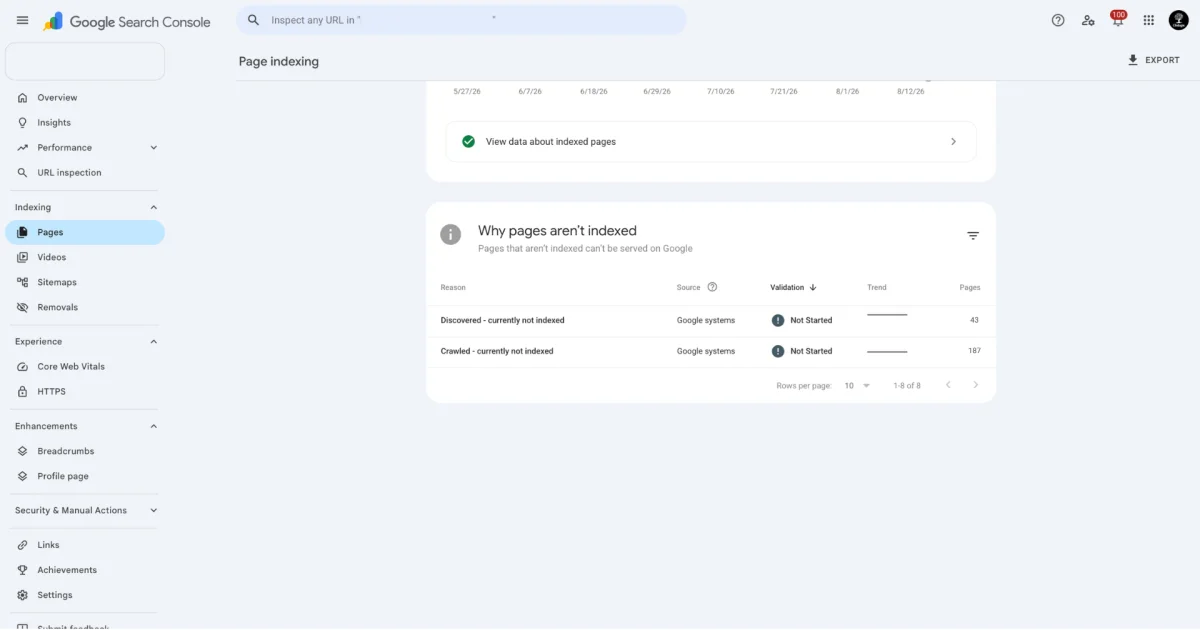
Fig 2 – Google Search Console showing Discovered and Crawled currently not Indexed issue in the search console page indexing report
What “Crawled, Currently Not Indexed” Actually Means
The definition matters here.
“Crawled, currently not indexed” means Googlebot visited your page. It downloaded the HTML. It processed the content. Google’s indexing systems then decided this page does not belong in the search index right now.
There is no error here. The page is not blocked. The server responded correctly. Google can access it just fine. It just decided your page does not clear the bar for inclusion in search results.
You can find this status in Google Search Console under Pages > Why pages aren’t indexed. It sits under the “Excluded” category, which already tells you something. Google is not confused about this page. It is choosing to leave it out.
Most site owners respond by hitting the Request Indexing button in the URL Inspection tool. Google’s John Mueller explained in July 2026 that this button does not force Google to index anything. It requeues the URL for evaluation. Google will reassess against the same criteria, and an unchanged page produces the same outcome.
Requesting indexing on the same unchanged page is like resubmitting a rejected application without changing anything on the form. It wastes your time and changes nothing.
What “Discovered, Currently Not Indexed” Means in Google Search Console
This one is different, and the difference matters for diagnosis.
“Discovered, currently not indexed” means Google knows your URL exists. It found it through your sitemap, an internal link, or a link from another site. But it has not actually visited the page yet. Googlebot has not downloaded the content.
“Crawled, not indexed” means Google evaluated the page and declined to include it. “Discovered, currently not indexed” means Google has the URL logged but has not allocated crawl resources to fetch it.
Google skips visiting known pages as a matter of prioritization. Google allocates crawl resources based on how much it trusts your site, how frequently your content changes, and whether previous crawls found content worth indexing. If your site has a history of thin or repetitive content, Google simply puts your URLs lower in the queue.
With our ecommerce client, the 43 pages stuck in “discovered” were mostly newer blog posts. Google had found the URLs through the sitemap but was not in any hurry to visit them. Once we fixed the quality issues on the already-crawled pages, the “discovered” backlog started clearing within three weeks. Google saw improved quality signals on what it had already crawled and started giving the rest of the site more crawl attention.
Why Google Skips Your Pages? The Quality Problem Most People Miss
In July 2026, Google’s John Mueller and Martin Splitt sat down on the Search Off the Record podcast and said something that every site owner needs to hear. Mueller confirmed that when Google’s systems have “strong concerns” about the overall quality of a website, they reduce both crawling and indexing across the entire site.
The reduction applies sitewide, including pages that would otherwise qualify.
His framing was direct. If Google has strong quality concerns, spending a lot of time on the website does not make sense for their systems. So they crawl less. They index less. And you start seeing crawled not indexed and discovered not indexed pile up in Search Console.
Mueller went further on what quality means. He called out pages that are terrible to access, where your computer fan spins up just loading them. He mentioned recipe sites that bury the recipe under a wall of filler content. He talked about pages hidden behind ads and interstitials.
Splitt’s framing was direct. If ten other pages already cover the same ground, Google has no reason to add yours to the index.
Mueller also highlighted a blind spot. Site owners struggle to see their own quality problems because “it is your website, and it is your baby. And of course, it is the best baby ever.” Every site owner thinks their content is solid. That makes it incredibly hard to step back and see what Google sees.
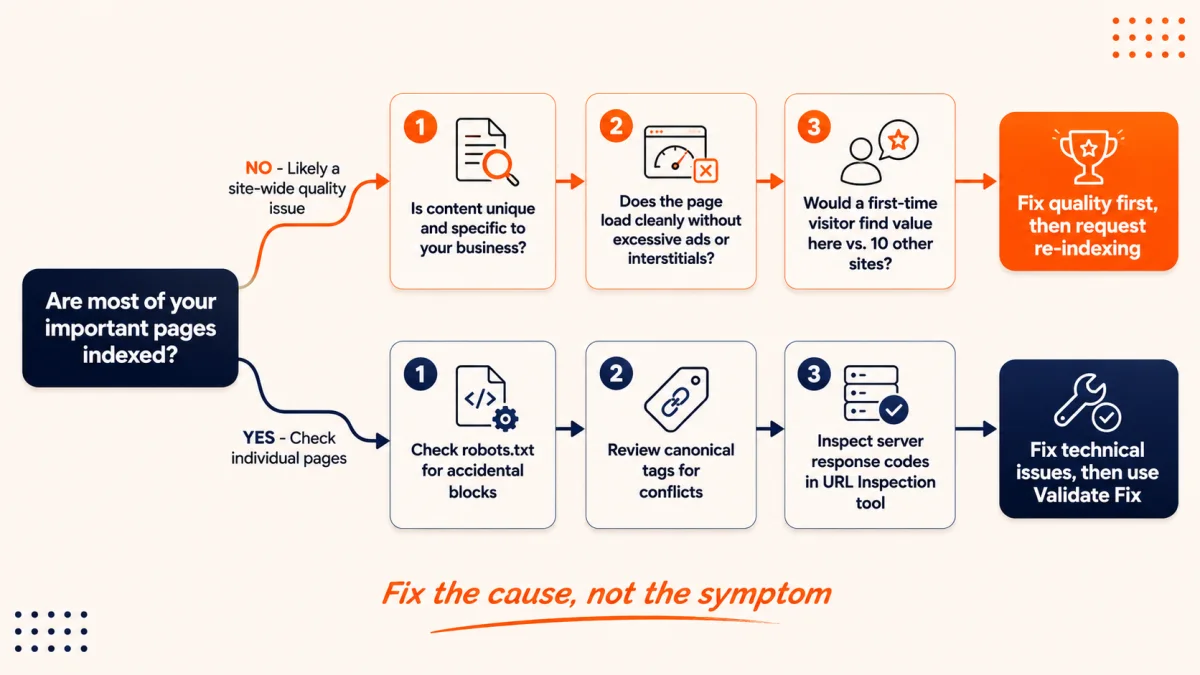
Fig 3 – Use this flowchart to figure out whether your indexing problem is about content quality or technical setup before you start making changes.
The Unchecked AI Content on the Webpages Problem
Mueller went further in that same podcast episode and directly named undifferentiated AI Generated content.
He said, “Anyone could have written this. This tells me nothing.”
Plenty of sites use AI tools in their writing process and get indexed without issue. The risk shows up when AI output goes straight to publish without editing, fact checking, or anything original layered on top. When every page reads like a slightly rearranged version of the same prompt output that hundreds of other sites are also publishing.
Our ecommerce client fit this description exactly. The previous team had used an AI tool to generate product descriptions and blog posts at scale. The descriptions were technically accurate. They described the products. But they said nothing a buyer could not read on five competing stores. No original photography notes, no buying guidance from actual experience, no data from real customer feedback.
We rewrote 60 product descriptions with specific details like material weight, how the product holds up after repeated use, which customer segment actually buys it and why, and size comparison photos with common household objects. We pulled real review data and wove it into the descriptions.
Those 60 pages moved from “crawled, not indexed” to indexed within four weeks. The content was no longer interchangeable with every other store in the category.
If you have scaled content production recently and your “not indexed” count has grown at the same time, Google has explicitly named this behavior as a signal they watch for.
Technical Causes That Actually Block Indexing of Webpages on Google
Quality is the most common reason for indexing problems on business sized sites. Genuine technical issues do exist, and you need to rule them out before assuming everything is a quality problem.
Check whether your robots.txt file is accidentally blocking resources that Googlebot needs to render your pages. This includes CSS and JavaScript files. If Googlebot cannot render the page properly, it cannot evaluate the content. Also check individual pages for noindex meta tags or X-Robots-Tag headers that you may not have intentionally set. CMS plugins, staging environment settings that leaked to production, and developer mistakes are common causes.
Canonical Tag Confusion
If a page’s canonical tag points to a different URL, Google treats that page as a duplicate and consolidates signals to the canonical target. The page itself gets left out of the index. This is technically correct behavior from Google, and it looks like a “not indexed” problem when you do not realize your canonical tags are wrong. Run a crawl of your site and check every page’s canonical tag against its actual URL.
Server Response and Crawl Budget Issues
Slow server response times (high TTFB), frequent 5xx errors, and aggressive bot protection that blocks or throttles Googlebot all reduce crawl demand. If your server takes two seconds per request, Google crawls it far less aggressively than a server responding in 200 milliseconds.
One important note on crawl budget. As per Google’s own documentation, crawl budget is primarily a concern for very large sites, roughly one million or more URLs. For a typical business website with a few hundred or even a few thousand pages, crawl budget is almost never the bottleneck. If you have 500 pages and 200 are not indexed, the bottleneck is Google’s judgment that those 200 pages are not worth indexing. Crawl budget rarely applies at this scale.
Sitemap Problems
Your XML sitemap should only contain URLs you actually want indexed. That means pages that return a 200 status, are not blocked by noindex, and are not redirecting. Every bad URL in your sitemap is a negative signal. Google sees a sitemap full of 404s, redirects, and noindexed pages as a sign that the site is not well maintained. Clean your sitemap before you do anything else.
Orphaned Pages With No Internal Links
Pages with zero internal links pointing to them get deprioritized. They carry no authority signals because nothing on your own site tells Google these pages matter. If you publish a blog post and never link to it from anywhere else on your site, expect it to stay in “discovered, currently not indexed” for months.
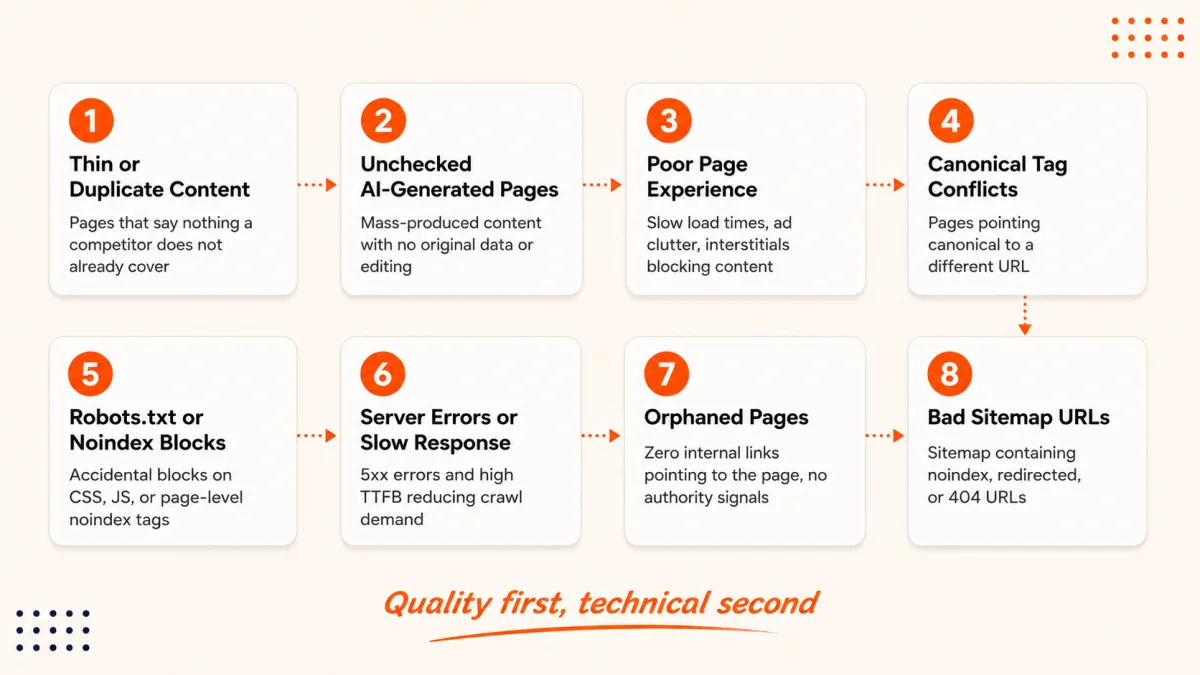
Fig 4 – These are the most common reasons pages get stuck in the not indexed status, listed from most likely to least likely for a typical business website.
How to Fix Crawled Currently Not Indexed Pages (Step by Step)
This is the exact process we used with our ecommerce client. The order matters. Quality first, technical second.
Step 1: Audit your stuck pages in Search Console. Go to Pages > Why pages aren’t indexed. Sort by status. Separate “crawled” from “discovered.” Look for what the stuck pages share. Are they all blog posts? All product pages? All from a specific date range? With our client, the grouping was clear. Every AI Generated blog post from the previous six months was stuck. The manually written product pages from two years earlier were mostly indexed. That finding pointed directly at content quality as the operative variable.
Step 2: Run a quality gut check on each stuck page. Open the page. Read it as a stranger who just landed there from a search result. Ask yourself whether this page tells you something specific that three other sites do not. If the honest answer is no, that page needs to be rewritten, merged with another page, or removed. Do not request reindexing until you have genuinely changed the page.
Step 3: Check for technical blockers on individual pages. Use the URL Inspection tool in Search Console. For each stuck page, check for a noindex tag, a canonical tag pointing somewhere else, a server error returned to Googlebot, and whether Google can render the page properly. These checks take two minutes per page and rule out the technical causes.
Step 4: Fix internal linking. This matters most for pages stuck in “discovered, currently not indexed.” If a page has zero internal links, Google has no authority signal telling it the page matters. Add contextual links from relevant, already indexed pages. These are genuine inline links placed where a reader would benefit from following them. Footer links and sidebar widgets do not carry the same weight. You can track how Google handles your pages in Search Console to monitor the impact of these changes.
Step 5: Clean your sitemap. Remove every URL that returns a non 200 status, has a noindex tag, or redirects. Submit the cleaned sitemap through Search Console. A clean sitemap tells Google you are serious about which pages matter.
Step 6: Improve page experience. If Mueller’s “computer fan spinning up” example sounds familiar, you have page experience work to do. Reduce ad density above the fold. Cut interstitial popups that fire before the visitor has even read the first sentence. Fix load times, particularly on mobile. These are all quality signals that affect Google’s willingness to index.
Step 7: Wait for recrawl, or use Validate Fix correctly. After you have actually fixed the issues, you have two options. For individual pages, use URL Inspection and request indexing. For groups of related issues, use the Validate Fix button. Mueller explained that Validate Fix samples a set of affected pages, and if those pass, Google triggers a faster recrawl of the rest. It assumes you have fixed everything. If some pages still have the same problem, validation fails. Use this button only after the work is done.
Why Getting Indexed on Google Matters More Than It Used To
The cost of this problem has changed materially in the last two years.
Google’s index now feeds AI Overviews, AI Mode, and the conversational search results that are replacing traditional SERPs for a growing number of queries. The cost of a non-indexed page has gone up accordingly.
This connects directly to generative engine optimization (GEO). You cannot optimize for AI visibility if Google has not indexed the page in the first place. A page stuck in “not indexed” is absent from regular search results and absent from every AI Generated answer built on top of Google’s index.
A GEO implementation strategy depends on the content being in the index first. Everything else builds on top of that.
When to Stop Publishing and Start Fixing Your Website for Indexing
Most agencies avoid giving this advice because it means less billable content work. It remains the right call.
If your “not indexed” count is growing faster than your “indexed” count, publishing more content is making the problem worse. Every new page you add to a site Google already has quality concerns about is another page that will likely get skipped. You are diluting your site’s quality signals further with each publish.
Mueller’s point was clear. Google reduces crawl demand for the whole site when quality concerns exist. More pages under a suppressed crawl rate means a higher share get skipped.
The right sequence is to pause publishing, audit and fix or remove weak existing content, rebuild quality signals on your core pages, watch your indexed page count stabilize and grow, and only then resume publishing with higher content standards.
With our ecommerce client, we paused new blog publishing for six weeks. During that time, we rewrote 60 product descriptions, consolidated 22 thin blog posts into 8 stronger ones, removed 15 pages that added zero value, and fixed internal linking across the site. In those six weeks, their indexed page count went from 153 to 241. After we resumed publishing at one post per week, every new post was indexed within five days.
If you have worked through all these steps and pages are still stuck after four to six weeks, the issue may need a full technical and content audit from a team that has done this before. That is where professional SEO services and a focused digital marketing strategy come in. A fresh set of eyes often catches what you cannot.
Pages still stuck after you have done the work?
We run indexing diagnostics as part of our technical SEO process, separating quality problems from technical ones before anything gets rewritten. If your not indexed count is not moving, talk to our SEO team and we will audit the site.