TL;DR
Google published its first dedicated help page for YouTube audio ads. The format reaches people listening to music, podcasts, and background content on YouTube and YouTube Music. Ads can run up to 30 seconds, use Target CPM bidding under the Brand Awareness goal, and the creative is a YouTube video link with a static image or simple animation. We break down every specification, walk through the setup, and add the practical tips Google left out.
YouTube has grown beyond video. Over 1 billion monthly podcast viewers and 125 million YouTube Music and Premium subscribers make up a large listening audience. Their screen is off. They are commuting, cooking, or working out with the phone in a pocket.
Until now, no single place explained how to reach that audience with ads built for the moment. Google scattered references to audio ads across multiple help pages and never centralised them. That changed in late July 2026, when Google published its first official guide for YouTube audio ads and put the specs, setup steps, and creative best practices into one document.
We read the entire guide, pulled out the details that matter, and added the practical context Google’s documentation skips over. Anyone running paid media campaigns who has not tested audio ads yet will find this walkthrough useful.
Why YouTube Audio Ads Matter Right Now
YouTube is the number 1 podcast platform in the United States. 31% of weekly podcast listeners in the U.S. choose YouTube as their top service, ahead of Spotify at 27% and Apple Podcasts at 15%.
MIDiA Research found that 62% of monthly active podcast users globally use YouTube, compared to 47% on Spotify. That is a 15 point gap.
Viewers watched over 700 million hours of podcasts on living room devices in October 2025 alone. The same figure was 400 million hours a year earlier. The audio audience on YouTube is growing fast, and most advertisers still buy only video placements.
Audio ads let you show up during those listening sessions at a fraction of what standard video ads cost. CPMs run 30% to 50% lower than traditional video placements, with completion rates that often run 25% higher. The math works.
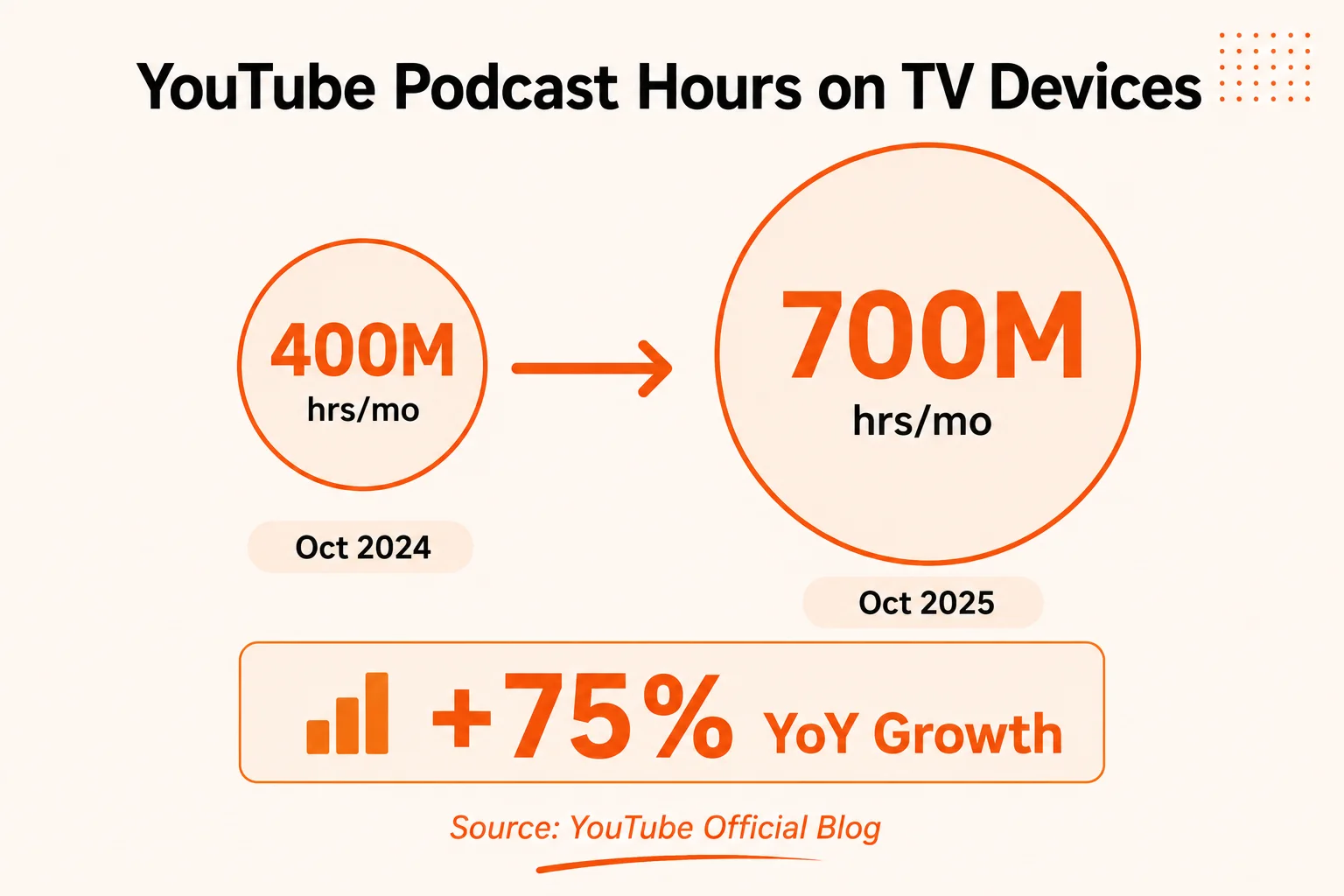
Fig 1 – YouTube podcast consumption on living room devices nearly doubled in one year.
What Are YouTube Audio Ads, Exactly?
YouTube audio ads are an ad format designed for people who are streaming music, playing a podcast, or running YouTube in the background while doing something else.
The creative is a YouTube video link, and the visual component stays intentionally minimal. Google suggests a static image or a simple animation. The audio does the heavy lifting.
Here is how it differs from standard YouTube video ads.
Video ads assume someone is watching the screen. Investment goes into visuals, motion graphics, actors, and locations. Audio ads assume someone is listening. Investment goes into the voiceover, the script, and the sound design. The visual acts as a companion piece.
That distinction matters because production costs drop significantly. A video production crew becomes unnecessary. What you need is a good microphone, a solid script, and a static brand image or a light animation loop. Google even provides example ads to show the range.
The Complete YouTube Audio Ad Specs Reference
Google’s official guide lays out the specifications clearly. Here is the full table in one place.
A few things are easy to miss in the documentation.
The 15 second cutoff matters. A creative of 15 seconds or shorter runs without a skip option. A creative of 16 to 30 seconds becomes skippable. That is a large difference in guaranteed exposure. We generally suggest starting with 15 second creatives to get full completion on every impression.
The voiceover word count is specific. Google recommends 60 to 80 words in a 30 second ad. That works out to roughly 2 to 2.7 words per second, which is a comfortable conversational pace. Rush it and you lose the listener. Drag it and you waste seconds.
Your creative must be uploaded to YouTube first. Google Ads does not accept a raw audio file. The ad is served as a YouTube video, so you need a video file (even a still image with audio) uploaded to your YouTube channel before you can use it in the campaign.
How to Set Up YouTube Audio Ads Step by Step
Here is the exact process as it works in Google Ads today. The steps below reflect the current 2026 UI.
Step 1. Start a New Campaign
Log into your Google Ads account. Click the Campaigns icon in the left sidebar, then click the blue plus button and select ‘New campaign.’
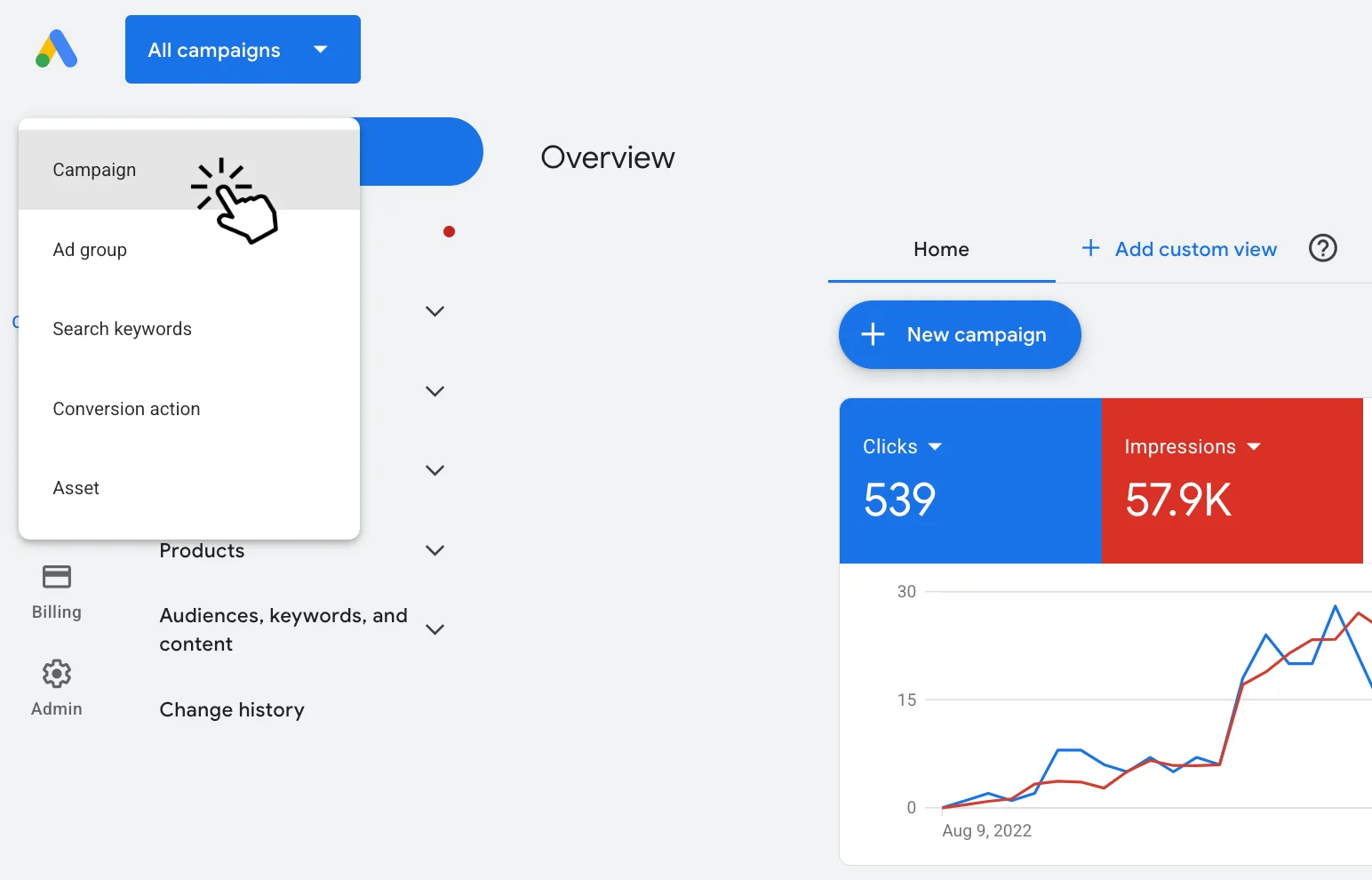
Fig 2 – Click the plus button and select New Campaign to see the full list of goals.
Step 2. Select Create a Campaign Without Guidance
From the goal list, select ‘Create a campaign without guidance’ at the bottom. This path gives you access to the Audio subtype. The goal based options (such as the renamed “YouTube reach, views, and engagements,” which used to be called “Awareness and consideration”) do not surface the Audio subtype directly.
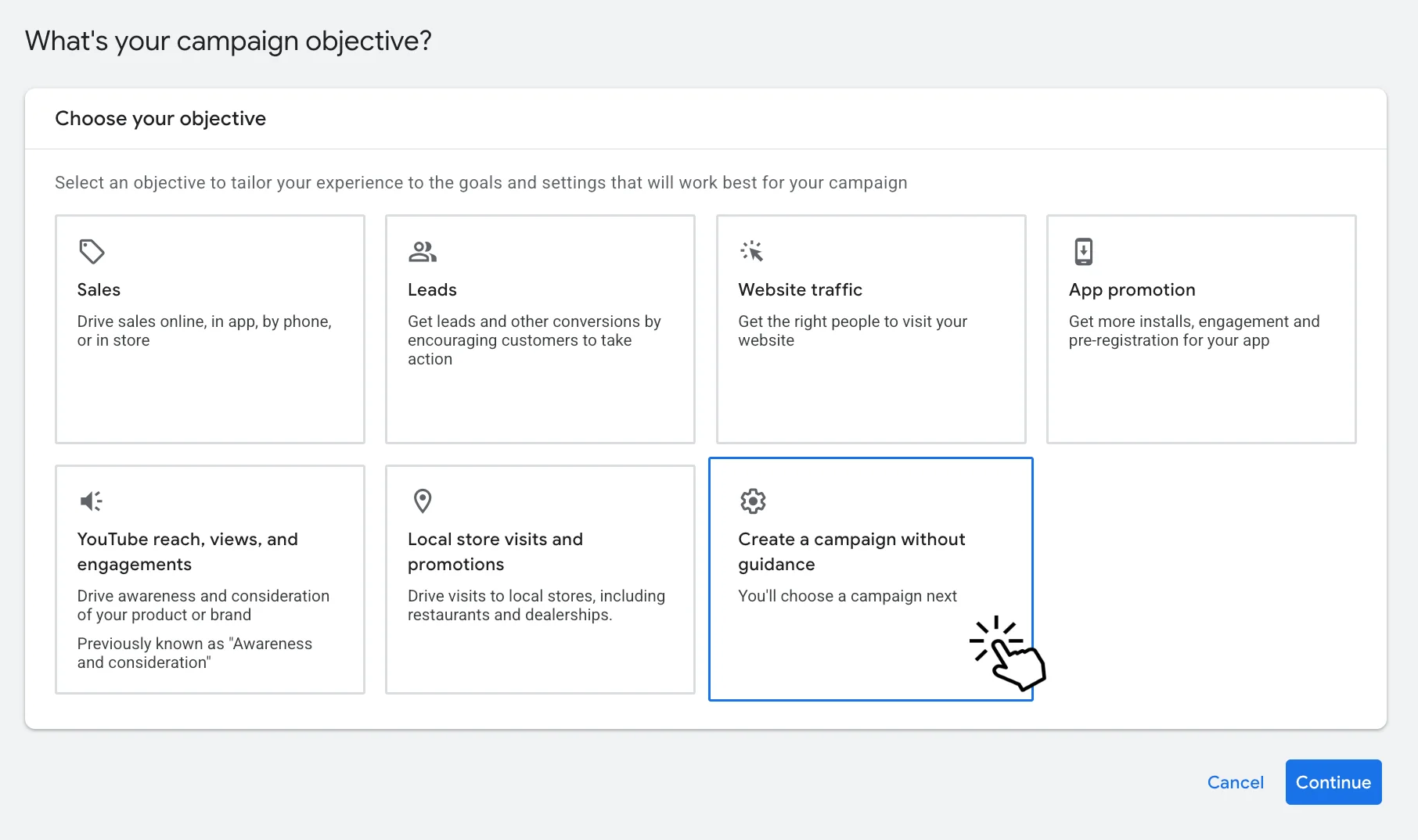
Fig 3 – Choose ‘Create a campaign without guidance’ to access the Audio ad subtype.
Step 3. Select Video as the Campaign Type
On the next screen, you will see campaign types. Performance Max, Search, Demand Gen, Display, Shopping, Video, and App.
Select ‘Video.’ Audio ads live under the Video campaign type. Google Ads has no standalone Audio campaign type.
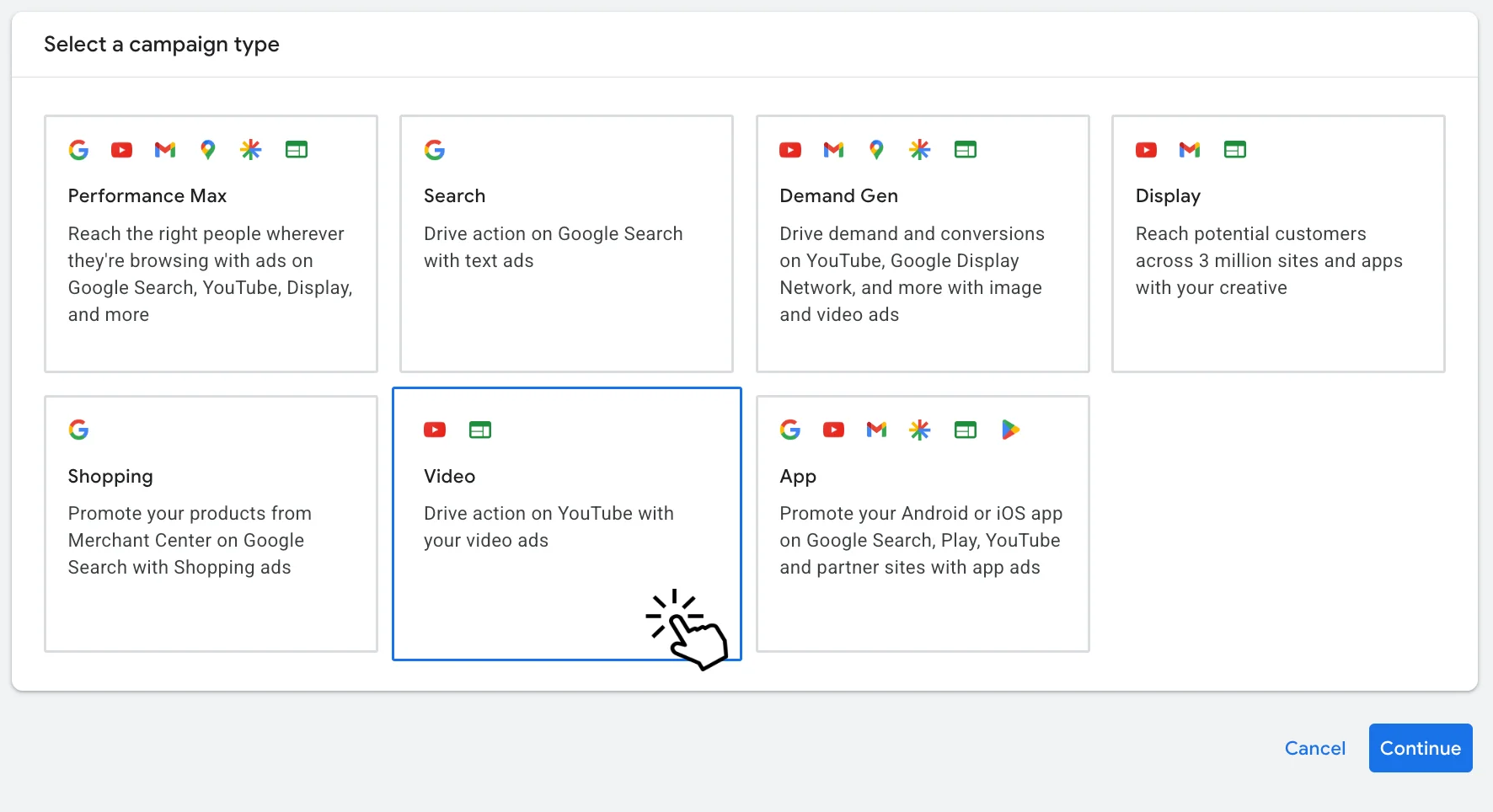
Fig 4 – Audio ads are nested under the Video campaign type.
Step 4. Choose Audio Reach as the Subtype
After you select Video, Google shows you a list of subtypes. Video Views, Video Reach (with Efficient Reach, Non-skippable Reach, and Target Frequency options), Drive Conversions, Ad Sequence, Audio Reach, and YouTube Subscriptions and Engagements.
Select ‘Audio reach.’ The description reads, “Reach people while they’re listening to content on YouTube.”
This is the only subtype that creates an audio focused campaign. Any other option here produces a standard video campaign.
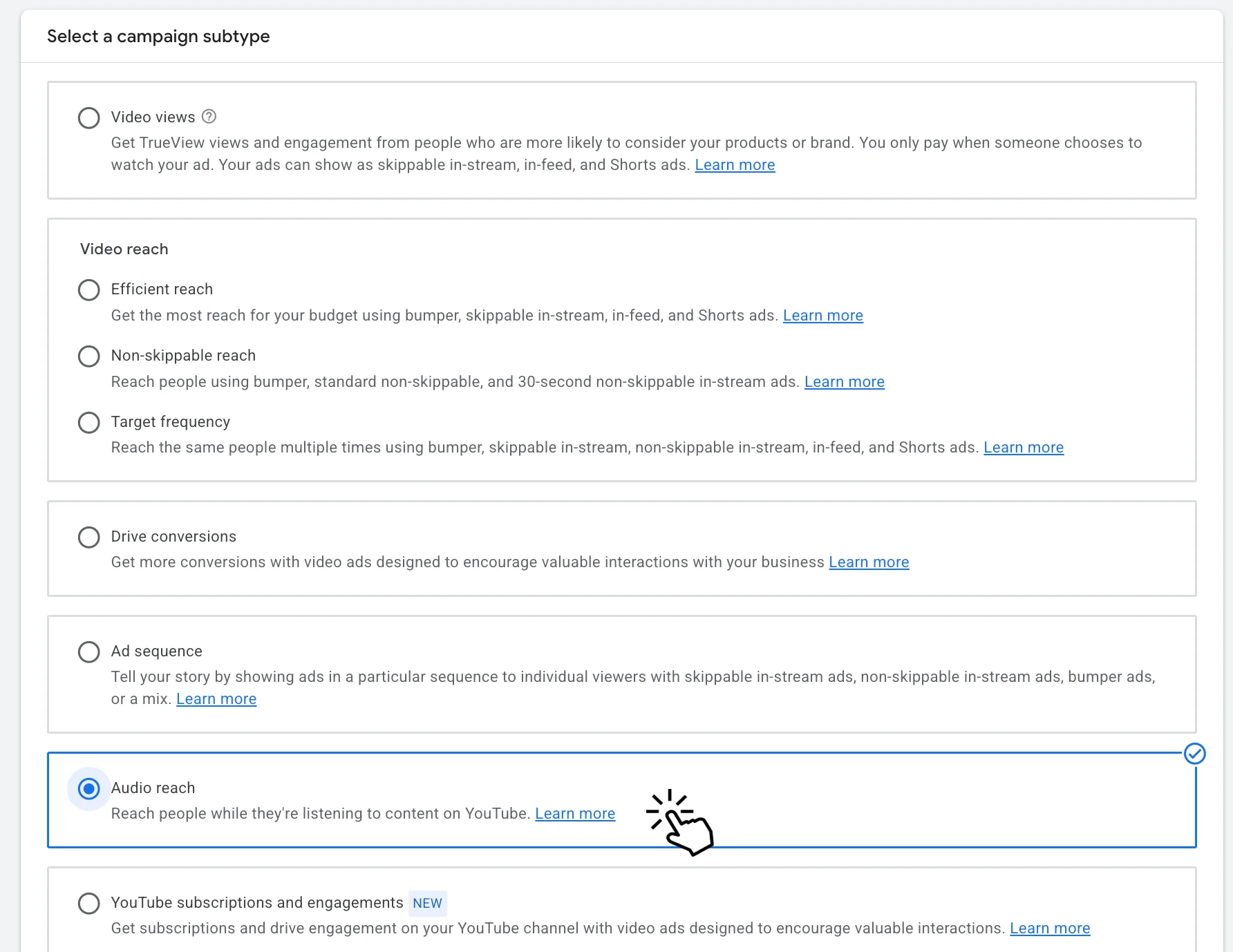
Fig 5 – Pick ‘Audio reach’ from the Video subtypes list to set up your audio ad campaign.
Step 5. Configure Campaign Settings
Once you select Audio reach and click Continue, you land on the full campaign setup screen. Here is what you will see, from top to bottom.
General Settings confirms your campaign type as “Video campaign” with “Subtype: Audio.” Give your campaign a clear name.
Bid Strategy is locked to Target CPM. Google Ads sets this automatically for audio campaigns. You cannot change it to CPC or CPV.
Budget and Dates lets you set a campaign total or daily budget. You will also set your start and end dates here. Google requires an end date for audio campaigns.
Networks defaults to YouTube and Video Partners on the Google Display Network.
Locations and Languages let you target by country or specific regions, and filter by language.
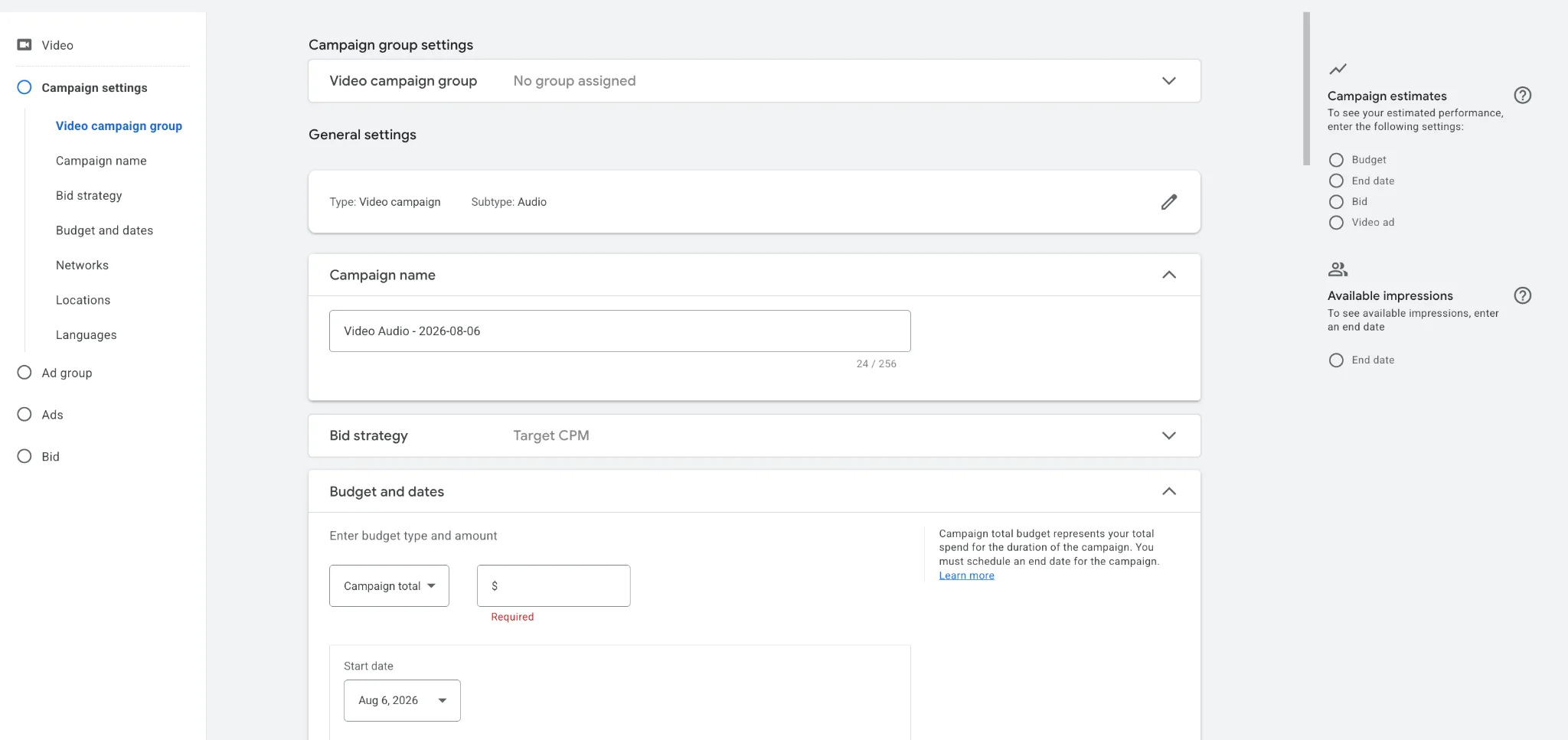
Fig 6 – The campaign setup screen for audio ads with Target CPM bidding and budget configuration.
Step 6. Set Up Your Ad Group and Targeting
Scroll down to the “Create your ad group” section. Name your ad group something descriptive.
Under Audience, you get the same targeting options as standard YouTube video campaigns.
- Demographics (age, gender, household income, parental status)
- Interests and detailed demographics (affinity audiences, in market audiences, life events)
- Your data (first party customer lists and remarketing audiences)
- Audience expansion finds more users who look like your selected audience
Under Content, you can target by keywords, topics, and specific placements. Google’s own advice still holds. Keep targeting broad. Audio ads work best with wider audiences because the goal is reach and frequency, and narrow targeting works against that.
Step 7. Add Your Creative and Set Your Bid
In the “Create your video ads” section, paste or search for your YouTube video URL. This is the video you uploaded earlier with your audio creative and static image or simple animation.
You will also see a helpful link. “Need a video? Create an audio focused ad in a few steps.” Google now offers a simplified creation tool for advertisers without a video ready.
If your video is not yet on YouTube, there is a direct link to upload it.
Below the creative section, set your Target CPM bid. Google explains it right on the page. “Your Target CPM (cost per thousand impressions) bid is the average amount you want to pay for every 1,000 times your audio ads are placed.”
Our tip. Start with a CPM bid slightly above the amount Google suggests. Audio ad inventory is still underpriced compared to video. Early CPM benchmarks from campaigns we have run land in the $2 to $6 range depending on targeting, well below standard video CPMs of $5 to $10.
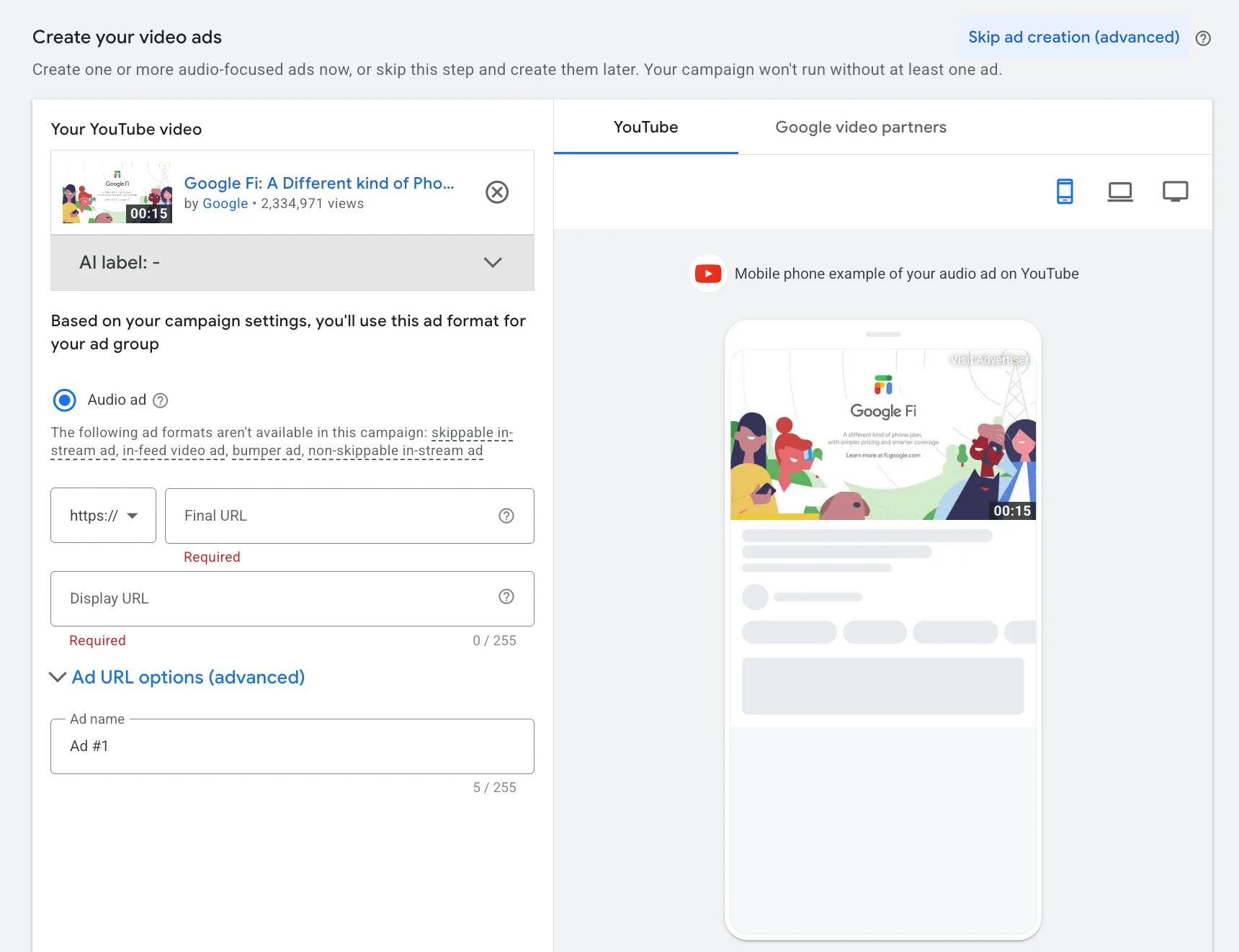
Fig 7 – Paste your YouTube video URL and set your Target CPM bid at the bottom of the setup page.
Step 8. Review and Launch
Check the “Campaign estimates” widget on the right side of the screen. It shows available impressions based on your budget, bid, end date, and video ad selections. If any of those fields are empty, you will not see estimates.
Review all your settings, then click the green ‘Create campaign’ button at the bottom.
Your audio ad is now live. After launch, watch the reporting dashboard. Look at impressions, reach, frequency, and, if you are eligible, set up a Brand Lift study to measure ad recall and favorability.
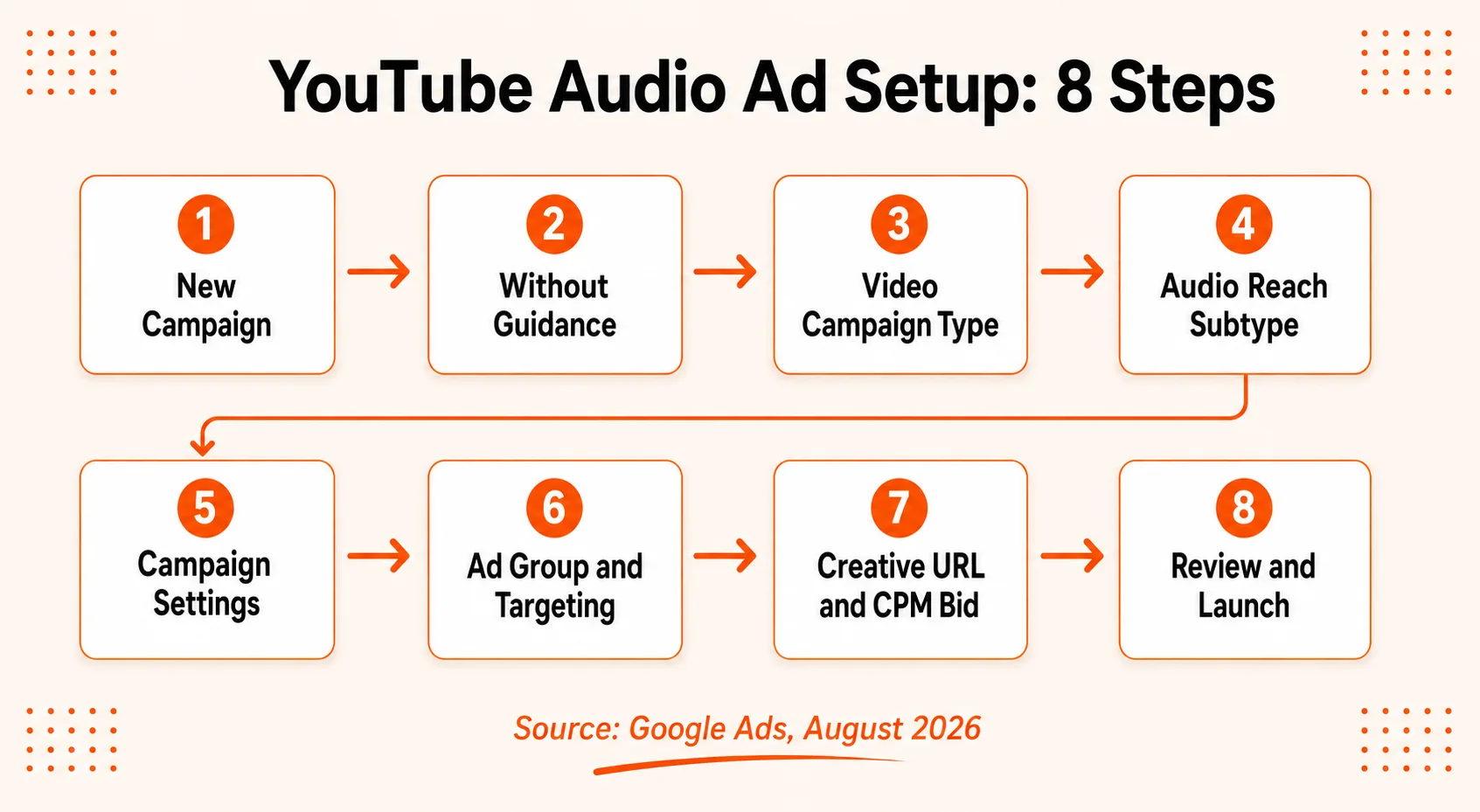
Fig 8 – The full setup flow for YouTube audio ads, from campaign creation to launch.
Best Practices for YouTube Audio Ads (Google’s Tips + Ours)
Google’s guide includes a set of creative best practices. Here is what Google suggests, along with what we would add from running paid media campaigns.
Lead With Your Brand
Google says to introduce your business or product early. We agree, and we would push this further. Say your brand name within 3 seconds. Audio listeners commit less than video viewers. If they tune out after 5 seconds, your brand name needs to already be in their head.
Sound Is Everything
The visual is secondary. Your voiceover, music bed, and sound effects carry the ad. Invest in professional voice talent or at minimum a clean recording setup. A bad microphone will kill an otherwise good script.
Keep a Conversational Tone
Google specifically suggests a friendly tone that helps transition listeners between entertainment content and ads. This is good advice. Audio ads interrupt music playlists and podcast episodes. If your ad sounds like a robot reading corporate copy, listeners mentally check out immediately.
Include a Clear Call to Action
Google says to include a CTA in the audio or in the video creative. We suggest both. Say the CTA out loud (‘Visit oursite.com to learn more’) and display it visually on the static image or animation. Give the listener two ways to catch it.
Test 15 and 30 Second Creatives
The 15 second format runs without a skip option, which guarantees completion. The 30 second format is skippable, which means you need a stronger hook. Run both and compare completion rates, recall, and cost per completed listen.
Need Help Setting Up YouTube Audio Ads?
Running audio ads well means getting the creative, targeting, and measurement right from the start. Our paid media team builds and manages YouTube campaigns across every ad format, including audio. Anyone who wants to add audio ads to a media mix without the trial and error phase can talk to us.
Talk to Our Paid Media Team
Who Should Be Running YouTube Audio Ads?
Audio ads suit certain advertisers more than others. They work best for the following profiles.
Brands focused on awareness and recall. For anyone whose goal is getting a name in front of new audiences cheaply, audio ads are one of the most efficient ways to do it on YouTube right now.
Businesses already running YouTube video campaigns. Audio ads extend reach into inventory that video ads do not touch. Running them alongside existing video campaigns fills gaps in audience coverage.
Companies targeting podcast and music listeners. For any audience that overlaps with YouTube’s podcast and music demographics, audio ads put you directly in front of them during listening sessions.
Advertisers with limited creative budgets. No video production required. A voiceover, a script, and a static image can get you live in a day.
Audio ads suit direct response campaigns poorly. The format is built for brand building, and immediate clicks and conversions come from other formats.
Common Mistakes to Avoid With YouTube Audio Ads
Reusing a video ad script for audio. Video scripts rely on visual cues. Audio scripts need to stand completely on their own. Rewrite from scratch.
Over targeting. Stacking too many audience layers kills delivery on awareness campaigns. Keep targeting broad.
Bidding too low. Google’s auction runs on competition. If your CPM bid sits below the floor for your audience, your ads will not serve.
Ignoring frequency. Audio ads are short. One impression will not move the needle. Plan for enough frequency to build recall. 3 to 5 exposures per user per week is a reasonable starting range.
Skipping measurement. For any budget that qualifies for Brand Lift studies, use them. Without measurement, you are flying blind on whether the ads actually build awareness.
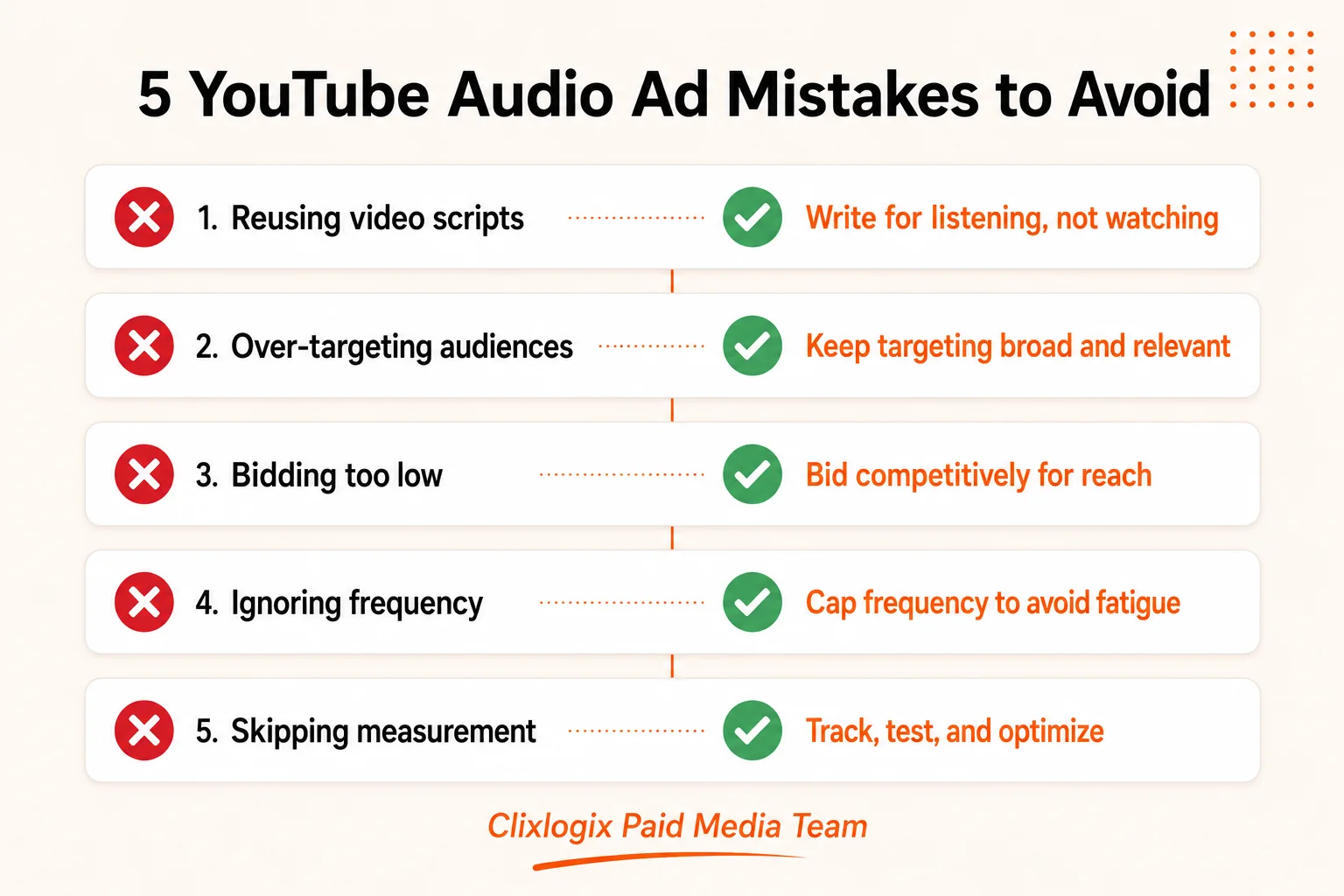
Fig 9 – Avoid these five mistakes when launching your first YouTube audio ad campaign.
Audio ads are awareness tools, so the metrics you track differ from search or shopping campaigns. Here is what to look at.
Impressions and Reach. How many people saw and heard your ad. This is your primary volume metric.
Frequency. How many times each person heard the ad on average. Too low means no recall. Too high means wasted spend.
CPM. Your actual cost per 1,000 impressions. Compare this against your video CPMs to see the efficiency gain.
Brand Lift (if eligible). Google’s Brand Lift studies measure ad recall, awareness, and favorability. This is the gold standard for measuring awareness campaign impact. Early testers like Shutterfly reported a 14% lift in ad recall and a 2% lift in favorability from audio ads.
View Through Conversions. These track users who heard your ad and later visited your site or converted, even without clicking. Watch these for a fuller picture.
What This Means for Your Ad Strategy
YouTube audio ads complement video ads. The smartest way to use them is alongside existing video campaigns to fill gaps in audience reach. Video ads hit the watchers. Audio ads hit the listeners. Together, they cover more of YouTube’s 2.7 billion monthly users than either format alone. Any brand already running paid media campaigns through Google Ads can add audio to the mix as one of the easier wins available right now. Low production cost, low CPMs, and an audience that most competitors are still ignoring.
Google publishing this official guide is a signal. Google wants more advertisers using the format. That usually means the inventory is underpriced and the opportunity window will close eventually. Any digital marketing strategy that includes YouTube should treat audio ads as part of the conversation now, not 6 months from now.
Ready to Add YouTube Audio Ads to Your Campaigns?
We build and manage YouTube campaigns across video, audio, Shorts, and more. Whether the need is creative production, campaign setup, or full funnel management, our team has it covered.
Get a Free Campaign Consultation
Frequently Asked Questions