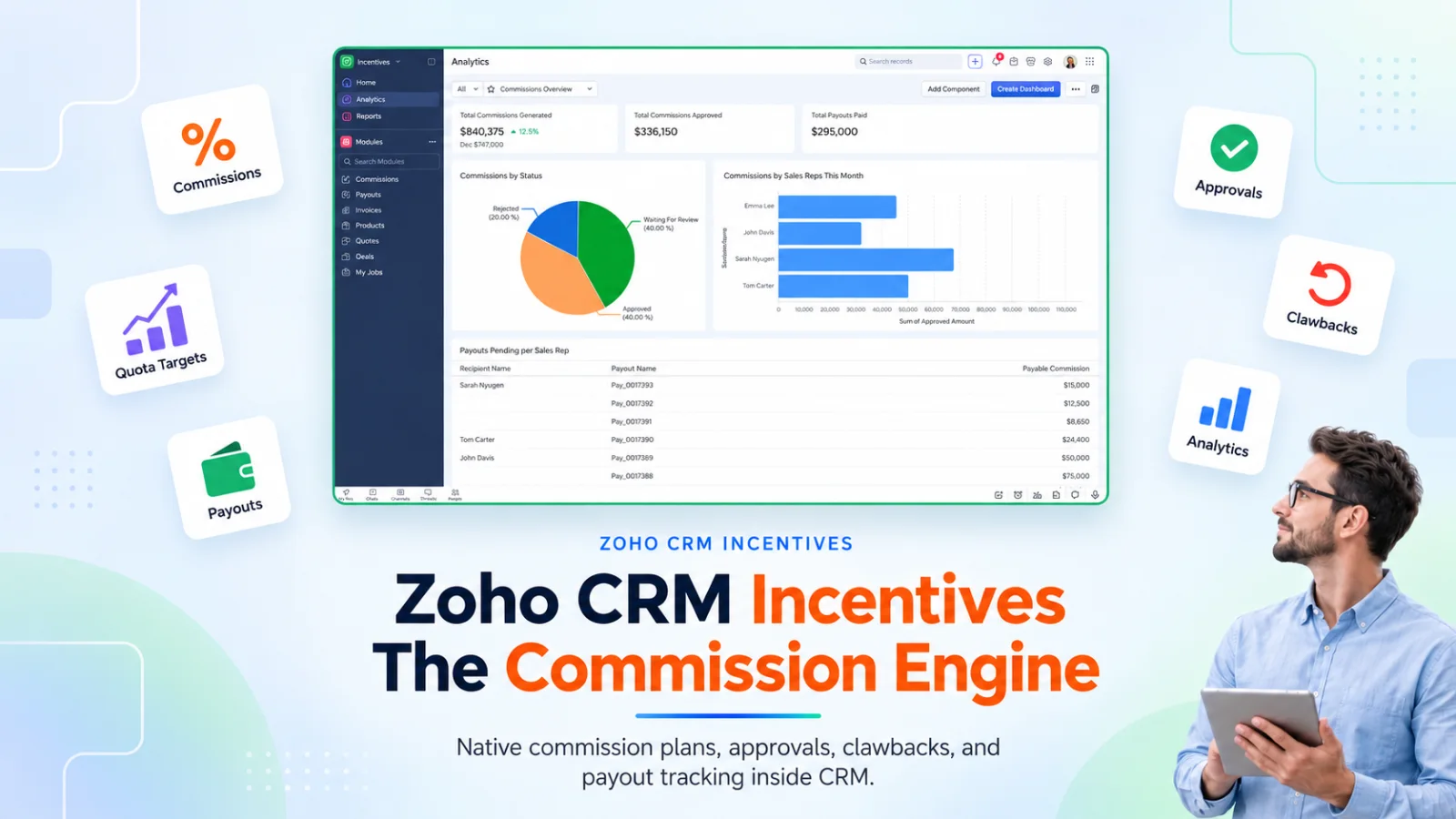
TL;DRZoho CRM users have been asking for native incentive compensation management since 2015. On August 25, 2026, they got it. Incentives for Zoho CRM is Zoho’s native sales commission software, an App Space application that handles commission plan design, calculation, approval, clawbacks, and payout tracking using CRM data. The v1 covers CRM native compensation cleanly. It does not yet read from Zoho Books, Finance, or Inventory, which limits any team whose commission logic depends on invoiced revenue or warehouse level events. Bundled at no extra charge for Enterprise, Ultimate, CRM Plus, and Zoho One “for the moment.”
How Sales Leaders Manage Sales Commission Plans
Every sales leader we brief walks in with a commission plan they can describe in two sentences and a management burden they cannot. The plan design is often the easy part. Running it end to end across a fiscal year is where the labor sits.
The commission models we see most across our client base fall into roughly ten shapes. Understanding how each one works, and where it earns its place, is the starting point for scoping any commission platform.
Flat percentage on booked revenue. The simplest structure. A rep earns a fixed percentage of every deal closed, applied uniformly regardless of size or attainment. Most common in early stage SaaS, professional services firms, and B2C sales floors where deal size varies little and the plan needs to be trivially explainable to new hires. The economics are predictable. Total commission scales linearly with revenue, so payroll cost as a share of revenue stays flat. The weakness is that a flat plan does not motivate stretch performance and does not discourage discounting, because the rep earns the same percentage regardless of margin surrendered.
Tiered attainment plans. The commission rate accelerates as the rep crosses attainment milestones against their quota. A common shape looks like 5% below quota, 8% from 100% to 150%, and 12% above 150%. Widely used in mature enterprise sales organizations where quota discipline matters. The economics align pay with performance and reward reps for blowing through quota. Variations we see most often include cliff structures (no commission below a threshold), pure accelerators (rate steps up without a cliff), capped versus uncapped models, and prorated tiers where the higher rate applies only to the revenue inside that tier.
Product mix plans. Different commission rate for each product family or SKU. Used when the business wants reps steering deals toward higher margin or strategic products. A representative shape looks like 12% on strategic add ons, 8% on new logo product, 4% on renewals. The economics are direct. Reps are paid to sell what the business wants sold. Best fit for portfolios with meaningfully different margin profiles. Governance overhead is real, because plan documents get long and rate lookup tables need version control across fiscal years.
Recurring revenue plans. SaaS and subscription businesses pay commission on MRR or ARR contribution in place of booked cash. Multi year kickers reward longer contract commitments, for example 1x MRR on a one year contract, 1.5x on a two year, 2x on a three year. Some businesses add a retention bonus paid at first renewal. The economics align rep incentives with recurring revenue durability over closed ACV alone, which matters when Customer Success or churn risk sits downstream of the initial sale.
New logo versus renewal differentials. Higher rate on net new customers than on renewals or expansions, typically a 2x or 3x differential. Standard in SaaS where the business recognizes that acquisition is materially harder than retention. Often paired with a lower rate for account expansion inside existing customers, reflecting the fact that expansion is easier than net new but still deserves reward. The economics protect the business from over paying for renewal revenue that would have arrived on autopilot.
Team splits. Multiple contributors share commission on a single deal. A typical enterprise SaaS split runs 60 percent to the Account Executive, 20 percent to the Sales Engineer, 20 percent to the BDR who sourced the opportunity. Common in complex B2B where no single seller carries the deal alone. The economics reward collaboration and reduce credit disputes when the split ratios are documented before the deal closes. Governance overhead is real, because credit assignment becomes a systemic decision made before deal close.
Manager overrides. Sales managers earn a percentage of their team’s booked revenue on top of any individual selling they do. First line manager overrides typically run 0.5% to 2% of team production. Second line managers may earn a smaller override on their aggregated team. The economics keep managers vested in team results alongside their own book, and they support the transition of a manager moving away from selling toward coaching, pipeline management, and forecast accuracy.
Draws with monthly true ups. Reps receive a guaranteed monthly draw for predictable pay, typically 60% to 80% of expected commission at plan. At month end, the draw is reconciled against actual commission earned. Excess earned pays out as additional payout. Under earned draws carry forward as an advance against future commission. The economics smooth rep income during ramp periods or seasonal cycles while maintaining a durable link between actual performance and total pay. Common in businesses with long sales cycles where a rep can go two or three months without a closed deal through no fault of their own.
Clawbacks on churn, refund, or return. If the sale is reversed inside a defined window, commission is recovered from the rep. Standard in SaaS with a seasoning period of 60 to 120 days after close. Also standard in physical goods businesses with meaningful return rates. The economics protect the business from paying commission on unstable revenue and align rep behavior with sales quality alongside quantity. Governance requires a clear clawback window, defined trigger criteria (cancellation, refund, non payment, downgrade), and a documented reconciliation process the rep understands upfront.
SPIFFs and short window contests. Tactical, time bound incentives that sit on top of the standard plan. A common example is an extra 500 dollars per deal closed on Product X between today and the end of the quarter. SPIFFs sit on top of the standard plan as a temporary push for a specific behavior. The economics are that a well designed SPIFF pays for itself in accelerated pipeline conversion on the target SKU or account list. A poorly designed SPIFF steers reps away from the standard plan and creates disputes about deal timing, which is why finance teams keep SPIFF windows short and criteria narrow.
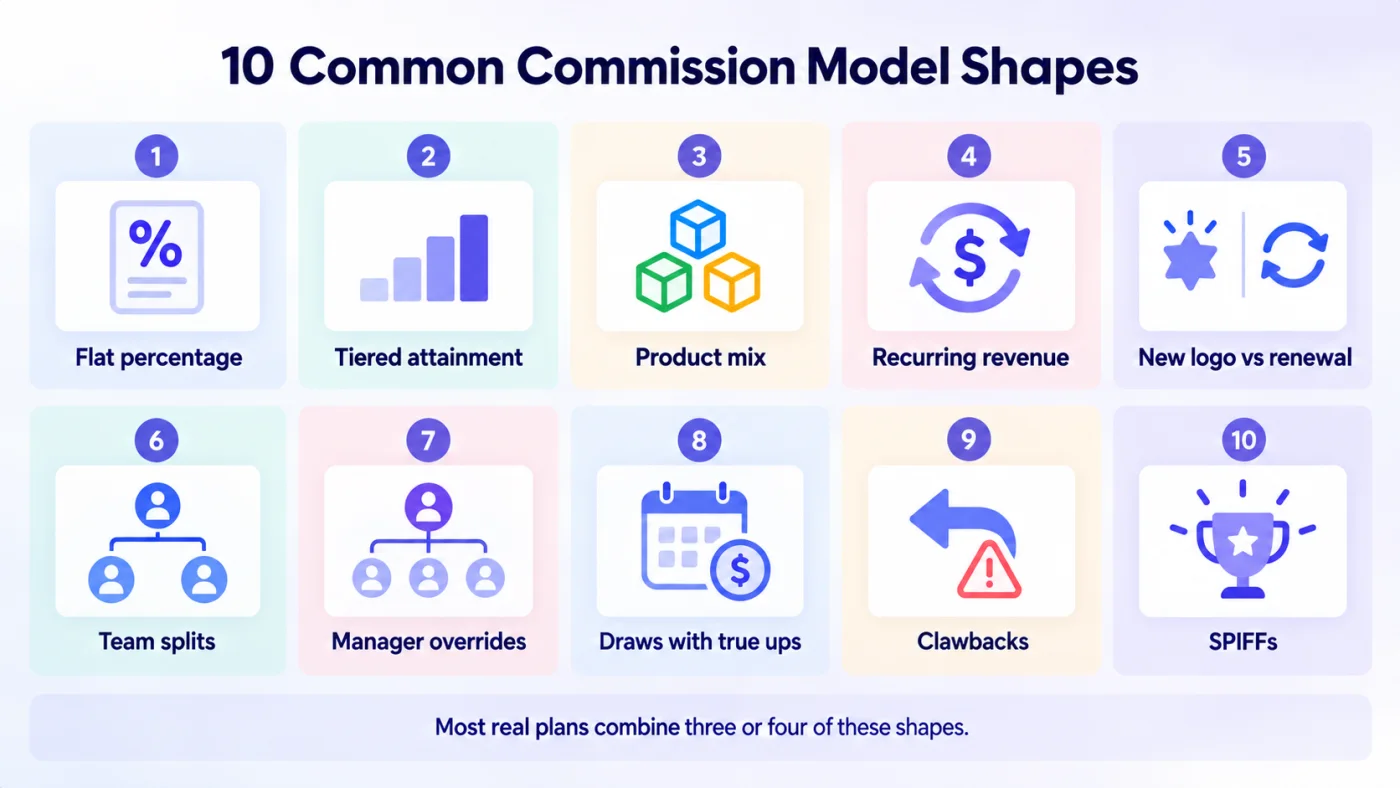
Fig 1 – 10 Common Commission Model Shapes
Most real commission plans combine three or four of these shapes. A SaaS enterprise plan might use tiered attainment as the primary structure, a new logo differential on rate, team splits between AE and SE, and a 90 day clawback on churn. Every combination adds calculation complexity the underlying platform has to handle correctly.
Running any of these means managing a lifecycle that spans eight discrete stages every fiscal period.
- Plan design
- Quota assignment per rep
- Event capture from the source system
- Calculation against the plan
- Approval by managers
- Payout readiness confirmation
- Actual disbursement through payroll or AP
- Reporting to finance, and dispute or clawback handling when a sale changes or falls through
That is eight discrete stages that a sales ops team quietly holds together every month.
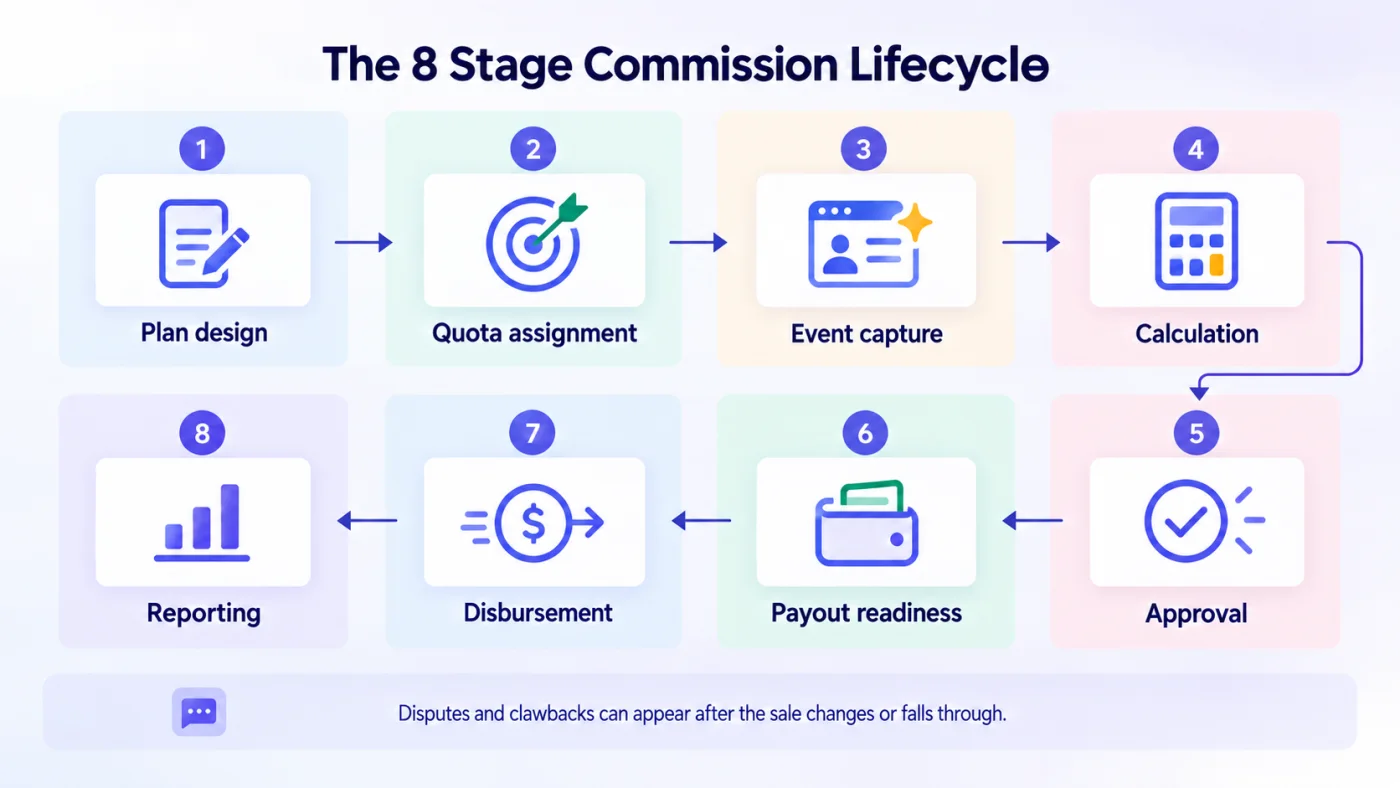
Fig 2 – The 8 Stage Commission Lifecycle
For most of Zoho CRM’s history, that whole lifecycle has lived somewhere other than CRM.
How Zoho CRM Users Handled Commission Management Before Incentives
Sales performance management inside Zoho CRM has quietly developed along three separate axes over the last decade. Each one solves a different job for a different part of the sales organization. None of them, until this month, calculated internal sales rep commissions natively.
Before we look at each axis in detail, here is the shape of the three.
- Motivator. The recognition and gamification tool for internal reps. KPIs, targets, games, leaderboards, and TV Channels for the sales floor. Handles the psychology of performance. Does not calculate commission.
- Partner Commissions inside PRM. The channel comp engine. Its scope is channel partners, and direct sales reps sit outside it. Actively developed. Shares the same engine that now powers Incentives.
- DIY builds and spreadsheets. The internal comp work that lived outside CRM entirely. Custom modules, Deluge functions, Widgets, Client Scripts, marketplace apps, and, most commonly, Excel. What sales ops teams actually ran on for years.
Together, these three axes covered recognition and channel comp cleanly. They left internal sales rep commission calculation as an assembly job for every Zoho CRM customer to solve on their own. Here is each axis in detail.
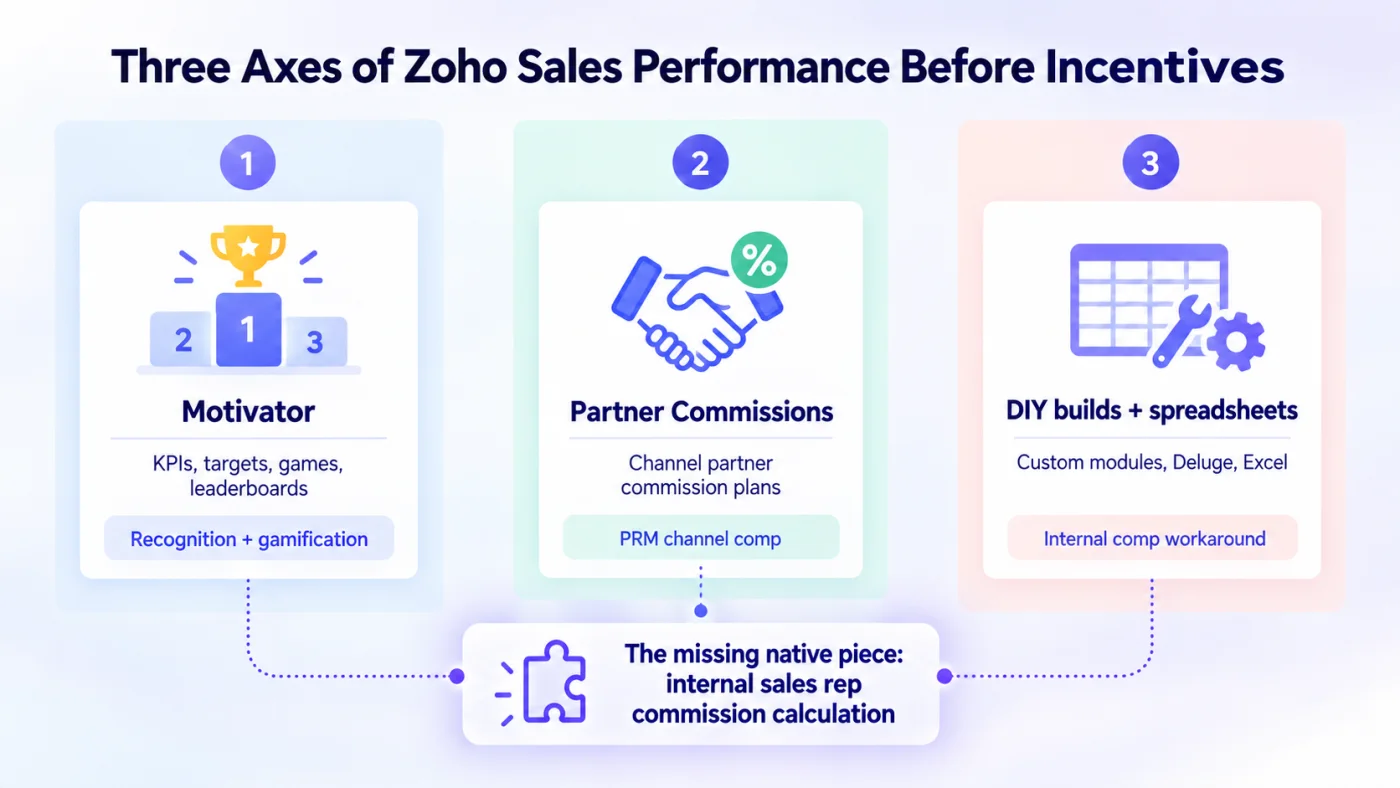
Fig 3 – Three Axes of Zoho Sales Performance Before Incentives
Motivator, where recognition and gamification live
Motivator for Zoho CRM has lived inside CRM for years as the tool that handles KPIs, targets, games between reps or teams, achievement boards, and TV Channels for the sales floor. It was originally a standalone product, absorbed into CRM around September 2021 when Zoho announced Motivator would replace the standalone version. Later that year Gamescope, another gamification tool, was folded in.
What Motivator does well is turn any sales activity into a scored KPI, set targets for individuals, teams, or the whole company, run games between users or teams that award points, and broadcast leaderboards to TV channels or dashboards. The mechanics are usable for a manager who wants to run a quarterly contest or track KPI attainment.
Motivator’s core capabilities have been stable since around 2022. Users have filed enhancement requests for an Apple TV app, deeper Zoho Connect integration, and more granular team lead permissions. These sit on Zoho’s roadmap. Today Motivator handles KPIs, targets, games, and TV Channel broadcasting to the sales floor.
For a sales leader, Motivator remains the tool inside Zoho CRM that handles the psychology of sales performance.
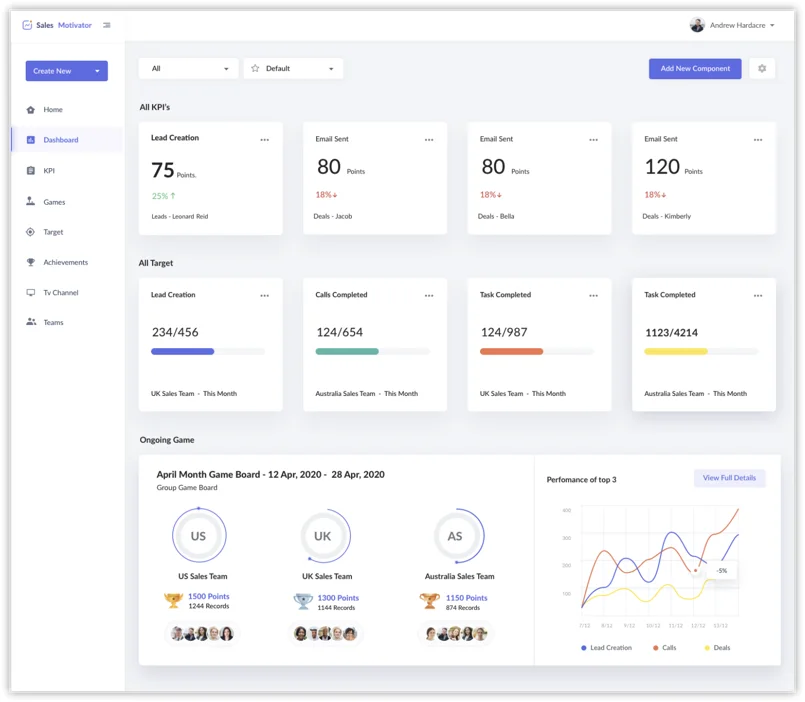
Motivator for Zoho CRM dashboard source, Zoho
Partner Commissions, where channel comp is calculated
Partner Commissions inside PRM for Zoho CRM is the other native commission tool Zoho has been quietly maturing. It calculates commissions for channel partners. Internal sales reps sit outside its scope. Its documentation exposes the exact building blocks that Incentives now uses. Line item versus total amount plans, quota based commissions, structures, commission triggers and record selection, review and approval, discrepancy handling, and clawbacks.
The vocabulary overlap is not a coincidence. Incentives shares the same Incentives/Partner Commissions permission grant, meaning the two features are administered as one. Read that as evidence that Zoho built the commission engine first for the channel partner use case, matured it inside PRM over several release cycles, then turned it around for internal sales reps and packaged it as Incentives.
This has one practical implication for buyers. The Incentives calculation engine is not a v1. It is an established engine given a new wrapper. That is a positive signal for reliability.
DIY builds and spreadsheets, where internal comp actually ran
Everything else that internal sales rep commissions ran on lived outside CRM. Here are the most common setups we see across client engagements.
The custom module build. A Deluge function on deal close writes a commission record to a custom module, calculates the rate against a lookup table, and posts to a rollup on the User record. Zoho Analytics on top for attainment dashboards. Manual export to Books or payroll for actual disbursement.
Widgets and Client Scripts. Zoho’s own recommendation to Ram Freedman in September 2024 when he filed a comprehensive ICM feature request. Their exact words were “you can explore Widgets and Client Scripts to achieve your requirements.” Higher lift, more flexible, demanded a Deluge capable admin.
Marketplace apps. Teams past a certain size adopted Commissionly, Elite Commissions, Palette, or a similar dedicated app, bringing their own data model and reporting.
Spreadsheets. By far the most common setup in the SMB clients we work with. Deals close, admin exports the monthly commission report, applies plan logic in Excel or Google Sheets, uploads back a summary.
Nothing at all. A material share of Zoho CRM shops we brief still run commission entirely outside CRM, in spreadsheets or payroll, because CRM never held the calculation logic.
The pre-Incentives spreadsheet reality is laid out directly in Zoho’s own Incentives Overview.
“An ideal system is the one that is coupled with a single source of the truth which is your CRM. Unfortunately, that setting can’t just be a spreadsheet. As your revenue grows, your data grows, and a spreadsheet will not be able to scale. Irrespective of the smart syntaxes you use, your spreadsheet cannot sustain conflicts and claw-backs. Lastly, with the growing volume of commission payouts, spreadsheets adds a lot of manual toil, susceptible to financial errors.”
Eleven Years of Asking for Native Incentive Compensation Management
Native incentive compensation management inside Zoho CRM has been an open request in the ecosystem for more than a decade. In our own practice we have been fielding scoping calls for Zoho commission builds since 2018, and by 2022 it was one of the most consistent gaps clients flagged when comparing Zoho CRM against Salesforce, HubSpot, and dedicated ICM tools.
The shape of the ask has been remarkably stable. Enterprise buyers want tier acceleration and quota attainment logic. Mid market buyers want split commissions, manager overrides, and clawbacks on cancellation. SMB buyers want the calculation and payout hand off to work without an external tool. Zoho customers have been filing feature requests along these exact lines on the community forum since at least 2015, and Zoho’s public response for most of that decade was to point users at Widgets, Client Scripts, and Deluge as the DIY path.
By 2023, commission complexity had grown and dedicated ICM tools (Everstage, CaptivateIQ, Xactly) had matured into serious platforms. Zoho customers were increasingly asking for a native option. In September 2025 Zoho publicly confirmed the work was underway. In August 2026 the answer landed as Incentives for Zoho CRM.
Incentives is the resolution of a decade long ask that Clixlogix and other Zoho partners have been watching build. Read the launch through that lens. It is the closing of a category gap the ecosystem has been asking Zoho to close for over ten years.
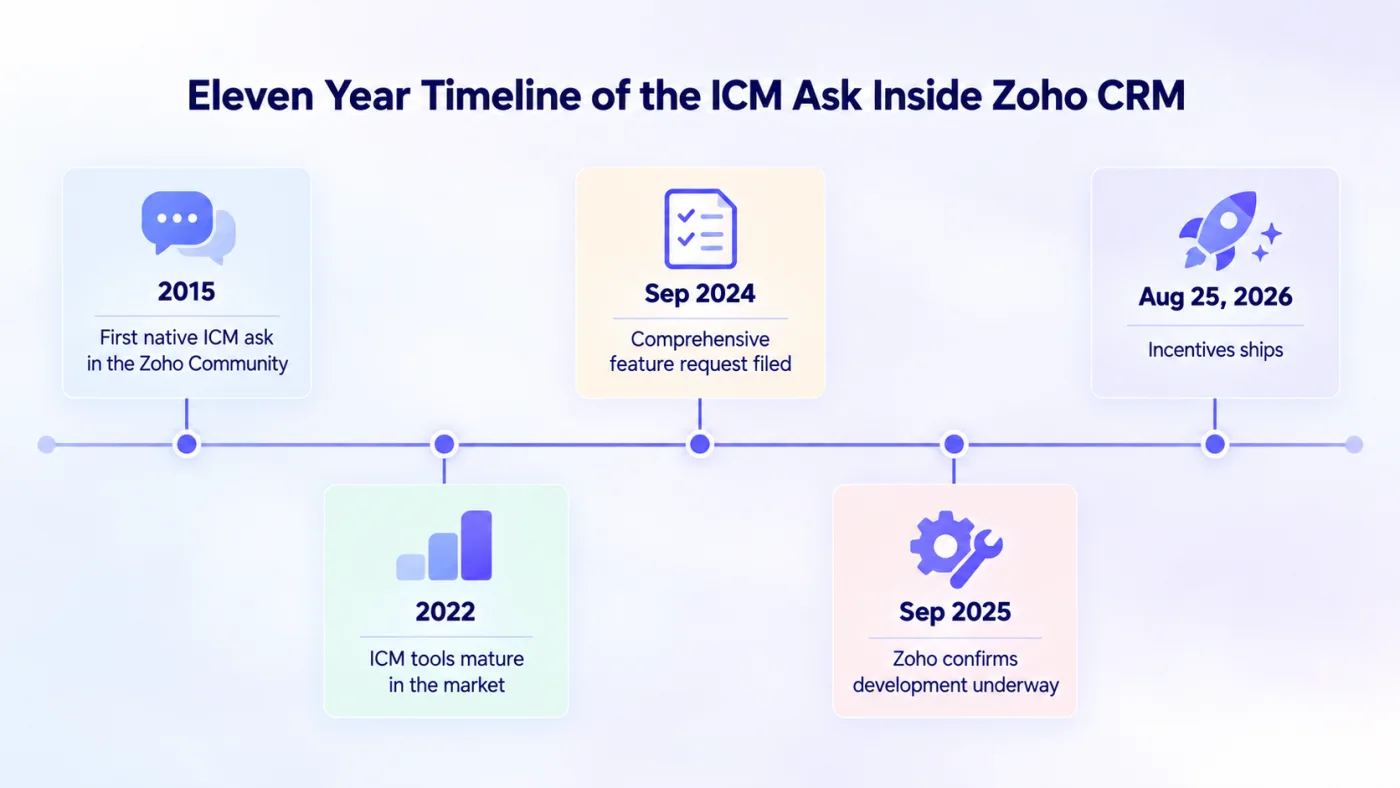
Fig 4 – Eleven Year Timeline of the ICM Ask Inside Zoho
What Zoho CRM Incentives Just Shipped
On August 25, 2026, Zoho released Incentives for Zoho CRM as a native App Space application. It sits inside CRM’s App Space container alongside ABM and Voice of Customer, using CRM data as its calculation source. In category terms, Incentives is Zoho’s answer to dedicated incentive compensation management software like Everstage, CaptivateIQ, and Xactly. Zoho bundles it inside the CRM stack.
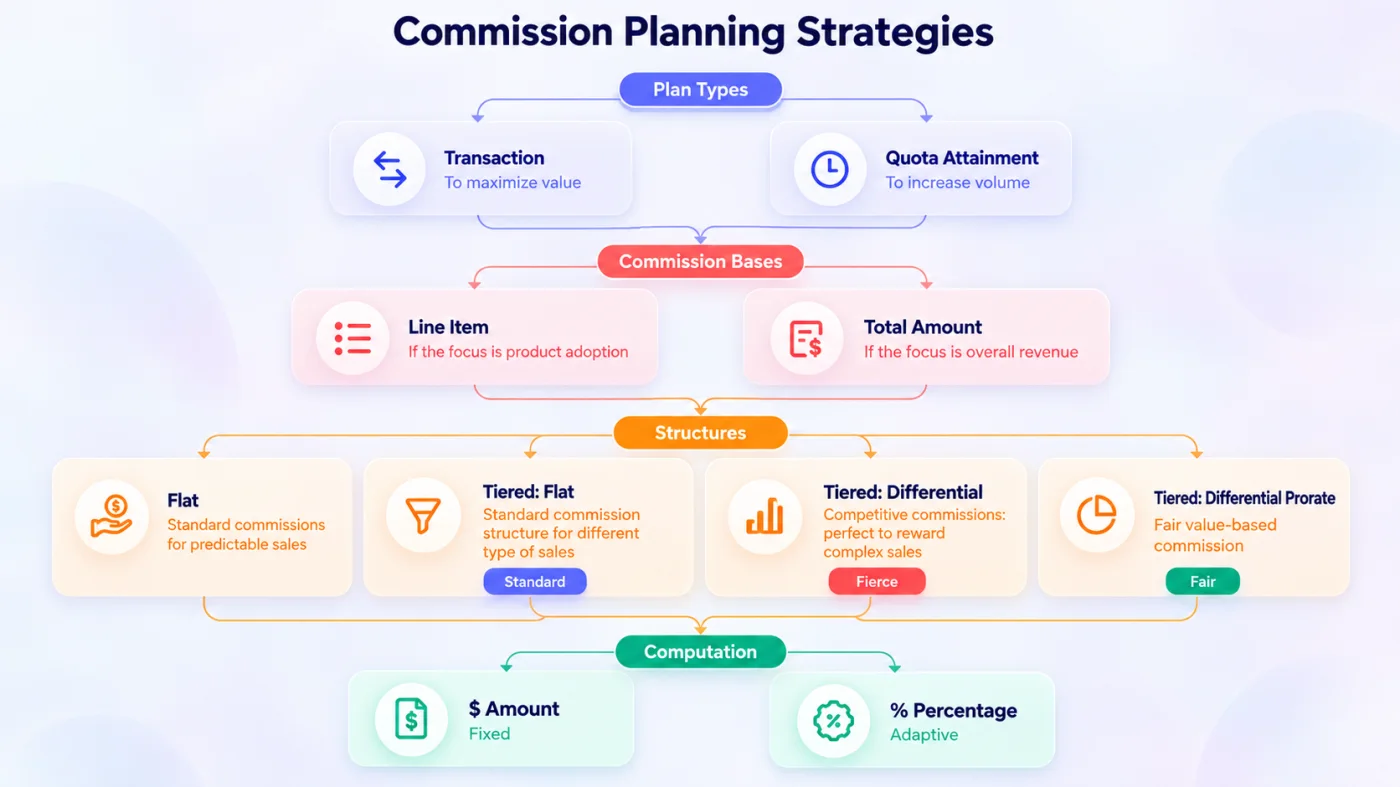
Fig 5 – Commission Planning Strategies
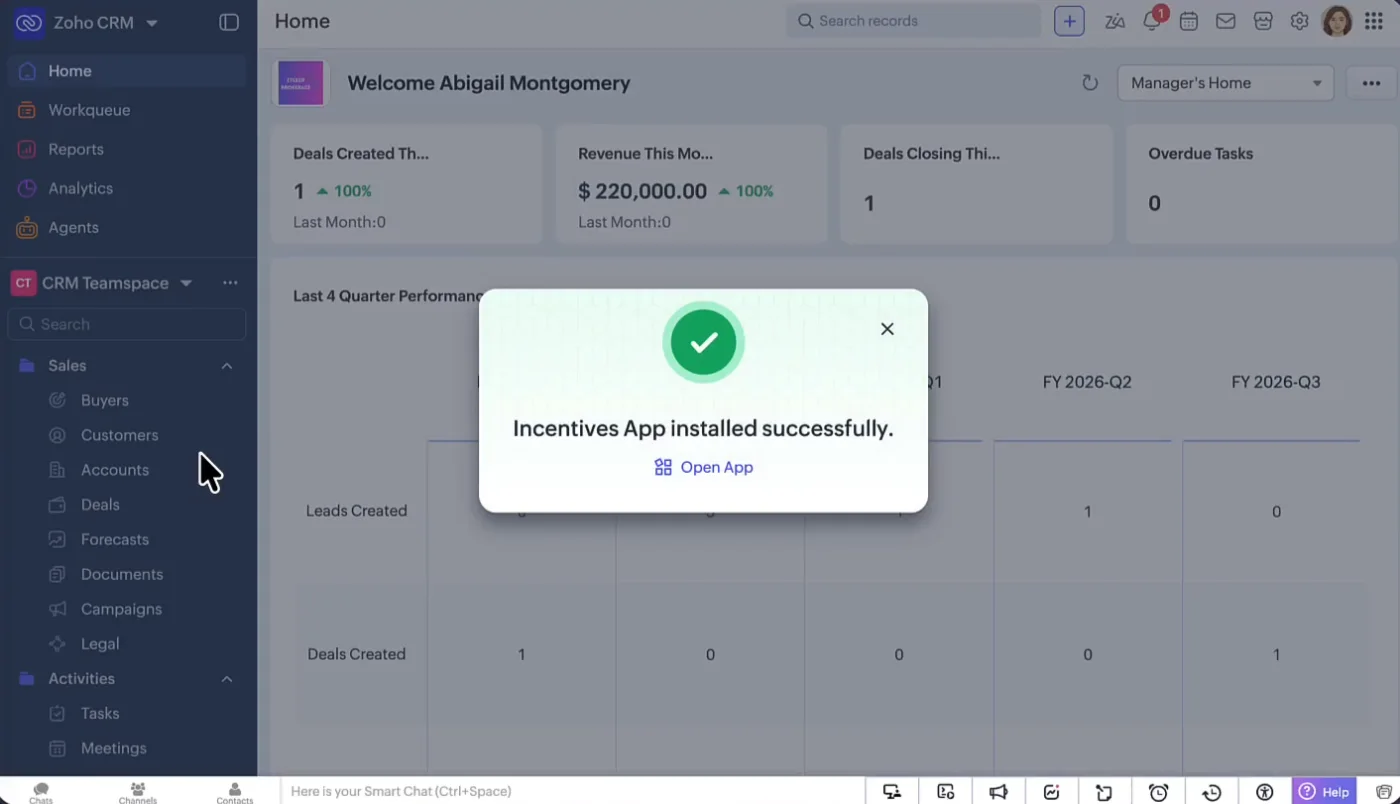
Incentives app inside App Space navigation source, Zoho
Zoho ships the v1 mechanics as three orthogonal choices, all documented in the commission plan configuration guide.
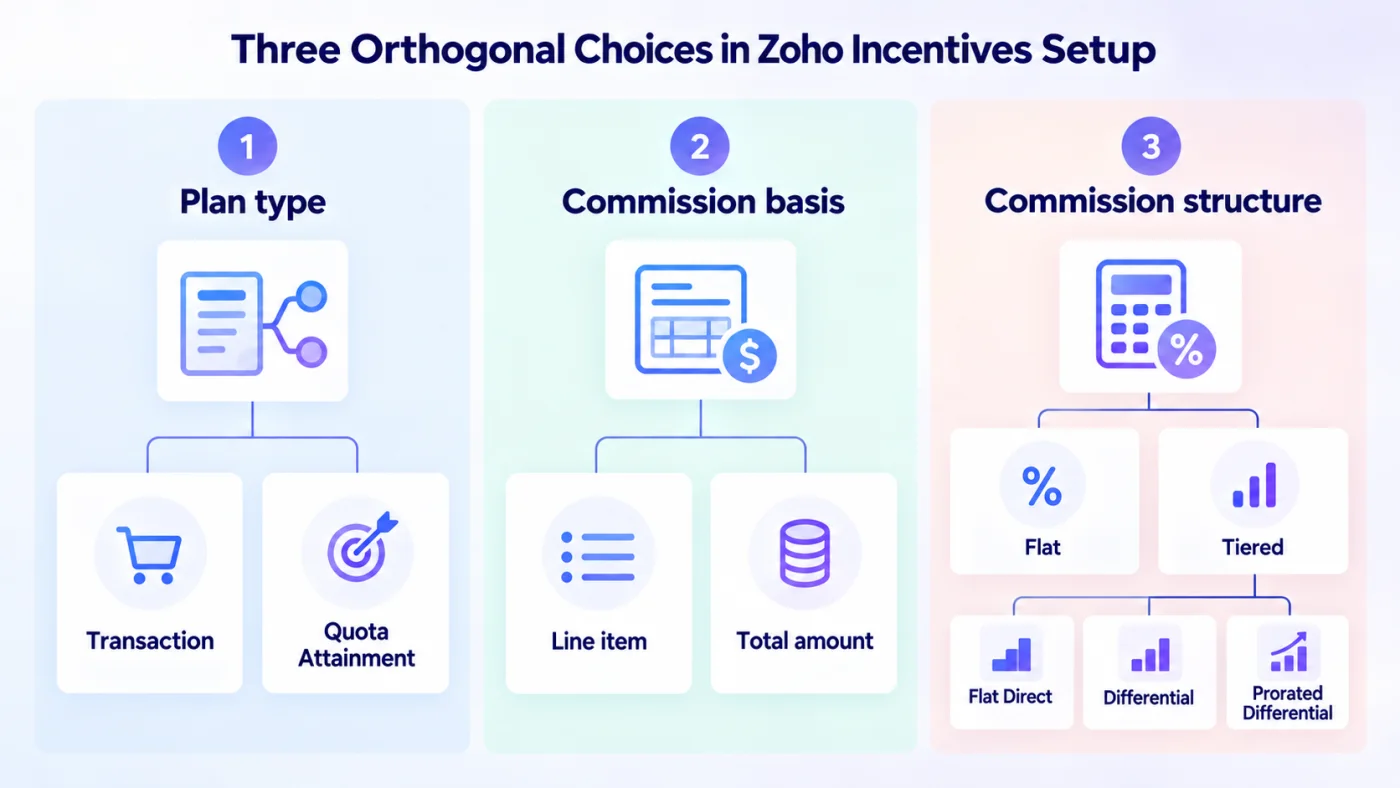
Fig 6 – Three Orthogonal Choices in Zoho Incentives Setup
Choice 1. Plan type
Two options that decide when commissions are earned.
Transaction based plans. Commissions calculated for every eligible transaction the rep closes. Payout scales with each transaction value. Best fit when deal values vary significantly, sales cycles are longer, and individual deals need sustained follow up. In our practice this is where real estate, capital equipment sales, and enterprise services deployments land. Limited volume, high stakes, months of pursuit per deal.
Quota attainment plans. Commissions earned only after the rep meets a predefined target. Target can be a transaction count or a revenue threshold. Best fit when the business relies on sales volume with short cycles and high transaction frequency. Retail floors and ecommerce operations are the natural fit in our deployments. Short cycles, high transaction volume, quotas as the performance frame reps understand.
Choice 2. Commission basis
Two options that decide what the commission is calculated on.
Line item. Commission calculated at the individual product or SKU level within a deal. Useful when a single sale involves multiple components with different margins, vendors, or strategic weight. Line item plans require a Set, which is a grouping of SKUs or product types that share a commission structure. Best fit for portfolios where the business wants different rates on different products, for example higher margin add ons, home grown parts, or strategic bundles.
Total amount. Commission calculated on the total transaction value regardless of components. Rewards high value deals end to end. Best fit when the business wants the rep focused on landing the biggest deal regardless of the product mix.
Choice 3. Commission structure
Two structures that decide the math.
Flat. A fixed amount or fixed percentage regardless of the sale size. Predictable payroll cost, simple to explain, weakest at motivating stretch performance. As an example, $2,000 per sale flat, whether the sale is $10k or $100k. Or 10% flat, which pays $1,000 on a $10k sale and $10,000 on a $100k sale.
Tiered. Different commission slabs based on where the sale value or attainment falls. Line item plans can define tier ranges on amount or on quantity. Total amount plans always use amount. Within Tiered, three calculation methods sit underneath.
Tiered Flat (Direct). Whichever tier bracket the sale falls into, the rep earns that tier’s flat commission. Simplest tiered variant. A storefront rep closing a $25,000 sale under tier brackets of $0 to $15k, $15k to $30k, and $30k and above lands in tier 2 and earns that tier’s flat commission of $5,000. A $16k sale and a $29k sale in the same tier both pay the same $5,000. Simple to explain, easy for reps to visualize.
Tiered Differential. The sale value is split across tiers. Each portion earns that tier’s commission, summed. Rewards big deals meaningfully more than flat tiered. A field sales rep closing a $120,000 enterprise deal after nine months of pursuit sits in the top bracket of a tiered plan. Under Flat Tiered logic, only that final bracket’s commission applies, say $12,000. Under Differential, the sale value flows through each tier bracket in turn, and the rep collects each portion’s commission stacked. The same deal now pays $17,350. That is a $5,350 uplift on one deal. Reps notice.
Tiered Differential Prorated. Same split logic as Differential, but the carried over amount inside each tier is calculated per unit consumed. The rep earns only for units actually sold in that tier, and the business saves money on tiers that are partially consumed.
The four combinations Zoho supports
The three choices multiply out into four plan configurations, each pairing with either the Flat or Tiered structure.
Limits worth knowing before scoping
- Up to 4 tiers per commission plan
- Up to 500 line items per plan across all Sets
- Line item plans take tier ranges on amount or on quantity, and total amount plans always use amount
- Lowest tier is fixed at 0 by default
- Line item plans require an explicit Set grouping before structure can be configured
- Total amount plans skip the Set requirement and configure structure directly
Zoho CRM Incentives availability and rollout
Two hard eligibility gates. The organization must be on the New CRM UI. Legacy UI orgs will not see the app. And Incentives is not available in the Zoho CRM mobile app in v1.
The pricing language on Zoho’s launch post is “at no extra charge—for the moment.” Any three year TCO model we build for a client on Enterprise scale commission volume assumes conservative pricing past year one.
The Seven Step Commission Plan Configuration Model
Zoho’s own commission plan configuration walks through seven steps. This is the scaffold your team will move through when scoping. Treat it as a checklist.
Discrepancy sits at Step 3, before structure and approval. Zoho has designed the app so that clawback and adjustment rules are set early. That is a smart default. It also means the team scoping the plan has to think about post sale conflict handling upfront, as part of the initial configuration.
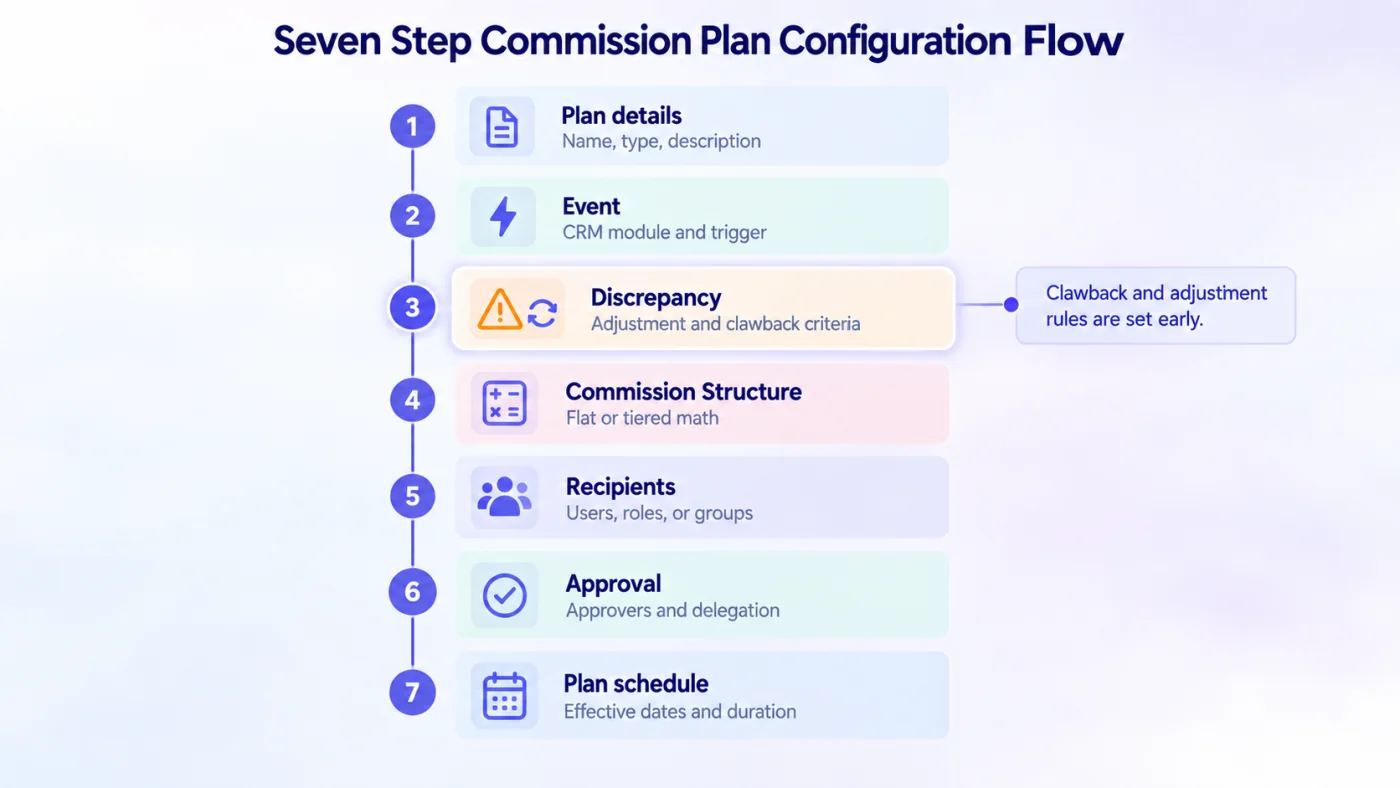
Fig 7 – Seven Step Commission Plan Configuration Flow
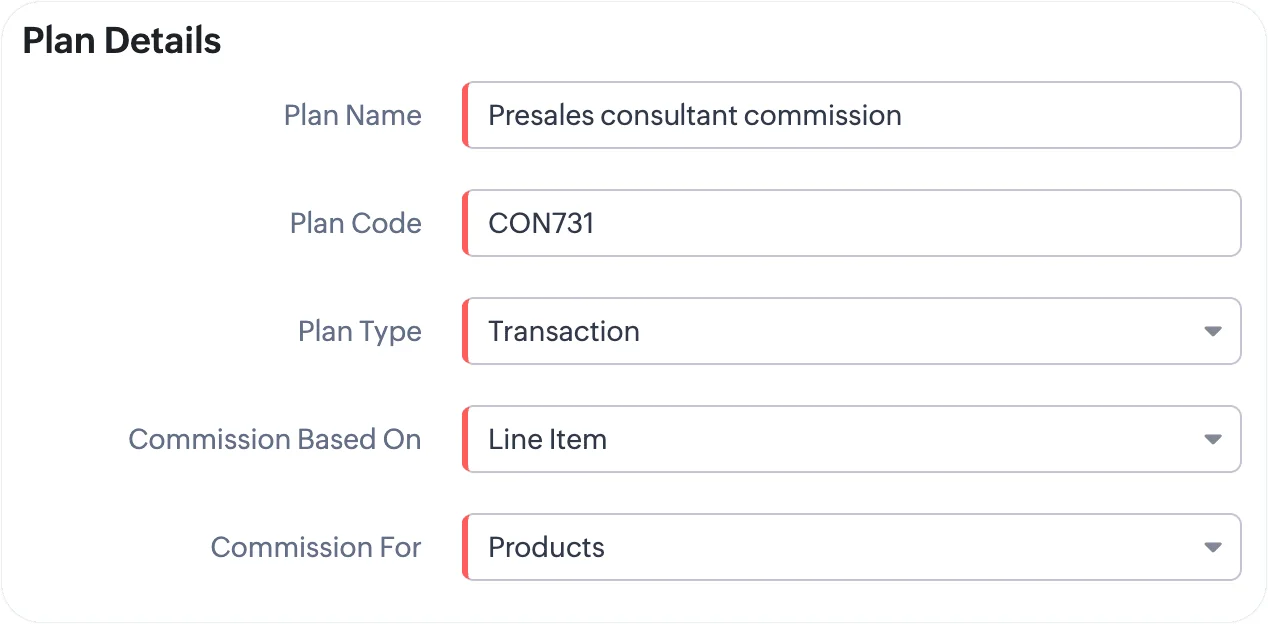
Step 1 Plan Details setup screen source, Zoho
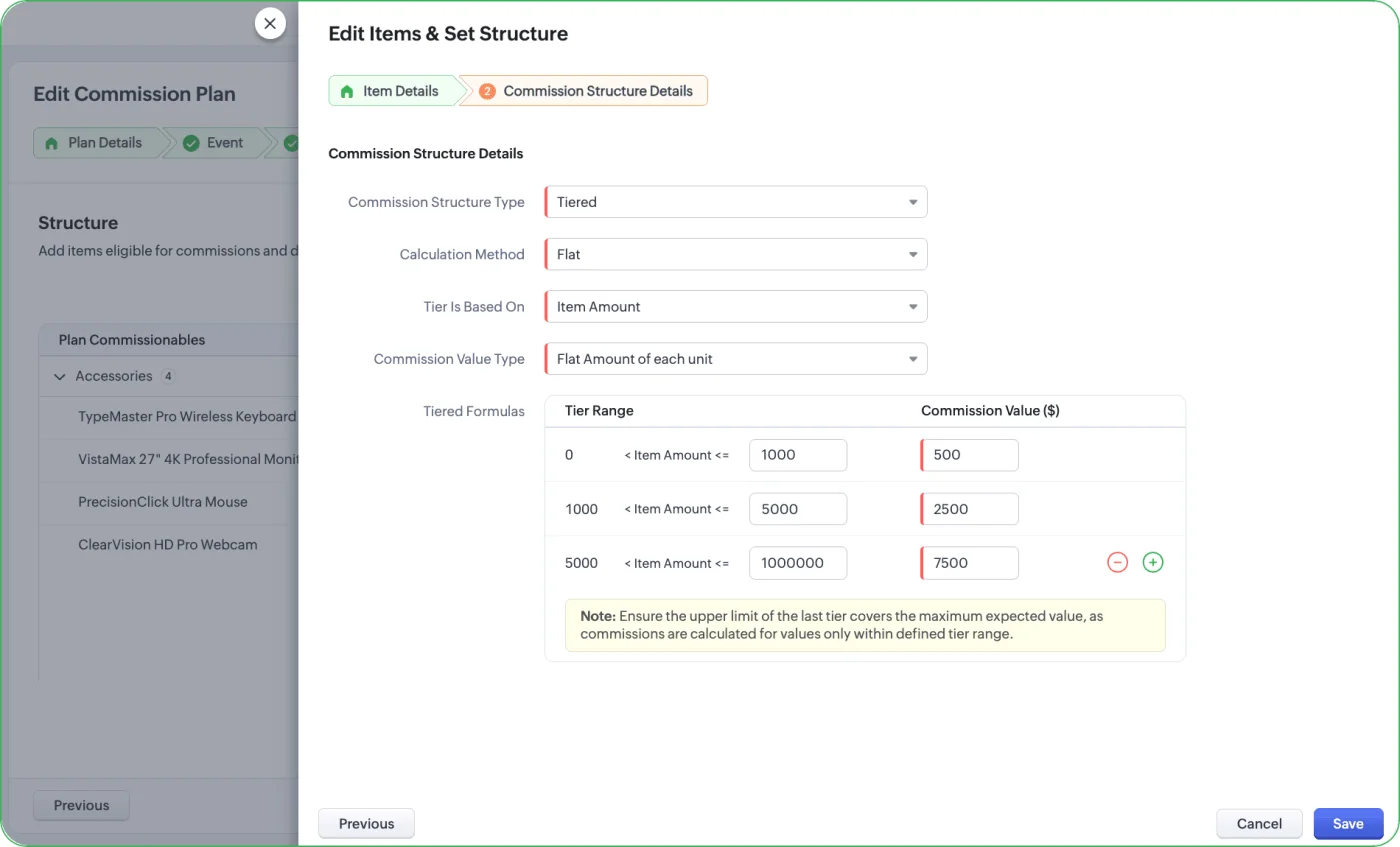
Step 4 Commission Structure setup with Tiered Formulas source, Zoho
How Zoho CRM Commission Records Behave
For a sales ops or finance reader, the mechanics matter. A few details worth surfacing before you scope.
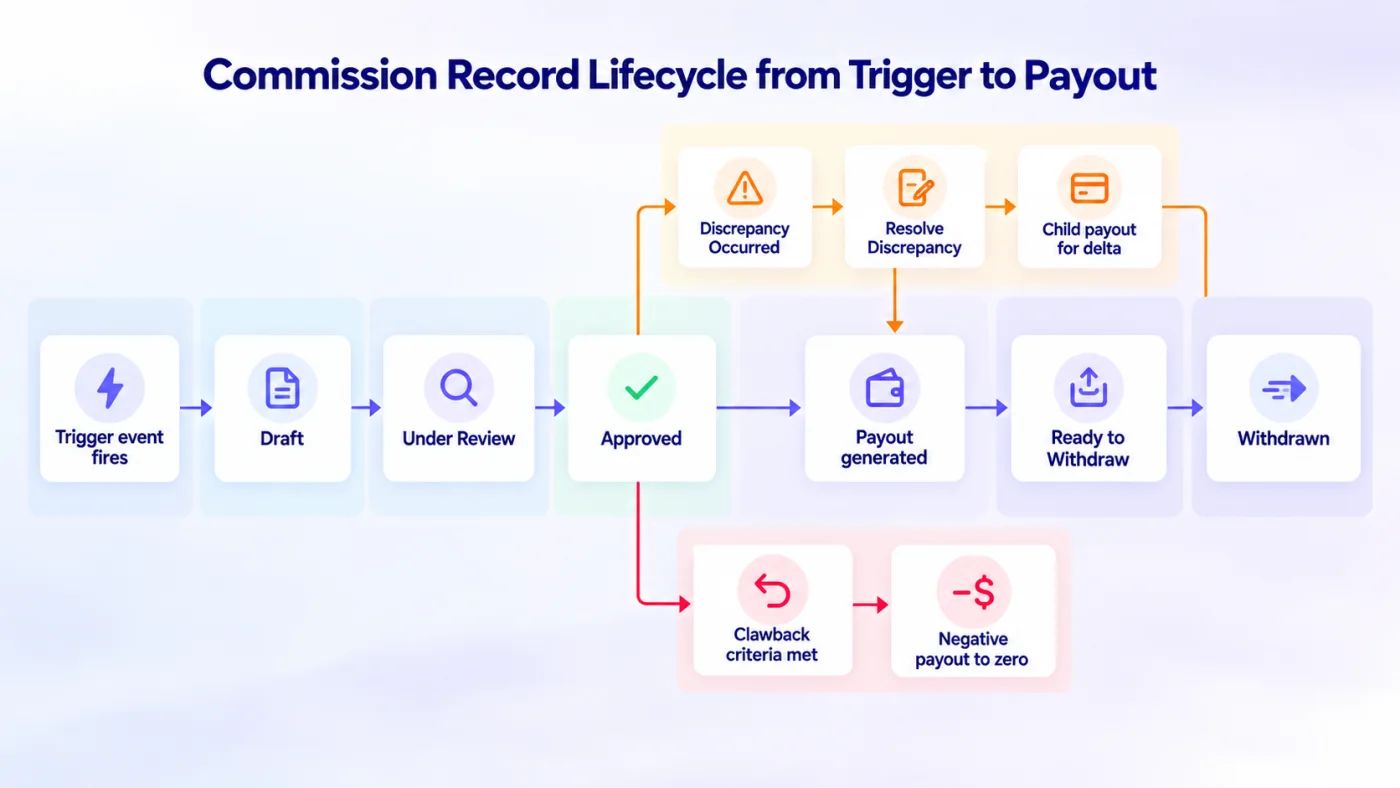
Fig 8 – Commission Record Lifecycle from Trigger to Payout
Commission records are non editable. Once the app generates a commission record based on a trigger event, that record cannot be manually edited. Adjustments flow through Discrepancy Resolve or Clawback pathways only. That is the right design for audit posture, and it means any adjustment leaves a traceable record.
Discrepancy Resolve is manual. When a sale value changes after the commission was approved (a customer upgrades, downgrades, or changes their order), the Discrepancy Occurred field flips on the commission record. An authorized user (with the Resolve Discrepancy permission, or an admin, or someone higher in the hierarchy than the recipient) sees a Resolve Discrepancy button. They enter mandatory notes explaining the adjustment and a corrected approved amount. For transaction based plans the app generates a child payout carrying the difference. Quota attainment and line item plans generate a consolidated discrepancy payout instead. Full audit trail preserved.
Clawback is automatic. When the clawback criteria configured in Step 3 are met, typically a sale cancellation, the app creates “a negative payout amounting to value 0” automatically per Zoho’s own discrepancy and clawback documentation. Read that phrasing carefully. Clawback zeros out the payout record. It does not, by itself, recover funds that have already been disbursed to the rep. That recovery is a downstream payroll or AP action that lives outside Incentives.
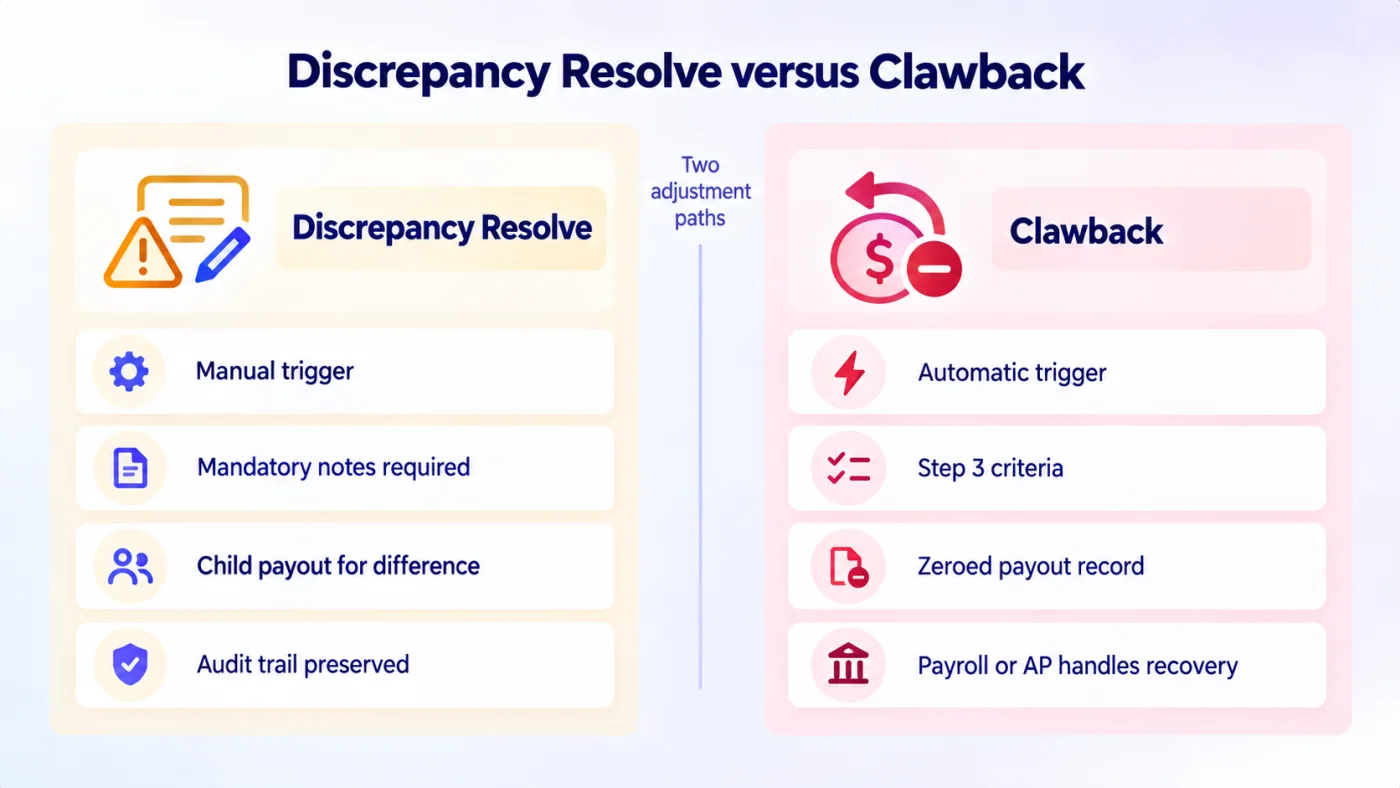
Fig 9 – Discrepancy Resolve versus Clawback
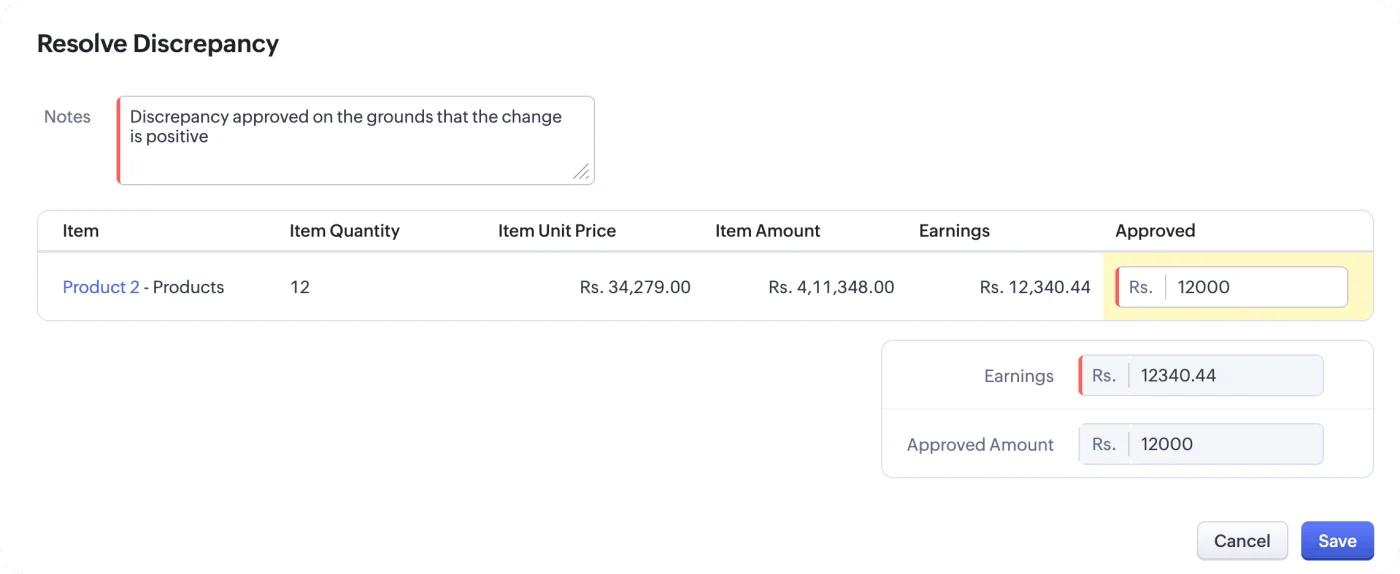
Resolve Discrepancy button and dialog source, Zoho
Payout disbursement lives outside the app. Zoho states this directly in its own analytics documentation, noting that “most businesses enroll these payouts with a third-party application to auto-trigger commissions.” Incentives generates the Ready to Withdraw payout record. Zoho Payroll, an AP tool, or an integration handles the actual money movement.
For the initial rollout, we recommend clients build a simple monthly report export as the handoff to their payroll or AP process, and revisit when Zoho Analytics sync ships.
Zoho CRM Incentives for Sales Ops Leaders
Once Incentives is live in the org, the day to day work moves to sales ops. Four operational anchors matter more than any launch talking point.
Getting installed. Incentives lives in the App Space container inside Zoho CRM. Only admins with the Ready to Install privilege can install it from the App Space, which means the ops team scoping the rollout needs to work with a CRM admin on day one. Install takes a few minutes. Post install, both the Incentives app and the Setup > Commission plans page become available. Installation is org wide, and the app is visible only to users you subsequently grant access to. Non admin users see the app in their App Space only after it is enabled for them.
Install Incentives button from the Getting Started help article source, Zoho
Commission record structure. Every calculated commission lands in a dedicated Commission Records module inside the Incentives app. The record carries the recipient, the source transaction reference, the earnings amount, the approval status, the Approved amount, a Discrepancy Occurred flag, and a full timeline of state changes. Records are auto generated and non editable, which supports audit posture. Ops leaders configuring custom views should filter on status (Draft, Under Review, Approved, Rejected) and the Discrepancy Occurred flag, which surfaces records that need Discrepancy Resolve action. Payouts are a separate record type with their own status. Ready to Withdraw is the state ops teams care about most, as it is the trigger for downstream disbursement.
Approval flow. Incentives approvals ride the standard CRM approval process and surface in the My Jobs module, alongside all other CRM approvals a manager or role holder handles. Approver assignment at Step 6 of plan configuration can point to specific users, to a role, or to a group, with delegation supported. Approvers see the commission record with its earnings amount and approve, reject, or delegate. Approval is what moves the record from Under Review to Approved and generates the payout. The operational impact is that approval related permissions and delegations are governed by the same CRM approval framework used elsewhere, so no separate access model to learn.
Measurement shapes for ops leaders. Incentives ships six native dashboard components ops leaders can pull immediately. Total commissions generated, total commissions approved, and total payouts paid, each as a running KPI over a chosen period. Commission distribution by status, which shows how records are spread across Draft, Under Review, Approved, and Rejected. Commissions earned by rep, which supports the top contributor and coverage view. Pending payouts by rep, which is the readiness signal for the downstream payroll cycle. Beyond these six, the CRM central reports module handles any custom measurement (attainment by plan, forecast against target, spend against budget) until the Zoho Analytics sync ships. Once Analytics is connected, the six components above become the starting point for enterprise reporting standardization.
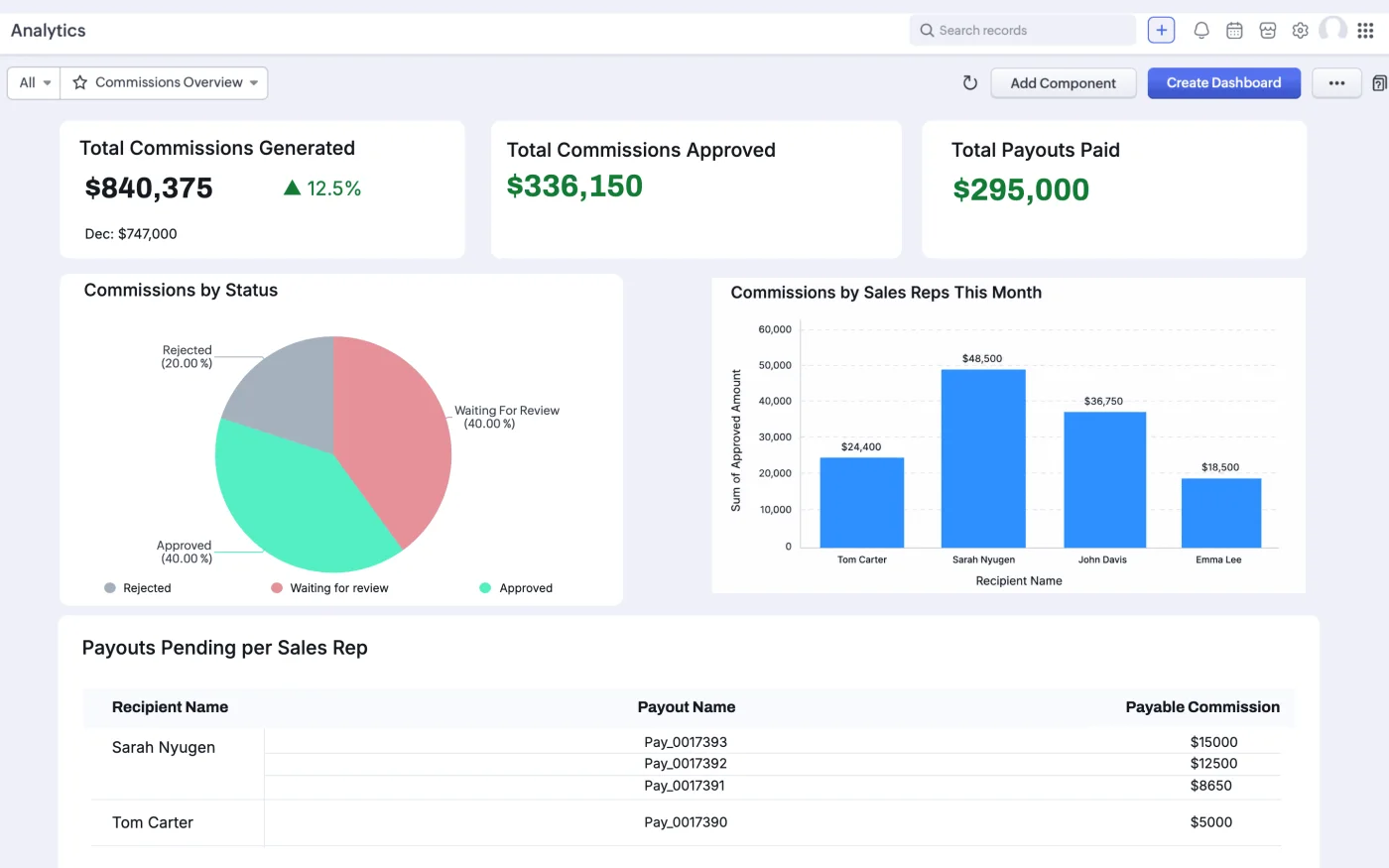
Native Incentives analytics dashboard with commission KPIs and distribution charts source, Zoho
What Zoho CRM Incentives v1 Does Well, What It Misses
What Zoho CRM Incentives handles cleanly
Deal based commission for CRM native pipelines where the closing event lives inside CRM. Line item commission on CRM Quotes, Sales Orders, Purchase Orders, Invoices, and custom modules with subforms. Quota attainment plans with rate escalators at defined tiers. Individual contributor plans across most industry standard structures. Approval workflows with delegation. Discrepancy handling and clawback rules from day one. Native dashboards for total commissions generated, distribution by status, comparison across reps, and pending payouts by rep. Granular permission for discrepancy resolution.
Where Zoho CRM Incentives does not fit yet
Revenue tied to Books, Finance, or Inventory. The most consistent pushback we hear in enterprise scoping calls. In every deployment where client revenue flows through Zoho Books, the same wall appears. Commission eligibility depends on the Books invoice, the Books PO converting to an invoice, or a shipment out of a specific warehouse in Zoho Inventory. Incentives reads only CRM events in v1. Zoho has publicly said Books and Finance support is in the pipeline, without a committed date. Until it lands, the workaround is a data flow that lifts the Books event into a custom CRM module and triggers the commission from there. Workable. The clean architecture our clients want has to wait for Books support.
Zoho Analytics as the reporting backbone. Incentives ships with native dashboards adequate for a plan owner. Finance and RevOps functions typically standardize reporting in Zoho Analytics, and until the sync ships, commission data does not appear there. For mid market and enterprise organizations that already run Analytics as the reporting backbone, this is a real gap. Zoho says the sync is in build.
Mobile for reps in the field. Reps who work outside a laptop cannot check attainment, dispute a commission, or view their payout status on the go. For inside sales operations this is a footnote. For field sales, distribution, and any team where reps spend the day in a truck or at a customer site, mobile parity matters. Not available in v1.
OTE plans with fixed plus variable pay. Enterprise comp plans rarely run as pure variable. The common structure is a base salary plus a variable component tied to plan attainment, presented to the rep as one OTE number. Incentives handles the variable half. Base pay lives in payroll. Reconciling the two into a single OTE view is manual work today. Named on Zoho’s roadmap as On-Target Earnings.
Manager compensation on team performance. Any organization paying first line managers or second line leaders a percentage of their team’s production runs into this immediately. Incentives does not aggregate team performance into a manager’s commission record. Any manager comp today runs on manual calculation or a supplementary spreadsheet. Zoho has this named as Manager Roll-Up Commissions on the roadmap.
Team splits on complex deals. In the enterprise SaaS deployments we scope, no complex deal closes on one person. Splits between the Account Executive, Sales Engineer, and BDR are the norm, with ratios documented upfront. Incentives cannot represent a single deal paying multiple contributors with defined shares. Zoho has this named as Team Split Commissions on the roadmap.
Explicit acceleration curves and tier caps. Tiered structures give you tier logic. What Incentives does not clearly expose is the shape enterprise plans usually run, for example 2x above 100% attainment with a hard cap at 200%, or a pure accelerator with no cap. These plan shapes are common in SaaS AE plans. The v1 tiered mechanic can approximate them with careful setup. The language of accelerators and caps is not native.
Payout gates across products. The plan logic no commission on Product B until 80% attainment on Product A is a real requirement in businesses steering reps toward strategic products or new logo. v1 has no obvious way to express product level gates. Workarounds involve tier logic on custom fields, which is fragile and expensive to maintain.
Forecasting and accrual for finance. Finance teams want a rolling forecast of commission liability against attainment run rate, and the ability to book monthly accruals. Neither is in the v1 capability list. For SOX tracked organizations, this rises to a scoping decision early.
Plan versioning and audit depth. Basic timeline exists on commission records. Enterprise ICM tools maintain a full versioned history of plan changes, quota adjustments, and payout revisions. For compliance sensitive organizations such as public companies and regulated industries, scope a supplementary audit log alongside Incentives, or push Zoho to expose one.
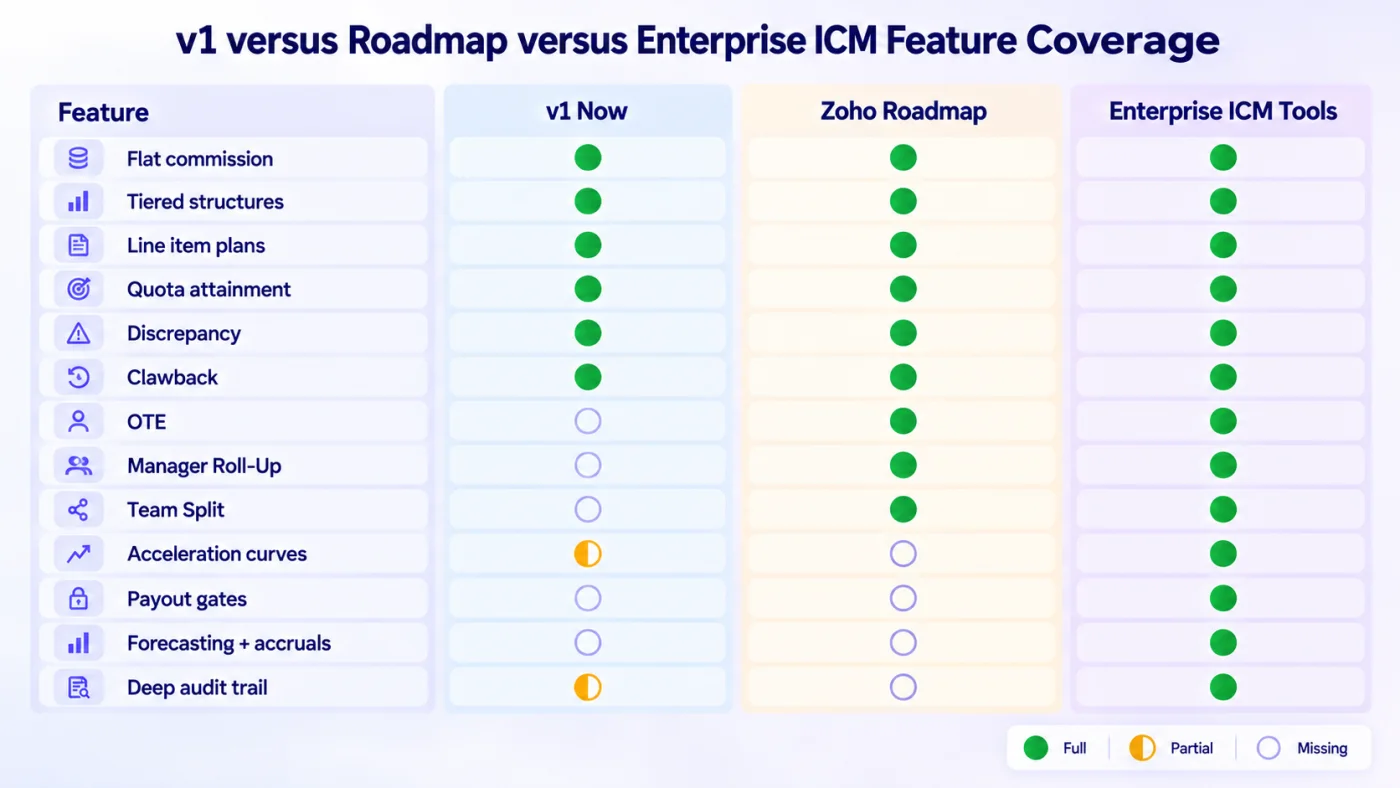
Fig 10 – v1 versus Roadmap versus Enterprise ICM Feature Coverage
Zoho CRM Incentives Buyer Verdict
Adopt Incentives now if your organization looks like this
- CRM native pipelines where deals close inside Zoho CRM
- Commission logic based on CRM Deal, Quote, Sales Order, Purchase Order, Invoice, or a custom module with subforms
- Individual contributor plans with flat or tiered structures
- Enterprise, Ultimate, CRM Plus, or Zoho One edition on the New CRM UI
- Comfortable using native Incentives dashboards until Zoho Analytics sync ships
Wait one to two release cycles if any of these apply
- Books driven revenue recognition where commission eligibility depends on Books invoices or POs
- Multi warehouse commission tied to shipment events in Zoho Inventory
- Manager compensation on team performance as a day one requirement
- Team split plans across AEs, SEs, and BDRs on the same deal
- Cross product payout gates or explicit acceleration curves with caps
- Organizations still on the legacy CRM UI
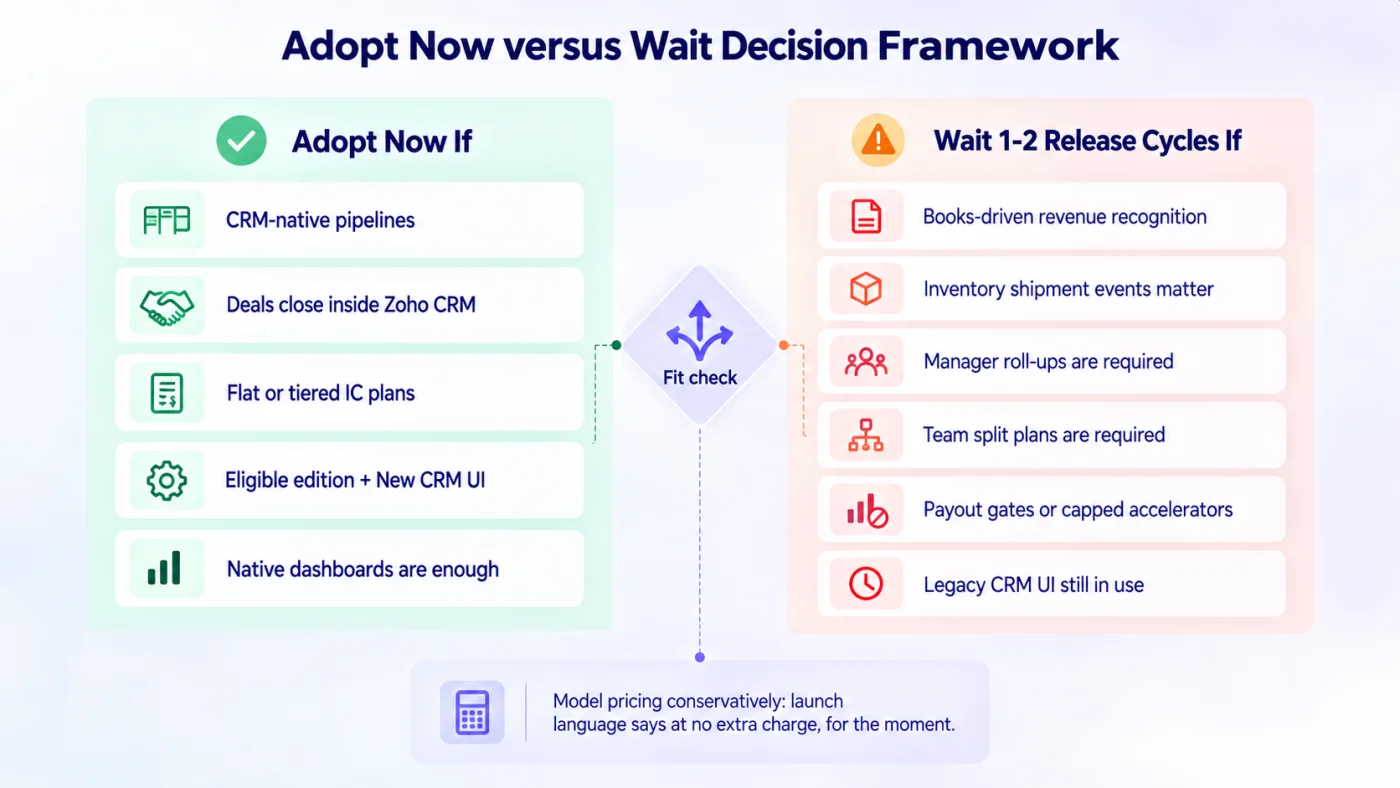
Fig 11 – Adopt Now versus Wait Decision Framework
Zoho CRM Incentives FAQ