TL;DR
- Magento runs as 2 editions today. Magento Open Source is free to download and you host it. Adobe Commerce is licensed and quote based, includes content staging, and makes the separately licensed B2B extension available.
- The cart is a quote entity with its own lifecycle, a totals collector chain, and a reservation model for stock. Most cart work is an intervention in one of those 3 places.
- The current release is 2.4.9, published 12 May 2026. Each release line carries 3 years of standard support from its general availability date.
- Adobe has published Cloud upgrade deadlines per release line. 1 June 2027 for 2.4.4 and 2.4.5, 1 June 2028 for 2.4.6 and 2.4.7. Adobe states the action includes suspending traffic, so the storefront goes offline.
- Adobe ended official Magento 1 support on 30 June 2020. Stores still on it receive no Adobe issued security fixes. Moving to Magento 2 is a rebuild with data migration.
What Magento Is In 2026
Magento is an ecommerce platform you install and control, rather than a storefront you rent. The catalogue, the checkout, the pricing logic and the database are yours, and so is the responsibility for keeping them patched.
The version of Magento described in most articles on the open web no longer exists. Community, Enterprise and Go were retired as names years ago. What follows is the platform as Adobe documents it today.
Editions
Magento Open Source and Adobe Commerce
Current release
2.4.9, published 12 May 2026
Support window
3 years of standard support from each version’s general availability date
Licence
Open Source is free to download. Adobe Commerce is quote based
Hosting
You supply it for Open Source. Adobe Commerce offers a managed cloud option
Spec 1 – Magento as Adobe documents it in September 2026
Adobe publishes the click by click configuration reference for every setting named on this page, starting with cart configuration. What follows is the layer above it, being how the system behaves and what that means for the work.
How The Magento Cart Works
Most articles about Magento carts list features. A team about to spend money on one needs the model underneath, because every quote, every timeline and every unpleasant surprise traces back to it.
The cart is a quote. In Magento the shopping cart is a quote entity with its own table, its own items, its own addresses and its own totals. It is a separate object from an order. When a shopper places an order the quote converts into an order and is marked inactive, and the quote survives as the record of what the cart looked like at that moment. Anything that reads or writes cart state is working against the quote, which is why cart customisation and order customisation are different pieces of work with different blast radius.
Guest carts and customer carts are different objects that merge. A guest builds a quote identified by a masked identifier, which is what the API exposes so that a quote ID is never guessable. When that guest logs in, Magento merges the guest quote into the customer’s existing quote rather than discarding either. Merge behaviour is where a surprising amount of real world cart trouble lives. A customer with a 3 month old abandoned cart who adds a new item as a guest and then signs in gets both, and if the older item has since changed price or gone out of stock the merged cart has to handle it.
Totals are a chain rather than a calculation. Magento collects totals through an ordered sequence of collectors, covering subtotal, shipping, tax, discount and grand total, and that sequence is declared in configuration rather than hard coded. Custom pricing logic is added by inserting a collector at the right point in the chain. Getting the position wrong is the classic defect, because a discount collected before tax and a discount collected after tax produce different numbers and both look plausible on a single test order.
Promotions come in 2 layers. Catalog price rules change the price of a product before it ever reaches the cart. Cart price rules act on the assembled cart, carry conditions and actions, and are what coupon codes attach to. A requirement phrased as a discount almost always has to be sorted into one of those 2 layers first, and the answer decides whether the work is configuration or development.
Tax is a matrix. Magento resolves tax from tax classes on the product and on the customer, combined through tax rules that hold the rate and the zone. That model handles most jurisdictions natively. It also means a tax requirement is rarely a single setting, and that a store selling across borders is configuring a grid rather than a field.
Stock is reserved, then deducted. Inventory Management holds physical sources and aggregates them into stocks that a sales channel sells from. When an order is placed Magento writes a reservation against the stock rather than immediately decrementing it, and the actual deduction happens on shipment. That is what allows multiple sources, partial shipments and backorders to coexist. It also means a stock number in the admin and a stock number in a connected ERP are answering slightly different questions, which is the root of most inventory integration work.
Persistent carts and multi address checkout are built in. A persistent shopping cart keeps a logged out shopper’s cart across sessions through a cookie. Multi address checkout splits a single cart across several shipping addresses and produces several orders from it. Both ship with the platform and both are commonly left switched off, which is worth checking before anybody quotes to build them.
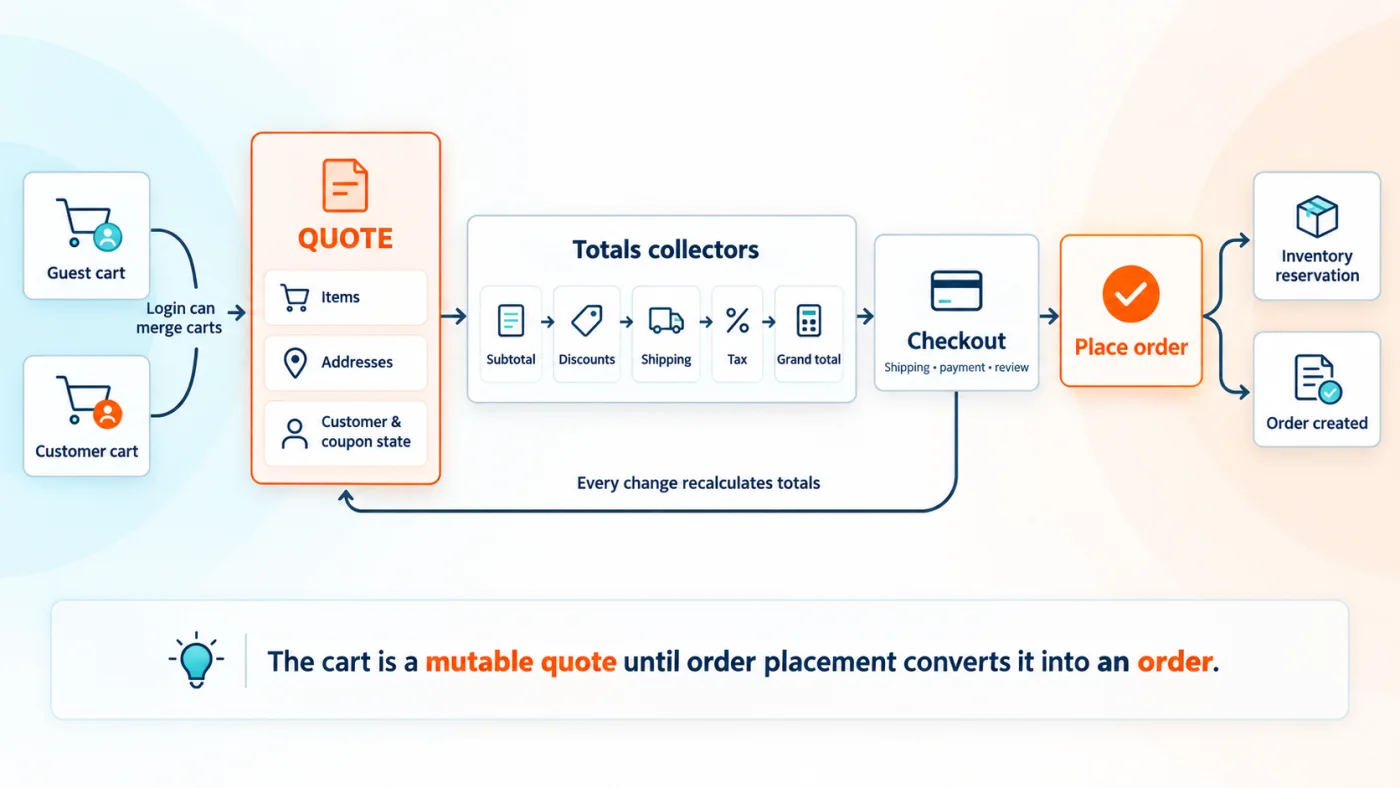
Fig 1 – The cart is a mutable quote until order placement converts it into an order.
Every one of those 7 behaviours is a place where a requirement lands. A cart estimate that has not identified which one is an estimate of something else.
The reason Magento keeps turning up on shortlists is that the hard parts of a large catalogue are in the box.
- Multiple storefronts, currencies and tax rules from 1 installation
- Configurable, bundled and grouped product types, so variants do not become separate listings
- Cart price rules and catalogue price rules, including coupons and tiered pricing
- Company accounts, negotiable quotes and requisition lists through the B2B extension on Adobe Commerce
- A module architecture, so custom checkout, pricing or fulfilment logic ships as code you own
- A GraphQL API, so a headless storefront is a supported build rather than a workaround
- Admin roles and permissions granular enough for a merchandising team
- Persistent carts, multi address checkout and Inventory Management, all native and all often left disabled
Custom development starts where that list stops, and in practice it clusters in 5 places. Pricing logic that no combination of catalog and cart price rules expresses, which becomes a totals collector. Checkout steps that collect information Magento has no field for, which becomes a UI component and a quote extension attribute. Fulfilment rules that decide which source ships which item, which becomes source selection logic. Integrations with an ERP, a PIM or a tax service, which become modules with their own queues and retry behaviour. And reporting that the admin grids do not answer.
Knowing which of those 5 a requirement belongs to is most of estimating it. Adobe documents the B2B feature set in detail, and reading it before commissioning B2B work regularly removes a line item.
Magento Open Source, Adobe Commerce And Cloud
Both editions run the same underlying platform. A team choosing between them is deciding about licence cost, hosting responsibility and a specific set of commercial features, rather than about 2 different pieces of software.

Fig 2 – The edition choice comes down to hosting, licence and scale.
There is a third axis the 2 column comparison hides, which is where the thing runs. Adobe Commerce is available self hosted and on Adobe Commerce on Cloud, which is Adobe’s managed infrastructure, and Adobe also offers Adobe Commerce as a Cloud Service as a software as a service option. Those choices carry different upgrade obligations, and the version enforcement deadlines further down this page apply to Cloud environments specifically.
The features that justify the licence are scheduled content and B2B workflows. A team that needs neither is paying for capability it will not use, and that is the question to settle before the quote conversation rather than after it.
Magento B2B On Adobe Commerce
Adobe Commerce makes Magento B2B available as a separately licensed extension, added to the customer’s contract through an Adobe representative. It covers company accounts with their own user hierarchy, negotiable quotes, requisition lists, and catalogues priced per customer company. Magento Open Source has none of it, so a B2B merchant on the free edition is either buying a third party extension or building the model from scratch. That single question settles the edition for most B2B stores before licence cost enters the conversation.
Storefront Choices
The storefront is now a genuinely separate decision from the platform, and it has moved a long way since the last time most teams looked.
Luma and Blank. Adobe ships both themes with Adobe Commerce and Magento Open Source, and developers extend them to build a custom storefront. This is the traditional path, the one the largest number of agencies and extensions assume, and the one where a Magento 1 store usually lands first after migration.
Third party frontends. Hyvä is the widely adopted third party alternative, built to replace the Luma frontend stack with a lighter one. It is not an Adobe product, so it carries its own licence, its own compatibility matrix and its own extension ecosystem, and those are the 3 things to check before committing to it.
PWA Studio. Adobe documents PWA Studio for building progressive web application storefronts against Adobe Commerce or Magento Open Source, driven through GraphQL.
Edge Delivery Services. This is Adobe’s newer storefront approach, documented under Adobe Commerce Storefront. It uses framework agnostic drop in components and is aimed at sites where organic performance and content velocity matter. For teams moving gradually, Adobe provides Luma Bridge, a PHP module that shares the shopper’s cart and sign in session between a Luma storefront and Edge Delivery drop ins so both stay coherent during a transition.
That last detail matters more than it sounds. It means a storefront replatform does not have to be a single cutover, and a store can move surface by surface while the cart stays consistent underneath.
When Magento Is The Right Choice
Magento carries real running costs. Being honest about where it fits saves a rebuild 18 months later.
Magento fits when
- The catalogue runs to thousands of SKUs with variants, bundles and tiered pricing
- Pricing or fulfilment logic is specific enough that an off the shelf platform would need working around
- You sell B2B, or B2B and B2C from one back office
- You operate several storefronts, regions or brands
- You have engineering capacity, or budget to retain it
Look at other platforms when
- The catalogue is small and the pricing is flat, which is the case our comparison of open source shopping carts walks through in more detail
- There is no budget to patch, upgrade and monitor the store on an ongoing basis
- You want infrastructure to be somebody else’s responsibility entirely
- Time to launch matters more than control of the stack, which is usually where a hosted platform wins. Our WooCommerce and Shopify comparison covers the 2 most common alternatives
The second list describes stores that would pay for capability they will never use. Saying so early is cheaper for everybody than discovering it in month 9.
Magento 1 To 2 Migration
Magento 1 to 2 is where expectations and reality separate most often, so it is worth being blunt about the shape of it before the phases.
The catalogue, customers and orders migrate. The theme does not, because Magento 2 uses a different frontend architecture. The extensions do not, because a Magento 1 module will not run on Magento 2 and many of the originals are no longer maintained. Budgeting it as an upgrade is the reason these projects stall.
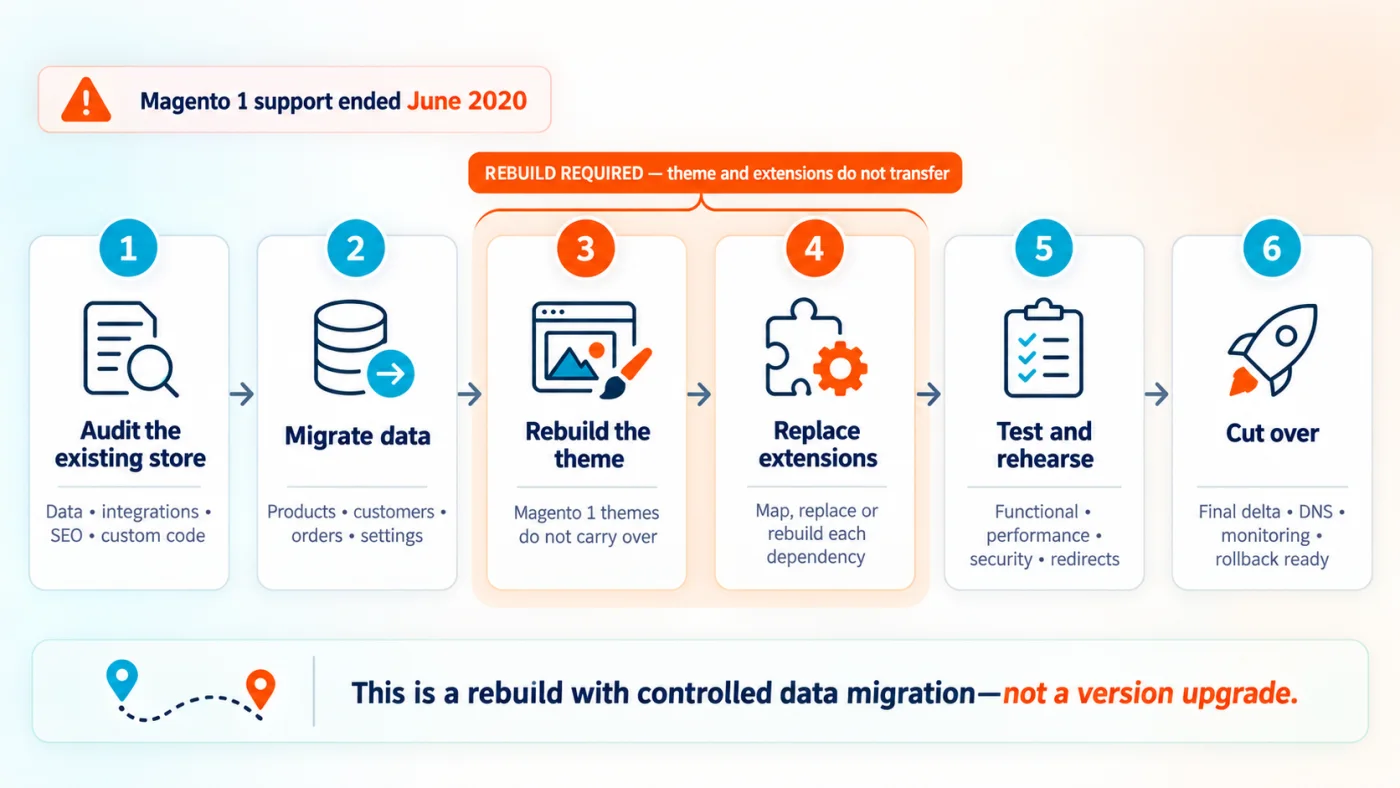
Fig 3 – Magento 1 to 2 is a rebuild with data migration.
1. Audit. Inventory every extension, every customisation and every integration on the Magento 1 store, and sort each one into carried, replaced, rebuilt or dropped. This is the phase that sets the budget, and skipping it is why migration quotes move after they are accepted. Most stores discover here that a meaningful share of their Magento 1 extensions have no Magento 2 equivalent and were solving a problem the platform now solves natively.
2. Environment and data. Stand up the Magento 2 environment on supported dependency versions, then run the data migration for products, categories, customers and order history. Adobe documents how the migration works and the mapping model it uses. Data that does not map cleanly, which is usually anything an extension wrote into its own tables, needs a decision rather than a tool.
3. Extension replacement. Install Magento 2 equivalents, and build replacements where none exists. This phase and the audit are where the real variance sits.
4. Theme rebuild. The storefront is built new on whichever of the options above the store has chosen. Design can be carried across. Templates cannot.
5. SEO continuity. Every URL that changes needs a redirect, and on a store with a large catalogue that is a mapping exercise rather than a handful of rules. URL keys, category paths and any pagination or filter URLs all need deciding before launch. This is the phase most often left until the week of cutover, and it is the one that shows up in traffic within days of getting it wrong.
6. Rehearsal. Run the whole migration end to end against a copy of production, time it, and test the store that comes out. A rehearsal is what converts a cutover plan from a document into a number of hours.
7. Delta migration and cutover. The rehearsal proved the process, and the live store has kept taking orders since the last run. Delta migration moves only what changed, which is what keeps the maintenance window short enough to be acceptable. Then DNS moves, and the Magento 1 store stays available in read only form until everybody is satisfied.
The audit at phase 1 and the extension work at phase 3 decide the cost of the other 5.
Magento 2 Version Upgrades
An upgrade between Magento 2 release lines is a smaller piece of work than a Magento 1 migration, and it is the one more stores need this year. The scope is set by PHP rather than by Adobe, because each release line is tested against specific PHP versions and Adobe supports only the combinations it lists in its system requirements.
Read down that table and the size of the job becomes clear. A store on 2.4.6 running PHP 8.1 has to reach PHP 8.5 to run 2.4.9, which is 4 releases of PHP 8. Every custom module, every third party extension and every integration has to be carried across that gap.
The work runs in a set order, and the order is what keeps it predictable.
Audit the dependency tree. Read the Composer manifest and the lock file and establish, for every package, whether a version exists that satisfies the target Commerce release. Anything abandoned is a decision rather than a version bump.
Resolve the platform dependencies. PHP, the database, the search engine, the cache and the message queue all move with the release line. Adobe lists the tested combination for each version and supports only that combination, so a partial move leaves the store outside support even though it runs.
Upgrade custom code. Deprecations removed between release lines are the common failure, and custom modules written against internal classes rather than service contracts are the ones that break.
Rebuild and test the storefront. Theme changes between release lines are usually smaller than the backend ones and are rarely zero.
User acceptance testing on a production copy. Checkout, payment, tax, shipping and every integration, run against real data rather than sample data.
Plan the rollback before the deployment. A database backup taken immediately before the upgrade, a tested restore, and a decision in advance about the point at which rolling back is preferable to fixing forward.
Three dates worth checking against your own store.
1 June 2027, and 1 June 2028. Adobe is introducing an enforced version upgrade policy for Adobe Commerce on Cloud. It states that it will stop maintaining Cloud environments running unsupported Commerce versions, that the action it takes includes suspending traffic to the affected infrastructure, and that the result is the storefront going offline. The date depends on the release line. Adobe publishes 1 June 2027 for 2.4.4 and 2.4.5, and 1 June 2028 for 2.4.6 and 2.4.7. For 2.4.8 and 2.4.9 it lists the deadline as not yet set. Its instruction is to move to a supported version, or to Adobe Commerce as a Cloud Service, before the end of extended support date for your release line.
31 December 2026. PHP 8.2 reaches end of life, following PHP 8.1 on 31 December 2025. Adobe states that Commerce versions running them, being 2.4.4, 2.4.5 and 2.4.6, are at risk of falling out of PCI compliance as a result.
30 June 2020. Adobe ended official Magento 1 support. Stores still on it receive no Adobe issued security fixes, and have not since that date.
All 3 are published in Adobe’s software lifecycle policy.
These 3 travel together on Magento more than on most platforms, because the same act of falling behind on versions degrades all 3 at once.
Performance on Magento is mostly a caching question and a query question. Full page cache in front of the application, a block cache underneath it, and a reverse proxy in front of both. Catalogue pages that miss cache because of a personalised block are the usual cause of a slow store that benchmarks well on an empty cart. Search configuration is the second cause, since Magento moved search onto a dedicated engine and a misconfigured one degrades category browsing rather than just search. Indexing mode is the third, because indexers left on update on save turn a catalogue import into an outage.
Security is version currency plus the patch cadence. Adobe issues security patches on a schedule for every supported release line, and a store outside its support window simply stops receiving them. That is the whole mechanism. There is no configuration that substitutes for it.
PCI compliance is where the previous 2 meet a deadline. Adobe’s lifecycle policy states plainly that running a Commerce version on a PHP release past end of life puts PCI compliance at risk, because vulnerabilities in PHP itself stop receiving fixes. It names 2.4.4, 2.4.5 and 2.4.6 as the affected lines and recommends consulting a qualified security assessor. Adobe is also explicit that PCI compliance remains the merchant’s responsibility to assess, and nothing an agency says changes that. How we handle client data and compliance obligations on our side is set out on our security and compliance page.
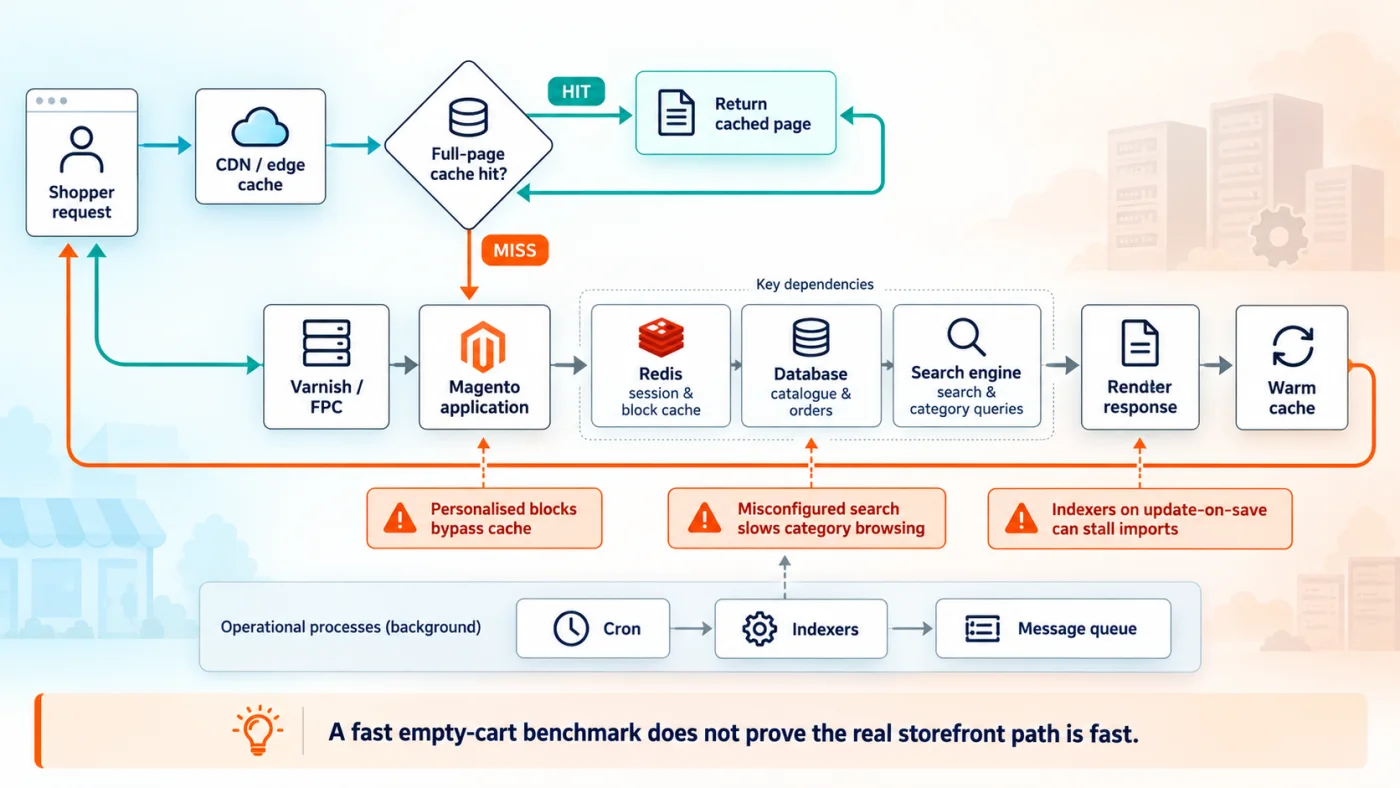
Fig 4 – A fast empty cart benchmark does not prove the real storefront path is fast.
Where a store actually sits is a version by version question rather than a count of releases. 2.4.7 is 2 lines behind 2.4.9 and remains in standard support until 31 May 2027. 2.4.6 is 3 lines behind, left standard support in August 2026, and runs a PHP version that is at or past end of life. Table 2 above is the one to read against your own store, and the answer decides whether this is a planning conversation or an urgent one.
Magento Development Cost Drivers
No 2 Magento estimates are alike, and the variance is rarely random. 6 things move a number more than anything else. No prices appear below, because a number quoted without inspecting these is a guess.
Catalogue shape, meaning product count, attribute count and how many of the products are configurable or bundled. A catalogue of 200 simple products and a catalogue of 200 configurables with 40 attributes each are different systems.
Integration count and integration quality. An ERP with a documented REST API and an ERP with a nightly file drop are the same line item on a brief and very different work. The failure modes are the ones we set out in 12 ERP implementation risks, and they apply whichever side of the integration moves first.
Extension inventory. On a migration or an upgrade this is usually the single biggest driver. Every extension is a compatibility question, and an abandoned one is a build.
Custom pricing and tax logic. Anything that has to enter the totals collector chain carries test surface that a configuration change does not.
Storefront choice. Extending Luma, adopting a third party frontend and building on Edge Delivery Services are 3 different budgets and 3 different skill sets.
The state of the current store, on a migration or an upgrade. A store with a test environment, a deployment process and a clean dependency tree is a fundamentally different proposition from one with none of those, and the difference shows up before any Magento work starts.
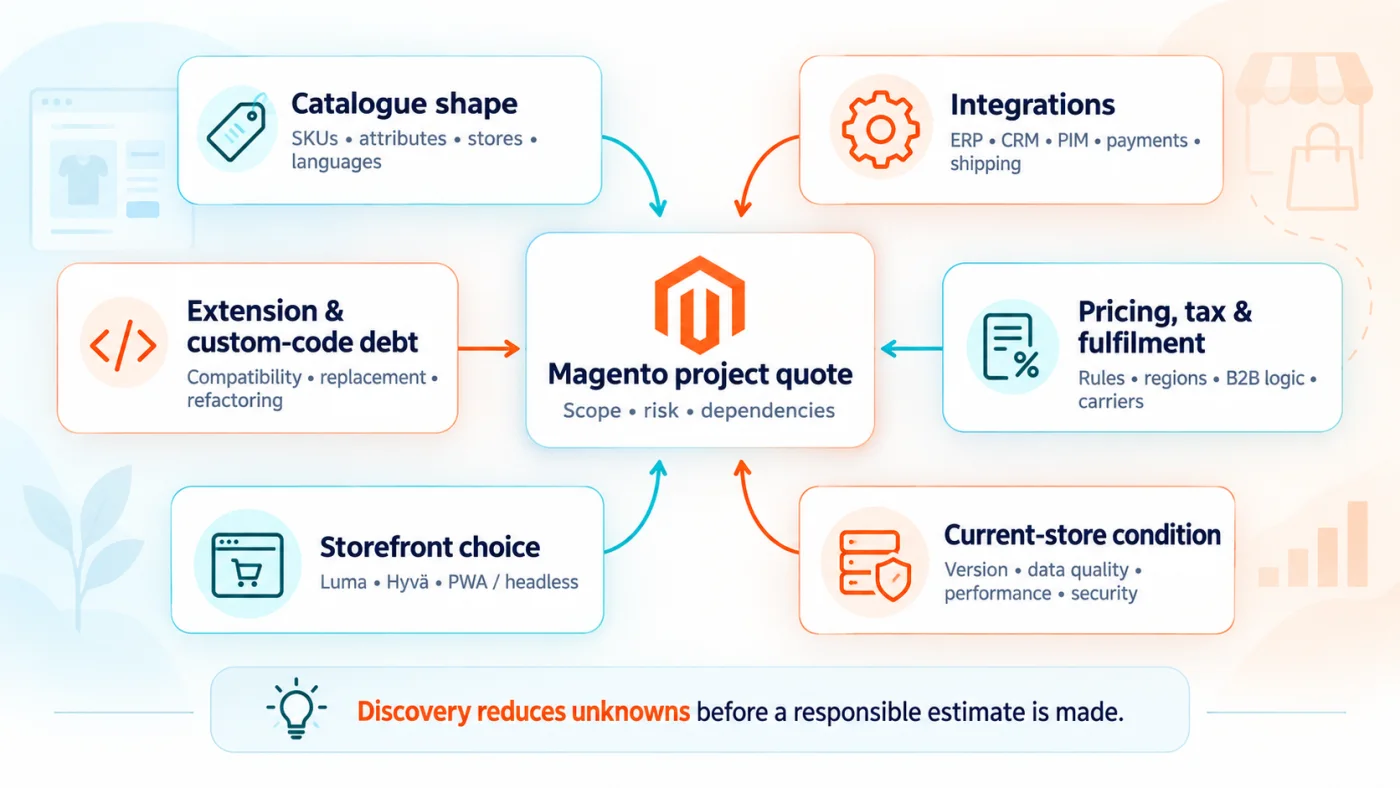
Fig 5 – Discovery reduces unknowns before a responsible estimate is made.
A useful estimate names which of those 6 it has actually inspected. One that does not is a placeholder.
Magento Work We Take On
6 service lines, all delivered in house.
New Magento builds
Catalogue structure, theme, checkout, payment and shipping integration, and the launch itself. This covers stores moving onto Magento from another platform as well as stores starting from nothing.
Magento 1 to 2 migration
The 7 phases above, onto self hosted Magento or onto Adobe Commerce on Cloud.
Version upgrades and PCI readiness
Magento upgrade services covering the move between release lines, the PHP and dependency upgrades that travel with it, and the extension and theme compatibility work each one triggers.
Performance work
Caching strategy, search configuration, database and query tuning, indexer behaviour, image and asset delivery, and the frontend work that decides what a customer actually experiences.
Extension development
Custom modules for pricing, fulfilment, ERP and CRM integration, and the work of replacing an abandoned third party extension with code you own.
Ongoing Magento support and maintenance
Magento support services covering security patches, monitoring, small enhancements and release management. This is the line that keeps a store inside its support window, so PCI readiness is maintained rather than recovered.
How we staff Magento work
Magento delivery is in house. A build runs with the roles below, sized to the scope.
Find Your Starting Point
Every Magento conversation starts from one of 5 positions, and the shape of the engagement follows from which one you are in. Find the row that describes your store.
Two of those rows carry a date that is set by somebody other than you. Adobe ended official Magento 1 support on 30 June 2020. A store on 2.4.4 or 2.4.5 running on Adobe Commerce on Cloud has until 1 June 2027 before Adobe stops maintaining the environment, and 2.4.6 and 2.4.7 have until 1 June 2028.
If your row is one of those 2, the useful next step is establishing which release line and which PHP version the store is actually on. That is a short piece of work and it decides everything after it.
Talk to us about your Magento store
Magento FAQ