Here is what to watch for when you compare the two:
Table 2 - What We Observed Across 1.1 and 1.2 Output
Two things stood out that we did not expect.
First, the food looked significantly better on 1.2. The risotto on the plate in the final scene had visible texture and gloss. On 1.1, it was a beige smear. If you are producing product videos or food advertising, that detail gap matters more than any spec sheet number.
Second, 1.2 handled the rack focus in the final scene (shifting focus from the plate in the foreground to the husky in the background) in a way that actually looked like it was shot on a real camera. 1.1 kept everything at the same focal plane.
Now here is the part that complicates the clean "1.2 wins" story. We ran a separate test with a static product shot. A perfume bottle on a marble counter, no camera movement, no characters. Just a 10-second beauty shot. And 1.1 produced a cleaner frame. No micro movements, no subtle drift in the reflections. 1.2's improved motion handling seems to introduce tiny movements even when you want absolute stillness. For static hero shots, the older model was actually more reliable in that specific test.
We are not sure yet whether that is a consistent pattern or a one off result. It is worth watching if your production work includes a lot of static product shots. But for anything with characters, motion, or multi scene narratives, 1.2 is a clear step forward.
The paw-to-knife interaction still looked a little off on both models. Annoying, but not surprising. Animal extremities holding human tools remains one of the harder physics challenges for any video generation model, and neither version has solved it cleanly.
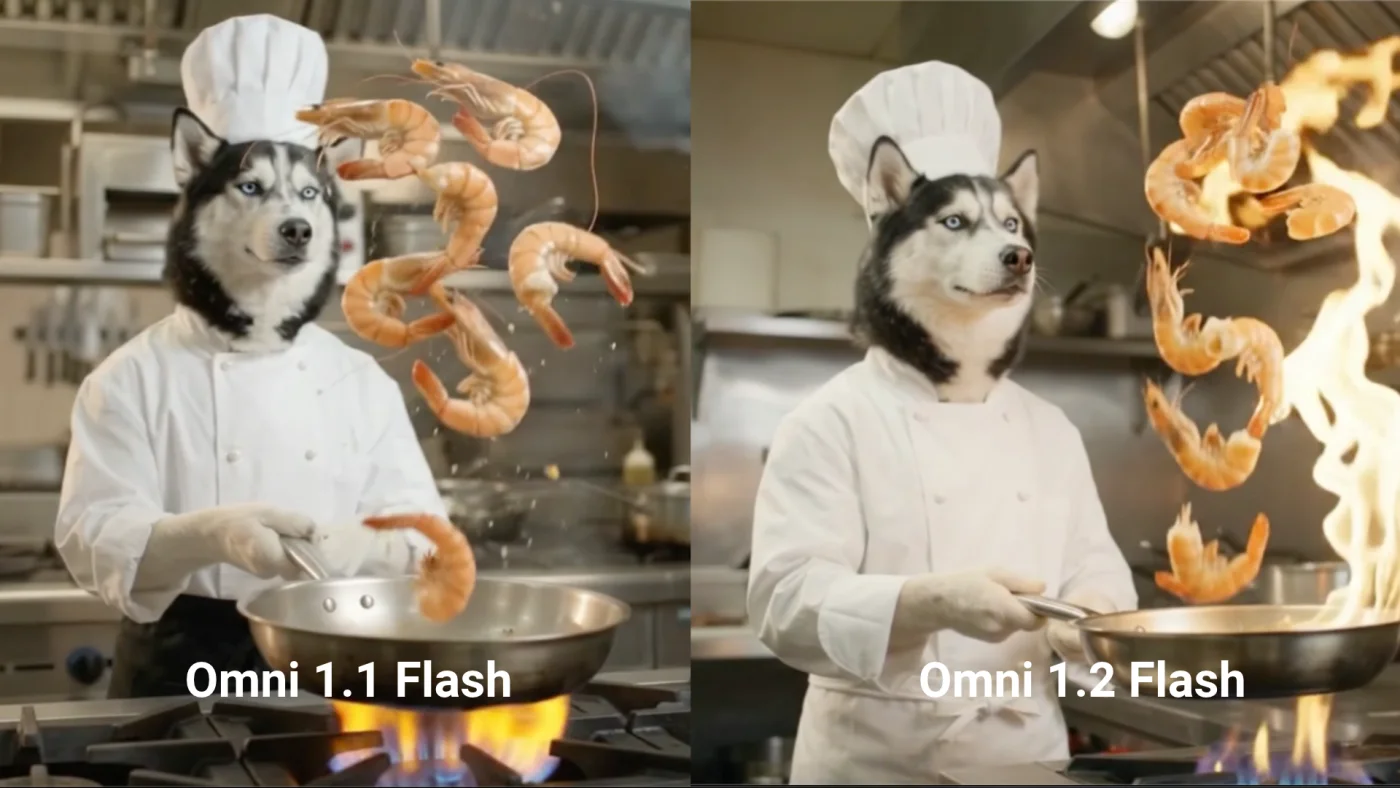
Frame grab from scene 3, the plating sequence. Notice the detail on the food, the stability of the chef's coat, and the background kitchen staff. Left is 1.1 Flash. Right is 1.2 Flash.
What This Changes About AI Video Production Economics
Let us walk through the actual cost math for a business producing video content.
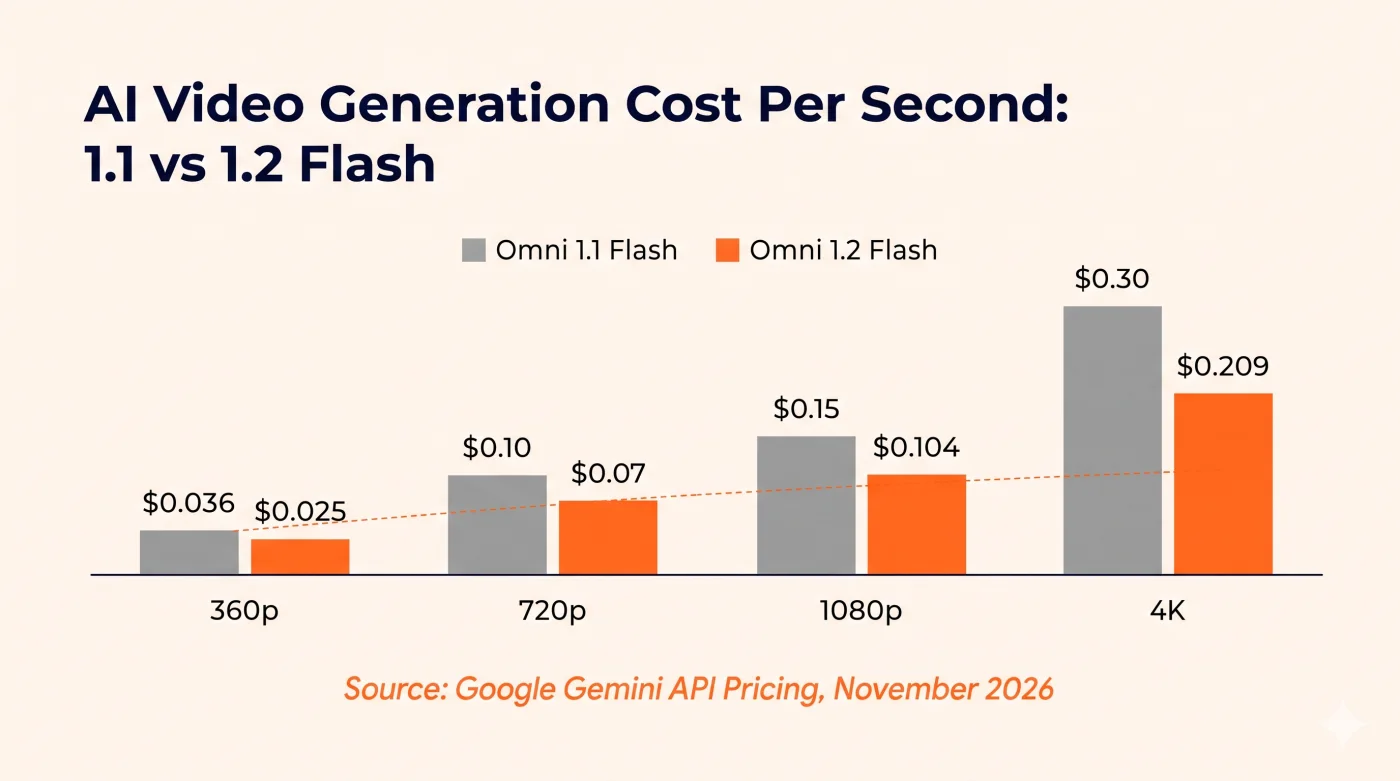
Say you need a 30-second ad for Instagram Reels. Under the old model, here is what that looked like versus now:
Table 3 - Cost of a 30 Second Ad, Old Workflow vs New
That is raw API cost only. It does not include the production expertise (prompt engineering, scene planning, Scenebuilder assembly, color grading, audio design) that turns raw clips into a finished video. At Clixlogix, our AI video production pricing starts at $18 per finished second because that production layer is where most of the value sits.
Here is what matters more than the per second math. The 15 second clip threshold changes which ad formats are even possible.
A standard Instagram Reel is 15 to 30 seconds. A TikTok ad is 15 to 60 seconds. A YouTube bumper is 6 seconds. With 1.1, generating a single 15-second clip meant stitching two clips together with a visible seam. With 1.2, that same clip generates in one pass. No seam. No continuity break.
That said, cheaper generation does not automatically mean cheaper production. The teams whose bottleneck was generation cost will feel this immediately. Teams whose bottleneck is creative direction, script development, or approval cycles? The model upgrade does not speed any of that up. We have seen projects where the generation was done in an afternoon and the client review took three weeks. A 30% drop in API pricing does not fix a broken approval process.
Want AI video production at brand quality without learning the tools?
Our team runs this stack daily across multiple models. You bring the concept, we handle the production.
Talk to our AI video production team
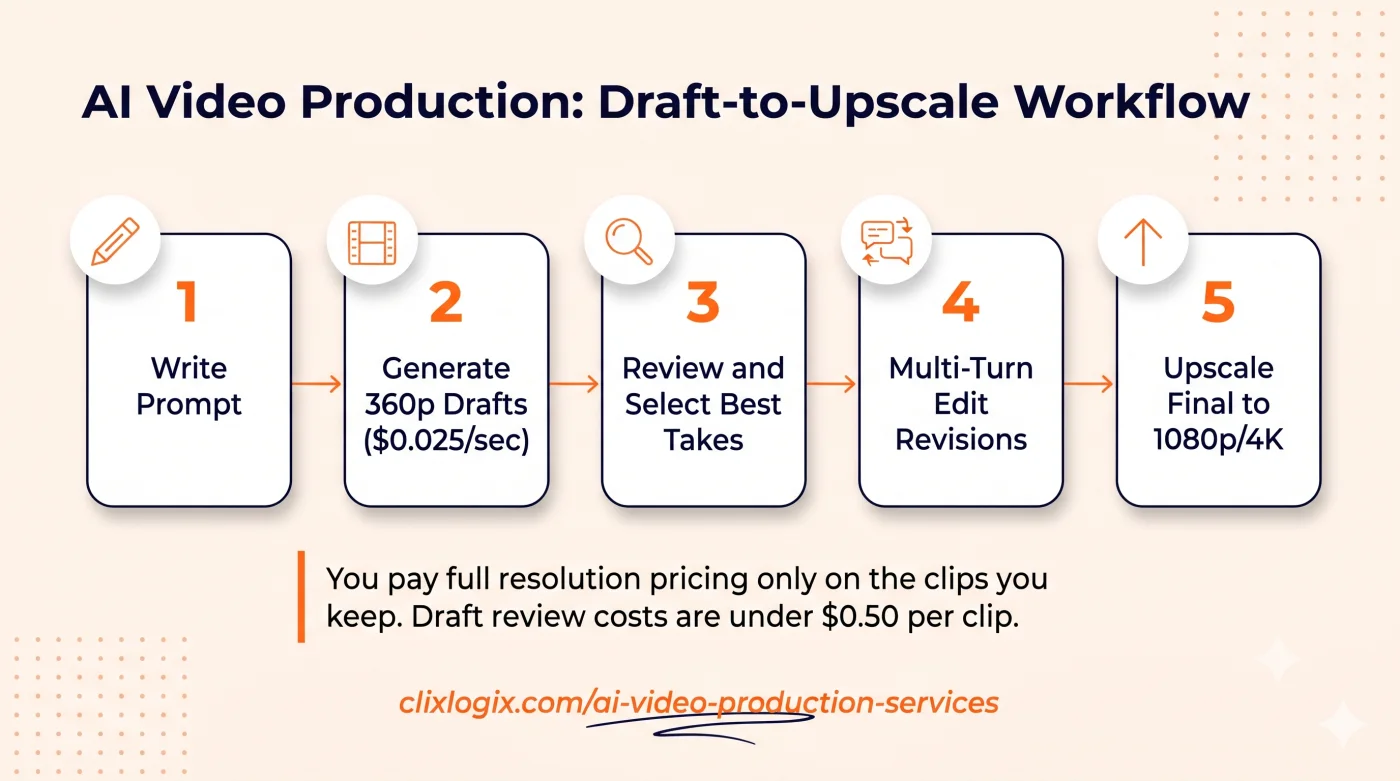
Fig 2 - The draft then upscale workflow. Generate cheap, review fast, render expensive only once.
What This Does Not Fix (Yet)
Look, we sell AI video production services. We have every reason to tell you the technology is ready for everything. But it is not, and pretending otherwise wastes your money and our time.
Google's own documentation lists these known limitations for Omni 1.2 Flash:
- Fast sports action and rapid physical movement still produce artifacts
- Complex multi character scenes with overlapping dialogue remain inconsistent
- Lip sync has improved but is not production locked for every use case
- Physics interactions (objects colliding, liquids pouring, fabric draping) still need multiple generations to get a clean take
From our own testing, we would add three more:
- Animal extremities holding objects (like our husky with a knife) need 3 to 5 generation attempts to get right
- Text and typography in the scene (signs, labels, screen content) still garble about 40% of the time
- Consistency across very long sequences (10 or more clips stitched together) degrades around clip 7 or 8 and needs human intervention to correct
A product demo, a brand story, a social ad, an explainer concept all work well right now. A 60-second narrative film with dialogue, multiple characters, and complex blocking? Not yet. But there are ways of specialized prompting techniques which help us get the best output, and we use those specialised techniques in our client works.
When a client brings a concept that is at the edge of what the models can do, we say so upfront. We would rather scope the right project than deliver a mediocre one. That is not a sales pitch. It is cheaper for everyone involved.
What Your Marketing Team Should Do This Week
Three different starting points, three different actions. Though honestly, the right move depends on context we cannot see from here.
If you are already producing AI video content, test 15-second single clip generations against your current stitched workflows. If the quality holds (and in our testing, it does for most standard commercial concepts), you can simplify your pipeline and cut revision costs. Worth noting: if your current workflow involves a lot of static product shots, test those separately. As we mentioned, 1.2 may introduce micro movements that 1.1 handled more cleanly.
If you have been evaluating AI video production and waiting for the "right moment", this is a reasonable threshold. The cost per finished second at production quality is now under $20 when you factor in prompt engineering, generation, revisions, upscaling, and audio. That is below the cost of stock footage licensing for most premium libraries. Whether the timing is right for your business specifically depends on factors a blog post cannot answer: your team's capacity, your content calendar, your audience's tolerance for AI-generated content. Those are real questions.
If you are an agency reselling video services to clients, your raw generation costs just dropped 30 to 40%. Your margin on AI video work improved without changing your pricing. The production complexity is real though. The prompt engineering, scene architecture, character consistency management, and post production assembly are what separate a $1 raw clip from a $500 finished product.
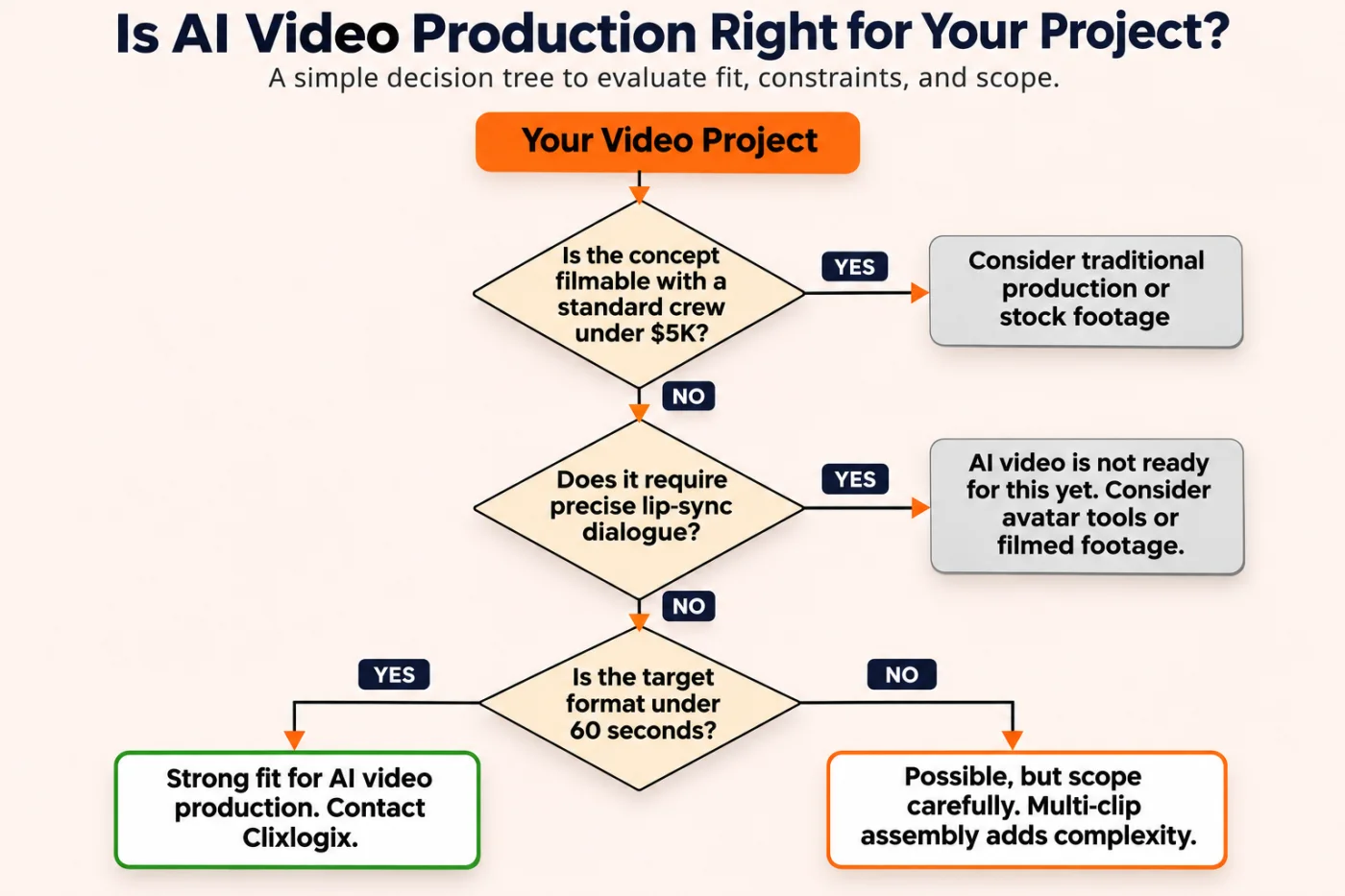
Fig 3 - Not every video project fits AI production. This is the decision framework we use internally.
Everyone Gets the Same Model on December 3. Then What?
This is the part where most articles would tell you to "partner with experts" and link to a contact page. We are going to do that too, but first, here is why the question actually matters.
On December 3, 2026, Google auto routes all 1.1 API requests to 1.2. Everyone gets the same model. Every agency, every freelancer, every in-house team. The generation quality levels out completely.
So what separates good AI video production from bad after that date?
Same things that separate a good photograph from a bad one when everyone has the same camera. Composition. Pacing. Story structure. Knowing when to break the rules. And, honestly, knowing when to tell the client "this concept will not work with the current models" instead of burning through 50 generations hoping for a miracle.
In AI video production, that translates to prompt architecture (how you structure a multi scene video so each clip connects to the next), character consistency management (using reference images as ingredients so the same person or character holds their identity across scenes), Scenebuilder assembly (trimming, ordering, and pacing clips so the final video feels like one continuous piece), and post production (color grading, audio design, music, voiceover layering).
We run this stack daily at Clixlogix, across Google Flow, Veo, and other generation platforms. Our production team has built the prompt engineering workflows and QA processes that turn raw API output into something you would actually put in front of customers.
But here is the honest question we are sitting with ourselves. If the models keep improving at this rate, how long does production expertise remain the differentiator? Another year? Two? We do not have a clean answer. What we do know is that right now, in November 2026, the gap between raw output and finished product is still wide. And that gap is where our work lives.
Frequently Asked Questions