Updated 17 September 2026 to cover Cloudflare’s new Disallow AI Training setting, the Accountable crawler designation, and the automatic migration of legacy Block AI Bots accounts.
TL;DR
Cloudflare itself is not bad for SEO – Misconfigured Cloudflare bot rules are.
The wrong toggles deindex pages – Bot Fight Mode, Super Bot Fight Mode, and the Block AI Bots toggle can all serve 403 errors to Googlebot, quietly removing your pages from the index.
September 15, 2026 changes the defaults – Cloudflare will enforce its strictest applicable rule against any crawler that does more than one job. If you block AI Training, you block Googlebot too.
Cloudflare powers roughly 24% of all websites – This is not a niche problem.
You can fix this today – Check your Cloudflare dashboard, review the AI Crawlers & Scrapers settings, and test with Google Search Console before the deadline.
We see this same case at least once a month now.
A business owner calls us because their organic traffic dropped off a cliff. No Google penalty, no algorithm update, no lost backlinks. Google Search Console shows Google has dropped a large share of pages from the index, with the error “Blocked due to access forbidden (403)” in the page indexing report. Crawl logs show 4xx errors everywhere. The site is telling Google to go away.
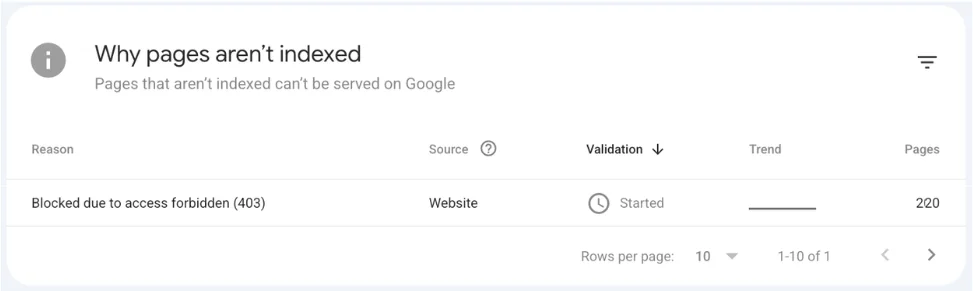
Fig 1 – Screenshot from Google Search Console showing ‘Blocked due to access forbidden (403)’ error in page indexing report
The cause? A single toggle in their Cloudflare dashboard.
If your website sits behind Cloudflare, and about 24% of all websites do, you need to read this. A security setting you turned on to protect your content from AI scrapers might be the reason Google can no longer crawl your pages.
With a major Cloudflare policy change taking effect on September 15, 2026, the problem gets worse for anyone who does not act.
Cloudflare Is Not Bad for SEO. Bad Configuration Is.
Cloudflare, when set up correctly, is good for SEO. The CDN speeds up delivery, SSL certificates come free on every plan, and DDoS mitigation keeps your site reachable during attacks. Each of these helps rankings.
The Cloudflare SEO problems people run into come almost entirely from their own configuration. Settings designed to block bad bots often end up blocking search engine crawlers as well.
We have worked with hundreds of websites over the past decade, and the sequence plays out the same way each time. Someone on the team enables a security feature, nobody checks whether Googlebot can still access the site, and weeks later the traffic chart looks like it fell off a table.
The difference between a site that ranks well on Cloudflare and one that drops out of Google entirely comes down to 3 specific features. Bot Fight Mode, the Block AI Bots toggle, and WAF rules. Get those wrong and you will have Cloudflare SEO issues that no amount of content or link building can fix.
3 Cloudflare Features That Cause SEO Problems
1. Bot Fight Mode and Super Bot Fight Mode
Bot Fight Mode is a free Cloudflare feature that automatically challenges traffic it thinks is automated. Super Bot Fight Mode, available on Pro plans and above, gives you more control over what happens to suspected bots.
The problem? These features are blunt instruments. Cloudflare built them to stop credential stuffing, inventory hoarding, and scraping attacks. They do not always tell the difference between a malicious bot and Googlebot.
Multiple site owners have noticed that Bot Fight Mode intercepted Googlebot with zero warning in Search Console. The site owner sees no errors anywhere. Pages simply stop getting indexed.
As Search Engine Roundtable reported, one site owner recently found that their managed IT provider had toggled on crawl controls to stop all bots. The result? Google could not reach the site for 2 weeks, and traffic cratered.
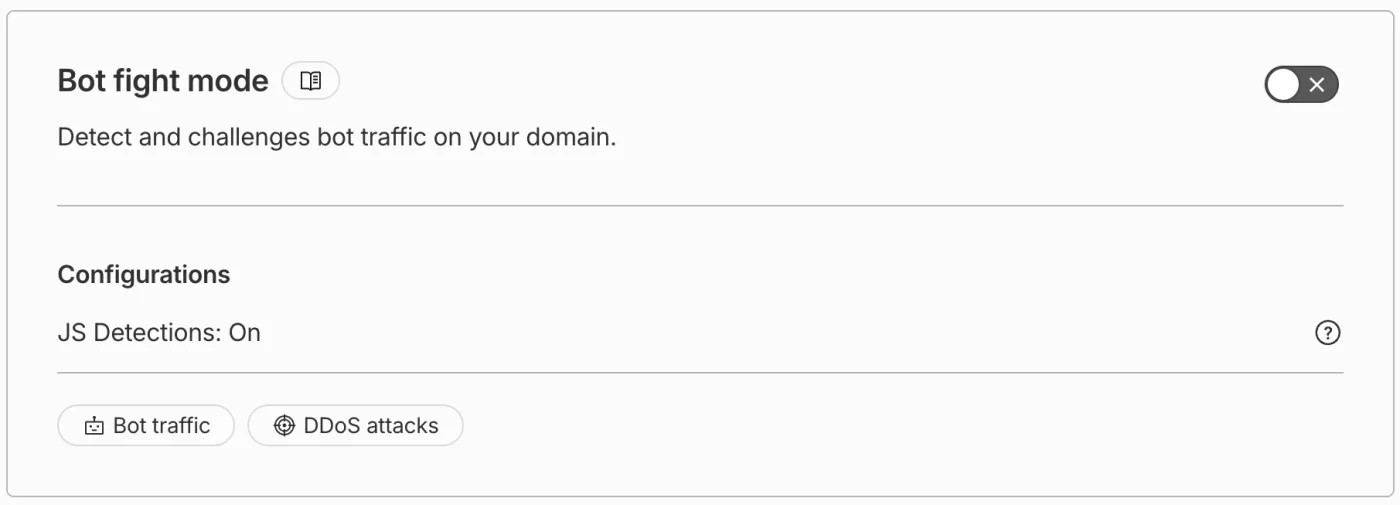
Fig 2 – Screenshot from Cloudflare showing Bot Fight Mode toggle that is turned on to block bot traffic on the website.
2. The “Block AI Bots” Toggle
In July 2025, Cloudflare launched a single toggle to block AI crawlers. Cloudflare positioned it as a way for publishers to protect their content from training large language models. The intent was sound. The execution was blunt. The toggle blocked every AI crawler, including the ones that power AI search features like ChatGPT Search, Google AI Overviews, and Perplexity.
If you turned this on and forgot about it, you may have been invisible in AI search results for months without realizing it.
That toggle is about to cause an even bigger problem. More on that in the next section.
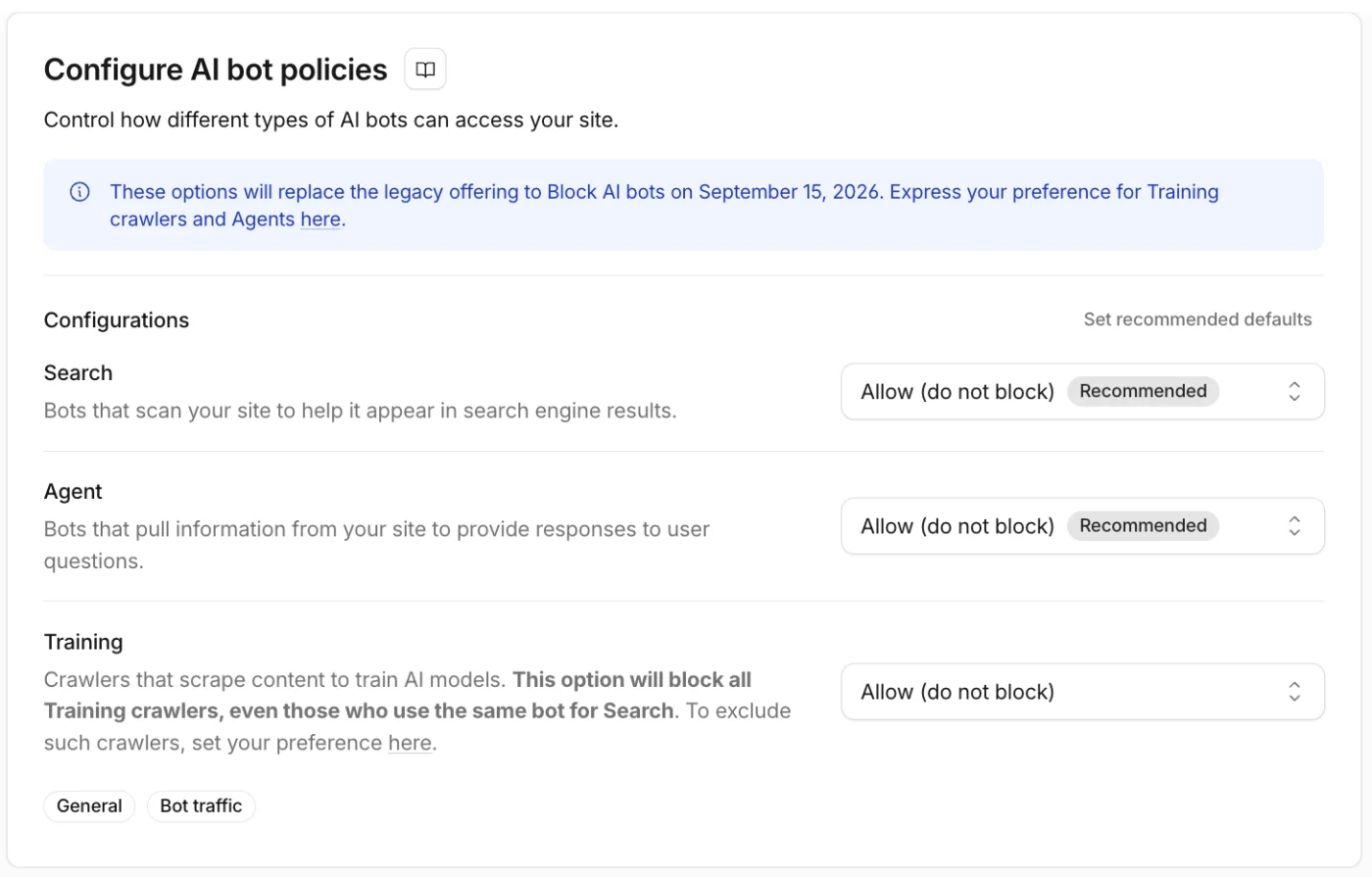
Fig 3 – Screenshot from Cloudflare showing Configuration block where you configure AI bot policies for your website.
3. WAF Rules That Fire Too Broadly
Cloudflare’s Web Application Firewall lets you create custom rules based on user agents, IP ranges, ASNs, and threat scores. This works well for blocking real attacks. We have also seen site owners write rules that accidentally block every request with a suspicious user agent, catch search engine crawlers by IP range, or set threat score thresholds so low that legitimate crawlers get challenged.
The tricky part is that WAF blocks are invisible in Google Search Console. Your coverage report might show everything as fine because Google simply stops trying after getting blocked.
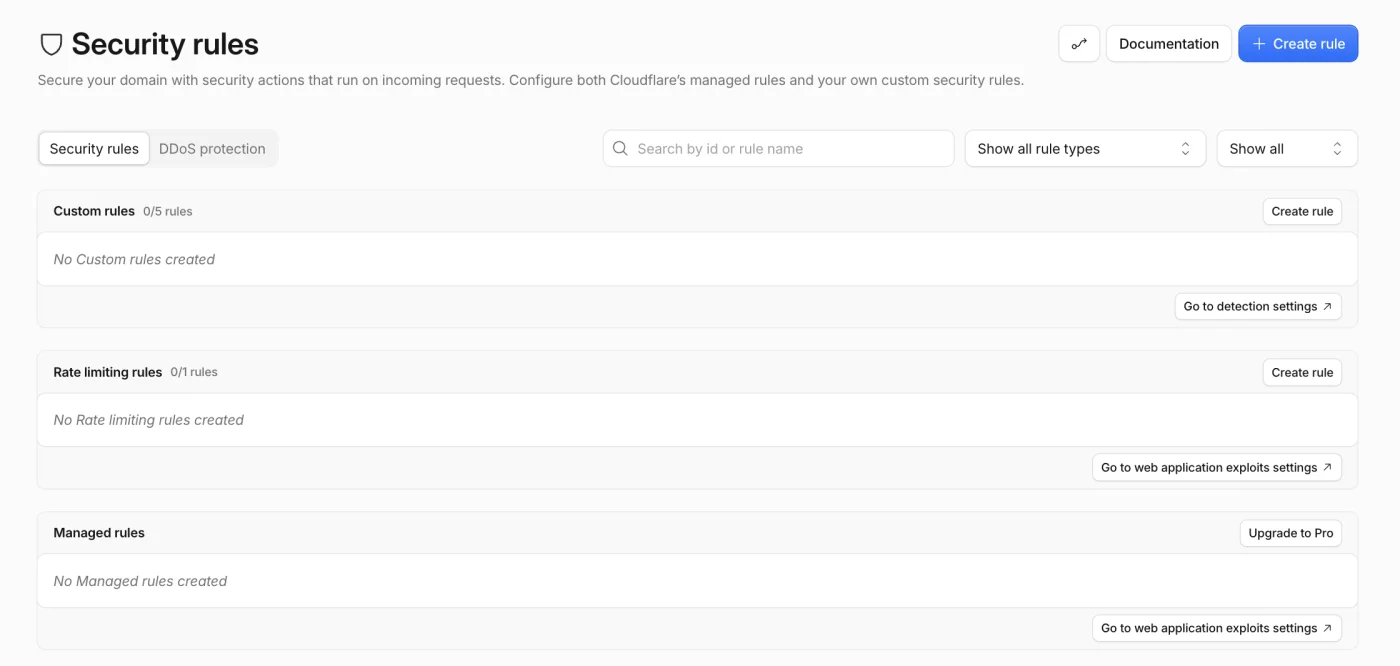
Fig 4 – Screenshot from Cloudflare showing Security Rules block where you set up custom rules for your website.
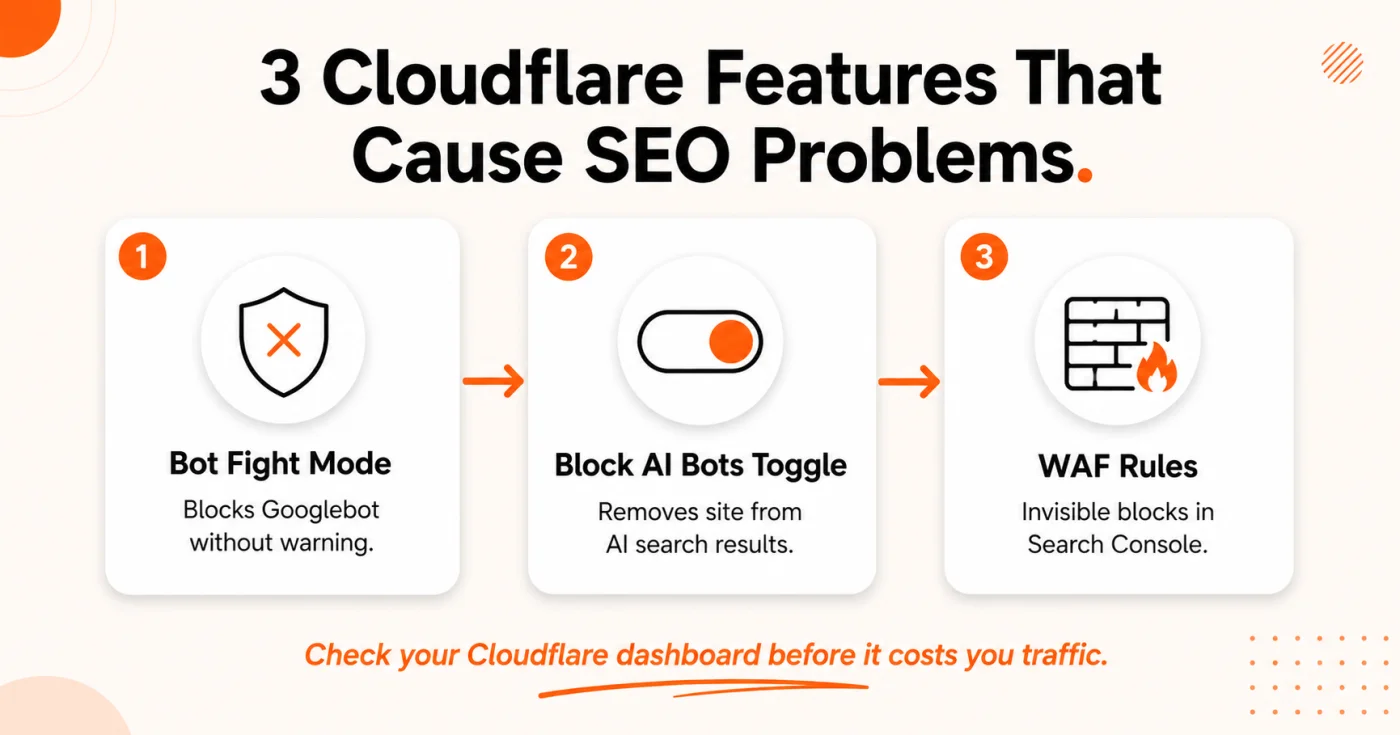
Fig 5 – 3 Cloudflare settings that can quietly deindex your website.
The September 15, 2026 Update That Changes Everything
On July 1, 2026, Cloudflare announced a major overhaul of how it handles AI crawlers. The changes are live now, and a critical set of new defaults takes effect on September 15, 2026.
Here is what is changing and why it matters for your SEO.
3 New Crawler Categories
Cloudflare is replacing the old “block all AI bots” approach with 3 separate categories.
- Search – Crawlers that index your site to answer questions later. This is the traditional index and rank behavior.
- Agent – Bots that act in real time on behalf of a user. Think ChatGPT browsing the web for you, or Gemini doing research inside Chrome.
- Training – Crawlers that pull your content to train or adapt AI models.
This is a smart categorization. The real issue arises when a single crawler does more than one of these things.
The Problem With Crawlers That Do Two Jobs
This is where the Cloudflare SEO issues get serious. Googlebot is a crawler with multiple jobs. It indexes your site for Google Search and it collects data that feeds AI training for features like AI Overviews. Applebot and Bingbot work the same way.
Starting September 15, Cloudflare will apply the most restrictive applicable rule to any crawler that does more than one job.
Block and “Block on pages with ads” previously did not apply to mixed-use crawlers at all, because blocking them would have cost you search discoverability. Now that Disallow AI Training exists as the middle option, both of those settings do apply to Applebot, Bingbot and Googlebot. Choosing Block stops them entirely, for search as well as training. That is the setting to be careful with, and you have to choose it deliberately.
This is not theoretical. A site owner on Reddit confirmed that setting AI Training to “Block” caused both Googlebot and Bingbot to receive HTTP 403 errors when trying to fetch the sitemap. Google’s John Mueller personally responded to investigate the issue and noted that the defaults will apply to new Cloudflare customers, new sites for existing customers, and all existing free tier customers who have not changed their settings by September 15, 2026.
Who Is Affected by the September 15 Defaults
How to Check If Cloudflare Is Hurting Your SEO Right Now
You do not need to wait for September 15 to find out if you have a problem. Here is the process we run for every client using Cloudflare.
Step 1. Check your Cloudflare AI Crawlers & Scrapers settings
Log into your Cloudflare dashboard. Go to Security, then look for the AI Crawlers & Scrapers section. Check whether any of the 3 categories (Search, Agent, Training) are set to Block. If Training is blocked, check whether Googlebot appears in the blocked list.
Step 2. Test with Google Search Console
Use the URL Inspection tool in Search Console to test a handful of your most important pages. If Googlebot cannot access them, you will see a “Blocked by robots.txt” or a server error. Also test your sitemap URL to make sure it is accessible.
Step 3. Run a curl test from outside your network
Run this command to simulate a Googlebot request.
curl -I -A "Mozilla/5.0 (compatible; Googlebot/2.1; +http://www.google.com/bot.html)" https://yoursite.com
If you see a 403 response or a cf-mitigated header, Cloudflare is blocking Googlebot.
Step 4. Review Bot Fight Mode and Super Bot Fight Mode
Under Security > Bots, check whether Bot Fight Mode or Super Bot Fight Mode is enabled. If it is, make sure verified bots (which include Googlebot) are set to Allow, not Challenge or Block.
Step 5. Audit your WAF custom rules
Go to Security > WAF and review every active rule. Look for rules that target user agents, IP ranges, or ASNs broadly enough to catch search engine crawlers. Document each rule and test its impact.
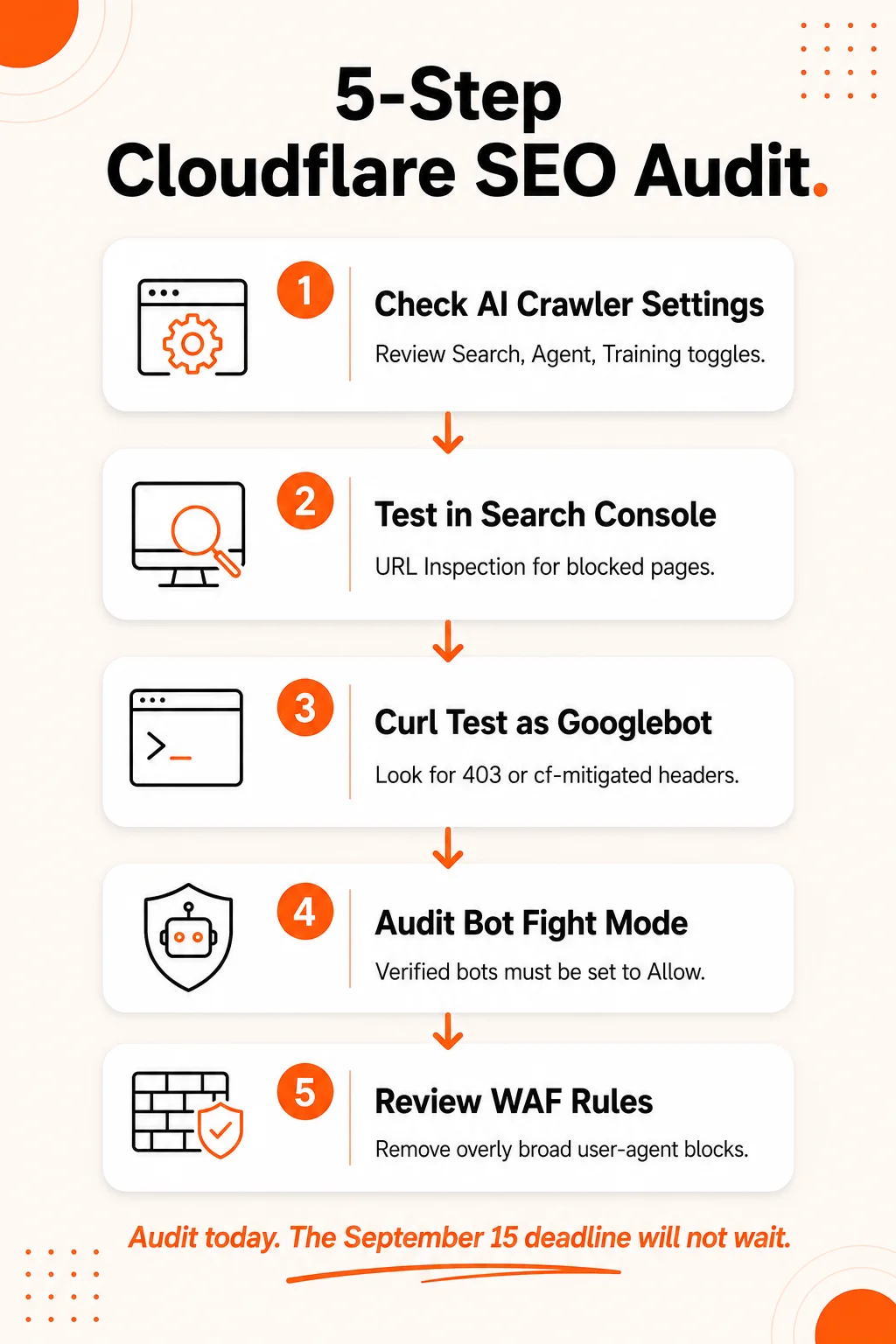
Fig 6 – Run this 5 step audit to catch Cloudflare SEO problems before they cost you traffic.
What Cloudflare Actually Shipped on September 15
Cloudflare’s position is that blocking removes a crawler without changing how its operator behaves. So from July it negotiated directly with the operators, and on 15 September it published the outcome. The result is a third Training option that did not exist when the September defaults were first announced.
Disallow AI Training is named for the Disallow: directive it publishes in your robots.txt through Bot Preference Sync. It tells an operator not to train on your content while leaving that operator’s search crawler free to index you. It is available on the Training control only, not on Search or Agent.
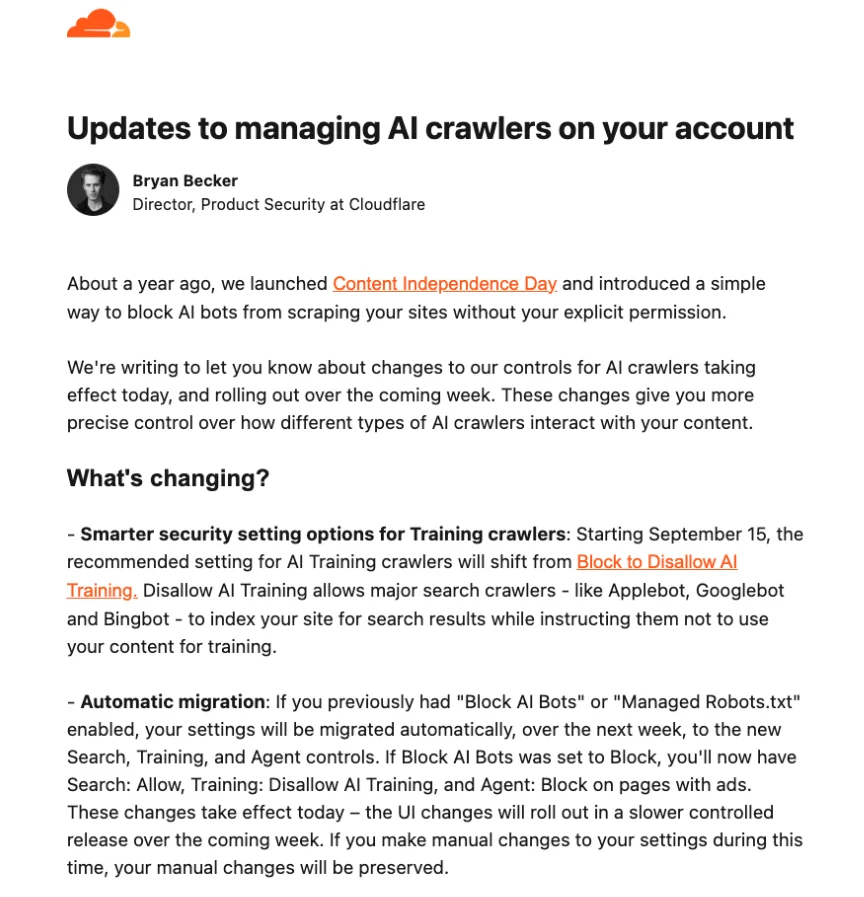
Fig 7 – Excerpt from Cloudflare's customer notice of 16 September 2026, stating the shift to Disallow AI Training and the automatic migration of Block AI Bots accounts
The Accountable designation
A mixed-use crawler keeps its search access under Disallow AI Training only if Cloudflare labels the operator Accountable. To qualify, an operator has to meet or commit to meeting four requirements.
- A mechanism for site owners to opt out of AI training, through robots.txt or a similar standard.
- A mechanism to opt out of AI summaries, set with the operator directly today and through Cloudflare next year.
- URL level visibility into which pages were made available for training, plus metrics showing how content appeared in search.
- An assurance that opting out of AI training will not affect traditional search results.
Apple, Google and Microsoft all qualify, which is why Applebot, Bingbot and Googlebot keep crawling for search under this setting. Amazon, Anthropic, Meta and OpenAI are also Accountable, for a different reason: they run separate search and training crawlers, so Cloudflare can block the training crawler without touching search. Under Disallow AI Training their training crawlers are still blocked.
What the setting actually does at each engine
This is the part worth understanding before you switch it on, because the three engines are at three different stages.
| Engine | Mechanism | Effect on search |
|---|
| Google | A Disallow rule for Google-Extended | Google states it does not affect inclusion in Search or ranking. AI Overviews, AI Mode and Discover are controlled separately through a Search Console setting, and that control does not affect training. |
| Apple | A Disallow rule for Applebot-Extended | Applebot-Extended does not crawl pages and is not used in ranking. Keeping content out of Siri and Search answers still takes the nosnippet meta tag. |
| Bing | Nothing yet. Microsoft has not added robots.txt no training support | The current opt out is the NOARCHIVE meta tag, which also removes your links from Copilot. Cloudflare puts Microsoft’s robots.txt support in early 2027. |
What is being retired
The old switches are on their way out. Block AI Bots is deprecated in favour of the granular Search, Training and Agent controls, and Managed Robots.txt is deprecated in favour of Bot Preference Sync, with existing users migrated across. If you have been treating the Block AI Bots toggle as the thing to audit, the audit has moved.
Three things are still in flight. Google expects to add URL level transparency for Google-Extended within weeks, Apple is building its equivalent for next year, and Cloudflare is aiming to let you control how much of your content appears in AI summaries from a single setting by early next year.
What to Do Now
The September 15 changes are live. If you are using Cloudflare, here is your action plan.
- If you want search engines to keep crawling your site – Make sure Search is set to Allow, and set Training to Disallow AI Training rather than Block. Block now applies to Applebot, Bingbot and Googlebot, so it stops them for search as well as training.
- If you are on the free tier and have not touched your settings – Cloudflare moved you to the new defaults on September 15. Log in and check what you actually ended up with, then set the three controls deliberately.
- If you turned on “Block AI Bots” last year and forgot about it – Cloudflare migrated you rather than broke you. That toggle now maps to Search: Allow, Training: Disallow AI Training, and Agent: Block on pages with ads, so Googlebot, Applebot and Bingbot keep crawling for search. Log in and confirm, because the toggle itself is being deprecated.
- If you want to block AI training and keep Google Search – This used to be the hard case. Disallow AI Training is the answer to it: Cloudflare publishes the Google-Extended disallow in your robots.txt while Googlebot carries on crawling you for search. Note what it does not cover. Whether your content appears in AI Overviews and AI Mode is a separate Search Console setting, and on Bing the training opt out is still the
NOARCHIVE tag.
When Cloudflare Helps Your SEO
We do not want to leave the impression that Cloudflare is a risk to avoid. When configured correctly, it is one of the better things you can do for your site’s technical SEO.
- Page speed improvements – Cloudflare’s CDN serves your content from edge servers close to the user. Faster page loads mean better Core Web Vitals scores, and Google uses those as ranking signals.
- DDoS protection – If your site goes down from an attack, Google will stop crawling and your pages will eventually drop from the index. Cloudflare prevents that.
- Free SSL – HTTPS is a confirmed ranking factor. Cloudflare provides SSL certificates on all plans, including free.
- DNS speed – Cloudflare’s DNS is among the fastest in the world. Faster DNS resolution means faster time to first byte, which matters for crawl efficiency.
The takeaway is simple. Cloudflare is not bad for SEO. Ignoring your Cloudflare configuration is. The same tool that speeds up your site and protects it from attacks can also cut it off from Google entirely if you do not manage the settings with SEO in mind.
AI Search Visibility Depends on Getting This Right
AI search now matters as much as traditional Google rankings. Google AI Overviews, ChatGPT Search, Perplexity, and Claude all pull from web content to generate answers. If your Cloudflare settings block the crawlers that feed these systems, you are invisible in a channel that grows more important every month.
Our guides on What is Generative Engine Optimization and the GEO Implementation Checklist walk through the best practices for visibility in AI search results in 2026.
Not sure if your Cloudflare setup is costing you rankings
We audit Cloudflare configurations as part of our technical SEO process. If you are not sure whether your bot rules are hurting your crawlability, talk to our SEO team and we will run the full check for you.
Frequently Asked Questions