TL;DR
Zia Vision ICR Can Now Write Into Subforms
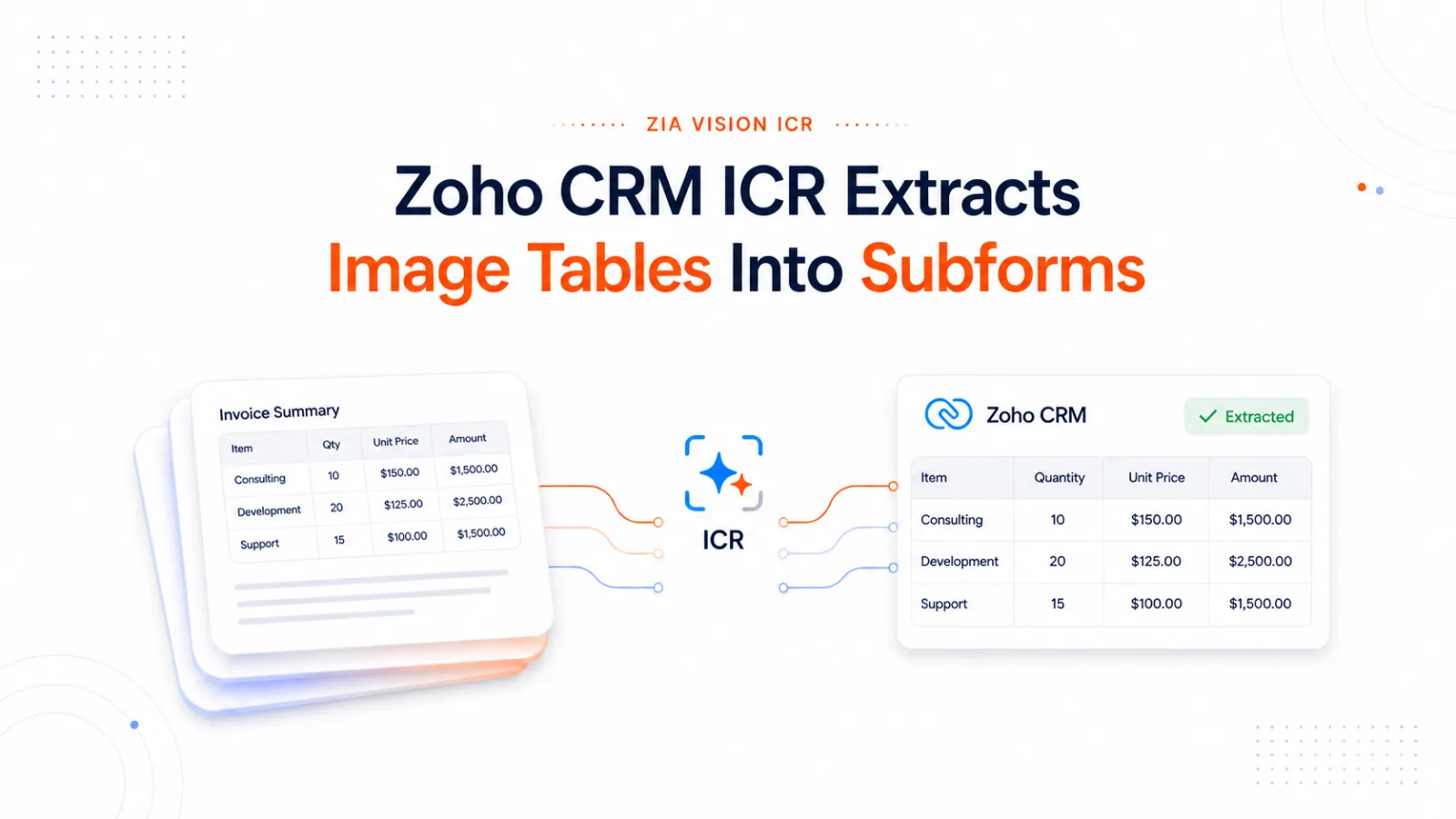
Zia Vision, the AI image validation capability inside Zoho CRM, can now recognize tabulated values in an uploaded image and store them as subform rows. Zoho announced the capability in late July 2026 as an enhancement to Zia Vision ICR.
Zoho OCR inside CRM is delivered by Zia Vision. Zoho CRM ICR, or intelligent character recognition, extends optical character recognition to handwritten and variable layout documents, which is why Zoho uses the term ICR.
Zoho’s announcement documents up to 3 subforms and 20 fields overall per rule. The current rule builder adds a Note banner stating that up to 20 rows in total can be extracted per rule. Advanced extraction prompts are available on any field that needs disambiguation.
Zoho lists the enhancement for 3 CRM editions:
- Professional
- Enterprise
- Ultimate
Before native table extraction reached ICR, teams moving line item data from document images into CRM subforms could use approaches such as:
- Deluge processing an intermediate file
- Zoho Creator based intake
- Custom middleware parsing documents on the server side
- OCR processing outside CRM followed by a Deluge writeback
Each introduced an additional processing or integration step between the document image and the CRM subform. The July release allows that document image to subform transfer to happen inside CRM ICR for supported workflows.

Fig 1 – CRM ICR intake path comparison. Representative approaches for moving document image data into a Zoho CRM subform, with older multi step paths shown beside the newer native CRM ICR path.
Zoho listed the enhancement as available in the US, India, and EU data centres, while noting that the release had reached organizations in the US and India data centres at publication time. Confirm feature visibility in the target CRM organization before estimating implementation work.
Latest release cadence for Zoho CRM is tracked at Clixlogix Latest Zoho Updates.
A Zoho CRM subform is a table embedded inside a CRM record. Rows share a single parent record, and each row carries its own fields. Subforms let a single CRM record hold multiple related line items inside the same record structure.
Common uses include:
- Line items on a quote, sales order, purchase order, or invoice
- Dependants on an insurance record
- Previous employers on a job application
- Contact details associated with an account
Zoho ships 2 subform types. Standard subforms allow multiple rows to be added to a record, up to the configured row limit. Static subforms use predefined rows and values configured by an admin, making them useful for KYC checklists, vendor verification, and other scenarios where specific information needs to be collected consistently.
This article scopes its configuration steps, examples, and architecture to Standard subforms.
The complete list of field types available inside a subform, including Single Line, Multi Line, Currency, Number, Date, Lookup, and others, lives in the Zoho subforms help documentation.
Zero shot field prompting in Zia Vision ICR uses a VLM based model. Zoho explains the technology through the architecture of a typical Vision Language Model. A vision encoder turns the uploaded image into visual embeddings, the prompt is represented as text embeddings, and a projection component brings both into a compatible representation that the LLM can use to generate the requested output. Zoho presents this as a general explanation of VLM technology, so the diagram should not be read as a disclosure of Zia’s exact proprietary architecture.

Fig 2 – VLM extraction flow. A high level view of how image content and field prompts move through the VLM explanation Zoho provides before values are associated with CRM fields and subform rows.
In CRM, the admin selects the fields whose values should be extracted. Zia identifies relevant values from the uploaded image and associates them with those CRM fields. Zero shot requires no sample training or manual value localization. When several values could plausibly match the same field, Zoho provides optional advanced extraction prompts so the admin can add natural language instructions. Billing versus Shipping address is Zoho’s own example of this ambiguity.
The extraction configuration centers on selecting CRM fields and, where ambiguity exists, adding natural language extraction instructions. From an implementation perspective, the admin work shifts from sample training and field localization toward field selection and prompt design. Validation still matters. Zoho’s record creation workflow explicitly asks the user to review the extracted field associations before saving the CRM record.
The 2 methods behave differently under stress. Template driven extraction is sensitive to layout consistency. Zoho recommends the method when incoming images follow a standard, constant structure and says uploaded images should match the trained layout. Significant layout changes may require updated template training or a different extraction design. Zero shot field prompting can produce incorrect associations when several values in the document plausibly match the same CRM field. Advanced extraction prompts provide additional instructions for those cases. Adding training samples is not part of the zero shot workflow, so troubleshooting centers on field selection, source image quality, and prompt specificity.
Production intake around ICR should handle idempotency in the surrounding workflow using the source document identity as the processing key. Extracted field values are business output and should not anchor state tracking. The user validation step in Zoho’s record creation flow exists because extraction output requires review before commit.
Clixlogix has documented a separate legal workflow where a 2 stage OCR and reasoning pipeline was replaced with multimodal document processing. That implementation shows why retaining visual context matters when downstream decisions depend on document structure. The case is architectural context, distinct from claims about Zia’s internal implementation.
Template Driven vs Zero Shot ICR in Zoho CRM
Zoho ships 2 ICR extraction methods, and every rule uses 1 of them. The choice determines what documents fit, whether admins need to train the model, and whether table to subform extraction is available.
Template driven ICR requires sample images that use the same template and orientation. The admin uploads samples, and Zia recognizes the characters in each image and marks them as regions of interest using bounding boxes. The admin then associates those regions with CRM fields and can adjust the margins where needed. Template driven extraction works with card type orientation and can extract images as well as characters from the source. Zoho does not currently permit training tables in a sample file for association with a record’s subform.
Zero shot field prompting requires no training. The admin selects the CRM fields whose values should be extracted, optionally adds advanced extraction prompts for fields that risk conflation, and saves the rule. The VLM based model described in How the Extraction Actually Works handles recognition and association at runtime. Zero shot supports table to subform extraction. Current zero shot cannot capture image objects.
Zoho’s decision guide is concrete. Template driven extraction is intended for source images that arrive in a standard and constant format. Zoho says stable trained structures can produce higher accuracy. Field prompting is recommended for source images whose format or orientation varies between uploads, source images containing handwritten text, and impromptu extraction needs.

Fig 3 – Template driven versus zero shot decision matrix. A side by side comparison of input fit, training needs, orientation support, subform support, and best use case.
Template driven remains a strong fit for fixed format documents such as ID proofs and other card type inputs that consistently follow the trained layout. Template driven extraction depends on layout consistency. Zoho says incoming images should use the same layout as the training sample, so material changes to the source format may require the rule to be retrained or redesigned.
For subforms, the method choice is constrained by the platform. Zoho states that template driven extraction cannot currently train a table in a sample file for association with a record’s subform. A workflow that needs tabulated source values written into subform rows therefore uses field prompting. Existing template driven use cases do not need to move to field prompting solely because subform extraction has been added.
Zoho’s public documentation does not describe interaction between template driven and field prompting rules configured against the same module and layout. Teams planning that configuration should test the exact invocation flow in their target CRM organization.
Configuring a Zero Shot ICR Rule for Subform Extraction, Step by Step
The zero shot rule builder is where the July 2026 subform release is configured. This walkthrough covers the 7 configuration steps a Zoho admin needs and separates Zoho documented setup from production design guidance.
Step 1. Navigate to Setup > Zia > Vision > Intelligent Character Recognition. Click Create New Rule.
Step 2. Provide a rule name, choose the module and layout, and select Field prompting as the extraction type. This creates a zero shot ICR rule for the selected module and layout.
Step 3. Select general fields to extract. Current field prompting support includes general Single Line and Multi Line fields plus tabulated subform fields, per Zoho’s ICR help documentation. Zoho’s July announcement says support for additional extraction data types is planned, without a published delivery date. For workflows that eventually write into destination fields with specific API formats, a staging design gives the team a place to validate, review, and convert values only where the destination schema requires it. The rule can also include an optional field that stores the uploaded source image for future reference, subject to audit and retention policy.
Step 4. Click Add Subform. Select the subform from the layout, then choose the subform fields that should receive extracted values. Repeat for additional subforms up to the documented 3 subform and 20 field ceiling. The current rule builder also shows a Note banner in the Subform fields to be extracted section stating that up to 20 rows in total can be extracted. Retain a current screenshot of this banner in the editorial evidence pack because this row limit is visible in the rule builder, not in the public announcement text. Documents with more than 20 table rows need intake design review before production. The What Breaks and How to Design Around It section covers the operational implications.

Fig 4 – ICR rule configuration walkthrough. The zero shot ICR rule builder showing subform field selection, advanced extraction prompts, and the current Note banner that states only up to 20 rows in total can be extracted.
Step 5. Enable advanced extraction prompts for Zia when multiple values or interpretations are possible for a selected field. Zoho’s example uses Billing address and Shipping address. The rule builder examples use short, plain language hints that explain what the field means and where the value is usually found. Prompt wording should stay close to that style.
Example prompt wording for a purchase order intake rule:
- Ship To. Ship To is the delivery address on the purchase order. It is often found in the header above the line items.
- Item Code. Item Code is the product or SKU code in each line item row. It is often a short alphanumeric value.
- Unit Price. Unit Price is the price for 1 unit of the item. It is usually shown before the row total or amount.
Step 6. Save the rule and test with representative documents from the target class. Zoho documents a validation step where the user reviews Zia’s associations and decides what to retain. The test set should include the inputs that the workflow must actually handle, including rotated orientation, low image quality, partial content, and the same ambiguity covered by advanced prompts. After each prompt revision, run the same document set again before moving the rule into production. Zoho does not publish a regression testing method for ICR, so this test cycle belongs in the implementation QA plan.
Step 7. Choose the invocation flow. Creating a new record from an image uses the Create Record dropdown in the module and selects the ICR rule. Enriching an existing record uses the Enrich from Image button on the record’s uploaded image. The 2 flows share the same rule configuration and the same review screen.
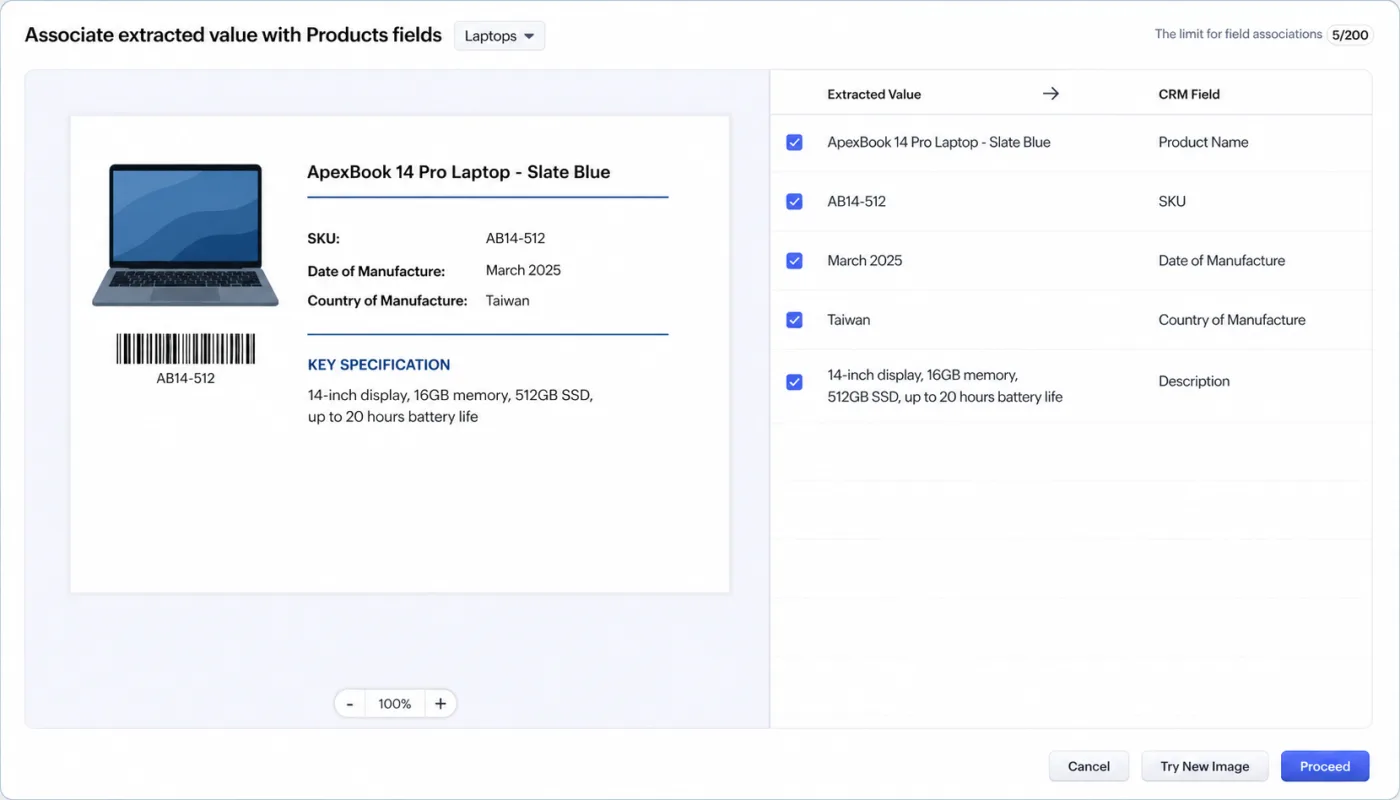
Post extraction validation screen. Zia shows each extracted value beside the CRM field it will populate, for review before the record is saved.
Findability note
The Add Subform section appears inside the zero shot Field prompting rule builder. Admins configuring template driven rules will not see it because Zoho documents table to subform extraction under field prompting and separately states that template driven ICR cannot train tables in sample files for association with a record’s subform. If the section does not appear when creating a new field prompting rule, verify the edition, data centre rollout, selected module and layout, and current feature visibility with Zoho support.
Design time gotcha
Values that appear inside a table in the source image must be configured through the Subform section of the ICR rule. Zoho’s Points to remember says that if a field inside a table is selected as a general field, ICR will not extract that table value. Only Table to Subform extraction is possible for those source values.
Designing a Production Intake Workflow With Zia Vision ICR
The subform release opens ICR to document types with tabular data. Production intake workflows require design work Zoho does not document. The 6 decisions below apply whether the source is a vendor purchase order, an insurance claim form, a rental application, or a multi line service request.
1. Staging module design. When the destination module has strict validation, lookup dependencies, or downstream automation, a dedicated staging module gives reviewers a controlled place to validate extracted header fields and subform rows before the destination record is created or updated. A custom module works when the intake process needs a separate review queue. An existing module works when a workflow status field can hold the record before final posting.
2. Destination field handling. Current field prompting documentation lists general Single Line and Multi Line fields plus tabulated subform fields. When the reviewed value is later written to a destination field with a different API format, conversion is required at that point. Zoho’s V8 Insert Records documentation lists Number as integer, Currency as numeric, Date as yyyy-MM-dd, and Lookup as a JSON object with a record ID. Deluge is 1 implementation option for that conversion, not a Zoho requirement for ICR.
3. Review workflow states. The staging module should carry an explicit workflow status field. Records move through Extracted, Validated, Reviewed, and Approved. State changes should be logged where audit requirements apply. Records that fail validation stay in staging until resolved. The destination write should wait until the staging record reaches Approved.
4. Enrichment safety. Zoho’s ICR help documentation says enriching an existing record adds imported subform values and does not replace existing table values. A workflow that reprocesses the same document can therefore add duplicate rows unless the implementation reconciles existing rows first. Zoho’s V8 Update Subforms API documents the correction tools. Adding a new subform record appends it while old rows remain unaffected, an empty JSON array deletes all rows in that subform, and _delete: null deletes a specific subform row by ID.
5. Identity resolution. Destination records are governed by the destination schema. For native inventory line items, Zoho’s V8 examples use a Product reference with an ID. The implementation should match extracted product codes or names against governed Product records before the destination write. Unresolved values should route to review with a flag before any native Sales Order is created.
6. Exception handling. Zoho documents a user validation step after extraction. The workflow should check for missing required header fields, empty line item tables, duplicate source identifiers, unresolved Product records, and documents that exceed the current rule builder’s 20 row extraction limit. These checks keep incomplete or ambiguous extraction results in staging for review.

Fig 5 – Production intake workflow architecture. A production intake flow from document image input through ICR extraction, staging, destination field handling, identity resolution, review states, and the final CRM write.
Purchase Order to Sales Order Example
A vendor purchase order lands as an image and needs to become a native Sales Order. Staging captures header fields and a Line Items Staging subform. The implementation validates quantities, prices, dates, and product references before writing to the destination schema. Identity resolution matches extracted SKU values to governed Product records. Unresolved SKU values route to review. Reviewed staging records write to the native Sales Orders module with populated Ordered_Items, which Zoho documents as the line item subform for Sales Orders. The same design applies to claim forms with claim line items, rental applications with occupants, or any other document with tabular source data. Downstream workflows often extend from Sales Orders into project execution or fulfillment, covered in Integrating Zoho CRM with Zoho Projects.
What Breaks and How to Design Around It
Zoho’s ICR help includes a Limits and limitations section. Production intake adds a second set of design risks around file intake, review, enrichment, and downstream writes. The 6 points below are the ones to settle before a workflow moves beyond testing.
PDF input is not the current CRM ICR input path. Zoho documents JPG, JPEG, and PNG as the supported formats for field prompting.
- Put a small conversion service between the PDF source and CRM ICR. Common wiring options include Zoho Catalyst Functions, Zoho Flow orchestrating a custom function, AWS Lambda, Google Cloud Functions, Azure Functions, or a self hosted n8n workflow
- This wiring has worked across past Clixlogix document intake use cases where the source arrived as a PDF but the extraction surface expected an image
- Keep the original PDF attached or archived when audit policy requires it, and send the rendered JPG or PNG into the ICR rule
- Scope page splitting, image quality, temporary file storage, and multi page handling before estimating the ICR configuration
The 20 row extraction limit is visible in the current rule builder. Zoho’s public announcement documents up to 3 subforms and 20 fields overall per rule. The rule builder Note banner adds that only up to 20 rows in total can be extracted.
- Retain a current screenshot of the Note banner in the evidence pack
- Send documents above that row count to review or to a separate intake path before destination write
Table values need the Subform configuration path. Zoho’s Points to remember says that a field inside a table must be selected in the Subform configuration. Selecting the same field as a general field will not extract that table value.
- Configure table values through Add Subform
- Check for empty expected subform rows before destination write
Enrichment adds subform rows. Zoho says enriching an existing record adds imported subform values and does not replace existing table values.
- Reprocessing the same source document can create duplicate rows
- Use a reconciliation step before enrichment writes to an existing record
No published accuracy floor. The current Zoho ICR documentation reviewed for this article does not publish a general accuracy percentage or error free guarantee.
- Keep human review before commit for high consequence workflows
- Track processing state against the source document identity, not against extracted values
Wrong extraction surface for the document class. CRM ICR is the native choice when supported image input should populate CRM fields and subforms. Zoho RPA IDP is a separate Zoho surface for broader document automation, including PDF and image files, prompt based extraction, and workflow steps outside the CRM ICR rule builder.
- Choose CRM ICR for image intake into CRM fields
- Consider Zoho RPA IDP when PDF handling or wider document automation is the primary requirement
Where ICR Ends and What to Plan for Next
Zoho has indicated the ICR direction of travel in 2 announcements. Both point to expansions that reshape the template driven versus zero shot method choice, zero shot rule configuration, and production intake workflow design.
Zoho’s stated roadmap:
- Additional extraction data types are planned. Zoho’s July release note flagged “the ability to extract fields of different data types” as coming soon, with invoice to quote and receipt to inventory workflows named as the direction of travel.
- PDF listed as a planned ICR capability. Zoho’s zero shot announcement included extraction from formats such as PDF in its “next in line” roadmap. No delivery date published.
What this means for teams designing intake now:
- Design the destination schema on the target module with typed fields today, so the Deluge conversion step can simplify or drop when Zoho ships typed extraction
- Do not wait for PDF support at the CRM ICR surface. The image conversion step is low friction and unblocks a real workflow today
- If PDF handling is central to the workflow and CRM ICR does not fit, Zoho RPA IDP is the shipped alternative inside the Zoho suite
- The invoice to quote and receipt to inventory workflows Zoho hinted at are variations of the purchase order to sales order example in Designing a Production Intake Workflow With Zia Vision ICR. The staging design covered there extends cleanly as Zoho expands the supported extraction data types
Zia Vision ICR is where Zoho OCR lives inside CRM, and it is part of Zoho’s broader AI portfolio. For context on how it sits alongside Zia Agents and Zoho MCP as the platform’s 3 AI depths, see The No Nonsense Guide to Zia Models, Zia Agents, and Zoho MCP.
Working on Your Document Intake Setup
If you have read this far, document workflows are on your mind. Vendor documents sit in email. Someone types values into Zoho by hand. The July release opens a path.
Send a photo of the document class you want to intake and a note about where the data should land in your CRM. Expect a draft architecture within 3 business days at no charge.
Document intake is one piece of a larger setup. The same team covers Zoho consulting, implementation and custom development.
Talk to a senior Zoho consultant