c-84, sector 65, Noida
Clixlogix rebuilt a lash brand’s Magento storefront with bilingual content and a CodeIgniter training portal, then migrated the platform to Magento 2.
A lash extensions brand with a stylist training arm, serving the full market across English and French, had outgrown its WordPress and WooCommerce storefront. A professional product line meant for authorised stylists sat on an existing storefront implementation that could not separate who sees a product, who sees its price, and who is allowed to buy. The training operation ran on a disconnected administration, and bilingual content required engineering intervention on every edit.
Clixlogix delivered the engagement in 2 phases. The initial rebuild migrated the storefront onto Magento Community Edition 1.9.x and built an attached CodeIgniter training portal connected through single sign on and an API bridge. The customer group logic was extended into 3 independent controls across 3 enforcement surfaces, matching the brand’s distinction between consumer browsing and professional purchasing.
The training portal gave administrators a defined home for session dates, stylist records, certification content, and training registrations. Store view based bilingual administration moved routine French content out of the engineering queue.
A later migration moved the storefront from Magento 1 to Magento 2 after the Magento 1 end of life, carrying the custom permissions logic, the discount logic, and the CodeIgniter integration forward through redevelopment onto Magento 2 primitives.
The initial rebuild delivered approximately 3 months of engineering work with ongoing technical support. The later migration phase re-landed the operating model onto a supported Magento 2 runtime, leaving the brand on a commerce platform engineered for its operating model and backed by the current Magento Open Source line.
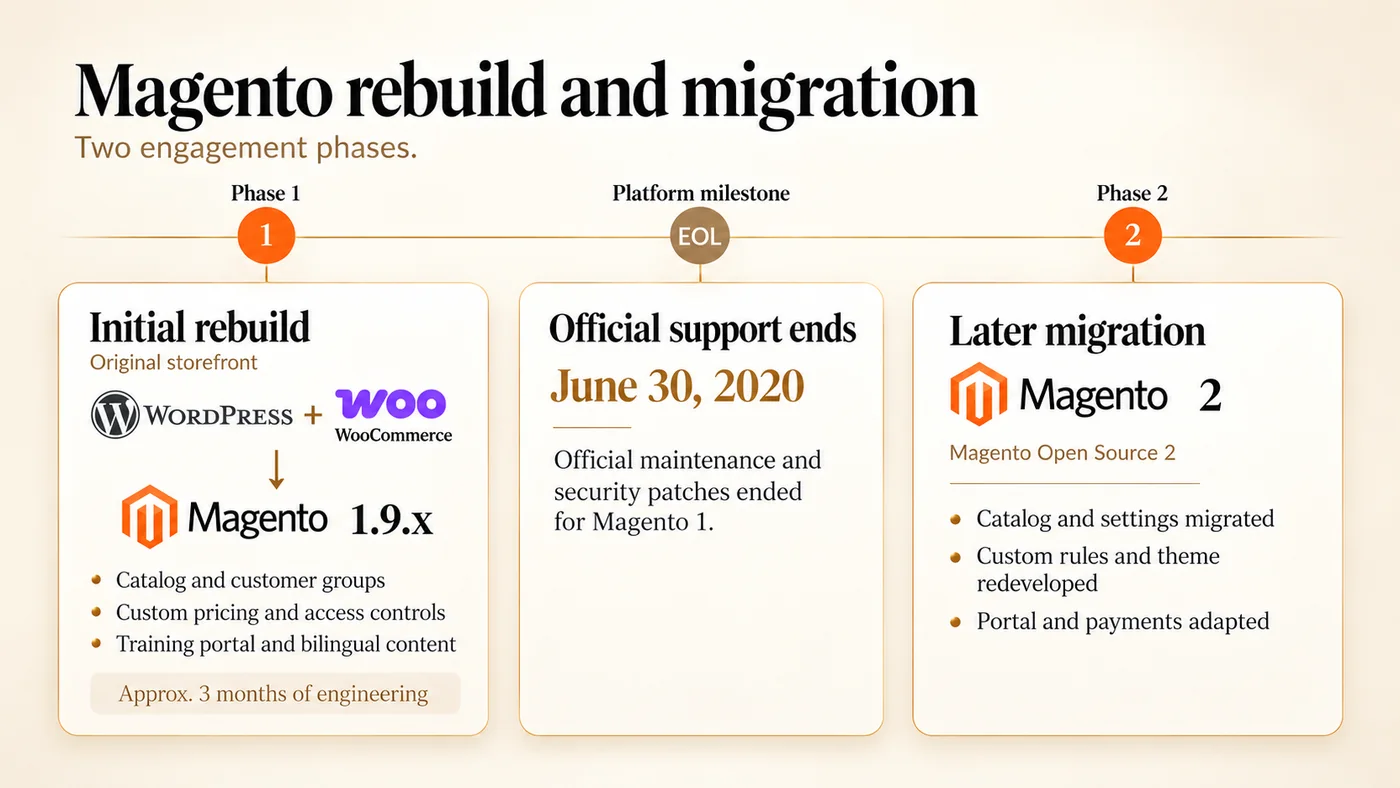
Fig 1 - Two engagement phases from WordPress and WooCommerce to Magento 2
The initial rebuild moved the storefront from WordPress and WooCommerce to Magento Community Edition 1.9.x. Magento 1’s end of official support on June 30, 2020 appears as a platform milestone before the later Magento Open Source 2 migration; the approximately 3 month engineering window applies to the initial rebuild.
Xtreme Lashes Canada is a professional lash extensions brand founded by a registered nurse, with a global network of lash professionals the brand reports as operating across more than 50 countries. The storefront is pitched at a professional audience under the brand’s “trusted by professionals” positioning, with trade pricing visible only after a professional login and consumer facing cosmetics carried as a separate catalog section alongside the professional supply.
The storefront serves 4 primary commerce audiences.
The training operation covers 3 pathways. One trains aspiring stylists on the brand’s core methodology. Another trains credentialed stylists to go on to teach others. A third covers an adjacent service that stylists offer alongside the core line. The pathways run through physical training locations and online course material, and sit as an attached operational capability on the brand’s commerce surface, separate from the product line.
Administrators manage the product catalog, training session dates and locations, stylist directory records, certification content and images, training registrations, and French language content from the connected admin environment. The business operates across English and French to serve its full market, with Quebec French requirements shaping the storefront’s bilingual administration.
These audience shapes made customer groups, product variations, bilingual content, and the attached training portal central to the rebuild.
The legacy WordPress and WooCommerce storefront required an overhaul of commerce functionality. The correspondence from the engagement identified 5 operating problems that shaped the work.
The product catalog carried approximately 150 base products that expanded to roughly 1,700 records when all variant combinations were included, with lash extension SKUs carrying type, length, and volume dimensions. The storefront needed native commerce primitives for configurable products, variant pricing, and inventory on top of a platform that could carry Canadian provincial taxation and customer group commerce rules. WooCommerce on the legacy WordPress storefront did not fit the operating scale or the group commerce complexity.
The client described different customer profiles and controlled access to different products as a mandatory requirement. The ask was more granular than a simple hide from group behaviour. Products needed 3 separate controls per customer group.
An existing customer group visibility functionality on the storefront collapsed all 3 onto a single hide from group toggle, which did not match the operating model. The gap between the existing behaviour and the operating requirement needed custom Magento development on the storefront.
Lash product configurations had to interact correctly with the storefront’s shopping cart price rules and customer group pricing without silently misfiring on the cart.
Staff needed to add training session dates, manage training locations, locate stylist directory records, manage certification related content and images, and handle training registrations coming in from the storefront. The commerce platform’s administration environment did not fit those administrative shapes naturally. A separate administration environment was needed for the attached training portal, and the 2 application model needed its own authentication handoff and data exchange connectivity to the commerce storefront.
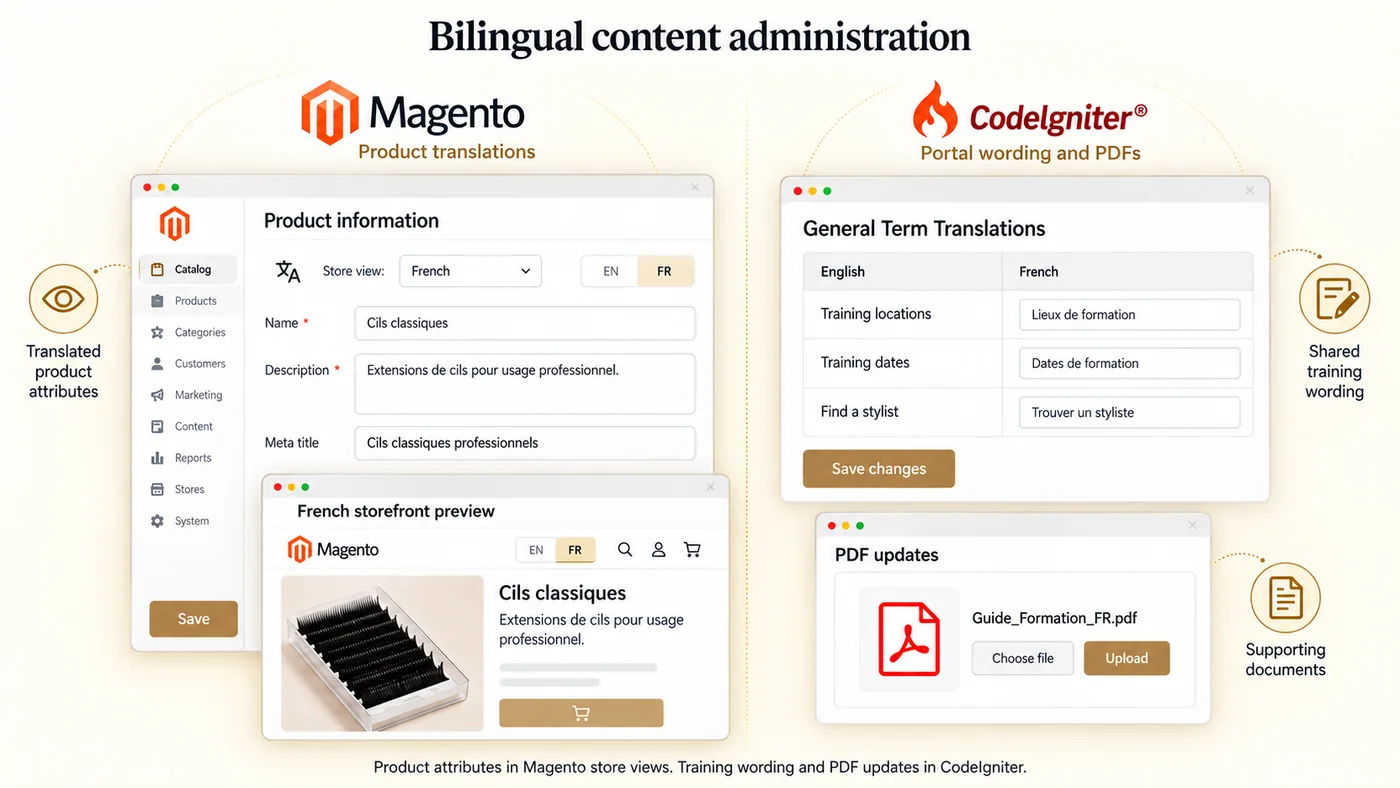
English and French content introduced a routine administration task alongside catalog, training, and stylist updates. Staff needed defined places to manage English and French product content, correct shared training terms, and update supporting PDFs without engineering intervention on every change.
This table captures the initial rebuild phase (WordPress and WooCommerce to Magento Community Edition 1.9.x). The later migration phase from Magento 1 to Magento 2 is described in its own section further down, and carries the Magento 2 destination state for each row where it applies.
| Area on the initial rebuild | Before | After (Magento 1.9.x phase) |
|---|---|---|
| Commerce platform | WooCommerce on WordPress | Magento 1.9.x |
| Product catalog | Legacy WooCommerce catalog | 150 base products, 1,700 records |
| Customer group commerce rules | None | 4 groups, 3 independent controls |
| Volume discount rule | None | 10 or more units of a product |
| Canadian provincial tax configuration | Flat tax handling | Provincial rules by tax class |
| Technical SEO baseline | Canonical issues | Robots.txt and canonicals corrected |
| Attached training portal | None | CodeIgniter portal, 5 record types |
| Cross application authentication | Separate logins | Single sign on |
| Cross application data exchange | None | API bridge |
| Training session date administration | None | Dates, locations, search |
| Stylist directory records | None | Directory with search |
| Training registration intake | None | Storefront forms routed to staff |
| Bilingual content administration | None | Store views plus portal term tool |
| Hosting resource allocation | Default limits too tight | Limits raised by the host |
Table 1 - Initial rebuild phase before and after on the Magento 1.9.x engagement
Clixlogix delivered the engagement in 2 phases.
The Clixlogix project management team coordinated delivery with the client and the client’s digital partner. The client’s digital partner acted as the primary coordination counterpart across the engagement.
The initial rebuild phase covered the ecommerce migration and build onto Magento Community Edition 1.9.x, standard catalog functionality for configurable products, standard customer groups and group pricing configured for the business, standard provincial tax rules and classes configured for Canadian requirements, custom Magento development separating product visibility, price visibility, and purchase eligibility per customer group, cart price rules with the custom quantity aggregation handling, the attached CodeIgniter training portal, single sign on authentication and API bridge data exchange between the 2 applications, bilingual content administration through store views and the training portal’s translation tool, and technical SEO implementation. The training portal scope was administrative only: training session date and location management, stylist directory records, certification related content and image management, and training registration handling through forms. Automated course progress tracking, automated completion triggers, and automated certificate generation were not part of the engagement scope. Post launch support covered pricing rule conflicts, tax class assignments on specific products, host resource constraints, edge cases on the single sign on handoff and the API bridge, and search engine configuration corrections.
The later migration phase covered the catalog, customer group, tax, cart price rule, and store view data migration onto Magento 2, redevelopment of the custom module separating product visibility, price visibility, and purchase eligibility per customer group as a Magento 2 module, redevelopment of the shopping cart price rule aggregation using Magento 2 plugins and observers, the storefront theme and layout rebuild on Magento 2’s theme system, and the integration surface rebuild carrying the single sign on handoff and the API data bridge onto Magento 2 primitives. The Moneris payment integration was re-landed on a Magento 2 compatible connector because Magento 1 payment modules are not directly compatible with Magento 2’s module architecture and payment gateway framework.
Clixlogix carried the ecommerce migration, the Magento configuration, the custom development on customer group controls, the custom handling on cart price rule quantity aggregation, the attached CodeIgniter training portal build, the single sign on handoff and API bridge between the 2 applications, the bilingual content administration setup, and the technical SEO engineering on the initial rebuild. On the later migration, Clixlogix carried the data migration onto Magento 2, the redevelopment of the custom module and the discount logic, the storefront theme rebuild, and the rewiring of the CodeIgniter integration onto Magento 2 primitives. The client and the client’s digital partner carried content supply, French language review, product data decisions, acceptance on specific fixes, and the promotion decision on when each phase went live.
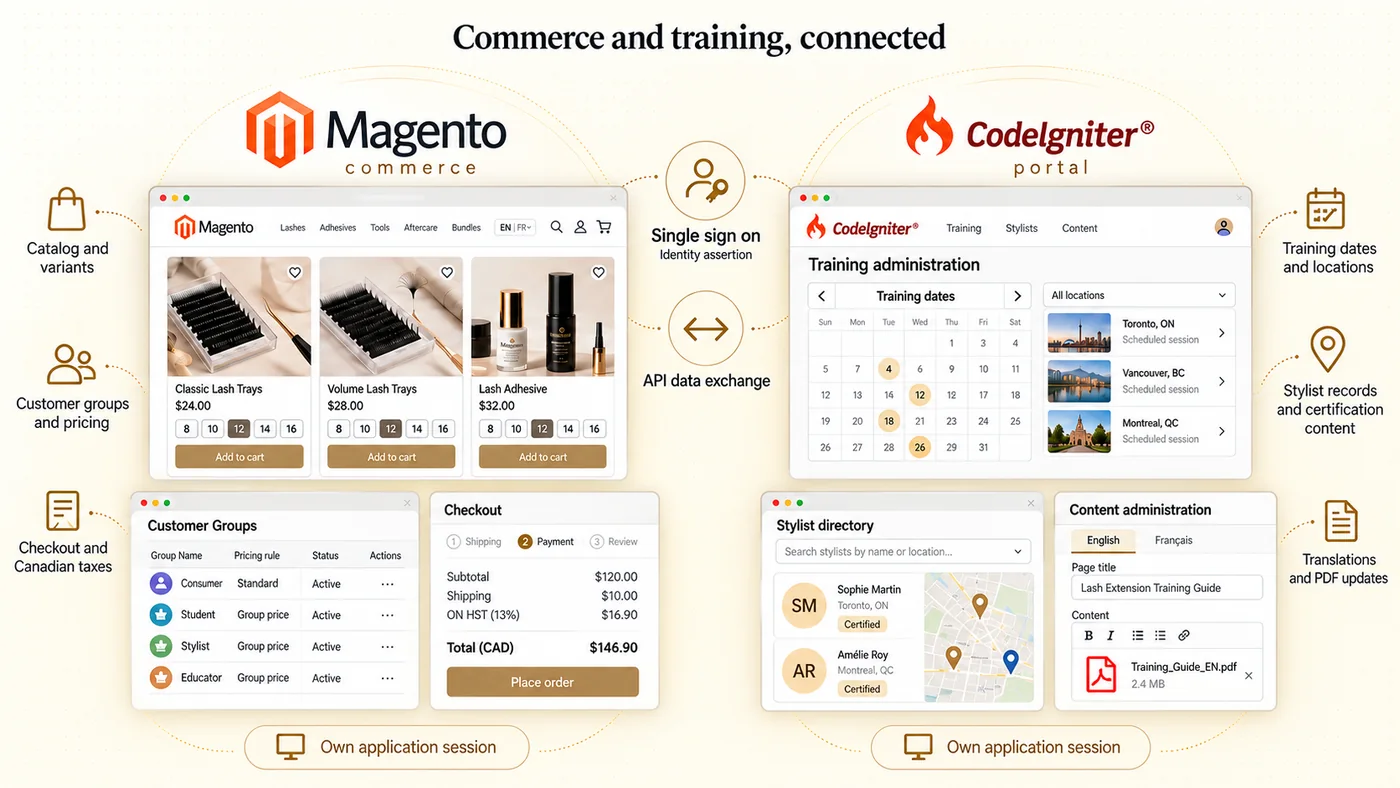
The engagement’s central architectural decision was to deliver the commerce storefront on Magento with a specialist training portal attached through 2 separate connections to the storefront.
Magento provides commerce primitives for catalog records, variant handling, customer groups, pricing rules, and taxation that fit a professional beauty ecommerce brand. Stylist training session administration, directory records, certification content management, and training registration intake did not fit those commerce primitives naturally. Clixlogix built a dedicated CodeIgniter training portal attached to the Magento storefront, keeping the training surfaces outside the commerce platform’s admin.
This division also shaped administrator instructions. Product catalog, customer group, cart price rule, store view translation, and tax changes were made in the Magento admin. Training session dates, training locations, stylist records, certification content and images, training registrations, and the General Term Translations tool for shared training wording were managed through the attached CodeIgniter portal.
Fig 2 - Commerce and training administration connected through two separate mechanisms
Magento manages the catalog, customer groups, pricing, taxation and orders, while the attached CodeIgniter portal manages training and stylist administration. A single sign on handoff connects authentication, and a separate API bridge exchanges data; each application maintains its own session. Illustrative UI cutouts and functional icons show the main commerce and portal surfaces; the panels are illustrations of those capabilities.
The attached portal model required 2 separate connections between Magento and CodeIgniter. One carried authentication. The other carried data. Each connection had its own operating concerns.
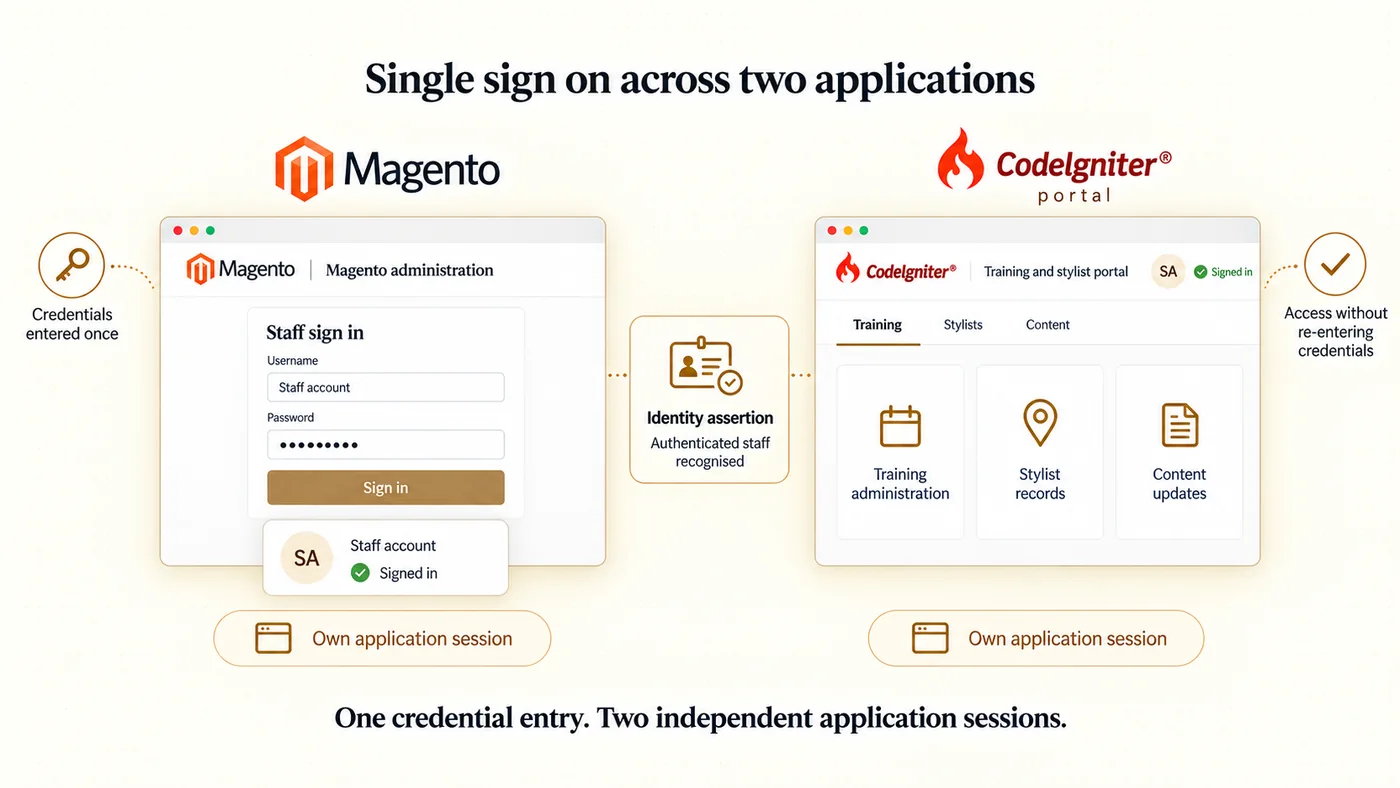
Single sign on carried authentication. Staff entered credentials once in either application and were accepted by the other application through an identity assertion passed between the 2 applications. Each application maintained its own application session on its own server. The single sign on handoff ensured a staff member authenticated in one application was recognised in the other without re-entering credentials. The 2 applications did not share one session store.
Fig 3 - Single sign on authenticates staff across two independent application sessions
A staff member signs in to one application and is recognised by the other through an identity assertion. The receiving application establishes its own authenticated session, allowing access to both administration environments after one credential entry. The illustrative UI cutouts show Magento as the sign in entry point and CodeIgniter as the receiving application; staff could start in either application.
The API bridge carried data exchange. Shared user records and operational data moved between the 2 applications through programmatic API calls, so that changes in one application’s data store were reflected in the other without a manual sync step.
Support correspondence recorded edge cases on each connection. The single sign on handoff showed authentication state drift when a session expired in one application but not the other. The API bridge showed payload shape changes when either application’s data model moved. Each case was addressed through specific fixes during the support period.
Clixlogix moved the legacy WooCommerce storefront catalog onto Magento. The catalog carried approximately 150 base products before variations and around 1,700 records in total when configurable products and their associated simple product variants were counted together. The catalog check cycle included client review of the uploaded records and backend reindexing to make the uploaded catalog searchable from the storefront.
The storefront’s runtime at the time of the engagement was Magento Community Edition 1.9.x (Magento 1 archived documentation), the open source edition of the Magento 1 line. The paid Enterprise Edition sat on its own 1.14.x version carrying additional capabilities beyond CE 1.9.x. Configurable products and their associated simple products are standard catalog functionality on this runtime. Clixlogix used that standard functionality to carry the lash extension product families onto the storefront.
Configurable products on the catalog remained an engineering concern across the engagement because their variations interacted with the storefront’s shopping cart price rules and customer group pricing. The configurable product administration carries the simple product variants that back a configurable, and discount rules on the shopping cart have to apply correctly against the selected variant. Support work continued after the initial catalog upload to address those interactions on Magento 1.9.x.
The catalog and configurable product handling also carried onto the later Magento 2 migration. The product catalog, customer groups, cart price rules, tax configuration, and store view translations were migrated and configured in Magento 2 from the Magento 1.9.x source data. The custom cart price rule aggregation logic for configurable variants was redeveloped through Magento 2 plugins and observers working with cart totals collectors and quote item processing. The Magento 2 upgrade path section below describes how each component was migrated.
Customer groups configured on the engagement included Consumers, Students, Stylists, and Educators as the 4 primary commerce audience segments. Customer groups are standard Magento functionality configured for this business.
An existing customer group visibility functionality on the storefront allowed products to be hidden from selected customer groups entirely. The correspondence from the engagement records the client’s requirement for a more differentiated set of controls per customer group. Products needed 3 separate controls.
The existing hide from group behaviour collapsed all 3 controls onto a single visibility toggle, which did not match the operating model.
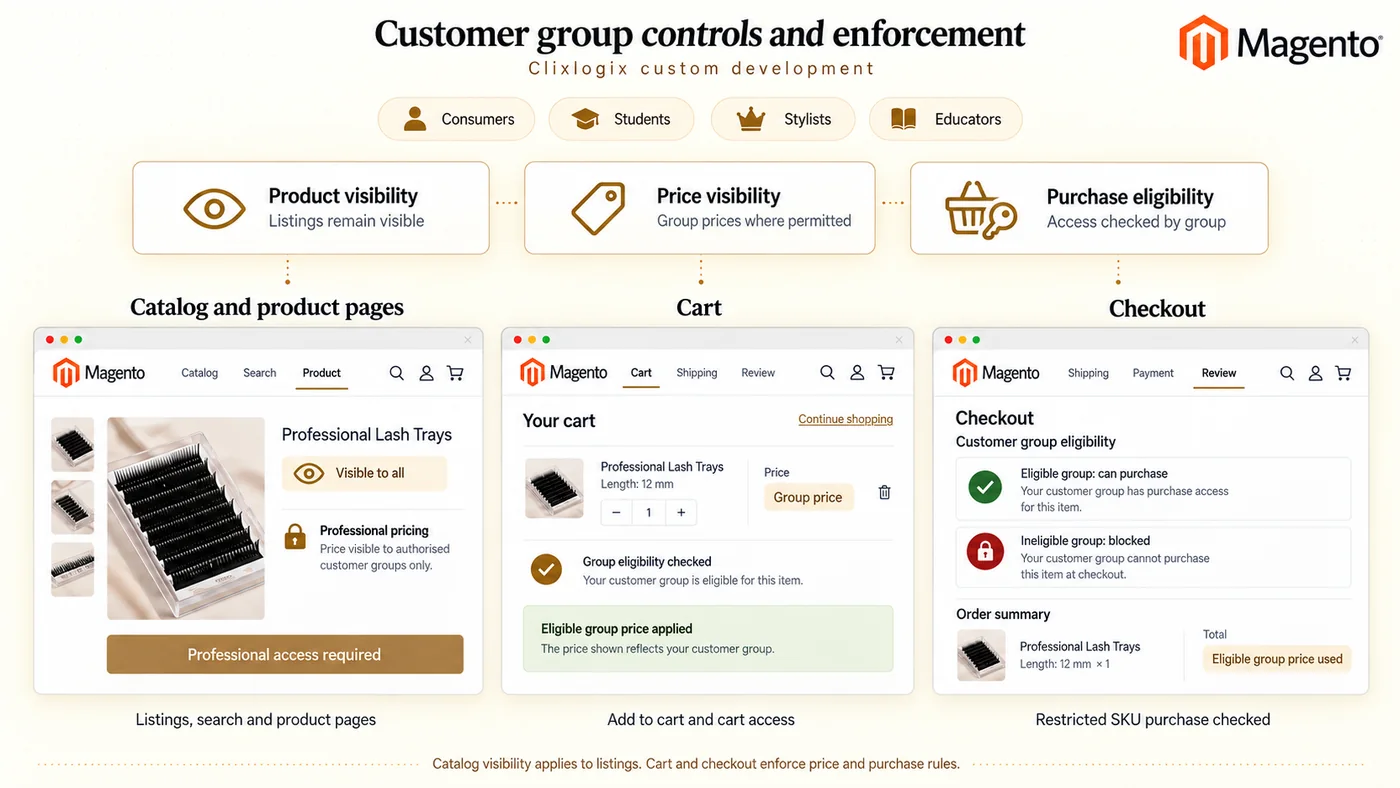
Clixlogix built custom Magento development on the storefront so each of the 3 controls operated independently. Product listings stayed visible to all browsers (consumer and non authorized groups included). Price visibility and purchase eligibility were controlled per customer group on each product. Enforcement ran on 3 surfaces.
| Control | Category pages and product detail pages | Cart | Checkout |
|---|---|---|---|
| Product visibility | Product listings remained visible to all browsers | N/A | N/A |
| Price visibility | Group prices displayed where permitted | Eligible customer group selling price applied | Eligible customer group price used in order totals |
| Purchase eligibility | Purchase actions reflected customer group access | Add to cart and cart access were gated by customer group | Ineligible groups were blocked from completing a purchase |
Table 2 - Customer group controls and enforcement locations
Product visibility also covered search results. N/A marks a surface outside catalog listing visibility.
Fig 4 - Customer group controls and enforcement locations
The custom Magento development separates product visibility, price display and purchase eligibility per customer group. Illustrative UI examples show visible catalog and product listings, eligible group pricing in cart, and alternative eligibility outcomes at checkout. Table 2 maps each control to its enforcement surfaces; catalog visibility covers category pages, search results and product pages, with cart and checkout marked N/A for that control.
Non authorized groups could discover and view the catalog but could not see group only prices or complete transactions on restricted SKUs.
A shopping cart price rule applied a volume discount when 10 or more units of an eligible product were in the cart, counted across the product’s configurable variants. The threshold combined units of the same base product across its variant selections, so the count ignored both individual variants in isolation and the cart total. Standard Magento cart price rule configuration supplies the condition and action framework, and Clixlogix added custom handling for the aggregation across configurable variants so the rule evaluated the configurable’s selected variants as a single quantity bucket, collapsing the separate line items into it. During support, Clixlogix addressed a conflict between Magento 1.9.x configurable products and the shopping cart price rule evaluation by making changes to Magento core files, and the client accepted the fix.
Canadian taxation work covered product tax class assignments on the product record, customer tax classes associated with the configured customer groups (Consumers, Students, Stylists, Educators), and provincial tax rules on the Magento tax configuration. The configuration flow runs customer account to customer group to customer tax class. Tax rules then combine the customer tax class, the product tax class, and the applicable geographic rate to produce the tax at order time. During follow up support, specific products required product tax class corrections on the product record.
Post launch SEO work on the Magento storefront covered robots.txt deployment, XML sitemap configuration, and canonical issues. Clixlogix deployed robots.txt and corrected the canonical issues on the storefront during the support period. Redirects for the legacy WordPress URLs moved through the support cycle as the client approved them, with the full redirect coverage across the legacy URL list carried as an ongoing task alongside the live storefront, with coverage extended through successive support cycles.
The attached CodeIgniter training portal carried training session dates, training locations, and stylist directory records. The engagement added search fields on the 2 record surfaces.
Each surface was searched on its own, and staff moved between them as the task required.
Staff manually added training session dates and locations through the attached training portal, managed certification related content and images through the admin surfaces, and handled training registrations through forms on the storefront that routed to the training portal. The public storefront carried a stylist finder with advanced search. Training lead forms routed storefront visitors toward relevant training locations, and popup submissions landed on training location pages for follow up by the client’s training staff.
The attached training portal delivered administrative scope only. Automated course progress tracking, automated completion triggers, and automated certificate generation were not part of the engagement scope.
The storefront supported English and French across the commerce and training experience to serve the full market.
Product content on the Magento storefront was managed through store views, the standard Magento mechanism for multilingual product content. Staff selected the French or English store view in the admin and edited translated attribute values on each product for the selected store view (name, description, meta data, URL key, and other translatable attributes). The scope of translation is attribute level per store view, and each store view reads the same product record. New SKUs inherited the store view structure, so a product added once was available to be translated on each store view.
The attached CodeIgniter training portal carried a separate set of translation tools for the training surfaces. The General Term Translations tool allowed correction of shared wording across the training and administration surfaces, and additional controls supported updating supporting PDFs that staff referenced in training communications. The General Term Translations tool is distinct from Magento store views; it covers training terminology maintained inside the CodeIgniter portal, while product attributes stay on the Magento storefront.
These tools gave staff defined administration surfaces for routine content corrections across the product catalog, the shared training terminology, and the supporting PDFs that staff referenced in training communications.
Fig 5 - English and French content administered in Magento and the attached training portal
Magento store views provide translated product attribute values for the English and French storefronts. The CodeIgniter General Term Translations tool manages shared training wording, while separate portal controls support PDF updates. The illustrative example pairs a French store view editor with its storefront preview and keeps the portal term editor and PDF upload control visibly separate. Product attributes are translated on the same product record; the PDF control handles document updates independently of term translation.
Quebec’s Charter of the French Language, administered by the Office québécois de la langue française at oqlf.gouv.qc.ca (Charter of the French Language), governs how French appears in commerce in Quebec. Article 51 covers inscriptions on a product, its container or wrapping, and documents or objects supplied with the product. Article 52 extends to commercial publications, including websites that offer goods or services to Quebec consumers, so the language made available to customers on the storefront is the compliance surface, and the back office administration sits outside it. The engagement needed a defined administration path for French content so staff could keep the English and French customer facing surfaces aligned without engineering intervention on every edit.
The initial rebuild phase on Magento 1.9.x delivered the following outcomes. The later migration preserved these business capabilities through data migration and redevelopment, as described in the Magento 2 upgrade path section further down.
robots.txt and corrected canonical issues on the storefront during post launch support.Magento 1.9.x reached end of life on June 30, 2020. Adobe ended official vendor maintenance and security patches for Magento 1 on that date. The later migration used Magento Open Source 2 to carry the catalog, custom commerce rules, and attached training portal integration onto the successor platform.
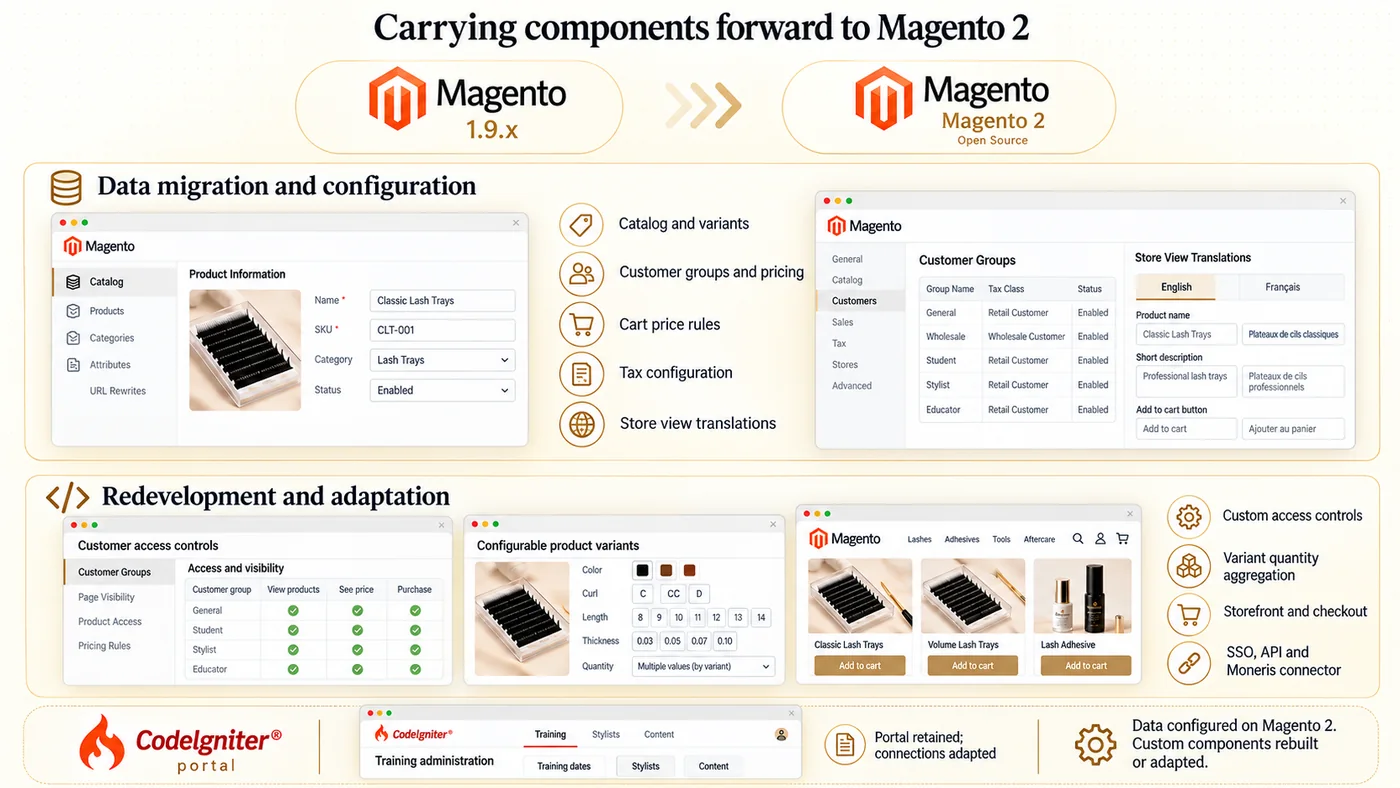
A Magento 1 to Magento 2 move is a migration and a redevelopment of affected components, because the 2 lines differ across the database schema, the admin layout, the theming system, the extension API, and the front end rendering stack. The custom development, the discount logic, and the CodeIgniter connections built on 1.9.x do not carry across unchanged; each has to be re-landed on Magento 2 primitives.
The components delivered on Magento 1.9.x were adapted for Magento 2 along the following lines.
Fig 6 - Commerce data migrated and custom components redeveloped for Magento 2
Catalog records, customer groups, tax configuration, cart rules and store view translations carried forward through data migration and configuration. Custom access controls, variant quantity aggregation, the storefront theme and checkout were redeveloped for Magento 2; browser single sign on, the API bridge and the Moneris connector were adapted separately. The CodeIgniter portal remained the training and stylist administration environment with adapted commerce connections. Illustrative UI cutouts distinguish these workstreams, while Table 3 lists the approach for each component.
The comparison pairs each Magento 1.9.x component with the approach used on Magento 2, distinguishing data migration and configuration from code redevelopment and integration adaptation.
| Component | Magento 1.9.x implementation | Magento 2 approach | Work type |
|---|---|---|---|
| Product catalog and variants | Configurable plus simple variants | Migrated to the Magento 2 catalog model | Data migration |
| Customer groups and pricing | 4 groups with group pricing | Same groups re-configured | Migration and config |
| Shopping cart price rules | Standard rules, custom quantity handling | Re-created on the Magento 2 framework | Configuration |
| Canadian taxation | Tax classes, provincial rates | Re-created classes and rules | Migration and config |
| English and French product content | Translated attributes per store view | Re-attached to migrated products | Migration and config |
| Independent customer group controls | Custom core overrides | Magento 2 module using plugins | Custom module |
| Variant quantity aggregation | Core file changes | Plugins and observers | Custom logic |
| Storefront theme and layout | Magento 1.9.x theme, PHP templates | XML layouts, PHTML, RequireJS | Theme rebuild |
| Checkout rendering | Magento 1 checkout | UI components with KnockoutJS | Checkout rebuild |
| Training and stylist administration | CodeIgniter portal | Retained, connections adapted | Portal continuity |
| Browser single sign on | Magento 1 authentication hooks | Magento 2 authentication and sessions | Auth redevelopment |
| API data bridge | Magento 1 API surface | Magento 2 REST endpoints | API redevelopment |
| Moneris payments | Magento 1.9.x integration | Magento 2 compatible connector | Payment adaptation |
Table 3 - Magento 1 to Magento 2 migration and redevelopment by component
The product catalog, the customer group configuration, the cart price rule configuration, the tax configuration, and the store view translations were re-created on Magento 2 primitives from the Magento 1.9.x source data. Configurable products and their associated simple products were re-loaded onto Magento 2’s catalog data model, and the per store view translated attribute values for English and French were re-attached to the migrated product records.
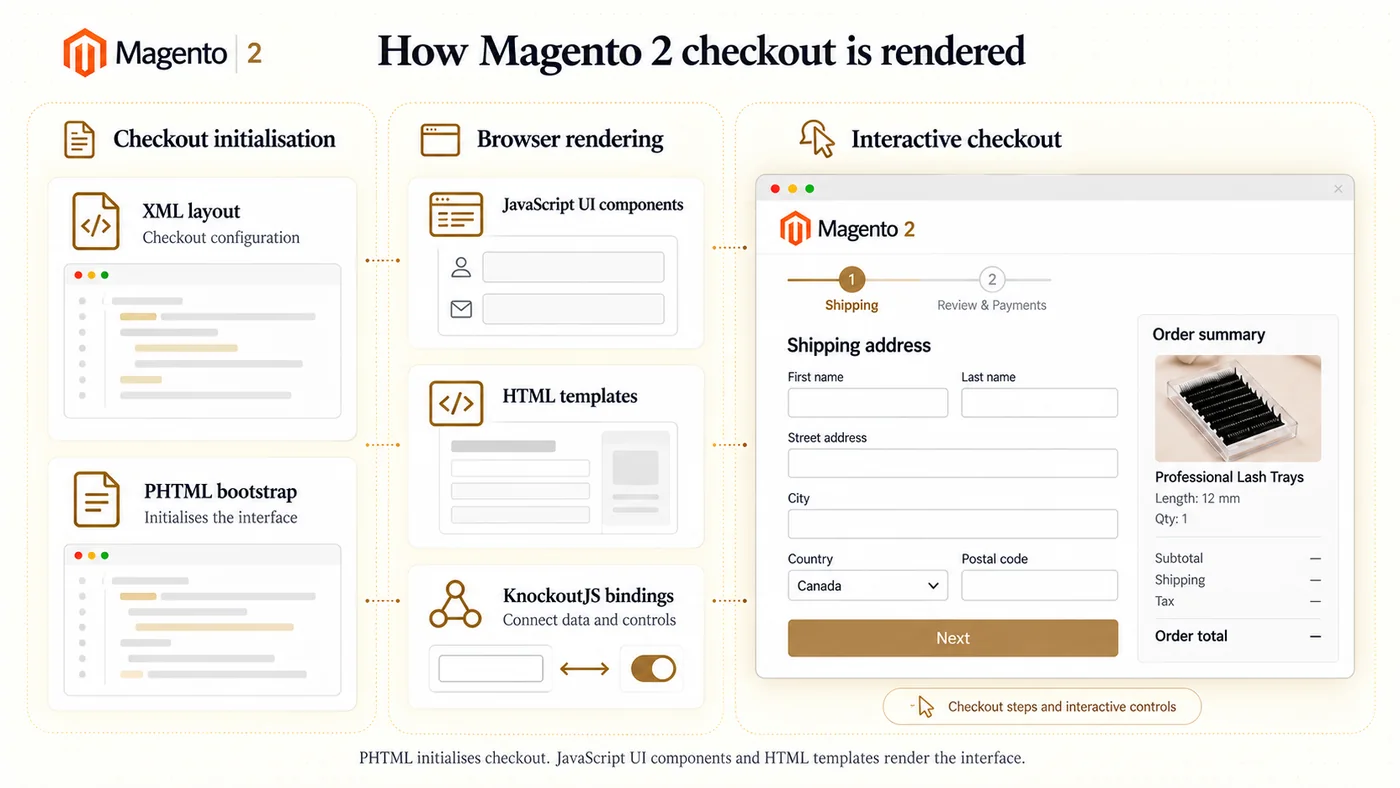
The storefront theme and layout were rebuilt on Magento 2’s theme system, which is architecturally different from the Magento 1.9.x theme and therefore does not accept the earlier theme files. The rebuild covered XML layout files that compose the page structure, PHTML templates that render category pages, product detail pages, and cart on the server side, and JavaScript organised through RequireJS for client side modules. Checkout was rebuilt on Magento 2’s JavaScript UI components and HTML templates (with an XML layout entry point and a PHTML bootstrap), because Magento 2 renders checkout through KnockoutJS backed UI components, where Magento 1 rendered checkout as a server side page; the Magento 1.9.x prototype based front end does not carry across to that mechanism.
Fig 7 - Magento 2 checkout rendered through JavaScript UI components and HTML templates
XML layout configuration and a PHTML bootstrap initialise the checkout interface. JavaScript UI components use HTML templates and KnockoutJS bindings to render the checkout steps and interactive controls. The illustrative file and component cutouts distinguish initialisation from browser rendering. The checkout preview shows a shipping address form, order summary and the Shipping and Review & Payments steps as examples of the interface those components support.
The custom development that separated product visibility, price visibility, and purchase eligibility per customer group was redeveloped as a Magento 2 module. The 3 independent per group controls, the enforcement across category pages, product detail pages, cart, and checkout, and the visible catalog with gated price and purchase for non authorized groups were re-landed on Magento 2’s module architecture, with plugin interception points replacing the Magento 1.9.x core overrides that had carried the behaviour on the earlier runtime. The customer group model (Consumers, Students, Stylists, Educators) carried forward, so the migrated module continued to operate against the same 4 group audience structure.
The shopping cart price rule with custom quantity aggregation across configurable variants was redeveloped on Magento 2’s cart price rule framework. The aggregation logic that treated the selected variants of an eligible configurable product as a single quantity bucket (triggering the volume discount at 10 or more units of that product) was re-implemented using Magento 2 plugins and observers, replacing the Magento 1 core file changes that had been used on 1.9.x. Working against Magento 2’s cart totals collectors and quote item processing surfaced different edge cases than the Magento 1.9.x implementation; those were addressed inside the Magento 2 redevelopment, ahead of any support cycle.
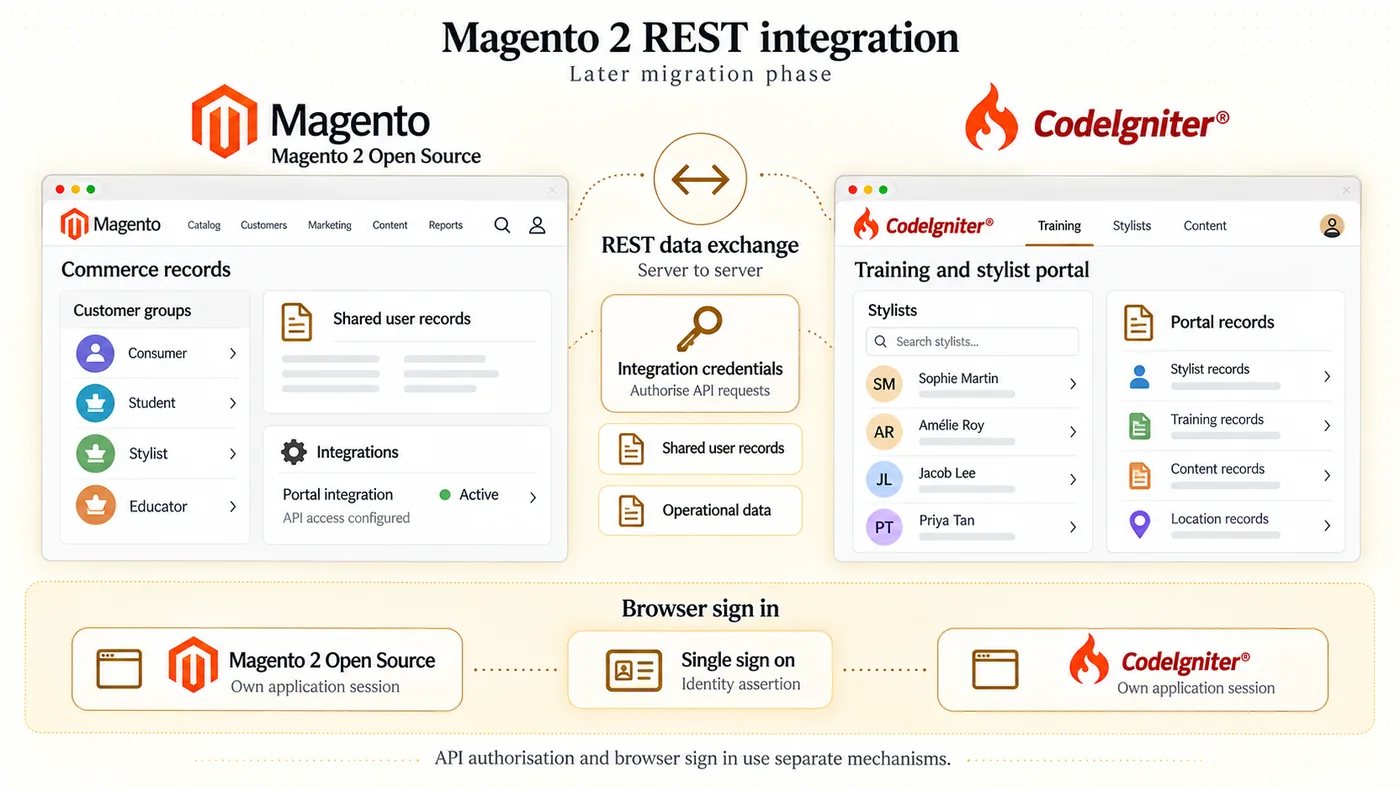
The attached CodeIgniter training portal remained the stylist and training administration environment. The 2 connections between the Magento 2 storefront and the CodeIgniter portal (the browser single sign on handoff and the server to server API data bridge) were rewired independently, because they carry different kinds of traffic and use different authentication mechanisms on Magento 2.
The single sign on handoff is the browser session mechanism. A staff member authenticated in one application is accepted by the other without re-entering credentials, through an identity assertion passed between the 2 applications. Each application continues to maintain its own application session on its own server, as on the Magento 1.9.x phase. The identity assertion mechanism was re-landed against Magento 2’s authentication flow (login, session handling, and the admin and customer area session cookies), replacing the Magento 1.9.x hooks it had been built against.
The API data bridge is the server to server REST exchange carrying shared user records and operational data between the 2 applications’ data stores. The bridge was re-pointed at Magento 2’s REST endpoints, which replace the Magento 1.9.x API surface entirely. The API bridge is authenticated through Magento 2 integration credentials for server to server calls, which authorise API requests but do not establish a browser session; the browser session continues to be handled by the single sign on mechanism described above. The record types moving across the bridge carried the same shape as on Magento 1.9.x, but the transport and the authentication layer were rebuilt against Magento 2 conventions.
Fig 8 - Magento 2 integration credentials authorise the portal’s REST data exchange
During the later migration, the API bridge was adapted to Magento 2 REST endpoints and integration credentials. Shared user records and operational data move between the commerce application and CodeIgniter, while browser authentication continues through the separate single sign on handoff. The illustrative application cutouts place integration configuration beside the commerce records, with API authorisation and browser sign in shown in separate areas. Each application maintains its own browser session.
The Moneris payment integration delivered on the Magento 1.9.x phase was re-landed on a Magento 2 compatible Moneris connector during the migration. Magento 1 payment modules are not directly compatible with Magento 2’s module architecture and payment gateway framework (which uses a different gateway abstraction and transaction object model), so the Magento 1.9.x Moneris integration could not be carried across as a file copy. A Magento 2 compatible connector was used to continue Moneris as the payment path on the migrated storefront.
The approximately 3 month engineering window described earlier covers the initial Magento 1.9.x delivery. The Magento 2 adaptation above describes a later phase of work on the same custom development, the same discount logic, and the same attached CodeIgniter portal, carrying the operating model forward onto a supported Magento 2 runtime after the Magento 1 end of life.
The rebuild gave the client control over the product catalog, professional purchasing rules and training administration. Staff could manage the following through Magento and the attached CodeIgniter portal:
The later Magento 2 migration carried these capabilities onto the successor platform, with the custom commerce logic and portal connections redeveloped or adapted. The client could continue managing product sales, bilingual content and training administration across the two applications.
| Area on this engagement | Technologies and tools |
|---|---|
| Previous commerce environment | WordPress with WooCommerce as the commerce application |
| Commerce application runtime (initial rebuild) | Magento Community Edition 1.9.x |
| Commerce application runtime (later migration) | Magento Open Source 2 |
| Standard catalog functionality | Configurable products and associated simple products, native variant handling, product tax class assignment on the product record; carried forward across both phases through re-creation on Magento 2’s catalog data model during migration |
| Standard customer group functionality configured for this business | Magento customer groups (Consumers, Students, Stylists, Educators), customer group pricing, customer tax classes associated with customer groups; carried forward across both phases |
| Custom Magento development on customer group access | Custom development on the storefront separating product visibility, price visibility, and purchase eligibility per customer group across category pages, product detail pages, cart, and checkout; delivered as core overrides on Magento 1.9.x in the initial rebuild and redeveloped as a Magento 2 module using plugin interception points in the later migration |
| Standard shopping cart price rule with custom handling | Magento shopping cart price rule framework with custom handling for quantity aggregation across the configurable variants of an eligible product; delivered as Magento 1 core file changes on the initial rebuild and re-implemented using Magento 2 plugins and observers against the cart totals collectors and quote item processing in the later migration |
| Standard tax functionality configured for Canadian requirements | Magento tax configuration carrying product tax classes on products, customer tax classes associated with customer groups, and provincial tax rules combining product tax class, customer tax class, and the applicable geographic rate; carried forward across both phases |
| Catalog scale | Approximately 150 base products expanding to roughly 1,700 records when configurable products and their associated simple product variants were counted together |
| Payments | Moneris payment integration on the Magento 1.9.x phase, re-landed on a Magento 2 compatible Moneris connector in the later migration because Magento 1 payment modules are not directly compatible with Magento 2’s module architecture and payment gateway framework |
| Attached training portal (custom integration) | CodeIgniter training portal built as custom integration carrying training session dates, training locations, stylist directory records, certification content and image management, training registration handling, and the General Term Translations tool; the portal continued as the stylist and training administration environment across both phases |
| Cross application authentication (custom integration) | Browser single sign on handoff between the Magento storefront and the attached training portal, so staff authenticated once in either application and were recognised by the other through an identity assertion passed between the 2 applications. Each application maintained its own application session. On the later migration, the identity assertion mechanism was re-landed against Magento 2’s authentication flow (login, session handling, admin and customer session cookies). |
| Cross application data exchange (custom integration) | Server to server API bridge between the Magento storefront and the attached training portal, carrying shared user records and operational data between the 2 applications’ data stores through programmatic API calls. On the later migration, the bridge was re-pointed at Magento 2’s REST endpoints and the calls were authenticated through Magento 2 integration credentials for server to server calls, which authorise API requests without establishing a browser session. |
| Technology stack (initial rebuild) | Magento 1.9.x theme on PHP, Bootstrap, CSS, JavaScript, and MySQL used on the initial rebuild |
| Technology stack (later migration) | Magento 2 theme and layout rebuild covering XML layout files, PHTML templates for server side rendering of category pages, product detail pages, and cart, JavaScript organised through RequireJS, and KnockoutJS backed UI components where Magento 2 ships them (checkout being the primary example, implemented through JavaScript UI components and HTML templates with an XML layout entry point and a PHTML bootstrap); the underlying runtime continues on PHP and MySQL |
| Standard bilingual administration | Magento store views on the storefront for per store view product attribute translations; CodeIgniter General Term Translations tool and PDF update controls for shared training wording on the attached portal; carried forward across both phases |
| Technical SEO primitives | Robots.txt deployment, XML sitemap configuration, canonical tags on the Magento storefront |
| Hosting configuration | Hosting runtime limits raised by the host to accommodate the catalog scale on the Magento 1.9.x phase |
Table 4 - Technologies and tools across both phases
The classification distinguishes standard Magento functionality, business configuration, custom Magento development and custom portal integrations.
| Magento Capability | Standard or Custom Build | Implementation on This Storefront |
|---|---|---|
| Configurable products and associated simple products | Standard | Lash families and variants |
| Customer groups and group pricing | Standard, configured | 4 commerce audiences |
| Shopping cart price rule framework | Standard, configured | Promotion conditions and actions |
| Canadian provincial taxation | Standard, configured | Tax classes and provincial rules |
| Product attribute translations | Standard, configured | English and French per store view |
| Independent product visibility, price visibility and purchase eligibility | Custom Magento | Visibility, price and purchase separated |
| Quantity aggregation across configurable variants | Custom Magento | Combined by base product before the discount |
| Training and stylist administration | Custom portal | CodeIgniter, 5 record types |
| Browser single sign on | Custom integration | One login across both applications |
| API data exchange | Custom integration | Shared records between applications |
Table 5 - Native Magento features, business configuration and custom development distinguished
The engagement delivered a commerce platform matched to the brand’s operating model, an attached training administration, and bilingual content administration, carried forward onto Magento 2.
Our team can share client references, scope your project, and answer any question about your delivery.
More engagements where our delivery teams shipped similar outcomes for clients across industries. Read on for context on the patterns we reused, the trade offs we navigated, and the metrics that landed in production.