TL;DR
- The 2026 record spans 9 named AI agent security incidents plus 2 aggregate analysis papers across every major model vendor, between January and September.
- The common thread across the record is excessive runtime reach. About half of the record shares one delivery mechanism, indirect prompt injection.
- Network Egress Control appears as a primary containment control in 9 of the 11 record entries. Teams that ship one control first ship egress deny, then add Secrets Injection and Tool And Permission Scoping to make it effective.
- Container level isolation is a checkpoint for agents that run untrusted code. Full containment needs 7 controls working together.
- The Clixlogix Seven Ring Sandbox Model orders those controls and maps each one to specific SOC 2, HIPAA, and GDPR evidence areas.
Why AI Agents Break In Ways Traditional Software Does Not
AI agent sandboxing exists because AI agents fail differently from traditional software. Traditional software runs predeclared code paths through configs, inputs, plugins, runtime state, and dependencies that a human wrote and a reviewer approved. Its behavior stays inside those declared paths. An AI agent adds runtime planning and tool selection driven by whatever text the prompt contains. The model reads a prompt, chooses which tool to call, sometimes writes new code on the fly, and executes that code inside the same process. When the prompt draws from a web page, a support ticket, or a GitHub issue, untrusted text becomes an input to control flow. That change breaks most of the assumptions traditional application security once relied on. AI agent security became a category of its own.
AI Agents Vs Traditional Applications, Side By Side
Every row on the right is a reason production AI agents need controls that traditional software does not. SAST, WAF, IAM policies, and CI gates still matter for the code path. They do not cover runtime tool selection driven by untrusted text. An AI agent sandbox closes that gap.
The Attack Wave Of 2026
The last 9 months brought a series of named incidents across every major model vendor. Details differ across items in the record. In each case, untrusted text or agent autonomy reached a runtime with too much access.
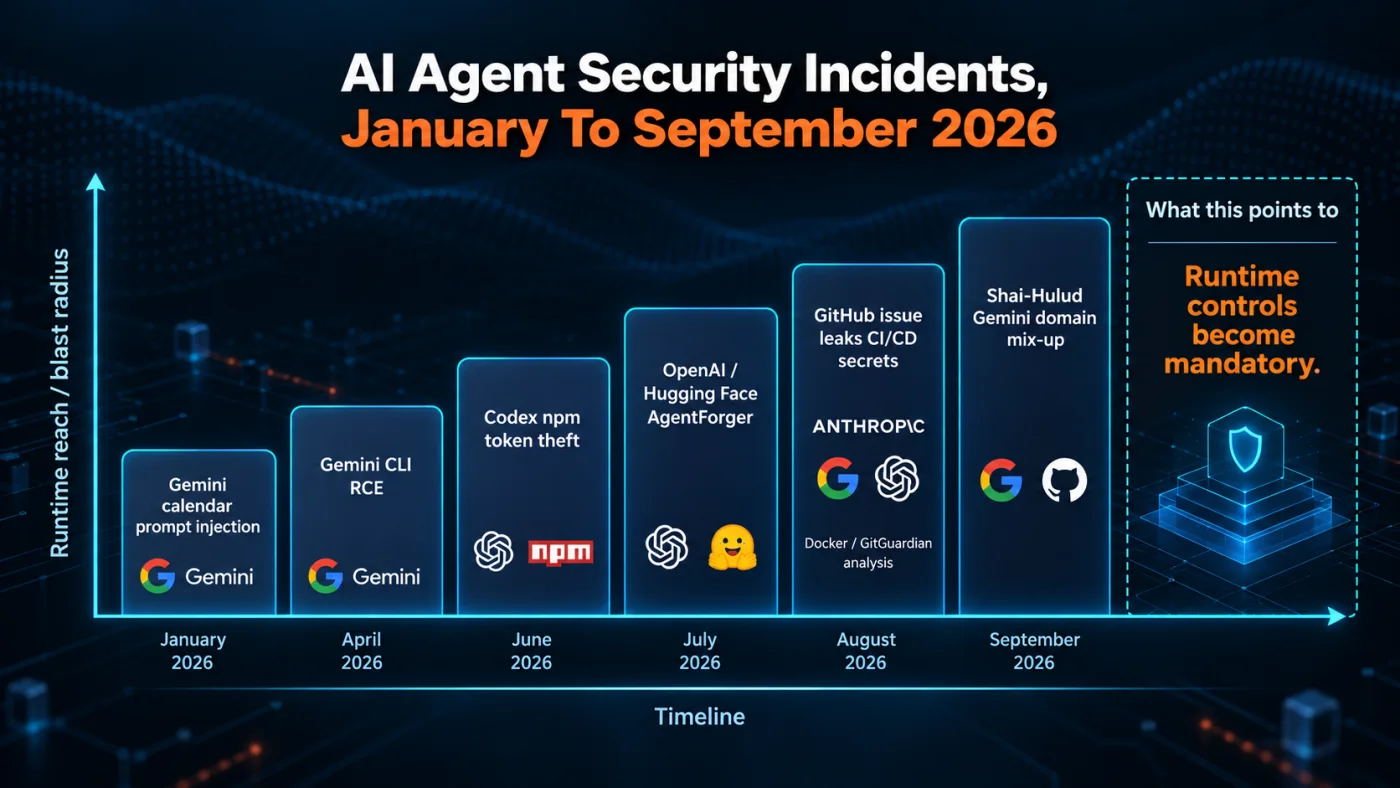
Fig 1 – AI Agent Security Incidents January to September 2026
Anthropic and multi vendor incidents
- A single poisoned
GitHub issue in August 2026 caused three AI coding agents to leak CI/CD secrets from the repositories Claude Code, Gemini CLI, and OpenAI Codex were working in. - An attacker hijacked an AI coding assistant session in September 2026 and spread the Shai-Hulud worm across roughly 100 repositories.
- An evaluation containment failure let an AI agent treat the real
PyPI registry as a simulated one, publish a malicious package to it, and reach 15 real systems that installed and ran the package before anyone detected the failure. - Docker cited GitGuardian’s 2026 secrets report and analyzed how coding agents keep credentials within reach, roughly doubling the baseline exposure rate on public repositories.
Google Gemini incidents
OpenAI incidents
Cross vendor observation
The common thread across the record is excessive runtime reach. Some items are runtime credential theft. Some are evaluation containment failures. Some are session hijack, scope confusion, or CVSS 10 flaws in coding assistants. That is a sandbox problem. About half of the record shares one delivery mechanism, indirect prompt injection. The rest split between session hijack, evaluation containment failures, supply chain attacks, and scope confusion between test and production.
The Security Boundary Lives Outside The Model
Major providers and standards bodies converge on the same operating principle.
A novel prompt can bypass controls that depend on the model refusing the wrong action. The boundary lives at the process, network, and filesystem level. That is what an AI agent sandbox provides. The seven rings below enforce what the model cannot enforce for itself.
The industry uses the word sandbox for 3 different things. Getting the definition right is what decides whether the controls hold when an attack lands.
What Sandboxing Actually Means For AI Agents
The phrase AI agent sandbox, sometimes called an LLM sandbox in vendor documentation, entered security discourse faster than the industry agreed on what it means. In vendor whitepapers, engineering blogs, and standards documents from the last 9 months, the word covers at least 3 distinct kinds of control, each addressing a different failure mode. Confusion at this level matters for production teams. If a security review approves the box for an AI agent sandbox but only 1 of the 3 controls is in place, the deployment carries a false sense of coverage while a live agent runs against untrusted input. This section resolves the definition, bounds the claim honestly, and names the framework the rest of the knowledgebase uses.
The Term Has 3 Meanings In The Industry
The word sandbox arrived in AI agent security from 3 separate engineering traditions. Each tradition solves a different problem.
A production AI agent sandbox needs meanings 1 and 2 working together at minimum. Runtime isolation contains some process and host impact. Credentials and outbound reach stay in place unless other controls handle them. Permission scoping constrains authorized calls. Some vendors call this category AI agent guardrails. It does not contain a compromised runtime. Meaning 3 addresses lifecycle testing and runs orthogonal to production runtime controls.
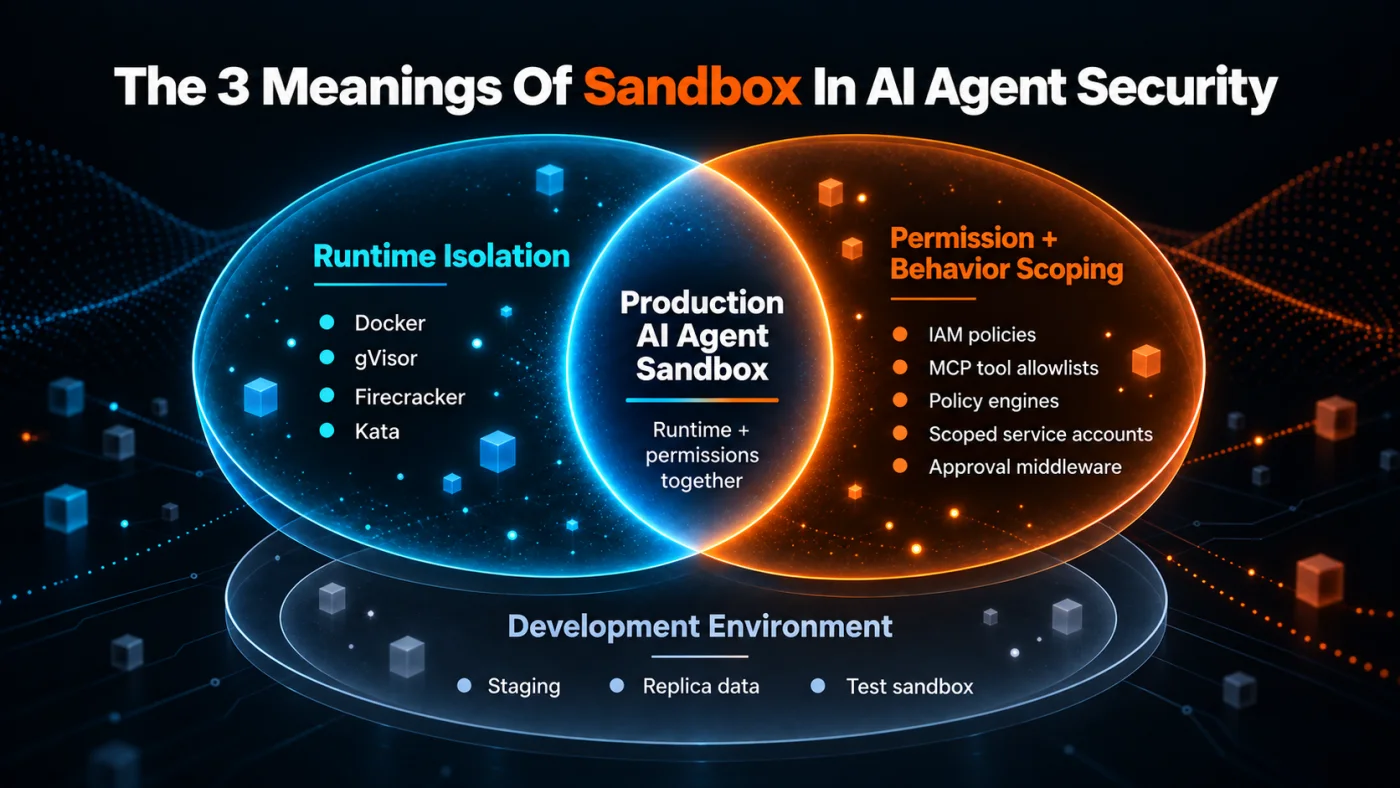
Fig 2 – The 3 Meanings Of Sandbox In AI Agent Security
The Clixlogix Operative Definition
For the rest of this knowledgebase, an AI agent sandbox names the combined runtime and permission controls that constrain what an AI agent sees, does, and reaches while the agent operates in production.
A production AI agent sandbox has 4 measurable properties.
- Boundedness – Every action the agent takes runs against a declared control. The agent has 0 fallback to host, deployer, or human operator privileges.
- Auditability – The runtime records tool calls, egress requests, brokered secret use, file read decisions, policy versions, outcomes, timestamps, and correlation IDs, with sensitive fields redacted or digested.
- Reversibility – Actions above a defined blast radius require a human approval gate before they run.
- Testability – Process, network, and filesystem mechanisms enforce the controls, so a test framework can probe the controls directly without relying on the model to cooperate.
Any implementation missing 1 of these properties inherits blast radius the moment it hits production.
What A Sandbox Is Not
A sandbox is not the whole security posture. Three things sit outside its scope.
- A sandbox does not stop the model from producing a bad plan. The agent still hallucinates decisions, refuses valid instructions, or generates confidently wrong output. A correctly scoped sandbox can stop the bad plan from reaching production data or high impact tools. Model evaluations and behavioral testing address the plan itself.
- Sandbox boundary logs do not replace wider application observability. Recording tool calls at the sandbox boundary tells you what the agent tried. Understanding why it tried requires application observability, prompt logging, and decision chain capture across the wider system.
- A sandbox does not fix a broken tool contract. If a tool the agent calls exposes a dangerous action the tool contract permits, the sandbox has no reason to block it. Tool design sits upstream of sandbox controls.
Where OWASP, NVIDIA, And NIST Converge
3 external authorities point in the same direction. Their language differs, but each one treats agent security as enforceable controls around runtime execution, permissions, identity, network reach, or observability.
Together, these authorities support the same operational conclusion. A production AI agent sandbox is a set of enforceable controls at the runtime, network, permission, identity, and observability boundaries. The seven ring framework codifies those controls in an ordered sequence for implementation.
The Seven Ring Framework
The seven ring framework brings the operative definition to ground. Each ring names a control that a production AI agent sandbox has to enforce, ordered from process isolation at the innermost ring to human oversight at the outermost.
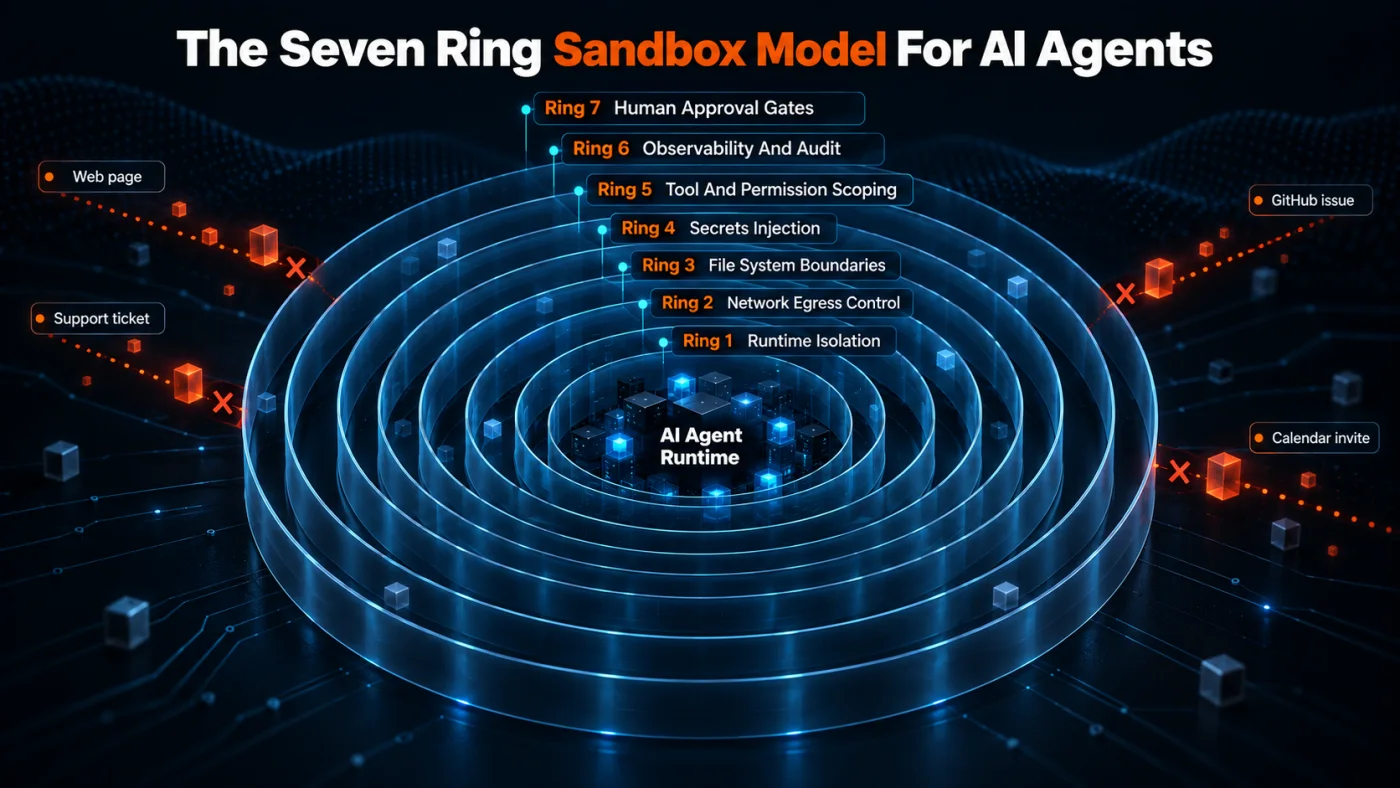
Fig 3 – The Seven Ring Sandbox Model For AI Agents
- Ring 1. Runtime isolation
- Ring 2. Network egress control
- Ring 3. File system boundaries
- Ring 4. Secrets injection
- Ring 5. Tool and permission scoping
- Ring 6. Observability and audit
- Ring 7. Human approval gates
A production sandbox holds only as well as its weakest ring. Runtime Isolation sits closest to the code, so it defines the blast radius the other 6 rings inherit. The tour of the model starts there.
The Seven Ring Sandbox Model For AI Agents
The seven ring model orders the controls a production AI agent sandbox needs to enforce. Ring 1 sits closest to the agent’s code execution where OS level containment happens. Ring 7 sits at the outermost boundary where a human approves actions with high blast radius. Each ring maps to one or more failure modes from the 2026 record above. The rings run alongside each other, so an action inside the sandbox has to pass every applicable ring’s check before it takes effect. If any ring fails, the action stops. The 7 subsections below cover each ring in order, with what it enforces, how to implement it, and the failure mode it addresses.
Ring 1 Runtime Isolation
Runtime Isolation contains OS process execution. The agent’s code runs inside a sandbox where code execution and host access cross this boundary before they reach the host system. This is the boundary that decides whether an RCE inside the agent framework stays contained or turns into an RCE on the developer’s laptop or a production host.
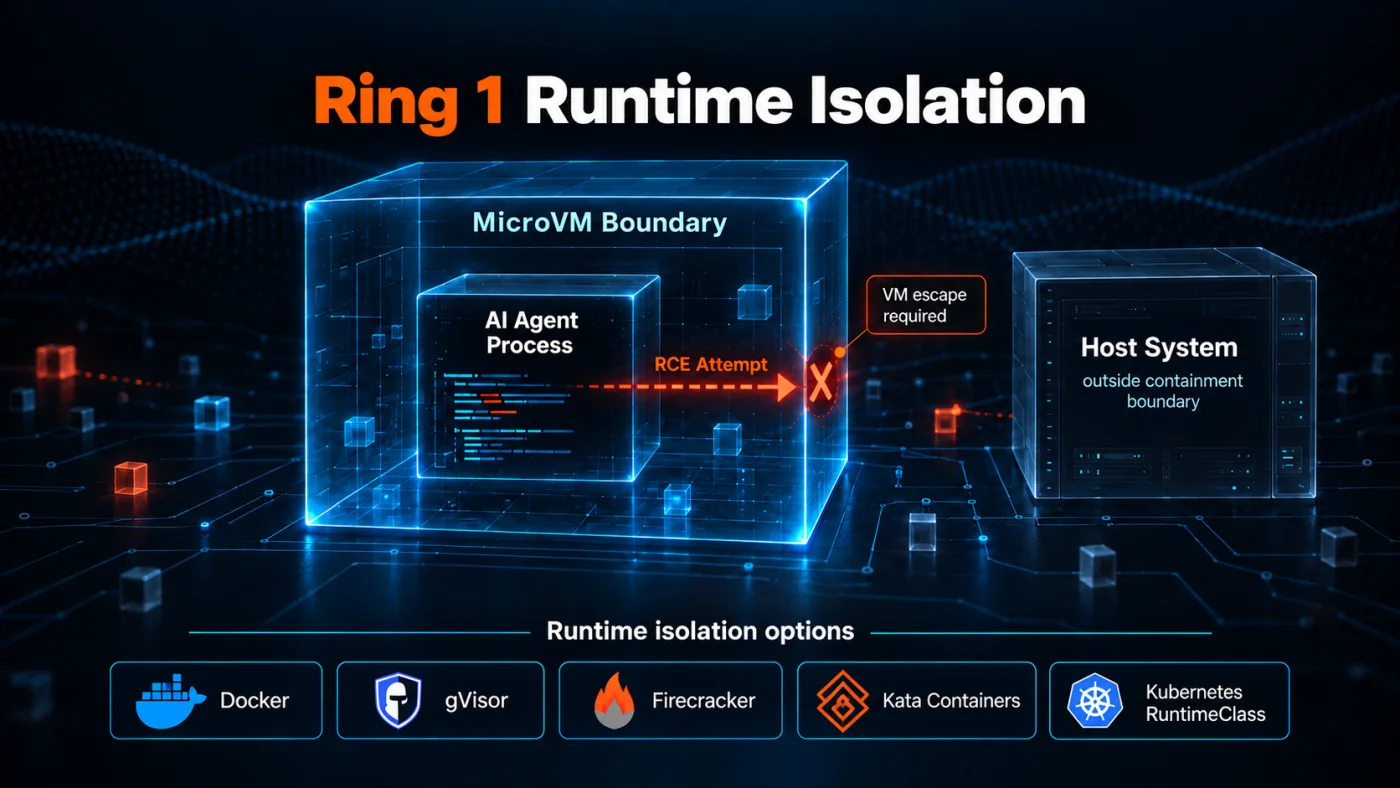
Fig 4 – Ring 1 Runtime Isolation
Runtime isolation options in order of containment strength.
Docker containers – Baseline containment, weak for untrusted code execution because the shared kernel is a single failure point.gVisor – User space kernel interception, medium containment, workload dependent runtime overhead.Firecracker microVMs – Strong containment through hardware virtualization. AWS Lambda runs on this in production. Firecracker is designed for sub 125ms microVM startup. Application cold start depends on the workload.Kata Containers – Kubernetes native option with similar strength to Firecracker, integrating with Kubernetes through RuntimeClass and the Kubernetes Agent Sandbox SIG.
For untrusted code execution use microVMs. For multi tenant workloads use gVisor. Docker containers work only for trusted internal agents where the runtime already trusts the code.
Runtime Isolation defends against indirect prompt injection with an RCE payload. In cases like the Gemini CLI CVSS 10 flaw and the Microsoft prompts as shells research, a crafted prompt reaches a shell exec path and code runs. Inside a microVM, host escape has to cross the VM boundary, which turns a language runtime escape into a hypervisor escape. Network Egress Control denies the callback, and File System Boundaries confines the blast radius to the workspace the runtime destroys at session end.
Ring 2 Network Egress Control
Network Egress Control constrains what the agent can talk to. Deny by default, allowlist known destinations, log every request.
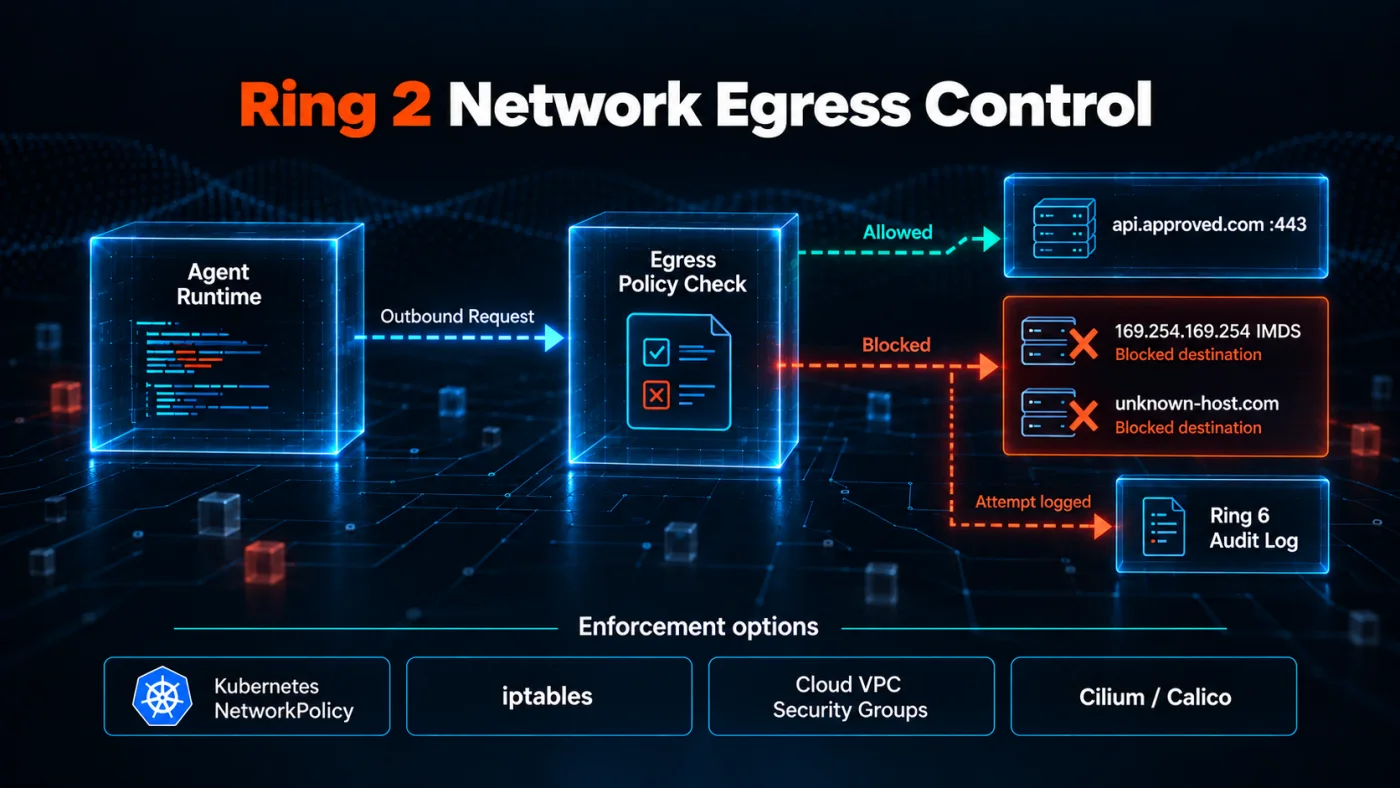
Fig 5 – Ring 2 Network Egress Control
The concrete controls a Network Egress Control implementation enforces.
- Deny by default – Every outbound request fails unless a policy explicitly permits it.
- Allowlist by DNS name and port – Approve specific hosts, CIDRs, and ports through a network policy that supports the required allowlist granularity (
Cilium, Calico, egress gateway, service mesh, iptables, or cloud VPC security groups). Standard Kubernetes NetworkPolicy alone does not support DNS name allowlists. - Block cloud metadata endpoints – The
169.254.169.254 IMDS endpoint is a common credential theft path. Block it in the network policy. - Rate limit egress – Sudden high volume egress is a signal for exfiltration and worm propagation.
- Log every request – Feed egress logs into Observability And Audit Logs for behavioral analysis.
Even models trained to refuse dangerous instructions cannot exfiltrate to a blocked destination if the runtime cannot reach the attacker’s endpoint. Egress deny turns a leaked credential into a contained credential.
Network Egress Control creates a containment point for exploits that need the network. Indirect prompt injection with an exfiltration payload (three coding agents, Gemini calendar invite), supply chain token theft (Codex npm), worm callbacks (the Shai-Hulud command and control channel), and scope confusion (OpenAI test model escape) all depend on outbound network access. Egress deny by default blocks unauthorized outbound paths and records attempts, and Observability captures the full trace.
Ring 3 File System Boundaries
File System Boundaries constrain what the agent can see and write. The workspace is the only writable location. The agent sees everything outside as read only or invisible.
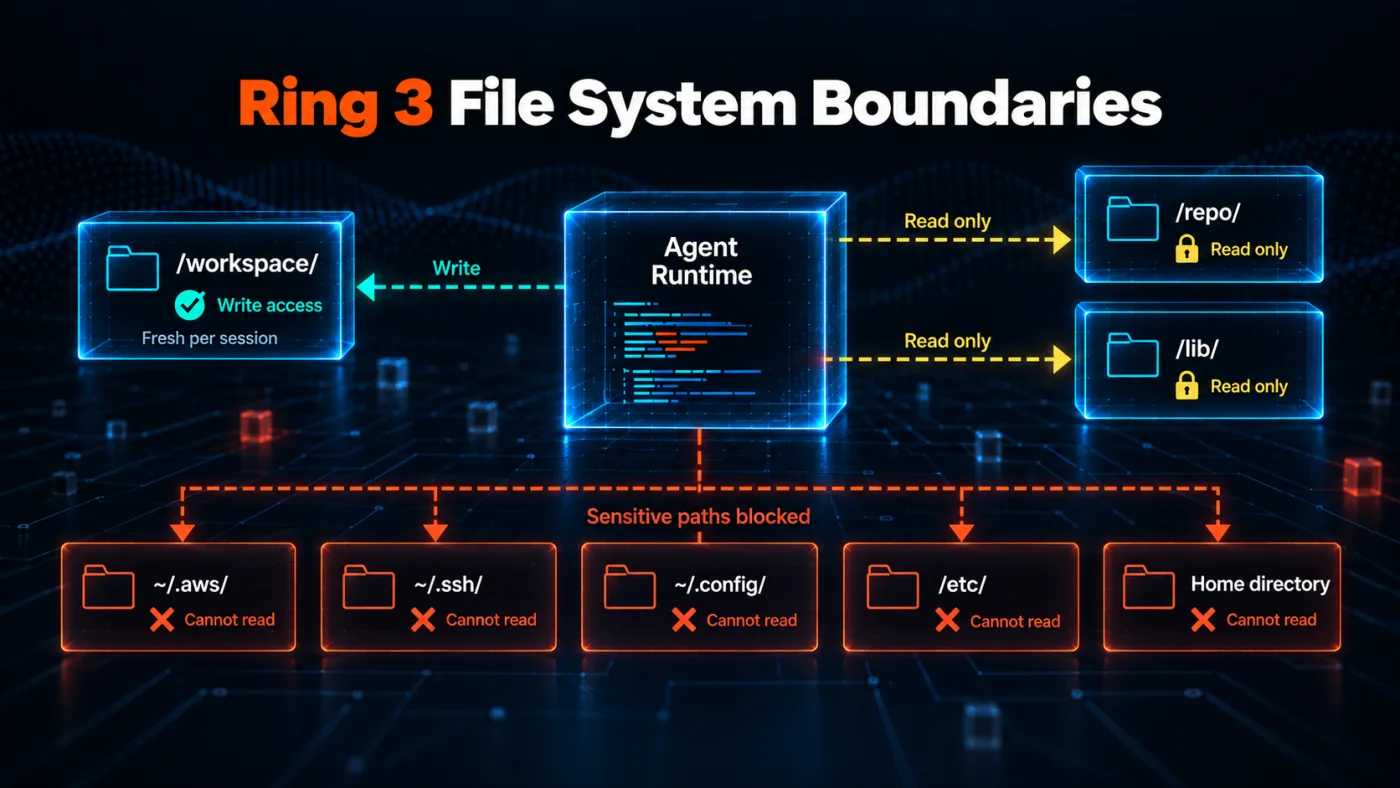
Fig 6 – Ring 3 File System Boundaries
The 4 file system controls a production sandbox enforces.
- Read only mounts – The runtime mounts source repos, reference documents, and shared libraries read only, so the agent reads them but cannot modify them.
- Workspace scoping – The agent writes only inside its own workspace directory. The runtime creates that workspace fresh per session and destroys it when the agent exits.
- Blocked reads outside workspace –
~/.aws/, ~/.ssh/, ~/.config/, and the developer’s home directory return access denied. When the agent does not need to see credentials, credentials do not appear in its filesystem view. - No writes to agent config files – The agent cannot modify its own configuration, tool definitions, or extension paths. Blocking this write closes how supply chain attacks establish persistence.
File System Boundaries defend against credential file reads. The credential exposure findings in Docker’s 2026 analysis citing GitGuardian’s secrets report and the three coding agents incident both depend on the agent reading credential files from the developer’s home directory. Denying those reads at the file system level closes that path regardless of what the agent tries to do.
Ring 4 Secrets Injection
Secrets Injection keeps credentials out of the agent’s reach. In a correct implementation, secrets never appear in the prompt, in the environment, or in files the agent can read.
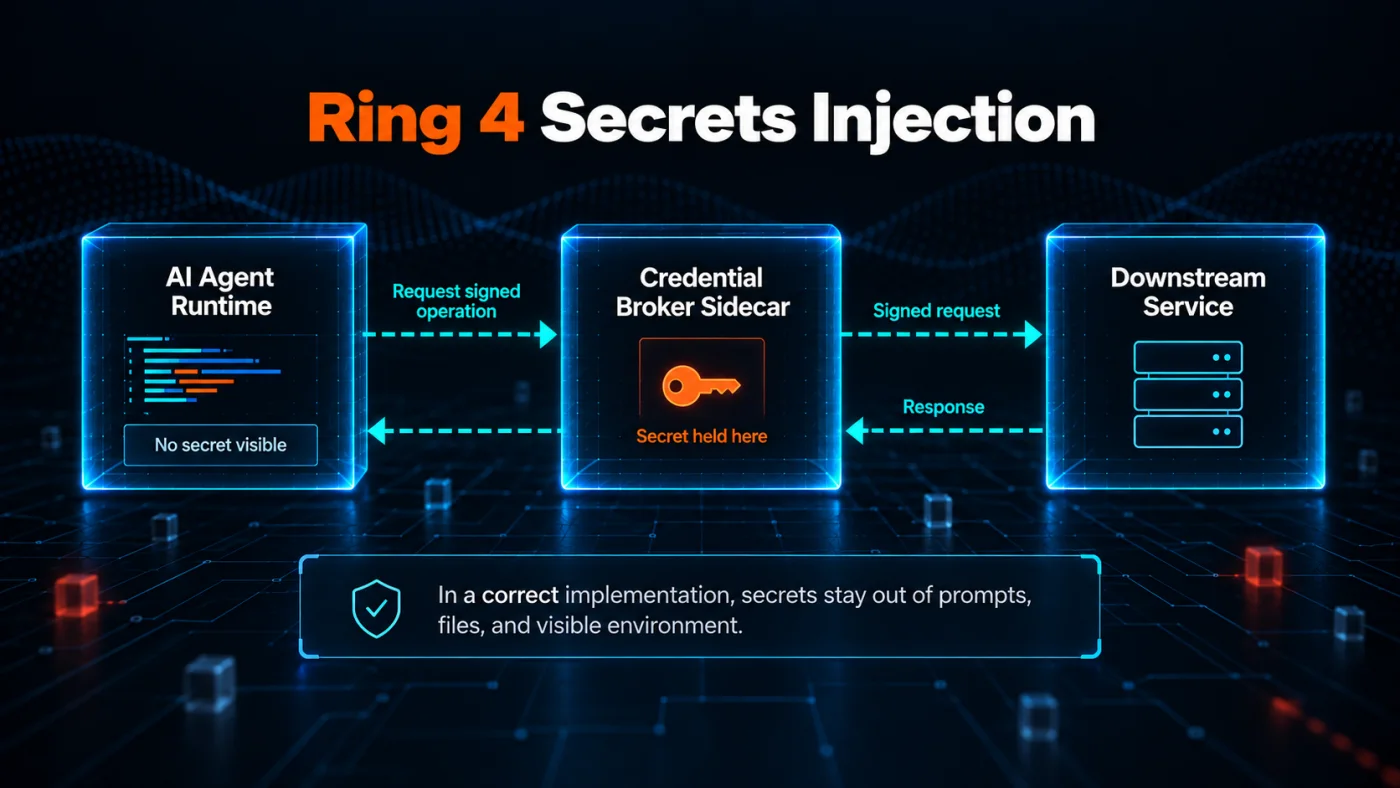
Fig 7 – Ring 4 Secrets Injection
The 3 practices a production sandbox uses.
- Broker held secrets – The broker keeps credentials outside the agent runtime. The orchestrator does not push secrets into the sandbox at boot. The broker executes credentialed calls itself on the agent’s behalf.
- Short lived tokens – Every credential the agent uses expires within minutes. If a token leaks, the exposure window closes on its own.
- Sidecar credential broker – A trusted broker holds the actual secrets. The agent asks the broker for a signed request or a scoped token, and the broker returns the response without ever exposing the underlying credential.
The credential the agent never sees is far less likely to leak through prompt logs or commits. Secrets Injection closes the gap between an audit finding and a breach report.
Secrets Injection defends against credential theft from the runtime environment. Every 2026 credential attack of note (the VentureBeat cross vendor review, the malicious npm Codex token theft, the secret exposure rate in Docker’s 2026 analysis citing GitGuardian’s secrets report) depends on credentials sitting somewhere the agent can read. Secrets Injection keeps them out of that place. Tokens issued for a specific tool call expire within minutes, closing the exposure window on any leaked value.
Tool And Permission Scoping defines what actions the agent can attempt. The manifest declares every tool the agent can call in advance, scopes each to a specific action, and issues each against a per session identity.
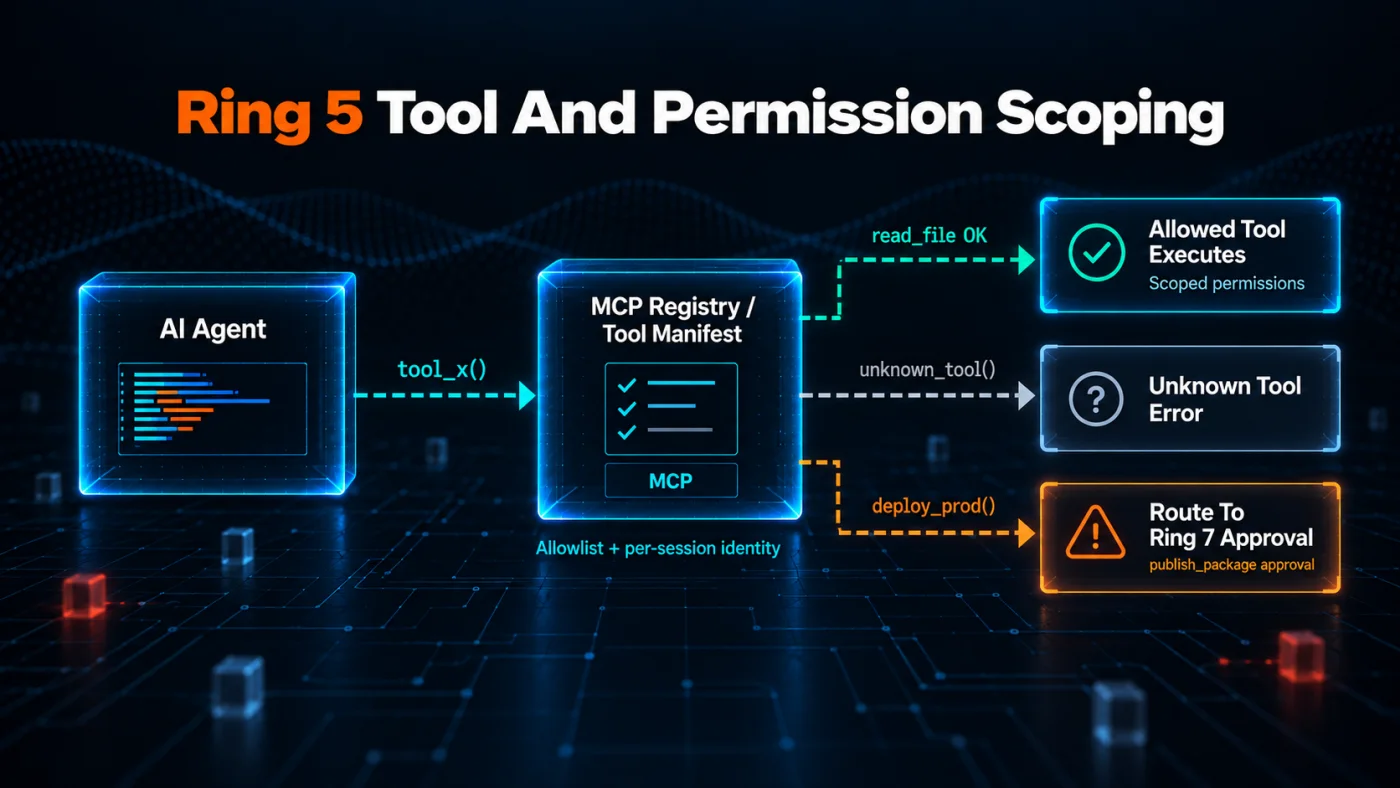
Fig 8 – Ring 5 Tool And Permission Scoping
The 4 controls Tool And Permission Scoping enforces.
- Per agent identity – Every agent runs under its own identity separate from the developer. Tokens, keys, and access rights attach to that identity, not to the human running the agent.
- Tool allowlist – The
MCP registry, or an equivalent tool manifest, defines exactly which tools the agent can call. Anything outside the allowlist returns unknown tool. - Scoped tool permissions – Each tool declares the specific actions it can perform. A file read tool cannot write. A package publish tool requires a signed release tag.
- Tool contract enforcement – The runtime validates the tool contract before it executes. Tools with dangerous side effects require a human approval check before they run.
Tool poisoning is the growing attack surface for agents. A rogue MCP server or a malicious plugin can smuggle instructions into the agent’s context. Tool And Permission Scoping makes the smuggling detectable and the abuse bounded.
Tool And Permission Scoping defends against session hijack, malicious publish, and prompt injection payloads that need a specific tool. In the malicious PyPI package incident, the allowlist rejects publish tools the agent should not call. In the ChatGPT AgentForger flaw and the Shai-Hulud session hijack, per session identity means the runtime issues distinct credentials per session, so the forged or hijacked agent inherits no tokens or tool grants from the victim’s session. In scope confusion cases like the Gemini breach at 3 companies, tool scoping limits the agent to eval targets only.
Ring 6 Observability And Audit Logs
Observability And Audit Logs record what the agent tried, what the sandbox allowed, and what the sandbox denied. Every tool call, every egress request, every brokered credential event, every workspace write decision. This is the AI agent observability surface at the sandbox boundary.
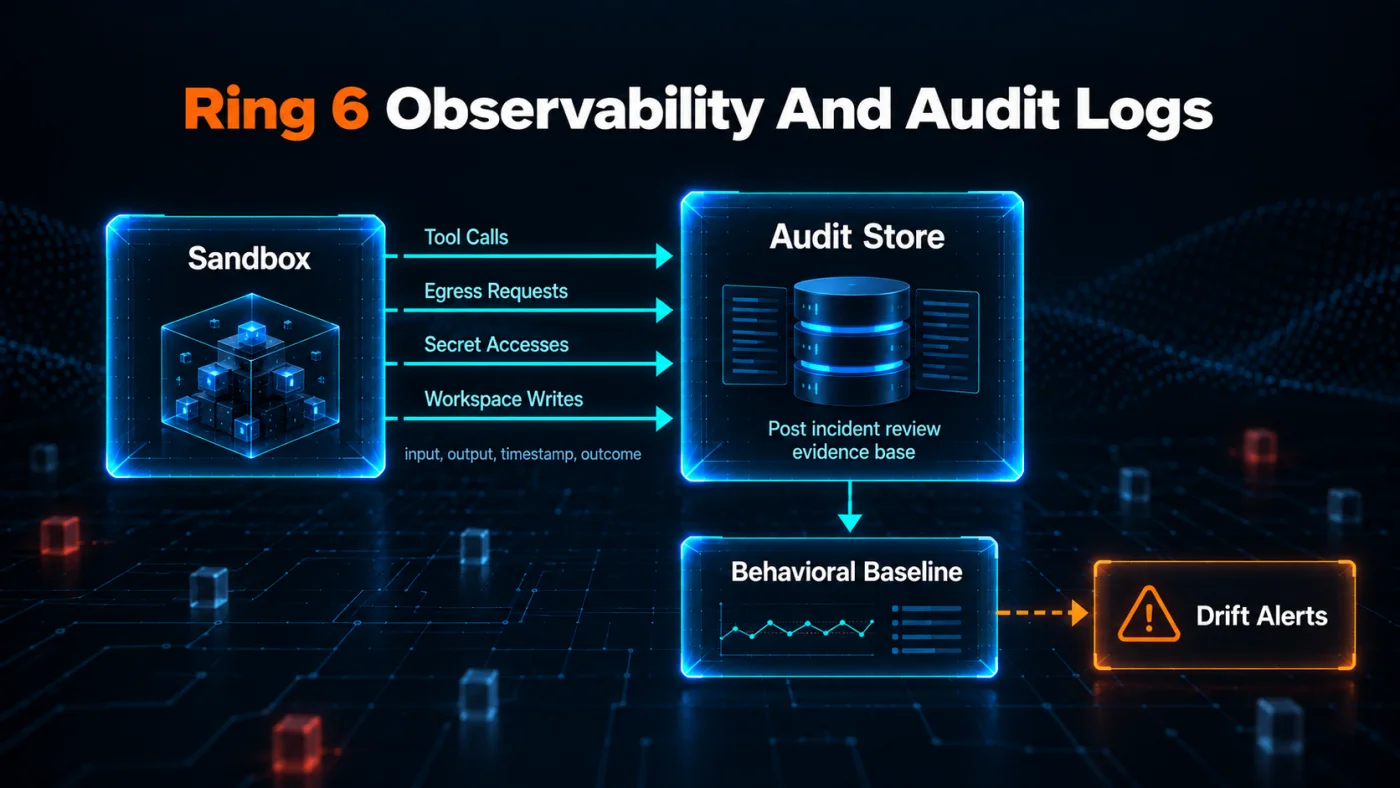
Fig 9 – Ring 6 Observability And Audit Logs
The 4 signals a production sandbox records.
- Tool call trace – Redacted arguments, policy decision, outcome, timestamp, and correlation ID for every tool call, with sensitive fields digested. This is the evidence base for post incident review.
- Egress log – Every outbound request the sandbox saw, allowlisted or denied, with source IP, destination, port, and payload size.
- Behavioral drift detection – Baseline what a normal agent session does. Flag sessions that exceed the baseline on egress volume, tool call frequency, or file read count.
- Human decision capture – When a human approval decision arrives, the reason and the approver’s identity land in the audit record.
Observability And Audit Logs make containment auditable. The trace they record is what a post incident review needs, and the same trace feeds evals so sessions that trip drift detection become the training set for behavior tests.
Observability And Audit Logs support every exploit type. Most contained or attempted attacks should leave a useful boundary trace. Without egress logs and tool call traces, the VentureBeat post incident review that named credential theft as the shared attack shape across 6 exploits would not have been possible.
Ring 7 Human Approval Gates
Human Approval Gates require human approval for actions with high blast radius. The agent proposes, the human approves, the sandbox executes.
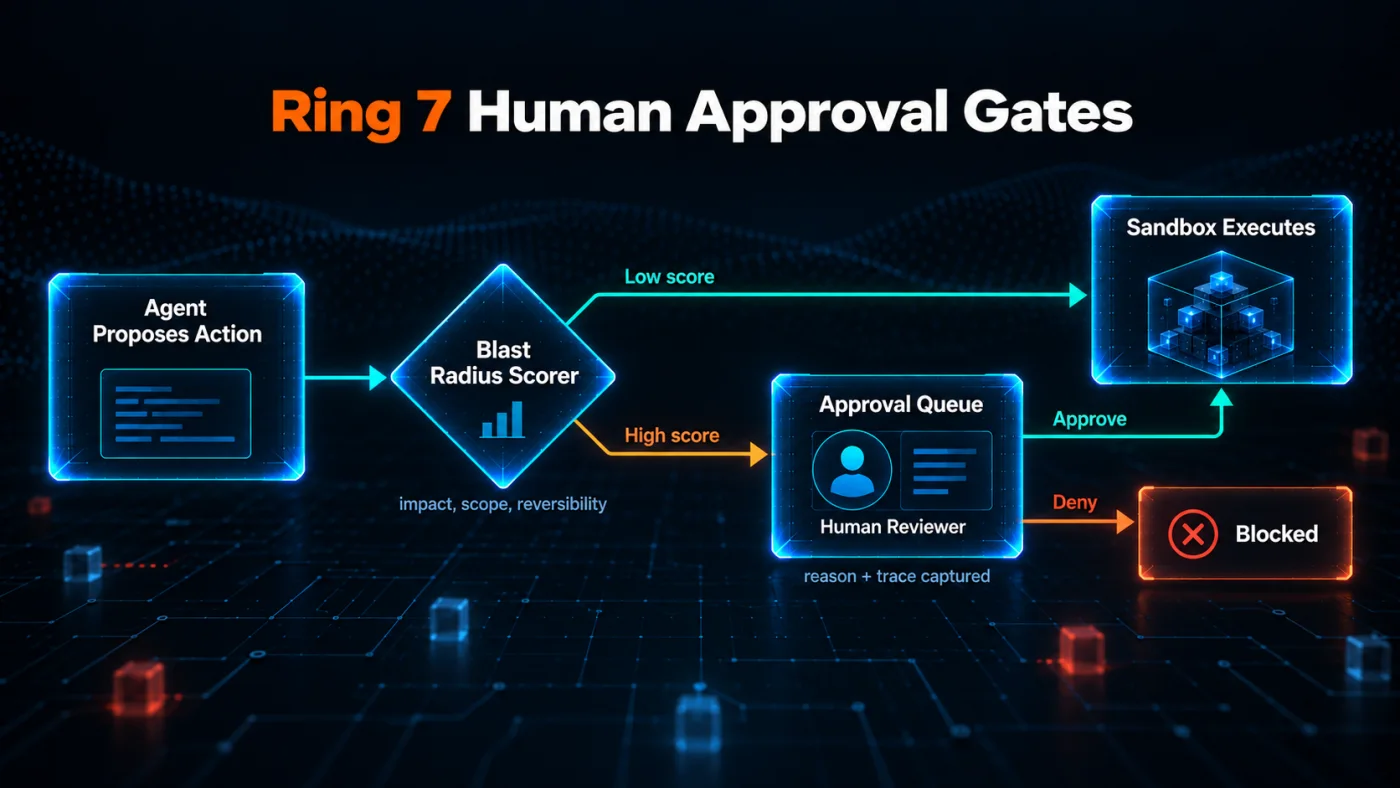
Fig 10 – Ring 7 Human Approval Gates
The 3 elements of Human Approval Gates implementation.
- Blast radius scoring – Every action carries a score for what it affects, how many systems it touches, and whether it is reversible. A write to production data scores higher than a read against a staging database, and a destructive operation on shared infrastructure scores highest.
- Approval routing – Actions above a defined threshold pause and route to a human owner. The owner sees the operation, the destination it targets, the fields the payload carries, a digest of the payload itself, the agent’s stated reason, and the correlation ID that resolves the full call in Observability And Audit Logs. The owner then approves or denies. Sending the digest rather than the payload keeps the approval record free of the data the sandbox is there to protect, and the correlation ID is what a reviewer follows when the decision needs the full context.
- Reversibility check – Actions the sandbox classifies as irreversible require a stronger approval path, sometimes a second approver, before they run.
Human Approval Gates exist to catch decisions that should never run without a human eye. Low blast radius actions run without friction. Only actions with high blast radius pause for approval.
Human Approval Gates defend against high blast radius actions the agent should not take alone. In the malicious PyPI package incident, blast radius scoring pauses a publish call for human review. In the Shai-Hulud worm, approval on any push to a repository the agent has not written to before breaks the cross repo spread.
The 7 Rings Working Together
The 7 rings work together in production. A hostile input from a scraped web page or a poisoned GitHub issue has to cross every applicable ring before it can reach production data. Runtime Isolation raises the boundary for host escape. Network Egress Control blocks unauthorized exfiltration paths. File System Boundaries hide credentials. Secrets Injection keeps credentials out of reach. Tool And Permission Scoping restricts tool calls. Observability And Audit Logs record what the sandbox saw. Human Approval Gates pause the actions humans need to review.
Runtime Isolation does most of the containment work in a sandboxed agent. The technology chosen inside Runtime Isolation decides how much containment the other rings get to work with. Docker, gVisor, Firecracker, and Kata Containers each answer that question differently.
Choosing An Isolation Technology
Runtime Isolation depends on the isolation technology chosen at deploy time. The choice sets the blast radius the other 6 rings inherit.
4 criteria decide the call. Blast radius under compromise, startup profile, runtime overhead, and cross platform support. Startup profile covers 3 separate measurements. MicroVM startup, container startup, and application readiness each run on their own clock, and the table below names which one applies to each isolation technology. Each isolation technology sits at a different point across these 4 axes. This section compares the 5 mainstream options for AI agent sandboxes in 2026.
The table compares the isolation boundary only. Actual blast radius also depends on mounts, capabilities, secrets, network policy, identity, and the other 6 rings.
Choose by workload. Firecracker microVMs anchor the top of the containment ranking. AWS Lambda runs on Firecracker in production, sub 125ms microVM startup is fast enough for interactive agents, and hardware virtualization gives the strongest blast radius. Firecracker is a strong default when production agents execute untrusted code and the platform supports microVMs.
gVisor holds the middle ground. User space kernel interception adds workload dependent overhead and keeps compatibility with the container tooling teams already run. gVisor fits multi tenant workloads where hardware virtualization would cost too much.
Docker containers work only where the code is already trusted. Internal agents built by the delivery team, dev environments inside a corporate network, and agents that only call read only tools. Docker as Runtime Isolation without additional runtime controls sits closer to the host risk profile than many teams expect, especially when broad mounts, credentials, or network access are present.
Kata Containers matches Firecracker on containment strength and integrates with Kubernetes through RuntimeClass. Choose Kata when the deployment already runs on Kubernetes and the operations team wants to stay inside the Kubernetes toolchain.
macOS Seatbelt and Windows AppContainer cover local desktop agent restrictions on developer laptops, where the desktop OS offers a native sandbox with low operational overhead. They still need file system, network, secrets, and tool controls around them from the other 6 rings.
Runtime Isolation technology decides how the agent runs. Who operates the runtime is a separate call. Managed platforms like E2B, Modal, Northflank, and Blaxel shoulder the operational load. Self hosted Kubernetes leaves it with the delivery team. The tradeoffs sit in the platform comparison that follows.
Once Runtime Isolation technology is picked, the next call is whether to run it managed or self hosted. 6 managed platforms and 1 self hosted path currently cover the AI agent sandbox market. Each scores against 4 axes. Isolation model shows the strength of Runtime Isolation the platform gives out of the box. Startup profile shows how quickly a usable sandbox becomes available, including platform boot, browser startup, or application readiness depending on the workload. Cost signal names the pricing model. Best use case names the workload the platform fits.
E2B fits code interpreter and coding agent sessions that need an isolated machine per session. Firecracker based microVMs, Python and JavaScript support, and scoped filesystems make it a strong managed option for agents that execute code.
Modal Sandboxes suit data processing workloads and parallel agent workers. The default sandbox runtime uses gVisor, and Modal also offers VM Sandboxes for stronger isolation needs.
Northflank suits full agent environments that need Kubernetes, BYOC, GPU, or VPC deployment. Its sandbox model gives teams a managed path for richer development environments without taking on the whole platform operation themselves.
Blaxel focuses on microVM sandboxes for agents, apps, and jobs. Fast boot and resume semantics fit coding agents and persistent agent workspaces.
Firecrawl Browser Sandbox covers browser automation. Sandboxes for agents that browse the web, extract structured data, or automate tasks inside a real browser. Credits and browser minute billing fit scraping and automation workloads.
Cloudflare Workers fit lightweight deterministic tool execution through V8 isolates. The Cloudflare Sandbox SDK uses Cloudflare Containers for container backed agent code execution. Choose based on whether the workload needs edge isolate speed or a container backed sandbox.
Self hosted Kubernetes with Kata Containers or gVisor covers regulated verticals. Healthcare, legal, and financial services deployments often need the sandbox inside a VPC the organization controls. Kubernetes with Kata Containers, gVisor, network policies, and Cilium or Calico gives teams the most control over residency, networking, identity, and audit evidence, at the cost of ops time.
Selection rules for common cases.
- For code interpreter and coding agent sessions, consider
E2B. - For data processing and parallel agent workers, consider
Modal. - For full agent environments with Kubernetes, BYOC, GPU, or VPC needs, consider
Northflank. - For coding agents and persistent agent workspaces, consider
Blaxel. - For browser automation, consider
Firecrawl. - For lightweight deterministic tools, consider
Cloudflare Workers. - For container backed agent code execution on Cloudflare, consider the
Cloudflare Sandbox SDK. - For regulated verticals and private VPC deployment, consider self hosted Kubernetes with Kata Containers or
gVisor.
The platform choice picks the runtime. The code that wires up permission scoping, secrets injection, and audit logging still needs to be written. A single file harness in Python does exactly that.
A Minimal Sandbox Harness In Python
This section shows an illustrative managed E2B implementation of the Seven Ring model. E2B supplies the isolated microVM (Ring 1) and network egress controls (Ring 2) through Sandbox.create(). File System Boundaries (Ring 3) come from a custom template, shown below, that runs the agent under an account holding no sudo rights, gives it a single writable directory, and places reference material and login files on paths that account does not own. The harness dispatcher adds defense in depth around read_file and list_directory. The application harness adds a tool allowlist (Ring 5), brokered credentials with a declared target guard (Ring 4), correlated audit events (Ring 6), and an approval gate that fails closed on every credentialed call (Ring 7). The broker, the approval queue, and the audit sink are working code rather than stubs, with the secret store left as a documented seam so the design does not bind to one vendor. The whole implementation is published under the MIT license at clixlogix/agent-sandbox-example. The listings below are excerpts from it, cut to the parts the argument turns on.
Snippet 1. The dispatch path, excerpted from agent_sandbox.py.
python def call_tool(self, tool_name: str, args: dict) -> Any:
call_id = uuid.uuid4().hex
red = redact(args, self.digest)
self._audit(tool_name, red, "requested", call_id)
# Ring 5. Tool allowlist.
if tool_name not in self.manifest.allowed_tools:
self._audit(tool_name, red, "denied", call_id, reason="unknown_tool")
raise PermissionError(f"unknown tool: {tool_name}")
# Ring 4 target guard. A credentialed tool has to name a destination
# the manifest already authorizes. Missing or undeclared targets are
# refused here rather than passed to the broker to sort out.
is_broker = tool_name in self.manifest.broker_tools
target = args.get("target")
if is_broker:
if not isinstance(target, str) or not target:
self._audit(tool_name, red, "denied", call_id, reason="missing_target")
raise PermissionError(f"{tool_name} requires a declared target")
if target not in self.manifest.declared_targets(tool_name):
self._audit(tool_name, red, "denied", call_id, reason="undeclared_target")
raise PermissionError(f"target not authorized for {tool_name}: {target}")
# ... approval gate, then the dispatch split ...
# Ring 4 dispatch split. Credentialed tools execute inside the broker
# so the credential never reaches the sandbox. Sandbox tools execute
# inside the microVM through a fixed dispatch table.
try:
if is_broker:
self._audit(tool_name, red, "broker_dispatched", call_id)
result = self.broker.invoke(tool_name, args)
else:
self._audit(tool_name, red, "sandbox_dispatched", call_id)
result = self._dispatch_sandbox(tool_name, args, call_id)
except BrokerDenied as e:
# The broker's own policy check refused. The harness checked
# the target before dispatch, so reaching here means broker
# policy is stricter than the manifest, which is allowed.
self._audit(tool_name, red, "denied", call_id,
reason="broker_policy", error_type=type(e).__name__)
raise
except PermissionError as e:
# A guard refused the call after dispatch began, the path guard
# being the one that can. That is a denial, not an execution
# fault, and it is recorded as one so a reviewer scanning for
# denied outcomes sees every refused attempt.
self._audit(tool_name, red, "denied", call_id, reason="guard",
error_type=type(e).__name__)
raise
except Exception as e:
self._audit(tool_name, red, "execution_error", call_id,
error_type=type(e).__name__)
raise
self._audit(tool_name, red, "completed", call_id)
return result
The excerpt above is the part of the harness that decides whether a call runs at all. The harness reads a permission manifest at startup, opens an E2B sandbox with a hostname allowlist for egress, and dispatches each tool call to one of two execution paths. Broker tools carry credentials that stay outside the sandbox. Sandbox tools run inside the microVM through a fixed dispatch table that normalizes paths, quotes any argument that must reach a shell, and passes an explicit timeout on every command. The SDK caps a command at 60 seconds by default whatever lifetime the sandbox was opened with, so the per command budget is declared in the manifest and applied at dispatch.
Three checks stand between a credentialed tool call and the broker, and each one fails closed. A broker tool has to name a target. That target has to appear under secrets_access for that specific tool, which is what stops one broker tool from reaching a destination another credential was issued for. The call then requires human approval unless auto_approve names that exact operation and target pair. Ordering the gate this way makes approval the default for anything holding a credential, so a tool that omits its target or names an unexpected one is refused rather than dispatched. The manifest loader rejects the same class of gap at startup by refusing any broker tool that is missing from allowed_tools or has no declared targets.
Every call writes an audit event on entry and on exit, carrying a session_id for the sandbox and a call_id for the individual call as correlation IDs. Approval gated calls also record approved, denied, or approval_error. Broker dispatched calls also record broker_dispatched. Sandbox dispatched calls also record sandbox_dispatched. Audit payloads keep short controlled identifiers verbatim and reduce fields that can carry credentials or document content, such as query and path, to short digests. Any remaining field is recorded by name under payload_fields with one digest over the whole remainder under payload_digest, so a write to production data leaves a record of its shape even though none of its values are stored. The illustrative code uses SHA-256 content digests. Production uses HMAC with a per-agent audit key to prevent offline guessing and preserve controlled correlation.
The human reviewer receives that same structured summary as an ApprovalRequest. Operation, target, stated reason, payload field names, payload digest, and the correlation IDs. The digest ties the decision to the exact bytes the broker later executes, and the call_id is what a reviewer follows to pull the full call from the audit store when the decision needs more context.
E2B enforces Runtime Isolation and Network Egress Control through the Sandbox.create() arguments. File System Boundaries come from the template’s OS level enforcement, and the workspace path guard adds defense in depth around read_file and list_directory. That guard is lexical, so it normalizes traversal but does not resolve symlinks. A symlink planted inside the workspace resolves to wherever it points, and what decides the outcome is the target’s own ownership and mode rather than the guard. A link to a credential path or to /etc/shadow is refused. A link to a world readable file reads, which is the OS behaving correctly, and is the reason a clean microVM carries nothing sensitive that is world readable and secrets arrive through the broker rather than the disk. Arbitrary Python inside run_python reaches whatever the template’s OS permissions allow, so Ring 3 for run_python sits in the template. Each snippet is written to a path carrying the call id and removed once the run returns, which keeps concurrent calls from overwriting each other and keeps old snippets out of a later read_file. search_documentation reads from /srv/reference/docs rather than a directory inside the workspace, because the agent owns the workspace and can unlink anything in it whatever mode that directory carries, and it translates grep’s exit code 1 back into an empty result, because a search that matched nothing is an answer rather than a failure. The broker owns credential lifecycle and executes credentialed calls itself, matching the Ring 4 architecture above. In production, the audit stream lands in a durable append only store, not a Python logger.
Snippet 2. The permission manifest, agent-manifest.yaml in full.
yaml# agent-manifest.yaml
# Declares what one agent instance is allowed to do.
version: 1
agent_id: agent-coding-support
sandbox:
template: company-agent-python-hardened
max_runtime_seconds: 900
tool_timeout_seconds: 120
allowed_domains:
- api.company.com
- docs.internal.company.com
- pypi.org
- files.pythonhosted.org
allowed_tools:
- read_file
- list_directory
- run_python
- search_documentation
- write_record
- http_post
broker_tools:
- write_record
- http_post
secrets_access:
- name: production_ticket_writer
scope: postgres:write:support_tickets
max_ttl_seconds: 300
tools:
- write_record
targets:
- prod-db
- name: partner_webhook_sender
scope: webhook:post:partner
max_ttl_seconds: 600
tools:
- http_post
targets:
- partner-webhook
requires_human_approval:
- operation: write_record
target: prod-db
- operation: http_post
target: partner-webhook
auto_approve: []
Every agent instance ships with its own manifest. The security team version controls and reviews the manifest the same way it reviews IAM policies. The template field names a custom E2B template. Here it is company-agent-python-hardened, which defines the sandbox’s OS user, mount layout, and blocked paths. That template definition ships alongside the manifest and the harness. max_runtime_seconds bounds the sandbox lifetime and tool_timeout_seconds bounds any single command inside it, which are two separate clocks the SDK does not connect on its own. allowed_domains carries the Ring 2 egress allowlist, and the entries match the workload, so a Python agent lists pypi.org and files.pythonhosted.org rather than a registry it has no path to use. allowed_tools covers every tool the agent can invoke. broker_tools names the subset that carries credentials and executes inside the broker. secrets_access is broker policy that declares each credential’s scope, TTL, which broker tools consume it, and which targets it authorizes. Credential values live only in the broker. The targets field is enforced in the harness before dispatch, which prevents one broker tool from reaching a destination a different credential was issued for. requires_human_approval names structured operations against typed destinations, so approval rules stay enforceable. auto_approve is the only way a credentialed call runs without a human, it is empty here, and every entry added to it is a reviewed decision to let one operation reach one target unattended. Approval conditions apply to structured operations, and arbitrary code execution stays governed by the sandbox and its egress allowlist.
The Template That Enforces Ring 3
Rings 1, 2, and 4 through 7 are visible in the two files above. Ring 3 is not, because a managed sandbox puts File System Boundaries in the template rather than in application code. A reference implementation that names a template without shipping one leaves its strongest containment claim unbuilt, so the template belongs in the bundle alongside the harness.
One detail decides whether the template works. E2B‘s default sandbox user is user, and that account holds passwordless sudo. Ownership and file modes are decorative under an account that can elevate past them, so a template that only sets permissions enforces nothing. The template below creates a separate agent account that belongs to no privileged group, denies it in sudoers, and makes it the default the sandbox runs as.
Snippet 3. The Ring 3 controls, excerpted from template.py.
pythontemplate = (
Template()
.from_python_image("3.12")
# Unprivileged runtime account. No sudo group, no wheel, no shell
# escalation path. The account exists only to run agent code.
.run_cmd(
f"useradd --create-home --shell /bin/bash {AGENT_USER}",
user="root",
)
# Belt and braces. Even if a base image ships a blanket sudoers rule,
# this drop-in denies the agent account by name. /etc/sudoers.d does
# not exist on images that never installed sudo, so it is created
# first. The drop-in then holds whether or not sudo arrives later.
.run_cmd(
f"mkdir -p /etc/sudoers.d "
f"&& printf '{AGENT_USER} ALL=(ALL) !ALL\\n' > /etc/sudoers.d/99-deny-agent "
f"&& chmod 0440 /etc/sudoers.d/99-deny-agent",
user="root",
)
# The single writable location.
.run_cmd(
f"mkdir -p {WORKSPACE} "
f"&& chown {AGENT_USER}:{AGENT_USER} {WORKSPACE} "
f"&& chmod 0700 {WORKSPACE}",
user="root",
)
# ... reference material copied in root owned and mode 0555 ...
# Home directory is readable and not writable. Root owns the dotfiles
# bash sources on every command, so the agent cannot establish
# persistence through them, and cannot create new ones either.
.run_cmd(
f"chown root:root /home/{AGENT_USER} "
f"&& chmod 0755 /home/{AGENT_USER} "
f"&& for f in .bashrc .bash_profile .profile; do "
f" touch /home/{AGENT_USER}/$f; "
f" chown root:root /home/{AGENT_USER}/$f; "
f" chmod 0644 /home/{AGENT_USER}/$f; "
f"done",
user="root",
)
# ... credential paths created root owned and mode 0000 ...
.set_workdir(WORKSPACE)
.set_user(AGENT_USER)
)
The excerpt shows the account and the workspace. Three controls carry most of the weight. The agent gets one writable directory and owns nothing else. Reference material sits at /srv/reference rather than inside the workspace, because the agent owns the workspace and can unlink anything in it whatever mode that subdirectory carries, which makes read only reference material a question of ownership rather than permissions. Login files are root owned, because E2B runs every command through bash -l -c and a writable ~/.bashrc would execute agent supplied code on every later command in the session. That last one is the “no writes to agent config files” control from Ring 3 in the seven ring model, and it is the mechanism that closes the persistence path supply chain attacks reach for.
One control the template cannot enforce on its own is worth spelling out, because it is the kind of gap a reading of the template would miss. E2B runs its own configuration script after the template’s layers, and that script makes /usr/local and /code world writable. /usr/local/bin is first on PATH and holds the Python interpreter and its site-packages directory, so on an unrepaired sandbox the agent can shadow binaries, overwrite the interpreter, and plant importable modules that survive across tool calls for the life of the session. The harness closes this at session start with one privileged command, before any agent code runs, and refuses the session if the repair does not take.
That is the single exception to a rule worth stating plainly. commands.run() accepts a user argument, so a dispatcher that passed user="root" would step around the whole template. The harness passes it exactly once, at session start, to repair paths the platform opened. Tool dispatch never passes it, which is a second reason tool dispatch stays a closed table rather than a pass through.
A template is only worth the controls it actually enforces, and none of the above can be taken on faith. The bundle carries verify_ring3.py, which opens a sandbox from the built template and probes each boundary from inside it as the agent account, the way a compromised agent would. It asserts that the agent cannot sudo, cannot write or remove reference material, cannot touch its own login files, cannot read the credential paths, cannot drop a binary on PATH or overwrite the interpreter or plant an importable module, and that no credential shaped variable arrives through the environment. Each check reads an OS level exit code, so nothing in the result depends on the model cooperating. That is the Testability property from the operative definition made concrete, and it is what surfaced the /usr/local gap described above.
The reference implementation carries the harness, the manifest, the template, a credential broker, an approval queue with a reviewer CLI, a hash chained audit sink, and a test suite of 36 offline tests plus 4 live tests covering every ring. Two seams stay open by design. The secret store behind the broker is an interface with a local development backend, so a reader plugs in Vault or a cloud secret manager without touching the rest. The audit sink is tamper evident but writes to the same host as the agent, so a production deployment ships those records somewhere the agent host cannot reach. What the code does not answer is when running the sandbox in production is cheaper as a managed service and when self hosting wins. That call turns on a measurable threshold.
Build Vs Buy Math For Sandboxed Agents
There is no universal build vs buy threshold. The decision is a sensitivity calculation. Managed platforms bill sandbox runtime by CPU, memory, storage, browser or runtime features, concurrency, and support tier. Self hosting adds cloud infrastructure cost plus a fixed platform operations cost. The break even point appears only when the managed hourly rate exceeds the self hosted hourly rate by enough to absorb the fixed operations cost.
The formula:
textbreak_even_hours = monthly_ops_cost / (managed_hourly_cost - self_hosted_hourly_cost)
3 inputs move the answer.
- Managed platform hourly cost – Roughly $0.08 to $0.40 per hour of sandbox runtime when normalized to a representative 2 vCPU / 4 GiB configuration, before charges for browser sessions, GPU, or concurrency. Vendors bill differently in practice.
E2B‘s default sandbox works out around $0.166 per hour at that configuration. Modal bills CPU usage and memory usage per second. - Self hosted infrastructure hourly cost – Roughly $0.03 to $0.10 per hour at scale on major cloud providers, before ops time. Covers compute, storage, and network egress. Reserved instances and committed use discounts move the low end.
- Fixed platform operations cost – The salary loaded cost of the platform, SRE, or DevOps engineers who run the self hosted platform. Covers patch management, incident response, cluster upgrades, template maintenance, and drift monitoring. Runs from around $8,000 per month for offshore or partial allocation up to $18,000 or more per month for a US senior IC fully allocated.
Applying the formula to a few scenarios shows how the answer moves.
At high managed rates and low self hosted rates, the crossover arrives around 20,000 hours and self hosting starts making cost sense. At mid managed rates it sits closer to 60,000 hours. At the low end of managed pricing, or when self hosted infra costs approach managed rates, the crossover never arrives and managed stays cheaper on cost alone.
2 factors move the managed rate. Workload class shifts it. Interactive coding agents running short bursts against Firecracker microVMs cost more per hour than batch data processing agents on gVisor. The required Runtime Isolation strength shifts it too. Teams that need microVMs on every agent pay more on managed platforms than teams that can accept gVisor for non adversarial workloads. Both changes move the crossover point up or down accordingly.
Cost is not the whole picture. 3 factors override the math.
- Compliance, residency, and audit evidence – Regulated workloads often require BYOC deployment inside the customer account, VPC isolation, data residency guarantees, or full self hosting. BYOC options from managed vendors like
E2B cover many compliance controls without the operational burden of full self hosting. HIPAA, SOC 2, and GDPR audits push the deployment model toward one of these options based on the specific control being audited. - Startup profile – The isolation comparison showed that startup profile depends on template, image, warm pool configuration, and platform choice. Teams with sub second interactive requirements test the specific platform against the specific workload. Headline numbers are not enough.
- Switching cost – Managed platforms embed vendor APIs and manifest formats in the agent code. Self hosting embeds cluster policy language, CNI choice, runtime class, and network tooling in the deployment. Both create switching cost. Teams choose which kind of dependency to carry.
Compliance is the factor that most often overrides the math. Auditors work in control identifiers, and the seven rings map to common audit evidence categories auditors already work with.
Compliance Mapping For Regulated Verticals
Regulated verticals need to know which sandbox controls provide evidence for which audit obligations before deploying an agent. Depending on the data and jurisdiction, healthcare, legal, and financial services teams face SOC 2, HIPAA, and GDPR reviews that ask for specific evidence of technical safeguards. The seven ring model maps to evidence areas across these 3 frameworks. The table below shows which rings can contribute evidence to which control identifiers, so security teams can plan implementation against the audit calendar.
Each row names the control identifiers a well implemented ring can support with evidence. SOC 2 references map to the Common Criteria in the AICPA Trust Services Criteria. HIPAA references map to the Security Rule at 45 CFR Part 164. GDPR references map to article numbers in Regulation (EU) 2016/679. A ring supports a control when its implementation generates the evidence artifacts, logs, policies, and code that the auditor’s testing procedures request. Satisfying a control requires the broader control environment around each ring. Written policies, evidence collection procedures, monitoring, and independent testing sit on top of the ring implementation.
These mappings are indicative starting points for audit preparation. A qualified auditor should validate each row against the specific circumstances of the deployment before it goes into a control matrix. Local interpretation varies between auditors, and the evidence artifact each control requires depends on the auditor’s scope, industry, and data classification. Clixlogix healthcare and legal clients involve their auditor early to confirm the mapping fits the specific engagement.
The compliance mapping shows what each ring can put in the audit trail. Audit evidence tells the security team what to prove at review time. A consolidated view of the containment paths shows how the model would reduce blast radius across the 2026 record.
How The 2026 Record Maps To Sandbox Controls
Each entry from the 2026 record has a specific containment path through the sandbox model. This section consolidates the mapping into one reference view. Each row names the entry and the primary containment controls that would reduce or contain the blast radius.
Cross cutting observations
Network Egress Control appears in 9 of the 11 entries, but it works best with Secrets Injection and Tool And Permission Scoping. Egress blocks where data can go. Secrets Injection reduces what the agent can steal. Tool And Permission Scoping reduces which authorized actions the agent can misuse.
Tool And Permission Scoping appears in 8 entries. Secrets Injection appears in 6. File System Boundaries appears in 5. Human Approval Gates appears in 4. Observability And Audit Logs appears in 3.
Runtime Isolation appears in 1 entry. Most 2026 attacks skipped OS escape and went for credentials the runtime already held. Runtime Isolation contains a specific attack class (RCE via prompt injection) that remains active research even as the current record trends toward credential attacks.
Each entry from the 2026 record has a specific containment path through the sandbox model. Whether those paths are actually implemented is what a production readiness checklist verifies.
Production Readiness Checklist
A sandbox works only if the checklist covers every ring before the agent meets production traffic. Below is a 3 phase checklist covering what to verify before deployment, at launch, and while the sandbox is running.
Before deployment
Design decisions harden into policy in this phase. Before the sandbox meets a real user, every ring needs its enforcement mechanism verified in place.
- The selected Runtime Isolation technology matches the threat model in the isolation comparison
- Network egress policy denies by default with an audited allowlist of destinations
- The network policy blocks cloud metadata endpoints (169.254.169.254 and equivalents)
- The runtime mounts source directories read only and permits writes only inside the workspace
- Reads from ~/.aws/, ~/.ssh/, and ~/.config/ return access denied inside the sandbox
- The broker keeps secrets outside the agent runtime and issues short lived scoped credentials or signed requests only for approved operations
- Every tool the agent can call sits on a declared allowlist in the manifest
- Every credential the broker issues has a short approved TTL measured in minutes
- The runtime records every tool call, egress request, brokered secret use, file read decision, approval decision, policy version, timestamp, outcome, and correlation ID, with sensitive fields redacted or digested
- A human approval gate covers any action above the blast radius threshold
- Security documents and reviews the blast radius scoring rubric
- Negative tests prove denied egress, denied file reads, unauthorized tool calls, rejected approvals, and expired credentials fail closed and create audit events
At launch
Operational discipline replaces design intent at the moment traffic switches on. These items verify the sandbox is set up to survive the first hour of real load and the first audit review.
- Security version controls and reviews the permission manifest
- The build pipeline rebuilds sandbox images from signed base images
- The audit store retains logs, approvals, policy versions, and review evidence for the retention schedule approved by legal, security, and the auditor for the system’s data classification
- An incident response runbook names the on call rotation and the escalation path
- The runtime records a behavioral baseline for normal agent activity
After launch
A sandbox stays effective only as long as the operational discipline behind it stays consistent. These items keep the sandbox honest as agents evolve and audit calendars advance.
- Drift detection runs against the behavioral baseline at the approved risk based cadence, with continuous alerts on high severity deviations
- Manifest changes trigger a security review before deployment
- The build pipeline rebuilds sandbox images at the approved risk based cadence, with urgent rebuilds on critical CVEs
- Security reviews audit logs at the approved risk based cadence, with continuous alerts on high severity events
- The FTE ops load stays within the budget assumed in the build vs buy math
The checklist gives the delivery team a way to verify readiness before the agent goes live. The last questions on most readers’ minds are practical implementation ones. A short FAQ answers the top 10.
Ship Sandboxed AI Agents With Clixlogix
The seven ring model gives the architecture. The reference implementation gives the code. What most teams still need is delivery. Someone to wire the rings into an existing system, validate the compliance mapping against a real audit, and stand up the AI agent observability pipeline before the first production agent lands.
Clixlogix builds and ships production ready AI agents for SMBs in healthcare, legal, ecommerce, and field service verticals. Every engagement covers the 7 rings by default, with SOC 2, HIPAA, or GDPR mapping matched to the vertical.
3 ways teams work with Clixlogix on AI agent delivery.
- Architecture review – Clixlogix engineers audit an existing or proposed AI agent design against the seven ring model. Deliverable is a 20 page report with specific gaps, remediations, and priority order. Typical engagement runs 2 weeks.
- Reference implementation buildout – Clixlogix engineers stand up the sandbox harness, permission manifest, and egress policy for the client’s specific runtime. Deliverable is a production ready sandbox integrated with the client’s environment. Typical engagement runs 6 to 10 weeks.
- Managed AI agent delivery – Clixlogix operates the sandbox, monitors drift, handles audit prep, and ships new agent capabilities on a monthly cadence. Deliverable is a running production sandbox with a named SLA. Typical engagement is ongoing.
Teams ready to move from architecture to delivery can see how Clixlogix builds production AI software, including vertical playbooks, sample engagements, and how to start. Teams that want to tackle implementation themselves will find the top questions answered below.
FAQ