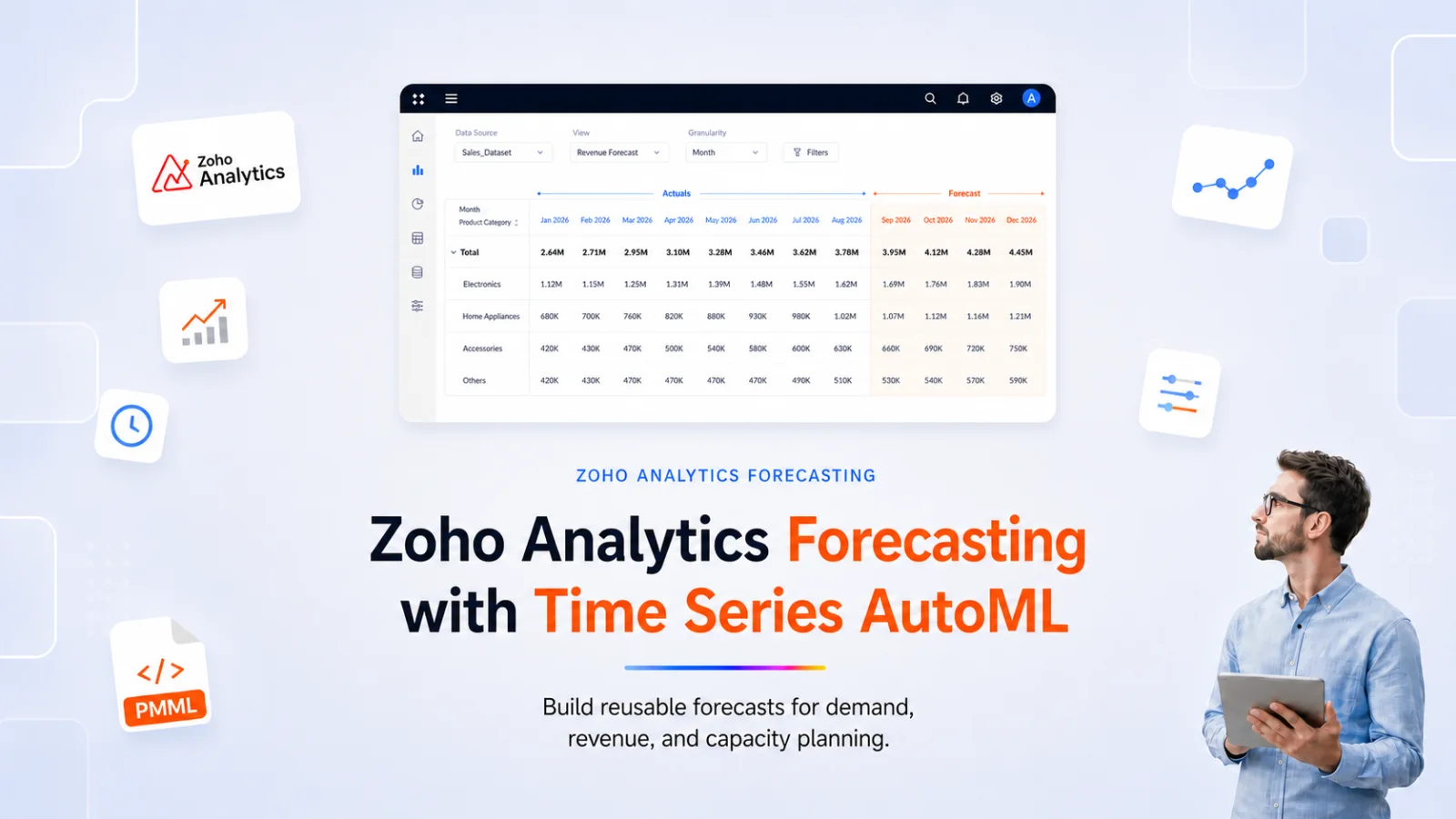
Zoho Analytics forecasting now gives operations, finance, and revenue teams a practical way to turn historical business data into planning inputs without moving the work into a separate machine learning platform. For an authorized analyst or admin, Time Series AutoML can create reusable forecast models from the same Zoho Analytics tables that already power reports and dashboards.
That changes the outcome for teams that plan demand, revenue, staffing, and campaign response. Instead of waiting for a data science handoff or rebuilding forecasts in spreadsheets, they can validate a forecast, publish it into the reporting workflow, and refresh it on a schedule. The July 2026 Zoho Analytics release makes that workflow broader by adding Time Series AutoML, Pivot View forecasting, and PMML import.
What forecasting in Zoho Analytics covers today
Zoho Analytics has offered chart level forecasting for several releases. A time series chart supports projected values directly on the visualisation, so a monthly revenue trendline can extend forward with modelled points and confidence bands. That capability is useful for reporting narratives, and it stays confined to a chart context.
The July 2026 release extends forecasting in 3 directions. AutoML now supports full time series model building. Pivot tables now render forecasts alongside actuals. And PMML import brings externally trained models into Zoho Analytics without a rebuild.
Viewed commercially, the 4 forecasting surfaces solve different planning problems.
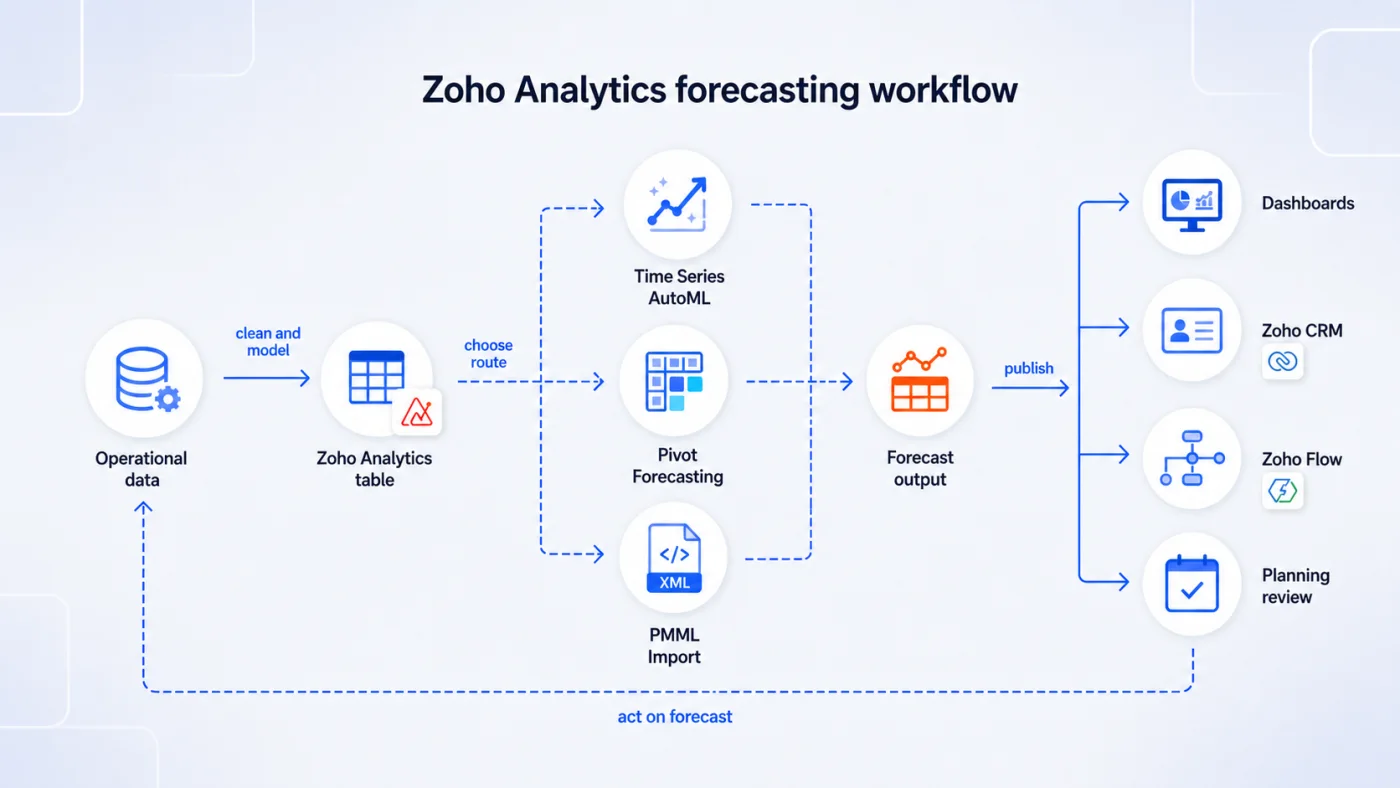
Fig 1 – End to end Zoho Analytics forecasting workflow from source data to planning outputs.
Time Series Model in AutoML
AutoML in Zoho Analytics now includes a Time Series model type. The workflow accepts a historical dataset with a date column and one or more numeric measures. Zoho Analytics fits models to the series, identifies trend, cyclical behaviour, and seasonal effects, and produces forecasts for the forward periods the analyst configures. For the standard AutoML path, no SQL, Python, or external modelling tool is required.
Univariate and multivariate forecasting. AutoML supports both single series forecasting where only the target’s own history drives the projection, and multivariate forecasting where outside factors influence the target. Univariate forecasting fits a stable series where trend and seasonality carry most of the signal. Multivariate forecasting matters when the target responds to external variables such as price or marketing spend, and those drivers are available as related variables in the training or scoring data.
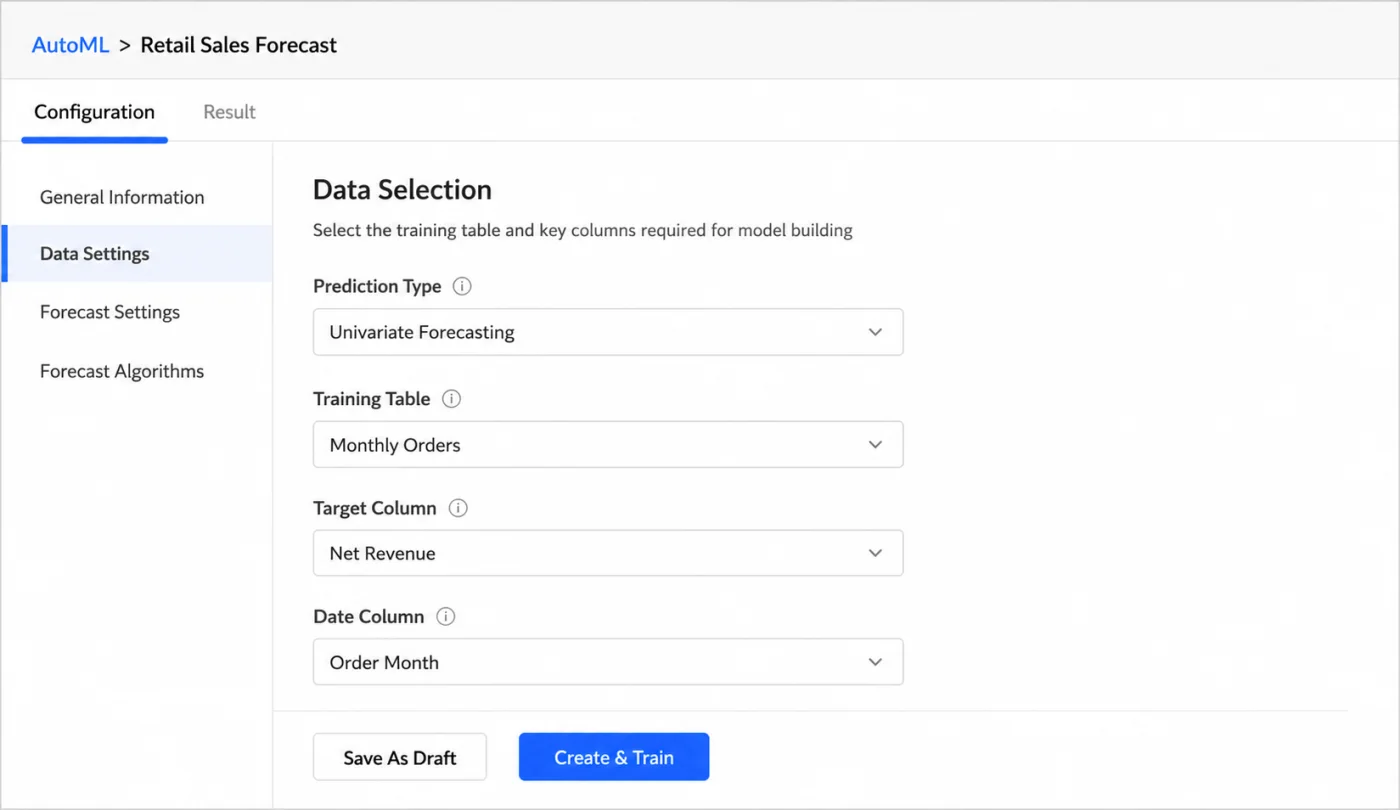
Fig 2 – Time Series AutoML data settings showing prediction type, training table, target column, and date column selection.
Forecast configuration. The authorized analyst or admin configures forecast horizon (how many periods forward the model projects), forecast format, or how the forecasted results should be generated, and lower and upper limits that bound the projected values. An avoid negative forecast option prevents the model from producing values below zero for series such as inventory or units sold where negative numbers make no business sense.
Automatic and manual algorithm selection. AutoML defaults to automatic algorithm selection where Zoho Analytics picks a model family based on the characteristics of the series. The authorized analyst or admin can also restrict the search to a specific algorithm family when domain knowledge or prior modelling has established which approach fits best.
Algorithm families and when each fits. Zoho Analytics evaluates several model families for time series forecasting. ARIMA fits stable single series forecasts where the underlying process is broadly stationary and the analyst wants a well understood statistical baseline. Regression models matter when external variables influence the forecast and those drivers are available as features. STL and ETS both help where trend and seasonality carry the signal, with STL decomposing trend, seasonality, and residual components, and ETS modelling error, trend, and seasonality. Ensemble and Blend approaches help when combining models improves reliability, typically for series where no single algorithm dominates across the holdout window.
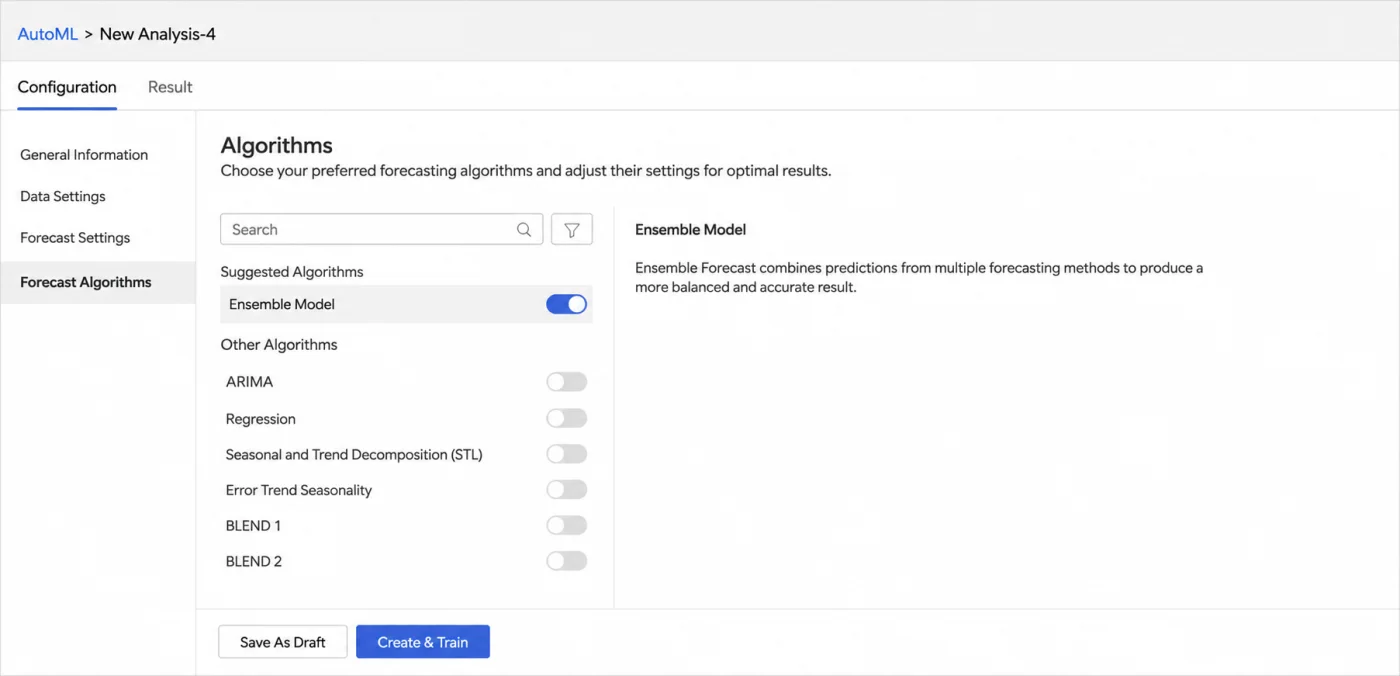
Fig 3 – Forecast algorithm selection showing model families available for Time Series AutoML.
Most of the forecasting demand we see in client engagements is not exotic. Teams want a defensible projection of next quarter’s sales. Handing that projection to a data science team is expensive. Handing it to a business analyst using the tool that already holds the data reduces cycle time and cost.
Zoho Analytics can deploy the trained model to a production table and apply it to new data on a scheduled cadence, so the same forecast pipeline can refresh weekly or monthly against the latest snapshot. Zoho’s Time Series AutoML documentation covers setup, algorithm families, and the full configuration surface.
Forecasting in Pivot View
Chart level forecasting was always useful for narrative reports. It was less useful for the finance and operations analysts who spend most of their day inside pivot tables reconciling actuals against plan. The July 2026 release brings forecasting into that surface.
A pivot view can now show projected values in the same table as actuals. Historical months carry real numbers. Forward months carry modelled numbers with a forecast label so the reader can distinguish them at a glance. Most pivot analysis controls remain available, while forecasted rows have specific drill through, alerting, and dashboard interaction limits.
Visual context inside the pivot. Forecasted rows can carry data bars or sparklines that make trajectory visible without leaving the table. Confidence ranges appear in the forecast tooltip so the reader can see the range around the projection when the value is uncertain. A model info panel shows the training period, forecast period, algorithm used, parameter settings, trend and seasonality components, and the performance indicators the model was trained against. That panel gives the analyst provenance without opening a separate model registry.
Zoho also supports influencing factors in pivot forecasting, with up to 5 additional measures, although VARX is not supported in pivot tables.
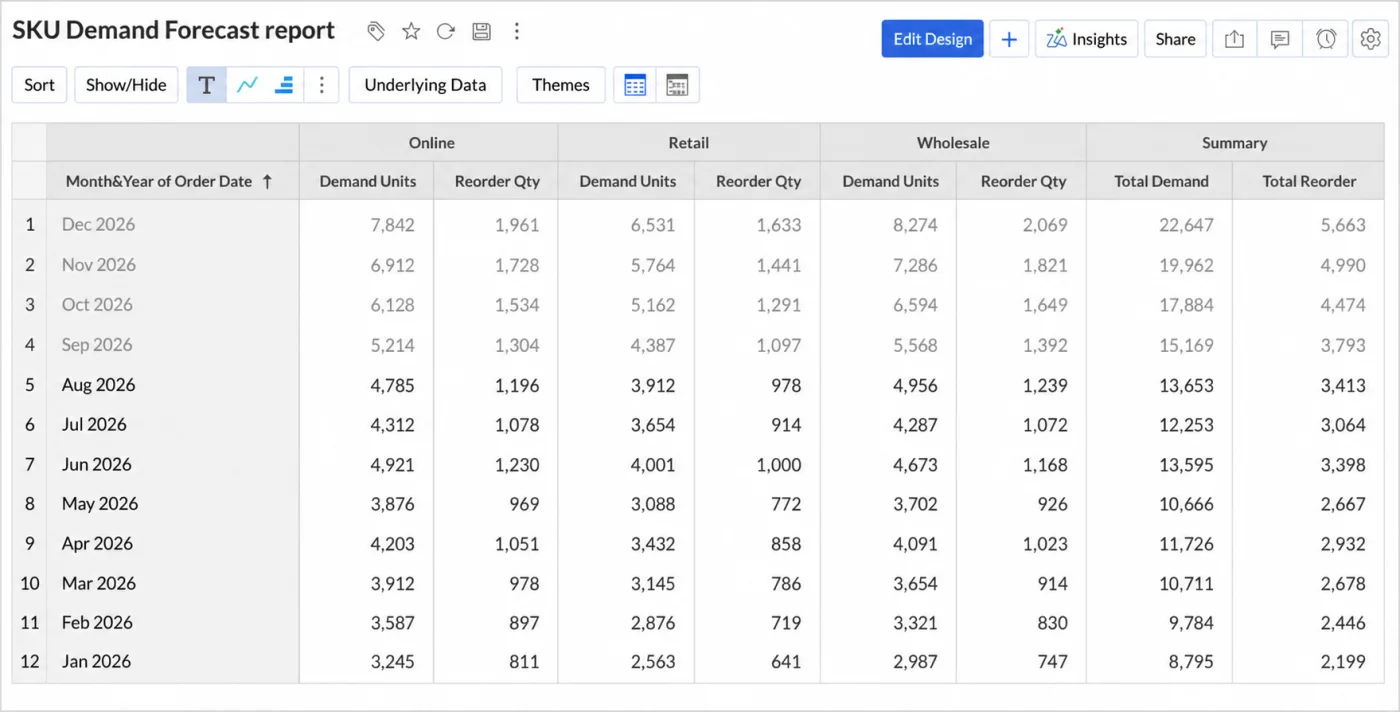
Fig 4 – Pivot view showing actual and forecasted periods in the same demand report.
Export behaviour. Exported pivot tables preserve both actual and forecasted values together, with a Type column that flags each row so downstream consumers can filter cleanly. Confidence interval lower and upper limit columns do not currently export with pivot data, so any workflow that needs those bounds outside Zoho Analytics has to plan a separate forecast output workflow.
For monthly close and rolling forecast cycles, the value is direct. A revenue analyst can see actual January through October revenue by region and product line, and read the modelled November and December values in the same row. Variance analysis and scenario reads happen without a context switch. Zoho’s documentation on forecasting in pivot tables covers configuration, the model info panel, and export behaviour.
PMML Import for External Models
Some forecasting use cases do not fit the AutoML box. Multivariate demand models with promotional lifts often need custom regressors that go beyond what AutoML exposes. Teams typically build these in Python or a specialist forecasting platform. Bringing those models into a reporting tool used to mean rebuilding them or standing up a separate scoring service.
Zoho Analytics now accepts PMML imports. PMML is a portable model format supported by most mainstream ML tooling. A data science team can export a trained model to PMML and upload it to Zoho Analytics without retraining. The imported model then applies to datasets inside the tool, and the prediction becomes available across the same reports and dashboards that consume other Zoho Analytics data.
Production deployment inside Zoho. The PMML deployment workflow inside Zoho Analytics does more than run individual predictions. The team selects the input features that map to the imported model’s expected inputs, defines an output table where predictions get written, preserves selected context columns from the source dataset so predictions carry the identifiers needed for reporting, and schedules the deployment so predictions refresh on a defined cadence. That converts an imported model from a static artefact into a scheduled prediction workflow. For scheduled PMML deployment, confirm whether the output table rewrite behaviour fits the downstream reporting workflow.
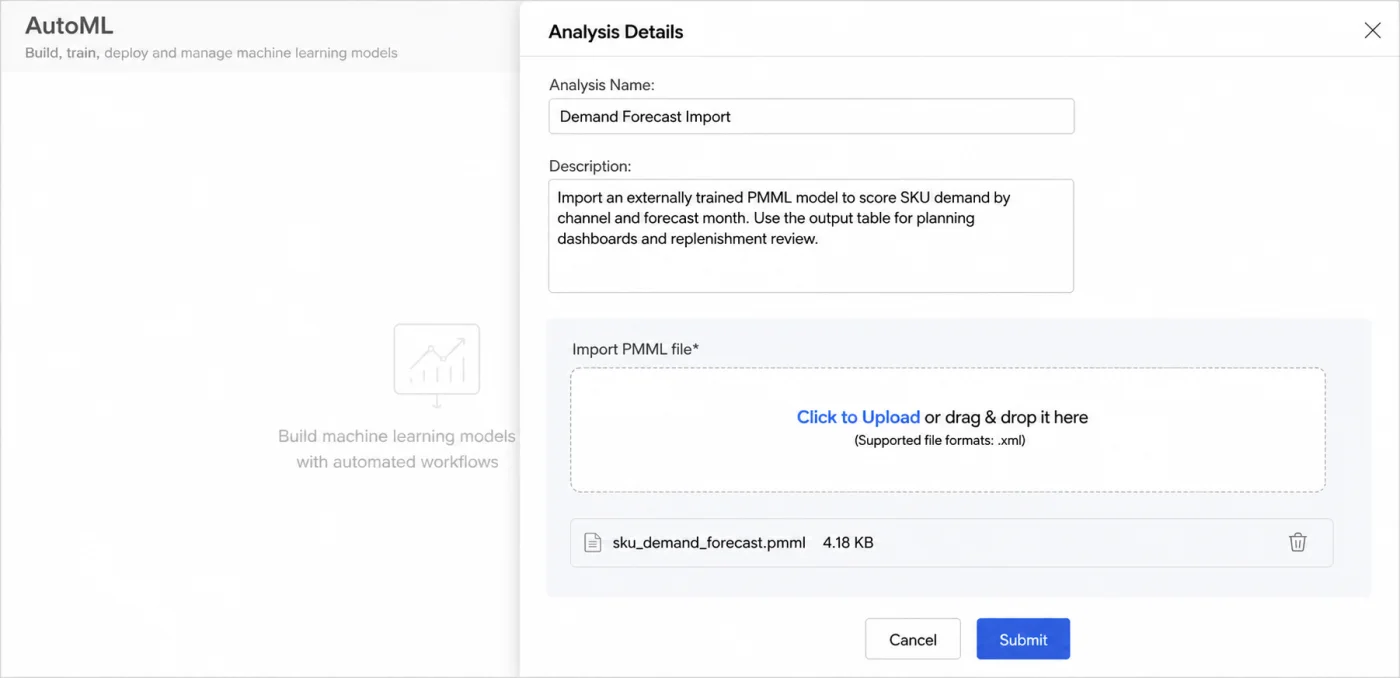
Fig 5 – PMML model import screen showing an externally trained demand forecast model ready for deployment.
For teams that have already invested in external model development, this reduces the deployment problem. Model training stays where the data science team wants it. Model scoring and consumption happen where the business reads numbers.
2 practical notes on this workflow. PMML supports a defined range of model types, so confirm the trained model’s algorithm and preprocessing steps map cleanly to the PMML specification before committing to this path. Model governance still applies. Track which PMML version the team has deployed, which dataset backed the training, and when the team plans to retrain it. Zoho’s PMML model documentation covers import and deployment. Confirm supported algorithms and preprocessing compatibility during model design.
Business use cases for Zoho Analytics forecasting
The forecasting workflows we build for clients cluster into 4 categories.
Demand and inventory planning. Retailers, distributors, and manufacturers use historical order and consumption data to project SKU level demand. AutoML handles the standard case of steady demand with weekly and seasonal cycles. PMML import handles more complex cases where promotional calendars and price elasticity need modelling. Teams that run inventory in Cin7 Core can now pipe that data into Zoho Analytics through the new July 2026 connector and forecast against it in the same workspace where sales data already lives.
Revenue and cash forecasting. Subscription businesses model MRR and ARR by cohort. Services businesses model billing from active engagements and pipeline. Pivot view forecasting fits both because the finance team already reads revenue by segment inside pivot tables.
Workforce and capacity planning. Support teams project ticket volume by channel. Field service teams project job volume by geography. Time series AutoML gives operations managers a defensible baseline that plan discussions can start from.
Marketing spend and campaign response. Marketing teams project lead volume and conversion by channel to size spend. When historical campaign response data has enough depth, AutoML produces baseline projections. When campaign design changes materially quarter to quarter, external models built with features specific to each campaign usually perform better and land through PMML.
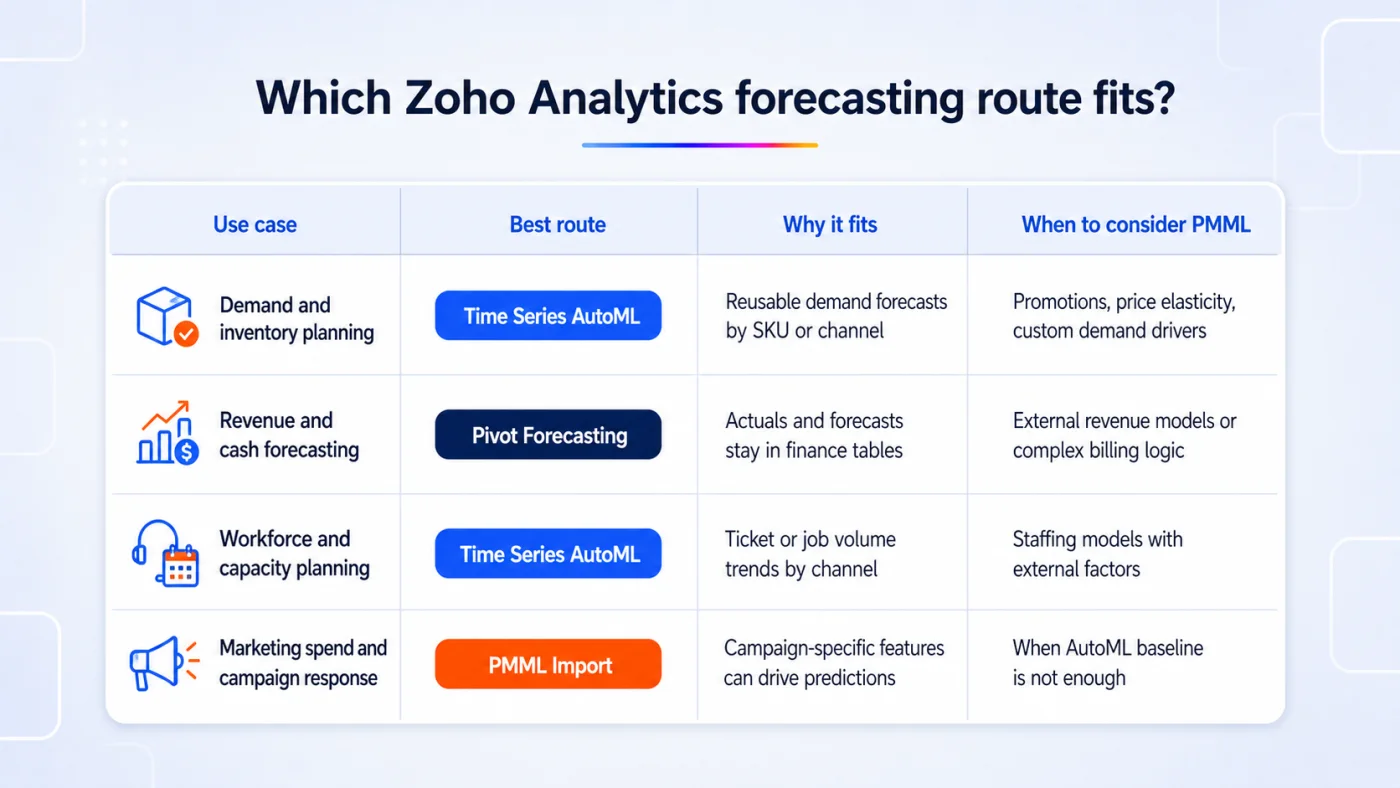
Fig 6 – Forecasting route matrix for common Zoho Analytics planning use cases.
Practical limitations to plan around
Zoho Analytics forecasting is capable, and the boundaries are worth understanding before committing a workflow to it. These are the constraints that most often shape implementation decisions on our projects.
Minimum data requirements. Forecasting needs a date column and at least 1 numeric measure. Zoho’s chart and pivot forecasting require at least 7 data points. In practice the useful floor is much higher because 7 points cannot support seasonality.
Data density inside pivot forecasting. Pivot forecasting will not run if more than 40% of the data points in the series are empty. Sparse data has to be handled through gap filling or aggregation upstream before it reaches the pivot.
Series limit per pivot. A single pivot table can forecast a maximum of 20 series at once. For higher fan out use cases such as SKU level or store level forecasts across a wide catalogue, the workflow has to be split across multiple pivots or moved into AutoML pipelines that write to a dedicated output table.
Drill through and downstream reads. Forecasted data points do not support drill through to underlying rows. A user looking at a forecast in a dashboard cannot trace it back to a source dataset the way an actual value drills into its supporting records. This matters when the same dashboard mixes actuals and projections in a single visual and users expect consistent drill behaviour.
Data alerts. For pivot forecasting, data alerts evaluate actual data only, so forecasted values are excluded. An alert configured on a metric will fire when the actuals cross a threshold, and the forecast crossing the same threshold in a forward period will not trigger it. In our implementations, forecast driven alerts usually need separate logic, often by writing forecast output to a dedicated table and applying alert rules there.
Confidence intervals in exports. Pivot exports include actual and forecasted values with a Type column, and the confidence interval lower and upper limit columns are not part of the export. Any workflow that consumes forecast uncertainty outside Zoho Analytics has to plan a separate forecast output workflow if those bounds need to leave Zoho Analytics.
Implementation considerations
3 inputs determine whether a Zoho Analytics forecasting deployment holds up.
Historical depth and data quality. Time series models need enough history to identify cyclical behaviour. For weekly forecasts with annual seasonality, 2 years of clean history is a working minimum. Gaps in history hurt model accuracy and need handling in preprocessing. A pricing model change or a market entry that lands partway through the series introduces regime shifts that also need explicit treatment.
Model selection and validation. AutoML picks a model type based on the data, and the analyst still needs to validate performance on a holdout period. Zoho Analytics exposes a set of model performance and fit indicators (WMAD/WMAPD, AICC, LEPS, RMSE, MAPE/MAPD, BIC, and quality scores) so the analyst can compare candidate models on more than one dimension. The implementation question is which metric matches the business decision. Error metrics such as RMSE and MAPE/MAPD matter when the cost of a wrong forecast scales with the size of the error. Information criteria such as AICC and BIC matter when model parsimony matters, typically to avoid overfitting on short series. Directional accuracy matters when the plan responds to trend direction more than absolute value. Choose the metric before selecting the model, and the model comparison stays honest.
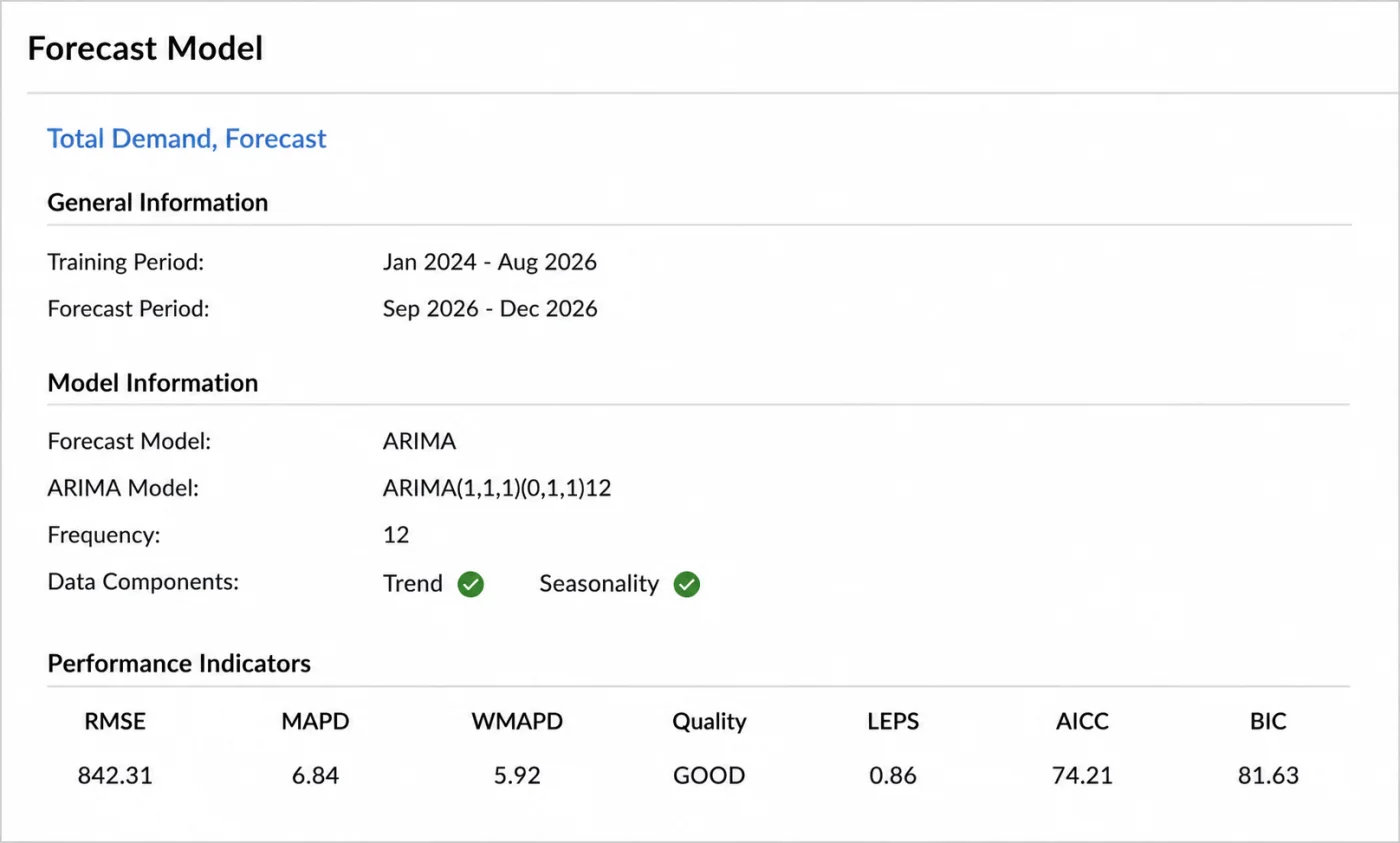
Fig 7 – Forecast model information dialog showing training period, algorithm, and performance indicators.
Refresh cadence and governance. Forecasts drift as underlying series change. Weekly and monthly refresh schedules should include a review of forecast against actual, and a retraining trigger when accuracy degrades beyond an agreed threshold. Zoho Analytics scheduling handles the refresh. The July 2026 release also introduced System Tags such as Certified and Outdated, which give the analytics team a lightweight way to signal which forecast reports have been validated and which are out of date. Applying those tags as part of the governance routine makes trust in the outputs visible to the business consumers reading them.
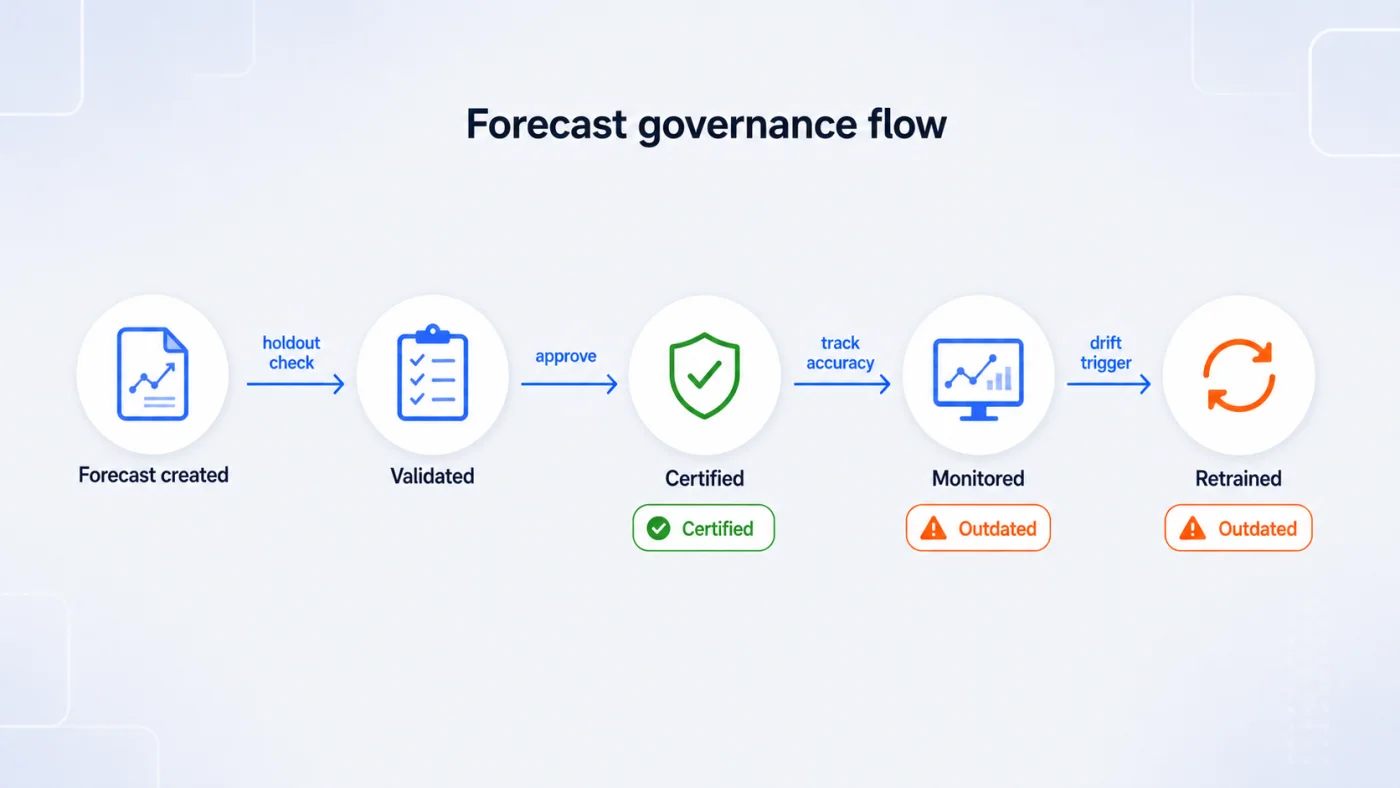
Fig 8 – Forecast governance flow using validation, certification, monitoring, and retraining.
Where the forecast feeds decisions matters as much as accuracy. A demand forecast that lands in a dashboard nobody opens is a report. A demand forecast that flows into a replenishment order is a business input. Design the delivery surface before finalising the model.
How Clixlogix delivers Zoho Analytics forecasting projects
We work with clients on Zoho Analytics deployments as a Zoho Expert Partner, and forecasting ranks among the more requested capabilities since the July 2026 release. Our engagements typically cover 4 areas.
Data preparation and modelling. We clean, join, and shape source data from Zoho CRM and connected operational systems into tables ready for forecasting. This is where most forecasting projects succeed or fail.
Model selection and validation. For each forecast target, we evaluate whether AutoML time series is sufficient or whether the use case calls for an external model brought in via PMML. Accuracy testing happens against defined holdout windows using the metric the business decision requires, before anything ships to production.
Delivery surface design. Forecasts land in the dashboards and downstream systems where the business will actually use them. This often includes writing forecast outputs back to Zoho CRM or triggering alerts through Zoho Flow, and it accounts for the drill through and alerting limitations that come with pivot forecasts.
Governance and refresh. We document refresh schedules and retraining triggers, apply System Tags to signal certification and freshness, and deliver model documentation alongside the technical build.
Plan your Zoho Analytics forecasting build
Data preparation and model validation decide whether a forecasting workflow holds up in production. We scope the forecast target, shape the source tables, validate accuracy against a defined holdout window, and land the output in the dashboards and downstream systems your team already reads. Tell us the planning decision the forecast needs to support and we will map the route through AutoML, Pivot View, or PMML import.
Scope your forecasting use case
Frequently Asked Questions