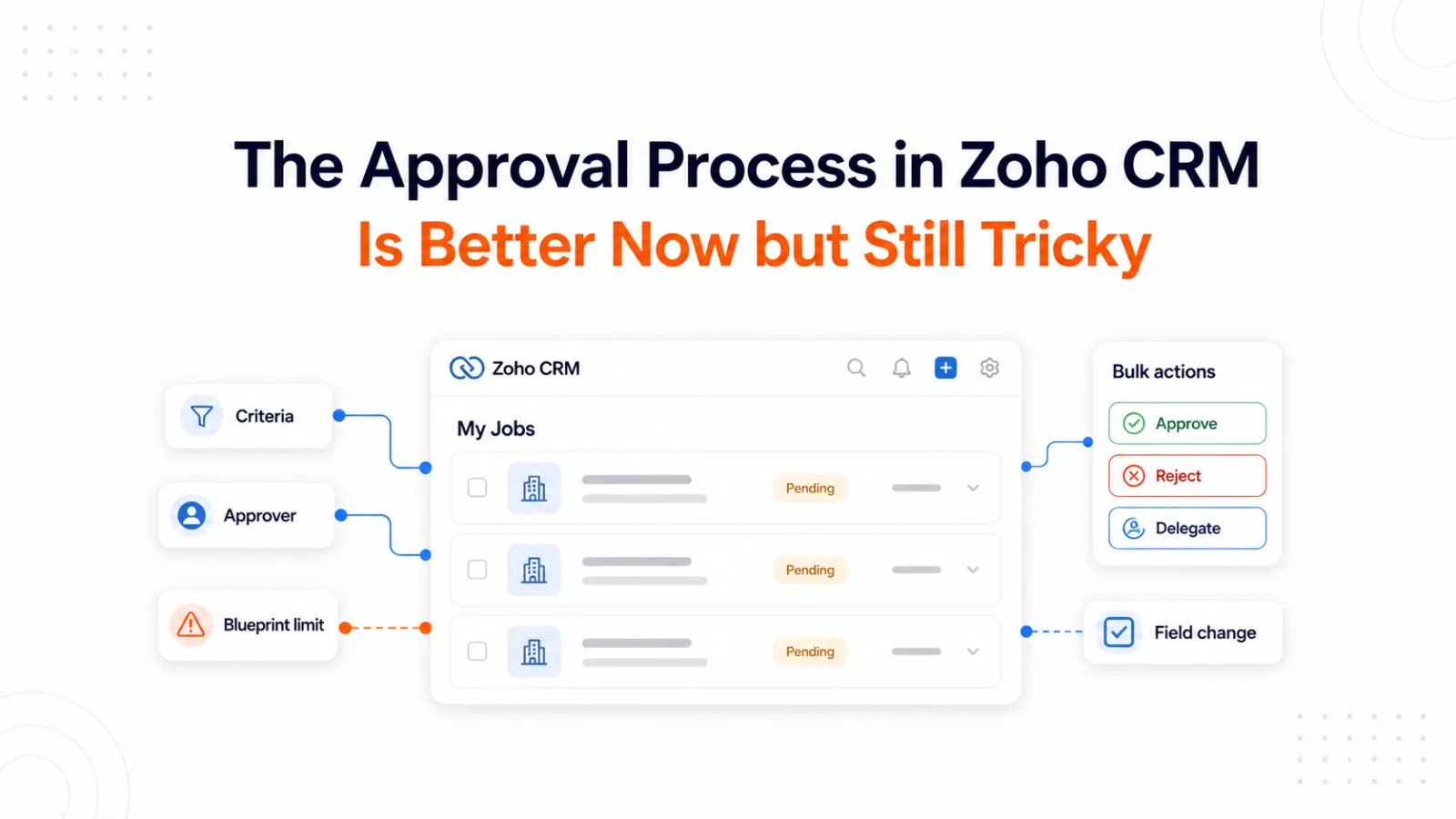
Approval configuration in Zoho CRM covers the basics without difficulty. A rule, an approver, a submit button, a locked record until the approver signs off. Production behavior is where the design decisions get expensive.
Most operational pain traces to 2 structural limits. Approval criteria cannot fire on a specific field change out of the box, so any edit matching the rule submits the record for review. Records already inside a Blueprint cannot enter a CRM approval process, which forces a boundary in any document workflow that needs review before delivery to a customer. That is why the approval process in Zoho CRM has to fit the way records actually move in production.
Zoho’s recent updates to My Jobs, bulk actions, approver flexibility, and comment persistence have improved daily approval work considerably. The 2 structural limits remain. The sections below cover what the updates address, where the workarounds apply, and how to design around both limits.
What changed in Zoho CRM approvals recently
Zoho has shipped approval improvements across 2025 and 2026. Recent updates cover faster approval management in My Jobs, more flexible approver options, deeper approval history, actions scoped to individual stages, and tighter configuration controls.
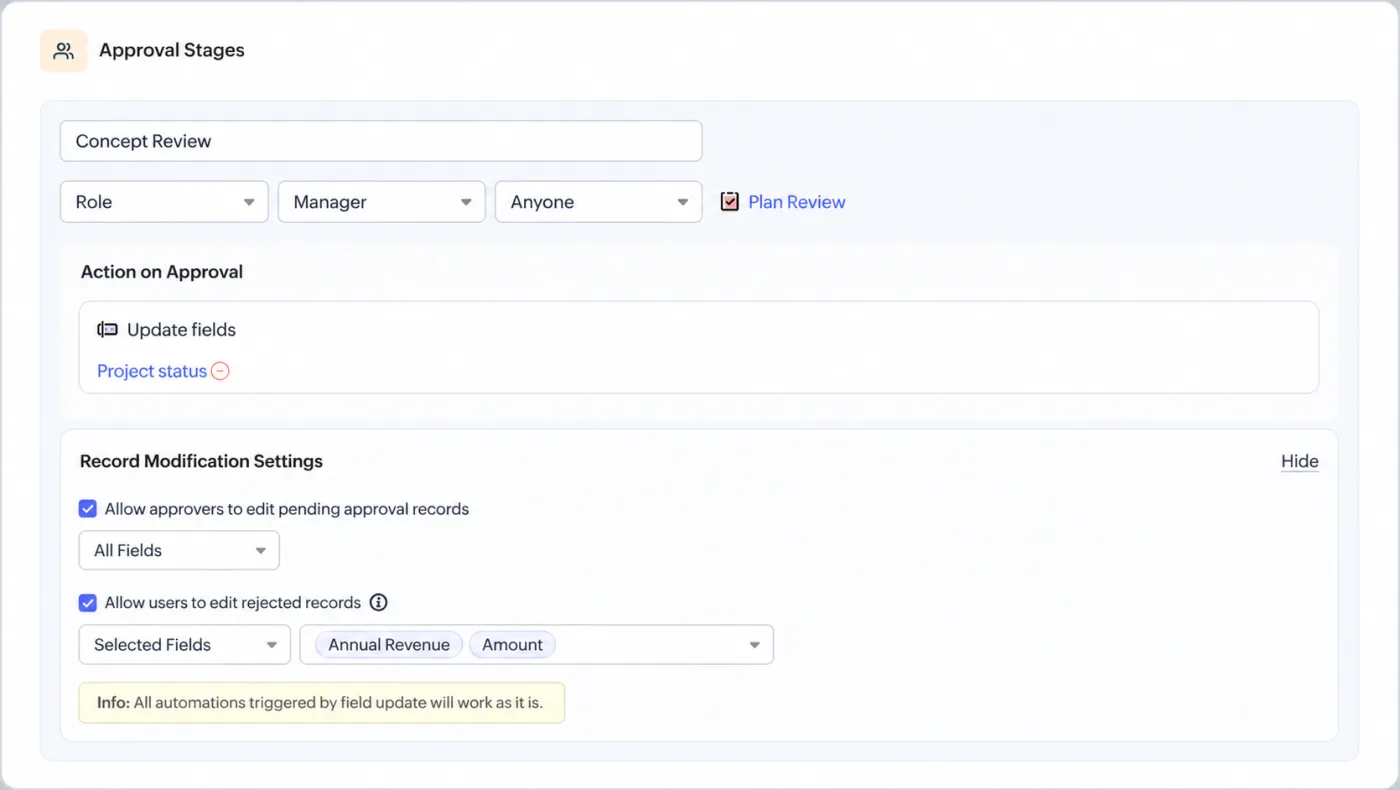
Fig 1 — Approval stage settings in Zoho CRM showing approver selection, field updates, and record modification controls.
| Update | What it helps with |
|---|
| Bulk approve, reject, and delegate | Clears large approval queues faster |
| Advanced filters in My Jobs | Helps approvers find the right pending records |
| Admin approval views | Lets admins review their own approvals and other users’ approvals |
| Approval comments saved as notes | Keeps approval context attached to the CRM record |
| User lookup fields as approvers | Makes approvals dynamic and specific to each record |
| Editable records during approval | Lets users update records that are pending approval, so the final record reflects current data |
| Process admins | Assigns specific administrators to oversee approvals and take over pending records |
| Role or group Anyone versus Everyone | Chooses whether any single approver in a group can approve, or every user in the group must approve |
| Hierarchical approval flexibility | Lets Anyone or Everyone higher up the reporting hierarchy approve when a user has no direct manager |
These updates matter because approval processes fail operationally for reasons that sit outside the approval rule itself, most often because approvers miss requests, queues get messy, or admins cannot easily track what happened.
What an approval process in Zoho CRM actually does
An approval process in Zoho CRM controls whether a record can move forward after meeting certain criteria. The table below shows common approval scenarios and typical owners.
| Use case | Typical approval owner |
|---|
| Deal discount above a threshold | Sales manager |
| Quote or proposal review | Finance or operations |
| Lead or account data change | CRM admin or sales manager |
| Compliance document signoff | Technical director or compliance lead |
| Custom module record approval | Department manager |
When a record meets the criteria, Zoho can submit it for approval, notify the approver, lock the record, and then perform actions after approval or rejection.
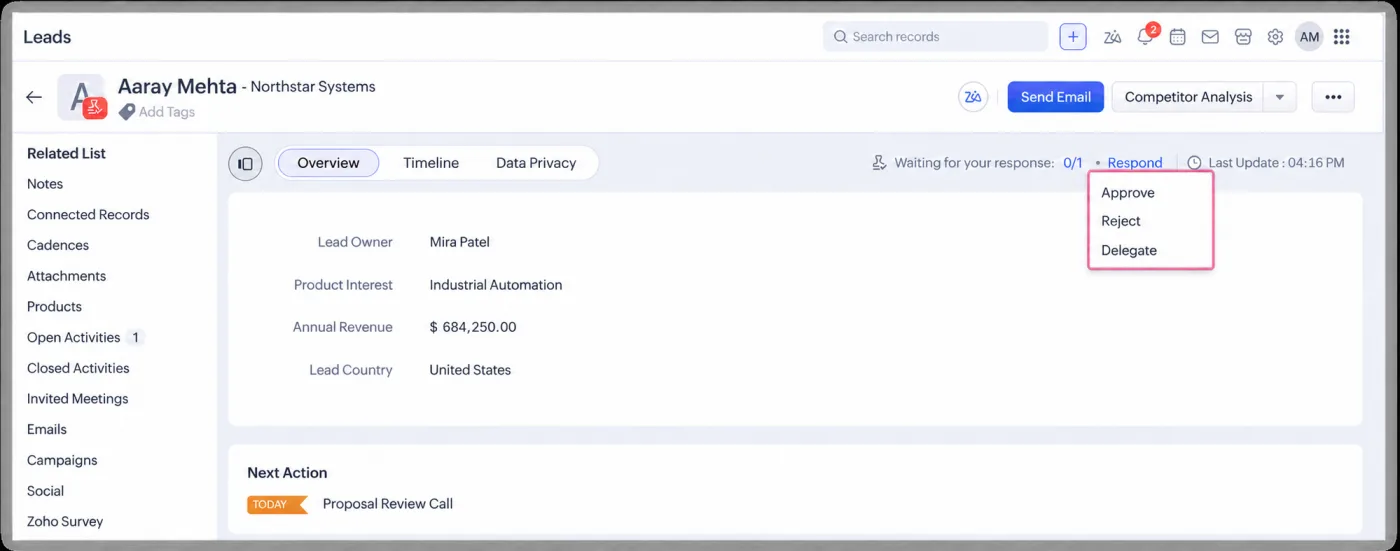
Fig 2 — A Zoho CRM record waiting for approval, with approve, reject, and delegate actions available from the Respond menu.
The design decisions sit in the configuration. Approval timing and its interaction with the rest of your CRM automation both need deliberate choices.
Triggering approvals on specific field changes
The clearest need across our Zoho CRM engagements is direct. Users want an approval process to trigger on changes to specific fields only. As currently designed, any edit that matches the rule counts.
That sounds basic. The operational difference is major.
A company may want approval when the discount field changes and no approval when a sales rep updates a note, a phone number, or the next contact date. If approval fires on every edit, the process becomes noisy and people stop trusting it.
Zoho has not shipped native support for this behavior. Our clients raise this requirement on almost every serious Zoho CRM build, and the working substitute is a checkbox and workflow combination.
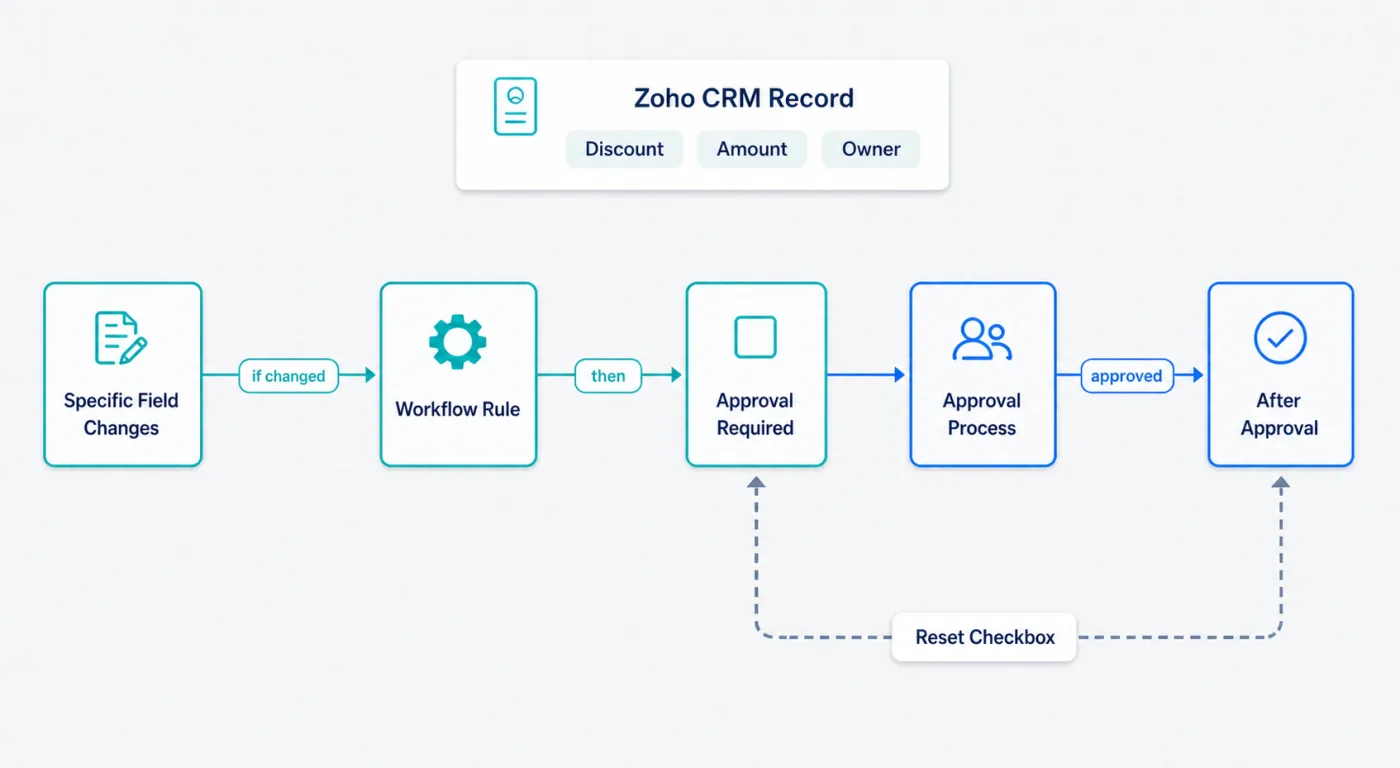
Fig 3 — The field update workaround uses a workflow rule to select an Approval Required checkbox, which then submits the record for approval.
| Step | What to do |
|---|
| 1 | Create a checkbox field such as Approval Required on the module |
| 2 | Configure the approval process criteria to fire on edit when Approval Required equals true |
| 3 | Create a workflow rule that watches for changes to the specific fields you care about |
| 4 | Add a field update action on that workflow that sets Approval Required to true |
| 5 | On the approval process, add an approve or reject action that sets Approval Required back to false, so the same logic can fire again on the next relevant field change |
Native criteria tied directly to field changes would be cleaner. In the meantime, this approach gives administrators direct control over what triggers a review.
Custom functions can accidentally trigger approvals
Another tricky area is automation.
If your CRM uses custom functions, API updates, or integrations, the system itself edits records alongside human users. Depending on trigger configuration, those updates can accidentally start approval logic.
| Trigger control | When to use it |
|---|
{"trigger":["workflow"]} | When you want workflows to run and want tighter control over other automation triggers |
{"trigger":[]} | When the update should not trigger automations |
| Approval checkbox workaround | When only selected field changes should submit a record for approval |
The lesson is direct. When functions update records involved in approvals, treat those updates as automation events. Decide which automations should fire and explicitly control the trigger behavior where possible.
Blueprint and approval process do not always fit together
Blueprint is another place where the approval process in Zoho CRM can surprise teams.
One real-world scenario involved a penetration testing workflow in a custom CRM module. The team used a Blueprint to move work through scheduling, tester assignment, regulatory document generation, execution, and report delivery. Before sending generated documents to a customer, the technical director needed to approve them.
Zoho CRM did not support approval processes on records already inside a Blueprint. Zoho Writer’s option to merge a document and send it for approval also failed to solve the problem through API or Deluge in that scenario.
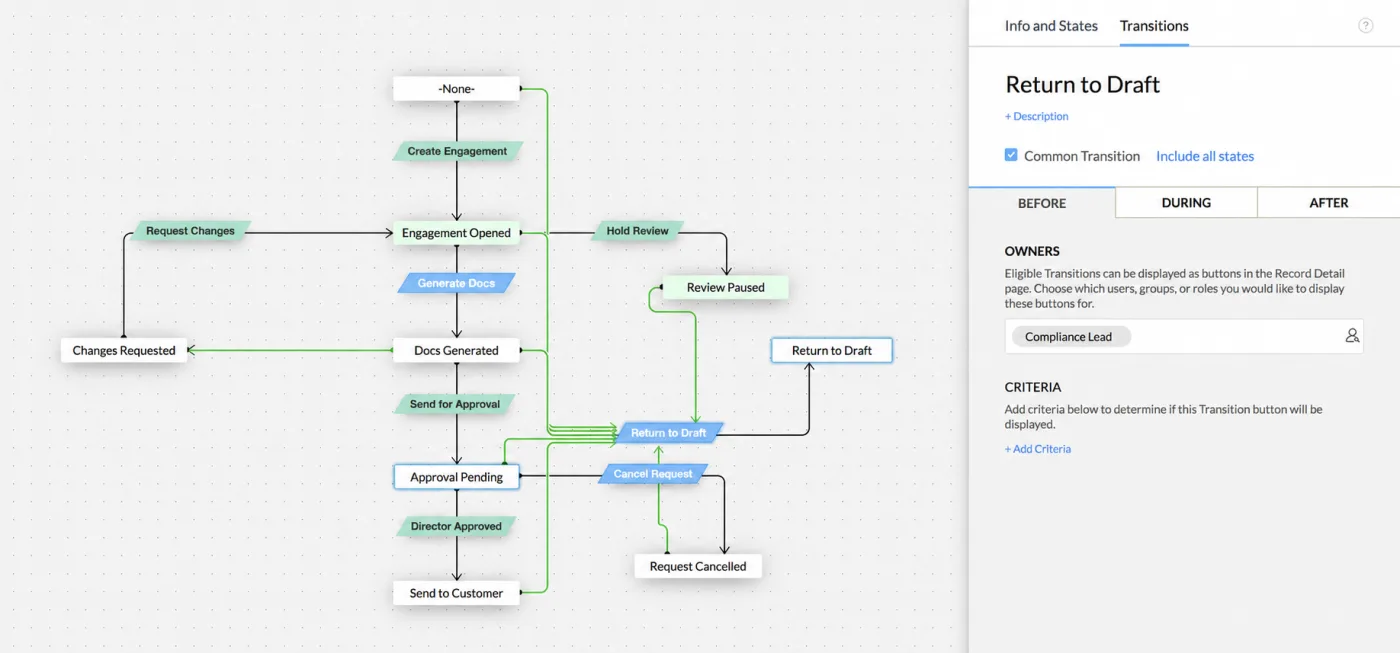
Fig 4 — A Zoho CRM Blueprint editor view showing a document approval workflow with transitions, states, and transition settings.
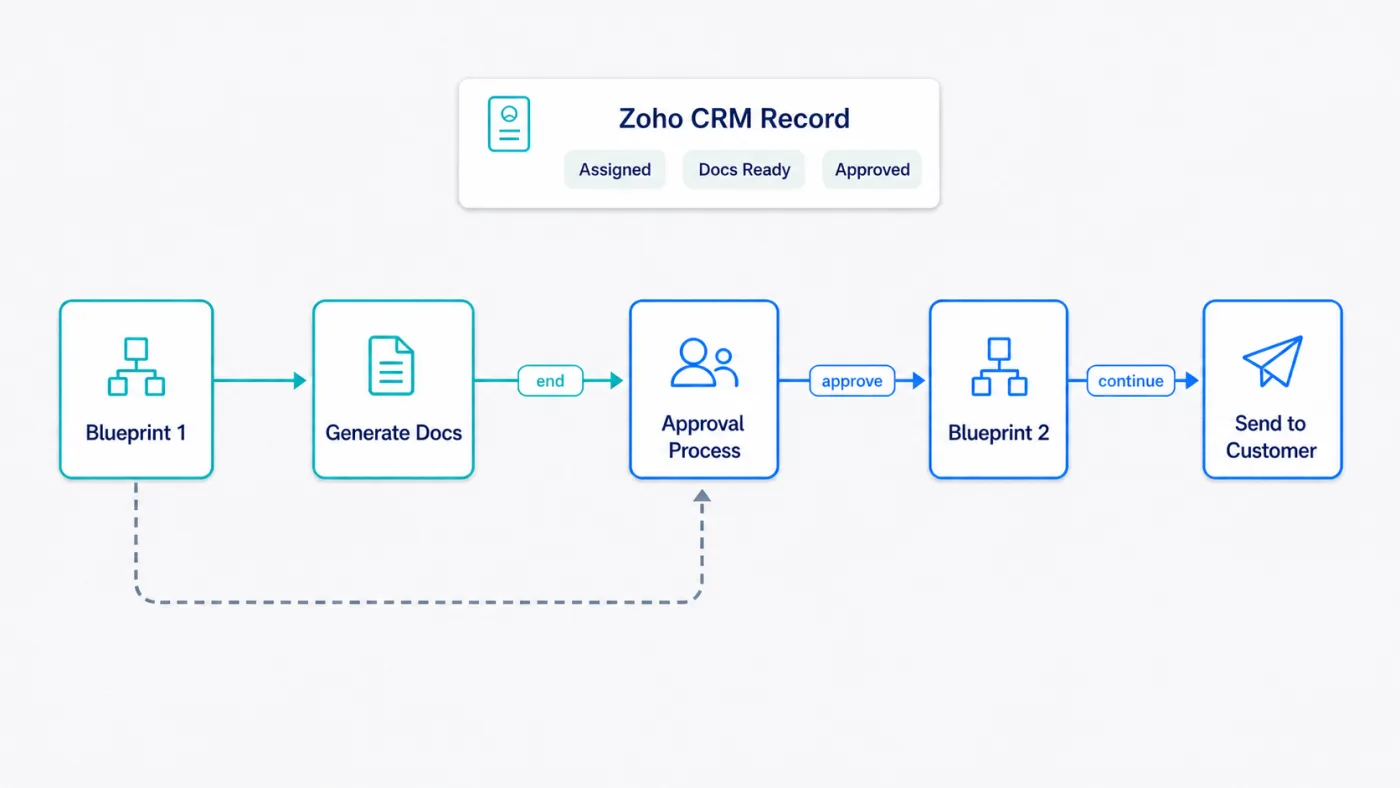
Fig 5 — The split Blueprint workaround ends the first Blueprint before approval, then continues the workflow in a second Blueprint after approval.
| Problem | Practical workaround |
|---|
| Record is inside a Blueprint and cannot enter CRM approval | End the first Blueprint before approval |
| Documents need approval before customer delivery | Generate documents, then run CRM approval |
| Workflow must continue after approval | Move the record into a second Blueprint |
| Users should not bypass the review step | Use record locking, restricted transitions, or ownership controls where needed |
This is the kind of limitation most basic setup guides miss. If your approval process is part of a regulated workflow or one built around document generation, design the Blueprint and approval boundary before building the automation.
Anyone versus Everyone approvals matter
Zoho has partly addressed older pain many of our clients hit around reminders and multiple approvers.
The issue was direct. When multiple people could approve something, everyone might receive the same notification. The first approver would clear it and the others wasted time opening a request already handled.
| Approval style | Best for |
|---|
| Anyone | Any single approver from the group can approve |
| Everyone | Every selected approver must sign off |
| Sequential stages | Different people approve in a fixed order |
| Parallel approval | Multiple approvers review at the same time |
| User lookup approver | The approver depends on a user field in the record |
Accountability decides the choice. If only 1 manager needs to approve a discount, the Anyone setting fits and forcing every manager to act adds noise. If compliance, finance, and delivery each need to approve different risks, sequential stages hold up better.
My Jobs makes approvals easier to manage
The My Jobs updates are useful because they focus on daily approval operations.
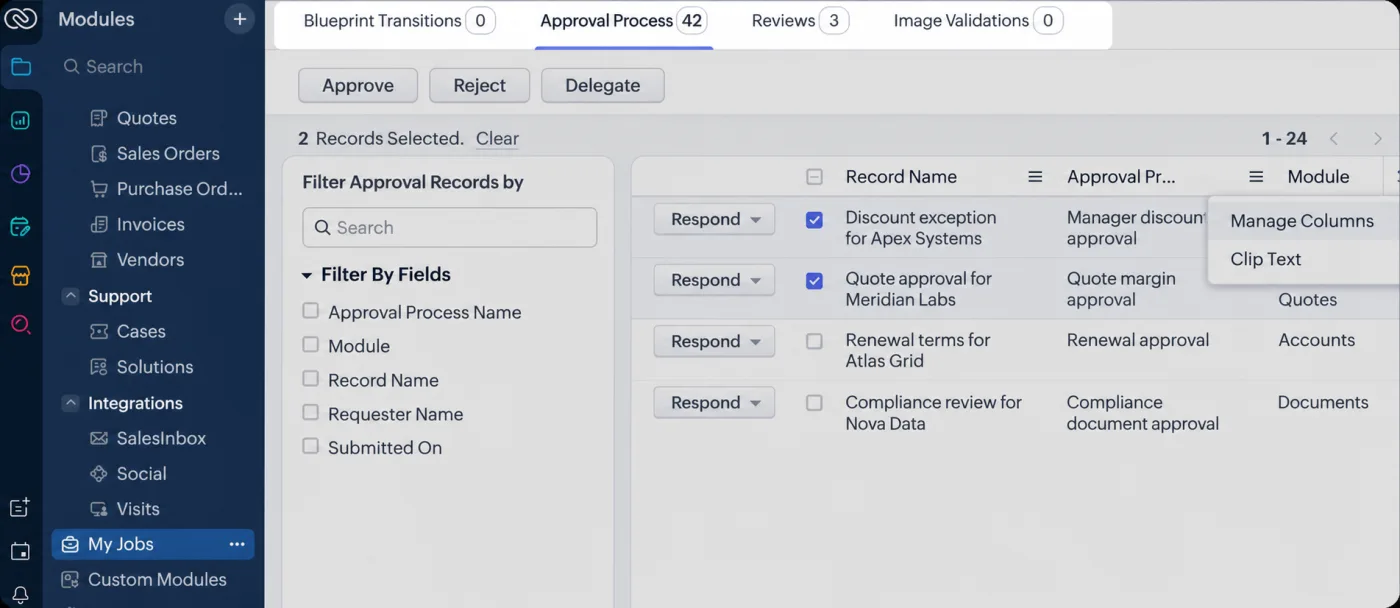
Fig 6 — The My Jobs Approval Process tab lets approvers filter approval records, select multiple requests, and act in bulk.
Approvers and admins can now manage records more efficiently with bulk approve, reject, and delegate options. Filters help people narrow down pending work. Admin views make it easier to inspect other users’ approval queues. Saving comments as notes also improves record history.
| My Jobs feature | Why it matters |
|---|
| Bulk approve | Handles repeat approvals faster |
| Bulk reject | Clears invalid requests without opening each record |
| Delegate | Moves approvals to the right person when ownership changes |
| Filters | Reduces time spent searching pending approvals |
| Comments as notes | Preserves approval reasoning on the record |
If your team already uses approvals, review My Jobs again. Newer controls may remove manual work your users have gotten used to.
Approval APIs are still a watch item
Approval APIs for performing approval actions sit in Early Access status per Zoho’s own public statements. Zoho has pointed customers toward support for specific use cases and has not yet published a general availability endpoint set. The likely use cases based on the current UI updates include programmatic approve, reject, and delegate actions, though those specific endpoints have not been confirmed publicly.
Early Access status falls short of a fully documented public API release. For now, treat approval APIs as a coming capability. Any critical workflow that depends on programmatic approval actions needs a direct availability check with Zoho support before build.
Common approval process problems to troubleshoot
| Problem | Likely cause | What to check |
|---|
| Approval triggers too often | Criteria are too broad | Use the checkbox and workflow workaround for specific fields |
| Approval does not trigger | Criteria, module, or user permissions are wrong | Check process criteria, record owner, and submitter rules |
| Function update starts approval unexpectedly | Automation triggers not scoped correctly | Review trigger options such as {"trigger":[]} |
| Approval does not work inside Blueprint | Record is still inside an active Blueprint | Split the workflow before and after approval |
| Approvers miss requests | Notifications or My Jobs usage is weak | Use filters, admin views, and clearer approver logic |
| Record cannot be edited | Pending approval has locked the record | Review approval lock settings and process state |
| Status is unclear | Approval history is hard to review | Use the newer approval history views and filters |
How Clixlogix scopes Zoho approval work
Clixlogix scopes Zoho approval work by mapping the trigger surface first, cataloging every field, workflow, custom function, and API path that can move a record, before writing any approval rule. Approval design that skips this step generates the noise problem or the Blueprint collision within the first few months of production use. Clixlogix runs this mapping as a standard step before starting any Zoho CRM build that involves approvals, Blueprints, or document generation.
Design decisions that hold up
Zoho’s recent updates address daily operations. My Jobs improvements, bulk approval actions, filters, approval comments saved as notes, editable records during approval, process admin oversight, and Anyone versus Everyone flexibility for roles and groups all reduce the work of running an approval queue at scale.
The 2 structural limits still shape design. Triggers that fire only on specific field changes need the checkbox and workflow workaround. Document flows built on Blueprints need an approval boundary that splits the process into 2 stages. Custom functions and API updates need explicit trigger control so system edits do not submit records for review by accident.
Approval APIs remain in Early Access at the time of writing, which means any workflow depending on programmatic approval actions should confirm current availability with Zoho support before build.
Approval design in 2026 works when the team maps the workflow before configuring the rule. The map covers trigger paths, automation paths, Blueprint boundaries, and behaviors that fire when the record is locked. The setup wizard handles the surface configuration. The operational decisions around it are where most of the work lives.
Working on your approval process setup?
Two things separate an approval process that ships from one that stalls at configuration. The team has to map the trigger surface before writing rules, and design the Blueprint boundary before building automation. Both are cheaper to think through before configuration than after.
Send us your current approval process or the workflow you want approvals to gate, the modules involved, and the Blueprint or custom function context. We will send back a trigger surface map, a workaround recommendation for the field trigger and Blueprint limits, and a rough scoping estimate. No discovery call. No slide deck. No obligation.
Clixlogix has built Zoho stacks since 2011. Our team ships approval process designs across sales, finance, compliance, and document workflows.
Talk to our Zoho and CRM automation team