TLDR
AI in Zoho Creator now runs on the LLM provider you choose (Zoho GenAI, OpenAI, Google, or Anthropic). Here is what we cover.
- 6 concrete gains provider choice unlocks, spanning P&L, compliance, region, and vendor risk
- 5 Zia features accept your provider choice. 1 does not, and we name the 4 workarounds
- Zoho MCP as the way to extend provider choice past Creator into your full Zoho account
- 4 gotchas Zoho documents quietly, including one that surprises compliance teams
- A workload planning matrix for picking the right provider for the right job
- What Chat Agent will change once it ships, honestly framed
For Zoho SMBs, the practical productivity gain is real. Read on for how to make it work for your specific business.
The News, Plainly
Zoho Creator has been a tool to build business apps for nearly 2 decades. The kind of app it can now build has changed. Most teams planning or running a Creator app have not caught up yet.
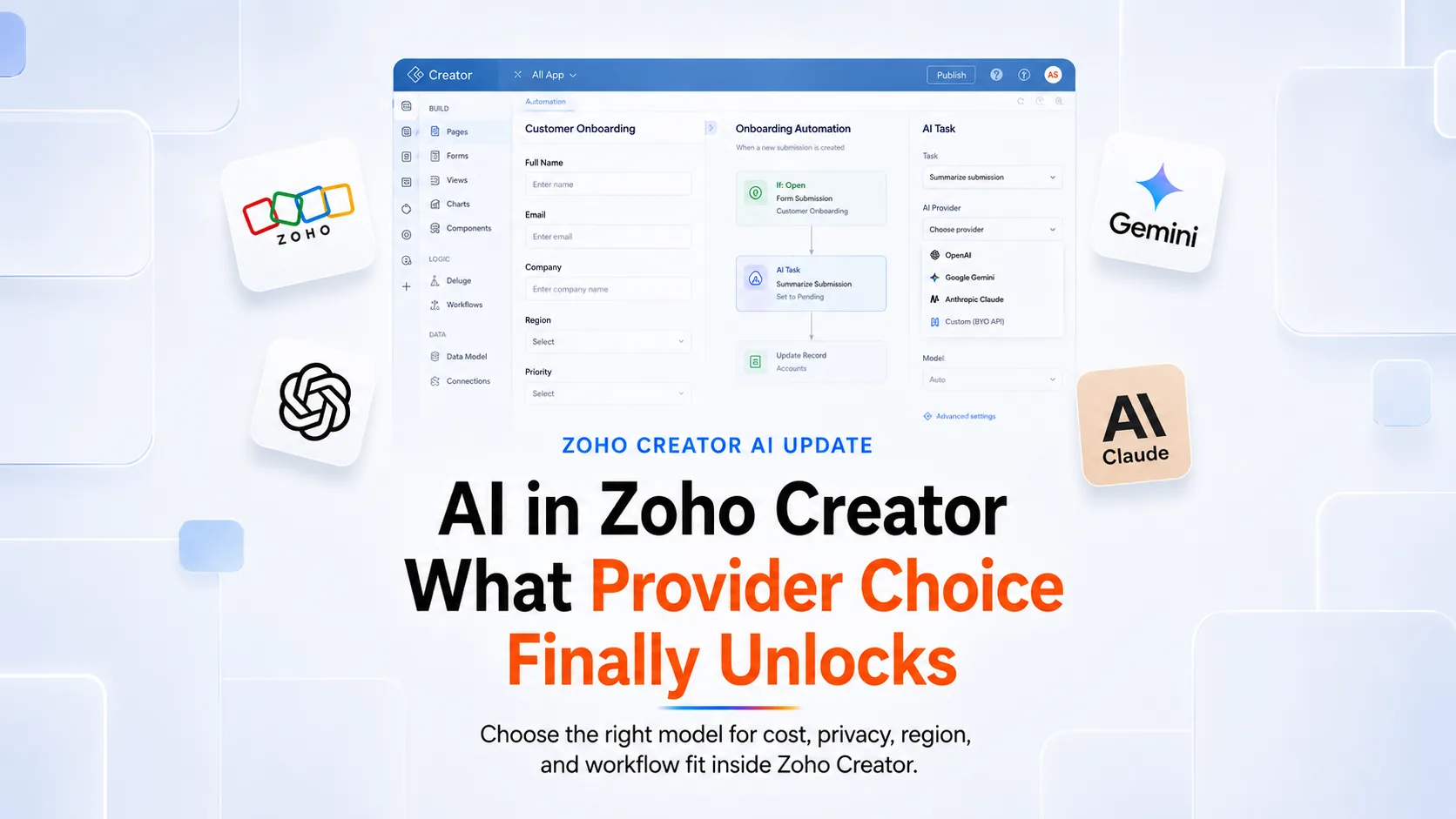
The change lives in Zia, the AI running inside every Creator app. Until recently, Zia in Creator ran on OpenAI. If you wanted Zia to build applications from a prompt, generate forms, suggest fields, or write Deluge for you, OpenAI handled the work. That has shifted. Zia in Creator now runs on the LLM provider you choose. Zoho GenAI, Zoho’s own AI model, is included at no additional cost as the default. OpenAI, Google Gemini, and Anthropic Claude are all available under a bring your own key model.
If you are considering Zoho Creator for the first time, this is the maturity signal worth reading. The platform has matured into something where the AI itself is configurable to match your business. That was not the case even a couple of quarters ago.
If you already run a Creator app, this changes what that app can do without rewriting a single form. The vendor risk, the cost profile, and the compliance posture around your AI are all now things you can shape directly. Your data model and workflows stay put.
Here is what we will cover.
- The specific gains provider choice unlocks
- Where in your Creator app the choice applies
- The 1 constraint that still holds
- How Zoho MCP extends the choice beyond Creator itself
- What Chat Agent, the conversational AI feature Zoho has confirmed is coming for Creator apps, will change once it ships
The 6 gains ahead touch every corner of your business. Some hit your P&L directly. Others buy you time. Let’s start.
6 Gains Zoho Creator Brings With LLM Provider Choice
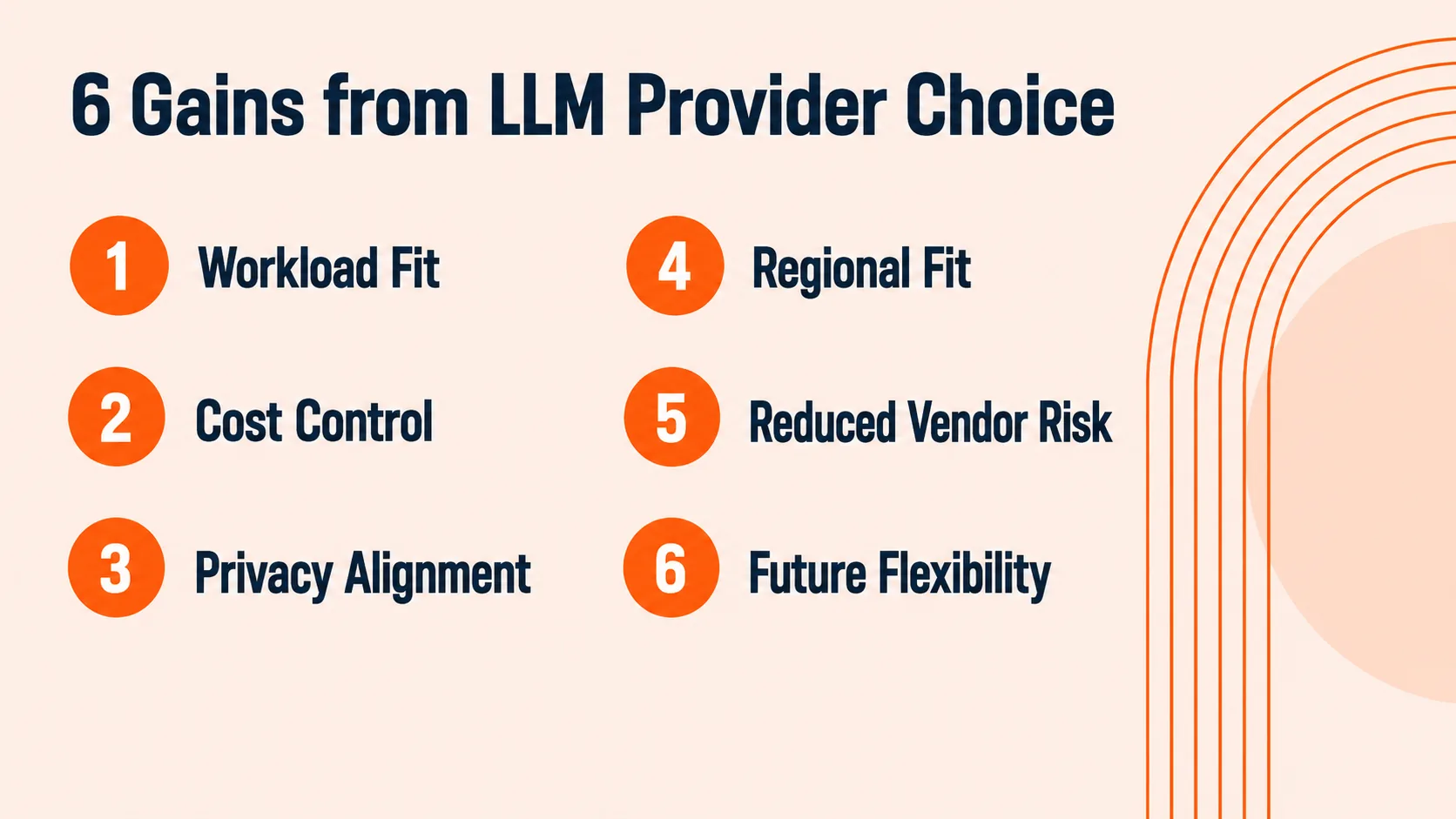
Fig 2 – The 6 gains LLM provider choice unlocks in Zoho Creator: workload fit, cost control, privacy alignment, regional fit, reduced vendor risk, and future flexibility.
These are sorted in the order they show up in real projects. Read them thinking about what your Creator app already does, or is about to.
Gain 1, Provider fit for the workload. Different providers earn their pay on different jobs. When your Creator app extracts data from vendor invoices, one frontier model may read the layouts more accurately. When your app needs to reason across long documents or many records at once, another model may hold the full context more reliably. The 4 provider options let you pick the model whose strengths fit the work.
Gain 2, Cost control by default. Zoho’s own AI model (Zoho GenAI) comes at no additional cost and handles the light AI calls where speed and predictable cost matter most. Field suggestions on a lead intake form. Basic form generation. Simple text summarization. Reserve your premium provider spend for the workloads that need frontier reasoning. Document extraction from a legal contract. Reasoning across your Creator app and your CRM. Decision workflows that span multiple steps. Zoho’s own Configuring Zia documentation gives a concrete cost signal to plan around. A provider plan capped at 15 requests per minute can hit that ceiling under Zia bulk work, so plan tier and workload volume need to match, not just the vendor choice.
Gain 3, Privacy alignment with your compliance posture. If your compliance team has spent months vetting a specific AI vendor for your industry (patient data, financial records, government documents, legal instruments), that evaluation now carries directly into Zia in Creator. Before provider choice, Zia ran only on OpenAI. Compliance teams committed to Anthropic or Google faced a hard choice. Add OpenAI to their approved vendor list, or skip Zia AI features. Provider choice removes that constraint. Your existing vendor becomes the vendor running your Creator app’s AI. The Zoho BAA is a separate arrangement, and it exists whether you use OpenAI, Anthropic, Google, or Zoho GenAI. Provider choice fixes the AI vendor question. Your Zoho paperwork stays what it was.
Gain 4, Regional data center fit. Not every LLM provider is available in every region. Zoho GenAI is not available in CN, JP, or SA. If your Creator app runs for a Japanese subsidiary, a Saudi partner, or a Chinese customer base, the free default is not on the table. External providers cover those regions. There is a second edge worth naming. Zoho GenAI accepts English prompts only. If your Creator app serves teams operating in Japanese, Portuguese, or Arabic, external providers become the necessary path.
Gain 5, Reduced vendor risk. If an LLM provider changes pricing, tightens terms, or ships a model regression, you swap API keys and keep your Creator app’s forms, data model, and workflows in place. Zoho built this in on purpose. The platform supports up to 5 nameable API keys per provider, so teams can segregate credentials by workstream, region, or purpose. That is a product design choice that anticipates vendor churn. Vendor risk becomes a key rotation exercise for your ops team.
Gain 6, Future flexibility inside your existing app. Provider choice keeps working for the life of your app. When a new model wins your workload, you swap keys. When a new provider enters with terms your compliance team prefers, you swap keys. Your data model stays put. Your forms stay put. Your workflows stay put. Only the provider slot changes.
Those are the gains. The next question is where inside your Creator app the choice actually applies.
5 Zia Features Where LLM Provider Choice Applies
Provider choice does not apply uniformly across every Zia feature inside Creator. 5 of the 6 Zia features accept your choice of Zoho GenAI, OpenAI, Google, or Anthropic. The 6th sits under a separate rule and gets its own section next.
Here we walk through the 5 features where LLM provider choice matters, and what each one lets you do differently depending on which provider is running the work. For each feature, the choice shows up in a specific way. Some benefit from picking a frontier provider for accuracy. Some are fine with the default. All of them are places where the shift you just read about actually lands inside your app.
Zia App Builder
Zia App Builder is Zoho’s natural language app generation feature. You describe an application requirement in a paragraph, Zia interprets it, builds a data model, and generates the full app with forms, integration forms, reports, pages, workflows, blueprints, permissions, dashboards, and sample data. Optional PRD or process diagram upload adds context.
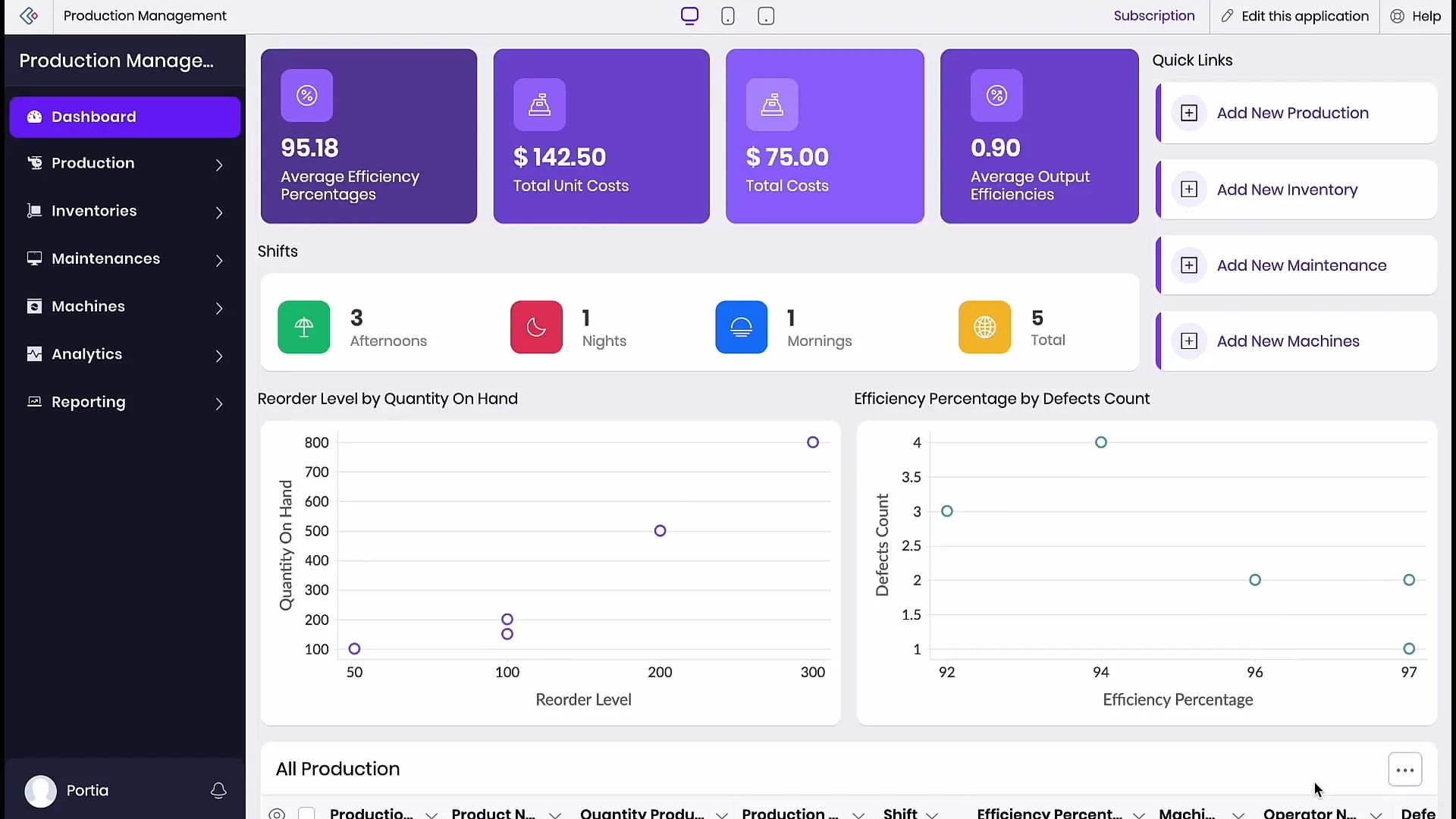
Fig 3 – A full production management application generated by Zia App Builder in Zoho Creator from a single natural language brief.
Because App Builder does heavy interpretation work, the provider running it matters. An operations lead at a manufacturing company describes a production management requirement in 1 paragraph. If the org is committed to Anthropic for downstream text handling terms, Zia App Builder runs on Claude via BYOK. The team ships the full production management app that afternoon with the compliance chain intact. Zia generates the dashboard, production module, inventory tracking, maintenance workflows, and reporting from that single brief. If the org runs on a Google Cloud commitment, Gemini takes the same brief, and the existing Cloud spend covers the AI too.
Form Creation From Natural Language
Form creation lets you describe a form’s purpose in a sentence and get a suggested field list back. Zia interprets the purpose, picks appropriate field types, and hands you a scaffold you can accept, edit, or reject field by field.
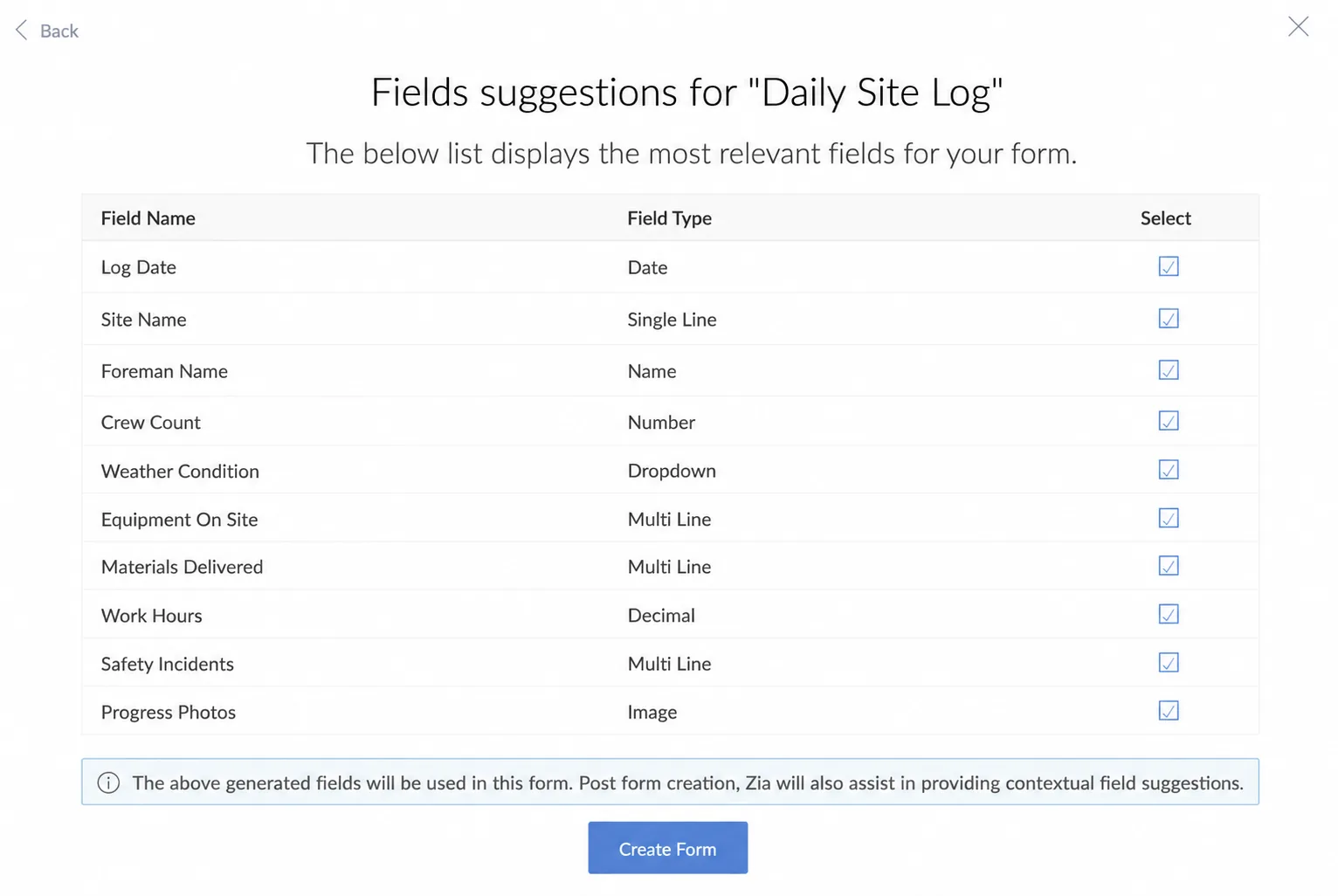
Fig 4 – Form creation from natural language in Zoho Creator, turning a daily site log prompt into a suggested field list.
A construction PM describes a daily site log form. The account runs on Zoho GenAI, and form creation returns approximately 10 sensible fields for weather condition, crew count, equipment on site, materials delivered, safety incidents, and progress photos. The PM keeps 8, drops 2, and ships the form that morning.
For teams whose account runs on Claude or Gemini, the same feature returns richer suggestions on tricky forms. A subcontractor compliance intake, a regulatory reporting form spanning regions, or an inspection checklist with conditional logic. All places where a frontier model catches nuance the default might miss.
Next Field Suggestions
Next field suggestions runs inside the form builder while you work. As you add fields, Zia recommends the next few based on what the form appears to be for, whether you started with Zia’s help or built the form manually.
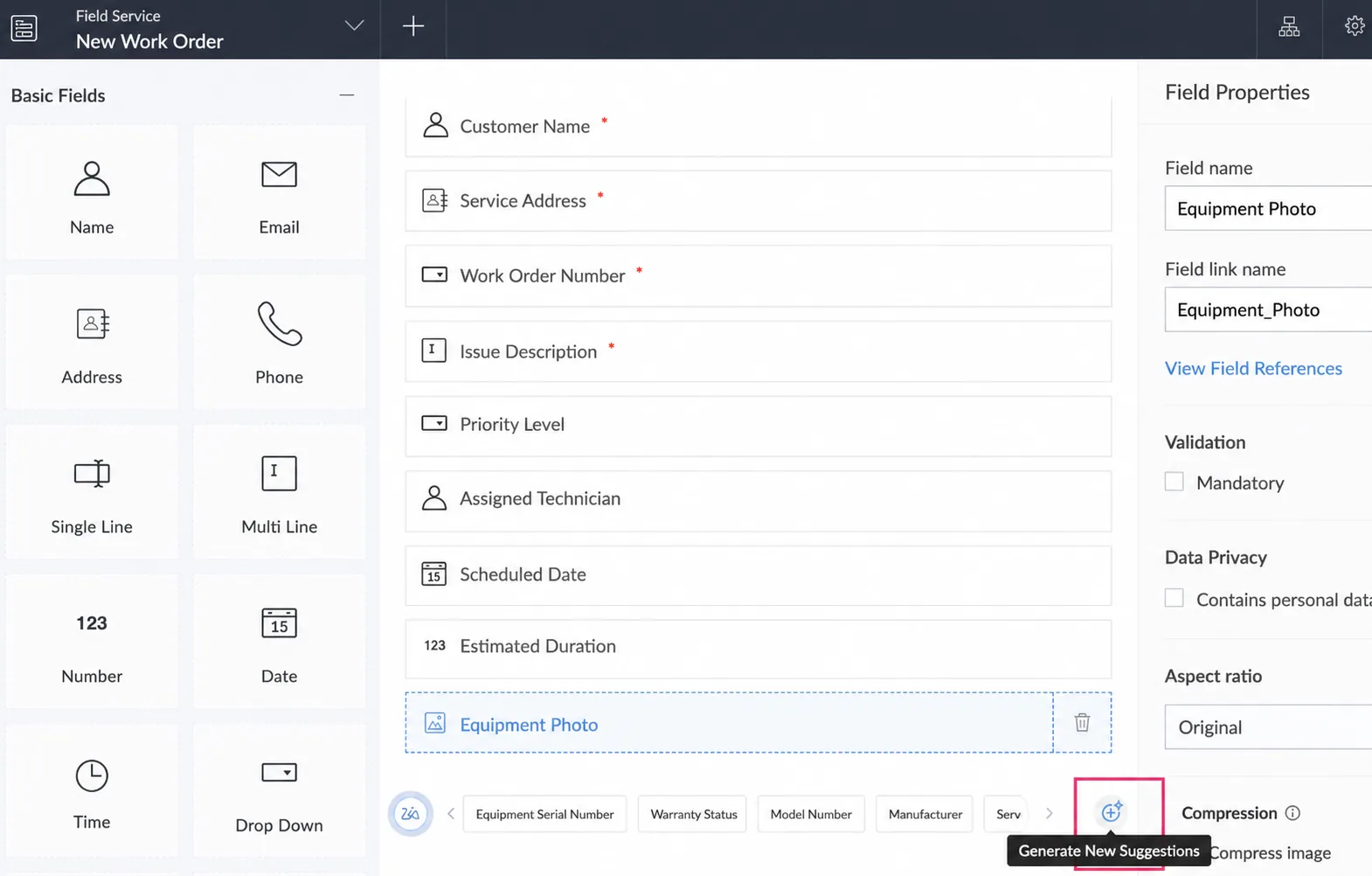
Fig 5 – Next field suggestions in the Zoho Creator form builder, surfacing contextual fields as a dispatcher builds a work order form.
A field service dispatcher builds a work order form manually. She adds Customer Name, Service Address, Priority Level, Assigned Technician, and the other standard fields her team needs. When she drops in an Equipment Photo field, Zia surfaces 5 contextual suggestions in the bar below. Equipment Serial Number, Warranty Status, Model Number, Manufacturer, Service History. She accepts Serial Number and Warranty Status, drops the rest, and keeps building.
This is a small, frequent workload. Every field add triggers a small LLM call. Volume matters more than reasoning depth.
For most teams, Zoho GenAI’s free default handles this well. The suggestions are contextually good enough for common form types, and no cost per call accumulates over hundreds of form edits per week.
External providers make sense here only when the org has centralized every LLM call under 1 vendor for audit or governance reasons. Even then, the suggestions do not change materially.
Deluge Script Generation
Deluge script generation lets you describe a script’s intent in plain language and get Deluge code back. It also reviews and optimizes scripts you have already written. This runs inside the Deluge editor as you write.
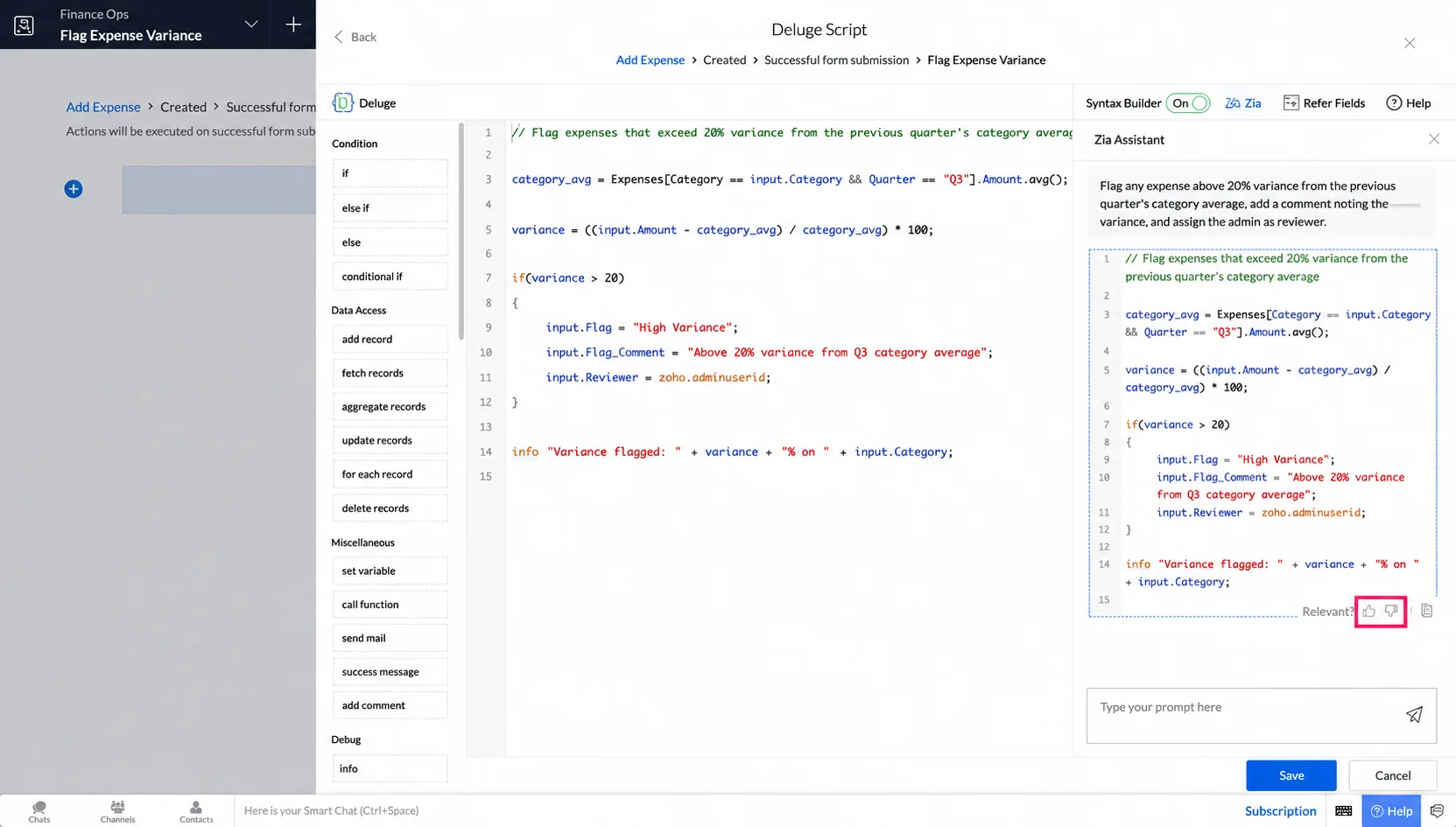
Fig 6 – Deluge script generation in the Deluge editor, turning a plain language expense variance rule into a working script.
An operations manager writes a requirement to flag expenses above 20% variance from the previous quarter’s category average. Zia returns a working script that pulls the baseline, computes variance, adds a flag field with a comment, and links to the source record.
For Deluge assistance, the provider choice question is usually about consistency with the dev team’s other coding work with AI. If the team already uses Claude for coding across the stack, keeping Claude for Deluge preserves the mental model. If OpenAI is the standard, GPT stays the standard here too. The output is Deluge either way. What changes is the muscle memory.
Deluge Zia Task
The Zia task is a Deluge function that calls an LLM inline from your workflow scripts. You pass it a prompt and an optional file, get a response back, and use the response in the next line of code. It handles text analysis, summarization, document extraction, and generated content.
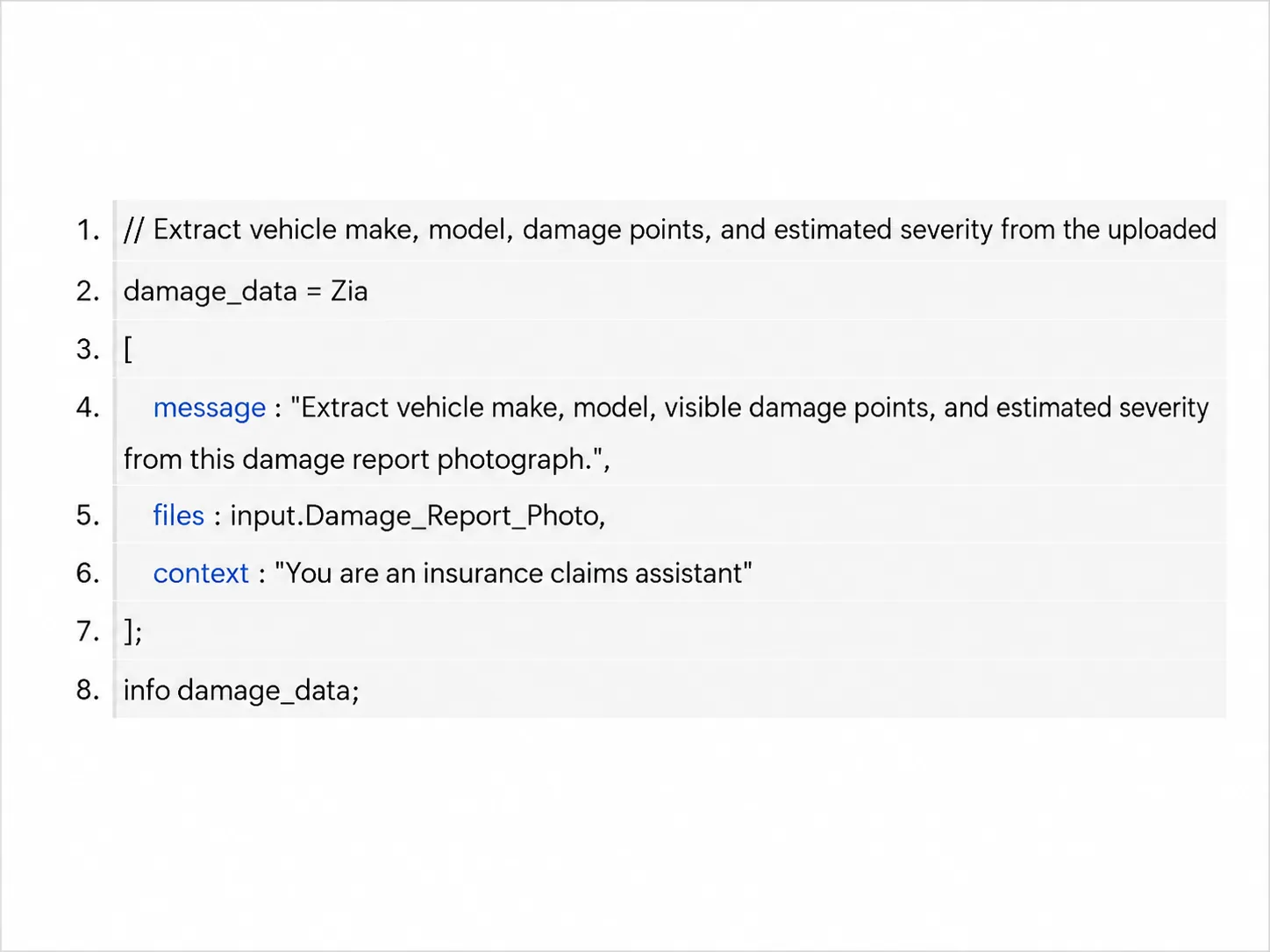
Fig 7 – A Deluge Zia task inline in an insurance claims workflow, extracting vehicle and damage detail from a photographed report.
An insurance claims app receives photographed damage reports from adjusters in the field. A Deluge workflow calls the Zia task on the uploaded image with a prompt to extract vehicle make, model, visible damage points, and estimated severity. The extracted data populates the claim record before the adjuster gets back to the office.
Provider choice shapes what the extraction produces. For commercial claims where cost matters more than nuance, Zoho GenAI handles the workload at no additional cost. For claims that touch regulated data or need higher accuracy on ambiguous damage descriptions, the account’s chosen frontier provider takes over. Same feature, same Deluge task, different fit per claim type.
5 of the 6 Zia features are yours to configure. The 6th sits under a rule of its own. Let’s look at that next.
The 1 Constraint on Zoho Creator’s AI Provider Choice
Before we get to the constraint, worth naming what Zia AI Agent actually is.
Zia AI Agent is Zoho’s agentic automation feature inside Creator. You give it an objective in natural language and a set of Deluge functions it can call. The agent decides which functions to call in what order to complete the objective. What you get back is an endpoint URL you can invoke from your workflows, either through Deluge’s invokeURL task or through a JavaScript call. Think of it as a small autonomous worker inside your Creator app that reasons across multiple steps.
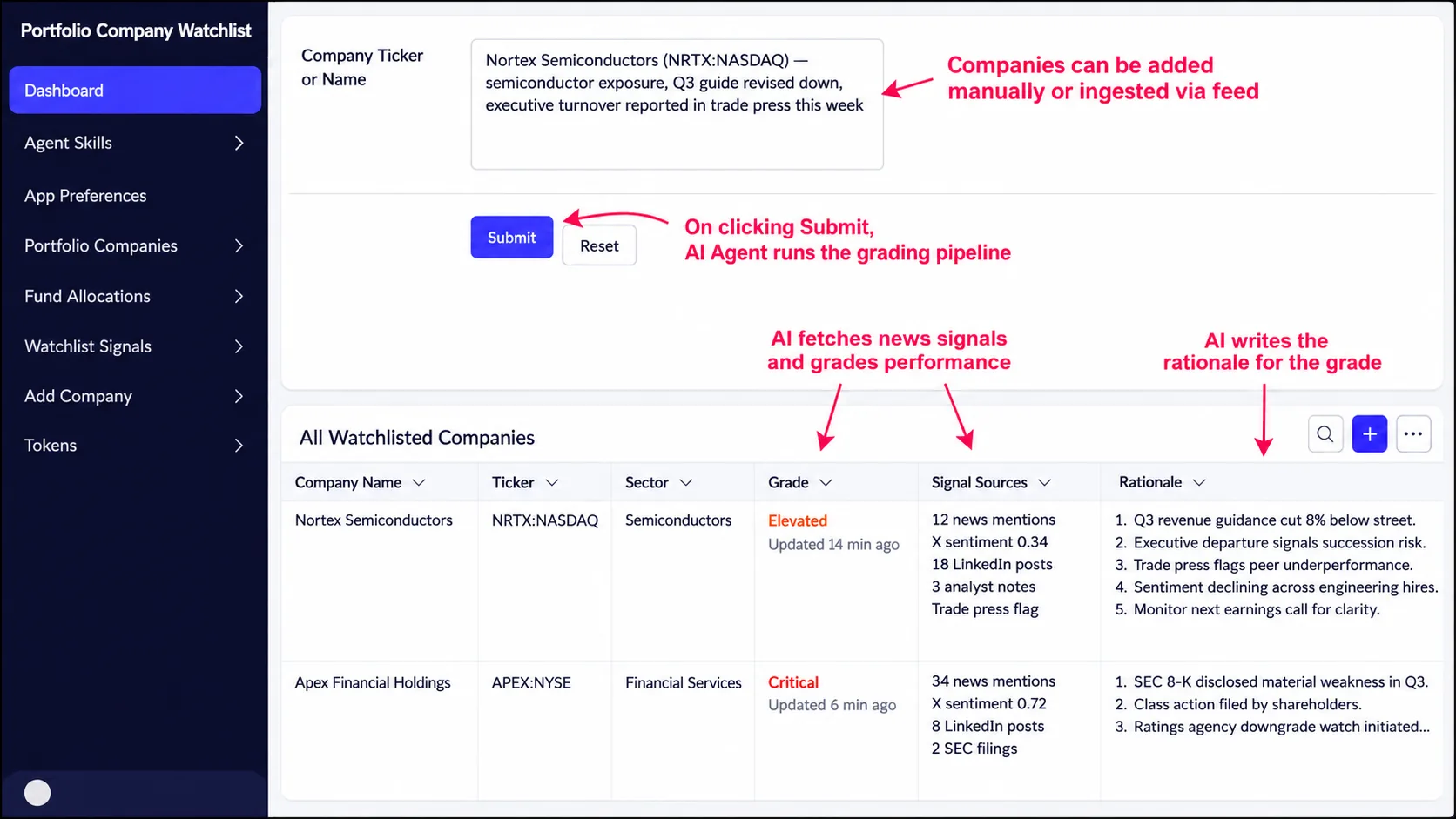
Fig 8 – An Investment Watchlist app where a Zia AI Agent grades portfolio companies and writes the rationale in one agentic pass.
Picture an Investment Watchlist app. A specialty investment firm tracks 200+ portfolio companies, each with a grade, fund allocation, and rationale field. When a company is added or refreshed, the Zia AI Agent behind Submit ingests the latest news and social signals, reasons about material change, sets a new grade (Watch, Elevated, Critical, Normal), and writes back a rationale. All in 1 agentic pass.
Here is the catch. Zia AI Agent supports only OpenAI as its LLM provider. Google, Anthropic, and Zoho’s own default GenAI cannot power AI Agent. If your app needs agentic behavior, OpenAI is the only option for that specific feature.
Why this matters
If you are planning a Creator app that needs an agent to reason across steps, OpenAI has to be in your provider mix, even if your team has committed to a different vendor everywhere else. If you already run a Creator app with AI Agents, you have an OpenAI dependency that no other Zia feature carries.
When OpenAI is not on the table for you, 4 alternatives are worth knowing.
The Zia task with your preferred provider. If your agentic requirement is really document extraction or a reasoning task, the Zia task handles it via Anthropic, Google, or Zoho GenAI. You lose the autonomy of orchestrating multiple steps. You keep the LLM work under your preferred vendor.
Zoho MCP with the LLM of your choice. Zoho MCP (short for Model Context Protocol) is Zoho’s orchestration feature at the account level. It lets external LLMs like Claude, GPT, or Gemini query your Zoho data across apps and take actions in response. If your agentic need spans Creator plus CRM or Books, MCP handles the reasoning at the account level with whatever LLM you point it at.
Route the agent through middleware. Build the agentic logic in a workflow tool like n8n, Zoho Flow, or Make. The workflow calls your preferred LLM (Anthropic, Google, or OpenAI) for the reasoning across multiple steps, then calls back into Zoho Creator via API to execute actions. You trade Zia AI Agent’s native Creator integration for full LLM provider choice and better workflow observability. Our n8n agent mesh guide walks through this architecture in depth.
Wait for Chat Agent. Chat Agent is Zoho’s upcoming conversational AI feature for Creator apps, confirmed on the roadmap but not yet shipped. Whether it inherits the BYOK model across providers or ships with a specific provider is not yet public. If your agentic need is really a chat interface for end users, holding for Chat Agent may be the right call.
The constraint is real. It applies to 1 specific feature. The other 5 Zia features accept your provider choice unchanged. In most cases, the workaround covers what you would have wanted from AI Agent anyway.
MCP is where provider choice extends past Creator itself. Let’s look at that next.
Beyond Zia, How Zoho MCP Extends LLM Provider Choice
Zia is native to Creator. Its LLM provider choice affects what happens inside your Creator app. Provider choice does not stop there. Zoho MCP (short for Model Context Protocol) is Zoho’s own MCP server, exposing your Zoho data across the canonical set (Creator, CRM, Books, People) to any LLM client that speaks MCP. Point Claude, GPT, or Gemini at the endpoint and each can query and act. Zoho’s own launch used Claude as the reference LLM.
3 things shift when a Creator app is exposed through MCP. Users can ask questions that span Creator plus other Zoho services in 1 prompt. Business logic locked inside Deluge workflows becomes invokable by an external LLM. Forms in your Creator app become natural language front ends when accessed through an MCP client.
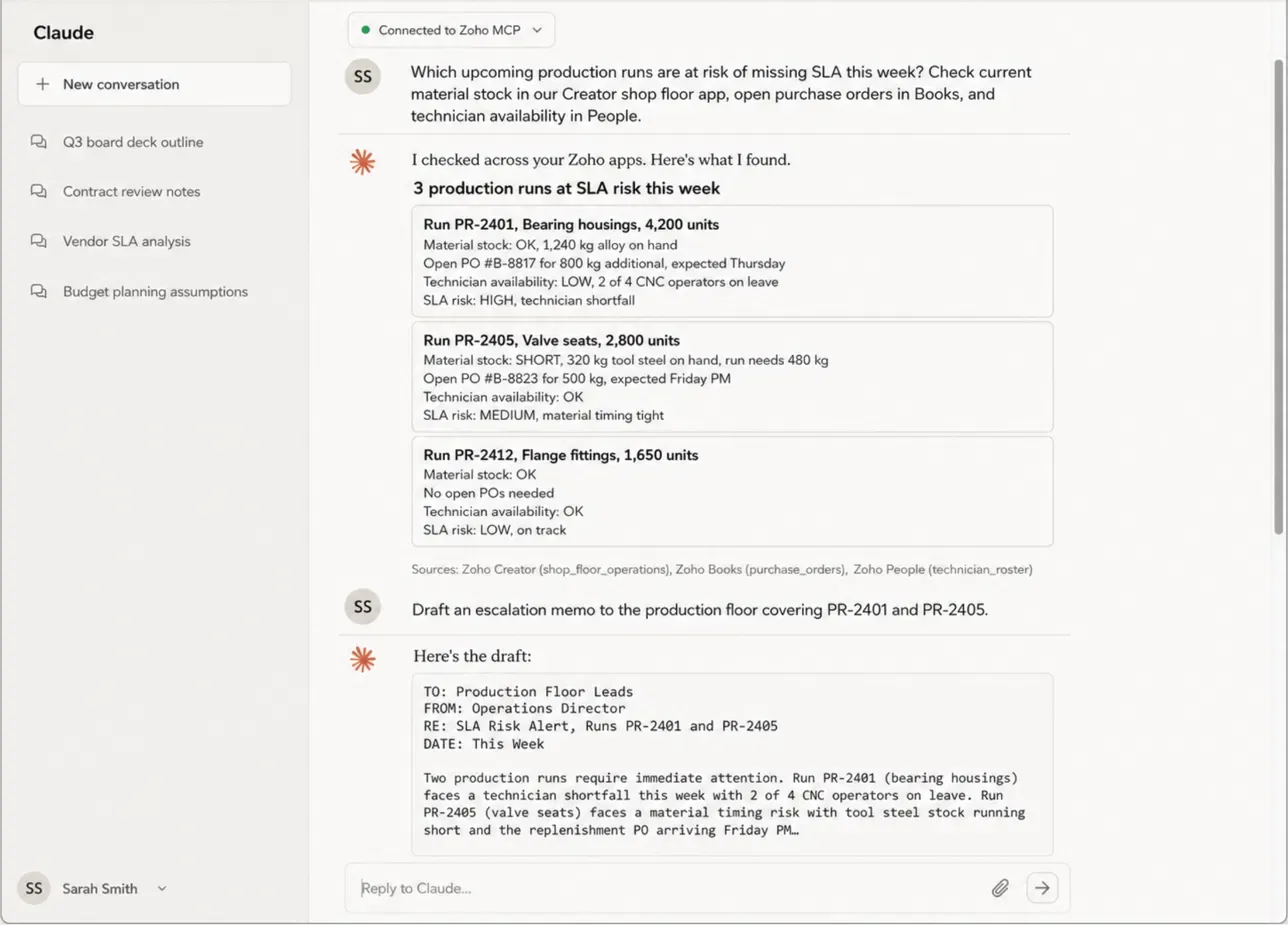
Fig 9 – A Claude conversation via Zoho MCP synthesizing production run SLA risk from Zoho Creator, Books, and People into one summary.
Picture a precision components manufacturer. Shop floor operations live in a Creator app with custom modules for production runs, materials, inspections, and maintenance. Via Zoho MCP, the operations director asks Claude which runs are at risk of missing SLA given material stock in the Creator app, open purchase orders in Books, and technician availability in People. The MCP session synthesizes the answer from 3 services in 1 prompt. The director drafts the escalation memo from the same session.
Case Study
A Bay Area alternative investment firm running Claude across the business needed agentic reasoning inside their portfolio app on Zoho Creator. Because Zia AI Agent runs only on OpenAI, Clixlogix built the agentic logic on Zoho MCP with Claude, connecting Claude directly to Creator, Analytics, and CRM.
MCP is provider choice past Creator itself. What still cannot happen is a conversation inside your Creator app with your end users. Chat Agent is what happens next.
On the Horizon, Chat Agent for Zoho Creator
Zoho has confirmed Chat Agent is under development for Creator. Zoho describes it as conversational interactions inside Creator apps with permissions based on user roles. Whether Chat Agent will inherit the BYOK model or ship with a specific provider is not yet public.
For teams planning a Creator app today, build the data model and workflows on the current Zia features plus MCP, and hold conversational interfaces for the Chat Agent release. For teams already running Creator apps, avoid overinvesting in Deluge and Zia task chains for end user conversation that Chat Agent may absorb.
The practical question is choosing well today. That’s next.
How to Choose Well, and 4 Zoho Creator AI Gotchas
Here is how to make sensible provider choices today, and 4 gotchas Zoho documents quietly that are easy to miss.
Choosing Your Provider Mix
Decision 1, start with the Zoho GenAI default unless you have a reason to move. Zoho GenAI covers form creation, next field suggestions, and light Deluge assistance at no additional cost. Step up to an external provider only when a workload has a specific need like compliance, frontier reasoning, or an existing vendor commitment.
Decision 2, pick your primary external provider based on the org’s broader AI posture. If your team already uses Claude elsewhere, use Claude here. If your commitment is Google Cloud, use Gemini. Consistency in 1 provider simplifies audit and cost tracking.
Decision 3, treat AI Agent as an OpenAI island. If your app needs agentic behavior, OpenAI is your provider for that feature. Route the rest through your preferred provider.
Decision 4, add MCP on top when the workflow spans Creator plus other Zoho services. Zia stays native to Creator. MCP handles orchestration at the account level when you need Claude, GPT, or Gemini to reason across Creator plus CRM plus Books plus People in 1 prompt.
The matrix below shows how the 4 decisions play out by workload.
| Workload | Volume | Recommended provider | Why |
|---|
| Form field suggestions and basic form generation | Light | Zoho GenAI | Free default, sufficient depth |
| Invoice or document extraction | Any | OpenAI, Anthropic, or Google | Layout accuracy varies by model |
| Reasoning across Zoho apps in 1 prompt | Any | Anthropic Claude via MCP | Zoho’s own reference in the MCP launch |
| Agentic automation with multiple steps | Any | OpenAI | Zia AI Agent constraint |
| Bulk generation runs | High volume | Match plan tier to workload volume | 15 RPM cap will error out |
Workload planning matrix mapping typical Creator AI workloads to recommended LLM providers.
The Gotchas Zoho Documents Quietly
Gotcha 1, Zoho GenAI usage cannot be monitored inside Creator. Teams choosing Zoho GenAI have no view within Creator of AI consumption. If your governance requirement tracks AI usage per team or per feature, plan for this gap or pick an external LLM where the provider dashboard covers monitoring.
Gotcha 2, Zoho’s documentation is inconsistent on mapping providers per feature. A recent Zoho community announcement described LLM provider assignment per feature as newly supported. The canonical Configuring Zia documentation still states that the LLM provider configured applies to all AI features and different providers cannot be selected for different features. Teams planning architectures with multiple providers should verify against a live Zia settings screen before committing.
Gotcha 3, AI Agents run under the user’s role and permission scope. Any AI Agent configured with a broad admin role has access to whatever that role can access. Scope agent permissions to the minimum required for the task.
Gotcha 4, BYOK does not replace Zoho’s own BAA for regulated data. If your Creator app handles PHI, financial records, or equivalent regulated data, your BAA or DPA with the external LLM provider covers only the provider’s side of the API call. Zoho becomes the intermediary handling the data through, so your Zoho BAA needs to cover Creator’s AI paths too. Raise this with Zoho legal before configuring BYOK for a regulated workload.
That covers the decisions and the traps. Time to close.
Making LLM Provider Choice Work for Your Creator App
Where Creator lands today with LLM provider choice is a broader surface than most teams realize. 5 Zia features accept your choice of Zoho GenAI, OpenAI, Google, or Anthropic. 1 feature (AI Agent) still requires OpenAI. Zoho MCP extends the choice past Creator itself. Chat Agent will fill the last piece when it ships.
What still cannot happen today is narrower than most people assume. AI Agent on providers other than OpenAI, conversational interfaces inside Creator apps for end users, and queries into services outside the canonical Creator plus CRM plus Books plus People set.
Team decisions come before tool decisions. Start with the Zoho GenAI default. Decide which workloads justify stepping up to a premium provider. Then pick that provider based on your broader AI posture.
For small and medium businesses running on Zoho, this is the practical productivity gain worth naming. The AI running your bespoke Creator apps can now match your compliance stack, your cost profile, and your vendor commitments. That is a real shift for teams building their operational backbone on the Zoho ecosystem, and it is exciting to see Creator get here.
For a broader view of Zia and MCP across the Zoho suite, our No Nonsense Guide to Zia Models, Zia Agents, and Zoho MCP covers the full picture. For MCP with Claude in depth, our Zoho MCP + Claude Integration Guide walks through the architecture. For ongoing Zoho AI news, our Latest Zoho Updates page tracks what changes.
Ready to Make LLM Provider Choice Work for Your Creator App?
Whether you are planning a new Creator app or upgrading one you already run, our Zoho consulting team can walk through provider choice, MCP architecture, and the compliance and cost angles that matter for your specific business.
Provider choice is one decision inside a Creator build, and the same team handles Zoho consulting, implementation and custom development when the app needs more than configuration.
Start a Conversation With Our Team