If you’re a Zoho CRM admin and you’ve been hearing the words “AI agent” and “Digital Employee” thrown around without a clear sense of what they actually mean, this post is for you. We’ll start from the very beginning, move through what Zoho specifically has launched, compare it to what Salesforce and HubSpot are doing, and walk through how to deploy your first one.
No prior AI experience assumed.
First, what is an AI agent?
An AI agent is a piece of software that can do work on its own. You give it a goal, you give it a set of tools, and it figures out the steps in between.
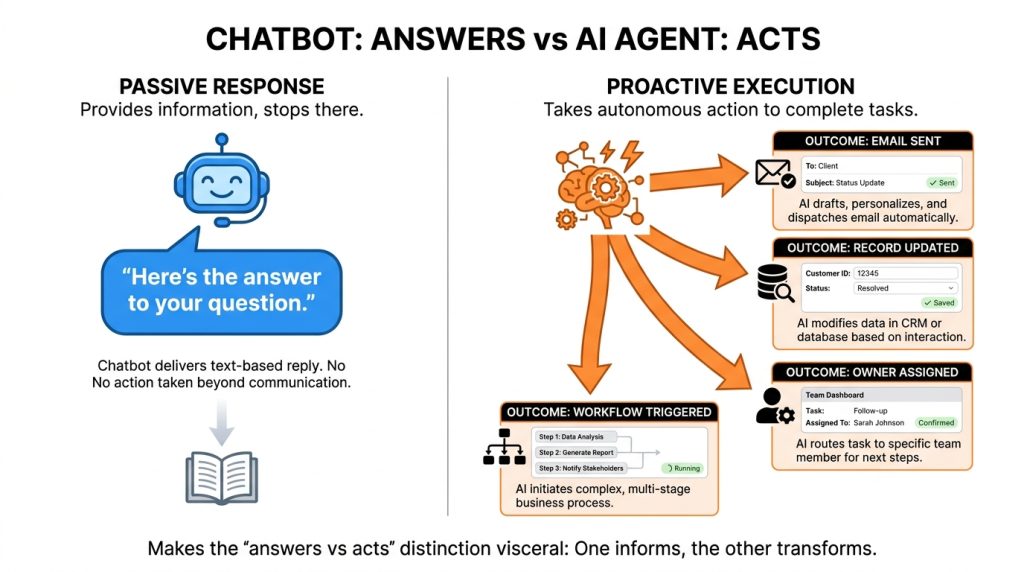
A chatbot answers questions. An AI agent takes actions. The difference matters.
Here’s a concrete example. Suppose a new lead comes into your CRM. A chatbot can answer questions about that lead if you ask it. An AI agent can look at the lead, check whether it matches your ideal customer profile, draft and send an introductory email, assign it to the right sales rep, and log everything back into the CRM. All without you clicking anything.
That’s the basic shape of an agent: a goal, some tools, and the ability to act.
In a CRM context, agents are useful because most CRM work is repetitive. Qualifying leads. Updating fields. Sending follow-ups. Watching for risk signals on accounts. These are tasks where the rules are clear but the volume is high, and that’s where agents earn their keep.
Fig 1 — Chatbots answer. Agents act.
What is a Zia Agent?
Zia is Zoho’s AI brand. It has been around for years, and originally it covered things like predictive scoring, sentiment analysis, and conversational assistance.
In 2024 and 2025, Zoho rebuilt the AI side of the product around agents. The result is called Zia Agents.
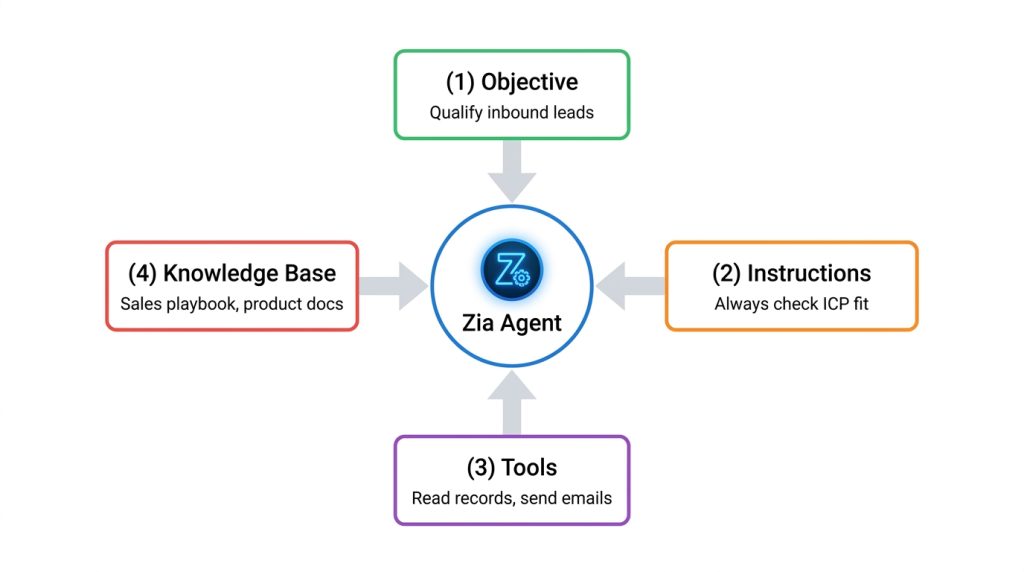
A Zia Agent has four parts:
An objective – What you want the agent to accomplish. Example: “Qualify inbound leads and assign them to the right owner.”
Instructions – The behavior rules, written in plain English. Example: “Always check the company size and industry. If both match our ICP, assign to the SMB pod.”
Tools – The things the agent can do. Read a record. Update a field. Send an email. Trigger a workflow.
A knowledge base – Reference material the agent can pull from. Product documentation, sales playbooks, past customer interactions.
You build a Zia Agent inside the Zia Agents platform, and then you deploy it into your Zoho CRM. The deployment part is where the new launch comes in.
Fig 2 — The four components of a Zia Agent
Two ways to deploy a Zia Agent
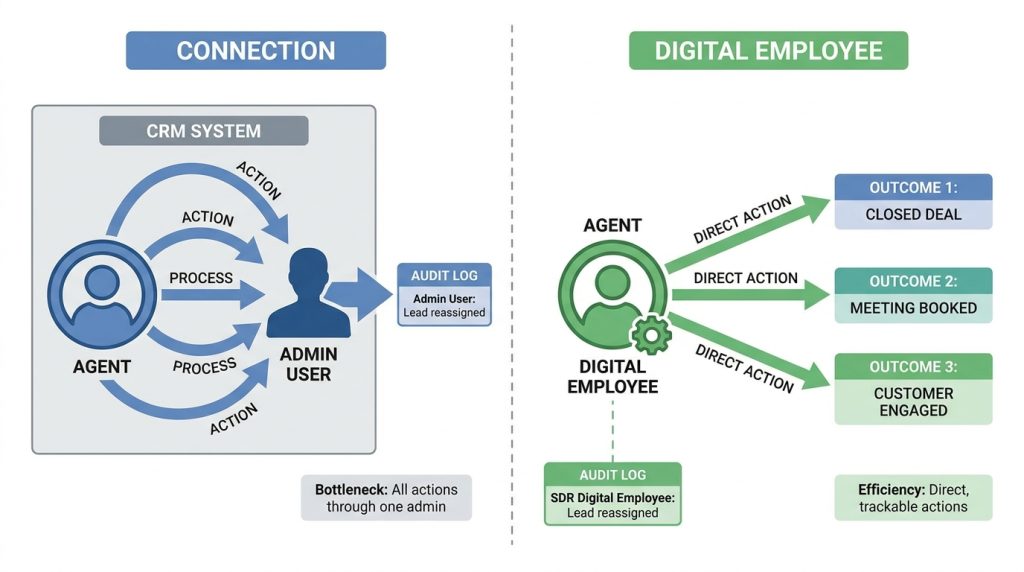
Until recently, there was only one way to put a Zia Agent into your CRM: as a Connection.
A Connection is the simpler model. You configure when the agent should activate (on every record, on records matching specific criteria, or manually through a custom button). You tell it what context to feed (which fields, which related modules, which signals like email sentiment). You map its tools to your CRM fields. Done.
The agent runs. It takes actions. The actions get logged under the identity of whoever set up the Connection, usually an admin.
This works for narrow, contained tasks. An agent that summarizes a deal when a rep clicks a button. An agent that enriches lead data on creation. The actions are useful, and they’re traceable to the admin who deployed the Connection.
In late 2025, Zoho introduced a second deployment option termed – Digital Employees.
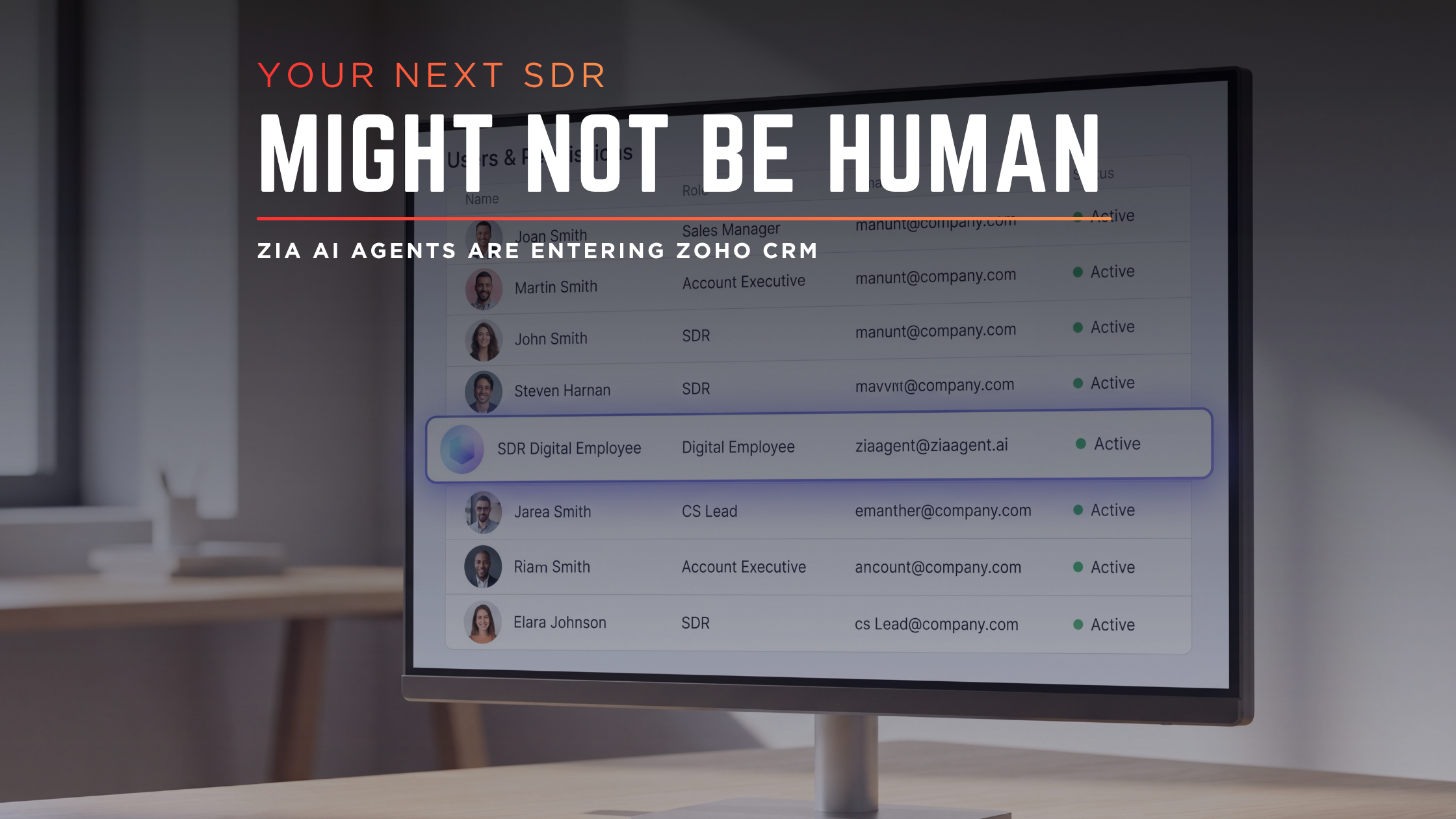
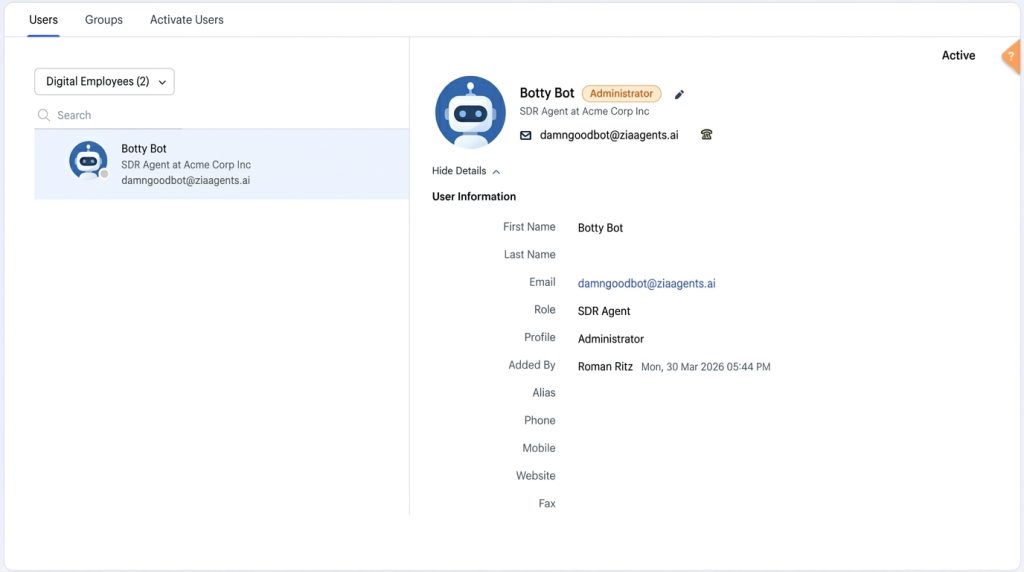
A Digital Employee is a Zia Agent that gets provisioned as an actual user in your Zoho CRM. It shows up in Zoho Directory with its own email address (@ziaagent.ai domain), its own role, and its own profile. From the user list view, you can’t tell it apart from a human user except by the email domain.
When a Digital Employee takes an action, the action is logged under the Digital Employee’s identity. Not under your admin name.
That single change has two practical consequences.
Audit visibility. If a lead gets reassigned, an email gets sent, or a record gets updated, you can see whether it was a human user or a specific Digital Employee that did it. When something goes wrong, you can trace it to the actor. When something goes right, you can trace that too.
Permission control. Because a Digital Employee has its own role and profile, you apply the same security model you use for human users. You decide which modules it can read, which fields it can write, which records it can see. If you want a sales agent that can only touch SMB leads, you build a profile that scopes it that way and assign that profile to the Digital Employee.
The model treats the agent as a colleague rather than as a script running on your behalf.
Fig 3 — Two deployment models, two identity outcomes
How Zoho compares to Salesforce and HubSpot
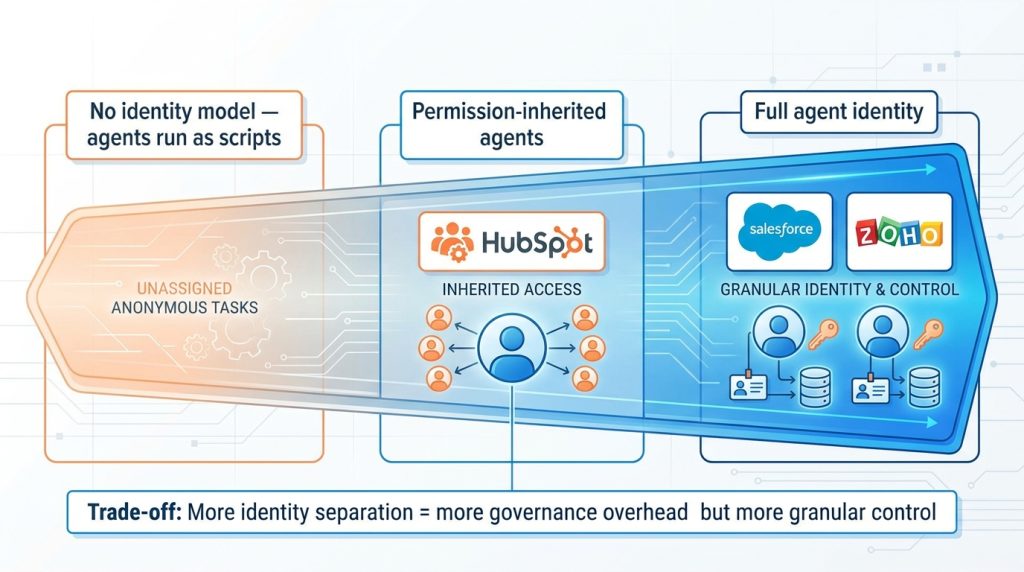
If you’ve read about Salesforce Agentforce or HubSpot Breeze, you may be wondering how Zoho’s approach lines up. The short version: Salesforce and Zoho are converging on a similar model. HubSpot is taking a different path.
Here’s the comparison.
Metric
Zoho Digital Employees
Salesforce Agentforce
HubSpot Breeze
Identity model
Agent provisioned as a full user with its own email (@ziaagent.ai), role, and profile
Each agent runs as a unique “agent user” with its own user record and permission set
Agents inherit the permissions of the user who invokes or owns them; not provisioned as separate user accounts in the user list
Audit attribution
Every action logged under the Digital Employee’s identity
Agent user appears in Setup Audit Trail and (with Shield) Field Audit Trail
Audit logs record agent activity, typically attributed to the user the agent acts on behalf of
Permission control
Standard role/profile model applied directly to the agent
Permission sets applied to the agent user; Salesforce explicitly recommends one unique user per agent
Governed at the admin level; agent access is shaped by the permissions of the invoking user
Setup approach
Build in Zia Agents platform, deploy as Connection or Digital Employee
Build in Agentforce with the Agent Builder; assign to an agent user
Configure in Breeze Studio; agents are tied to assistant or workflow level
Governance posture
Treats the agent as a discrete actor inside the CRM
Same; “treat each agent as a new identity” is the recommended posture
Treats the agent as an extension of an existing user
Marketplace
Zia Agent Store with pre configured agents
AgentExchange
Breeze Studio templates
Edition availability
Enterprise+ on standalone CRM plans (US and IN data centers)
Available across Enterprise editions; some features Shield gated
Available across Hub tiers, with feature variation
← Swipe to see more →
The two models that fully separate agent identity from human identity are Zoho and Salesforce. Both let you treat the agent as its own actor in the CRM. HubSpot’s approach is lighter on identity separation, which keeps it simpler to set up but gives you less granular control over what each individual agent can do.
For a Zoho admin, the practical implication is that if you’ve heard people in the Salesforce world talk about “agent users” and “least privilege per agent,” that vocabulary now applies to you as well. Digital Employees are Zoho’s version of that idea.
Fig 4 — Where the three platforms sit on the agent identity spectrum
How to set up your first Digital Employee
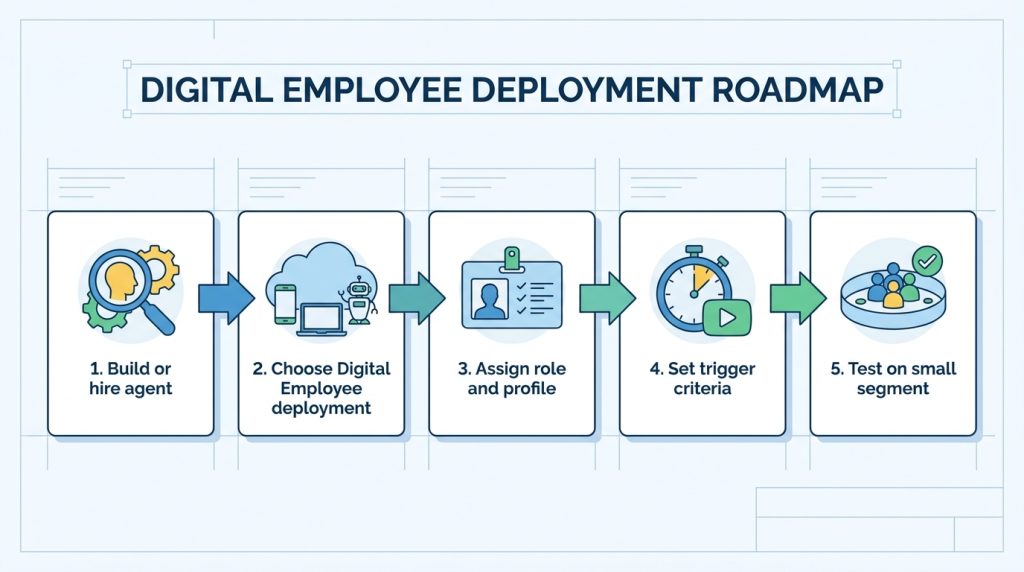
The setup flow has five steps. The decisions that matter happen early.
Fig 5 — From agent to deployed Digital Employee in five steps
Step 1: Pick or build your agent.
You have two paths. Build a Zia Agent from scratch by defining its objective, writing its instructions, attaching tools, and adding a knowledge base. Or use the new Agent Store, which Zoho launched alongside Digital Employees. The Agent Store offers pre configured agents for common workflows (lead qualification, churn monitoring, meeting prep) with the instructions and tools already wired up.
For your first one, the Agent Store is the faster start. Hire an existing agent, see how it behaves, and use that as a template for custom builds later.
Step 2: Deploy as a Digital Employee, not a Connection.
When you click deploy, you’ll see both options. Pick Digital Employee if you want the agent logged and governed as its own actor. Pick Connection if you want a lightweight, on demand action under your admin identity.
For most ongoing work agents, Digital Employee is the right choice.
Step 3: Assign a role and profile.
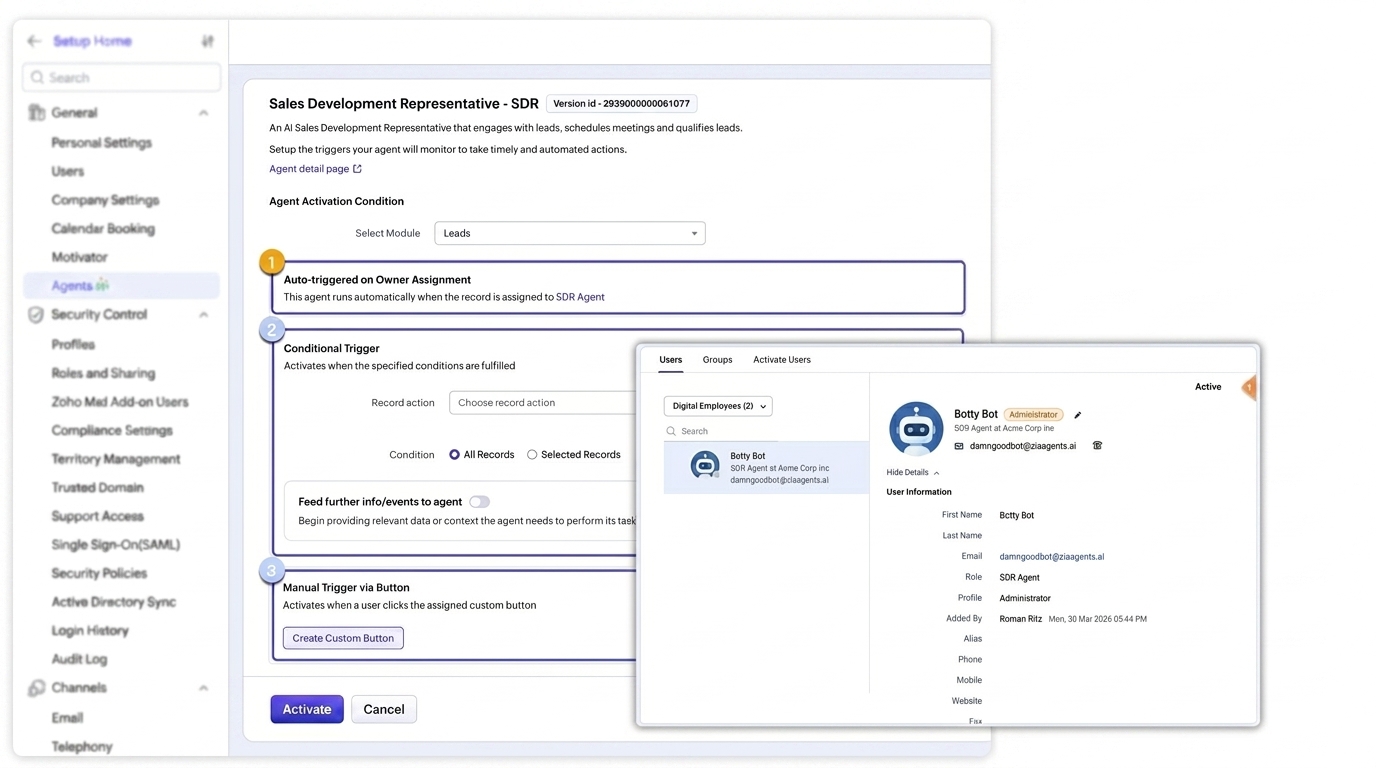
This is the step most admins underestimate. The Digital Employee gets the same role and profile structure as a human user. Default behavior is that the agent activates whenever a record is assigned to it, so its role and profile need to grant it visibility to the records you want it owning.
A good rule of thumb: start with the most restrictive profile that lets the agent do its job. You can always widen access later. Cleaning up an over permissioned agent is much harder than expanding a narrow one.
Step 4: Set the trigger criteria.
By default, a Digital Employee activates on record assignment. You can layer additional criteria on top. Only fire on leads from a specific source. Only run during business hours. Only act on records that hit a certain score. You can also wire the agent to a custom button for manual triggers.
Step 5: Test on a small segment first.
Don’t deploy across your entire lead base on day one. Pick a segment of records (one source, one geography, one campaign), run the agent there for a week or two, and review the audit log. Look at what the agent did, what it skipped, what it got wrong. Tune the instructions. Expand from there.
Three Digital Employees worth deploying first
If you’re new to this, pick use cases where the value is obvious and the blast radius is small.
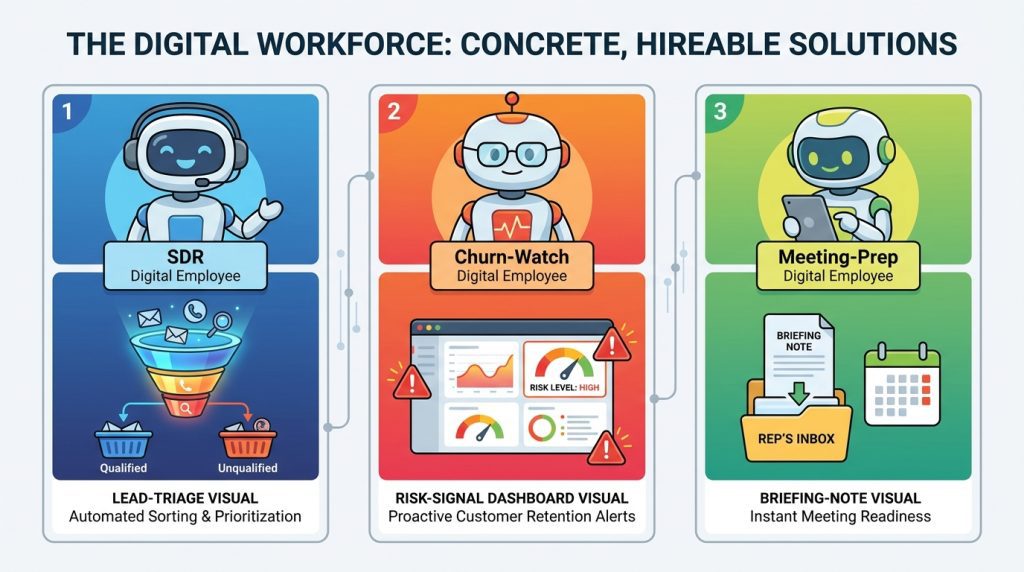
An SDR Digital Employee for inbound lead triage. When a new lead is created, the agent evaluates it against your ICP, sends a tailored intro email, and either qualifies it for sales handoff or routes it to nurture. Solves the problem of leads sitting in a queue for hours before a human notices them.
A churn watch Digital Employee for existing accounts. Monitors account level signals such as usage dropoffs, support ticket spikes, or missed renewal milestones. Either drafts a retention email for a CSM to review or sends one directly, depending on the risk tier. Every action shows up in the audit log under the Digital Employee’s name, so your CS leadership has real visibility.
A meeting prep Digital Employee for your sales team. Before every scheduled call, the agent pulls the latest activity on the account, summarizes deal state, flags risks, and drops a briefing note into the rep’s inbox. Low stakes, high value, and reps notice the difference immediately.
Fig 6 — Three Digital Employees, three jobs they do well
A few things to know before you deploy
Digital Employees count as users. They’re provisioned in Zoho Directory, which has licensing implications depending on your plan. Confirm with your account manager before you create a fleet of them.
The audit trail is your friend, but only if you actually read it. Most admins set up agents and then never check what they’re doing. The value of Digital Employees is the audit visibility. Use it. A weekly review of agent activity is a reasonable cadence for the first few months.
Permission misconfigurations are the most common failure mode. The agent either has too much access (and acts on records you didn’t intend) or too little (and fails on records it can’t see). Test your profile setup carefully on real records before scaling.
Don’t try to build all of them at once. One Digital Employee deployed well and tuned over two weeks is worth more than five deployed in a rush and ignored.
Where to go from here
Digital Employees are available on Enterprise editions and above of Zoho CRM, on standalone CRM plans, in the US and India data centers. If your edition supports it, the fastest path is to open the Agent Store, hire a preconfigured agent, and deploy it as a Digital Employee on a small segment of records.
If you’d rather have help getting the first one right, we work with Zoho customers on Digital Employee design, role and profile architecture, agent instructions, and phased rollout. You can reach us here. The shift from agent as script to agent as user is one of the more meaningful changes Zoho has made to the platform in years.
Worth understanding even if you don’t deploy one tomorrow.
Written By
Chief Executive Officer
As CEO of Clixlogix, Pushker helps companies turn messy operations into scalable systems with mobile apps, Zoho, and AI agents. He writes about growth, automation, and the playbooks that actually work.
The way people search for things has changed, and it happened faster than most marketers expected. A few years ago, the routine was predictable: type...
TL;DRThe average dental practice loses 15 to 20% of its patient base every year. For a practice producing $1.2M annually, that is $500,000 to $750,000...
TL;DRVibe coding is a legitimate prototyping tool. But the same properties that make LLMs fast at generating code, stateless context, completion bias, local optimization, make...