Zoho’s native WhatsApp integration is a good start. But for any team operating at real scale that includes, multiple brands, multiple agents, regional teams, or even tiered customer support, it’s not even close.
The current system limits you to one WhatsApp Business number. No dynamic routing. No message context separation by team or use case. No awareness of who should respond based on what was said.
This is a shortcoming due to design limitations. One that stems from how WhatsApp’s API is structured and how Zoho CRM handles messaging records.
And it’s the reason a new layer becomes so important.
What is the Problem? WhatsApp Messaging Bottleneck Hiding Inside Zoho CRM
In most Zoho CRM orgs, WhatsApp is treated like a shared mailbox bolted onto a deal record.
Here’s what that actually looks like in the wild:
Field sales teams using different personal or regional numbers
Support teams rotating on one shared WhatsApp line, with no CRM-linked ownership
Founders or brand heads jumping into chats because messages never route properly
No message metadata (tags, notes, status) showing up inside CRM
Automations that break when the incoming message isn’t from “the” one registered number
All this because Zoho’s native connector maps to just one number.
That means every message looks the same to the CRM. No concept of channel logic, team routing, or context-driven handoff.
Why Does This Problem Exist (And Isn’t Going Away)?
Let’s walk through what the architecture looks like today:
WhatsApp Business Platform (WABA):
Each phone number = one sender ID
Meta assigns template approval and webhook data per number
No multi-number context natively supported in the webhook layer
We’re talking about WABA, the WhatsApp Business API, not WhatsApp Web or the mobile app. WABA is designed for automation and scale, but with strict rules around numbers, templates, and data flow.
Zoho CRM:
Message data is tied to one number
No router/middleware exists to distinguish which number is speaking
No dynamic matching of message to rep, region, or pipeline
So what happens? Everything goes through one pipe.
The CRM can’t tell who the message is for, or what action should follow.
It’s just a dumb message log.
WhatsApp’s webhook URL allows only one endpoint per number, which means multi-brand or multi-product CRM setups hit a hard wall when trying to orchestrate replies based on source.
The WABA Constraint, Why Zoho Can’t Just “Add More Numbers”
Every WhatsApp Business Account (WABA) operates as a silo:
No payload identifier to route by number across Zoho CRM
Each webhook must be managed separately
Zoho CRM assumes a single sender identity. Without a middleware layer, there’s no way to make decisions based on the number that received the message.
What Zoho Users Are Saying About Zoho WhatsApp Shortcomings?
Recent posts from Zoho’s own community forum shine a light on real frustrations:
And Zoho’s own team has confirmed:
Same Vendor, Two Standards
Zoho SalesIQ now supports multiple WhatsApp numbers.Zoho CRM does not.
Same company. Different roadmaps. And no clarity on when the CRM will catch up.
The Workarounds by other Vendors Aren’t Working
There are vendors trying to patch this. Let’s break down the most common
Twilio
Powerful, but each subaccount can register only one WhatsApp sender
No native CRM sync unless you build it
You end up with hardcoded rules and webhook scripts duct-taped together
Twilio only allows one webhook per number. Custom middleware is required to route inbound messages dynamically, with potential API throttling issues if not batched correctly.
PickyAssist
Supports multiple numbers via UI-level routing
Expensive per number
Still requires jumping between browser tabs, not embedded in CRM.
TimelinesAI
Clean interface, solid Marketplace extension
Great for syncing WhatsApp chats into Zoho modules
But it lacks advanced routing, conditional logic, or CRM-triggered replies
WATI
Offers native CRM integrations with rich automation support
Limited Zoho CRM-specific routing out of the box
Popular among SMBs looking for plug-and-play setups
Even with platforms like WATI, fallback and error-handling logic is limited without custom Flow/Deluge scripting.
Gupshup
Strong in India and emerging markets
Solid developer APIs but poor UX for end users
Requires custom dev work to bridge to Zoho CRM
Integration Snapshot: Who Solves What?
Tool
Multi-Number
Zoho CRM Native?
Routing Logic
Embedded Chat
CRM Triggers
Price Control
Zoho Native
✖
✔
✖
✔
⚠Limited
✔
TimelinesAI
✔
✔(Marketplace)
✖
✖
✖
✔
PickyAssist
✔
✖
⚠UI only
✖
⚠Basic
✖
Twilio
✖
✖
✖
✖
✔(via dev)
✔
WATI
✔
⚠Limited
⚠Limited
⚠Partial
✔
⚠Mid-tier
Gupshup
✔
✖
✖
✖
✔(via API)
✔
(WhatsApp–Zoho CRM integrations compared)
Solution? What an Effective Multi-Number WhatsApp <> Zoho Layer Looks Like
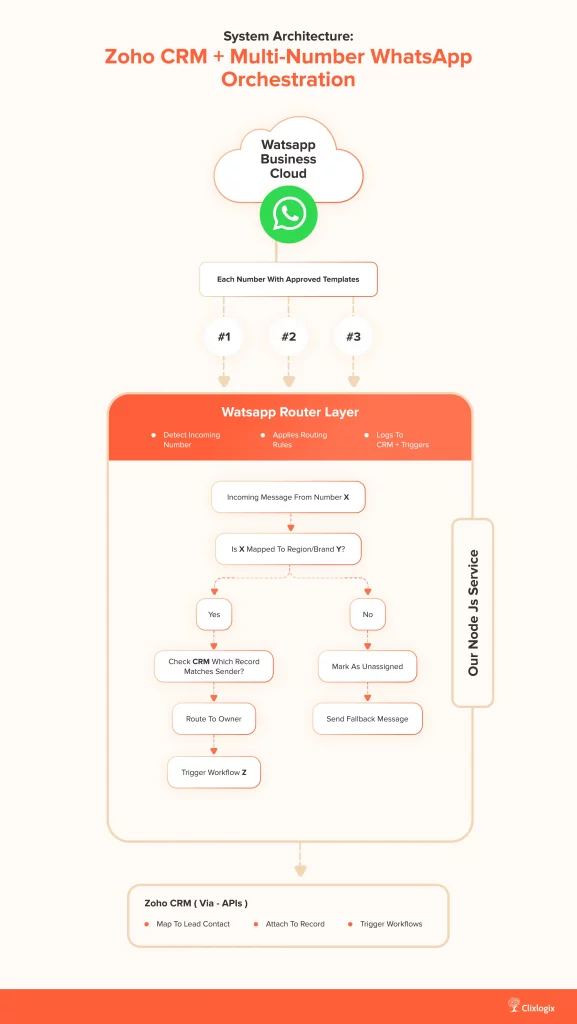
Here’s the architecture we think should exist:
System Architecture: Zoho CRM + Multi-Number WhatsApp Orchestration
Matching WhatsApp Messages to CRM Ownership
Side-by-Side Comparison: Zoho Native vs Proposed Solution
Feature
Zoho Native
Our Integration
Multi-number support
✖
✔
Routing by number
✖
✔
CRM field-based reply logic
✖
✔
Owner-based assignment
⚠Limited
✔
Embedded Inbox View
✔
✔
Support for multiple brands
✖
✔
No-code rule editor
✖
(Planned)✔
User Journey: Before vs After Our Integration
This workflow makes a huge difference between reactive messaging and true Zoho CRM-powered communication using WhatsApp integration.
Why We’re Building this Solution
We’ve helped teams integrate WhatsApp into Zoho for years in industries like:
Logistics, where delivery updates come from multiple numbers
Real estate, where each agent uses their own regional number
B2B sales, where support and sales share different communication threads
The pattern is always the same – one-number integrations break once you hit scale.
So we’re building a system that:
Works with Twilio, 360dialog, WATI, or your BSP of choice
Includes a middleware router to map numbers to CRM logic
Sends context-aware replies from Zoho Flow or Deluge
Handles failover, unassigned logic, dead letter queues, and error logs
Works across Deals, Contacts, Leads, and Custom Modules
Enables per-brand template logic and fallback responses
Gives you one pane of glass, Zoho CRM
Do You Want Access?
We’re in closed build mode for now but preparing for public rollout shortly. If you’re interested in early previews or want to shape the roadmap, we’d love to hear from you.
If your team:
Uses WhatsApp heavily in CRM workflows
Manages more than one number
Needs clarity, routing, and automation and not just chat logs
Then get in touch with us and we’ll send over the integration plan + rollout options.
Final Thought
Your Zoho CRM is the source of truth. WhatsApp messaging layer should reflect that with structure, ownership, and context. Right now, it doesn’t.
We’re fixing that.
Share this blog
Summarise this Blog with
ClaudeChatGPTGeminiPerplexity
Written By
Head Software Engineering @ Clixlogix
Akhilesh leads architecture on projects where customer communication, CRM logic, and AI-driven insights converge. He specializes in agentic AI workflows and middleware orchestration, bringing “less guesswork, more signal” mindset to each project, ensuring every integration is fast, scalable, and deeply aligned with how modern teams operate.
 DM Us
DM Us