Introduction
Missed calls are a recurring issue for many service businesses. In restaurants, it means lost reservations. In law firms, it means missed clients. In healthcare, it means patients turning elsewhere. We wanted to design a system that could reliably capture every call, understand the intent, and automate the follow-up, all without staff intervention.
Studies report that 20–30% of calls during peak hours go unanswered, and in some cases, this translates to thousands in lost revenue each month. If an average table of four spends $120, even three missed reservations per week can mean a loss of nearly $1,500 per month.
Using n8n as the orchestration layer, combined with a voice AI service (VAPI) and structured data handling, we built an AI Receptionist that runs 24/7. In this post, we’ll break down how the workflBuilding an N8N-powered AI Receptionist That Works As a 24/7 Booking Agentow is structured, explain the role of each component, and highlight practical lessons for making it production-ready.
Step 1. Capturing Call Data
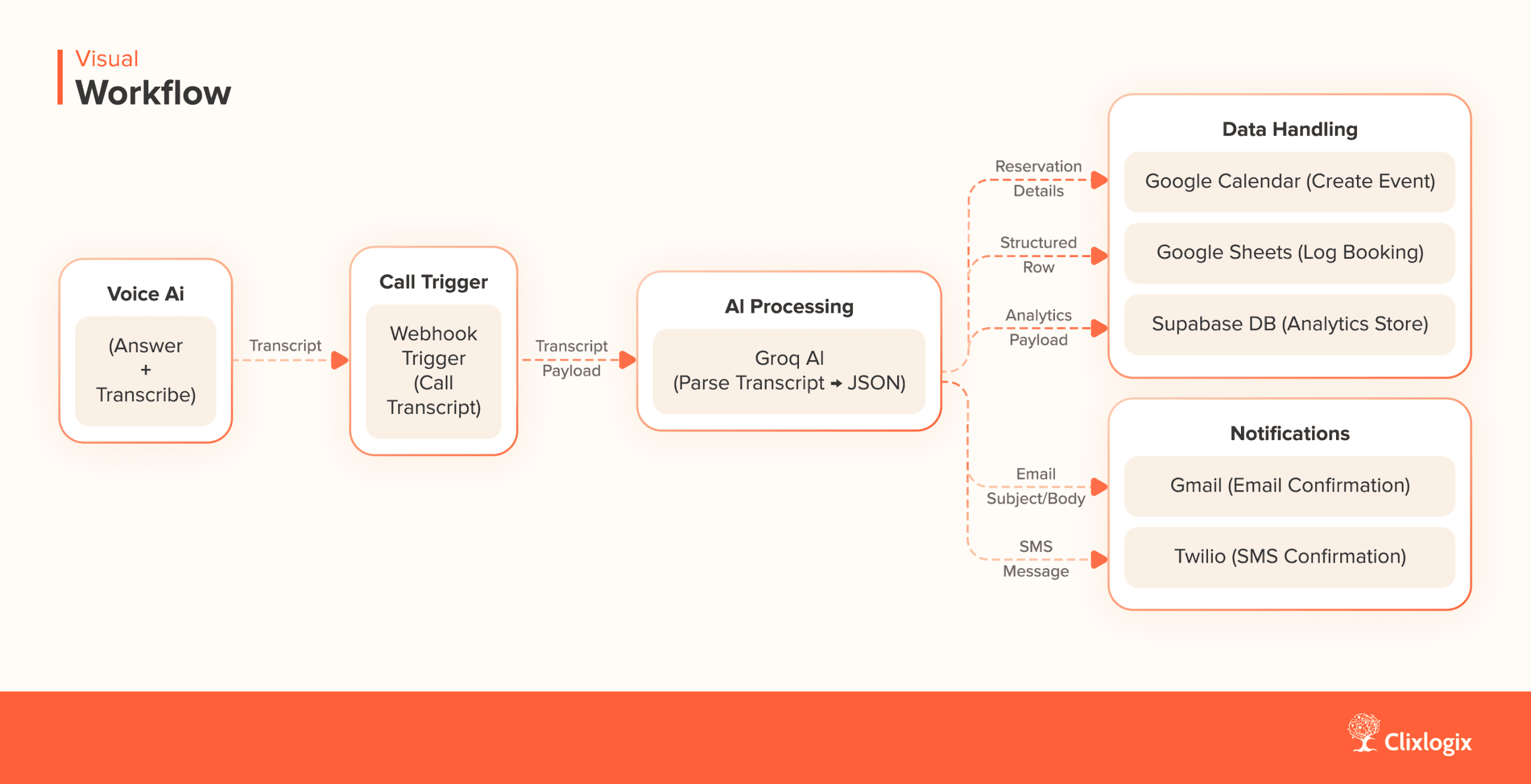
The workflow begins with a Webhook Trigger in n8n. Whenever a call ends, the telephony layer (in our case, Vapi) sends the transcript and metadata to this endpoint. We use a conditional check to make sure we only process calls once the call_ended event is received.
See n8n webhook security docs for best practices and our n8n cost optimization guide on how to architect your flows wisely.
Webhook Node Config:
{
  "type": "n8n-nodes-base.webhook",
  "parameters": {
    "httpMethod": "POST",
    "path": "712c8e50-8d36-45f2-a1d1-0ceeb9c95599"
  }
}
This captures payloads like:
{
  "event": "call_ended",
  "call": {
    "transcript": "Hi, this is Sarah. I'd like to book a table for 4 at 7pm Friday..."
  }
}
We immediately check the event type using an IF node to ensure only call_ended events are processed.
This step ensures that only complete transcripts are processed. Partial calls or ongoing conversations don’t trigger unnecessary downstream actions.
Step 2. Parsing the Transcript with AI
Once the transcript is captured, we send it to a large language model (LLM) hosted on Groq.
AI Node Config:
{
  "type": "@n8n/n8n-nodes-langchain.lmChatGroq",
  "parameters": {
    "model": "meta-llama/llama-4-maverick-17b-128e-instruct",
    "options": {
      "maxTokensToSample": 4096,
      "temperature": 0.7
    }
  }
}
The system prompt enforces structured JSON output:
{
  "name": "string",
  "phone": "string",
  "email": "string",
  "guests": "number",
  "date": "string",
  "time": "string",
  "special_request": "string",
  "email_subject": "string",
  "email_message": "string"
}
Sample Output:
{
  "name": "Sarah Johnson",
  "phone": "555-123-4567",
  "email": "sarah@example.com",
  "guests": 4,
  "date": "2025-09-30",
  "time": "19:00",
  "special_request": "Window seat if possible",
  "email_subject": "Your Table Reservation – Confirmed",
  "email_message": "Hi Sarah, your table for 4 on September 30 at 7:00 PM is confirmed. We look forward to welcoming you!"
}
The model is prompted to output a structured JSON object with all the relevant reservation details.
This step converts natural speech into predictable data. By enforcing JSON, the downstream nodes (calendar, email, SMS) can operate without ambiguity.
Step 3. Adding Reservations to Calendar
The structured data is passed into a Google Calendar node. Here, a new event is created for the reservation. Official docs: Google Calendar API
Google Calendar Node Config:
{
  "type": "n8n-nodes-base.googleCalendarTool",
  "parameters": {
    "calendar": "Restaurant Reservations",
    "title": "Table for {{$json.guests}} – {{$json.name}}",
    "start": "{{$json.date}}T{{$json.time}}",
    "end": "{{$json.date}}T{{$json.time}}+01:30"
  }
}
This guarantees that reservations are visible to staff in real time.
In practice, we recommend adding a final availability check before this step. This prevents scenarios where two callers attempt to book the same slot within a short time window.
Step 4. Logging for Operations and Analytics
We maintain two forms of logging:
1. Google Sheets – Provides a simple interface for staff to view and manually adjust reservations if needed.
Google Sheets Node Config:
{
  "type": "n8n-nodes-base.googleSheets",
  "parameters": {
    "operation": "append",
    "documentId": "1JZ_-T2oojLgl2KYzOUdKwjwu3k7jyYcPHJSsIPphQUI",
    "sheetName": "Sheet1",
    "columns": {
      "Name": "={{ $json.name }}",
      "Phone": "={{ $json.phone }}",
      "Guests": "={{ $json.guests }}",
      "Date": "={{ $json.date }}",
      "Time": "={{ $json.time }}",
      "Special Requests": "={{ $json.special_request }}"
    }
  }
}
2. Supabase Database – Stores structured data for long-term analytics, such as tracking booking volume, peak times, and customer preferences.
Supabase Node Config:
{
  "type": "n8n-nodes-base.supabase",
  "parameters": {
    "tableId": "Table Bookings",
    "fieldsUi": {
      "fieldValues": [
        { "fieldId": "name", "fieldValue": "={{ $json.name }}" },
        { "fieldId": "phone", "fieldValue": "={{ $json.phone }}" },
        { "fieldId": "guests", "fieldValue": "={{ $json.guests }}" },
        { "fieldId": "date", "fieldValue": "={{ $json.date }}" },
        { "fieldId": "time", "fieldValue": "={{ $json.time }}" },
        { "fieldId": "special_request", "fieldValue": "={{ $json.special_request }}" }
      ]
    }
  }
}
This dual logging approach balances immediate operational usability with the ability to run reports later. Sheets are convenient for staff, while Supabase enables analytics like peak booking times.
Example query in Supabase to find busiest booking times:
SELECT date, COUNT(*) as total_bookings
FROM reservations
GROUP BY date
ORDER BY total_bookings DESC;
This lets managers spot patterns, such as which days of the week fill fastest or how often special requests appear.
Step 5. Confirming with the Customer
Once the booking is finalized, the workflow branches into two parallel notification steps:
- Gmail Node – Sends a professionally worded confirmation email. The subject and body text are generated by the AI model during transcript parsing.
Gmail Node Config:
{
  "type": "n8n-nodes-base.gmail",
  "parameters": {
    "sendTo": "={{ $json.email }}",
    "subject": "={{ $json.email_subject }}",
    "message": "={{ $json.email_message }}"
  }
}
- Twilio Node – Sends a concise SMS with the same details.
Twilio Node Config:
{
  "type": "n8n-nodes-base.twilio",
  "parameters": {
    "from": "+15551230000",
    "to": "={{ $json.phone }}",
    "message": "Your reservation is confirmed for {{$json.guests}} guests on {{$json.date}} at {{$json.time}}."
  }
}
Both email and SMS confirmations reduce the chance of no-shows and give customers confidence that their request has been captured.
Cost Profile
The running cost of this setup is modest. With a combination of hosting, Vapi, and Twilio, the average monthly expense is around $60 – 100, depending on call volume. Per-minute handling costs range from $0.10 – 0.12. In most cases, even a handful of additional bookings per week easily covers this expense.
Error Handling & Scaling
During testing and deployment, several important considerations emerged:
- Validation before Calendar Insert: Always re-check availability to prevent double bookings.
- Handling Drop-Ins: Real-world operations include walk-ins. Options:
- Integrate directly with the POS/table management system if it has an API (real-time availability).
- Keep a buffer of “offline” tables for walk-ins.
- Use a staff confirmation loop where AI tentatively books and staff approve.
- Retry Logic: Configure retries for transient errors (e.g., email service timeouts).
- Webhook Security: Protect endpoints with auth headers or tokens (n8n docs).
- Scalability: For high-volume restaurants, add a message queue (e.g., RabbitMQ) so multiple workers can handle calls in parallel.
Why Groq?
Builders often ask us this, why use Groq over OpenAI or Anthropic Claude? The reasons are:
- Latency: Groq models return responses in milliseconds, ideal for real-time use cases like phone calls.
- Cost Efficiency: Running LLaMA-3/4 or Mixtral on Groq is cheaper per token compared to GPT-4.
- Flexibility: Multiple open-source models supported, not locked into one provider.
For those who prefer local deployments, Ollama can also serve as an alternative.
Applicability Beyond Restaurants
Although we first tested this in a restaurant setting, the architecture is universal. The same loop, capture -> parse -> log -> notify, can be adapted to law firms, healthcare practices, real estate agencies, or salons. In every case, the AI receptionist ensures no call is missed and customer requests are handled promptly.
Visual Workflow
Conclusion
This system costs roughly $60–100/month in infrastructure. Recovering just one lost reservation per week (~$120) pays for itself several times over.
We built an AI Receptionist to ensure businesses never miss another call. With Vapi + n8n + Groq + Twilio + Google integrations, it runs 24/7, saves staff time, and boosts revenue.
If you’re exploring AI Receptionists or agentic workflows for your business, we’d be glad to share our playbook and help you deploy one. Get in touch with our team to discuss implementation.
 DM Us
DM Us