The Zoho CRM and Projects integration connects sales and delivery across 10 CRM modules. But the native integration has real limits, no Vendor module support, half bidirectional task sync, custom field blind spots in Zoho Flow, and no Deal to Project data blending in Zoho Analytics. This guide covers what the integration does, how to configure it, where it falls short, and how to extend it with Flow, Deluge, and architectural workarounds.
KEY TAKEAWAYS
The native integration supports Projects related lists in 10 CRM modules, but client level sync is limited to Accounts and Contacts.
Task sync is not fully bidirectional. Projects to CRM requires a manual button click. Recurring tasks do not sync.
The Vendors module has no native integration path, five years of community requests, still not on the roadmap.
Deal to Project data blending is not supported in Zoho Analytics as of March 2026.
Deluge custom functions give full bidirectional control but carry rate limits (100 calls per 2 minutes, 30 mins lockout if exceeded).
Why Integrate Zoho CRM with Zoho Projects
A mid size HVAC company in Ontario had been running Zoho CRM and Zoho Projects as separate islands for about two years when the operations lead first raised the issue. The sales team closed service contracts in CRM. Operations managed installation projects in Projects. And the handoff between the two happened, in the owner’s words, “over email, usually late.”
The symptoms were familiar to anyone who has spent time in service delivery businesses. Project managers re-interviewing clients because the deal notes never crossed from CRM. Projects kicking off a week late because nobody notified the delivery team that the contract was signed. Sales reps promising installation timelines that contradicted the PM’s resource plan. Every one of these is a margin problem. When a PM spends two hours reconstructing context that already lives in a CRM record, that is rework you are paying for twice. When a project starts late because the handoff was an email that got buried, that is delayed revenue. When a client hears two different timelines from two different departments, that is a trust deficit that compounds over the life of the engagement.
The Zoho CRM to Projects integration exists to close this gap. Having seen it deployed across construction firms, SaaS onboarding teams, professional services companies, and agencies, I can say it works better than most teams expect in some areas, and worse in others. The point of this post is to be precise about which is which.
What the Native Integration Actually Supports
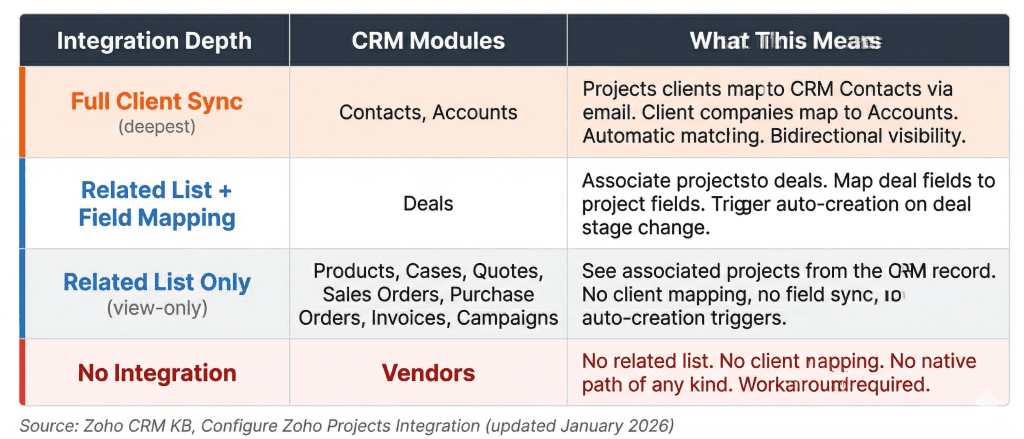
Most teams assume the integration only connects Accounts, Contacts, and Deals. That is the common understanding, and it is incomplete. The configuration page in Zoho’s documentation lists 10 CRM modules that support a Zoho Projects related list. Here is the full breakdown:
Figure 1: CRM modules with Zoho Projects integration coverage. Orange = client-level sync. Blue = related list only. Red = not supported.
The distinction that matters is between a related list and client level sync. All 10 modules can display a Projects related list inside a CRM record, showing associated projects, tasks, milestones, and status. But only Accounts and Contacts participate in client sync, the deeper integration where a Projects client maps to a CRM Contact via email address, and a client company maps to a CRM Account. This mapping is system defined and cannot be customized.
Put differently, the integration’s surface area is wider than commonly understood, but its depth is narrower. You get visibility across 10 modules, but true data connectivity across just two.
Beyond the related list, the integration enables several operational capabilities:
Creating a Projects portal directly from CRM
Setting profile level permissions for CRM users in Projects
Running client account mapping to auto associate Projects clients with CRM Accounts
Embedding a full Projects tab inside the CRM interface
Associating projects after a call
Managing project tasks from within any supported CRM record
Setting Up the Integration
The setup itself is four steps, all handled from CRM’s admin panel under Setup > Marketplace > Zoho > Zoho Projects. I will not rehash Zoho’s step by step configuration guide here, it is thorough and accurate. Instead, this section flags the four configuration decisions that, in my experience, cause the most downstream pain when teams get them wrong.
Edition Requirements and Cost
CRM’s Free edition gets a 15 day trial of the integration. Beyond that, Zoho Projects requires a paid subscription. Current pricing is $4/user/month on the Premium plan (billed annually) or $10/user/month on Enterprise. CRM paid plans have no separate edition restriction for the integration. For organizations already on Zoho One, both CRM and Projects are included, which is the most cost effective path for teams running three or more Zoho applications.
Portal Configuration for One Portal, One CRM
You can configure exactly one Zoho Projects portal per CRM instance. For organizations running a single portal, this is invisible. For agencies or multi division companies running multiple Projects portals, it forces a choice. A digital agency in Vancouver that ran separate portals for design and development divisions had to consolidate into a single portal to enable CRM integration, which meant rethinking their project organization structure entirely.
The deeper risk is ownership. If the portal owner changes, say, the original admin leaves the company, the integration breaks. CRM starts showing “The portal owner has been changed” errors on every project related action. The only fix is deactivating the existing portal link and reassociating with a new one, and deactivation removes all existing project associations in CRM. The safest approach is using a shared service account as the portal owner from day one.
Field Mapping & Custom Fields Have Limits
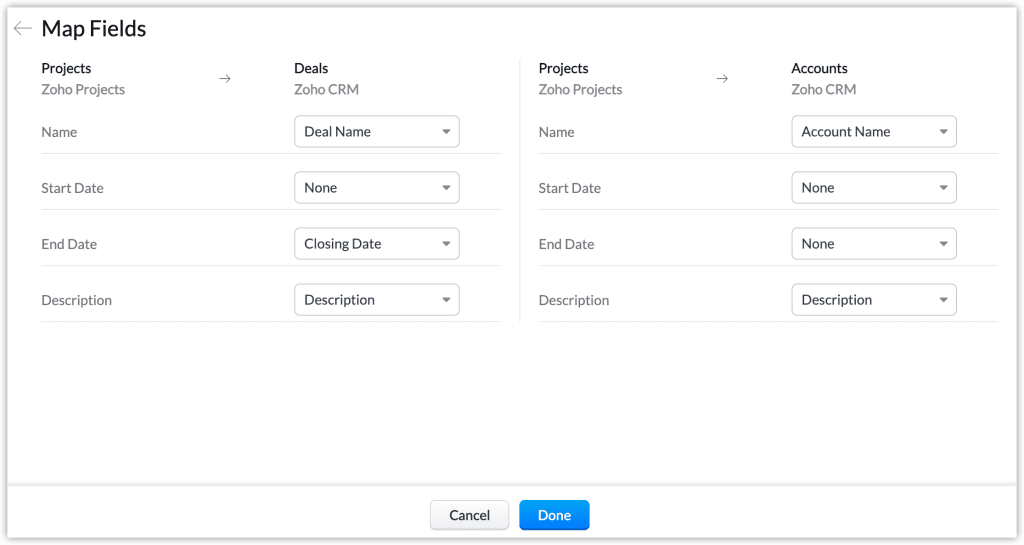
During setup, you map CRM module fields to Zoho Projects fields using the “Integration” field in the Projects layout. Both standard and custom fields in Projects appear for mapping.
However, Zoho’s FAQ clarifies that only custom fields in the standard layout of Deals and Accounts are available on the mapping page. Custom modules, custom layouts, and task level custom fields from CRM are not exposed in the native mapping UI.
In SaaS onboarding workflows, where teams often build elaborate custom fields on CRM Tasks (implementation tier, assigned CSM, onboarding deadline), this limitation hits hard. The assumption is that these fields will flow into Projects through the integration. They do not. The workaround is Zoho Flow or Deluge, both covered later in this post.
Client Account Mapping, Do It During Setup or Regret It
Client Account Mapping is a one time step during integration setup. It matches existing Zoho Projects clients to CRM Accounts automatically by company name. If you skip it, you cannot go back to automapping later unless you deactivate the entire portal and start over. I have seen teams spend days manually reassociating projects after skipping this step during what they thought was a quick test setup.
Common Use Cases For Zoho CRM and Zoho Projects Integration
Deal to Project Handoff
This is the integration’s primary use case, and it works through two paths. The no code approach involves building a Zoho Flow that triggers when a deal reaches Closed Won, creates a project in Zoho Projects from a template, and relies on the integration’s field mapping to link the project back to the CRM deal. The code approach involves a Deluge custom function attached to a CRM workflow rule that calls the Zoho Projects API and passes a template ID so the project spins up with preconfigured task lists, milestones, and team assignments. Zoho’s FAQ confirms this is a supported capability, and the CRM Gallery includes prebuilt functions for it
A real estate management firm in Toronto reduced their contract to project handoff from two to three days of email chains to instantaneous by using the Deluge approach. When a property management contract closed in CRM, a custom function created a new project from their “Property Onboarding” template, populated it with property address, unit count, and assigned property manager from the deal record, and notified the operations team via Zoho Cliq.
Task Sync (The Part That Trips Up Most Teams)
This is the use case that consistently generates the most confusion. The assumption is full bidirectional sync. The reality is more nuanced.
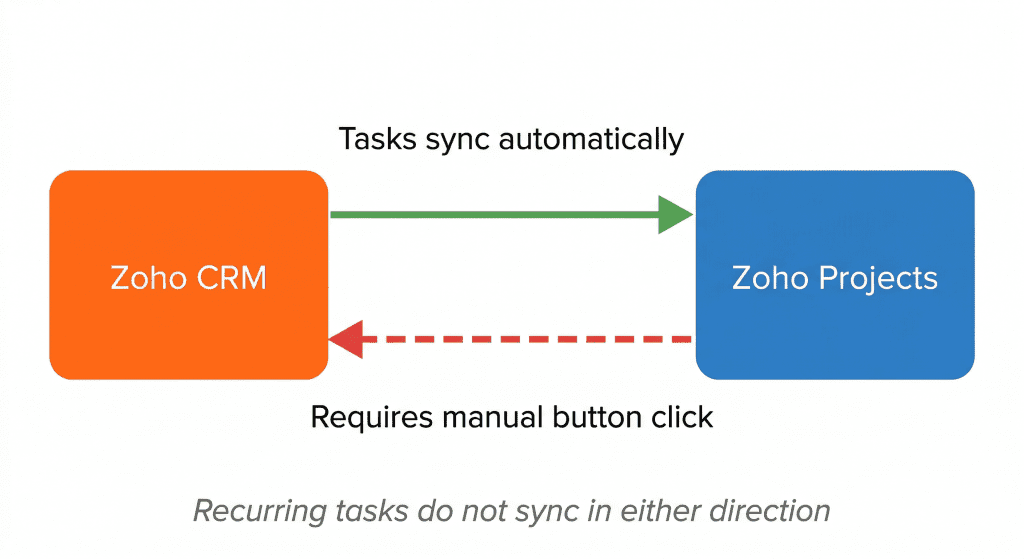
Figure 2: Task sync between CRM and Projects is not fully bidirectional.
CRM originated tasks sync to Projects as expected. But tasks created in Projects do not automatically appear in CRM. To push a Projects task to CRM, you must click “Save and Add Task to Zoho CRM” while creating the task. If you forget, the task exists in Projects but CRM has no knowledge of it. Recurring tasks do not sync in either direction. And comments added from Projects on a CRM originated task appear as notes on the associated contact, account, or deal, not as a task update.
Put differently, the sync is less “bidirectional” and more “automatic in one direction, manual in the other.”
Client Visibility and Cross Team Collaboration
Once the integration is active, project managers see account history, deal context, and contact details from inside Projects. Sales reps see project status, milestones, and task progress from inside CRM. A single project can have multiple clients, and a single client company can be associated with multiple projects. Call notes logged in CRM appear in the project activity feed.
For service businesses where account managers and project teams operate in separate applications, this visibility alone can justify the integration. A recruitment agency that onboarded the integration in 2025 found that their account managers had been manually copying client requirements from CRM deal records into project briefs, roughly 40 minutes of copy paste per new engagement. The native sync eliminated that entirely. Not every benefit requires custom code.
Where the Native Zoho CRM and Projects Integration Falls Short
Everything described above is what works. This section is about what does not. Every limitation listed below has been encountered in production and is corroborated by Zoho’s own documentation or community forums, verified against current (March 2026) sources.
The Vendors Module Gap
The most conspicuous absence in the integration. The CRM Vendors module, where organizations store supplier data, procurement contacts, and purchase order relationships, has no integration path to Zoho Projects. Not in the related list. Not in client mapping. Not through any native configuration.
In industries where sub contracting dominates delivery, construction, event production, facilities management, this gap hits hardest. A general contractor in the GTA managing 40+ subcontractor relationships in CRM’s Vendors module needed vendor contact details, insurance status, and trade specialization inside every project workspace. The native integration could not deliver any of it. The vendor data lived in CRM, the project lived in Projects, and the two systems had no awareness of each other. The resolution was a Deluge custom function on the Vendor module that, when a vendor was associated with a deal, wrote the vendor’s key information into the project’s custom fields.
Zoho’s official recommendation is simpler but blunter. Store vendor data inside the Accounts module using a different layout, then use filters to distinguish vendors from clients. Because Accounts participates in the native integration, your vendors appear in project related lists. At 10 vendors, this is manageable. At 200, your Accounts module is doing double duty and your reports need extra filter logic across the board. This limitation has been tracked in Zoho’s community for over five years with no movement from their product team.
No Unified Project Repository
Can all CRM data for a customer, contacts, call logs, emails, deal history, attachments, be aggregated in one place inside a project workspace? The answer is no. The integration provides related lists and field mapping, but not a consolidated project repository.
The solution is mostly a custom application built in Zoho Creator that pulls CRM data via API and renders it as an embedded panel inside Projects. Effective, but it requires development work. For teams evaluating low code options for this kind of internal tooling, Creator’s native Zoho ecosystem access gives it a clear edge over alternatives, something our comparison of Zoho Creator, FlutterFlow, and Bubble.io explores in more detail.
Custom Field Constraints
Three separate friction points that surface repeatedly in Zoho implementations.
First, the native mapping UI only exposes custom fields from Deals and Accounts standard layouts. If your custom fields live in other modules or custom layouts, the integration does not see them. This is by design, and it catches teams mid-setup when they realize the fields they need are simply not available for mapping.
Second, updating custom fields in Projects via automation hits permission and field-type constraints that are poorly documented. Multi user lookup fields are particularly tricky. A user trying to update multi user custom fields via the Projects API discovers that the API expects the layout defined field name (e.g., “instructor_one”), not the UDF identifier (“UDF_MULTIUSER1”) that Zoho’s own documentation appears to reference.
// What the documentation appears to suggest (does NOT work):Params.put("UDF_MULTIUSER1", Multi_User_Values);// What actually works (use the layout-defined field name):Params.put("instructor_one", Multi_User_Values);
Third, newly created custom fields in Projects do not automatically appear in Zoho Analytics. An admin must manually navigate to the Analytics data source setup, find and enable the new field, and trigger a sync.
Zoho Flow Cannot See Custom Fields on CRM Tasks
This limitation has caused more mid implementation pivots than any other single issue in my experience. The scenario is consistent. A team builds an automation in Zoho Flow to push CRM task data to Projects. Standard fields transfer fine. Then they add custom fields to CRM Tasks, carrier name, estimated delivery date, customs status in the case of a logistics operation and discover Flow cannot see them.
The fix is migrating the entire automation from Flow to a Deluge custom function, which means rethinking the trigger logic, handling error cases, and testing against the specific field schema. One hour of architecture planning saves ten hours of rework. The same dynamic shows up in other Zoho integration scenarios, something that became clear during our work on WhatsApp to CRM integrations, where the native connector looked complete until custom field data was needed.
Analytics and Reporting Gaps
This is the most recently confirmed limitation, and for my nickel, the most operationally significant.
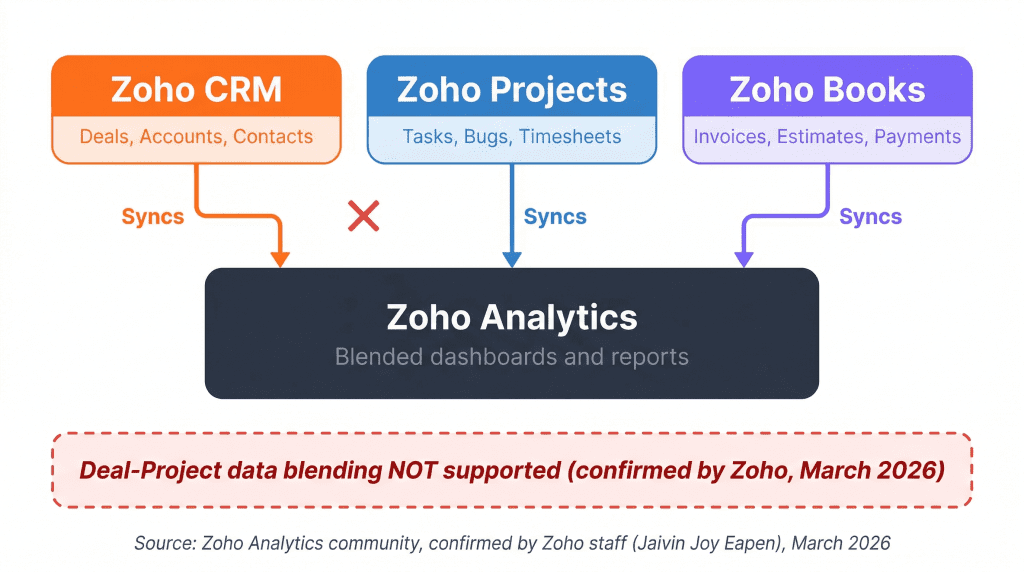
Figure 4: CRM, Projects, and Books data all sync to Analytics individually, but Deal to Project blending is not supported as of March 2026.
Zoho’s own support team confirmed that data blending between Zoho Projects and the CRM Deals module is not supported in Zoho Analytics. For professional services firms trying to reconcile billable hours tracked in Projects against deal values in CRM, there is no native dashboard that answers the question “for each engagement, what percentage of the contracted value have we consumed in logged time?”
An architecture firm that bills fixed fee projects ran into exactly this. They tracked time in Zoho Projects and contract values in CRM Deals. Their expectation, entirely reasonable. was that Zoho Analytics would let them build a profitability dashboard joining deal amounts with project hours. It cannot. The resolution was a Deluge scheduled function that runs nightly, queries Projects for timesheet totals per project, and writes those values back to a custom field on the CRM Deal record. Analytics then reports on CRM data only, which includes the synced time values.
Combining CRM, Projects, and Zoho Books data in a single Analytics workspace is theoretically possible using multi source joins, but the practical friction is significant. The default Analytics setup creates separate workspaces for each source. Importing a second data source into an existing workspace often fails if an integration for that source is already active. A documented workaround involves deleting one workspace and recreating the data source inside the other, or copying data between workspaces, which duplicates rows and can impact your license tier.
Gap
Status
Workaround
Complexity
Vendors module
Not on roadmap (5+ years)
Deluge function or Accounts layout workaround
Medium–High
No project repository
Not planned
Zoho Creator custom app or manual dashboards
High
Custom field mapping limits
By design
Deluge API with correct field names
High
Flow blind spots on Tasks
By design
Migrate to Deluge custom functions
High
Analytics data blending
Not supported (confirmed Mar 2026)
Deluge scheduled sync to CRM fields
High
Task sync bidirectionality
Partial by design
Manual button click or Deluge polling
Low–Medium
Multi-portal support
One portal per CRM
Consolidate portals or deactivate/re-associate
Low (destructive)
Figure 5: Native integration gaps, current status, and workaround complexity (March 2026).
How to Extend the Integration Beyond Native Limits
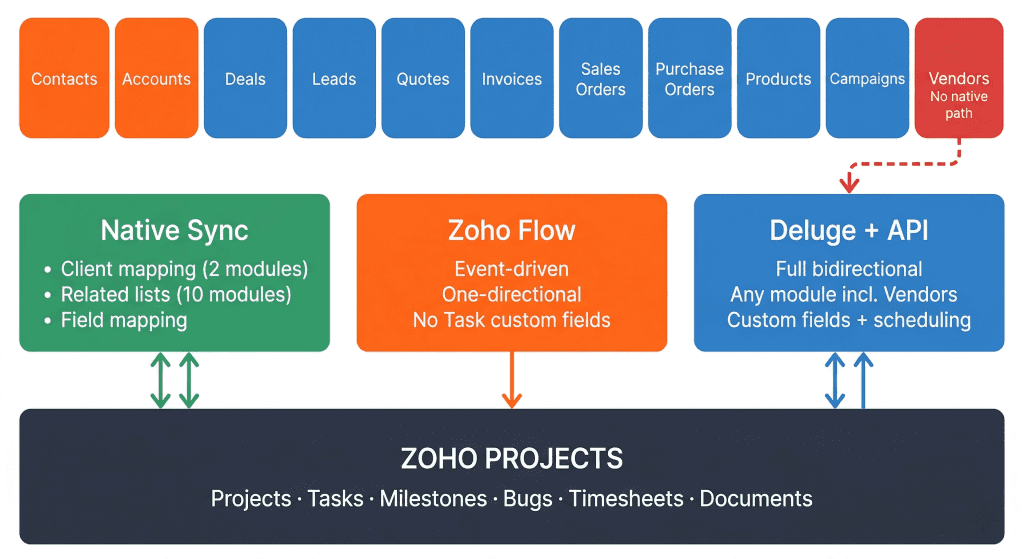
Every gap described above has a workaround. The choice depends on three variables, your team’s technical depth, whether you need oneway or bidirectional sync, and how many vendor or custom module relationships you need to bridge.
Figure 6: Three integration paths from CRM to Projects. Native sync covers 10 modules (client sync on 2). Flow adds one directional event driven automation. Deluge provides full bidirectional control including Vendors.
Option 1 – The Accounts Layout Workaround (No Code)
This is Zoho’s own suggestion for the Vendors gap, and it is the right choice for small teams that need a quick fix without writing code. Create a “Vendor” layout inside the Accounts module. Add a custom picklist field (“Account Type” with values Client / Vendor / Partner) to distinguish record types. Because Accounts participates in the native Projects integration, your vendor records now appear in project related lists.
A small event management company with about 15 vendor relationships used this approach for six months without issue. Then they grew to 60 vendors, and the Accounts module became cluttered. List views needed constant filtering. Reports that used to show “our clients” now mixed in vendors unless someone remembered to add the filter. Marketing automations that triggered new Account creation started firing for vendors. The breakpoint, in my experience, is around 30 to 40 vendor records. Below that, practical. Above that, a liability.
Option 2 – Zoho Flow Automation (Low Code)
Zoho Flow lets you build event driven automations with a visual builder. The most useful approach for CRM to Projects is configuring a trigger on a CRM module event (deal stage change, record creation, field update) and an action that creates or updates a project, task, or milestone in Projects.
Flow works well for straightforward handoffs. You can trigger project creation automatically when a Sales Order reaches “Approved” status, the Flow can create a project from a particular template and assign it to users. No code required, deployed in under a day.
Where Flow falls short is well documented. Sync is one directional, CRM to Projects only. Zoho Flow cannot see custom fields on CRM Tasks. If your Zoho schemas change, existing Flows can break. Zoho Flow is the right tool for event driven, standard field automations. It is not the right tool for bidirectional sync or any workflow that touches task level custom data.
Option 3 – Deluge Custom Functions + API (Full Control)
Deluge is Zoho’s server side scripting language, and it is the only approach that gives you full bidirectional control over the CRM to Projects data flow. The approach is to create a workflow rule on the CRM module of your choice (including Vendors, which the native integration ignores), then attach a Deluge custom function that calls the Zoho Projects API via the zoho.projects.createintegration task.
For reverse sync, where project status changes in Projects need to update a field on the CRM Deal, the approach is a scheduled Deluge function that polls Projects for changes and writes them back to CRM records. Zoho’s CRM Gallery includes pre-built custom functions for deal to project creation, and the current Deluge integration tasks (zoho.projects.create, zoho.projects.getRecords) are documented on Zoho’s Deluge help site.
The rate limit constraint is real. Zoho enforces a cap of 100 Projects integration tasks per 2 minutes. Exceed that, and your functions are locked out for 30 minutes. For high vol. implementations, batch your operations and build in defensive error handling.
Which Approach Should You Use?
Run through this decision checklist:
Do you need to integrate the Vendors module? → Deluge (Accounts workaround if <30 vendors)
Do your workflows depend on custom fields on CRM Tasks? → Deluge (Flow cannot see them)
Do you need bidirectional sync (Projects to CRM)? → Deluge
Is your use case a simple deal stage trigger with standard fields? → Flow
Do you have fewer than 30 vendor relationships? → Accounts layout workaround may suffice
Do you need blended CRM + Projects reporting? → Deluge scheduled sync to CRM fields, then report in Analytics
Approach
Complexity
Sync Direction
Custom Fields
Best For
Accounts layout
Low
Native (bidirectional)
Standard only
Small teams, <30 vendors
Zoho Flow
Medium
CRM to Projects only
Limited (no Task customs)
Simple event-driven triggers
Deluge + API
High
Full bidirectional
Full control
Complex workflows, enterprise scale
Figure 8: Extension approach comparison by capability.
Zoho CRM and Projects integrations fail in predictable ways. Most of those failures trace back to configuration decisions made during the first hour of setup, or assumptions that were never tested before go live. This checklist consolidates every lesson from this post into a single walkthrough.
Before You Configure
Zoho Projects is on a paid plan (Premium at $4/user/month or Enterprise at $10/user/month, billed annually)
Portal owner is a shared service account (e.g., zoho-admin@company.com), not an individual’s personal email. If the portal owner’s account is ever deactivated, the entire integration breaks.
You have administrator access to both CRM and Projects
You have identified which of the 10 supported CRM modules need the Projects related list. Not every module needs it, enabling it everywhere creates clutter.
Custom fields you need mapped between CRM and Projects exist in the standard layout of Deals or Accounts. Custom fields in other modules, custom layouts, or on CRM Tasks will not appear in the native mapping UI.
Project templates are configured in Zoho Projects for every project type you plan to auto create. Each template should include task lists, milestones, default assignments, and naming conventions. Skipping this means every auto-created project is a blank canvas your PM has to build manually.
If you need the Vendors module connected to Projects, you have chosen an approach, Accounts layout workaround (for fewer than 30 vendors) or Deluge custom function (for anything larger).
If you need blended CRM + Projects reporting in Zoho Analytics, you have planned a Deluge sync back function to write project data into CRM custom fields. Native data blending between Deals and Projects is not supported in Analytics.
Before You Go Live
Map only the CRM fields your project managers will act on. Lead source, campaign attribution, and sales stage history are noise in a project workspace.
Set profile permissions for all CRM user roles under Setup > Marketplace > Zoho > Zoho Projects > Permissions. A CRM admin is not automatically a Projects admin, users without the right Projects profile will get access errors when trying to create projects from deal records.
Run Client Account Mapping during initial setup. This is a one time step. If you skip it, you cannot auto match existing Projects clients to CRM Accounts later without deactivating the portal entirely.
If using Zoho Flow for automations, test your complete field set, including any custom fields on CRM Tasks, before committing. Flow cannot see custom fields on Tasks. Discovering this after building the automation means rewriting it in Deluge.
If using Deluge custom functions, verify that your custom field API names match the layout defined names in Projects, not the UDF identifiers. The API expects “instructor_one”, not “UDF_MULTIUSER1”.
Confirm that task sync behavior matches your team’s expectations. CRM to Projects is automatic. Projects to CRM requires clicking “Save and Add Task to Zoho CRM” manually. Recurring tasks do not sync in either direction.
After Go Live Verification
Create a test deal, advance it to Closed Won, and confirm a project is auto created from the correct template (if using auto-creation via Flow or Deluge)
Verify the auto created project appears in the CRM deal record’s Projects related list
Create a task in CRM and confirm it syncs to Projects within the expected timeframe
Create a task in Projects and verify the “Save and Add to Zoho CRM” button is visible and functional
Confirm custom field values mapped correctly between CRM and Projects, check at least two records
Verify Client Account Mapping completed successfully. The admin receives an email listing mapped and unmapped records with failure reasons.
If running a Deluge sync back function for Analytics, trigger it manually once and verify the data appears in the correct CRM custom fields
Document all current project to CRM record associations. If you ever need to change the portal or portal owner, deactivation wipes these associations and you will need this list to reassociate manually.
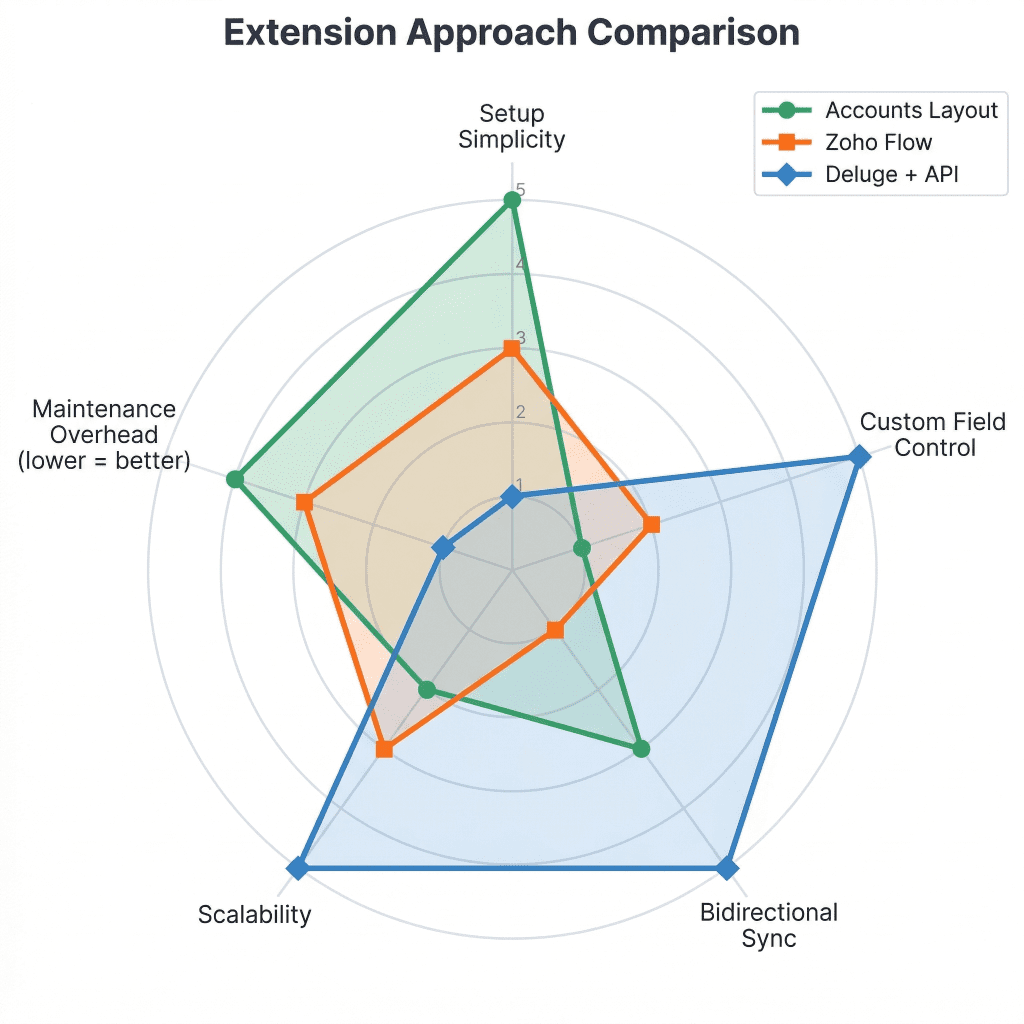
Figure 7: Radar comparison of the three extension approaches across five capability dimensions.
Running into integration gaps in your Zoho ecosystem?
We build and maintain Zoho integrations across CRM, Projects, Books, Analytics, and Creator, including the Deluge custom functions, Flow automations, and architectural decisions that the native tooling does not cover. If you are hitting any of the limitations described in this post, or planning a CRM to Projects integration and want to get it right the first time, talk to our Zoho team.
No. The Vendors module is absent from both the related-list modules and client sync. This limitation has been tracked in Zoho’s community for five years with no roadmap commitment. The practical workarounds are storing vendor data in the Accounts module with a separate layout (quick but limited in scale) or using Deluge to bridge Vendor records to Projects via the API (more flexible, requires development).
Yes, through two approaches. Zoho Flow with a deal-stage trigger, or a Deluge custom function attached to a CRM workflow rule. Zoho’s CRM Gallery includes prebuilt functions for this. The key detail is that you must pass the project template ID, not the template name.
CRM’s Free edition gets a 15 day trial. Beyond that, Zoho Projects requires a paid plan, Premium ($4/user/month annual) or Enterprise ($10/user/month annual). CRM paid plans have no separate restriction. Zoho One includes both CRM and Projects, making it the most cost effective option for teams already running multiple Zoho applications.
Not natively in an automated way. Task sync from Projects to CRM requires clicking “Save and Add Task to Zoho CRM” manually. For automated reverse sync, you need a Deluge scheduled function that polls Projects and updates CRM records. This is a common approach but requires development work specific to your field schema.
Flow is sufficient for standard field, event-driven automations. If your workflow depends on custom fields on CRM Tasks, bidirectional sync, the Vendors module, or complex conditional logic, you need Deluge. The general guidance is to start with Flow for the simplest use case and add Deluge when you hit a limitation.
Custom fields from the standard layout of Deals and Accounts are available in the native mapping UI. For custom fields in other modules, custom layouts, or on CRM Tasks, you need Zoho Flow or Deluge to transfer the data programmatically.
Only one portal can be linked per CRM instance. If the portal owner’s account changes or is deactivated, the integration breaks. The fix is to deactivate the current portal link and re-associate with a new portal. This removes all existing project associations in CRM. Prevent this by using a shared service account as the portal owner from day one.
Not for Deals and Projects as of March 2026. Zoho’s support team confirmed that data blending between these modules is not supported in Analytics. The practical workaround is syncing relevant data points (project hours, status, completion percentage) back to CRM custom fields via Deluge, then building your dashboards on CRM data in Analytics.
Written By
Technology Lead
Akhilesh leads architecture on projects where customer communication, CRM logic, and AI-driven insights converge. He specializes in agentic AI workflows and middleware orchestration, bringing “less guesswork, more signal” mindset to each project, ensuring every integration is fast, scalable, and deeply aligned with how modern teams operate.
TL;DR AI agents are autonomous systems that go beyond chatbots to reason, access business tools, and execute multistep tasks. In e-commerce, they are producing measurable...
Google's biggest Maps overhaul in over a decade just changed how local businesses get discovered. Here is what local SEO professionals and business owners need...