We have been doing SEO long enough to remember when getting to page one felt like planting a flag on the moon. You did the work, the rankings came, the traffic followed. Simple, satisfying, repeatable.
Search has always moved though. Algorithms updated, features changed, new formats appeared, and the people who spotted those shifts early were the ones who got ahead of them. What is happening right now with AI search is just the latest version of that story, and honestly, it is one of the more interesting ones we have seen.
People are using ChatGPT, Perplexity, and Google’s AI Mode to ask full, detailed questions and get direct answers. That is a real shift in how buyers find information, and it has opened up a genuinely new opportunity for businesses willing to pay attention. For the first time, there is data available inside a tool you already use that shows you exactly how your audience is prompting AI systems in your category.
That data has been sitting in your Google Search Console, quietly building up. Most people have not looked for it yet because they did not know it was there.
This article shows you where to find it, how to read it, and what to do with it. No paid tools required.
Why Appearing in AI Search Is Worth Your Attention
Here is a number worth sitting with. According to SparkToro and Datos research from 2024, around 60% of Google searches ended without a click. That figure has been climbing steadily, and AI generated answers on the results page are a big part of why.
On top of that, ChatGPT crossed 400 million weekly active users in early 2025. Perplexity is growing quickly among professional and research heavy audiences. Google’s AI Mode, which answers questions conversationally rather than just listing links, has been rolling out aggressively since late 2025.
What this adds up to is a meaningful chunk of your potential audience getting answers without landing on your website. They ask a question, an AI tool answers it, and the conversation moves on. Whether your business is part of that answer or not depends on how well your content serves those systems.
The upside here is real. Businesses that show up consistently in AI generated answers are essentially getting cited as authoritative sources, without paying for placement or competing in a traditional auction. It is a channel that is still relatively uncrowded compared to where paid search or link building competitions sit today.
This is what Generative Engine Optimization (GEO) is about. It is the work of making sure your business shows up in the answers AI systems give your buyers, not just in the blue links below them. We have written about why GEO deserves a place alongside traditional SEO in your overall strategy, and this article takes that conversation into the practical side of measurement.
What It Takes to Show Up in AI Search
Before getting into the tracking method, it helps to understand what AI systems actually look for when they decide which sources to cite, because it is a different game from ranking on Google.
AI tools do not sort results by domain authority and keyword density. They read content, understand context, and look for the clearest, most direct answer to the question being asked. If your content gives them that, they use it. If it dances around the topic in vague, general language, they find someone else who answered it better.
A few things matter most here.
Directness. AI systems respond well to content that answers a question specifically and gets to the point quickly. Saying exactly what someone needs to know, without burying it in the preamble, is the single biggest thing that separates content that gets cited from content that gets skipped.
Topical depth. If your website covers a subject consistently and with genuine expertise across multiple pieces of content, AI tools are more likely to treat you as a credible voice on that subject. One good article occasionally helps. A real body of work on a topic helps much more.
Content structure. Clear headings, focused paragraphs, and well organized answers make content easier for AI systems to parse and use. Think of it as writing for the reader first and the machine second, but knowing the machine is also reading.
Consistent entity signals. Your brand name, your services, your location, and your areas of specialization should be stated clearly and consistently across your site and anywhere your business appears online. AI systems build understanding by recognizing patterns. Mixed signals slow that process down.
Our GEO implementation checklist goes into the full tactical detail of this. What we are focused on in this article is how to measure where you already stand, starting with the query data you have right now.
How to Find the AI Queries You Are Ranking For
Here is the part that tends to make people’s eyes light up a little when they first try it.
Google’s AI Mode, its conversational search product, sends query data into Search Console’s performance reports. That means the long, detailed, sentence style questions people type into AI powered search are showing up in the same tool you use to check your regular rankings and clicks. They have been building up there quietly, and most people are still filtering their Search Console data the same way they always have, which means they are missing this layer entirely.
The reason these queries are easy to miss is that they look nothing like traditional keywords. A regular Google search might be three or four words. “CRM software for startups.” “App development company US.” An AI style query is a full thought, sometimes two:
“What are the best low code app development companies for building a custom CRM that integrates with Zoho for a B2B sales team of around 50 people?”
One regex filter separates these two worlds inside your Search Console data. Here is exactly how to apply it.
Step 1: Open Performance Reports
Log into Google Search Console. Click Performance in the left sidebar, then select Search Results.
Step 2: Set Your Date Range
Set the date range to the last three months. AI Mode data has been growing steadily since late 2025, so a recent window gives you the clearest picture of what is actually happening right now.
Step 3: Add a Query Filter
Click the New button in the filter row at the top of the performance view. Select Query from the options. When the match type options appear, choose Custom (regex) rather than the standard contains or equals options.
Step 4: Enter This Regex
Paste the following expression exactly as shown:
^(?:\S+\s+){9,}\S+$Click Apply.
What this does is filter your query list to show only queries that contain 10 or more words. Traditional keyword searches almost never reach that length. AI style prompts, because people write them as full questions with context included, nearly always do. One filter, two very different sets of data separated cleanly.
Step 5: Read What Comes Back
Scroll through the results. You are going to see queries that read nothing like search terms. They will look like questions typed into a chat window, specific, contextual, and full of the kind of detail that tells you a great deal about what the person asking them actually needs.
Some queries will mention your brand or services directly. Some will mention competitors. Some will be broad category questions from buyers who are still figuring out what kind of solution they are even looking for.
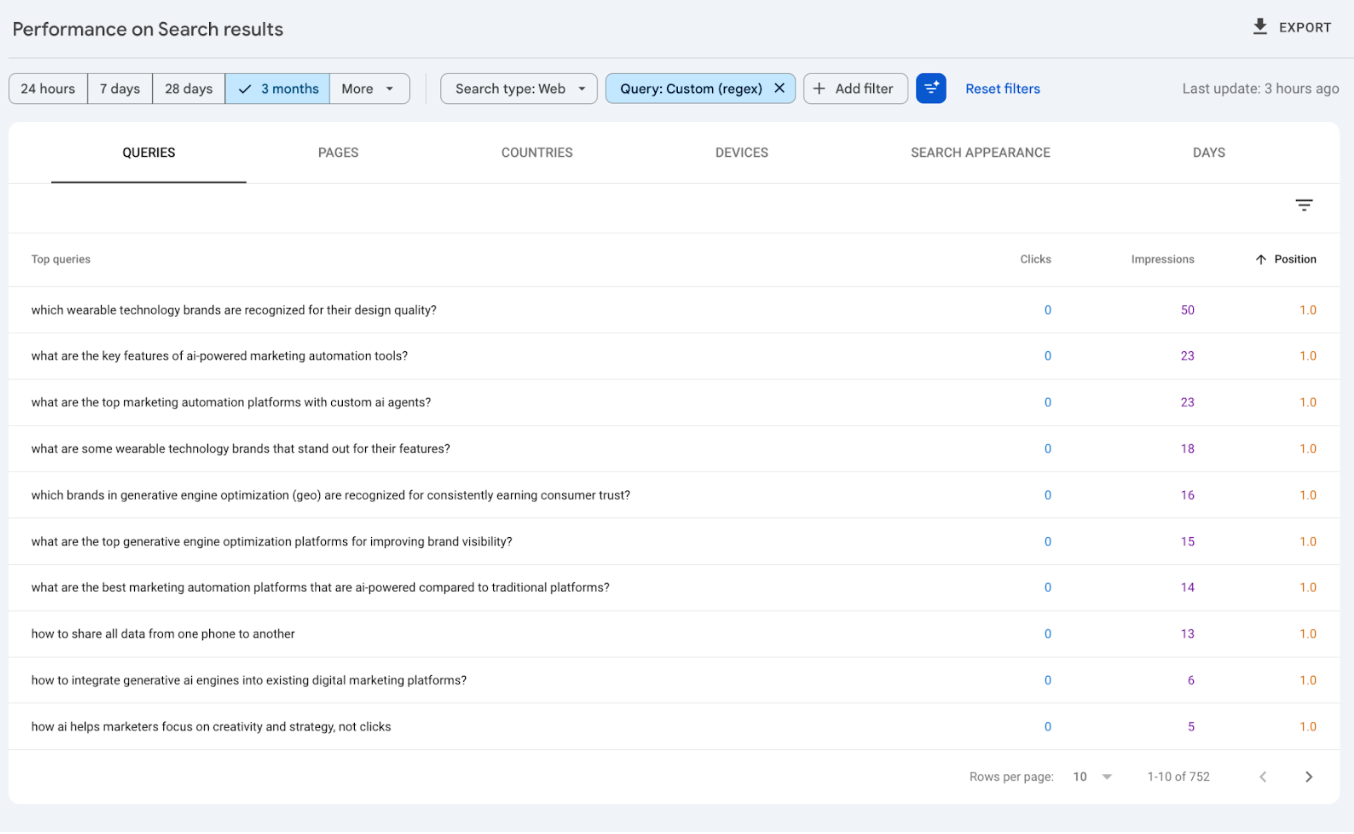
The screenshot above shows exactly what this looks like in practice. These are real queries, full conversational questions that read nothing like a keyword report. This is AI influenced search behavior, showing up inside a tool most of us have had open for years.
Step 6: Export the Data
Click Export in the top right corner and save the results as a CSV or Google Sheet. You will use this for the analysis steps below.
How Do We Know This Data Is Accurate?
It is a fair question, and it deserves a proper answer.
There are two confirmed sources that validate what you are seeing in this filtered data, and they come from credible, independently verified reporting.
Google’s Official Confirmation
Google has officially confirmed that AI Mode traffic and query data is tracked inside Search Console’s performance reports. This is documented in Google’s own Search Console support documentation, which specifically addresses AI Mode data availability within the performance report.
The ChatGPT Query Discovery
In November 2025, SEO researcher Jason Packer published an analysis showing that searches originating from ChatGPT’s browsing feature were appearing inside Google Search Console. When ChatGPT runs a background web search through Google, the query data from those searches was flowing into Search Console reports, including some that contained identifiable personal information.
Put these two sources together, and what you have is solid, independently confirmed evidence that your long tail query data is capturing real AI search behavior. Not perfectly, not exhaustively, but meaningfully.
How to Analyse This Data Properly
Getting the data out of Search Console is the quick part. Reading it well is where the real insight comes from. Here is how to go beyond the surface.
Sort by Impressions Rather Than Clicks
AI search queries tend to have high impression counts and very low clicks. This is not a bad sign. It often means AI systems are reading your content and using it to generate answers, without sending users directly to your page. A query showing 200 impressions and 0 clicks may well be one where your content is being cited regularly inside AI generated answers.
Sorting by impressions shows you your actual AI search footprint, which is a different and often more interesting picture than your click data.
Look for Query Clusters, Not Individual Queries
Reading through 500 queries one by one will wear you out fast and probably not reveal much. Instead, export the list and read through 30 to 50 queries looking for patterns. Which topics come up repeatedly? Which types of buyers seem most active? Which pain points appear across multiple different questions?
Those recurring themes are your content priorities. They show you where real demand exists in your category that your current content may not be addressing with enough depth or specificity.
Layer Additional Filters on Top
Once the long form query filter is applied, you can add a second filter to narrow further. Try filtering for queries that contain your brand name to see how buyers are asking questions that already include you. Then try filtering for a competitor’s name to see how your content shows up in comparison style queries.
Both filters tend to surface things that standard keyword reporting never would.
Read Your Pages Against Your Queries
Take five of your highest impression AI queries and open the pages on your site that are ranking for them. Read both side by side. Ask yourself honestly whether your page actually answers the question being asked, at the same level of specificity, in the same language.
More often than not, you will find that your page covers the general topic while the query is asking about a specific scenario. That gap is your most immediate opportunity.
How to Use This Data to Strengthen Your AI Search Visibility
Here is where the data pays off. These six moves will get you from insight to actual improvement in how your business shows up in AI search.
Group Queries Into Content Priorities
Take your exported query list and organize it by theme rather than trying to act on individual queries. Look for the topics, buyer scenarios, and pain points that come up most frequently. The themes with the highest concentration of long form queries are the ones where AI systems are actively hunting for good answers in your category. Those are your content priorities, and they are now grounded in observed buyer behavior rather than keyword tool estimates.
Audit Existing Content Against Real Buyer Questions
Go through your top query themes and check honestly whether your existing content answers those questions with enough specificity and depth. Not in a broadly optimized, covers the topic kind of way. In this way a real person who typed that exact question would find the page genuinely useful and complete.
Most businesses find a gap here. Content written for keyword algorithms often reads like it is talking about a topic rather than answering a question. Closing that gap is one of the most direct improvements you can make to your AI search visibility right now.
Rewrite Content So AI Tools Can Actually Use It
When you update existing pages or write new ones based on your query data, write to the specific scenario your buyers are describing. Use their language. Answer directly. Use clear headings that reflect the question being asked. Keep paragraphs focused.
A page that specifically and clearly answers “how to set up Zoho CRM for a remote B2B sales team with custom pipeline stages” will get cited by AI tools far more often than a page that covers Zoho CRM in general terms. The more directly you answer the question your buyers are asking, the more useful you are to the AI system trying to answer it on your behalf.
Use Comparison Queries as a Positioning Opportunity
If your query data shows buyers comparing your services to a specific competitor, that is an opening, not a threat. It means buyers are already aware of you and are actively evaluating their options. Content that addresses those comparisons honestly and specifically catches buyers at the exact moment they are making a decision. Done well, this type of content converts at a higher rate than almost anything else you can produce.
We applied this same thinking to Shopify merchants and found it works just as well in ecommerce. You can see how it plays out in our piece on getting Shopify product pages into Google AI reviews.
Build a Prompt Tracking List
Take your most important query themes and turn them into a short set of test prompts. Type them into ChatGPT, Perplexity, and Google’s AI Mode and see what comes back. Does your business show up? Which competitors are being cited? What do AI tools currently say about your category?
This becomes your AI visibility baseline. Check it every few weeks. As your content improves and your authority in specific topic areas grows, you will start showing up more consistently. Without a tracking list, you have no way of measuring whether any of this is working. With one, you have a simple, repeatable signal.
Apply the Insights Across Your Whole Site
The language patterns in your AI query data are useful beyond content creation. They can sharpen your service page copy, improve your meta descriptions, give your FAQ sections more relevant questions to answer, and make your overall messaging more specific. Anywhere you are currently using broad, generic language, your query data gives you real buyer language to replace it with. That specificity shows up everywhere, not just in AI search.
Want Better AI Search Visibility? Here’s Where to Start
Most marketing teams can pick up the framework in this article and make a solid start on their own. The method is not complicated, and the data is already there.
The harder part is what comes after. Analyzing a large query dataset for real patterns takes more than scrolling through a spreadsheet. Rewriting content in a way that genuinely improves AI citation, rather than just updating a few sentences, requires a specific understanding of how these systems read and use source material. Setting up prompt tracking across multiple AI platforms and staying current with a space that is moving quickly adds up to a real ongoing workload.
For most in-house teams juggling active campaigns, client deliverables, and a full content calendar, layering all of this on top is a stretch. Knowing when to bring in specialists is not a limitation. It is just good judgment about where to put your energy.
At Clixlogix, we work with businesses to understand their current AI search visibility, identify where competitors are showing up in AI generated answers instead of them, and build content and technical strategies that close those gaps, with real data behind every decision.
Every engagement starts with a proper look at your Search Console data, your AI platform visibility, and the specific questions your buyers are asking in your market. That picture shapes everything we build. We do not do off the shelf.
If you are curious whether your business shows up when AI tools answer questions in your category, or if you want a team that stays ahead of how search is changing and acts on it before your competitors do, let’s talk.
Get a Free AI Visibility Assessment from Clixlogix
We will review your Search Console data, run an AI visibility check across the top platforms, and give you a clear picture of where you stand. No obligation, no pressure. Just an honest read of what the data shows and what it would take to improve it.
Conclusion
Every few years, search does something new and the people who notice early get a head start on everyone else. The ones who caught on to long tail content early won traffic. The ones who invested in local SEO before it got crowded built positions that still hold today. AI search is the current version of that opportunity.
The Google Search Console method in this article gives you a free, immediate way to see where you already stand. One regex filter and suddenly you can see the conversational, AI style queries your site is showing up for, queries that tell you far more about how your buyers think than a standard keyword report ever did.
Start with what you have. Pull the data. Read through the queries and let them show you the gap between where your content is and where your buyers actually are.
The businesses paying attention to AI search visibility now, while most competitors are still focused entirely on traditional metrics, are the ones building positions that will be hard to displace later. The window is open. Go look at what is in your Search Console.