So you’ve created a stellar looking blog for yourself using WordPress, you’ve written some great blog posts in it and you are getting a decent amount of engagement from your users. But wait, what’s this? Your blog is still not ranking on the first page of Google for any of those blog posts!
One of the main reason for this might be your under-optimized category, tag and author pages!
So in this blog post we will learn what all these terms mean, what are the best SEO practices for tag, categories and author pages and how to hack WordPress for following these best practices.
So let’s get started, shall we?
What are Categories, Tags and Author Pages?
Let’s say your blog is about health and fitness. You’ve written many blog posts about biceps & triceps workout, chest workout, cardio and nutritious foods. If a user comes to your website, it will be very difficult for him to find all the posts on nutrition, when these posts are arranged in a chronological order.
You categorize your content into certain topics! In this case, we can create categories like: Resistive-training, Cardio and Nutrition. If a user wants to view more posts on nutrition, he can simply click on that particular category and read all the posts on nutrition easily.
Simple enough, right?
Now let’s suppose your user wants to view posts only related to chest workout, but there is no specific category for it. Now how can you help your user achieve his goal?
By making use of Tags of course!
So under resistance training category, tag blog posts into different categories like – chest, biceps & triceps, back, shoulders and legs!
When a user clicks on any tag, he is directed to a page where all the blog-post that have been tagged with that specific keyword are displayed in a chronological order.
If you observe, you’ll notice that we are moving from generalization to specialization: Category is like our macro goal and tag is our micro goal.
This helps our user to view blog posts according to their particular need. Similarly, if we have multiple authors posts on our blog, users should be able to click on author’s name and view only blogs written by that author. Such pages are called Author pages.
Can A Post Come Under More Than One Category?
If I had a dime for every time I heard this question, I would’ve been a millionaire by now!
First and foremost, if you have planned your categories strategically, this situation should never arise. But if you feel that your blog post should come under more than one category, always ask yourself, that whether this will enhance your user’s experience or not.
If the answer is yes, you should enlist it under multiple categories, but if you are doing it for the sake of search engines, then you should refrain yourself from doing such stuff as it has no SEO benefits.
If you are finding yourself stuck in such a predicament quite often, then you should consider restructuring your categories.
What About The Usage Of Multiple Tags?
You can assign as many tags as you want to a single blog post on WordPress. There is no limit attached to it. However, just because you can, doesn’t mean you should!
Think of these tags as an index for users which comes in handy when they are specifically searching for something. So you should be careful while assigning tag to these blog posts, and try your best to assign tags that will enhance your user’s experience.
One of the reasons that people tend to assign so many tags to a single post is that they think tags contribute to the keyword meta tags. But it’s not like that, although it can be implemented using Yoast plugin, which allows users to use tags in a meta keyword template.
Before we start exploring the best practices for categorization, tags and authors pages, let’s have a look at what tag means:
When crawlers crawl the page, and find meta tag, it drops that page entirely and doesn’t display it in the search engine results. It should be applied on the header section of the page. For more info on meta tags, read this article from Google’s Search Console Help.
This tag instructs the robots to follow all the links on the given page. It is most often used in this way: <noindex, follow>, to tell the robots that though the page should not be indexed, all the links on the page should be followed.
Problems With Categories, Tags and Author Pages
The problem that arises with segmenting data according to categories, tags and authors is that multiple copy of similar data is created on your website. Although from a developer’s perspective it is a single copy being displayed on different URLs, for search engine spiders they are different pages having the same content.
The thought of having duplicate content on a website makes most of the webmasters’ blood run cold, and the image of a fat Panda devouring their website starts flashing before their eyes!
The truth is most of us start acting crazy when it comes to duplicate content issue. I’d like to remind you that Matt Cutts has explicitly mentioned that Google only penalizes for duplicate data that is meant to manipulate search engine for rankings.
Here is a great article by Neil Patel that addresses duplicate content issues. It’s a must read!
Why Should We Care About Duplicate Data?
Although Google doesn’t penalize for copied data, it discourages webmasters from creating duplicate data. This is due to the fact that Google’s main aim is to show most relevant unique data to the users, but when Google encounters the same data being displayed on multiple pages, it gets confused as to which one should be presented to the users.
This results in your own pages competing against each other for getting displayed on the Google’s SERP, and also many websites link back to different copies of that page, thereby distributing the link juice which in an ideal world should’ve been consolidated to a single page.
Therefore it becomes imperative to minimize duplicate content issues on your website.
Best Practices to Follow For Categories, Tags and Author Pages
There is no panacea when it comes to duplicate content problem that arises from these categories, tags and author pages. Let’s explore how we can optimize these pages to give us the best results.
i) All these three pages share similar content, so it does not makes sense to index them all.
ii) A good rule of thumb is that your category and tag name should never be the same.
Let me explain this with the help of an example. If your site has a category named Nutrition and a tag named nutrition too, then most of the data in these two pages will be almost identical, which will lead to duplicate content issues.
Moreover, this will confuse the search engine that which page should it rank first!
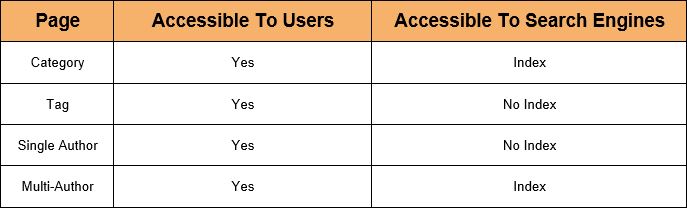
iii) Either <noindex, follow> category page or tag page and add unique two liner description to the one which you are indexing. This strategy will minimize the duplicate content issue and will allow one of these pages to rank without competing against each other.
iv) If you have a single author blog, then you should always <noindex, follow> it. For multi-author blogs, allow the page to be indexed and add two liner unique description to each of the excerpts you are displaying.
v) Before you choose to any of the pages, you should go to your Google Analytics dashboard and see from which page you are getting the maximum amount of traffic, and then proceed with de-indexing the page that is giving you less traffic among these pages.
v) I personally follow this strategy –
How to <noIndex,follow> Any Page Without Using Plugins?
You can <noindex,follow> any specific category(e.g- nutrition), tags(e.g- chest workout) and author pages on your site with the code I’ve provide below. The only pre-requisite for this code to work is that you should be aware of the id of the page that you want to apply it to.
Paste the below code on the header portion of the header.php template file, for de-indexing the specific category, tag or author page and following all the links on that page:
<?php if ($post->ID == 15 || $post->ID == 137 || $post->ID == 4008)
{
echo meta name="robots" content="noindex,follow";
}
Replace the random IDs with the ID of your desired category, tags, and author pages and voila!, those pages will be de-indexed.
So these are some of the best SEO practices you should follow for optimizing content, tags and author pages in your WordPress blog. What all practices do you follow? Let me know in the comments section below!