• Chat 24*7
  • +1-(315) 215-3533
  • +61-(02)-8091-3919
  • +91-(120)-4137067
Clixlogix
  • About
    • Company
    • Our Team
    • How We Work
    • Partner With Clixlogix
    • Security & Compliance
    • Mission Vision & Values
    • Culture and Diversity
  • Services
    • All
    • Mobile App
    • Web Development
    • Low Code Development
    • Design
    • SEO
    • Pay per click
    • Social Media
  • Solutions
  • Success Stories
  • Industries
  • We’re Hiring
  • Blog
  • Contact
Get In Touch
Clixlogix
  • About
    • Company
    • Our Team
    • How We Work
    • Partner With Clixlogix
    • Security & Compliance
    • Mission Vision & Values
    • Culture and Diversity
  • Services
    • All
    • Mobile App
    • Web Development
    • Low Code Development
    • Design
    • SEO
    • Pay per click
    • Social Media
  • Solutions
  • Success Stories
  • Industries
  • We’re Hiring
  • Blog
  • Contact
Clixlogix
  • About
    • Company
    • Our Team
    • How We Work
    • Partner With Clixlogix
    • Security & Compliance
    • Mission Vision & Values
    • Culture and Diversity
  • Services
    • All
    • Mobile App
    • Web Development
    • Low Code Development
    • Design
    • SEO
    • Pay per click
    • Social Media
  • Solutions
  • Success Stories
  • Industries
  • We’re Hiring
  • Blog
  • Contact
We are available 24/ 7. Call Now.

(888) 456-2790

(121) 255-53333

example@domain.com

Contact information

Theodore Lowe, Ap #867-859 Sit Rd, Azusa New York

Shape Images
678B0D95-E70A-488C-838E-D8B39AC6841D Created with sketchtool.
ADC9F4D5-98B7-40AD-BDDC-B46E1B0BBB14 Created with sketchtool.
  • Home /
  • Blog /
  • How Ecommerce Marketing Automation Can Make Your Holiday Sales Smoother
#E-commerce

How Ecommerce Marketing Automation Can Make Your Holiday Sales Smoother

by Abdullah Habib
36 min read

Last week, I got a call from a friend in Colorado, who sells semi-precious jewellery online. She walked me through her last holiday season.

They had what she called a “perfect” Black Friday: ads were humming, traffic was wild, orders were rolling in non-stop.

Two weeks later, things went quiet.
December was flat.
Most of those new customers never came back.

She asked me to help her fix the situation. Once I pulled up the analytics, the pattern was obvious. They didn’t have a traffic problem. They had a follow-up problem.

No real welcome flow. Weak cart reminders. No post-purchase emails to explain the product. No refill prompts. Just manual blasts and hope.

I recommended ecommerce marketing automation that would make buyers feel wanted and would maintain an ongoing relationship with them. Done right, it quietly handles the boring but crucial work in the background:

  • Welcoming new visitors
  • Nudging people who viewed or added to cart
  • Guiding first-time buyers so they don’t refund out of confusion
  • Asking for reviews, refills, and repeat orders at the right time

And this isn’t just her story. I see versions of this across a lot of ecommerce brands right now. So, in this guide, I’m putting the whole playbook on the table.

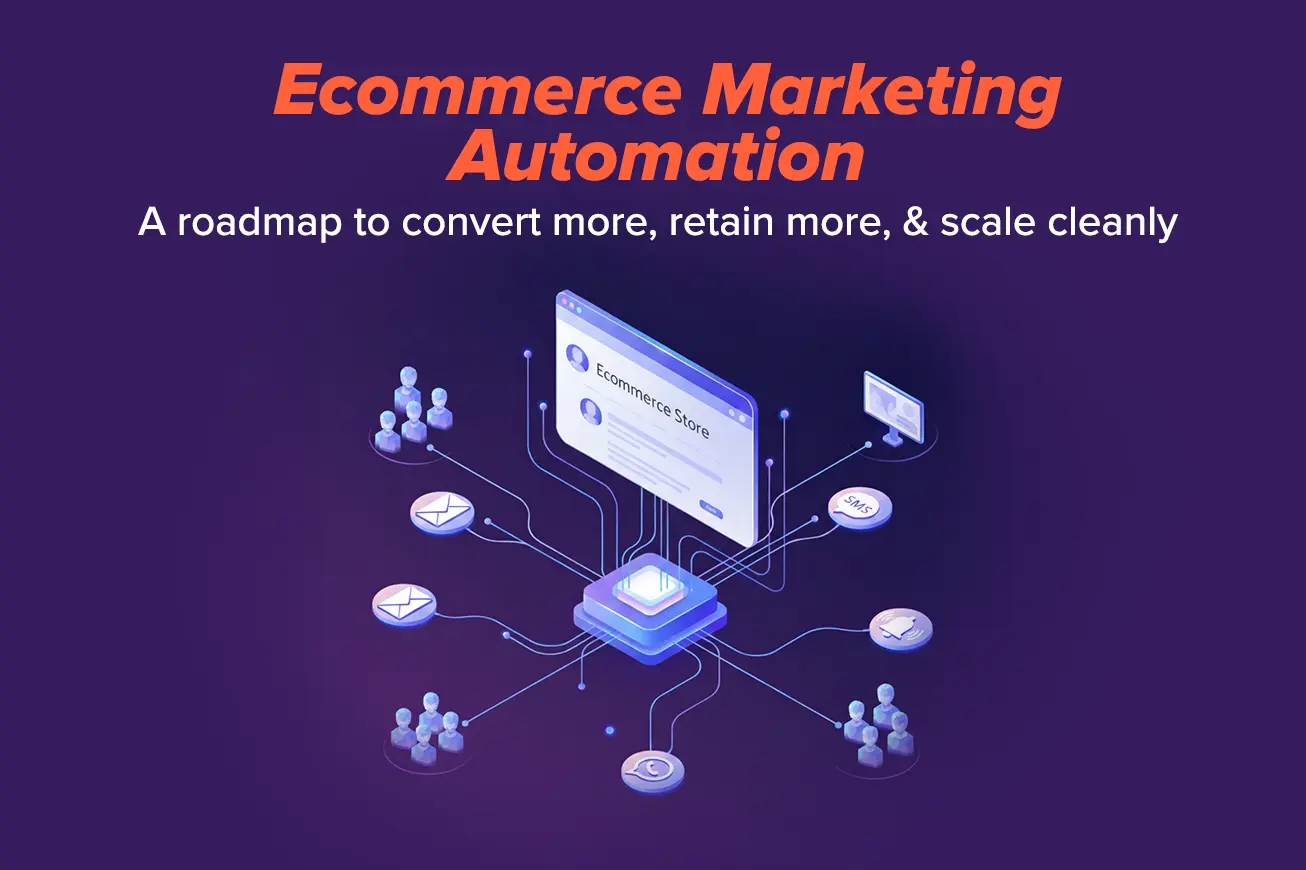
We’ll keep it simple and practical: how marketing automation for ecommerce should work across email, SMS, WhatsApp, push, and ads during the holiday rush, and which flows you should build first if you actually want Black Friday customers to still be around in February.

What Ecommerce Marketing Automation Means in 2025 (Minus the Buzzwords)

Marketing automation for ecommerce is the set of rules, data, and flows that decide who hears from you, on which channel, and at what moment, without manual effort each time.

When people talk about ecommerce marketing automation, they’re not talking about one magic tool. They’re talking about a system where:

  • Messages go out based on what a shopper does, not when someone on your team finds time
  • Offers and reminders follow real behavior: visits, clicks, carts, purchases
  • Your team spends less time pushing buttons and more time deciding what should be said

Campaigns vs. Automation: the easy way to see the gap

Campaigns ride on top of your marketing automation ecommerce setup. However, most stores are heavy on campaigns and light on automation:

  • Campaigns are the one-off blasts:
    • “Black Friday is live,” “New collection,” “Weekend sale.”
      Someone writes it, schedules it, hits send.
  • Automation is everything that runs on its own once you set it up:
    • Welcome emails for new subscribers
    • Cart reminders for people who left items behind
    • Refill prompts for products that run out
    • Winback emails for customers who have gone quiet
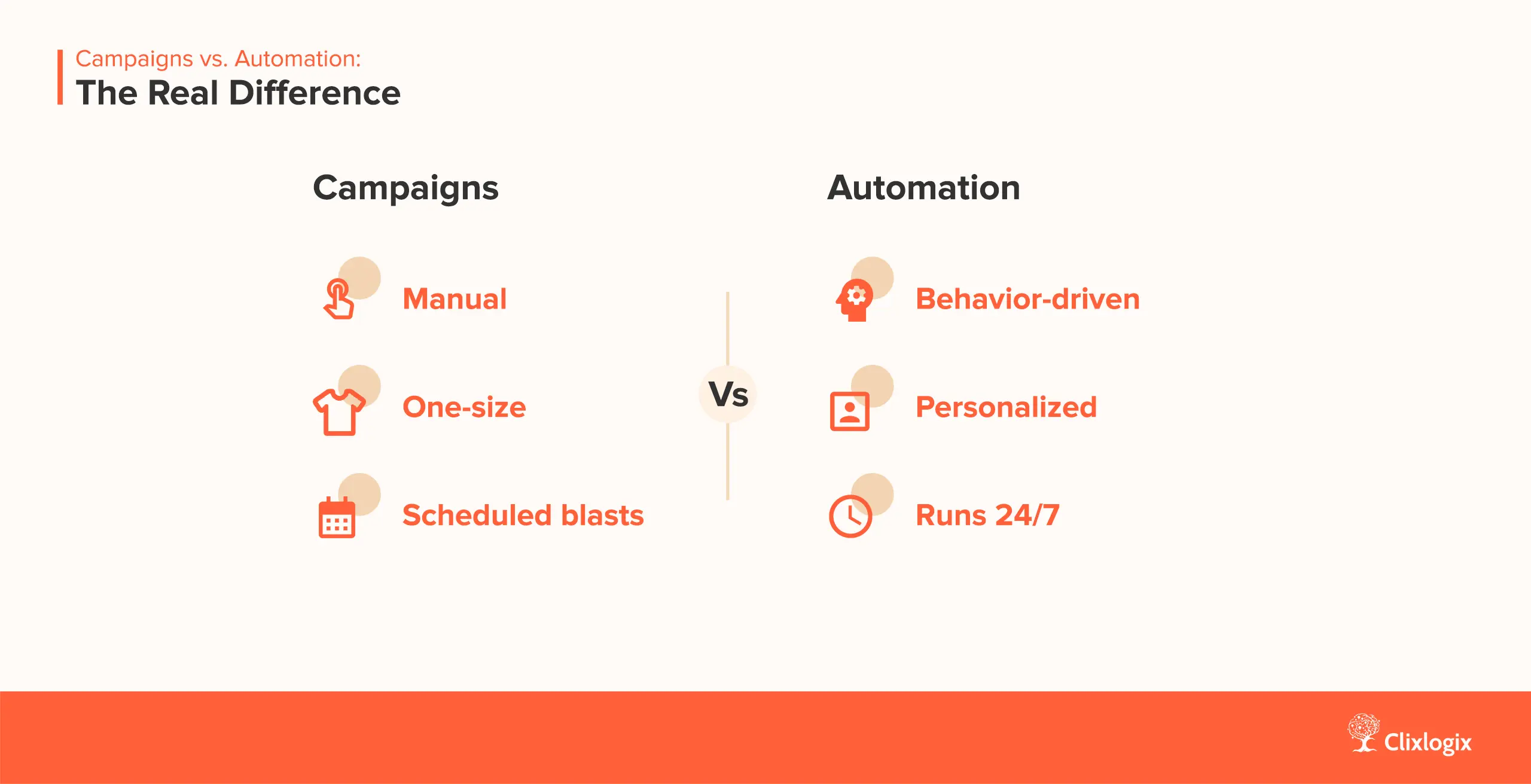
Infographic explaining the difference between the Ecommerce Marketing Campaigns and Ecommerce Marketing Automation

It’s not just email anymore

A few years ago, “marketing automation for e-commerce” mostly meant email flows. Today, even mid-size stores can connect with their buyers via:

  • Email
  • SMS
  • WhatsApp
  • Push notifications (web or app)
  • Product-based remarketing ads

The shopper doesn’t care which channel you used; they just feel either:

  • “This brand is helpful and on time.”
  • Or: “This brand is annoying, and everywhere.”

The difference is whether your channels talk to each other or behave like separate teams. A smooth setup might look like this:

  • Email carries the main story and details
  • SMS or WhatsApp only step in when timing is tight (cart, delivery, last-day reminder)
  • Push handles gentle nudges: “back in stock,” “price dropped,” “you left something”
  • Ads show the exact products someone viewed or added, instead of random catalog it

Why this matters more in a holiday season

During Black Friday and the other holidays, three things happen at once:

  • Traffic spikes
  • Support volume spikes
  • Attention span drops

If your follow-up is manual, your team will default to broad campaigns and ignore the smaller, high-value moments such as:

  • The person who viewed your best seller product three times but never added it
  • The first-time buyer who needs a quick “here’s how to use this” email so they don’t refund
  • The loyal customer who should see a VIP offer before you run a public sale

An effective ecommerce marketing automation setup turns these into automatic flows, not “if we have time” tasks. That keeps sales coming in even after the big weekend and stops your list from burning out under panic emails.

How You Should Shift your Mindset

If you want this to work, the mindset has to move from “What can we send this week?” to:

  • “Which moments in the customer’s path are we missing right now?”
  • “What data do we already have and fail to use?”
  • “Which of these can be handled by an AI bot instead of a person?”

Once you think that way, tools, AI help, and everything else we’ll cover later are just ways to make those decisions faster.

Let’s map the seven most important moments for an ecommerce store, and see where your automation is already doing the heavy lifting and where it’s missing completely.

The 7 Moments That Matter Most in Ecommerce Marketing Automation

If you try to build every possible flow, you’ll stall. The fastest way to make ecommerce marketing automation useful is to focus on a few high-impact moments first.

Think of these seven as the basic wiring that will make things move faster. Once these are in place, campaigns work better, ads make more sense, and your team spends less time firefighting.

1. First Visit to First Purchase

This is where most stores leave money on the table. Someone visits, maybe signs up for a discount, and then… they get nothing for days.

A good ecommerce email marketing automation setup starts the second a visitor gives you an email or phone number:

  • A clear welcome email that sets expectations
  • A follow-up that shows best sellers or a quiz to learn what they care about
  • A gentle reminder if they haven’t purchased after a few days

For holiday traffic, this might look like:

  • Day 0: “Welcome, here’s how our store works during Black Friday / holiday sales”
  • Day 1–2: A short story about the brand and top products by use case
  • Day 3–4: A nudge with social proof, not just a bigger discount

Goal: turn a random visitor into someone who actually knows your store and feels safe buying.

2. Browse to Cart

Next, you’ve got people who keep looking at things but don’t even add them to the cart.

You already have strong intent here. Your marketing automation for ecommerce should catch it:

  • Track which products or categories a visitor views
  • Trigger browse emails if they view a few times without adding to cart
  • Use the page they viewed as the main item in that email (not something random from your catalog)

Example: Someone views three different protein powders and leaves. A day later, they get an email that leads with those products, with a quick “how to pick the right one” guide and maybe a short FAQ. No hard push, just helpful context and a way back. Or they see ads of that product with discounted prices on Facebook or Instagram.

3. Cart to Checkout

Cart abandonment is the classic use case for ecommerce marketing automation, and most stores still do the bare minimum: one sad email an hour later.

You can do better without being annoying:

  • Email: main channel for context and reassurance
  • SMS or WhatsApp: only for higher cart values or repeat visitors
  • Push: “you left this behind” for people who opted in on web or app
  • Ads: show the exact products they added or viewed

A simple flow:

  • 1 hour later: email with the cart and a quick “Any Questions?”
  • 12–24 hours later: second email with reviews or social proof
  • 24–48 hours later: SMS for high-value carts only (“Your cart is still waiting, sale ends soon”)

In parallel: cart-based ads on social for a few days

Goal: Recover the sale without turning every channel into a siren.

4. First Order to Second Order

This is the part most teams ignore. They chase new customers and forget the ones who already trusted them once.

Your ecommerce marketing automation setup should treat the first order as the start of a new relationship, not the end. Here’s what your automated workflows should do:

  • Order confirmation –> shipping updates (email + SMS if opted in)
  • “Here’s how to use what you just bought” content
  • A check-in email once they’ve had time to try it
  • A suggestion for what to buy next, based on that first product

Example: A customer buys a skincare starter kit.

  • Day 0: order + shipping emails
  • Day 2: “How to use these products together” with a simple routine
  • Day 10: “Common mistakes to avoid so your skin isn’t irritated”
  • Day 21: gentle nudge toward one add-on product that fits that routine

If you never guide that first use, you pay for support tickets and returns instead.

5. Replenish and Refill

If you sell anything that runs out (supplements, pet food, beauty, coffee, grooming products), refills are where a huge chunk of long-term profit hides.

Good marketing automation for e commerce can:

  • Estimate when a product usually runs out
  • Trigger refill reminders by email, SMS, or push a bit before that
  • Offer simple options: “refill now,” “change flavor,” “skip this time”

Example timing:

  • Day 20: “How is it going?” email with tips, no sale pitch
  • Day 25–30: refill reminder email
  • Day 32–35: SMS reminder for customers who usually respond well to text
  • Later: add these people to ads that feature bundle refills or bigger packs

You want people to feel like the brand has their back, not like you’re just chasing another order.

6. VIP and High-Value Customers

Not all customers are equal. Some buy once during a sale and vanish. Some come back over and over, refer friends, and rarely complain.

Ecommerce marketing automation should treat those groups differently:

  • Tag customers by basic patterns: how recent, how often, how much
  • Give repeat buyers early access to sales
  • Offer small “thanks for sticking with us” perks that regular buyers never see

Example moves:

  • Early access emails for VIPs 24 hours before a public Black Friday sale
  • Exclusive product drops to people with 3+ orders
  • Occasional surprise upgrade on shipping or samples, backed by an email that explains it

You’re not giving away the store. You’re protecting the customers who keep the store alive.

7. At-Risk Customers and Winback

Last group: customers who bought once (or even a few times) and then went quiet.

A basic winback system might:

  • Wait a certain number of days with no purchase or no opens
  • Send a “still here for you?” email that asks what changed
  • Offer help first, deals second

Possible flow:

  • After X days of no purchase: email asking if they still want to hear from you, with a simple preference link
  • A few days later: “here’s what you missed” email with recent best sellers or improvements
  • Only after that: a small, time-bound deal to bring them back
  • If no engagement: slowly reduce how often they hear from you or move them to a low-frequency list

Winback isn’t “spam them until they buy again.” It’s a last chance to keep the relationship before you stop leaning on them.

If these seven moments are wired, you stop relying on luck and last-minute campaigns.

In the next section, we’ll talk about how email, SMS, WhatsApp, push, and ads each play their part without stepping on each other’s toes.
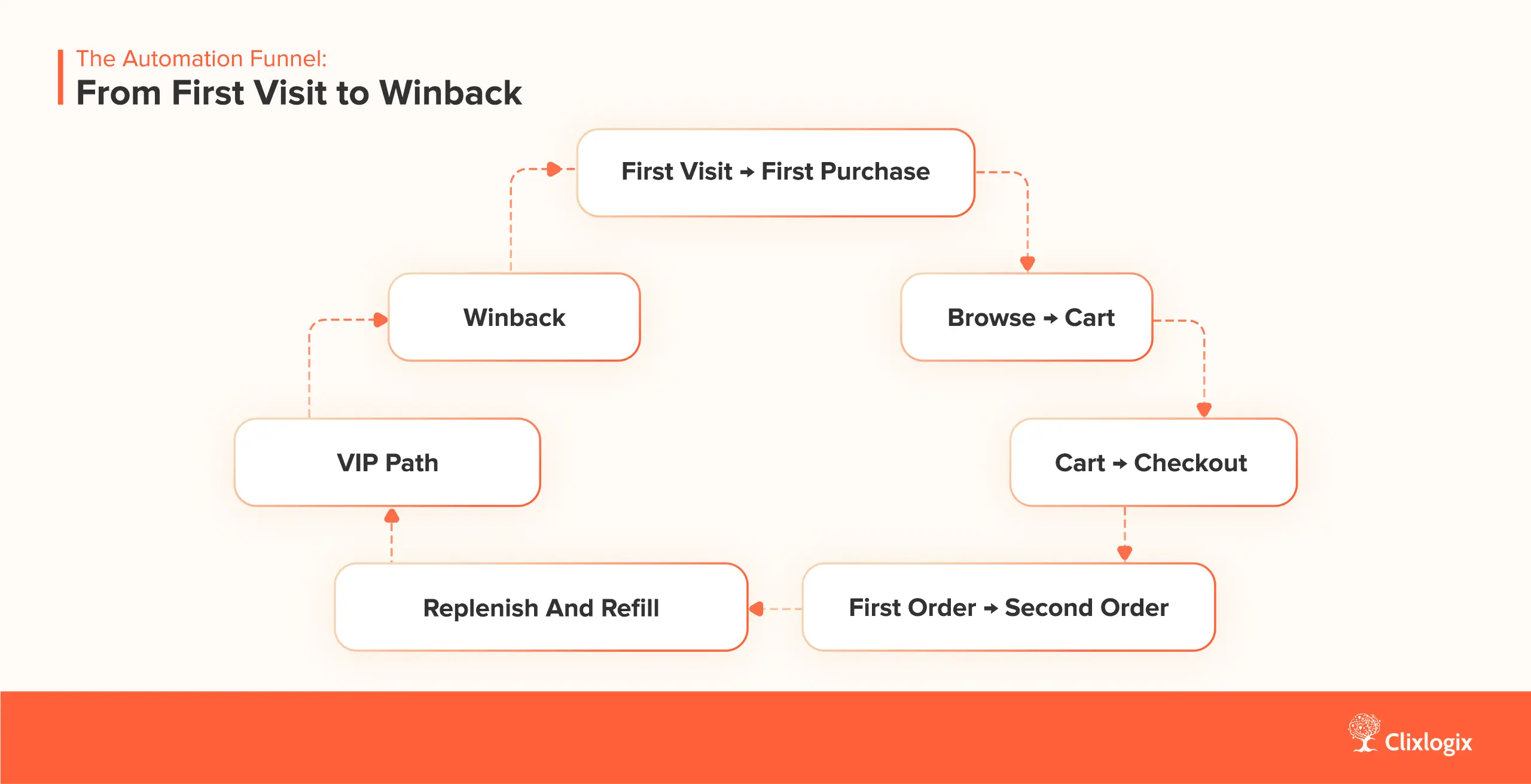
An Ecommerce Marketing Automation Funnel diagram

Your Channel Stack: Email, SMS, WhatsApp, Push & Ads Working Together

More than a channel problem, stores suffer from poor coordination between different channels.

Email is doing one thing, SMS is doing another, ads are running on old audiences, and nobody is quite sure how many times a single customer gets pinged in a day.

Ecommerce marketing automation brings it all together. The tools don’t matter if each channel behaves like a separate brand.

Let’s keep this simple.

Email: Still the Workhorse

If you took everything else away and left only email, a good setup would still make money.

This is where most of your core flows should reside:

  • Welcome
  • Browse reminder
  • Cart reminder
  • Post-purchase education
  • Refill prompts
  • Winback

Email is where you explain, tell stories, answer objections, and give people time to think. It’s the foundation of email marketing automation for ecommerce.

If your email is only doing “newsletter + sale,” you’re driving with half the dashboard turned off.

SMS and WhatsApp: High-Intent, Not High-Spam

Texts reach people directly on their phone. It’s power, and it’s also a risk.

Use SMS and WhatsApp when:

  • There’s less time (sale ending, stock running low, delivery updates)
  • The cart value is high
  • The customer has already shown strong interest

Good use:

“Hey Sarah, your skincare routine from last month is about to run out. Want us to ship the refill this week?”

Bad use:

“FLASH SALE!!! 20% OFF STOREWIDE” to everyone, three times in a weekend.

In a smart marketing automation for ecommerce setup, SMS and WhatsApp don’t copy email. They step in where email is too slow or too easy to ignore, and do not copy email.

Push Notifications: Gentle Reminders

Push works best when people have already allowed web push or installed your app.

Use push to:

  • Remind buyers about carts and wishlists
  • Share price drops or back-in-stock alerts
  • Give small nudges during events like Black Friday (“your saved item is now on sale”)

Think of push as a small tap on the shoulder. Short, clear, easy to dismiss. No essays, no drama.

Ads & Remarketing: Quiet Persistence

Ads are a vital part of your ecommerce marketing automation journey. If your product feed and tracking are set up, platforms can show people the exact items they:

  • Viewed
  • Added to cart
  • Bought in the past

Here’s an example of a simple, but effective use:

  • Someone views three winter jackets and leaves
  • Over the next week, they see ads for those jackets and close alternatives
  • If they purchase, they drop out of that group and move into a “recent buyers” group that sees different ads (care tips, accessories, or future drops)

This is where good tracking and your marketing automation tools for ecommerce start to work together. Email handles the explanation. Ads quietly follow up for people who didn’t open or didn’t click.

How They Work Together Without Being Annoying

Here’s a simple way to think about the stack:

  • Email: main storyteller and closer
  • SMS / WhatsApp: urgent or high-value prompts
  • Push: light reminders and alerts
  • Ads: background follow-up for people who clicked but didn’t convert

Basic rules that make sure that each channel plays its part:

  • Don’t send the same person an email, SMS, and push about the same cart in the same hour
  • If someone just completed a purchase, pause cart and promo flows for a reasonable amount of time
  • Let ad audiences update based on real events (purchases, refunds, unsubscribes), so you don’t chase people who are already done

Once these simple rules are in place, each channel stops fighting for attention and starts playing its part.
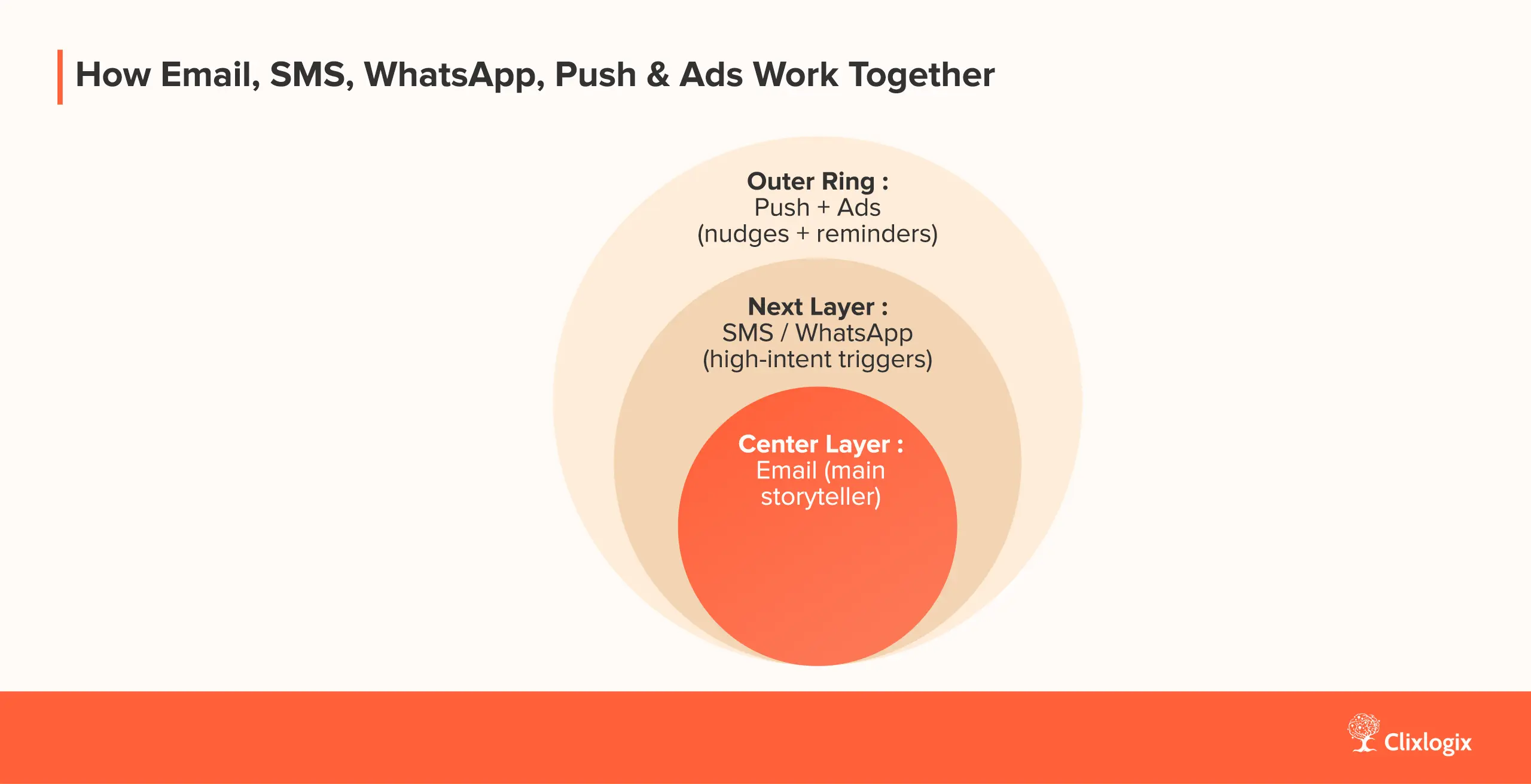
Layer diagram of channels used in ecommerce marketing automation

Holiday-Focused Ecommerce Marketing Automation: From Black Friday to New Year

The holiday season doesn’t start on Black Friday. By the time your sale email goes out, people have already seen dozens of “BIGGEST SALE EVER” messages from other stores.

If your ecommerce marketing automation is only active on the sale days, you’re late.

Let’s break it into three clear phases.

Before Black Friday – Warm People Up Early On

You don’t need more discount codes. You need a better signal on who wants what.

In the 2–4 weeks before Black Friday:

1. Build a simple VIP list

Ask people to join an “early access” list for Black Friday

Promise something specific: early access, limited bundles, or low-stock items first

Put VIPs in a separate segment so they get slightly better timing and offers

Simple automation:

  • Someone signs up for VIP –>
    • Instant email: “You’re on the early list, here’s what to expect”
    • Closer to Black Friday: “Your early access starts at X time, here’s a preview”

2. Collect intent, not just emails

This is where marketing automation for ecommerce can already start helping:

  • Short poll: “What are you planning to shop for this year?”
    • Android Mobile Phone
    • Iphone
    • Tablet
    • Laptop
    • Desktop
  • Tag people based on answers
  • Use those tags in your flows:
    • Pre-BF emails that focus on their category
    • Different hero products for each segment
    • Different cart reminders when the time comes

3. Warm-up content, not just warm-up discounts

Your flow in this phase doesn’t have to shout “Sale is coming!” every time.

Ideas:

  • “Top 5 products our regulars wait for during Black Friday”
  • “How to pick the right [category] for you so you don’t waste the discount”
  • “What usually sells out first and how to avoid missing it”

By the time Black Friday hits, you want your core list to know:

  • What you sell
  • What’s worth grabbing first
  • That you’re not going to spam them from six channels at once

During Black Friday & Cyber Monday

Things get intense during the BFCM. These are the days when bad automation setups expose themselves. People get:

  • 3 emails
  • 2 texts
  • A push notification
  • The same product ad 10 times

All in 24 hours. Then they unsubscribe and block you.

To keep ecommerce marketing automation from acting like a firehose, set a few control rules.

1. Channel rules for the sale window

Examples:

  • Email: main driver of offers and details (daily is fine during BFCM if the list is warm)
  • SMS/WhatsApp:
    • Only for VIPs or people with high cart value
    • Only once or twice during the whole event
  • Push: short, simple “now live” or “ending soon” alerts
  • Ads: heavier remarketing during the event, but exclude recent purchasers fast

If someone is in your VIP group, they may get:

    • One early access email
    • One public sale email
    • One SMS reminder if they haven’t bought and usually respond well to text.

2. “Quiet” segments for buyers and heavy engagers

Automation works both ways. It can stop sending as well as send.

Create a simple rule:

  • If someone buys during the sale –>
    • Move them out of “hard sale” promos within a few hours
    • Switch them into a “post-purchase” or “thank you + here’s what’s next” flow

Also:

  • If someone opened or clicked multiple messages in a day but didn’t buy, dial it down for 24–48 hours. Let them breathe instead of hammering them and sounding desperate.

This keeps your ecommerce marketing automation stack from feeling desperate.

3. Use flows instead of random blasts

Even during BFCM, flows should handle:

  • Cart reminders
  • Browse reminders
  • Post-purchase emails
  • Basic winback for older segments who didn’t respond last year.

After Cyber Monday – Turn Festival Buyers into Long-Term Customers

Most brands go silent or switch to “last chance” messages until New Year.

That’s a waste.

You just acquired a huge number of new buyers. This is where ecommerce marketing automation can turn them into regulars.

1. Holiday-specific post-purchase flows

Right after the rush:

  • Order + shipping emails as usual
  • Then a short series focused on:
    • How to use what they bought
    • How to avoid common mistakes
    • How to get help if something isn’t right

For gifts, adjust:

  • “If this was a gift, here’s how to help them with size, setup, or support”
  • “Here’s how to exchange or adjust without friction”

2. Refill and second-order planning

Don’t wait until March to think about repeat orders.

  • For wellness and beauty: set refill triggers based on average use
  • For fashion: show ways to style what they bought, then related products
  • For electronics: send setup guides, then accessories, then upgrade invites at the right time

This isn’t about spamming them after the sale. It’s about not ignoring your new customers .

3. Clean up your list before the new year

After the dust settles:

    • Identify people who never opened anything during the sale
    • Run a short “do you still want to hear from us?” flow
    • Move cold profiles into a low-frequency group or stop mailing them aggressively

That single clean-up step improves deliverability for the next year more than one more sale email ever will.

Free Holiday Automation Check-Up

If you read this and you’re thinking, “We’re not even close to this,” that’s normal. Most teams are buried in day-to-day work by the time Q4 hits.

If you want help spotting the fastest fixes in your own setup, I’m opening 20 free consultation calls for this season.

On this call, we’ll:

  • Look at your current flows for ecommerce marketing automation
  • Pick the top 2–3 moments you should fix before or during the holiday rush
  • Outline what you can do with the tools you already have

No long pitch, no 40-slide deck. Just a focused call to stop obvious leaks while there’s still time.

If that sounds useful, grab one of the remaining spots and we’ll go through your setup together.

12/20 left

Get Your Free Holiday Ecommerce Marketing Automation Check–Ups

Book My 30-Minute Review

How Different Industries Use Ecommerce Marketing Automation

The basic wiring of ecommerce marketing automation is the same, but what you send and when you send it should change by industry.

A supplement brand, a beauty store, a fashion label, and an electronics shop are not having the same conversation with buyers. If they run the same flows with new logos slapped on, they leave money on the table and annoy people for no reason.

Let’s go through four fast-growth sectors and show one concrete flow for each.

Health & Wellness Ecommerce

Health and wellness is where “just send more emails” can get risky fast.

People are buying products that affect their bodies: supplements, powders, kits, test devices. They are often:

  • Unsure what to expect
  • Worried about side effects
  • Influenced by friends, coaches, or practitioners

Automation here should calm people down, not shout discounts at them.

Example flow: 30-day supplement support

Trigger: Customer buys a gut health supplement for the first time.

Flow:

  • Day 0 – Order & basic intro
    • Standard order + shipping emails
    • Short “how to take this the right way” section: dose, timing, simple do’s and don’ts
  • Day 5 – Food & habit tips
    • Email: “How to help this supplement do its job”
    • Simple advice on meals, hydration, and what to avoid
    • No hard sale, just practical help
  • Day 10 – Gentle check-in
    • SMS or email asking: “How are you feeling so far?”
    • Links to a FAQ page: common reactions, when to contact support
  • Day 20 – Expectations reset
    • Email spelling out what is realistic to expect by now, and what takes longer
    • Invite to reply if something feels off
  • Day 28–30 – Refill reminder
    • Email: “You’re close to the end of your first bottle. Want to continue?”
    • Simple options: refill now, change flavor/variant, pause

Health and wellness customers marketing automation for ecommerce is doing its job when people feel guided, not rushed. It also makes your site content stronger for both search and Generative Engine Optimization, because you’re spelling out clear, factual guidance that AI tools can read and use.

Beauty and Personal Care

Beauty buyers live in routines. If your automation only shouts discounts, you’re acting like a cheap coupon site instead of a routine partner.

You usually have:

  • Skin type
  • Skin goals (acne, aging, dryness, glow, etc.)
  • Product usage patterns

Use that.

Example flow: “Skin Goals” starter routine

Trigger: customer takes a short skin quiz and buys a starter kit.

Flow:

  • Day 0 – Routine setup
    • Email: “How to use your new routine in 5 minutes a day”
    • Clear: morning steps, evening steps, what to do / what to avoid
    • A quick “what to expect in week 1 vs week 4” section
  • Day 3 – Application help
    • Email with a short video: correct order, amount, and common mistakes
    • Address one frequent worry (“Will this purge my skin?” type messaging)
  • Day 7 – Check-in and support
    • SMS (for people who opted in) asking how it’s going
    • Link to a help page or chat if they have irritation or confusion
  • Day 21 – Next-stage results
    • Email: “If you’re on track, here’s what you might see now”
    • Introduce one “next level” add-on product, not five
  • Day 35 – Refill with choice
    • Email: “Ready for month two?”
    • Options: refill same kit, switch one product, ask for help if results are off

Here, ecommerce marketing automation is less about pushing “20% off everything” and more about helping someone stay consistent long enough to see results. That naturally increases repeat orders and lowers refund rates.

Fashion & Apparel

Fashion has its own problems: sizing, returns, trend cycles, and seasonal stock. Good flows help shoppers:

  • Pick the right size
  • See how one item fits into the rest of their wardrobe
  • Catch drops and restocks without refreshing the site like maniacs

Example flow: winter jacket cart recovery

Trigger: visitor filters winter jackets by size, adds one to cart, then leaves.

Flow:

  • Hour 1 – Clear cart reminder
    • Email: shows the exact jacket, color, size they picked
    • Short section: “How this fits” (slim/relaxed, height range, real model reference)
    • Link to reviews focused on warmth and fit
  • Day 1 – Alternatives at same level
    • Email: 3–4 jackets in the same size and similar price
    • One is the original choice, others are similar style or slightly different warmth level
    • No endless grid, just a few solid options
  • Day 2 – Product ads doing quiet work
    • Social ads show:
      • The original jacket
      • A similar one in the same range
    • These run for a few days, then pause if no action
  • Day 5 – High-intent nudge (for repeat visitors)
  • SMS only if:
    • Customer has bought before
    • Or has visited the jacket page multiple times
  • Short text: “We still have [jacket name] in your size. Sale ends tonight.”

For fashion, marketing automation for e-commerce wins when customers feel like the brand understands their size and climate, not just their email address.

Electronics

Electronics usually means higher price, longer life, and more chances for confusion.

People worry about:

  • Setup pains
  • Compatibility with other devices
  • Support when something breaks

If your post-purchase flows are “thanks, here’s a discount on something random,” you’re wasting that nervous energy.

Example flow: smart home device care path

Trigger: customer buys a smart home device (camera, sensor, hub, etc.).

Flow:

  • Day 0 – Quick start
    • Email: “Your new [device] is on the way. Here’s a 3-step setup you can do in 10 minutes.”
    • Link to a simple video, not a 30-page PDF
  • Day 2 – Deeper tips
    • Email: “5 small settings that make [device] way more useful”
    • Show scenes, automations, or use cases most people miss
  • Day 10 – Setup check
    • Email asking: “Is everything working the way you expected?”
    • Two buttons: “Yes, all good” and “I need help”
    • “I need help” goes to support or a clear help page
  • Month 6 – Accessory ideas
    • Email with cases, mounts, extra sensors, or extended storage
    • Focus on usefulness, not clutter
  • Month 18–24 – Upgrade invite
    • Email: “You’ve had [device] for a while. Here’s what the newer models can do differently.”
    • Option to trade in or recycle the older model

For electronics, solid ecommerce marketing automation turns “I hope this works” into “this brand has me covered.” It also gives you clean, structured content that later helps AI tools and, by extension, AI search answers understand your products and use cases.

If you get these sector flows right, you’re already far ahead of the average “set one welcome email and pray” setup.

Next, we’ll talk about picking marketing automation tools for ecommerce without drowning in feature lists, and where something like Zoho fits in if your business already runs on it.

Let’s Pick Marketing Automation Tools for Ecommerce Without Getting Lost

You don’t need twenty tools. You need one stack that fits your store, your team, and your budget.

Here are 7 widely used ecommerce marketing automation tools, how they fit, and where they fall short.

1. Zoho Marketing Automation + Zoho Campaigns + Zoho CRM

Best for:

  • Stores that already use Zoho for sales, support, or back office
  • B2C + B2B hybrid setups (wholesale + retail)
  • Roughly 10–200 people, with some internal ops maturity

Use cases:

  • Email flows: welcome, cart, post-purchase, winback
  • Lead scoring and behavior-based journeys
  • Mixing ecommerce orders with CRM deals and offline activity

Strengths:

  • One contact record across CRM, marketing, and other Zoho apps
  • Strong for brands that sell online and through reps, dealers, or partners
  • Good fit if you care about ops and reporting as much as campaigns
  • Cost stays sane as your list grows compared to some “pure DTC” tools

Weaknesses:

  • Not as “plug and go” for Shopify as Klaviyo or Omnisend
  • UI and naming can feel heavy if you only care about simple email flows
  • Needs proper setup to shine; not the best fit if you hate systems work

2. Klaviyo

Best for:

  • Pure ecommerce and DTC brands
  • Strong on Shopify, BigCommerce, and similar stacks
  • Teams that live in email and SMS all day

Use cases:

  • Ecommerce marketing automation flows: welcome, browse, cart, post-purchase, refill
  • Strong SMS + email combo
  • Product feed based campaigns and browse/cart flows

Strengths:

  • Deep integrations with major ecommerce platforms
  • Prebuilt flows that actually match what a store needs
  • Clear revenue reporting by flow and campaign
  • Loads of community examples and playbooks

Weaknesses:

  • Can get expensive as your contact list grows
  • Not ideal if ecommerce is just one channel among many (e.g., heavy B2B)
  • Not a full CRM, so you may end up gluing it to something else

3. Omnisend

Best for:

  • Small to mid-size ecommerce brands, often on Shopify or Woo
  • Stores that want email + SMS + basic push in one place
  • Teams that want to move fast without heavy complexity

Use cases:

  • Welcome, cart, browse, post-purchase flows
  • Simple SMS automation tied to store events
  • Holiday campaigns across email + SMS

Strengths:

  • Very ecommerce-focused interface
  • Easy setup of core marketing automation for ecommerce flows
  • SMS and email under one roof
  • Good fit for lean teams that still want proper flows

Weaknesses:

  • Less deep CRM and lead-management features
  • Reporting is solid, but not as broad as a full CRM or CDP stack
  • If you outgrow it, migrating flows and segments can be a pain

4. ActiveCampaign

Best for:

  • Brands that mix ecommerce with lead nurturing or light sales
  • Agencies managing multiple stores
  • Teams that like detailed, logic-heavy automation maps

Use cases:

  • Email flows triggered by store events, form fills, page visits
  • Basic CRM needs alongside ecommerce
  • Scoring leads or contacts based on behavior

Strengths:

  • Very flexible automation builder
  • Good tagging and segment logic for complex setups
  • Can handle both ecommerce flows and simple sales pipelines
  • Works across many platforms, not just Shopify

Weaknesses:

  • Can seem complex to teams that just want simple flows
  • Needs a solid naming and tagging system or it turns messy fast
  • Native ecommerce integrations exist, but not as deep as Klaviyo’s Shopify focus

5. HubSpot Marketing Hub (with HubSpot CRM)

Best for:

  • Higher-ticket ecommerce or mixed B2B/B2C stores
  • Brands that care a lot about lead nurturing, content, and sales pipelines
  • Teams with 20–200 people and cross-functional sales + marketing

Use cases:

  • Email automation for ecommerce plus lead nurturing
  • Tying store orders to sales activity in the same CRM
  • Multi-channel campaigns (email, ads, onsite forms) with clear contact timelines

Strengths:

  • CRM and marketing deeply tied together
  • Strong reporting and dashboards
  • Good for brands that sell online and through reps or account managers
  • Plays nicely with content-heavy sites

Weaknesses:

  • Pricing climbs quickly as contacts and features grow
  • Overkill if you just want ecommerce marketing automation software for Shopify and basic SMS
  • You need someone who actually “owns” HubSpot for it not to rot

6. Drip

Best for:

  • Content-driven ecommerce brands
  • Creators and niche stores that care a lot about tagging and behavior
  • Teams that still want strong email focus without a heavy CRM

Use cases:

  • Story-driven email flows: launches, content, behavior-based follow-ups
  • Tag-based marketing automation for e commerce rather than strict lists
  • Solid Shopify + WooCommerce integration

Strengths:

  • Very flexible tagging and segmentation
  • Good for brands that mix editorial content and ecommerce
  • Plays well with creators who want to get fancy with flows

Weaknesses:

  • Less focused on SMS than tools like Klaviyo / Omnisend
  • Not a full CRM
  • Might be “too clever” for teams that just want standard flows and clear reports

7. Brevo (formerly Sendinblue)

Best for:

  • Budget-sensitive teams
  • Small stores that want email, simple SMS, and light CRM in one place
  • Brands that don’t need deep Shopify-first features yet

Use cases:

  • Basic email flows and campaigns
  • Simple SMS like order updates or small promos
  • Contact management with tags and simple deals

Strengths:

  • Pricing is friendly for smaller lists and mixed use
  • One tool for basic email, SMS, and light CRM
  • Enough features to cover starter ecommerce marketing automation needs

Weaknesses:

  • Ecommerce focus is weaker than Klaviyo or Omnisend
  • Fewer native templates aimed at advanced ecommerce flows
  • You may outgrow it faster if your store scales hard

Once you pick the stack, that’s where things like AI Marketing Automation and light AI agents start making sense: helping with sending time, product picks, and alerts, instead of trying to save a bad tool choice.

Next, we’ll talk about how AI fits into all this in a way that actually helps your flows, not just your buzzword count.

How AI Actually Helps in Ecommerce Marketing Automation

Short version: AI doesn’t run your strategy. It just removes grunt work so you can stop living in your inbox and reports.

In most ecommerce stacks, AI Marketing Automation quietly helps with:

  • Timing: send-time optimization so each contact gets emails when they usually open
  • Targeting: predictive segments like “likely to buy again” or “likely to churn”
  • Content: subject line and copy suggestions so you’re not staring at a blank editor
  • Products: smarter recommendation blocks in flows instead of random “top sellers”

You still decide what to say and which flows to build. AI just makes those flows smarter and faster to maintain.

Here’s how the tools we listed use AI today.

AI features in the main tools you’re likely to use

Zoho stack (Zoho Marketing Automation + Campaigns + CRM)

  • Zia (Zoho’s AI) suggests better send times and subject lines, and can help plan campaigns based on past engagement.
  • Good when you want AI to sit across your whole business stack (CRM, support, finance), not just email.

Klaviyo

  • Predictive analytics: purchase likelihood, churn risk, and expected next order timing.
  • Smart Send Time to find the best send hour for each contact.
  • AI-powered email features for content and dynamic product recommendations, including AI-based product feeds and 24/7 AI shopping assistant.

Omnisend

  • AI writer and subject line generator to draft emails faster in your tone.
  • AI analytics and AI segment builder to suggest segments and track AI-optimized emails across email, SMS, and push.
  • New AI assistant to speed up form creation and seasonal campaigns (like Black Friday signup forms) with less manual fiddling

ActiveCampaign

  • Predictive sending: uses past engagement to pick the best time to send for each contact.
  • AI suite for smart segmentation plus AI subject line and content suggestions.

HubSpot (Marketing Hub + CRM)

  • AI email writer for drafting and rewriting email copy and subject lines inside the editor.
  • Send-time optimization and AI recommendations for who to target and when.
  • Broader HubSpot AI / Breeze layer for analytics, insights, and workflow help across marketing, sales, and service.

Drip

  • Lighter on flashy AI, heavier on flexible tagging and behavior-based content. You’ll mostly lean on simpler AI helpers (subject lines, copy) and let your tagging logic do the real personalization.

Brevo (Sendinblue)

  • Focused more on affordable email/SMS with basic AI assists (copy help, some optimization) rather than deep predictive modeling. Good enough for small stores that don’t need a full prediction lab.

From a workflow point of view:

  • AI helps you build flows faster, test ideas faster, and react to behavior faster.
  • When you start publishing those post-purchase guides, routines, and FAQs on-site too, that same structured content makes life easier for AI search engines and supports your Generative Engine Optimization efforts.

Once the basics are solid, you can later add small AI agents (in whatever stack you pick) to watch metrics like cart recovery, open rates, or LTV and ping you when something breaks, instead of waiting for a quarterly “what went wrong?” review.

A 30-Day Plan to Get Your Automation Ready for Holiday Traffic

Let’s assume you’re just like any other ecommerce team:

  • Too much to do
  • Some flows half-done
  • No interest in rebuilding your stack from scratch in November

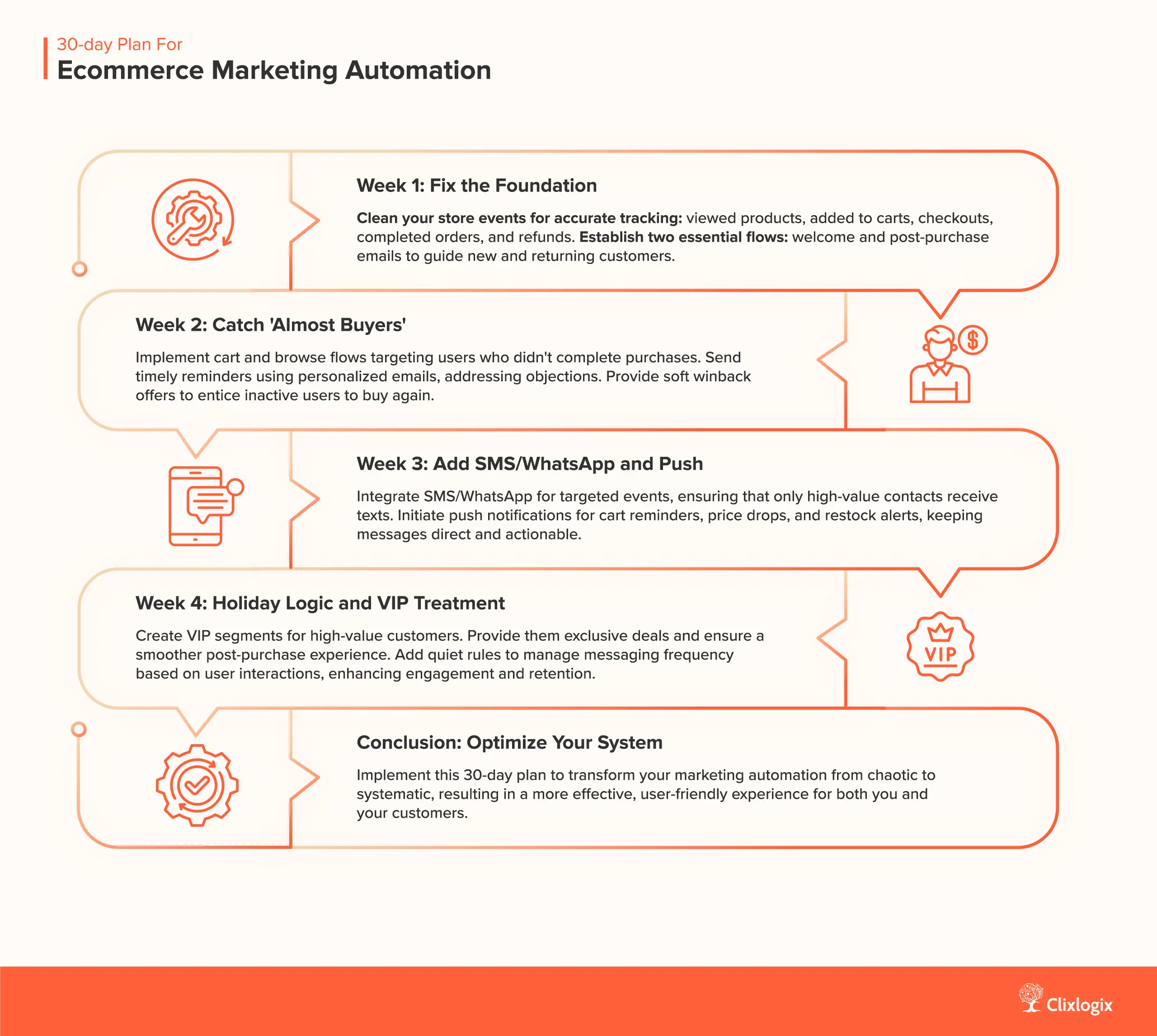
This 30-day plan is built for that reality. You’ll tighten ecommerce marketing automation in four weekly passes, not by “launching a whole new program,” but by fixing what matters in order.

You can follow this whether you’re on Zoho, Klaviyo, Omnisend, ActiveCampaign, HubSpot, Drip, or something similar.

Week 1: Fix the Foundation (Data + Two Core Flows)

Goal: By the end of week 1, your store events are clean and two flows are actually working: welcome and basic post-purchase.

1. Check your tracking and store events

Make sure your tool sees:

  • Viewed product
  • Added to cart
  • Started checkout
  • Completed order
  • Refunded / canceled order

If these events are wrong, every bit of marketing automation for ecommerce that follows will be blind. Fix this first.

2. Build or repair your welcome flow

For new subscribers or account signups:

  • Email 1 (instant): “Welcome, here’s what we do best and what to expect from us”
  • Email 2 (1–2 days later): best sellers or quiz / guide to help them pick
  • Email 3 (3–4 days later): social proof, FAQ, and a light nudge to buy

Keep it tight. One main action per email.

3. Build or repair your basic post-purchase flow

For all first-time buyers:

  • Order + shipping emails from your platform
  • Then 2–3 emails that cover:
    • How to use what they bought
    • Common mistakes
    • What to do if something feels wrong

This is also where you start thinking about Generative Engine Optimization: turn your how-to and FAQ content into clear, structured sections that can live on a support page as well as in email.

Week 2: Catch “Almost Buyers” (Cart, Browse, Soft Winback)

Goal: By the end of week 2, your ecommerce marketing automation has proper flows for people who nearly bought but didn’t.

1. Cart flow

Basic structure:

  • Email 1: 1–2 hours after cart is abandoned
    • Show the exact items
    • Address the most common objections (fit, shipping, use)
  • Email 2: 12–24 hours later
    • Reviews or before/after type proof
    • Clear link back to cart
  • Optional: SMS for high-value carts
    • Only if the cart is high and the person has opted in for text

2. Browse flow

Trigger: people who view products a few times without adding to cart.

  • Email 1: 1 day after repeated views
    • Lead with those products
    • Short “how to pick between these” block

This is where suggestion blocks powered by your tool’s AI start to help. Instead of dropping random top sellers, let AI Marketing Automation suggest related items from that category.

3. Simple winback for older contacts

Pick one group:

  • People who bought 3–6 months ago and have not bought again.

Flows:

  • Email 1: “Still interested in [category]?” with new arrivals or improvements
  • Email 2 (if no action): a smaller, time-bound offer or reminder
  • If they still don’t engage: move them to a lower frequency segment

Version 1 that runs is better than the perfect version that never ships.

Week 3: Add SMS/WhatsApp, Push and Smarter Remarketing

Goal: By the end of week 3, you’re using extra channels on purpose, not as echo chambers.

1. Set rules for SMS / WhatsApp

Decide:

  • Which events get a text (for example: high-value cart, delivery update, last-day sale reminder)
  • How many texts per week are acceptable
  • Which segments are text-worthy (VIPs, heavy repeat buyers, high spenders)

Wire your automation so:

  • Cart and order flows can send SMS / WhatsApp only when those rules are met
  • Regular promos do not flood everyone’s phone

2. Turn on basic push (if you have it)

For web or app push:

  • Cart reminder
  • Back-in-stock
  • Price drop on watched product

Keep messages short. Push is for taps, not essays.

3. Clean up remarketing

Check your ad setup:

  • Make sure “recent buyers” are excluded from hard-sale remarketing
  • Use product-based audiences:
    • Viewed product
    • Added to cart
    • Bought X (to later show Y)

Tie this back to your ecommerce marketing automation software so that:

  • Email flows and ads do not fight over the same person with the same message
  • Status updates (purchases, refunds) reach your ad audiences quickly

Week 4: Holiday Logic, VIP Treatment and Light AI

Goal: By the end of week 4, your system behaves differently for VIPs, recent

buyers, and cold contacts, and AI gives it a small boost instead of running the show.

1. Add VIP logic

Define VIPs in your tool:

  • For example: 3+ orders OR total spend above your chosen mark OR recent high value purchase

Give them:

  • Earlier access to holiday offers
  • Slightly better deals or perks
  • A smoother post-purchase flow (faster support, clearer updates)

2. Add “quiet” rules

Teach your ecommerce marketing automation when to pause:

  • If someone just bought: put them in a “cool down” group for hard promos
  • If someone opened or clicked multiple emails in one day without buying: reduce pressure for 24–48 hours
  • If someone hasn’t opened any communication in months: move them to low-frequency mailings

This keeps your list alive for next year instead of trashing it for a short spike.

3. Turn on simple AI features

Start with low-risk help:

  • Send-time optimization for main flows and campaigns
  • Product recommendations inside cart, browse, and post-purchase emails
  • Predictive segments like “likely to buy again” or “at risk of dropping off”

You’re not handing strategy to AI. You’re letting it sort timing and suggestions so your team can focus on better ideas.

If your tool supports alerts or small AI agents, you can also set one to watch:

  • Cart recovery rate
  • Open and click rates for welcome and post-purchase flows

When those numbers dip hard, you get a nudge instead of finding out a month later.

Run this 30-day plan once, and your ecommerce marketing automation stops being “a few random flows someone set up years ago” and starts acting like a real system. In the next section, we’ll look at the common mistakes I see when teams try to do this on the fly during Q4.

30 day plan for a holiday theme Ecommerce Marketing Automation

12/20 left

Get Your Free Holiday Ecommerce Marketing Automation Check–Ups

Book My 30-Minute Review

Closing Thoughts: Make This Holiday the Year Your System Grows Up

Holiday spikes come and go, but the brands that survive January are the ones whose ecommerce marketing automation quietly does the work every day. If you’ve got the basics in place, i.e. welcome, cart, post-purchase, refill, and simple winback flows across email, SMS, WhatsApp, push, and ads, you’re already ahead of most stores still blasting discounts and hoping for the best.

From there, tools and AI Marketing Automation features are just extra muscle: better send times, smarter product picks, cleaner segments, and small AI agents watching your metrics so you don’t miss problems. As you turn those flows and guides into clear on-site content, you’re also feeding AI search and strengthening your Generative Engine Optimization without extra drama. Do that, and this holiday season isn’t just a spike; it’s the year your system finally grows up.

FAQs on Ecommerce Marketing Automation

What is ecommerce marketing automation?

It’s the system that sends the right message based on behavior: visit, sign-up, cart, purchase, or silence. Instead of manual blasts, flows handle welcome, cart, post-purchase, refills, and winback so your store keeps talking to customers without you clicking send all day.

Which flows should I set up first?

Start with five: welcome series, cart recovery, post-purchase for first-time buyers, simple refill reminders, and a basic winback. Once these run cleanly, you can add browse flows, VIP flows, and industry-specific sequences for wellness, beauty, fashion, or electronics.

How is ecommerce email marketing automation different from a normal newsletter?

Newsletters go to everyone on a schedule. Ecommerce email marketing automation sends based on actions: signed up, viewed, added to cart, bought, or went quiet. Timing, products, and messages adapt to each shopper instead of one generic “blast” to the whole list.

Do I really need ecommerce marketing automation software?

If you only send the odd newsletter, the answer is no. Once you want proper flows, product-based messages, SMS/WhatsApp, and clear revenue tracking, dedicated ecommerce marketing automation software saves time, errors, and sanity compared to duct-taping a basic email tool.

How much revenue should come from automated flows?

There’s no exact target, but in healthy setups, flows often drive a big chunk of email revenue. If almost everything comes from one-off campaigns, your automation is underpowered and your marketing automation for ecommerce has plenty of upside.

Where do AI Marketing Automation and AI agents fit?

They support the system, not replace it. AI helps with sending time, product suggestions, segments, and draft copy. Light AI agents can watch metrics and flag problems. Well-structured flows and guides also strengthen your Generative Engine Optimization for AI search.

Written By

Sr. Digital Marketing Manager

Abdullah Habib is a digital marketing specialist with expertise in SEO, content marketing, social media, digital advertising, and data analysis. He excels in creating strategic, data-driven campaigns that boost organic traffic, enhance brand visibility, and drive growth for clients.

Don't forget to share this post!

Related Blog

Related Articles

Building an N8N-powered AI Receptionist That Works...

Introduction Missed calls are a recurring issue for many service businesses. In restaurants, it means lost reservations. In law firms, it means missed clients. In...

15 AI Workflows Real Estate Agents Can...

Across real estate brokerages, two patterns are emerging. Teams that teach AI to handle the repetitive preparation work are opening up more time for tasks...

Your 2025 GEO Implementation Checklist: Turning Traditional...

TL;DR If you want AI engines and chatbots to prioritize your brand and quote you as a trusted source, you need to move from chasing...

AI Marketing Automation: Tools, Strategies, Best Practices,...

A decade ago, marketing automation meant scheduling marketing messages and setting triggers. Today, it’s an intelligent ecosystem powered by algorithms that learn, predict, and adapt...

View All
About
  • Company
  • Our Team
  • How We Work
  • Partner With Clixlogix
  • Security & Compliance
  • Mission Vision & Values
  • Culture and Diversity
  • Success Stories
  • Industries
  • Solutions
  • We’re Hiring
  • Contact
Services
  • Mobile App Development
  • Web Development
  • Low Code Development
  • We Design
  • SEO
  • Online Advertising
  • Social Media Management
  • More
Solutions
  • Automotive & Mobility
  • Information Technology & SaaS
  • Healthcare & Life Sciences
  • Telecommunications
  • Media, Entertainment & Sports
  • Consumer Services
  • And More…
Resources
  • Blog
  • Privacy Policy
  • Terms Of Services
  • Sitemap
  • FAQ
  • Refund Policy
  • Delivery Policy
  • Disclaimer
Follow Us
  • 12,272 Likes
  • 2,831 Followers
  • 4.1 Rated on Google
  • 22,526 Followers
  •   4.1 Rated on Clutch

Copyright © 2025. Made with by ClixLogix.